
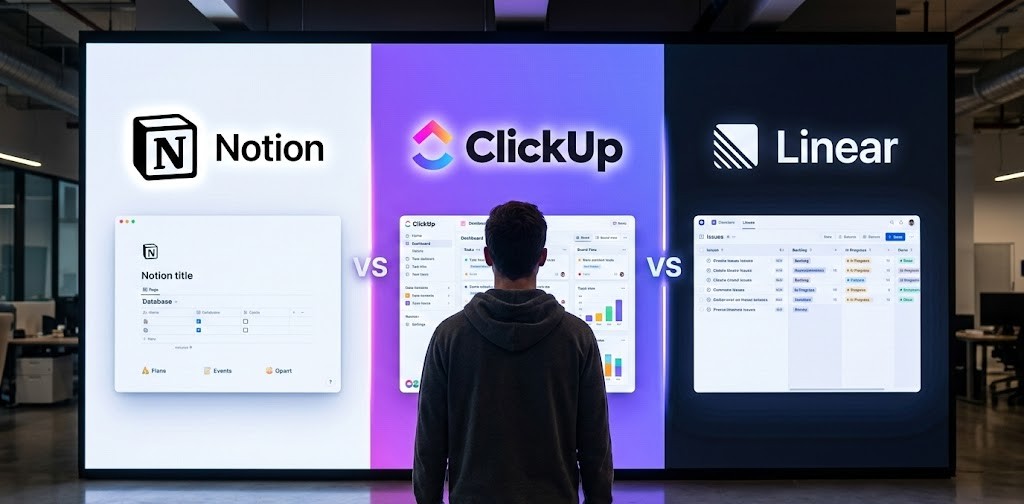
Lots of teams hit that point where Jira’s power comes with too much setup time, steep learning curves, or costs that creep up fast. Whether the focus lands on software development, general project tracking, or cross-team workflows, free options have matured a ton. Several platforms deliver core features like customizable workflows, sprint planning, bug tracking, and reporting-all accessible at zero upfront cost for many use cases.
The landscape splits between cloud-based tools offering forever-free plans for small teams (or generous starters) and open-source ones that stay free when self-hosted. Popular picks emphasize speed and simplicity over endless configuration, while others bring deeper agile support or visual flexibility. Exploring these can help find something that actually fits the team’s real needs instead of forcing a fit.
1. Notion

Notion combines notes, databases, wikis, and task management into one workspace. Users build pages for knowledge capture, project tracking, or simple automation with AI help. The setup stays flexible – someone might use it for personal notes one day and shift to shared docs or light project boards the next. AI features handle things like meeting summaries or quick content generation, though full access usually sits behind paid tiers.
The free version works well for solo users with unlimited pages and blocks, basic sharing for a handful of guests, and extras like calendar sync or mail integration. File uploads cap at a small size and page history stays short, so heavier collaboration or bigger attachments push people toward upgrades pretty quickly.
Key Highlights:
- All-in-one workspace for notes, databases, tasks, and wikis
- AI agents automate repetitive work and handle queries
- Flexible page building with custom properties and relations
- Built-in calendar and email sync on free tier
- Enterprise search across content
Who It’s Best For:
- Solo users organizing personal knowledge or projects
- Small groups experimenting with shared docs without heavy setup
- People who like combining notes and lightweight task lists
- Anyone wanting AI assistance on writing or summaries without switching apps
Contact Information:
- Website: www.notion.com
- LinkedIn: www.linkedin.com/company/notionhq
- Facebook: www.facebook.com/NotionHQ
- Twitter: x.com/NotionHQ
- Instagram: www.instagram.com/notionhq
- App Store: apps.apple.com/us/app/notion-notes-tasks-ai/id1232780281
- Google Play: play.google.com/store/apps/details?id=notion.id
2. ClickUp

ClickUp packs tasks, docs, chat, whiteboards, and automations into a single app. The platform tries to replace scattered tools by letting users customize views like Kanban or Gantt, add custom fields, and set up dependencies or time tracking. AI agents step in for things like assigning work or updating docs from voice notes, which cuts down on manual switching.
Free forever plan includes unlimited tasks and members with basic views and some automations, though storage stays limited and advanced reporting or extra agents require paid plans. It feels dense at first because so many options appear right away, but that same depth helps once workflows settle in.
Key Highlights:
- Unlimited tasks and team members on free plan
- Multiple views including Kanban, Gantt, lists, calendars
- Built-in docs, whiteboards, chat, and time tracking
- Custom fields, automations, and dependencies
- AI Brain for queries and agent assistance
Who It’s Best For:
- Groups tired of juggling separate apps for tasks and docs
- Users who need customizable statuses and fields
- Teams handling sprints or roadmaps with visual boards
- Anyone open to a feature-heavy setup that grows with needs
- People wanting built-in chat and whiteboarding without extras
Contact Information:
- Website: clickup.com
- LinkedIn: www.linkedin.com/company/clickup-app
- Facebook: www.facebook.com/clickupprojectmanagement
- Twitter: x.com/clickup
- Instagram: www.instagram.com/clickup
- App Store: apps.apple.com/us/app/clickup-tasks-chat-docs-ai/id1535098836
- Google Play: play.google.com/store/apps/details?id=co.mangotechnologies.clickup
3. Trello
Trello keeps things straightforward with visual boards made of lists and cards. Each card holds tasks, checklists, attachments, or comments, while the inbox catches quick ideas from email forwards or app messages that turn into organized items with AI summaries. Drag-and-drop planner snaps tasks to a calendar view when timing matters.
Automation runs no-code rules on every board, and integrations connect other apps or add small extensions called Power-Ups. Card mirroring lets the same item show up across boards without duplicating effort. Free plan covers core boards and basic features, though some advanced automations or unlimited extras sit on paid tiers.
Key Highlights:
- Simple card-based boards for organizing to-dos
- Inbox for capturing ideas from email or messages
- No-code automation built into boards
- Planner view for dragging tasks to calendar
- Card mirroring across multiple boards
Who It’s Best For:
- Individuals managing personal lists or quick ideas
- Small groups who prefer visual drag-and-drop over complex fields
- Anyone turning emails or chat messages into actionable items
- Users who want minimal setup for straightforward workflows
Contact Information:
- Website: trello.com
- LinkedIn: www.linkedin.com/company/atlassian
- Facebook: www.facebook.com/trelloapp
- Twitter: x.com/trello
- Instagram: www.instagram.com/trelloapp
- App Store: apps.apple.com/us/app/trello-organize-anything/id461504587
- Google Play: play.google.com/store/apps/details?id=com.trello
4. Asana

Asana focuses on connecting tasks to bigger goals with clear assignments and timelines. Workflows automate steps across projects, while AI pulls context to speed up decisions or handle routine parts. Views show progress on campaigns, launches, or resource needs, and integrations link hundreds of other tools.
The platform suits structured coordination where visibility across departments matters. Free personal plan exists for basic use, but most features aimed at group accountability live in paid versions. It leans toward clarity over endless customization.
Key Highlights:
- Goal tracking that links work to objectives
- AI assistance with business context for faster execution
- Automated workflows for campaigns or onboarding
- Portfolio and resource views for planning
- Integrations with a wide range of apps
Who It’s Best For:
- Groups needing accountability across projects
- Departments like marketing or ops running recurring processes
- Users who value goal alignment over visual boards
- Teams coordinating timelines and dependencies
Contact Information:
- Website: asana.com
- Address: 633 Folsom Street, Suite 100 San Francisco, CA 94107 United States
- LinkedIn: www.linkedin.com/company/asana
- Facebook: www.facebook.com/asana
- Twitter: x.com/asana
- Instagram: www.instagram.com/asana
- App Store: apps.apple.com/us/app/asana-work-management/id489969512
- Google Play: play.google.com/store/apps/details?id=com.asana.app
5. Linear

Linear serves as a product development system built around issue tracking and planning for fast-moving work. Issues move through statuses with labels, cycles, and projects while roadmaps and initiatives help visualize bigger pictures. AI agents handle parts of workflows – drafting docs, triaging, or even pushing code changes – so humans and agents share the load in a seamless way.
The platform automates intake from places like Slack or feedback channels straight into issues. Git integrations cover PR reviews with diffs that work for both human and agent output. Free forever plan covers basics like unlimited members with limits on teams, active issues, and file uploads, though paid tiers lift those caps for heavier needs. It leans toward quick setups, but the constraints might nudge bigger operations toward upgrades sooner than expected.
Key Highlights:
- Issue tracking with cycles, projects, and roadmaps
- AI agents for drafting, triaging, and code tasks
- Automated issue creation from Slack and feedback
- Git automations and structural PR diffs
- Visual planning tools and analytics dashboards
Who It’s Best For:
- Product-focused groups handling quick iterations
- Users incorporating AI agents into daily workflows
- Anyone migrating from heavier tools who wants less setup hassle
- Developers reviewing code from humans and agents side-by-side
Contact Information:
- Website: linear.app
- Email: [email protected]
- Twitter: x.com/linear
- Google Play: play.google.com/store/apps/details?id=app.linear
6. Redmine

Redmine acts as an open-source project management web app running on Ruby on Rails. Installation happens self-hosted across platforms and databases since everything stays under GPL license. Issue tracking forms the core along with flexible access controls and support for multiple projects at once.
Features spread wide – Gantt charts sit next to per-project wikis and forums while time tracking and custom fields adapt to different needs. SCM ties in with Git, SVN, and others for version control links, plus email-based issue creation keeps things flowing without constant logins. It feels classic and configurable, though the interface carries that older open-source vibe that takes getting used to.
Key Highlights:
- Flexible issue tracking and role-based access
- Gantt charts, calendars, and time tracking
- Per-project wikis, forums, and document management
- SCM integration with Git, SVN, Mercurial
- Custom fields and email notifications
Who It’s Best For:
- Users who want complete self-hosted control
- Groups needing basic but highly customizable tracking
- Anyone comfortable with open-source setup and maintenance
- Projects requiring SCM links and detailed access rules
Contact Information:
- Website: www.redmine.org
7. Taiga

Taiga delivers open-source agile project management with a clean, intuitive interface right from the start. Planning revolves around defining deliverables together so the whole group buys in and stays aligned on priorities. Daily stand-ups and bottleneck discussions keep communication tight while visibility into progress and resource use helps spot issues early.
Self-hosting keeps data under control with easy updates and customization options. No heavy training or setup drags things down – workflows evolve as needs change without forcing complexity upfront. The approach stays straightforward for agile flows, though it assumes some familiarity with stand-ups and backlog grooming to get full value.
Key Highlights:
- Intuitive interface for quick agile starts
- Planning with team buy-in and reprioritization
- Visibility into activities, resources, and deliverables
- Built for daily stand-ups and bottleneck discussions
- Self-hosted option with easy customization
Who It’s Best For:
- Cross-functional groups running agile processes
- Users who value simple setup over endless features
- Anyone self-hosting for data privacy reasons
- Teams focused on reflection and workflow tweaks
Contact Information:
- Website: taiga.io
- Email: [email protected]
- LinkedIn: www.linkedin.com/company/taigaio
- Twitter: x.com/taigaio
8. Plane

Plane focuses on project management where actual delivery matters more than endless tweaking. Projects use initiatives and work items that connect naturally so progress updates roll up automatically. Multiple views switch between board, list, spreadsheet, or Gantt depending on what someone needs at the moment.
Built-in wiki holds docs right next to the work while AI agents pull full workspace context to triage, summarize, or handle assignments. Cycles time-box efforts with velocity charts and real-time dashboards that fill themselves. Self-hosting works fully – even air-gapped setups – which makes it practical for controlled environments, though the density of features can feel a bit much at first glance.
Key Highlights:
- Unified workspace with projects, wiki, and AI
- Multiple views including Gantt and spreadsheet
- Cycles with burndown and velocity tracking
- Context-aware AI agents for triage and updates
- Full self-hosting support including air-gapped
Who It’s Best For:
- Groups wanting to ship without heavy configuration
- Users needing built-in docs alongside tasks
- Anyone self-hosting in secure or offline setups
- Teams integrating AI with real workspace context
- Projects migrating from other tools with support
Contact Information:
- Website: plane.so
- LinkedIn: www.linkedin.com/company/planepowers
- Twitter: x.com/planepowers
- App Store: apps.apple.com/in/app/plane-projects-wiki-ai/id6657986465
- Google Play: play.google.com/store/apps/details?id=com.plane.so
9. Hive

Hive organizes work into a single workspace with various project views like Kanban, Gantt, or calendar formats. Actions and projects kick off quickly using templates while labels and automations handle routine parts. Buzz acts as an AI helper that drafts emails, sets up meetings, or pulls insights from the workspace when asked.
Free plan sticks around forever for lighter use with limited storage and member caps though tasks stay unlimited. Upgrades unlock unlimited everything plus extras like broader integrations or advanced tracking. The layout responds well enough but the sheer range of views can make initial setup feel a tad scattered until things click into place.
Key Highlights:
- Flexible views including Kanban, Gantt, Timeline, Calendar
- Automated templates for actions and projects
- AI assistant Buzz for drafting and insights
- Built-in chat and proofing workflows
- Time tracking and reporting options
Who It’s Best For:
- Users starting projects fast with templates
- Groups needing multiple visualization styles
- Anyone experimenting with AI for quick admin tasks
- People handling approvals and time logs in one spot
Contact Information:
- Website: hive.com
- Email: [email protected]
- LinkedIn: www.linkedin.com/company/hivetechnology
- Facebook: www.facebook.com/hiveteams
- Twitter: x.com/hive
- App Store: apps.apple.com/us/app/hive-manage-projects/id6739138905
- Google Play: play.google.com/store/apps/details?id=com.hive.android.app
10. Lark Suite
Lark Suite bundles chat, docs, wikis, calendars, meetings, and workflows into one app. AI handles real-time meeting notes, translations across languages, content generation, and workflow triggers so things move without constant manual input. Components like Base let users build dashboards or automations while approvals track decisions smoothly.
Starter plan runs free with caps on users, storage, and some executions though core messaging, docs, and calls stay accessible. Paid tiers lift those limits and add deeper meeting features or unlimited history. It cuts down on switching apps quite a bit, even if the all-in-one feel sometimes packs too much into the interface at once.
Key Highlights:
- Integrated messenger, docs, wiki, and calendar
- AI for meeting summaries and unlimited translations
- Automated workflows and approvals
- Enterprise search across content
- Video meetings with smart notes
Who It’s Best For:
- Users wanting chat and docs without separate tools
- Groups working across different languages
- Anyone automating routine alerts or insights
- People needing frontline updates in one place
Contact Information:
- Website: www.larksuite.com
- LinkedIn: www.linkedin.cn/incareer/company/larksuite
- Facebook: www.facebook.com/Larksuite
- Twitter: x.com/larksuite
- Instagram: www.instagram.com/larksuite
- App Store: apps.apple.com/us/app/lark-team-collaboration/id1452166623
- Google Play: play.google.com/store/apps/details?id=com.larksuite.suite
11. Zenhub

Zenhub embeds project management directly inside GitHub so issues turn into structured hierarchies from objectives down to sub-tasks. Boards organize work while automations handle sprint setup or assignments and AI chips in with labels, summaries, or progress checks. Reporting pulls real-time data tied to code activity without extra exports.
Free tier covers basics for smaller setups with a trial unlocking fuller features like advanced AI or multiple workspaces. It solves some native GitHub gaps in visibility and hierarchy but stays tied closely to GitHub – which feels natural for dev workflows yet limiting if someone branches out.
Key Highlights:
- Deep GitHub sync for issues and hierarchies
- Multi-level structure with epics and sub-tasks
- Automation for sprints and assignments
- AI for labeling and progress summaries
- Real-time engineering reports
Who It’s Best For:
- Software devs living in GitHub daily
- Groups managing complex project layers
- Users automating repetitive issue handling
- Anyone wanting insights from code-linked data
Contact Information:
- Website: www.zenhub.com
- Email: [email protected]
- LinkedIn: www.linkedin.com/company/zenhub
- Facebook: www.facebook.com/zenhubhq
- Twitter: x.com/zenhubhq
12. WeKan
WeKan runs as open-source Kanban with boards holding lists for stages like To Do or Done. Cards carry task details, due dates, labels, checklists, and attachments while drag-and-drop moves them along. Access controls limit who sees or edits specific boards or cards.
Self-hosting gives full data ownership and customization since the code stays open for tweaks or audits. Security focuses on transparency through inspectable source plus permission settings. The pure Kanban approach keeps things visual and straightforward – though it lacks bells and whistles that some heavier tools pile on.
Key Highlights:
- Multiple customizable Kanban boards
- Drag-and-drop lists and cards
- Labels, checklists, due dates, and attachments
- Self-hosted with access controls
- Open-source under MIT license
Who It’s Best For:
- Users after simple visual task tracking
- Anyone self-hosting for privacy reasons
- Groups sticking to classic Kanban flows
- People importing from Trello setups
Contact Information:
- Website: wekan.fi
- Email: [email protected]
- Google Play: play.google.com/store/apps/details?id=team.wekan.boards.twa
13. Focalboard

Focalboard provides open-source project management centered on boards for technical workflows. Tasks get organized through Kanban, table, gallery, or calendar views with filters to zero in on priorities. Real-time updates happen via card comments and mentions while permissions control who sees or edits specific boards.
Templates cover things like roadmaps, meeting agendas, or goal tracking to skip starting from scratch. Self-hosting keeps everything local since the code stays open. It sticks to straightforward visualization without forcing heavy customization right away, though the options still let views adapt as work changes.
Key Highlights:
- Multiple views like Kanban, table, gallery, calendar
- Real-time collaboration with comments and mentions
- Board permissions and filtered saved views
- Pre-built templates for various workflows
- Open-source and self-hostable setup
Who It’s Best For:
- Technical users after simple board-based tracking
- Anyone self-hosting open-source tools
- Groups needing quick visual switches between views
- People starting with templates then tweaking later
Contact Information:
- Website: www.focalboard.com
14. nTask
nTask handles projects, tasks, issues, risks, and time in one spot. Kanban boards and Gantt charts lay out progress while custom statuses and templates shape workflows. Time logging tracks billable hours with timers or manual entry plus approvals.
Chat and comments keep discussions tied to tasks so updates flow without separate apps. Risk registers and meeting tools sit alongside planning features like milestones and resource views. Free forever plan covers unlimited tasks and workspaces with basic features for small groups, though things like projects, risks, and advanced reporting sit behind paid upgrades. Brief trial period tests out the premium options before committing.
Key Highlights:
- Kanban boards and Gantt charts
- Issue tracking and risk management
- Time tracking with timers and approvals
- Custom workflows and task templates
- Built-in chat and comments
Who It’s Best For:
- Users tracking time and risks together
- Groups running projects with clear milestones
- Anyone needing chat right next to tasks
- People who like mixing Kanban with Gantt views
Contact Information:
- Website: www.ntaskmanager.com
- Email: [email protected]
- LinkedIn: www.linkedin.com/company/ntask
- Facebook: www.facebook.com/ntaskmanager
- Twitter: x.com/ntaskmanager
- Instagram: www.instagram.com/ntaskmanager
- App Store: apps.apple.com/us/app/ntask/id1377651443
15. Backlog

Backlog combines issue tracking, task management, and code hosting in one platform. Workflows adapt with Kanban boards or Gantt charts while built-in Git and SVN handle repositories and pull requests. Wikis and file storage centralize docs so everything stays linked to tasks.
Agile features support sprints and backlog grooming with velocity tracking. No per-user fees apply which keeps scaling straightforward without sudden jumps in cost. It feels geared toward dev-heavy flows yet handles general planning decently enough.
Key Highlights:
- Issue tracking and bug management
- Built-in Git and SVN repositories
- Kanban boards and Gantt charts
- Wikis and file repository
- Agile sprint and backlog tools
Who It’s Best For:
- Dev groups linking code to tasks
- Users wanting repos and issues together
- Anyone avoiding per-user pricing
- Projects mixing agile with documentation needs
Contact Information:
- Website: www.nulab.com
- Email: [email protected]
- LinkedIn: www.linkedin.com/company/nulab
- Facebook: www.facebook.com/nulabinc
- Twitter: x.com/nulabinc
- Instagram: www.instagram.com/nulabinc
- App Store: apps.apple.com/us/app/backlog-project-management/id863872037
- Google Play: play.google.com/store/apps/details?id=backlog.android
16. Shortcut
Shortcut focuses on issue tracking, sprints, and roadmaps for product development. Work moves through customizable workflows with spaces for filtering and views that show progress daily. Goals connect projects to bigger objectives so alignment shows up clearly.
Free forever plan covers core features without time limits though some advanced reporting or extras live on paid tiers. It keeps the interface clean and quick to navigate – sprint setup feels snappier than some heavier alternatives even if roadmaps take a bit to dial in fully.
Key Highlights:
- Customizable issue workflows
- Sprint planning and tracking
- Roadmaps and progress views
- Goal alignment for projects
- Spaces for filtering work
Who It’s Best For:
- Software groups running sprints regularly
- Users linking daily work to company goals
- Anyone after fast issue handling
- People who prefer clean layouts over dense options
Contact Information:
- Website: www.shortcut.com
- Email: [email protected]
- Twitter: x.com/shortcut
Conclusion
Picking a free Jira alternative usually comes down to what actually bugs you about the original setup. Some folks get fed up with the endless clicking just to move a ticket forward, others hate how costs balloon the second you add a few extra people, and plenty just want something that doesn’t feel like it was designed by committee in 2010. The options out there now cover a pretty wide spread – from dead-simple visual boards that get out of your way, to more structured systems that still let you bend workflows without losing your mind, all the way to open-source stuff you can run yourself if privacy or control matters more than convenience.
None of them are perfect mirrors of Jira, and honestly that’s kind of the point. You trade some depth for speed, or some polish for zero recurring bills, or some fancy AI bells for plain reliability. The real win happens when you find the one that matches how your work actually flows instead of forcing you to adapt to someone else’s idea of “best practice.” Test a couple, import a small real project if you can, and see what sticks after a week or two of actual use. Chances are good you’ll land on something that feels lighter – and probably cheaper – without leaving important pieces behind.