
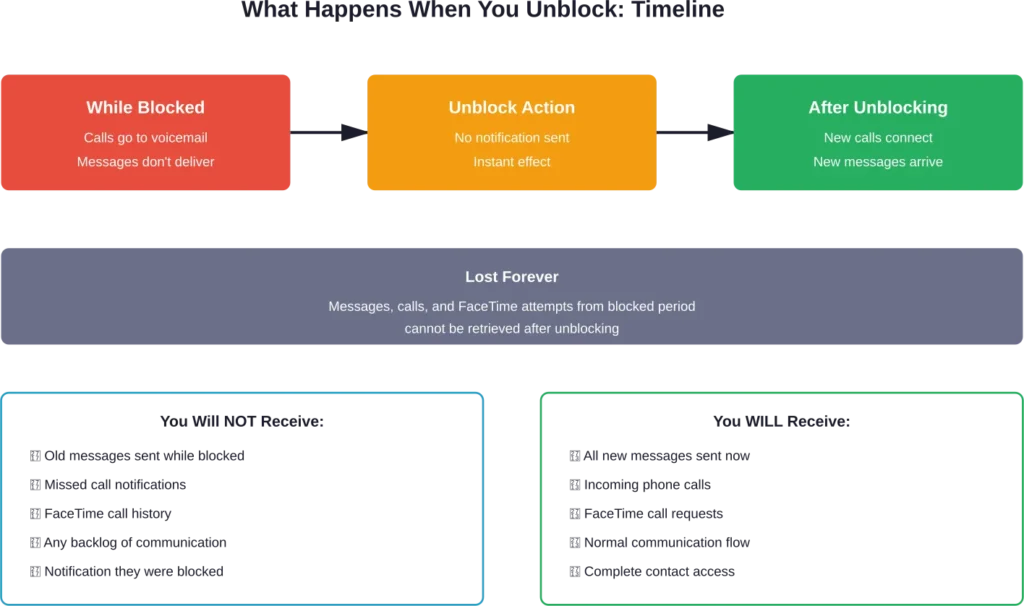
Quick Summary: When you unblock someone on iPhone, they can immediately call, text, and FaceTime you again. However, you won’t receive any messages or calls they sent while blocked—those are permanently lost. The unblocked person receives no notification about being unblocked, and communication simply resumes as normal once the block is removed.
Blocking someone on iPhone stops unwanted communication cold. But what about when circumstances change and it’s time to reverse that decision?
Blocking unwanted numbers has become increasingly important for protecting privacy and finances. The unblocking process creates confusion for many iPhone users. People wonder if old messages will suddenly flood their inbox, whether the other person gets notified, or if there’s some awkward digital trail left behind.
Here’s what actually happens when you hit that unblock button—and what doesn’t happen, despite common assumptions.
What Blocking Actually Does on iPhone
Before understanding what unblocking does, it helps to know exactly what blocking accomplishes in the first place.
When someone blocks a contact on iPhone, that person can’t reach them through three main channels: Phone calls, Messages (including iMessage and SMS), and FaceTime. According to Apple’s official support documentation, blocking works across all these communication methods simultaneously.
The blocked person doesn’t receive any notification. Their calls go straight to voicemail without ringing. Text messages appear to send normally on their end, but never reach the recipient. FaceTime calls simply don’t connect.
This creates a communication black hole. Everything the blocked person sends disappears into the void.
The Immediate Effects of Unblocking Someone
So what changes the moment you unblock a contact?
Communication channels reopen instantly. The previously blocked person can now call your iPhone, send text messages and iMessages, and initiate FaceTime calls. There’s no waiting period or gradual restoration—it’s immediate.
But here’s what doesn’t happen: You won’t see any backlog of communication from the blocked period.
Messages sent while someone was blocked don’t suddenly appear in your inbox. Calls made during that time don’t show up in your call log. Community discussions across various Apple forums confirm this consistently—those communications are permanently lost.
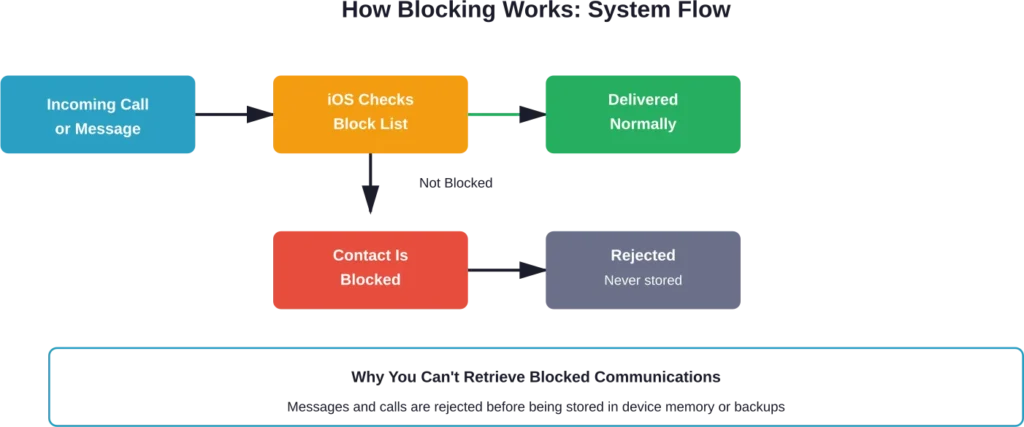
The technical reason is straightforward. When a message or call hits Apple’s servers and detects an active block, it’s rejected at the system level. These communications never reach the recipient’s device, so there’s nothing to retrieve later.
What Happens to Messages Sent While Blocked
This is the most frequently asked question about unblocking.
Messages sent during the blocked period remain only on the sender’s device. From their perspective, iMessages show as “Delivered” (though this isn’t always reliable as an indicator). SMS text messages simply send with no delivery confirmation either way.
Once unblocked, only new messages sent after the unblock action will come through. There’s no message queue waiting to flood your phone.
What About Phone Calls and FaceTime
Phone calls made while someone was blocked went directly to voicemail. If the caller left voicemails, those might still be accessible in your voicemail system, depending on your carrier’s retention policies.
FaceTime calls that didn’t connect leave no trace. They simply failed to establish a connection, and there’s no record of attempted FaceTime calls on the recipient’s end.
Will the Other Person Know They’ve Been Unblocked
No. Apple provides no notification when someone unblocks a contact.
The unblocked person only discovers the change when they attempt to contact you again and the communication succeeds. Until then, they have no way of knowing their status has changed.
This privacy-focused design is intentional. Apple doesn’t notify people when they’re blocked or unblocked, maintaining control and discretion for the person managing their block list.
How to Unblock Someone on iPhone
The unblocking process is straightforward but varies slightly depending on which iOS version is running.
The most direct method goes through Settings:
- Open the Settings app
- Scroll down and tap Phone (or Messages, or FaceTime—blocking syncs across all three)
- Tap Blocked Contacts
- Find the contact in the list
- Swipe left on the contact name
- Tap Unblock
Alternatively, unblocking can happen directly within apps. In the Phone app, navigate to Recents, tap the info button next to a blocked number, scroll down, and select Unblock Caller. The same process works in Messages and FaceTime.
What If You Can’t Find the Blocked Contact List
Some users report difficulty locating their blocked contacts. This usually happens because they’re looking in the wrong section of Settings.
The blocked list appears in three locations: Settings > Phone > Blocked Contacts, Settings > Messages > Blocked Contacts, and Settings > FaceTime > Blocked Contacts. These all show the same unified list—blocking in one area blocks across all communication methods.
Can You Recover Messages Sent While Someone Was Blocked
This question appears frequently in Apple support communities, and the answer disappoints many people.
No, there’s no native iPhone feature to recover blocked messages after unblocking. Once a message is blocked, it never reaches Apple’s servers in a stored format tied to your account. The message simply fails to deliver.
Third-party recovery software sometimes claims to retrieve blocked messages, but these tools can’t recover data that never existed on the device in the first place. They might recover previously deleted messages from iPhone backups, but they can’t conjure blocked communications that were rejected before delivery.
What About iCloud or iTunes Backups
Backups don’t help either. Since blocked messages never reached the iPhone, they’re not included in any backup—whether iCloud, iTunes, or Finder-based.
Some recovery services market themselves as solutions for this problem, but they’re recovering different data (like previously deleted messages) rather than blocked communications. Based on how Apple’s blocking system functions at the network level, retrieval isn’t technically possible.
Does Unblocking Affect Group Messages
Group message behavior gets complicated when blocking is involved.
If someone blocks a contact who’s part of a group conversation, that person’s messages in the group chat won’t appear to the person who blocked them. Other group members see those messages normally.
After unblocking, new messages from that person in group chats will appear. But messages they sent to the group while blocked remain invisible—there’s no retroactive delivery.
This can create confusing situations where group conversation context seems missing, because it is. Other participants referenced messages that the person who implemented the block never saw.
Common Scenarios and What to Expect
Real-world unblocking situations vary, and expectations should adjust accordingly.
Unblocking an Ex-Partner or Former Friend
Many people block contacts during relationship conflicts, then reconsider later. When unblocking an ex-partner or former friend, don’t expect to see any apology messages or attempts at communication they made while blocked.
If reconnection is the goal, the person doing the unblocking typically needs to initiate new contact. The previously blocked person has no way of knowing the block has been lifted unless they happen to try contacting again.
Accidentally Blocked Contacts
Accidental blocking happens more often than expected. Some users report contacts appearing on their blocked list without conscious action, possibly due to interface confusion or iOS glitches.
When discovering an accidentally blocked contact, unblock them immediately. Reach out to explain the situation if missed communication might have occurred during the blocked period. They won’t have received delivery failures or block notifications, so they might not realize anything was wrong.
Unblocking Spam or Unknown Numbers
Sometimes legitimate businesses or service numbers end up blocked because they appeared as spam. After unblocking these numbers, they can call or text normally.
For ongoing spam management, Apple offers alternatives to blocking in recent iOS versions. The “Silence Unknown Callers” feature sends calls from numbers not in contacts directly to voicemail without blocking them permanently. Message filtering can separate unknown senders into a separate list without full blocking.
| Communication Type | While Blocked | After Unblocking | Can Retrieve Old Content |
|---|---|---|---|
| Phone Calls | Sent to voicemail immediately | Rings normally | No (voicemails may exist) |
| iMessage | Not delivered, may show “Delivered” to sender | Delivers normally | No |
| SMS Text Messages | Not delivered, no notification to sender | Delivers normally | No |
| FaceTime Calls | Fails to connect | Connects normally | No |
| FaceTime Video | Fails to connect | Connects normally | No |
Privacy Considerations When Unblocking
Unblocking someone restores their full communication access, but it doesn’t grant them any additional information or privileges.
They can’t see your location through Find My Friends unless that was previously shared. They can’t access your iCloud data or view any information beyond what normal contacts can access. Unblocking simply removes the communication barrier.
If privacy concerns were the reason for blocking initially, unblocking doesn’t resolve those issues. Consider whether unblocking is truly appropriate or if other boundaries need to remain in place.
Alternatives to Full Unblocking
iOS provides middle-ground options between complete blocking and full access.
The “Silence Unknown Callers” feature (Settings > Phone > Silence Unknown Callers) sends calls from numbers not in contacts to voicemail without blocking. This helps manage spam while ensuring known contacts can reach you.
Message filtering (Settings > Messages > Filter Unknown Senders) separates messages from people not in contacts into a separate list. Messages still arrive, but they don’t create notifications and stay in a filtered tab.
These features provide spam protection without the finality of blocking specific contacts.
Technical Details: How iPhone Blocking Works at System Level
Understanding the technical implementation explains why blocked communications can’t be retrieved.
When a contact is blocked, that block is stored locally on the iPhone and synced across devices signed into the same Apple Account. The block list syncs through iCloud, so blocking someone on an iPhone also blocks them on iPad and Mac.
When a call or message arrives, iOS checks the block list before allowing the communication through. For phone calls, the call is immediately redirected to voicemail at the system level. For messages, they’re rejected before reaching the Messages app.
Because rejection happens before storage, there’s no local record to retrieve later. The communication never enters the device’s message database or call log.
Frequently Asked Questions
No. Messages sent while a contact was blocked are permanently lost and cannot be retrieved. Only new messages sent after unblocking will come through. The blocking system rejects communications before they reach your device, so there’s no backlog waiting to deliver.
No. Apple doesn’t send any notification when someone is blocked or unblocked. The person won’t know they’ve been unblocked unless they attempt to contact you and the communication succeeds. This maintains privacy and control for the person managing their block list.
Possibly. Blocked calls go straight to voicemail, so if the blocked person left voicemails, those might still be in your voicemail system. Check your voicemail inbox—these messages aren’t automatically deleted when you unblock someone. Voicemail retention depends on your carrier’s policies.
No. Even brief blocking periods prevent message delivery. If someone sends a message during the time they’re blocked—even just a few minutes—that message won’t arrive. Blocking and unblocking isn’t an effective way to temporarily pause communication, because you’ll miss anything sent during the blocked window.
Yes. Block lists sync across all Apple devices signed into the same Apple Account through iCloud. When you unblock someone on your iPhone, they’re automatically unblocked on your iPad, Mac, and Apple Watch. The change typically syncs within seconds if devices are connected to the internet.
It’s difficult but not impossible. For iMessages, blocked messages sometimes still show “Delivered” to the sender, making it hard to detect. However, if messages consistently show “Delivered” but never get responses, and calls go straight to voicemail repeatedly, the person might suspect blocking. SMS messages provide no delivery confirmation either way.
Blocking prevents specific contacts from reaching you entirely—their calls, messages, and FaceTime attempts don’t come through. Do Not Disturb silences notifications from everyone (or everyone except favorites), but communications still arrive and can be checked later. Do Not Disturb is temporary and situation-based, while blocking is contact-specific and persistent until removed.
Best Practices for Managing Blocked Contacts
Blocking serves important purposes for safety, privacy, and peace of mind. But it’s worth using thoughtfully.
Regularly review your blocked contacts list. Sometimes numbers or contacts end up blocked accidentally, or situations change making the block unnecessary. Access this list in Settings > Phone > Blocked Contacts to audit periodically.
For temporary situations, consider alternatives like Do Not Disturb or message filtering rather than full blocking. These provide breathing room without the permanence and lost communications that blocking creates.
When safety is a concern, keep blocks in place and document any harassment or threats before blocking. If someone is harassing or threatening, blocking them is appropriate and important—but documentation helps if the situation escalates to requiring legal action.
What About Android or Cross-Platform Blocking
Blocking behavior differs between iPhone and Android devices, which can create confusion in mixed-device communication.
When an iPhone user blocks an Android user (or vice versa), SMS messages behave similarly—they don’t deliver. But cross-platform messaging doesn’t have the same delivery indicators as iMessage, making it harder for either party to know what’s happening.
Third-party messaging apps (WhatsApp, Signal, Telegram) have their own blocking systems separate from iPhone’s native blocking. Blocking someone in iPhone Settings doesn’t block them in WhatsApp, for example. Each app requires separate blocking if needed.
Conclusion: Unblocking Offers a Fresh Start, Not a Rewind
When you unblock someone on iPhone, communication channels reopen immediately and completely. They can call, text, and FaceTime without restrictions.
But unblocking doesn’t recover lost communication. Messages, calls, and FaceTime attempts from the blocked period are gone permanently. There’s no notification, no backlog, no retrieval method.
Think of unblocking as opening the door to new communication, not rewinding to see what was missed. If reconnecting matters, the person doing the unblocking typically needs to reach out first—because the other person has no idea the block has been lifted.
Understanding these mechanics helps set appropriate expectations and avoid frustration when managing contact blocks on iPhone. The system prioritizes privacy and control, giving users complete authority over who can reach them and when.
Need to adjust your block list? Head to Settings > Phone > Blocked Contacts and take control of your communication preferences today.