

Quick Summary: Specialized Amazon ad tools automate bid management, keyword research, and campaign optimization to save sellers 5-8 hours weekly while reducing ACoS by 15-35%. Top platforms include WisePPC, Helium 10 Ads, Perpetua, Merch Jar, and Ad Badger, each offering unique automation workflows, AI-driven insights, and profit analytics that manual Seller Central management can’t match.
Running Amazon PPC campaigns manually through Seller Central drains time and leaves money on the table. Most sellers spend 8-12 hours each week adjusting bids, harvesting negative keywords, and analyzing performance reports.
Specialized Amazon ad tools reduce campaign management time through automating the repetitive tasks that kill productivity. These platforms connect directly to Amazon’s advertising API to optimize across multiple keywords—something that’s physically impossible to do by hand.
But here’s the thing: not all tools deliver the same results. Some focus on automation, others on analytics, and a few try to do everything but master nothing.
This guide breaks down 25+ specialized Amazon advertising platforms, comparing features, pricing structures, and real-world performance metrics so sellers can choose the right tool for their business size and goals.
What Makes an Amazon Ad Tool “Specialized”?
A specialized Amazon ad tool goes beyond basic campaign creation in Seller Central. These platforms offer advanced automation, AI-driven bid adjustments, and profit-focused analytics that factor in actual costs—not just revenue.
The core difference? Integration depth and automation sophistication.
Generic tools might pull basic performance data and display it in a dashboard. Specialized platforms connect to Amazon’s API at multiple levels, accessing search term reports, placement data, and inventory metrics to make real-time optimization decisions.
Key Capabilities That Define Specialized Tools
Most specialized Amazon ad tools share these foundational features:
- Automated bid management that adjusts bids 24/7 based on performance thresholds
- Negative keyword harvesting from search term reports to eliminate wasted spend
- Dayparting (time-based bid adjustments) to capitalize on high-conversion hours
- Bulk campaign operations across hundreds or thousands of products
- Profit analytics that incorporate COGS, FBA fees, and other costs
The best tools layer AI and machine learning on top of rule-based automation, learning from historical performance to predict which keywords will convert before burning through budget on testing.
Why Manual Management in Seller Central Falls Short
Amazon Seller Central provides basic PPC campaign management, but it’s built for simple, small-scale operations. Sellers managing 10+ products or spending $5,000+ monthly hit the platform’s limitations fast.
Here’s what breaks down at scale:
| Management Aspect | Manual (Seller Central) | Amazon Ad Tool | Time Savings |
|---|---|---|---|
| Bid adjustments | 5-8 hours weekly | Automated 24/7 | 7-8 hours saved |
| Negative keyword research | 3-4 hours weekly | Auto-harvested daily | 3-4 hours saved |
| Performance analysis | 2-3 hours weekly | Real-time dashboards | 2-3 hours saved |
| Bulk campaign changes | 4-6 hours per update | Minutes with bulk tools | 4-6 hours saved |
The time savings compound when managing multiple brands or marketplaces. A seller running campaigns across US, UK, and EU marketplaces might spend 30+ hours weekly on manual management—or 6 hours with the right automation tool.
But time isn’t the only cost. Manual management misses optimization windows. By the time a seller notices a keyword’s ACoS spiked to 80%, they’ve already wasted hundreds of dollars. Specialized tools catch and correct these issues within hours, not days.
Top 10 Amazon Ad Tools in 2026
While many Amazon advertising tools try to cover everything, some platforms excel by focusing on specific strengths and delivering deeper value in their niche. Below is our curated Top 10 list of the most effective specialized Amazon PPC tools in 2026.
1. WisePPC

WisePPC is a next-generation AI-assisted Amazon Ads optimization platform designed for deep analytics and intelligent automation. The tool delivers granular performance metrics, real-time dashboards, and smart automation rules that go beyond standard bid adjustments.
It helps sellers uncover hidden trends, cut wasteful spend, and scale profitable campaigns more effectively. WisePPC is especially valuable for those looking for a modern, data-rich alternative with strong focus on insights and control.
Contact Information:
- Website: wiseppc.com
- Facebook: www.facebook.com/people/Wise-PPC/61573154427547
- LinkedIn: www.linkedin.com/company/wiseppc
- Instagram: www.instagram.com/wiseppc
2. PPC Entourage

PPC Entourage excels at bulk operations and campaign structure. The platform makes it easy to migrate from manual campaigns to auto campaigns, create mirrored campaign structures across product variations, and reorganize ad groups at scale.
It’s not the most advanced at AI optimization, but sellers who need to restructure messy accounts find it invaluable.
3. Sellics

Sellics, now integrated into Perpetua, combines PPC management with broader Amazon analytics. The platform includes organic rank tracking, review monitoring, and comprehensive profit dashboards.
The all-in-one approach works especially well for sellers who want a single platform for both advertising and general account health metrics.
4. Perpetua

Perpetua leads the enterprise category with AI-powered goal optimization. The platform doesn’t just automate bids — it allocates budget across campaigns to hit specific ACoS or ROAS targets at the account level, not just per campaign.
Pricing starts around $500/month plus a percentage of ad spend (typically 2-4%). Best suited for brands managing 100+ SKUs across multiple marketplaces.
5. Teikametrics

Teikametrics focuses on inventory-aware bidding. The platform integrates inventory velocity data to automatically reduce bids on products approaching stockout and increase spend on overstocked items.
This prevents the common problem of driving traffic to out-of-stock listings. Minimum monthly ad spend is usually $30,000+. Pricing follows a base fee + percentage of spend model.
6. Helium 10 Ads (Adtomic)

Helium 10 Ads bundles PPC management with Helium 10’s broader product research and listing optimization suite. The Adtomic module offers rule-based automation, keyword harvesting, and split testing for ad copy.
Full Adtomic access is included in the Diamond plan, making it especially cost-effective for sellers who also need keyword research and listing optimization tools.
7. Merch Jar

Merch Jar introduced “recipes” — pre-built automation workflows that chain multiple actions together. For example: “If a search term converts 3+ times with ACoS under 25%, create an exact match campaign and add it as negative to the broad campaign.”
Merch Jar offers affordable monthly pricing. The recipe system makes it one of the most user-friendly options for sellers new to automation.
8. Ad Badger
Ad Badger takes a hybrid approach, combining powerful software with human oversight. Subscribers get access to PPC managers who review automated changes and provide strategic guidance.
This solution works particularly well for sellers who want automation but don’t have in-house PPC expertise.
9. SellerApp

SellerApp offers AI bid optimization with accessible pricing. The platform focuses on ACoS targets — sellers set a goal percentage, and the AI automatically adjusts bids to maintain that threshold.
Its simplified interface makes it very accessible for sellers running their first Sponsored Products campaigns.
10. Zon.Tools

Zon.Tools pioneered AI-based Amazon PPC automation. The platform runs continuous experiments, testing different bid amounts and tracking which changes improve performance.
Pricing scales with ad spend, making it very accessible for new and small accounts.
Essential Automation Workflows Every Tool Should Offer
Not all automation delivers equal value. Some workflows generate immediate ROI, while others create marginal improvements that don’t justify the complexity.
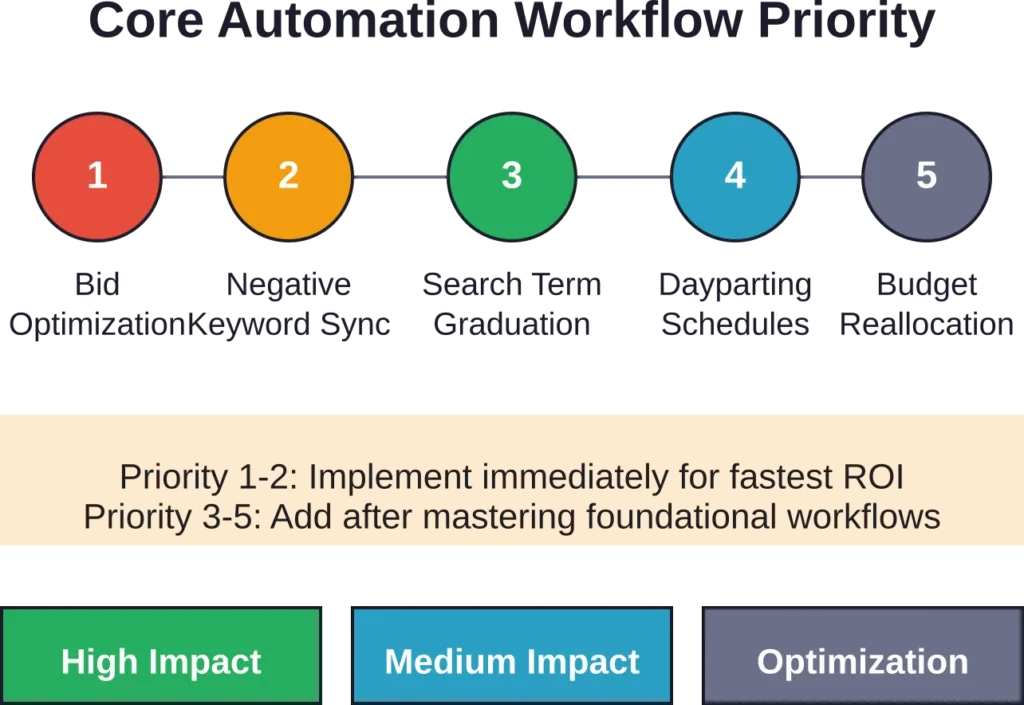
These five automation types should be non-negotiable in any specialized Amazon ad tool:
1. Performance-Based Bid Adjustments
The tool should automatically increase bids on high-performing keywords and decrease bids on underperformers based on your target ACoS or ROAS.
Basic version: daily bid changes based on the previous 7-14 days of performance data.
Advanced version: hourly adjustments using AI to predict conversion probability based on historical patterns, time of day, and seasonality.
2. Automated Negative Keyword Harvesting
The platform should scan search term reports daily and automatically add non-converting search terms as negative keywords after they hit your spend threshold without a sale.
Look for tools that let you set different thresholds by campaign type. For example: add negatives after $15 spend with no conversions in exact match campaigns, but allow $30 in broad match before adding negatives.
3. Search Term Graduation
When a search term in an auto or broad match campaign converts profitably, the tool should automatically create an exact match campaign for that term and add it as a negative in the original campaign.
This captures the search term at a lower cost-per-click in exact match while preventing cannibalization between campaigns.
4. Dayparting and Schedule-Based Adjustments
The platform should track which hours and days generate the best conversion rates, then automatically increase bids during high-performance windows and decrease them during low-conversion periods.
This is particularly valuable for products with clear usage patterns—for example, meal prep containers that convert better on Sunday evenings when people plan their week.
5. Budget Pacing and Reallocation
Advanced tools monitor budget consumption across all campaigns and automatically shift budget from underperforming campaigns to those exceeding targets.
This prevents the common scenario where your best campaign runs out of budget by noon while poorly-performing campaigns waste their full daily allocation.
How to Choose the Right Tool for Your Business
The best Amazon ad tool depends on five factors: monthly ad spend, catalog size, marketplace count, in-house PPC expertise, and growth trajectory.
Match Tool Complexity to Your PPC Knowledge Level
Sellers new to Amazon PPC benefit from tools with strong educational resources and simpler interfaces. Platforms like Merch Jar and SellerApp offer guided setup and pre-built automation recipes that work out of the box.
Experienced PPC managers prefer platforms like Perpetua or Teikametrics that expose granular controls and allow custom rule creation. These tools assume you understand campaign structure and bidding strategy—they won’t hold your hand.
Calculate True Cost Including Learning Curve
Don’t just compare monthly subscription fees. Factor in:
- Setup time required to connect accounts and configure rules
- Training time to understand the platform’s unique approach
- Opportunity cost if the tool’s complexity delays optimization
- Support quality—do you get a dedicated manager or just email tickets?
A $500/month tool that includes account management might cost less than a $200/month DIY platform if you value your time at $100+ per hour.
Prioritize Profit Analytics Over Vanity Metrics
Many tools track ACoS and ROAS, but the best ones calculate true profit by incorporating your actual costs: COGS, FBA fees, referral fees, storage fees, and PPC spend.
This matters because a product with 25% ACoS might be unprofitable if it has high COGS and FBA fees, while a product with 40% ACoS might still generate solid profit if costs are low.
Look for tools that connect to your inventory management system or allow manual cost input so you’re optimizing for profit, not just revenue.
Test Integration Quality Before Committing
All Amazon ad tools connect through Amazon’s Advertising API, but integration quality varies dramatically. Poor integrations create data delays, miss attribution windows, or fail to sync negative keywords correctly.
Most platforms offer 7-14 day free trials. During the trial:
- Verify that campaign changes in the tool reflect in Seller Central within minutes
- Check that search term data refreshes daily
- Test bulk operations on a small campaign set before applying changes account-wide
- Confirm that profit calculations match your own spreadsheet math
If data syncing feels slow or unreliable during the trial, it won’t improve after you subscribe.
Real-World ROI: What Results to Expect
Tools that claim to “double your sales” or “cut ACoS in half overnight” are overselling. Real improvements happen gradually as the AI learns your account’s patterns.
Here’s what sellers typically see based on community discussions and platform case studies:
First 30 Days: Stabilization Phase
The tool learns your account patterns and may make conservative changes to avoid disrupting profitable campaigns. Expect minimal improvement—sometimes even slight performance dips as the AI experiments.
ACoS change: -2% to +3%
Time savings: 3-4 hours weekly (basic tasks now automated)
Days 31-90: Optimization Ramp-Up
The platform identifies clear winners and losers, aggressively reallocates budget, and implements proven automation workflows.
ACoS reduction: 8-15% from baseline
Time savings: 5-7 hours weekly (most manual tasks eliminated)
90+ Days: Sustained Performance
Continued refinement through seasonal adjustments, competitive response, and long-tail keyword discovery.
ACoS reduction: 15-25% from baseline for most accounts; up to 35% for previously unmanaged accounts
Time savings: 6-8 hours weekly (only strategic reviews required)
These ranges assume consistent product demand and reasonable starting campaign structure. Tools can’t fix fundamental product-market fit problems or overcome poor listing quality.
| Scenario | Starting ACoS | 90-Day ACoS | Time Saved Weekly | ROI Timeline |
|---|---|---|---|---|
| Well-managed account | 28% | 23-25% | 4-5 hours | 60-90 days |
| Basic management | 38% | 28-32% | 6-7 hours | 30-60 days |
| Unmanaged/chaotic | 55% | 35-42% | 8-10 hours | 15-30 days |
| New launch | 65%+ | 40-50% | 5-6 hours | 90-120 days |
Common Mistakes When Implementing Amazon Ad Tools
Even the best tool will underperform if configured incorrectly. These mistakes sabotage results:
Setting Unrealistic ACoS Targets Too Early
New sellers often set 15% ACoS targets on brand-new products with no reviews and weak organic ranking. The tool can’t defy market physics—aggressive ACoS targets on unproven products just pause all your ads.
Start with conservative targets (35-45% ACoS) during the launch phase, then tighten as organic ranking improves and review count grows.
Ignoring Campaign Structure Before Automation
Automation amplifies whatever campaign structure exists. If you’re running one broad match campaign with 500 keywords, automation will optimize that mess—it won’t rebuild your account architecture.
Clean up campaign structure first: separate campaigns by product, match type, and strategy (launch vs. profit vs. clearance). Then let automation optimize within that framework.
Not Excluding Out-of-Stock Products
Some tools continue bidding on out-of-stock products unless you manually pause campaigns. This wastes budget and damages quality score when clicks don’t convert.
Configure inventory-based rules: auto-pause campaigns when stock drops below 7 days of supply, auto-resume when restocked.
Changing Settings Too Frequently
Sellers get impatient when they don’t see immediate results and start tweaking automation rules every few days. This prevents the AI from establishing baseline performance and learning what works.
Set your rules, then leave them untouched for at least 14 days (ideally 30) before making adjustments. The only exception: pausing rules that are clearly broken and bleeding money.
Advanced Features That Separate Top-Tier Tools
Beyond basic automation, a few features distinguish professional-grade platforms from entry-level tools.
Multi-Marketplace Synchronization
For brands selling across US, Canada, UK, and EU marketplaces, top tools synchronize learnings across regions. If a keyword converts well in the US, the platform automatically tests it in UK campaigns.
This accelerates international expansion and prevents redundant testing across similar markets.
Competitive Intelligence Integration
Some platforms (like Helium 10 and Jungle Scout integrations) overlay competitor advertising data, showing which keywords competitors bid on and estimating their ad spend levels.
This intelligence helps identify gaps in your keyword coverage and spot emerging search trends before they become saturated.
Creative Testing for Sponsored Brands
Sponsored Brands campaigns allow custom headlines and images. Advanced tools run multivariate tests, automatically rotating creatives and measuring which combinations drive the highest conversion rates.
This feature matters most for Sponsored Brands Video, where creative quality heavily impacts performance.
Attribution Modeling Beyond Last-Click
Amazon’s standard attribution is last-click: the ad that gets credit is the one clicked immediately before purchase. But customer journeys often involve multiple touchpoints.
Sophisticated tools track view-through conversions and assisted conversions, giving credit to ads that introduced the product even if a different ad got the final click. This reveals which campaigns drive awareness vs. which capture existing demand.
Integration with Broader Amazon Seller Tools
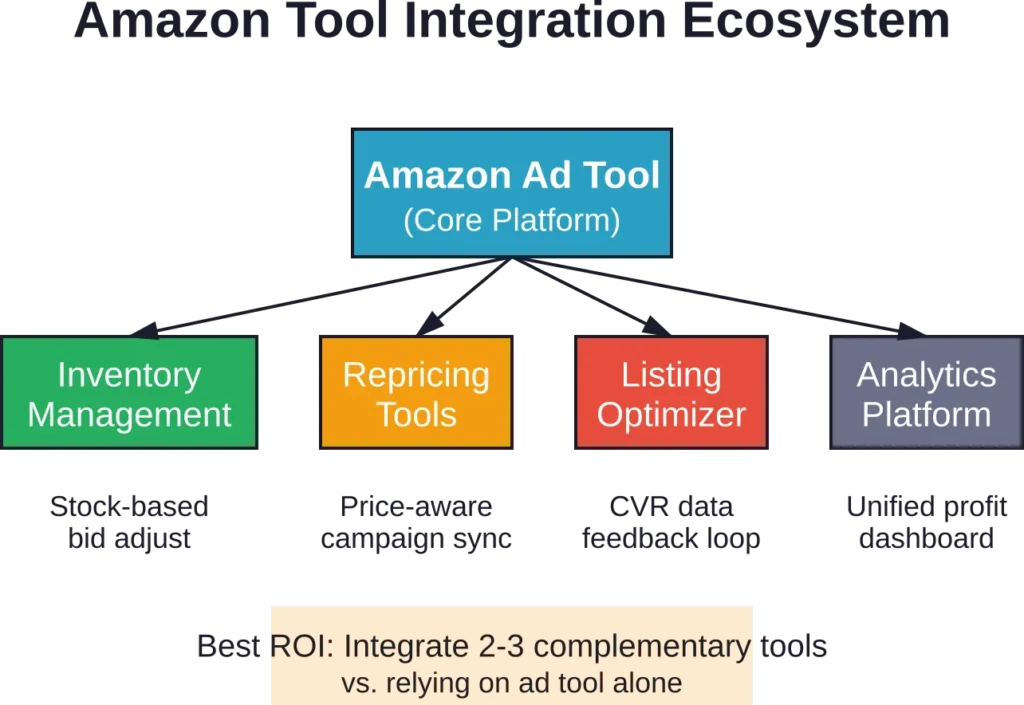
Amazon ad tools don’t operate in isolation. The best results come from integrating PPC management with inventory planning, pricing optimization, and listing quality.
Inventory Management Connections
Tools like Teikametrics and SellerLabs connect to inventory management systems (RestockPro, Forecastly, InventoryLab) to:
- Reduce bids automatically when stock levels fall below reorder point
- Increase bids on overstocked items to accelerate turnover and avoid long-term storage fees
- Pause ads entirely on products approaching stockout to preserve remaining units for organic sales
This prevents the common disaster of running a successful PPC campaign that drives a stockout, tanking your organic ranking and killing momentum.
Repricing Tool Coordination
Repricing tools (RepricerExpress, BQool, Seller Snap) adjust prices in real-time based on competition. Coordinating PPC bids with pricing strategy maximizes profit:
- When you have the Buy Box at a premium price, increase PPC bids to capitalize on higher margins
- When competitors undercut you, reduce PPC spend to avoid driving traffic at break-even or loss
- When you’re out of the Buy Box, pause Sponsored Products entirely (they drive traffic but conversions plummet without the Buy Box)
Some enterprise platforms build this logic directly into their automation rules. For mid-market tools, sellers need to configure these connections manually using API integrations or third-party connectors like Zapier.
Emerging Trends in Amazon Ad Tool Development
The Amazon advertising landscape shifts constantly. Tools that don’t evolve become obsolete within 12-18 months.
AI-Powered Budget Forecasting
Next-generation platforms use machine learning to predict required ad spend for specific outcomes. Sellers input revenue targets, and the AI calculates the necessary weekly budget allocation to hit that goal based on historical conversion data and seasonality patterns.
This flips the traditional budgeting model from “here’s my budget, what results can I get?” to “here’s my goal, what budget do I need?”
Cross-Channel Attribution
Amazon now represents just one channel for many brands that also sell DTC and through other marketplaces. Advanced tools are building cross-channel attribution to understand how Amazon ads influence off-Amazon sales and vice versa.
For example: measuring how Google Ads for branded terms impact Amazon organic ranking, or how Amazon Sponsored Display ads that follow customers off-site affect DTC website conversions.
Automated Creative Generation
Tools are beginning to integrate AI image generation and copy writing specifically for Amazon ads. Upload your product images and bullet points, and the AI generates dozens of Sponsored Brands headline variations and A+ content modules optimized for conversion.
This is still early-stage but will become table-stakes within 18-24 months as creative testing proves critical for Sponsored Brands and Sponsored Display performance.
Platform-Specific Considerations for Amazon Ad Types
Different Amazon ad formats require different tool capabilities. Not every platform handles all three major ad types equally well.
Sponsored Products Tools
This is the bread-and-butter of Amazon PPC, and nearly all tools handle Sponsored Products competently. Key differentiators:
- Keyword harvesting speed (daily vs. weekly updates)
- Placement bid multiplier automation (top-of-search vs. product pages)
- Single-keyword campaign creation (isolating high-performers)
Merch Jar and Perpetua lead in Sponsored Products automation sophistication.
Sponsored Brands Management
Sponsored Brands campaigns have more variables: headline copy, custom images, video creative, landing page choice (Store vs. product list).
Few tools automate creative testing. Most handle bid management and budget allocation but require manual creative uploads.
Helium 10 and Teikametrics offer the strongest Sponsored Brands features, including video performance analytics and headline A/B testing.
Sponsored Display Optimization
Sponsored Display is Amazon’s newest ad format, targeting audiences on and off Amazon. It’s also the most complex to manage because it includes:
- Product targeting (advertising on competitor detail pages)
- Audience targeting (retargeting past visitors)
- Views remarketing (targeting users who viewed but didn’t buy)
Tool support is inconsistent. Perpetua and Teikametrics build dedicated Sponsored Display workflows. Smaller tools treat it as an afterthought or don’t support it at all.
If Sponsored Display represents more than 15% of your ad budget, verify that your chosen tool offers robust support including audience creation, bid optimization, and creative management.
Data Security and API Access Considerations
When you connect an Amazon ad tool, you’re granting API access to your advertising account, which includes:
- All campaign performance data (spend, sales, clicks, conversions)
- Product catalog and ASIN details
- Often, read access to your full Seller Central account
Reputable tools follow Amazon’s API security guidelines and undergo Amazon’s vetting process for advertising partners. Look for tools that are Amazon Ads Advanced Partners or Amazon Ads Verified Partners—these designations confirm the platform meets Amazon’s technical and security standards.
Red flags that suggest a tool may not be trustworthy:
- Requires your Seller Central login credentials instead of OAuth API connection
- Offers features Amazon’s API doesn’t support (e.g., “guaranteed ranking” or “hidden keyword discovery”)
- Lacks clear privacy policy explaining data usage and storage
- No information about data encryption or security certifications
Never share your Seller Central username and password with any third-party tool. Legitimate platforms use Amazon’s official API connection flow, where Amazon directly authorizes access without the tool ever seeing your password.
When to Use Multiple Tools Simultaneously
Some sellers run two or three specialized tools in parallel, each handling different aspects of their advertising strategy.
Common multi-tool setups:
Setup 1: Automation Platform + Analytics Tool
Use Perpetua or Ad Badger for bid management and campaign automation, plus an analytics platform like DataHawk or SellerLegend for deeper profit analysis and forecasting.
This works when the automation platform’s reporting doesn’t go deep enough for executive dashboards or investor reporting.
Setup 2: Sponsored Products Tool + Sponsored Brands Specialist
Run Merch Jar for Sponsored Products automation, and manage Sponsored Brands manually or through a creative-focused platform.
This makes sense when Sponsored Products represents 80%+ of spend and needs heavy automation, but Sponsored Brands requires more strategic creative work than automation.
Setup 3: Multi-Marketplace Configuration
Use different tools for different regions if a single platform doesn’t support all your marketplaces well. For example: Perpetua for North America, a local European tool for EU marketplaces.
The risk with multi-tool setups is conflicting automation rules. If two tools try to manage the same campaigns, they can create bid wars or contradictory negative keyword lists. Always ensure each tool owns distinct campaigns or ad types with zero overlap.
Frequently Asked Questions
Tools become cost-effective around $2,000-$3,000 monthly ad spend. Below that threshold, the monthly subscription fee represents too large a percentage of total spend. For sellers spending $500-$1,500 monthly, manual management or free tools like Amazon’s bulk operations can deliver similar results without subscription costs. Once ad spend exceeds $3,000 monthly, even a basic $99/month tool typically pays for itself through time savings and efficiency gains.
Yes, but expect a 2-3 week transition period where performance dips slightly. Disconnect the old tool, let campaigns stabilize for 48-72 hours, then connect the new tool. The new platform needs 7-14 days to establish baseline performance before making aggressive optimizations. Don’t switch tools during peak sales periods (Prime Day, Q4) when performance stability matters most. Make switches during slower months when temporary dips won’t significantly impact revenue.
Results vary by product economics. Books with $1-3 profit margins struggle with automated tools because there’s almost no room for profitable PPC spend—any ACoS above 15-20% erases profit. Low-priced items ($10-15) face similar constraints. Tools work best on products with $8+ profit per unit where there’s budget for 25-35% ACoS during launches and 15-25% at maturity. Niche products benefit from automation if search volume exists; for ultra-niche items with 50 searches monthly, manual management often outperforms automation.
Most platforms let sellers set different strategies by campaign or product lifecycle stage. Launch campaigns typically use higher ACoS targets (40-60%), broader match types, and aggressive budget allocation to build initial reviews and organic ranking. Mature product campaigns shift to lower ACoS targets (20-30%), more exact match keywords, and profit optimization. Advanced tools like Perpetua automatically adjust strategy based on product age and review count. Basic tools require manual configuration of separate campaign structures for launch vs. mature products.
Indirectly, yes. Tools optimize PPC to drive more sales velocity, and Amazon’s A9 algorithm uses sales velocity as a ranking factor. Higher sales from PPC-driven conversions signal product relevance, which can boost organic position for target keywords. But the effect is indirect—no tool directly manipulates organic ranking. The strongest organic ranking impact comes during new product launches when tools drive the initial sales needed to establish relevance. For mature products with stable organic rankings, PPC tools maintain ranking through consistent sales velocity but rarely create dramatic organic improvements.
Enterprise platforms like Perpetua and Teikametrics support multi-account management under a single dashboard, making them ideal for agencies and brand aggregators managing portfolios of acquired brands. Mid-market tools vary—some allow unlimited account connections (Merch Jar, SellerApp), while others charge per account. Budget tools typically restrict users to one account per subscription. If managing multiple brands, verify multi-account support and whether the pricing model charges per account or offers unlimited accounts under a single subscription.
Campaigns continue running in Amazon Seller Central exactly as they were when you disconnected the tool. Automated rules stop executing, but manual bid settings, budgets, and keyword lists remain. Performance doesn’t collapse immediately—you simply return to manual management. To prevent disruption, disable aggressive automation rules 3-5 days before canceling so campaigns stabilize at their current settings. Export all performance data, custom reports, and negative keyword lists before canceling since most platforms delete historical data 30-60 days after subscription ends.
Conclusion: Choosing Your Amazon Ad Tool in 2026
The specialized Amazon ad tool market matured significantly over the past 24 months. Every major platform now offers solid automation fundamentals—the differences come down to depth of features, quality of support, and specific workflows that match how sellers manage their business.
For most sellers, the decision tree looks like this:
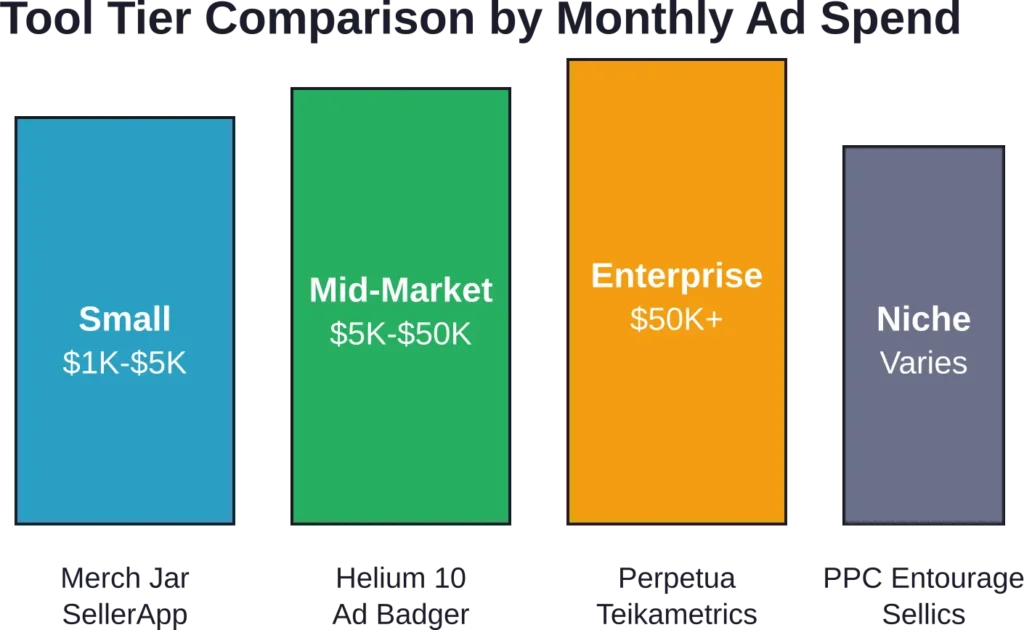
Spending under $5,000 monthly? Start with Merch Jar or SellerApp. Simple interfaces, strong core automation, and pricing that won’t overwhelm your margins.
Spending $5,000-$50,000 monthly? Evaluate Helium 10 Ads, Ad Badger, and Perpetua. Test all three during trial periods and choose based on which interface clicks with your workflow.
Spending $50,000+ monthly or managing multiple brands? Perpetua and Teikametrics offer the sophistication and account management needed at this scale. The higher cost is justified by the complexity these tools handle.
Selling in niche categories with unique workflows? Look at category-specific tools or platforms with strong customization like PPC Entourage that let you build exactly the automation logic your category requires.
The biggest mistake is choosing based on price alone or trying to use an enterprise tool when you need simplicity. Match the tool to your current reality, not your aspirational future. A $99/month tool that you actually use beats a $999/month platform that’s too complex to configure properly.
Real talk: no tool fixes bad product-market fit, poor listing quality, or fundamental inventory problems. Start with solid products, optimized listings, and healthy margins. Then layer in the right Amazon ad tool to amplify what already works.
Start your evaluation with free trials. Test the top 2-3 platforms that fit your budget tier. Run them in parallel for 7-14 days if needed. The platform that feels intuitive and delivers visible time savings within the first week is usually the right choice for your business.