

Quick Summary: Facebook Ads publishing tools streamline campaign creation, scheduling, and optimization, saving advertisers hours of manual work. This guide covers the best platforms for bulk ad launching, reporting, automation, and team collaboration—from AI-powered solutions like Extuitive, AdAmigo.ai to enterprise-grade platforms like Sprout Social.
Managing Facebook ads manually through Meta’s Ads Manager is tedious. Between uploading creatives, writing copy, configuring targeting, and monitoring performance, launching even 20 ads can consume an entire afternoon.
That’s precisely why Facebook ads publishing tools exist.
These platforms handle the repetitive grunt work—bulk launching campaigns, scheduling posts, automating optimizations, generating reports—so marketing teams can focus on strategy and creative. Some specialize in speed, others in analytics, and a few offer AI-powered recommendations that actually improve results.
But which tools deserve a spot in your 2026 marketing stack? This guide breaks down the leading options across four categories: bulk launchers, reporting platforms, automation tools, and collaborative publishing software.
What Makes a Great Facebook Ads Publishing Tool
Not every platform calling itself a Facebook ads tool actually solves real problems. The best ones share several characteristics that separate genuine productivity boosters from glorified dashboards.
First, they integrate directly with Meta’s advertising system. No exports, no imports, no CSV gymnastics. Changes made in the tool should reflect immediately in your live campaigns.
Second, they save measurable time. According to bulk ad launch tool providers, significant time savings are achievable by cutting out manual steps when launching multiple ad variations by cutting out manual steps. If a tool can’t demonstrate concrete time savings, it’s probably not worth the subscription cost.
Third, error detection matters. One misplaced decimal point in your budget can drain thousands of dollars overnight. Quality tools catch mistakes before campaigns go live—wrong audience selections, budget miscalculations, broken tracking pixels.
Fourth, collaboration features become essential as teams grow. Multiple stakeholders need to review creative, approve copy, and monitor spend without stepping on each other’s toes or accidentally launching the wrong version.
Finally, reporting depth separates tools that surface insights from those that merely display numbers. Raw metrics tell you what happened; good analysis explains why it happened and what to do next.
Bulk Ad Launch Tools: Speed at Scale
Creating dozens or hundreds of ad variations manually through Ads Manager is soul-crushing work. Bulk launch tools automate the repetitive parts—uploading creatives, duplicating campaign structures, applying targeting parameters across multiple ad sets simultaneously.
These platforms shine when testing multiple creative concepts, audience segments, or landing pages concurrently. Instead of clicking through Ads Manager’s interface 50 times, marketers configure settings once and deploy campaigns in minutes.
Extuitive: Predictive Bulk Launching
Extuitive empowers brands to generate, validate, and launch ads at massive scale by predicting real-world performance before spending a single dollar. The platform connects directly to your Shopify store, analyzes products and audience, then uses AI agents modeled on 150,000+ real consumers to forecast CTR, ROAS, and purchase intent across hundreds of creative variations in minutes.
What sets Extuitive apart: its pre-launch prediction engine. Instead of launching and testing blindly, it runs simulated consumer responses on your creatives and surfaces clear winners versus losers with performance projections benchmarked against your own historical data. This dramatically cuts wasted ad spend on underperformers.
The workflow combines AI creative generation (copy, images, video) with instant validation and bulk scoring — all inside one platform. Changes and approved ads flow directly into Meta Ads Manager for immediate launch.
Best for: Shopify e-commerce brands and performance marketers who run high-volume testing and want to scale ad output without burning budget on losers. Ideal for teams tired of slow creative cycles and expensive trial-and-error.
Contact Information:
- Website: extuitive.com
- Email: [email protected]
- LinkedIn: www.linkedin.com/company/extuitive
- Twitter: x.com/Extuitive_Inc
- Instagram: www.instagram.com/extuitiveinc
AdAmigo.ai: AI-Powered Optimization

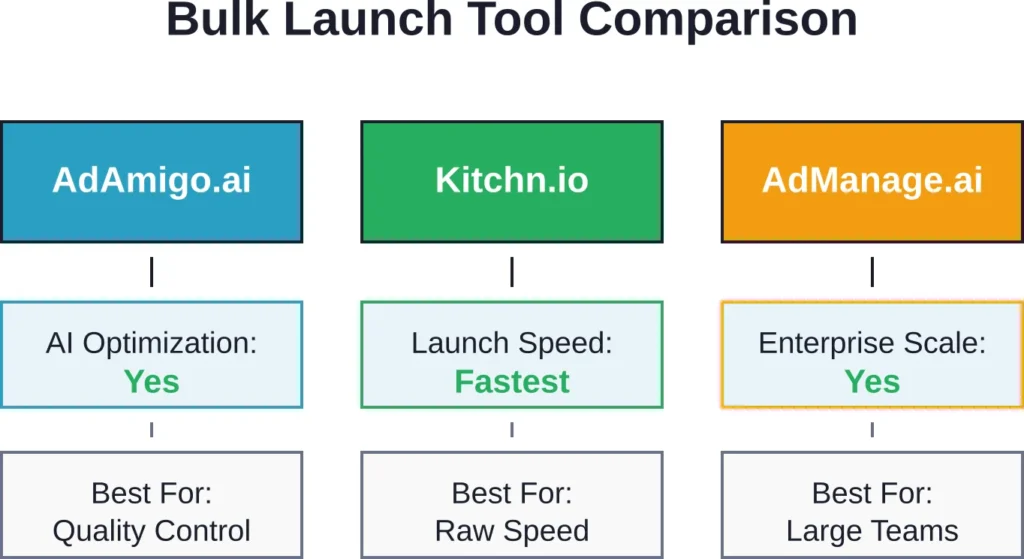
AdAmigo.ai combines bulk launching with artificial intelligence that flags potential issues before campaigns go live. The platform analyzes campaign configurations and recommends optimizations based on historical performance patterns.
What sets AdAmigo apart: its error detection system catches common mistakes—audience overlap issues, budget allocation problems, tracking pixel misconfigurations—before money gets wasted. For agencies managing multiple client accounts, this safety net prevents expensive errors.
The AI optimization component learns from past campaigns to suggest better targeting combinations, budget distributions, and bid strategies. It doesn’t make changes automatically; instead, it surfaces recommendations that marketers can accept or reject.
Works directly with Meta ad accounts, so there’s no need for third-party integrations or manual syncing. Campaign changes appear in Ads Manager immediately.
Best for: Agencies and in-house teams that value quality control alongside speed. The AI recommendations require some learning curve but deliver genuine value once you understand how to interpret them.
Kitchn.io: Raw Speed

Kitchn.io claims to make bulk ad launching 90% faster than using Meta’s Ads Manager directly. Its primary appeal lies in eliminating repetitive manual tasks through a streamlined interface designed specifically for high-volume campaign creation.
The platform focuses purely on speed. Upload multiple creatives, configure targeting once, and Kitchn generates hundreds of ad variations in minutes. For teams running constant A/B tests or seasonal promotions requiring rapid deployment, this approach works well.
Interface simplicity matters here. Instead of Meta’s cluttered dashboard, Kitchn presents only the essential fields needed to launch campaigns. Less visual noise means fewer mistakes and faster execution.
Best for: Performance marketers and e-commerce brands that prioritize launch speed over advanced features. If your workflow involves creating 50+ ad variations weekly, Kitchn saves legitimate hours.
AdManage.ai: Enterprise Scale

AdManage.ai targets larger organizations managing substantial monthly ad spend across multiple accounts. The platform handles enterprise-level complexity—hundreds of campaigns, dozens of team members, intricate approval workflows.
Bulk launching capabilities extend beyond simple duplication. AdManage supports complex campaign structures with nested ad sets, dynamic creative optimization, and automated rules that adjust bids based on performance thresholds.
Limited AI optimization compared to AdAmigo, but stronger collaboration features. Multiple team members can work simultaneously without conflicts, and granular permission controls ensure junior team members can’t accidentally modify high-budget campaigns.
Best for: Large marketing teams and agencies managing enterprise client accounts. The learning curve is steeper, but the platform scales to handle massive campaign volumes without breaking.
Revealbot: Automation Focus

Revealbot (formerly Birch) approaches bulk launching differently. Instead of purely manual campaign creation, it emphasizes automation rules that adjust campaigns based on performance triggers.
Limited bulk launching compared to dedicated tools like Kitchn, but stronger automation capabilities. Set rules like “pause ads with cost per acquisition above $50” or “increase budget by 20% when return on ad spend exceeds 4x.”
The platform monitors campaigns continuously and executes changes automatically. For teams that can’t watch dashboards 24/7, this hands-off approach prevents budget waste during off-hours.
Best for: Small teams managing moderate campaign volumes who need automation more than raw bulk launching speed. Works particularly well for scaling winning campaigns automatically.
Koast: Budget-Conscious Option

Koast offers basic bulk launching features at lower price points than enterprise platforms. Limited AI optimization and fewer advanced features, but covers essential bulk creation needs adequately.
Interface simplicity makes onboarding fast. New team members can launch campaigns within hours rather than days of training. For small businesses or startups with straightforward campaign needs, Koast provides sufficient functionality without complexity overhead.
Best for: Small businesses and startups with limited budgets that need basic bulk launching without enterprise features. Works well for teams launching under 100 ad variations monthly.
| Feature | AdAmigo.ai | Kitchn.io | AdManage.ai | Revealbot | Koast |
|---|---|---|---|---|---|
| Bulk Ad Launching | Yes | Yes | Yes | Limited | Limited |
| AI Optimization | Yes | No | Limited | Yes | No |
| Error Detection | Yes | Limited | Yes | Limited | No |
| Automation Rules | Yes | No | Yes | Advanced | Basic |
| Team Collaboration | Yes | Limited | Advanced | Yes | Basic |
| Best For | Agencies | Speed | Enterprise | Automation | Budget |
Facebook Ads Reporting Tools: Turn Data Into Decisions
Meta’s native reporting interface shows what happened. Quality reporting tools explain why it happened and what to do about it.
Raw metrics—impressions, clicks, conversions—matter less than insights. Which audience segments deliver the lowest acquisition costs? What creative themes drive the highest engagement? Where are budgets being wasted?
Good reporting platforms surface these answers automatically instead of forcing marketers to dig through spreadsheets.
Motion: Analysis Over Numbers

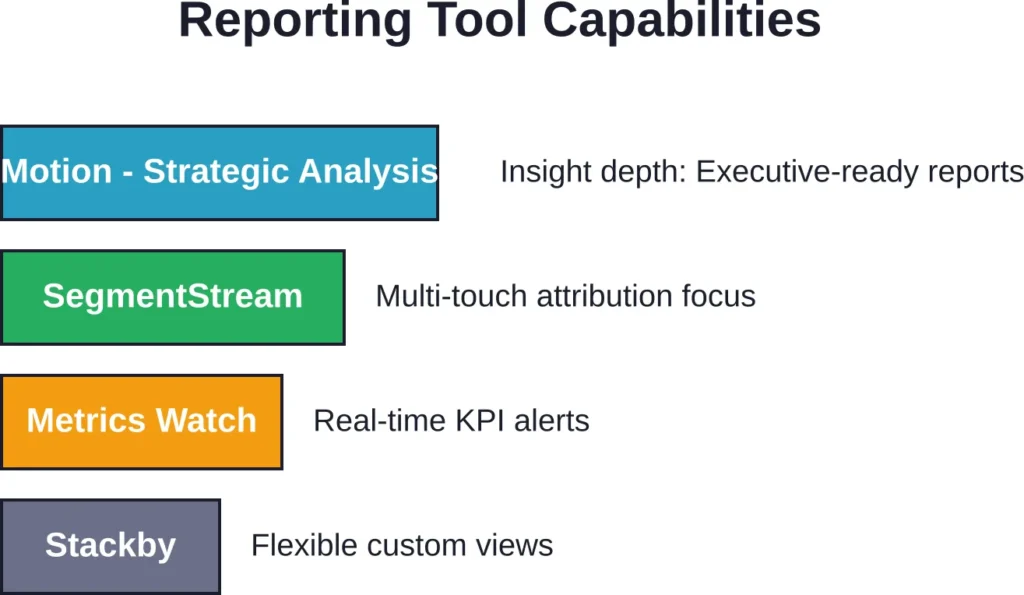
Motion emphasizes analysis rather than raw data display. The platform doesn’t just show metrics; it highlights patterns, anomalies, and opportunities buried in campaign performance.
According to their training content, CMOs don’t just want numbers—they want explanations. Why is this ad working? What are the big insights? Motion structures reports around answering these strategic questions.
Custom report templates speed up recurring reporting needs. Create a template once, and Motion automatically populates it with updated data weekly or monthly. For agencies reporting to multiple clients, this automation saves hours.
Best for: Marketing leaders and strategists who need to present findings to executives or clients. The focus on interpretation over data dumps makes reports genuinely useful rather than overwhelming.
SegmentStream: Attribution Clarity

SegmentStream tackles attribution—determining which touchpoints actually contributed to conversions. Facebook’s native attribution often credits the last click, ignoring earlier interactions that warmed up prospects.
Multi-touch attribution models show the complete customer journey. A prospect might first see a Facebook awareness ad, later click a retargeting ad, then convert after receiving an email. SegmentStream maps these pathways and assigns appropriate credit.
For businesses running multi-channel campaigns, understanding true attribution prevents over-investing in last-click channels while neglecting top-of-funnel efforts that generate initial awareness.
Best for: Businesses running complex multi-channel campaigns across Facebook, Google, email, and other platforms. Attribution clarity becomes essential when coordinating touchpoints across channels.
Metrics Watch: KPI Monitoring

Metrics Watch focuses on continuous monitoring rather than periodic reporting. The platform tracks key performance indicators in real-time and sends alerts when metrics cross predefined thresholds.
Set thresholds like “alert me if cost per conversion exceeds $40” or “notify me when daily spend hits 80% of budget.” Instant alerts prevent small problems from becoming expensive disasters.
Dashboard customization lets teams create focused views for different stakeholders. Account managers see campaign-level details; executives see high-level performance summaries; finance teams see spend pacing.
Best for: Teams managing substantial daily ad spend who need immediate alerts about performance changes. Real-time monitoring catches issues hours or days faster than manual dashboard checks.
Stackby: Flexible Reporting

Stackby combines database functionality with reporting capabilities. Store campaign data, client information, and performance metrics in one system, then generate custom reports by filtering and grouping data however needed.
Pricing flexibility makes it accessible. A limited-time annual deal offers paid features at fixed renewal prices, making long-term budgeting predictable.
The database approach works well for agencies managing multiple clients with different reporting requirements. Build custom views for each client without maintaining separate spreadsheets.
Best for: Agencies and consultants managing diverse clients who need flexible reporting without rigid templates. The database foundation supports custom workflows that specialized tools can’t accommodate.
Social Media Publishing Tools: Scheduling and Collaboration
While bulk launchers focus on paid campaigns and reporting tools analyze results, social media publishing platforms handle organic content scheduling and team coordination. Many also support Facebook ad publishing alongside organic posts.
These tools solve workflow problems—coordinating multiple team members, maintaining consistent posting schedules, managing approval processes, and planning content calendars weeks in advance.
Planable: Collaboration Champion

Planable emphasizes team collaboration above all else. Multiple stakeholders can review content, leave feedback, request changes, and approve posts without endless email threads or scattered Slack messages.
Visual approval workflows show exactly where each piece of content sits in the review process. Clients or executives see only finished drafts awaiting final approval, while team members see working versions with revision history.
According to customer feedback, Planable helps marketing teams overview entire marketing efforts in one centralized dashboard. For agencies juggling multiple client accounts, this unified view prevents things from falling through cracks.
Calendar view displays scheduled content across days, weeks, or months. Spot gaps in your publishing schedule at a glance and ensure consistent presence without overwhelming audiences.
Best for: Agencies and marketing teams with complex approval workflows. If content passes through multiple reviewers before publication, Planable streamlines the process significantly.
Hootsuite: Comprehensive Management

Hootsuite offers broader social media management beyond pure publishing. Customer relationship management features let teams track conversations, respond to comments, and monitor brand mentions alongside content scheduling.
Multi-platform support covers Facebook, Instagram, Twitter, LinkedIn, and other networks from one dashboard. Teams managing presence across multiple channels avoid logging into separate platforms constantly.
Analytics integrate with publishing tools, showing which content types drive the most engagement. Use performance data to refine content strategy rather than guessing what audiences want.
Best for: Teams managing comprehensive social media presence across multiple platforms who need unified management rather than Facebook-specific tools.
Buffer: Simplicity and Traffic Focus

Buffer strips away complexity to focus on straightforward scheduling with emphasis on driving traffic. The platform excels at helping e-commerce brands and online shops convert social engagement into website visits.
Link tracking shows which posts drive the most clicks to landing pages or product pages. For businesses where social media’s primary goal is traffic generation, these insights guide content strategy effectively.
Simple pricing tiers and interface design make onboarding painless. New team members can schedule content within minutes without extensive training.
Best for: E-commerce brands and online businesses focused on driving traffic from social media to websites. The simplified approach works well for teams that don’t need extensive features.
Sprout Social: Enterprise Solution

Sprout Social targets enterprise organizations with advanced needs. Features include optimal posting time recommendations based on when audiences are most active, team collaboration tools for large departments, visual content calendars, and content suggestions.
AI-powered posting time optimization analyzes audience engagement patterns and recommends when to publish for maximum reach. Instead of guessing ideal times, let data guide scheduling decisions.
Comprehensive reporting shows performance across organic and paid content, team productivity metrics, and competitive benchmarking against industry standards.
Best for: Large marketing departments and enterprise brands managing significant social media operations across multiple teams and regions.
Agorapulse: Listening and Engagement

Agorapulse combines publishing with social listening—monitoring brand mentions, competitor activity, and industry conversations across platforms.
Inbox management consolidates comments, messages, and mentions from all platforms into one unified feed. Respond to audience interactions without checking multiple apps constantly.
Engagement tracking identifies top contributors—accounts that frequently interact with content. Recognize and nurture these community members who help amplify reach organically.
Best for: Community-focused brands that prioritize two-way conversation over one-way broadcasting. Social listening capabilities matter most when building engaged communities.
CoSchedule: Marketing Calendar Focus

CoSchedule approaches social publishing through a marketing calendar lens. Plan entire campaigns—social posts, blog articles, email sends, events—in one unified timeline.
Cross-channel coordination prevents conflicting messages or overwhelming audiences with too much content simultaneously. See the complete marketing picture rather than just social media in isolation.
Built-in educational resources help teams learn as they work. For growing marketing departments adding capabilities, CoSchedule’s guidance reduces the learning curve.
Best for: Marketing teams coordinating across multiple channels who need unified campaign planning beyond just social media publishing.
| Platform | Core Strength | Best For | Collaboration | Multi-Platform |
|---|---|---|---|---|
| Planable | Approval workflows | Agencies | Advanced | Yes |
| Hootsuite | Comprehensive management | Multi-channel teams | Yes | Advanced |
| Buffer | Traffic generation | E-commerce | Basic | Yes |
| Sprout Social | Enterprise features | Large organizations | Advanced | Advanced |
| Agorapulse | Social listening | Community building | Yes | Yes |
| CoSchedule | Marketing calendar | Campaign coordination | Yes | Yes |
Specialized Publishing Tools: Niche Solutions
Beyond the major categories, specialized tools address specific publishing needs that mainstream platforms don’t handle well.
Post Planner: Content Curation

Post Planner focuses on content discovery and curation rather than original content creation. The platform finds shareable content from across the web that resonates with target audiences.
For teams struggling to maintain consistent publishing schedules, curated content fills gaps between original posts. Mix owned content with relevant third-party articles, infographics, or videos.
Content recommendations based on engagement predictions help identify pieces likely to resonate before publishing. Avoid wasting time on content that won’t perform.
Best for: Small teams stretched thin who need to maintain active social presence without creating 100% original content. Curation complements rather than replaces owned content.
Later: Visual Planning and Influencer Marketing

Later specializes in visual content planning with drag-and-drop calendar interfaces. See exactly how feed aesthetics will appear before publishing—crucial for brands where visual cohesion matters.
Influencer marketing features help coordinate campaigns involving multiple content creators. Manage collaboration workflows, track deliverables, and measure influencer-generated content performance.
Link-in-bio tools help overcome Instagram’s link limitations by creating mobile-optimized landing pages that consolidate multiple links.
Best for: Visual brands and e-commerce companies running influencer marketing programs. The visual planning interface particularly benefits Instagram-heavy strategies.
WordStream: Paid and Organic Integration
WordStream bridges paid advertising and organic social publishing. Manage both Facebook ads and organic posts from one platform, maintaining message consistency across paid and earned channels.
Budget optimization recommendations analyze campaign performance and suggest reallocation to improve overall return on investment. For businesses splitting budgets between organic and paid, unified optimization prevents channel silos.
Best for: Small to medium businesses managing both organic social presence and paid campaigns without dedicated specialists for each channel.
Building Your Publishing Tool Stack
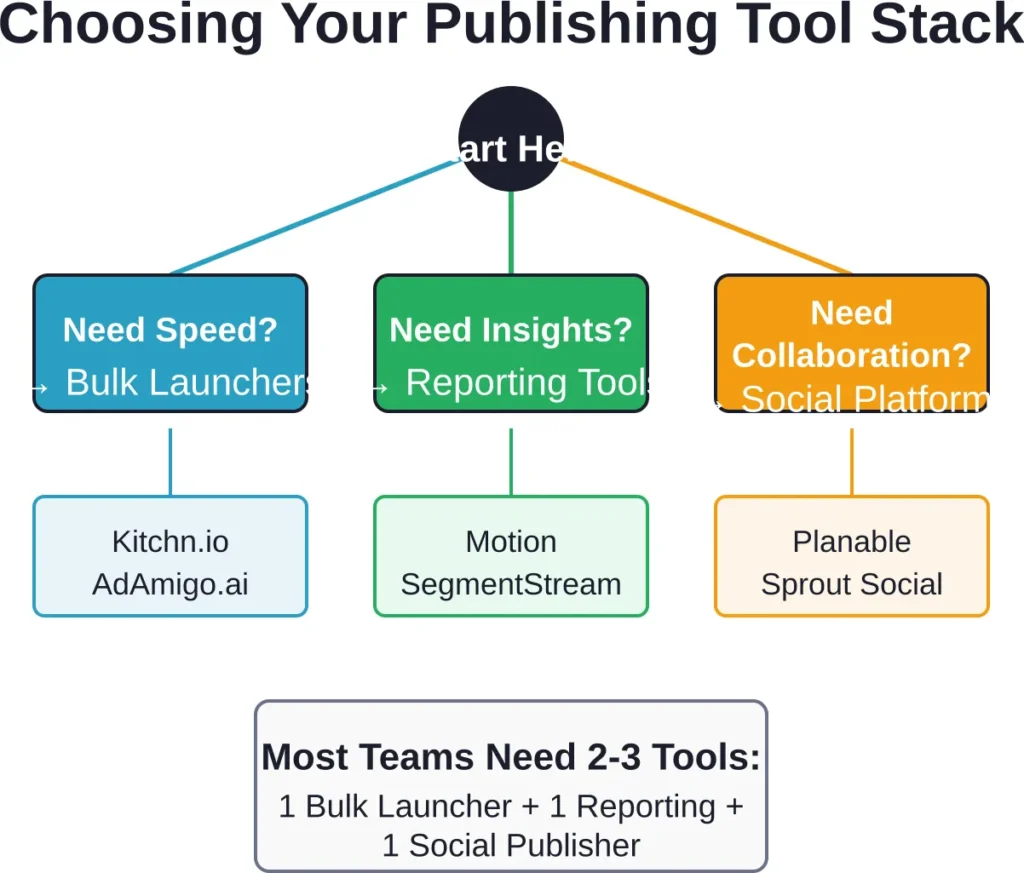
No single platform handles everything perfectly. Most successful marketing operations combine 2-3 specialized tools rather than forcing one solution to cover all needs.
Start by identifying your biggest pain point. Is it the time required to launch campaigns? The difficulty extracting insights from performance data? Coordinating multiple team members?
Address the most painful problem first. If campaign creation consumes three hours daily, a bulk launcher delivers immediate value. If executives constantly request ad hoc reports, prioritize reporting tools.
Stack Combinations That Work
For small businesses with limited budgets: Buffer (scheduling) + Koast (basic bulk launching) + native Facebook insights. This minimal stack covers essential needs without overwhelming teams or budgets.
For growing e-commerce brands: Kitchn.io (fast bulk launching) + Metrics Watch (real-time monitoring) + Buffer (traffic-focused publishing). Emphasizes speed and conversion tracking without collaboration complexity.
For agencies managing multiple clients: AdAmigo.ai (quality-controlled bulk launching) + Motion (client-ready reporting) + Planable (approval workflows). Prioritizes quality control, professional reporting, and efficient client collaboration.
For enterprise marketing departments: AdManage.ai (enterprise-scale bulk launching) + SegmentStream (multi-channel attribution) + Sprout Social (comprehensive social management). Handles complexity, scale, and cross-channel coordination.
Integration Considerations
Tools that integrate with each other multiply their value. Publishing platforms that feed data into reporting tools eliminate manual exports. Bulk launchers that sync with automation platforms enable sophisticated optimization strategies.
Check integration capabilities before committing. Native integrations work better than third-party connectors like Zapier, which add failure points and latency.
Most quality tools integrate directly with Meta’s advertising API, but connections between third-party platforms vary. If integration matters for your workflow, test it during trial periods.
Training and Adoption
Tool sophistication means nothing if teams won’t use it. The fanciest AI-powered platform delivers zero value if team members continue working in Ads Manager because they don’t understand the new system.
Prioritize platforms with quality documentation, training resources, and responsive support. Complex enterprise tools require dedicated onboarding; simpler platforms should be self-explanatory.
For larger teams, designate tool champions who master platforms and help colleagues. Distributed expertise prevents single points of failure when the one person who understands the system takes vacation.
Common Pitfalls to Avoid
Several mistakes plague teams adopting Facebook ads publishing tools. Awareness helps avoid wasting time and money on false starts.
Over-automating too quickly. Automation is powerful but dangerous without understanding. Teams that immediately enable aggressive automation rules before understanding their campaigns often waste budgets on poorly optimized automatic changes. Learn how campaigns perform manually before automating decisions.
Ignoring team workflow. Tools that technically work but clash with team processes create more problems than they solve. A sophisticated platform requiring three approval steps won’t work for teams that need to react quickly to trends. Match tools to actual workflows rather than forcing workflows to match tools.
Neglecting mobile experience. Marketing doesn’t stop when team members leave desks. Tools without functional mobile apps limit flexibility. Check whether platforms support critical functions on mobile before committing.
Failing to establish processes. Tools enable better processes but don’t create them. Without clear guidelines about who creates campaigns, who approves them, and who monitors performance, even the best platforms devolve into chaos. Document processes alongside tool adoption.
Chasing features over fundamentals. Impressive feature lists don’t matter if core functionality is weak. A platform with 50 features that executes basic bulk launching slowly is inferior to one with 10 features that executes flawlessly. Prioritize tools that excel at essentials over those that do everything mediocrely.
Pricing and Budget Considerations
Publishing tool costs vary dramatically—from free tiers serving solo entrepreneurs to enterprise contracts costing thousands monthly.
Pricing models differ across platforms. Some charge per user seat, others per connected ad account, and a few base pricing on monthly ad spend managed. Understand pricing structures before committing, especially for growing teams where costs might scale faster than anticipated.
Check official websites for current pricing rather than relying on outdated information. Subscription tiers, feature availability, and costs change regularly as platforms evolve.
Free trials let teams test functionality before paying. Take trials seriously—use them to run real campaigns, not just explore interfaces. Only actual usage reveals whether tools truly fit workflows.
Annual subscriptions typically offer discounts versus monthly billing. For tools you’ll definitely use long-term, annual commitments save money. But if you’re uncertain about fit, monthly flexibility is worth the premium.
Security and Access Control
Publishing tools require extensive permissions to manage ad accounts. This access creates security considerations that careless teams overlook until problems emerge.
Review permission scopes carefully. Some tools request broader access than necessary for their functions. Minimize permissions to reduce risk if tool credentials are compromised.
Enable two-factor authentication on both Meta ad accounts and publishing tools. Single-password protection is inadequate for accounts controlling advertising budgets.
For agencies managing client accounts, use Meta Business Manager properly. Never operate through personal accounts or share passwords directly. Business Manager enables granular permission control that protects both agencies and clients.
Audit access regularly. Remove team members who change roles or leave the company immediately. Stale credentials are common security vulnerabilities.
When testing new tools, use test accounts with limited budgets rather than primary accounts managing substantial spend. Unexpected issues or misconfigurations can’t cause major damage in sandboxed environments.
The Future of Facebook Ads Publishing
Publishing tools continue evolving as Meta’s advertising platform adds capabilities and marketers demand greater efficiency.
AI integration is expanding beyond current optimization features. Future tools will likely generate creative concepts, write ad copy variations, and predict performance before campaigns launch. Early versions of these capabilities exist now; expect rapid sophistication increases.
Cross-platform management is blurring boundaries between Facebook, Instagram, and other Meta properties. Tools increasingly handle unified campaigns across the entire Meta ecosystem rather than treating Facebook separately.
Privacy-focused attribution is adapting to reduced tracking capabilities. As third-party cookies disappear and tracking becomes more restricted, attribution models must rely on aggregated data and statistical modeling rather than granular user tracking.
Collaborative features are becoming standard rather than premium additions. As marketing teams become more distributed, integrated collaboration stops being a nice-to-have feature and becomes table stakes.
But the core need remains constant: marketers want to spend less time on repetitive mechanics and more time on strategy and creativity. Tools that genuinely deliver on this promise will thrive regardless of technical implementation details.
Frequently Asked Questions
Publishing tools focus on content creation, scheduling, and distribution—either organic posts or paid campaigns. Ad management platforms emphasize optimization, bidding strategies, and performance analysis after campaigns launch. Many tools blur these boundaries by offering both publishing and management features. For most teams, the distinction matters less than whether the tool solves specific workflow problems.
Yes, when launching dozens or hundreds of ad variations. Bulk ad launch tools can deliver substantial time savings by automating repetitive steps involved in launching multiple ad variations. The time savings compound—what takes five hours manually might take 20 minutes with bulk tools. However, for teams launching fewer than 20 ads monthly, the time investment learning bulk tools might exceed the time saved.
Not necessarily. Several platforms handle both paid and organic content from unified dashboards—Sprout Social, Hootsuite, and WordStream all support mixed workflows. However, specialized tools often excel in their focus area. Teams running sophisticated paid campaigns alongside active organic presence often benefit from dedicated tools for each rather than compromise with all-in-one platforms that do both adequately but neither exceptionally.
Consider your campaign complexity and team expertise. AI-powered platforms like AdAmigo.ai excel when managing numerous campaigns where pattern recognition provides value—flagging anomalies, suggesting optimizations, detecting errors. Manual platforms work fine for straightforward campaigns with experienced teams that don’t need algorithmic assistance. Test both during trial periods; some teams find AI recommendations helpful while others find them distracting.
Varies dramatically by platform sophistication. Simple schedulers like Buffer require maybe an hour to master basics. Enterprise platforms like AdManage.ai might require days of training plus ongoing learning. Most tools fall somewhere between—expect 2-4 hours to become functional, then gradual improvement with regular use. Quality tools offer documentation, tutorials, and support that flatten learning curves considerably.
Free tiers work well for solo entrepreneurs and very small teams with basic needs. They typically limit connected accounts, scheduled posts, team members, or advanced features. As operations grow, free tiers become restrictive quickly. Most teams managing serious ad spend find premium tools pay for themselves through time savings and performance improvements. Start with free versions to validate fit, then upgrade when hitting limitations.
Review tool performance annually unless major problems emerge sooner. Marketing technology evolves quickly—tools that led the market two years ago might now lag competitors. Annual reviews ensure you’re not stuck with outdated platforms from inertia. That said, don’t chase every new tool promising miraculous improvements. Switching costs—time investment, team training, workflow disruption—are substantial. Change tools when clear evidence shows meaningful benefits, not because something new and shiny appeared.
Conclusion: Match Tools to Your Actual Needs
Facebook ads publishing tools range from simple schedulers to sophisticated AI-powered platforms managing enterprise-scale operations. The best tool for your situation depends on specific pain points rather than generic “best practices.”
Small teams struggling to maintain consistent publishing benefit from basic schedulers like Buffer or CoSchedule. Agencies coordinating multiple stakeholders need approval-centric platforms like Planable. Performance marketers launching dozens of campaign variations weekly need bulk launchers like Kitchn.io or AdAmigo.ai.
Most successful marketing operations combine multiple specialized tools rather than compromising with all-in-one solutions that do everything adequately but nothing exceptionally. A bulk launcher for campaign creation, a reporting platform for insights, and a collaborative publisher for team coordination creates a powerful stack without overlap or gaps.
Start by identifying your biggest operational pain point—the task consuming disproportionate time or creating frequent errors. Address that first with a focused tool, then expand your stack as processes mature and needs evolve.
The publishing tools landscape continues evolving rapidly. What works perfectly today might feel outdated in 18 months as platforms add capabilities and competitors innovate. Regular evaluation ensures marketing operations leverage current best options rather than persisting with familiar but obsolescent tools.
Ready to streamline your Facebook advertising workflow? Start with free trials of 2-3 tools addressing your primary pain point. Run actual campaigns during trials rather than just exploring interfaces—only real usage reveals whether platforms genuinely fit your needs. Then commit to the tool that demonstrably improves your specific workflow rather than the one with the most impressive feature list.