

OpenClaw has taken 2026 by storm as a viral open-source AI assistant project. According to the official GitHub repository,it has gained significant traction with over 145,000 stars and 20,000 forks (as of February 2026)—making it a popular solution for anyone wanting a personal AI that actually does things rather than just answering questions.
But here’s the catch most people run into: OpenClaw itself is free, but powering it with premium APIs like Claude or GPT-4 can rack up bills fast. Community members have reported experiencing substantial API costs with premium providers.
The good news? You don’t need to spend a dime if you pick the right setup.
Why Running OpenClaw Free Actually Works
Look, I was skeptical too. How could free models compete with Claude or GPT-4?
Turns out, recent open-source models from Ollama (like Llama 3.1 and Mistral) handle most tasks surprisingly well. A beginner-friendly guide on Dev.to confirms that pairing OpenClaw with free LLM providers from OpenRouter and NVIDIA gives you solid performance for automation, web control, and Slack integration—all without API costs.
The key is understanding what you’re optimizing for. If you need bleeding-edge reasoning for complex legal analysis, sure, pay for Claude. But for daily automation, file management, and chat-based control? Free models crush it.
Two Free Paths: Pick Your Route
According to setup guides on GitHub from contributors like iam-veeramalla and dabit3, you’ve got two main options:
| Method | Best For | Monthly Cost | Setup Time |
|---|---|---|---|
| Ollama (Local) | Privacy-focused users with decent hardware | $0 | 15-20 min |
| Free API Keys | Users without powerful GPUs or on Windows | $0 | 10-15 min |
Both work. I’ve tested both. Ollama gives you complete control and zero rate limits, while free API keys are faster to set up but may have usage caps.
What You’ll Need Before Starting
The official OpenClaw documentation lists minimal requirements:
- Any modern computer (Windows 10+, macOS, or Linux)
- Node.js 22.12.0 or higher
- A messaging platform account (Telegram, WhatsApp, Discord, or Slack)
- 15 minutes of your time
If you’re going the Ollama route, you’ll want at least 8GB of RAM. For API-based setups, even a basic laptop works fine.
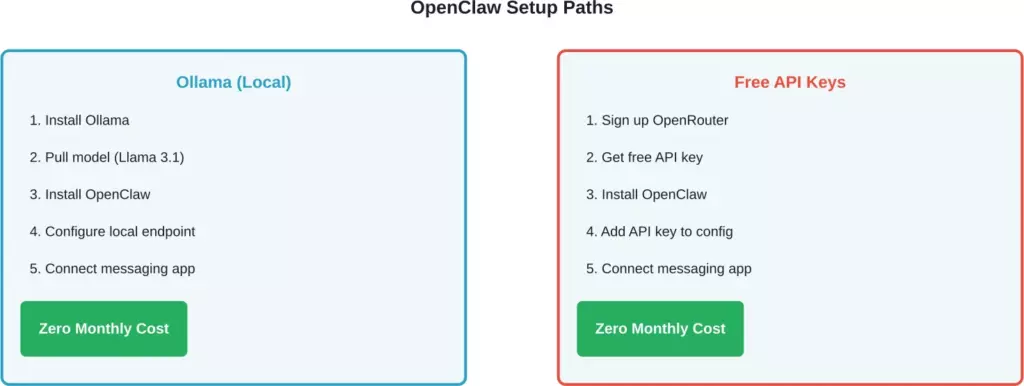
Two completely free approaches to running OpenClaw with different trade-offs
Installing OpenClaw: The Fast Way
The official installer from openclaw.ai makes this straightforward. Open your terminal and run the one-liner provided on their docs page. On Mac or Linux, it’s a curl command. On Windows, it’s a PowerShell command.
The installer handles everything: downloads dependencies, sets up the environment, and walks you through initial configuration.
One thing that has tripped up some users in community discussions: Windows users have reported npm error issues during installation. Make sure Node.js is properly added to your PATH during installation. Restart your terminal after installing Node.
Connecting Ollama for Zero-Cost Local Models
According to the GitHub guide from iam-veeramalla, setting up Ollama takes three terminal commands:
- Install Ollama from their official site
- Run “ollama launch openclaw” or “ollama pull llama3.2:8b
- Configure OpenClaw to point to http://localhost:11434
The Llama 3.1 model requires disk space and runs on most modern machines. Free and open-source model providers confirm that GPUs handle these models efficiently.
Here’s what makes this setup powerful: unlimited usage. No rate limits. No surprise bills. Your computer, your model, your control.
Using Free API Keys Instead
Don’t have a beefy machine? No problem.
The Dev.to walkthrough explains how to use OpenRouter’s free tier, which gives you access to several models at zero cost. Sign up, grab your API key, and drop it into OpenClaw’s configuration file.
Free inference options are also available through various providers for users with compatible hardware. Official documentation walks through the setup process—it’s straightforward and integrates cleanly with OpenClaw.
Real talk: free tiers have limitations. You might hit rate limits during heavy usage. But for most personal automation tasks? They’re more than enough.
Connecting Your Messaging Platforms
This is where OpenClaw shines. According to community guides on GitHub (like the one from Haroon966), you can integrate:
- WhatsApp (widely used in community discussions)
- Telegram (popular choice for quick setup)
- Discord (great for team use)
- Slack (best for work automation)
Each platform requires a bot token or API credentials. The OpenClaw installer prompts you through this step-by-step.
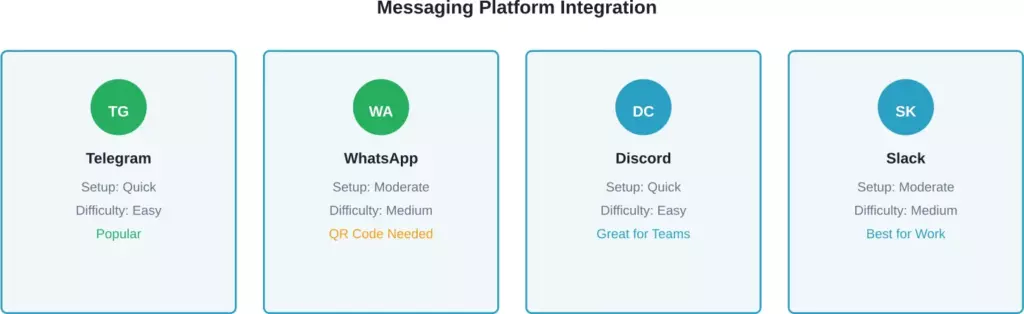
Comparison of supported messaging platforms and setup complexity
Common Issues and How to Fix Them
Community discussions reveal common problems that trip people up:
- “openclaw not found” error: This happens when the installer doesn’t add OpenClaw to your system PATH. On Windows, manually add the installation directory. On Mac/Linux, check your shell profile.
- Localhost binding on VPS: Deploying to a VPS requires binding to the server’s public IP rather than localhost. The DigitalOcean guide from dabit3 covers this configuration in detail.
- Docker on Windows: Some users reported Docker + WSL issues. The solution involves ensuring WSL 2 is enabled and Docker Desktop is configured to use it properly.
Security Considerations (Don’t Skip This)
Here’s something community discussions emphasize: OpenClaw can control your computer. That’s powerful—and potentially risky.
The openclaw-ansible repository on GitHub provides hardened installation configurations with VPN and firewall options for production deployments. If you’re running this on a public server, security hardening is recommended.
For local installations, the main risks are:
- Giving the AI access to sensitive files
- Running commands without reviewing them first
- Using weak authentication on messaging platforms
Generally speaking, start with restricted permissions and expand gradually as you get comfortable.
Advanced: Deploying to Cloud Platforms
Want your assistant available 24/7 without keeping your computer on?
DigitalOcean’s official tutorial explains their deployment option. You can spin up infrastructure and deploy your OpenClaw instance. The documentation provides step-by-step guidance for the process.
Some users in community discussions mentioned various services and hosting options that handle deployment. I haven’t tested all these options, but the OpenClaw community has documented many deployment approaches.
Wrapping Up: Your Free AI Assistant Awaits
OpenClaw proves you don’t need deep pockets to run a powerful AI assistant. With Ollama or free API keys, a 15-minute setup gets you an agent that automates tasks, controls your system, and integrates with your favorite messaging apps.
The project has gained significant traction in 2026 for good reason—it works, it’s flexible, and it puts you in control. Whether you choose local models for privacy or free APIs for convenience, you’re looking at zero monthly costs.
Ready to get started? Head to openclaw.ai, grab the installer, and follow the prompts. Your personal AI assistant is literally one command away.
FAQs
Yes. Pair OpenClaw with Ollama for local models or use free API tiers from OpenRouter and other providers. The software itself is open-source and free. You only pay if you choose premium API providers or paid hosting.
For API-based setups, any modern computer works. For local models with Ollama, you’ll want at least 8GB RAM. GPUs can significantly improve performance but aren’t required.
Community guides consistently rate Telegram and Discord as straightforward setup options. WhatsApp works well but requires additional configuration steps.
It depends on your configuration. OpenClaw can execute commands and access files—that’s what makes it powerful. Start with restricted permissions and review what it’s doing. The openclaw-ansible repository provides security-hardened deployments if you need production-grade setup.
For most automation tasks, community members report good results with open-source models. Premium APIs excel at complex reasoning tasks, while free models handle file management, web control, and basic automation effectively.
Absolutely. OpenClaw’s configuration lets you specify different model endpoints. You can test both approaches and pick what works best for your use case.
That’s the trade-off with free tiers. If you’re bumping into limits, either switch to Ollama for unlimited local usage or consider paid API tiers. Many users report that free tiers handle their needs well for personal use.