

OpenClaw has gained significant popularity on GitHub, becoming a popular open-source AI assistant platform. But here’s what nobody tells you upfront: setting it up involves two separate costs that can catch you off guard.
First, you need somewhere to run it. Second, you need an AI model to power it.
The good news? Both can be completely free if you know where to look. I’ve spent the last week testing every free option available, and I’m going to show you exactly how to get OpenClaw running without spending a dime on monthly subscriptions.
What Is OpenClaw and Why Should You Care?
OpenClaw (formerly known as Clawdbot, briefly Moltbot) is your own personal AI assistant that works across multiple platforms. Think Jarvis from Iron Man, except it’s open-source and you control everything.
It connects to Telegram, WhatsApp, Discord, Slack, Signal, and other messaging platforms. The real power comes from its ability to remember conversations, execute tasks on your computer, and chain together different AI models based on what you’re asking it to do.
According to the official OpenClaw GitHub repository, the platform supports multiple LLM providers and can run AI agents that perform complex tasks autonomously. That’s where the free credits become crucial—because every message your assistant processes costs tokens.
Understanding the Two-Part Cost Structure
Before we dive into setup, let’s break down what you’re actually paying for (or avoiding with free options):
| Cost Component | What It Covers | Free Options Available |
|---|---|---|
| Hosting/Compute | Where OpenClaw runs (server, VPS, or local machine) | Oracle Cloud free tier, old laptop, Raspberry Pi |
| AI Model Access | The brain that processes your requests | Claude credits via AI Perks, Gemini free tier, local Ollama models |
| Storage | Memory files and conversation history | Included in hosting options |
Community discussions on Reddit reveal that most people abandon OpenClaw setup because they don’t understand this separation. One user noted: “I wiped an old Surface Pro laptop and then started reading up… there are two main ways to setup OpenClaw safely.”
That Surface Pro approach? Brilliant. And completely free.
Path 1: The Completely Free Route (Local Models)
This is the zero-dollar-per-month option. You’ll run OpenClaw on hardware you already own and use local AI models that don’t phone home.
Hardware Requirements
You don’t need a beast of a machine.
Here’s what actually works:
- Recommended minimum for 2026 is 8GB RAM and at least 20 TOPS of dedicated AI acceleration (e.g., NVIDIA Jetson or Apple Silicon)
- 20GB free storage space
- Internet connection for initial setup
- Windows, macOS, or Linux—OpenClaw runs on all three
One Reddit user successfully deployed OpenClaw on a 16GB Intel NUC running Ubuntu. Another got it working on an old Surface Pro. The barrier isn’t hardware—it’s configuration.
Installing Ollama for Local Models
Ollama lets you run AI models directly on your machine. No API calls, no credits, no usage tracking.
Download Ollama from their official site and install it. Then pull a model that actually works with OpenClaw’s requirements:
- ollama pull llama3.2:3b
- ollama pull mistral:7b
- ollama pull qwen2.5:7b
According to OpenClaw installation guidance, models with larger context windows may provide better results for certain tasks. The models listed above support reasonable context windows.
Installing OpenClaw
Open your terminal and clone the repository:
| git clone https://github.com/openclaw/openclaw.gitcd openclawnpm installCreate a .env file in the root directory. This is where configuration happens_OPENCLAW_MODEL_PROVIDER=ollamaOPENCLAW_MODEL_NAME=llama3.2:3bOLLAMA_BASE_URL=http://localhost:11434Start the gateway (OpenClaw’s core service):npm run gateway |
If you see “Gateway running on port 3000” without errors, you’re golden. Local setup complete.
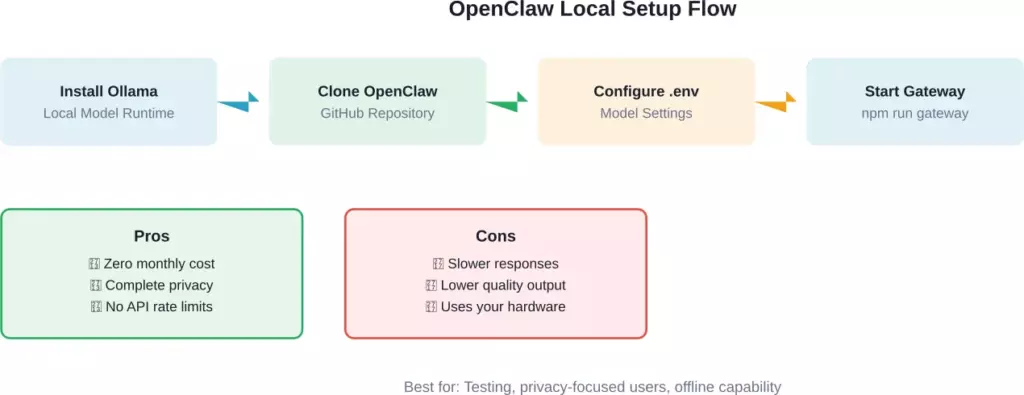
Complete flow for setting up OpenClaw with local Ollama models and trade-offs to consider
Path 2: Free Cloud Credits (Better Performance)
Local models work, but they’re noticeably slower and less capable than cloud-hosted ones. If you want GPT-level responses without paying, free credits are your answer.
Getting Free Claude Credits Through AI Perks
According to GetAIPerks.com, they provide access to free Anthropic Claude API credits. OpenClaw uses Claude as its primary brain, so this is a premium option for users seeking free credits.
Visit getaiperks.com and sign up. They aggregate startup credits and grants from various AI providers. Once you get your Claude API key, you have access to significant free usage.
| Add it to your OpenClaw .env file_OPENCLAW_MODEL_PROVIDER=anthropicANTHROPIC_API_KEY=your_key_hereOPENCLAW_MODEL_NAME=claude-sonnet-4-5 |
Google Gemini’s Free Tier
Google offers free access to Gemini models through their AI Studio. The free tier provides generous rate allowances—more than enough for personal use.
Head to ai.google.dev, create a project, and grab your API key. Configuration looks like this:
| OPENCLAW_MODEL_PROVIDER=googleGOOGLE_API_KEY=your_gemini_keyOPENCLAW_MODEL_NAME=gemini-pro |
OpenRouter for Multi-Model Access
According to OpenRouter’s official documentation, they integrate directly with OpenClaw and offer free-tier access to multiple models. You can set up model fallbacks so if one provider is down, OpenClaw automatically switches to another.
Create an account at openrouter.ai. They provide a signup bonus in credits, plus rotating free model access.
| OPENCLAW_MODEL_PROVIDER=openrouterOPENROUTER_API_KEY=your_keyOPENCLAW_MODEL_NAME=google/gemini-pro-1.5 |
| Provider | Free Credits/Access | Best Model | Rate Limits |
|---|---|---|---|
| AI Perks (Claude) | Variable amounts | Claude 3 Sonnet | Varies by grant |
| Google Gemini | Free tier available | Gemini 1.5 Pro | Rate limited |
| OpenRouter | Signup bonus + rotating free | Multiple options | Model-dependent |
| Local Ollama | Infinite (offline) | Llama 3.2, Qwen 2.5 | Hardware only |
Where to Host OpenClaw for Free
Now that you’ve got free model access sorted, you need somewhere to run the actual OpenClaw instance.
Oracle Cloud Always Free Tier
According to the Cognio.so setup guide, Oracle Cloud offers a legitimately free tier forever—not a trial. You get substantial cloud resources suitable for running OpenClaw continuously.
That’s more than enough to run OpenClaw 24/7 with room for multiple agent instances.
Sign up at cloud.oracle.com, provision an Ubuntu VM, install Docker, and deploy OpenClaw in a container. The Cognio guide walks through the complete process including SSL setup with Nginx.
Using Your Old Laptop
Real talk: this is what most people actually do. One Reddit user mentioned wiping an old Surface Pro specifically for OpenClaw. Another runs it on older hardware.
The advantage? Complete control, zero cloud dependencies, and if something goes wrong, you just wipe the drive and start over. As one community member put it: “The surface laptop is actually perfect for this. wipe + fresh install is your nuclear reset button if things go sideways.”
Docker on Your Main Machine (With Caution)
If you understand containerization, running OpenClaw in Docker on your daily driver works fine. The container provides isolation from your main system.
However, community discussions emphasize security concerns. One experienced user noted: “I use 1Password for my key management, the only key OpenClaw has is the one to access 1Password via a dedicated vault and a service account.”
That’s the right approach. Never give OpenClaw direct access to your primary credentials.
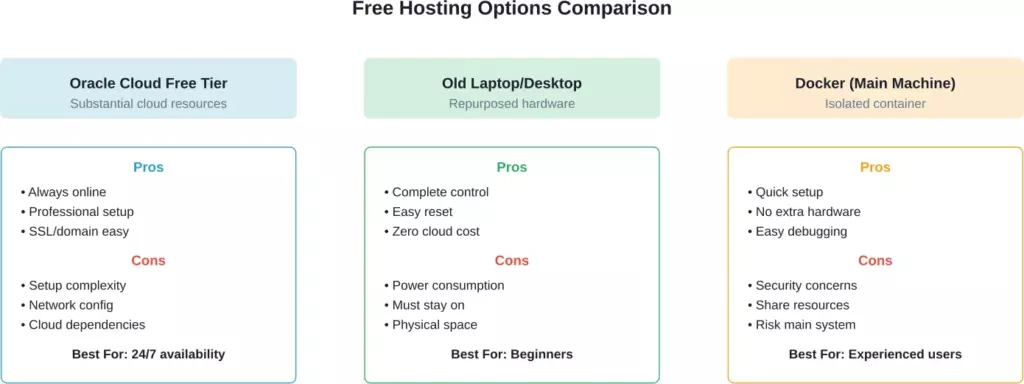
Comparison of three free hosting approaches with pros, cons, and ideal use cases
Connecting OpenClaw to Chat Platforms
You’ve got OpenClaw running and models configured. Now you need to actually talk to it.
WhatsApp Integration
WhatsApp is the most popular choice because everyone already uses it. OpenClaw connects through a QR code pairing system.
Install the WhatsApp channel plugin:
| npm install @openclaw/channel-whatsapp |
Add to your .env:
| WHATSAPP_ENABLED=true |
Start OpenClaw and watch the console. A QR code will appear. Scan it with WhatsApp like you’re adding a new device. Done.
However, community discussions mention some users have reported issues. One user shared: “I cannot get WhatsApp working beyond self number. Appears to be a buggy version?” While another confirmed success: “Got it working, access via whatsapp.”
Telegram Setup
Telegram requires creating a bot through BotFather. Open Telegram, search for @BotFather, and type /newbot. Follow the prompts and grab your token.
| TELEGRAM_ENABLED=trueTELEGRAM_BOT_TOKEN=your_token_here |
Restart OpenClaw. Message your bot. It should respond immediately.
One Reddit user asked: “how do you connect it via Reddit, create a bot at reddit.com/prefs/apps or?” Yes, that process is similar for Reddit integration, though it’s less commonly used than Telegram or WhatsApp.
Setting Up Model Fallbacks
Here’s something most guides skip: what happens when your free tier runs out mid-conversation?
OpenClaw supports fallback chains. If Claude hits rate limits, it automatically switches to Gemini. If Gemini’s down, it falls back to your local Ollama instance.
Configuration looks like this:
| OPENCLAW_MODEL_PRIMARY=anthropic/claude-3-sonnetOPENCLAW_MODEL_FALLBACK_1=google/gemini-proOPENCLAW_MODEL_FALLBACK_2=ollama/llama3.2 |
According to community discussions around free model configuration, this approach prevents your agent from breaking when hitting API limits.
Security Considerations You Can’t Ignore
Let’s address the elephant in the room. OpenClaw can access your filesystem, execute commands, and make API calls. If misconfigured, it’s a security concern.
One Reddit user wisely stated: “Absolutely, if you want to be truly safe, you need to ensure you have a first layer of protection against prompt injection. Something like this is needed.”
Here’s what you should do:
- Run OpenClaw on isolated hardware or in a Docker container
- Never connect it to accounts with payment methods
- Use a password manager to control API key access
- Review the skills/tools OpenClaw has access to
- Disable computer control features unless you specifically need them
Security-conscious setup involves auditing your configuration and understanding access controls.
Troubleshooting Common Setup Issues
Based on community discussions, here are the problems everyone hits:
OpenClaw Won’t Start
Check Node.js version. OpenClaw requires Node 18+. Run node –version to confirm.
Missing dependencies? Run npm install again with –force flag.
Model Responds But Makes No Sense
Your context window may be too small. Smaller local models may not perform well on complex tasks—consider upgrading to larger model versions or using cloud API options.
WhatsApp QR Code Won’t Generate
Some VPS configurations report issues with QR code generation. One user shared: “Terrible experience so far… I am literally pulling my hair.”
The fix: ensure your gateway is actually running before starting the WhatsApp channel. Run npm run gateway in one terminal, then npm run channel:whatsapp in another.
Out of Memory Errors
Local models consume RAM. If you’re running larger models on limited RAM systems, you may experience crashes. Either upgrade hardware or use smaller models or switch to cloud APIs entirely.
Making OpenClaw Actually Useful
Now that it’s running, what should you actually use it for?
Community members shared real use cases. One noted: “Lead generation for local businesses is probably the most straightforward. Set up automated outreach sequences.”
Another mentioned: “I had the best results when the agent can switch models based on task type (planning vs. coding vs. research).”
And this gem from Medium: “I Replaced 6+ Apps with One ‘Digital Twin’ on WhatsApp.” The author consolidated calendar management, note-taking, research, and communication through a single WhatsApp interface.
Here’s what actually works well:
- Research summarization (paste links, get summaries)
- Code review and debugging
- Meeting notes transcription
- Email drafting and responses
- Task list management
What doesn’t work great yet: complex multi-step automation, financial transactions, anything requiring perfect accuracy.
Monitoring Your Free Credit Usage
Free doesn’t mean unlimited. You need to track consumption or you’ll hit walls mid-project.
For Claude through AI Perks, check your dashboard regularly. Gemini shows usage in Google Cloud Console. OpenRouter displays remaining credits in your account settings.
Set up alerts before you hit limits. Most providers let you configure email notifications at 80% usage.
Community discussions mention various memory management strategies to optimize token usage for long-running conversations.
Advanced Configuration Options
Once you’ve got basics working, these tweaks improve performance:
Custom System Prompts
Edit your agent’s personality and capabilities by modifying the system prompt. Create a prompts/ directory and add custom instructions.
Tool Extensions
OpenClaw supports plugins for web scraping, database access, and API integration. One user mentioned: “I’ve set mine up with playwright to bypass needing scraping tools.”
Install tools selectively. Each one increases attack surface and token usage.
Memory Management
The real unlock for long-running agents is implementing effective memory management to preserve token budgets across sessions while maintaining relevant context.
OpenClaw stores memories in Markdown files. Configure retention policies to keep only relevant history.
The Reality Check
Look, I’ll be honest. Setting up OpenClaw with free credits takes time. You’re not going to do this in 60 seconds like some headlines claim.
Budget 2-4 hours for initial setup. Another few hours troubleshooting weird issues. Maybe a full day if you’re also learning Linux basics or Docker concepts.
But here’s what you get: a personal AI assistant that runs exactly how you want it, costs nothing per month, and doesn’t feed your data into someone else’s training pipeline.
One community member summed it up perfectly: “This guide is exactly what I wish I had when I started. The memory management strategies alone would have saved me hours of confusion.”
Taking the Next Step
You’ve got all the information you need to get OpenClaw running with free AI credits. Pick your path—local models for maximum privacy or cloud credits for better performance.
Start with the simplest setup first. Get it working on your laptop with Ollama before attempting Oracle Cloud deployments. Add complexity only after basics function.
Join the OpenClaw community on GitHub and Reddit. Real users share configuration files, troubleshooting tips, and use cases you won’t find in official docs.
And remember: the goal isn’t a perfect setup on day one. It’s a working AI assistant you can iterate on. Start free, learn the system, then decide if paid options make sense for your use case.
OpenClaw is actively developed and widely adopted. Once you get past the initial configuration hurdle, you’ll have a flexible AI assistant platform. Now go build something useful.
Frequently Asked Questions
Yes. Use local Ollama models on hardware you already own. Zero monthly cost. You’ll sacrifice response quality and speed compared to cloud APIs, but it works.
It depends on usage. Heavy daily use might consume credits more quickly. Light usage could stretch credits for extended periods. The exact duration varies based on your specific usage patterns and the provider.
Generally speaking, yes, but use caution. Don’t share sensitive information through the bot. One security-conscious user advised: “Never connect any important accounts (gmail, banking, etc) until you’re absolutely sure the setup is sandboxed properly.”
They’re all the same project at different stages. It was originally called Clawdbot, then renamed to Moltbot, and finally rebranded as OpenClaw. According to OpenRouter’s documentation, “OpenClaw (formerly Moltbot, formerly Clawdbot) is an open-source AI agent platform.”
Yes. Configure model routing so different task types use different models. Use GPT for coding, Claude for writing, Gemini for research. OpenRouter makes this particularly easy.
Basic command line comfort helps, but you don’t need to be a developer. If you can follow step-by-step terminal instructions and edit text files, you’ll be fine. The community has created various deployment tools, though some may have associated costs.
If you’ve set up fallbacks properly, OpenClaw automatically switches to your backup model. Without fallbacks, requests simply fail until limits reset (usually monthly) or you add payment info.