

Here’s the official answer to “What does OpenClaw cost?”: â¬0. The software is completely free and open-source.
But that’s not the full story, is it?
Running OpenClaw in practice means paying for a server and AI model access. Community discussions reveal that many users are burning way more money than they need to. Users have reported spending $47 in a single week of testing, and another reported burning through $50 in their first few days from poorly configured cron jobs.
Let me break down what OpenClaw actually costs in 2026, component by component, so you won’t be shocked by a $300 surprise bill.
The Two Core Costs You’ll Pay
Every OpenClaw setup has two distinct cost centers. Understanding these helps you budget accurately.
1. Hosting and Infrastructure Costs
OpenClaw needs to run somewhere 24/7. You’ve got options ranging from completely free to premium dedicated hardware.
- Free Tier Option: Oracle Cloud offers a free ARM-based VPS that’s powerful enough for OpenClaw. It’s genuinely $0/month forever if you stay within their generous free tier limits. This is a popular entry point for users testing OpenClaw.
- Budget VPS: Providers like Hetzner offer instances starting around $4-8/month. These are stable, reliable, and handle moderate automation workloads without hiccups.
- Mid-Range Cloud: AWS t3.medium instances cost approximately $30-40/month. You get better reliability and scaling options.
- Local Hardware: A Mac Mini M4 runs about $599 as a one-time purchase. This becomes cheaper than cloud hosting over a 3-year period if you’re running heavy workloads, and you can run local models and eliminate API costs entirely.
| Hosting Option | Monthly Cost | Setup Difficulty | Best For |
|---|---|---|---|
| Oracle Cloud Free Tier | $0 | Medium | Testing and light personal use |
| Hetzner VPS (CAX11) | $4-8 | Easy | Most users |
| AWS t3.medium | $30-40 | Medium | Business automation |
| Mac Mini M4 | $599 one-time | Easy | Heavy users, 3+ year commitment |
2. AI Model API Usage Costs
This is where most people get surprised. Community analysis suggests that many users overpay significantly on API costs.
OpenClaw doesn’t include an AI model. It connects to external LLM APIs like Claude, GPT, or Gemini. Every action your assistant takes consumes tokens, and those tokens cost money.
- Budget Models: Gemini Flash-Lite has a free tier that covers casual use. DeepSeek and other budget models run around $1-3/month for typical personal assistant tasks.
- Mid-Range: Claude Haiku 3 or GPT-4.1-mini typically cost $5-15/month for moderate automation workloads. This is the sweet spot for most users.
- Premium Models: Claude 3.5 Haiku costs $0.80/$4.00 per 1M tokens; GPT-5.2 mini costs $1.75 per 1M tokens.
- Heavy Automation: If you’re running complex overnight tasks, multi-step workflows, or business automation, costs can spike to $100-150/month or more. The key factor? Token burn from retries and context window bloat.
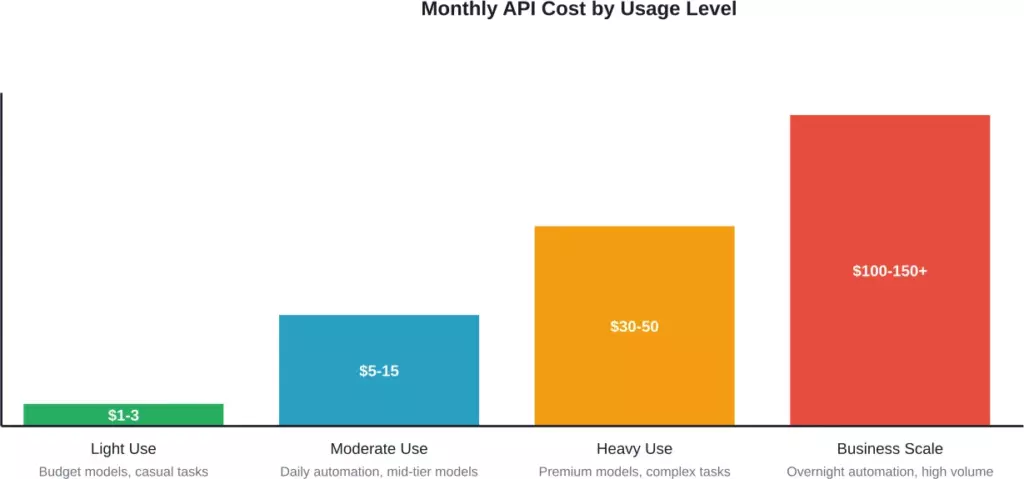
Typical monthly API costs based on usage patterns and model selection
Real-World Cost Examples from Actual Users
Theory is nice. But what do people actually spend?
According to community reports, a user spent $47 testing OpenClaw for one week. That’s roughly $200/month if sustained, typically driven by use of premium models without optimization.
Another user shared their setup: AWS t3.medium ($35/mo) plus Claude Haiku via OpenRouter ($8-12/mo) for a total around $45-50/month. They used this configuration for their daily automation including email management, shell commands, and document drafting.
On the budget end, users leveraging Oracle’s free tier with Gemini Flash report running costs of $0-3/month total. That’s genuinely viable for personal assistant tasks that don’t require cutting-edge model intelligence.
Community analysis suggests that a cost-effective configuration pairs Hetzner hosting ($8/mo) with Gemini Flash or DeepSeek APIs ($5-10/mo) for a total of around $13-18/month, handling approximately 100 requests per day.
Why Most Users Overpay (And How to Fix It)
Here’s what community discussions reveal about wasteful spending:
- Problem 1: Default model overkill. Most people leave OpenClaw set to the most powerful (and expensive) model for every task. You don’t need Claude Opus to check your email or rename files.
- Problem 2: Heartbeat token burn. Poorly configured health checks can burn thousands of tokens doing essentially nothing. Community reports indicate significant cost reductions from optimizing these background processes.
- Problem 3: Context window bloat. OpenClaw can dump entire code files into the context for simple fixes, burning 100k+ tokens unnecessarily. Community discussions suggest the original codebase often includes more context than needed.
- Problem 4: Retry loops. When tool calling fails, some models get stuck in expensive retry loops that rack up costs without accomplishing anything.
Smart Cost Optimization Strategies
- Use model routing. Configure OpenClaw to use cheap models (Gemini Flash, Claude Haiku) for simple tasks and only escalate to premium models for complex reasoning.
- Set up caching. If you’re using Claude, enable prompt caching to avoid re-processing the same context repeatedly. This can significantly reduce costs.
- Monitor in real-time. Several users built dashboards to track OpenClaw-specific spending. You can’t optimize what you don’t measure.
- Cap your spending. Most API providers let you set monthly spending limits. Use them. Better to hit a limit than face a surprise $300 bill.
- Consider local models. If you’ve got decent hardware (Mac Mini M4, or PC with 32GB+ RAM), running Ollama with models like Qwen or Llama locally eliminates API costs entirely.
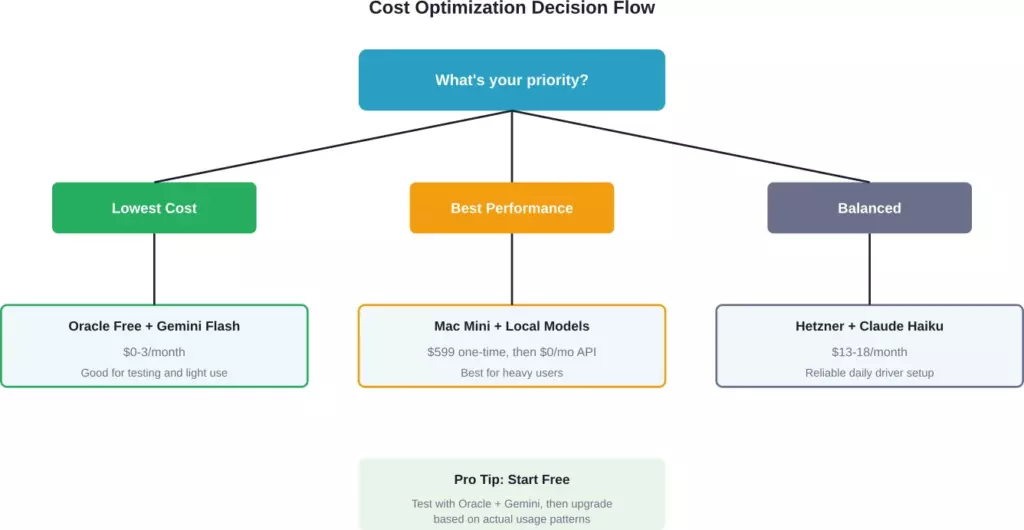
Decision framework for choosing the most cost-effective OpenClaw setup based on your priorities
Hidden Costs You Might Not Expect
Beyond hosting and API usage, there are a few sneaky costs that catch people off guard.
- Development Time: Getting OpenClaw configured properly takes time. If you’re billing hourly, that setup time has real cost. Managed hosting services charge $15-50/month partly because they eliminate this friction.
- Security Hardening: OpenClaw requires proper security configuration before deployment, especially if handling sensitive data. This requires time investment or service costs.
- Scaling Surprises: If your automation suddenly scales up, your costs can spike unexpectedly. Users have reported bills jumping significantly when expanding automation scope.
- Model Experimentation: Testing different AI models to find the right balance of cost and performance burns tokens. Budget $10-20 for this exploration phase.
Total Cost of Ownership: Three Realistic Scenarios
Let me put this all together with three complete cost profiles.
| Scenario | Hosting | AI Model | Monthly Total | Annual Total |
|---|---|---|---|---|
| Budget Beginner | Oracle Free Tier | Gemini Flash | $0-3 | $0-36 |
| Daily Driver | Hetzner CAX11 ($8) | Claude Haiku ($10) | $18 | $216 |
| Power User | Mac Mini M4 ($599 one-time) | Local Models (Ollama) | $0 (after hardware) | $200 year 1, $0 after |
| Business Automation | AWS t3.medium ($35) | Mixed routing ($25-50) | $60-85 | $720-1,020 |
For comparison, enterprise AI tools cost significantly more than typical OpenClaw setups. Even expensive OpenClaw configurations are a fraction of enterprise pricing.
Should You Use OpenClaw or Pay for Alternatives?
Look, I’ll be honest with you. OpenClaw isn’t for everyone.
If you want zero setup hassle and don’t mind paying $20-50/month, managed AI assistant services might be worth it. You’re paying for convenience and support.
But if you’re comfortable with basic server administration, OpenClaw offers unmatched flexibility and potential cost savings. You control your data, customize everything, and avoid vendor lock-in.
The sweet spot? Start with the free Oracle + Gemini setup. Use it for 2-4 weeks. Track what you actually use it for. Then upgrade deliberately based on real needs, not hypothetical ones.
The Bottom Line on OpenClaw Costs
OpenClaw’s cost story is simple: the software is free, but running it isn’t.
Your minimum viable setup costs $0-3/month using free tiers. A solid daily driver configuration runs $15-25/month. Heavy business automation might hit $50-100/month. And yes, if you’re careless, you can burn $300 in a month.
The key is starting small, monitoring religiously, and optimizing aggressively. Don’t just accept default configurations. Question every model choice. Cache everything you can. Route intelligently between cheap and expensive models.
Most importantly, track your actual usage for a month before committing to any expensive setup. What you think you’ll use OpenClaw for and what you actually use it for are often very different things.
Ready to set up OpenClaw without breaking the bank? Start with Oracle’s free tier and Gemini Flash. Run it for three weeks. Then come back and optimize based on real data, not guesswork.
Frequently Asked QuestionsÂ
Yes, the OpenClaw software itself is 100% free and open-source. However, you’ll need to pay for hosting (unless you use free tiers) and AI model API access. Your actual out-of-pocket costs depend entirely on how you configure these components.
The absolute cheapest setup is Oracle Cloud’s free tier for hosting paired with Gemini Flash-Lite’s free tier for the AI model. This can legitimately cost $0/month for light personal use. For more reliable performance, budget $3-8/month using a cheap VPS and budget API.
The most common culprits are: using expensive models for simple tasks, inefficient heartbeat configurations burning tokens on background processes, context window bloat including unnecessary information, and retry loops when tool calling fails. Implementing model routing and prompt caching can significantly reduce costs.
Yes, if you have decent hardware (Mac Mini M4 or PC with 32GB+ RAM), you can run local models via Ollama and eliminate API costs entirely. The trade-off is a higher upfront hardware investment ($599+ for Mac Mini) and potentially slower or less capable model performance compared to cloud APIs.
For most users, budget $15-25/month total. This covers a reliable VPS ($5-10) and moderate AI API usage ($10-15). If you’re running heavy automation or business workflows, plan for $50-100/month. Start with free tiers and scale up based on actual usage rather than assumptions.
Beyond hosting and API fees, consider setup time (3-8 hours for most people), security hardening requirements, potential scaling surprises if usage spikes unexpectedly, and token costs during the model experimentation phase. If you value your time at $50/hour, setup “costs” another $150-400 in opportunity cost.
Yes, significantly so. Enterprise AI solutions typically cost thousands of dollars annually. Even a high-end OpenClaw setup at $1,000/year represents substantial savings. The trade-off is that OpenClaw requires technical setup and doesn’t include enterprise support or compliance guarantees out of the box.