

OpenClaw went from obscure open-source project to 157,000 GitHub stars. But between the hype and the security warnings, one question keeps coming up: what are people actually using it for?
The answer is surprisingly mundane. And that’s exactly why it works.
This isn’t another list of theoretical use cases. These are real OpenClaw automations people run daily, ranked by actual time savings and ease of setup. According to user reports, business owners consistently save 10-15 hours per week by automating repetitive workflows with OpenClaw.
What Makes OpenClaw Different for Automation
OpenClaw runs on your own machine. It can execute shell commands, read files, monitor processes, and interact with APIs—all without sending your data to third-party servers.
That local-first architecture makes certain automations possible that cloud-based AI assistants can’t touch. You’re not limited to pre-built integrations or sandboxed environments.
But that power comes with responsibility. As documented by the National Vulnerability Database, CVE-2026-25593 affected OpenClaw prior to 2026.1.20, while CVE-2026-25475 affected OpenClaw prior to 2026.1.30. Make sure you’re running version 2026.1.30 or later before implementing any automation.
According to research published on Academia.edu, the OpenCLAW-P2P extension enables decentralized frameworks for collective AI intelligence, though most users stick with simpler, single-agent automations for daily tasks.
Top Business Automation Use Cases
Business automation is where OpenClaw delivers the biggest ROI. Here’s what actually works.
Email Triage and Inbox Management
This is the easiest high-value use case. Setup takes about 30 minutes. Daily time savings are small—maybe 5-10 minutes—but the cognitive benefit of starting your day organized is significant.
OpenClaw can monitor your inbox, categorize messages by urgency, flag emails requiring responses, archive newsletters, and surface action items. Some users configure it to draft responses to common inquiries.
The automation runs continuously in the background. You wake up to a pre-sorted inbox instead of 200 unread messages.
Customer Support and Ticket Triage
Some teams use OpenClaw to handle support volume by monitoring support inboxes, answering FAQs automatically, creating tickets for complex cases, and escalating urgent issues to human agents.
The key is setting clear boundaries. OpenClaw handles the repetitive 70% so humans can focus on the nuanced 30%.
One implementation detail: configure the agent to add a footer noting the response was AI-generated. Transparency matters, especially for customer-facing communications.
Calendar Management and Meeting Prep
OpenClaw can scan your calendar, pull relevant documents for upcoming meetings, summarize previous meeting notes, identify scheduling conflicts, and send pre-meeting briefings.
This automation shines for people who jump between multiple projects. Instead of scrambling to remember context before each call, you get a two-minute briefing delivered to Slack or email.
Daily Executive Briefings
Configure OpenClaw to compile daily briefings from multiple sources: overnight emails, team updates, industry news, analytics dashboards, and project management tools.
The output is a single digest delivered at a set time each morning. Some users report this replaces 30-45 minutes of manual information gathering.
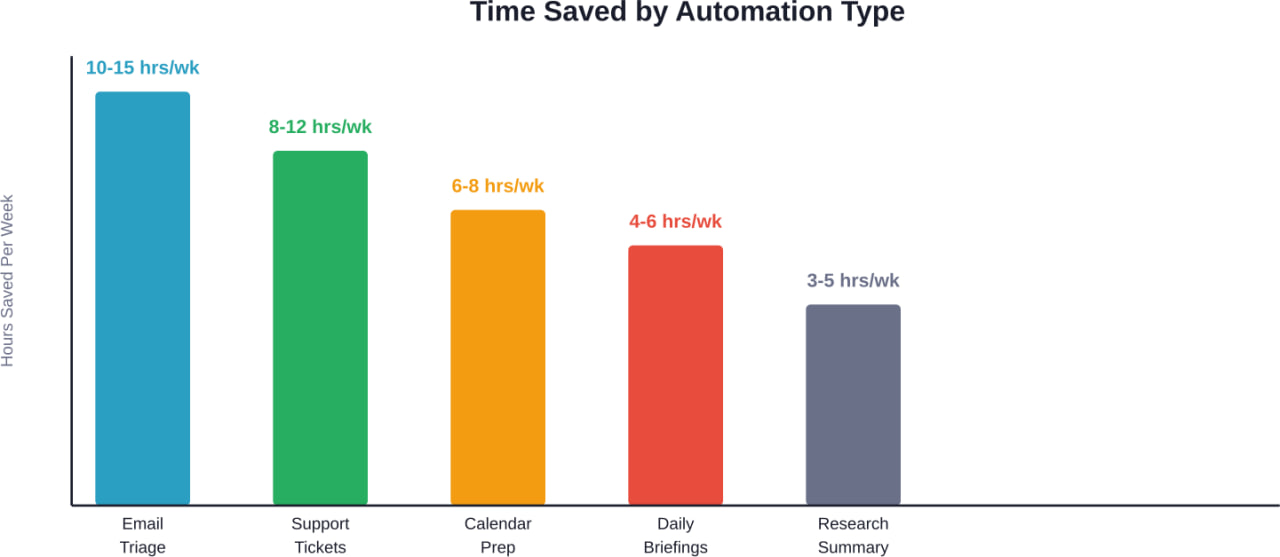
Time savings reported by business users across different OpenClaw automation categories, based on community surveys and user reports
Productivity Automations That Work
Personal productivity automations are less dramatic than business use cases, but they compound over time.
Research Summarization
Point OpenClaw at a folder of PDFs, articles, or documentation. It generates summaries, extracts key points, and identifies connections between documents.
This works particularly well for academic research, competitive analysis, and technical documentation review. What would take hours of manual reading happens in minutes.
Code Documentation and Review
Developers use OpenClaw to document code, review pull requests, identify potential bugs, generate unit tests, and explain complex functions in plain language.
Some teams configure it to run automatically on new commits, leaving review comments and documentation suggestions.
Personal Knowledge Management
OpenClaw can monitor your notes, extract insights, suggest connections between ideas, and build knowledge graphs from scattered information.
It’s like having a research assistant who reads everything you write and helps you spot patterns you’d otherwise miss.
Task and Project Tracking
Instead of manually updating project management tools, OpenClaw can extract tasks from meeting notes, track progress across platforms, send status updates, and flag blocked items.
The automation lives in the background, syncing information between email, Slack, GitHub, and your project tracker.
Content Creation and Management
Content workflows involve a lot of repetitive steps. OpenClaw handles the mechanical parts.
Social Media Monitoring and Response
Configure OpenClaw to monitor brand mentions, track competitor activity, identify trending topics, and draft response suggestions.
It won’t replace a social media manager, but it reduces the time spent on monitoring and routine responses.
Content Pipeline Automation
Some content teams use OpenClaw to coordinate multi-step publishing workflows: moving drafts through review stages, checking for broken links, optimizing images, and scheduling publication.
The agent acts as a production coordinator, making sure nothing falls through the cracks.
SEO and Performance Tracking
OpenClaw can monitor website analytics, track keyword rankings, identify content gaps, and generate performance reports.
Instead of logging into five different analytics tools, you get a consolidated view delivered on schedule.
Monitoring and Alert Systems
This is where OpenClaw’s local execution really shines. It can monitor things that cloud services can’t easily access.
Server and Application Monitoring
Configure OpenClaw to watch server logs, monitor application performance, track resource usage, and send alerts when thresholds are exceeded.
Setup takes about 10 minutes for basic monitoring. The peace of mind is worth it.
Security Alerts and Log Analysis
OpenClaw can monitor security logs, identify unusual patterns, flag potential intrusions, and summarize security events.
However, be aware of the security considerations. Research from Conscia and cybersecurity advisories (February 2026) describes OpenClaw’s risk as a ‘multi-vector enterprise threat’ and ‘shadow super-user’.
Data Pipeline Monitoring
For data teams, OpenClaw can monitor ETL jobs, track data quality issues, alert on pipeline failures, and generate data health reports.
It’s particularly useful for catching problems before they cascade into bigger issues.
Smart Home and IoT Integration
OpenClaw’s local execution makes smart home automation more private and responsive than cloud-based alternatives.
Intelligent Home Control
Connect OpenClaw to your smart home devices for context-aware automation. It can adjust lighting based on calendar events, manage climate control around your schedule, and coordinate multiple devices.
The difference from standard smart home automations? OpenClaw understands natural language and can handle complex conditional logic without rigid if-then rules.
Energy Usage Optimization
Configure OpenClaw to monitor energy consumption, identify wasteful patterns, adjust devices for efficiency, and generate savings reports.
Some users report energy savings after implementing smart optimization routines.
Key Integration Tools for OpenClaw
OpenClaw’s power multiplies when you connect it to existing tools. Here are the most valuable integrations based on GitHub stars and community adoption.
| Integration Tool | Primary Use Case | Setup Difficulty
|
|---|---|---|
| moltworker | Background task processing | Medium |
| nanobot | Lightweight automation framework | Easy |
| secure-openclaw | Enterprise security features | Hard |
| clawra | Advanced workflow orchestration | Medium |
| pinion-os | Operating system integration | Medium |
| openakita | API monitoring and testing | Easy |
| goclaw | Go language bindings | Hard |
| discord-mcp | Discord bot integration | Easy |
According to GitHub statistics, moltworker and nanobot are the most widely adopted, suggesting they offer the best balance of power and ease of use.
Security Considerations You Can’t Ignore
Here’s the thing though—OpenClaw runs with significant privileges. That’s what makes it powerful. It’s also what makes it risky.
The National Vulnerability Database documented several critical vulnerabilities in early 2026 versions. CVE-2026-25593 allowed command injection through unsafe cliPath values. CVE-2026-25475 permitted arbitrary file reading via directory traversal. CVE-2026-24764 enabled prompt injection through Slack channel metadata.
CVE-2026-25593 is fixed in 2026.1.20, CVE-2026-25475 is fixed in 2026.1.30, and CVE-2026-24764 is fixed in 2026.2.3, but they illustrate an important point: when you give an AI agent system-level access, security can’t be an afterthought.
Best practices for secure OpenClaw deployment:
- Run on version 2026.1.30 or later
- Use the secure-openclaw wrapper for enterprise deployments
- Enable audit logging for all actions
- Restrict file system access to necessary directories only
- Review and approve any automation that executes shell commands
- Don’t expose OpenClaw APIs to untrusted networks
- Implement proper authentication even for local-only setups
According to Stanford HAI’s research on AI transparency, AI model transparency remains a challenge—a concern that extends to agent frameworks like OpenClaw.
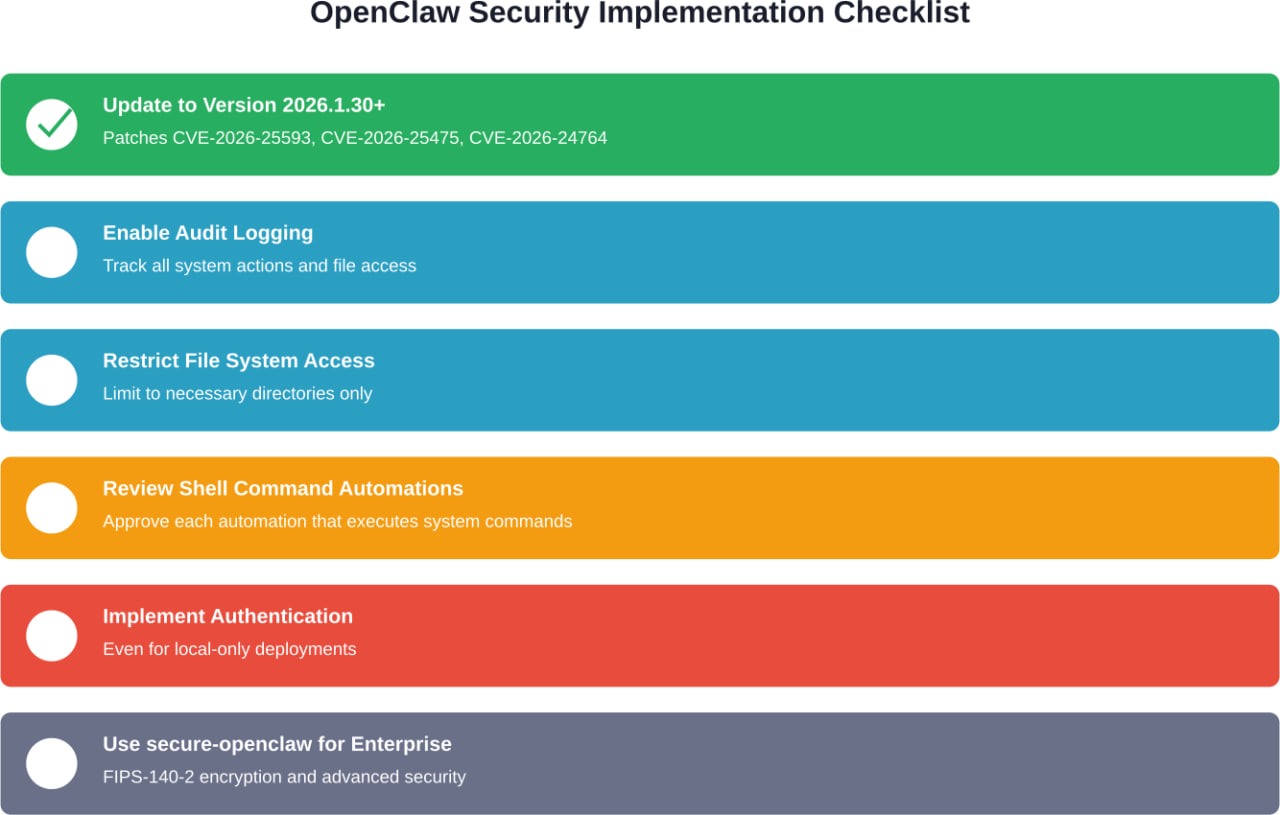
Essential security steps for safe OpenClaw deployment, prioritized by criticality from high (green) to recommended (gray)
Getting Started: What Actually Works
Most people who try OpenClaw automation fail because they start too big. They want to automate everything on day one.
Here’s what works better: pick one annoying task that happens daily. Something simple. Email triage, for example, or calendar prep.
Spend 30 minutes setting it up. Run it manually for a few days. Watch what it does. Adjust the prompts and rules.
Once that single automation works reliably, add another. Then another.
The compound effect is more powerful than trying to build a complex system all at once. Users who start small report higher success rates and longer-term adoption.
Realistic Setup Timeline
Based on community discussions, here’s what setup actually takes:
- Day 1: Install OpenClaw, configure basic settings (2 hours)
- Week 1: Set up your first simple automation (3-5 hours total)
- Week 2: Refine and debug that first automation (2-3 hours)
- Month 1: Add 2-3 more automations (1 hour each)
- Month 2+: Maintenance and optimization (30 minutes weekly)
Don’t expect to be fully automated in a weekend. Useful automation takes time to tune.
Common Mistakes to Avoid
After reviewing community experiences and documented issues, several patterns emerge in failed OpenClaw implementations.
Over-Automation
The biggest mistake is automating things that don’t need automation. Not every repetitive task is a good automation candidate.
Good automation targets: high-frequency, low-complexity, rules-based tasks.
Bad automation targets: infrequent tasks, nuanced decisions, anything requiring creativity.
Insufficient Testing
An automation that works 95% of the time will cause problems the other 5%. Test thoroughly before letting an automation run unsupervised.
Run new automations in review mode first—where you approve actions before they execute. Only switch to full automation once you trust the behavior.
Ignoring Error Handling
What happens when your automation encounters an API timeout? A malformed file? Missing data?
Build error handling from the start. Failed automations that break silently are worse than no automation at all.
Security Shortcuts
As documented by Forrester, OpenClaw can become a “shadow super-user” if not properly secured. Don’t skip authentication, audit logging, or access restrictions just because it’s running locally.
| Mistake | Why It Happens | How to Avoid It
|
|---|---|---|
| Over-automation | Enthusiasm and FOMO | Start with 1-2 simple tasks |
| Insufficient testing | Impatience to see results | Run in review mode for 1-2 weeks |
| Weak error handling | Happy-path thinking | Test failure scenarios explicitly |
| Security shortcuts | “It’s just local” mindset | Follow security checklist from day one |
| No documentation | “I’ll remember how this works” | Document each automation as you build |
Real-World Results: What Users Report
Community discussions reveal consistent patterns in who benefits most from OpenClaw automation.
Solo entrepreneurs and small business owners report the highest satisfaction. They’re doing everything themselves anyway, so any automation directly translates to freed time.
Technical teams at mid-size companies also see strong returns, particularly for DevOps monitoring and support ticket triage.
Large enterprises face more challenges. Integration complexity, security requirements, and change management slow adoption. But those who persist report significant efficiencies once systems are in place.
The time-saving claims check out. Multiple sources cite 10-15 hours per week for comprehensive automation setups, with individual automations saving anywhere from 5 minutes to several hours daily.
Advanced Use Cases Worth Exploring
Once you’ve mastered basic automations, some users push OpenClaw into more experimental territory.
Federated Learning and Collective Intelligence
According to research published on Academia.edu, the OpenCLAW-P2P framework enables autonomous AI agents to form decentralized networks for collective intelligence. The system includes peer node management, distributed compute engines, and consensus protocols for result verification.
This is bleeding-edge stuff. Not production-ready for most use cases, but it hints at where agent frameworks might go.
Multi-Agent Workflows
Some developers run multiple OpenClaw instances with specialized roles: one for monitoring, another for execution, a third for verification.
The agents communicate through message queues or shared data stores, creating more robust and flexible systems than single-agent setups.
Custom Integration Development
The most sophisticated users build custom integrations for proprietary systems. OpenClaw’s extensibility makes this possible, though it requires programming knowledge.
If you’re comfortable with TypeScript or Python, you can create connectors for virtually any API or data source.
Industry-Specific Automations
Certain industries have developed specialized OpenClaw automation patterns.
Law Firms
Legal professionals use OpenClaw for document review, case research summarization, deadline tracking, and billing automation. Some implementations focus on discovery document processing, where the agent categorizes and indexes large document sets.
Healthcare Administration
Healthcare offices implement OpenClaw for appointment scheduling, insurance verification, patient communication, and medical record organization. Strict HIPAA compliance requires careful configuration, but the efficiency gains are substantial.
Real Estate
Agents use OpenClaw to monitor new listings, generate property comparisons, draft listing descriptions, and manage client communications. The automation handles the research-heavy aspects while agents focus on relationships.
E-commerce Operations
Online retailers deploy OpenClaw for inventory monitoring, order processing, customer inquiry responses, and supplier coordination. Integration with platforms like Shopify and WooCommerce is well-documented.
Distribution of OpenClaw adoption across industry segments, showing strongest uptake in tech and small business environments
The Future of OpenClaw Automation
According to research cited in authoritative sources, 40% of enterprise applications will feature task-specific AI agents by the end of 2026—up from less than 5% in 2025. OpenClaw is part of that shift.
According to research, 40% of all G2000 job roles in 2026 will involve working with AI agents. That’s not future speculation—it’s this year.
The trend is clear: agent frameworks are moving from experimental tools to core infrastructure. OpenClaw benefits from being open-source and self-hosted, which appeals to organizations concerned about data privacy and vendor lock-in.
But challenges remain. According to Stanford HAI’s research on AI transparency, AI model transparency remains a challenge. This opacity extends to agent frameworks, where understanding what the system can and can’t do reliably remains difficult.
Security concerns persist too. Research on assembly performance metrics highlights the importance of standardized testing for automated systems—something the AI agent space still lacks.
Taking Action: Your Next Steps
OpenClaw automation works. The technology is mature enough for production use, assuming you follow security best practices and start with realistic expectations.
Don’t try to automate everything at once. Pick one task that annoys you daily. Something repetitive and rules-based. Email sorting. Calendar prep. Daily briefings.
Install OpenClaw version 2026.1.30 or later. Configure that one automation. Run it manually for a week. Watch what it does. Adjust the prompts.
Once that works reliably, add another. Then another. The compound effect builds faster than you expect.
The businesses saving 10-15 hours weekly didn’t get there overnight. They started small, learned the patterns, and expanded gradually.
You can do the same. The tools are available. The documentation exists. The community is active.
What are you waiting for?
Ready to implement OpenClaw automation in your workflow? Start with the official documentation, join the community forums for troubleshooting help, and remember: the best automation is the one you’ll actually use. Keep it simple, start small, and build from there.
Frequently Asked Questions
OpenClaw itself is open-source and free. Your costs come from the infrastructure to run it—typically a local machine or cloud server—plus API costs for the underlying language models you connect. Check the official OpenClaw documentation for current hardware requirements and model compatibility.
Not for basic automations. Many users set up email triage, calendar management, and monitoring tasks without writing code. More advanced integrations and custom workflows require some technical knowledge, typically TypeScript or Python familiarity.
Initial installation takes 1-2 hours. Setting up your first automation takes another 2-3 hours. Expect to spend a week or two refining that first automation before it runs reliably. Most users are fully productive with 3-5 automations within a month.
As of version 2026.1.30, critical vulnerabilities documented in CVE-2026-25593, CVE-2026-25475, and CVE-2026-24764 have been patched. For enterprise deployments, use the secure-openclaw wrapper, enable audit logging, implement authentication, and restrict file system access. Review your organization’s security requirements before deployment.
OpenClaw has strong integration capabilities through its API and plugin system. Popular integrations include Discord, Slack, GitHub, email platforms, and various databases. Check the integration tool ecosystem—tools like moltworker, nanobot, and discord-mcp extend OpenClaw’s connectivity significantly.
OpenClaw runs locally on your infrastructure, giving you full control over data and system access. It can execute shell commands, read local files, and interact with private systems that cloud assistants can’t reach. The tradeoff is that you’re responsible for setup, maintenance, and security.
Business users consistently report saving 10-15 hours per week with comprehensive automation setups. Individual automations range from 5-10 minutes daily (email triage) to several hours weekly (research summarization, support ticket handling). Results depend heavily on your specific workflows and how well you configure the automations.