
Quick Summary: Revit modeling costs vary widely depending on project scope and complexity. For software subscriptions, Autodesk Revit costs approximately $3,005 per year or $370 per month as of 2026. For outsourced 3D BIM modeling services, pricing typically ranges from $0.30 to $0.90 per square foot, with small residential projects starting around $5,000 and larger commercial buildings costing $15,000 to $50,000 or more.
When architects, engineers, or construction firms evaluate Building Information Modeling (BIM) workflows, the question of cost inevitably surfaces. Revit modeling has become the industry standard for detailed coordination and model-based delivery, but the financial commitment extends far beyond a simple software license.
Understanding the full cost picture matters whether purchasing subscriptions for in-house teams or outsourcing modeling work to specialized firms. Prices have shifted in recent years, and 2026 brings updated subscription tiers, regional variations, and new pay-as-you-go options that change the calculation.
This guide breaks down every cost component: software subscriptions, outsourced modeling services, training expenses, hardware requirements, and hidden fees that catch teams off guard. By the end, firms can budget accurately and choose the most cost-effective path for their specific needs.
Revit Software Subscription Costs: What Autodesk Charges in 2026
Autodesk offers several licensing models for Revit, each targeting different usage patterns. Prices listed here reflect the U.S. market as of May 2026, following Autodesk’s 3.3% price adjustment in mid-2025.
Monthly Subscription: Maximum Flexibility at a Premium
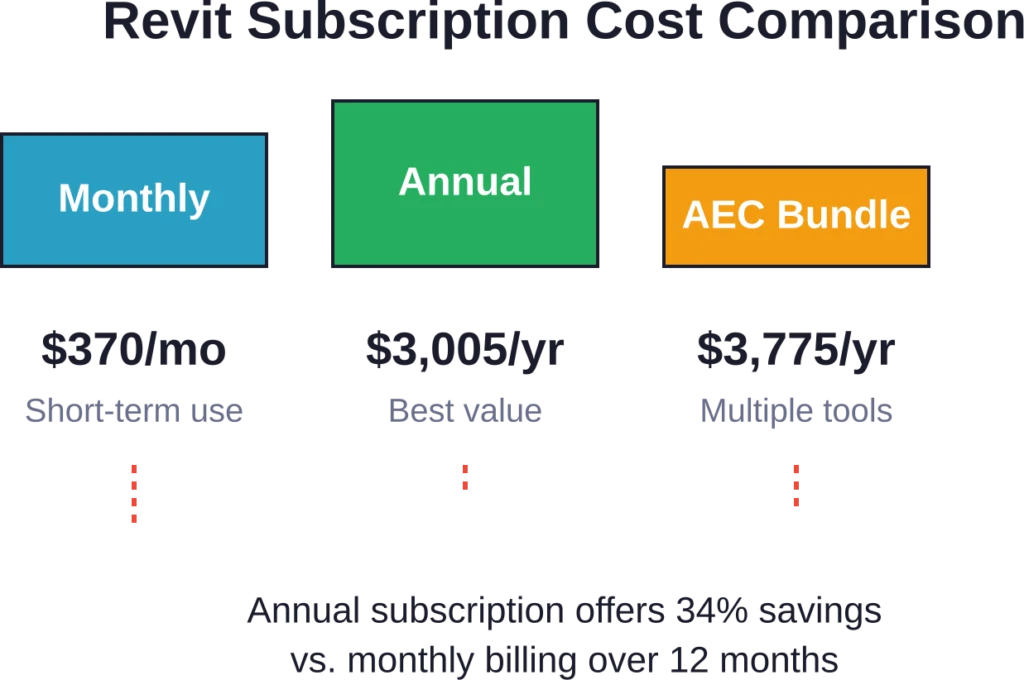
The monthly subscription runs approximately $370 per month. This option suits short-term projects, temporary staff augmentation, or firms testing Revit before committing long-term.
However, it’s the most expensive route annually. Twelve months of monthly billing totals roughly $4,440—about 48% more than purchasing an annual subscription upfront.
Best for contractors needing Revit access for a single three-month coordination phase or consultants brought onto a project temporarily.
Annual Subscription: The Standard Choice
Annual subscriptions cost approximately $3,005 per year (roughly $250 per month). This represents the baseline for most architecture and engineering firms running Revit regularly.
The annual plan includes all software updates, cloud storage through Autodesk Drive, and access to technical support. It saves about 34% compared to paying month-by-month.
For solo practitioners and small teams using Revit consistently throughout the year, the annual plan delivers the best value among standalone options.
Three-Year Subscription: Locking in Savings
Multi-year commitments offer additional discounts, typically around 10-15% compared to three separate annual purchases. Firms committed to Revit long-term can lock in current pricing and avoid future increases.
The tradeoff? Less flexibility if project volumes drop or if the firm decides to transition to alternative tools.
AEC Collection: Bundled Value for Multidisciplinary Teams
The AEC Collection bundles Revit with AutoCAD, Civil 3D, Navisworks, and additional tools for approximately $3,675-$3,775 per year. For firms using multiple Autodesk products, this represents significant savings versus purchasing each license separately.
According to industry pricing data, the collection saves roughly 40-50% compared to buying Revit, AutoCAD, and Civil 3D individually. It’s particularly valuable for civil engineering firms, MEP consultants, and integrated design-build contractors.
Flex Plan: Pay-as-You-Go Tokens
Autodesk’s Flex plan operates on a token system. Firms purchase token bundles upfront, then consume tokens to unlock software access on a daily basis.
Token pricing works out to approximately $300 for 100 tokens (minimum purchase), or roughly $3 per token. Each day of Revit access consumes tokens, making this viable for firms with highly variable workloads.
For example, 500 tokens at $1,500 might cover approximately 50 days of sporadic Revit usage throughout the year (at 10 tokens per day)—cheaper than maintaining an annual subscription if the software sits idle most months.
That said, heavy users burn through tokens quickly. Teams needing Revit more than 60-70 days annually typically save money with a standard annual subscription.
Free Options: Trials and Education Licenses
Autodesk offers a 30-day free trial for professionals evaluating Revit. This provides full functionality without payment, though it requires creating an Autodesk account and cannot be extended.
Students and educators qualify for free three-year education licenses through Autodesk’s Education Community. These licenses include full Revit functionality but embed watermarks on output, making them unsuitable for commercial work.
Educational licenses work well for learning, academic projects, and personal skill development before entering the workforce.
Outsourced Revit Modeling Services: Cost Per Square Foot and Per Project
Many firms choose to outsource BIM modeling rather than maintaining in-house Revit teams. This shifts the cost structure from subscription licenses and salaries to per-project fees based on scope and detail level.
Typical Pricing Models for BIM Services
3D BIM modeling services typically charge in one of three ways:
- Per square foot: Rates range from $0.30 to $0.90 per square foot depending on level of detail, building complexity, and turnaround time requirements
- Fixed project fee: Based on deliverables, building type, and coordination requirements
- Hourly rates: Typically $75 to $150 per hour for skilled Revit modelers, though this varies by region and expertise
The per-square-foot model dominates for straightforward architectural modeling. Complex MEP coordination, structural steel detailing, or projects requiring extensive design development often shift to fixed fees negotiated based on scope.
Cost Ranges by Project Size
Market data from U.S. BIM service providers shows typical project costs as follows:
| Project Type | Square Footage | Typical Cost Range | Cost Per Sq Ft |
|---|---|---|---|
| Small Residential | 1,500 – 3,000 sq ft | $5,000 – $8,000 | $0.50 – $0.70 |
| Medium Residential | 3,000 – 6,000 sq ft | $8,000 – $15,000 | $0.40 – $0.60 |
| Small Commercial | 5,000 – 15,000 sq ft | $10,000 – $20,000 | $0.60 – $0.90 |
| Medium Commercial | 15,000 – 50,000 sq ft | $20,000 – $50,000 | $0.50 – $0.80 |
| Large Commercial | 50,000+ sq ft | $50,000 – $150,000+ | $0.40 – $0.70 |
These ranges assume LOD 300-350 models (design development to construction documentation). Higher levels of detail for fabrication and installation increase costs by 30-50%.
What Drives BIM Modeling Costs Higher
Several factors push project costs toward the upper end of these ranges:
Architectural complexity: Curved facades, complex roof geometries, and custom curtain wall systems require significantly more modeling time than rectangular box buildings.
MEP coordination: Mechanical, electrical, and plumbing systems add substantial modeling effort, especially in occupied renovations where existing conditions must be field-verified and modeled.
Structural detail: Steel connection detailing, complex concrete formwork, and rebar modeling for LOD 400 fabrication models increase costs considerably.
Turnaround time: Rush projects with compressed schedules often carry 25-50% premiums for overtime and dedicated resources.
Revision cycles: Projects with frequent design changes and multiple revision rounds consume more hours than stable, well-defined scopes.
Hidden Costs: What Most Firms Don’t Budget For
The subscription or service fee represents just the starting point. Several additional expenses catch firms unprepared:
Training and Learning Curve
New Revit users face a steep learning curve. According to corroborated market data, formal training courses run $500 to $2,000 per person depending on duration and depth.
Self-taught learning reduces out-of-pocket training costs but extends the ramp-up period. Expect 3-6 months before new users achieve proficiency for production work, during which productivity lags significantly.
Firms adopting Revit for the first time should budget for reduced billable efficiency during the transition period—often 20-30% productivity loss for the first few projects.
Hardware Requirements
Revit demands robust workstations. Minimum specifications include 16GB RAM (32GB recommended), dedicated graphics cards, and fast solid-state drives. A properly configured Revit workstation costs $1,500 to $3,000.
Older computers struggle with large models, leading to crashes, slow performance, and frustrated staff. Hardware refresh cycles become necessary every 3-4 years to maintain acceptable performance.
Template Development and Standards
Out-of-the-box Revit requires extensive customization to match firm standards and project workflows. Developing office standards, custom families, view templates, and sheet layouts consumes 40-120 hours of senior staff time.
Data from BIM consulting firms shows that standardized templates and content libraries enable approximately 40% faster project startup compared to those recreating standards project by project.
Many firms hire BIM consultants to establish these standards initially, adding $5,000 to $15,000 in upfront costs.
Maintenance and Support
Annual subscriptions include basic technical support, but firms often need additional help. BIM consultants charge $150 to $250 per hour for troubleshooting, workflow optimization, and advanced training.
Expect to budget 20-40 hours annually for consultation and troubleshooting, especially during the first two years of adoption.
Plugin and Add-On Costs
Revit’s core functionality often requires supplementation with third-party plugins for specialized tasks. Popular add-ons cost anywhere from free to several hundred dollars annually per seat.
According to market data, one plugin offering extended functionality runs approximately $99 per year. Firms using multiple plugins can easily add $300 to $500 per seat annually.
Get Revit Modelling Support for Design and Coordination
Revit modelling costs are often influenced by project size, level of detail, coordination scope, and technical requirements. Powerkh supports Revit BIM workflows with modelling, coordination reviews, and technical delivery services.
Need Revit Modelling Support?
Talk with Powerkh to:
- develop BIM models for coordination workflows
- support structural and MEP project delivery
- prepare models for technical documentation
- improve collaboration across design teams
Talk with Powerkh about Revit modelling support for your project.
Cost-Benefit Analysis: Does Revit Modeling Pay for Itself?
The investment makes sense when the value returned exceeds the cost. For firms operating at RIBA Stage 3 and beyond (or equivalent design development and construction documentation phases), Revit delivers measurable returns.
Coordination Failure Reduction
According to BIM consulting firm data, firms with structured BIM execution plans and coordination workflows achieve 80% fewer coordination failures compared to traditional 2D workflows. Resolving clashes in the model before construction begins eliminates expensive field rework.
A single major clash correction on site—say, relocating ductwork that conflicts with structure—can cost $10,000 to $50,000 in labor, materials, and schedule delay. Preventing even one or two such issues per project justifies the Revit investment.
Quantity Takeoff and Cost Estimation Efficiency
According to research on 5D BIM implementation, a significant portion of traditional cost estimation time is spent on manual quantity takeoff. Revit’s model-based quantities automate this process, reducing estimation cycles from days to hours.
Using model-based quantity extraction, detailed material counts can be calculated directly from the Revit model with minimal manual input.
Material Waste Reduction
According to peer-reviewed research on 5D BIM implementation, approximately 33% of building materials delivered on-site are wasted during typical construction projects. More accurate quantity tracking through BIM modeling reduces over-ordering and improves material utilization.
Even a 10% reduction in material waste on a $500,000 construction budget saves $50,000—far exceeding the cost of modeling services.
Project Startup Speed
Data from BIM consulting firms shows that standardized templates and content libraries enable approximately 40% faster project startup. Teams spend less time setting up sheets, views, and families, getting to productive design work faster.
For firms billing hourly, this translates directly to profitability. For lump-sum contracts, it creates schedule buffer and reduces crunch time.
Strategies to Reduce Revit Costs Without Sacrificing Quality
Smart firms optimize their Revit spending through several proven strategies:
Right-Size Your License Count
Not every team member needs a full Revit license year-round. Analyze actual usage patterns using monitoring tools like those mentioned in industry sources.
License monitoring tools can track utilization patterns, revealing opportunities to reduce seat count or shift underutilized licenses to Flex tokens for occasional users.
Defer BIM Authoring to Later Project Phases
Revit excels at coordination and construction documentation but proves overkill for early conceptual design. Using lighter tools for RIBA Stages 0-2 (or equivalent early design phases) and transitioning to Revit at Stage 3 reduces the license-hours consumed per project.
Lighter alternatives for early design typically cost significantly less than maintaining full Revit licenses for conceptual work.
Leverage the AEC Collection for Multi-Tool Workflows
Firms using AutoCAD, Civil 3D, or Navisworks alongside Revit save significantly by bundling through the AEC Collection rather than purchasing individual licenses. The collection costs only slightly more than standalone Revit but includes $8,000+ worth of additional software.
Invest in Training Upfront
Paradoxically, spending money on comprehensive training reduces long-term costs. Well-trained users work faster, produce cleaner models, and require less troubleshooting support.
A $1,500 training investment that increases productivity 20% pays for itself within weeks on billable projects.
Develop Robust Office Standards Early
Firms with documented BIM standards achieve 3x more consistent quality according to authoritative consulting data. Clear standards reduce rework, enable staff to move between projects seamlessly, and minimize the learning curve for new hires.
The upfront investment in standards development—whether through internal effort or hiring consultants—returns multiples in efficiency gains.
Consider Outsourcing Strategically
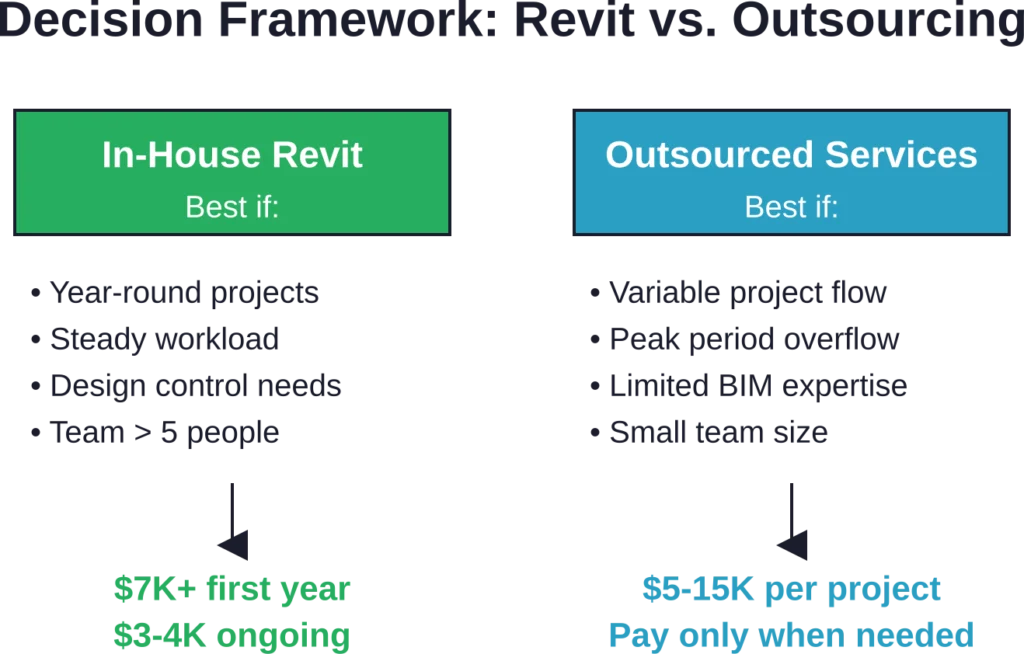
For firms with variable workloads or limited BIM expertise, outsourcing modeling can prove more economical than maintaining full-time staff and licenses. Compare the cost of a $15,000 outsourced model to the annual cost of a full-time Revit operator (based on AIA career center data showing $85-$115K salary range, plus benefits, license, hardware, and overhead).
Outsourcing works particularly well for overflow work during peak periods or specialized modeling tasks outside the team’s core expertise.
Comparing Revit Costs to Alternative BIM Platforms
Revit isn’t the only option for BIM workflows. Several alternatives offer different cost structures:
| Platform | Annual Cost (Approx) | Strengths | Best For |
|---|---|---|---|
| Autodesk Revit | $3,005 | Industry standard, comprehensive | Full BIM workflows, large projects |
| ArchiCAD | $2,500 – $3,000 | Intuitive interface, strong visualization | Architectural design focus |
| BricsCAD BIM | $1,200 – $1,500 | DWG-native, affordable | AutoCAD users transitioning to BIM |
| Vectorworks | $2,500 – $3,000 | Strong for landscape, entertainment | Specialized disciplines |
| SketchUp Pro | $300 – $700 | Fast conceptual modeling | Early design, visualization |
Alternatives like BricsCAD offer 50-60% cost savings compared to Revit subscriptions. However, consider the ecosystem: Revit’s market dominance in the AEC industry means broader consultant compatibility, more training resources, and better job market demand for skilled staff.
The decision hinges on project requirements, client expectations, and team expertise. Firms deeply embedded in Autodesk ecosystems or working with consultants who standardize on Revit may find switching costs outweigh subscription savings.
When Revit Costs Don’t Make Sense
Despite its capabilities, Revit isn’t always the right financial choice:
Very small firms: Solo practitioners or two-person studios with limited budgets and simple projects may find $3,000+ annual subscriptions difficult to justify, especially when clients don’t require BIM deliverables.
Early-stage design focus: Practices specializing in conceptual design, feasibility studies, and schematic work often operate more efficiently with lighter tools. Revit’s coordination strengths go unused in these phases.
Occasional use: Consultants needing BIM access only a few weeks annually (roughly less than 60-70 days per year) pay less with Flex tokens or by outsourcing those specific projects rather than maintaining year-round subscriptions.
Non-building projects: Infrastructure, landscape, or highly specialized work may benefit more from discipline-specific tools than general-purpose architectural BIM platforms.
Honest assessment of actual project needs prevents overspending on capabilities that won’t be utilized.
Real-World Cost Scenarios
Seeing how costs play out in practice helps ground the analysis:
Scenario 1: Solo Architect with Sporadic BIM Needs
A sole practitioner handles 3-4 small residential projects annually. Two require BIM deliverables.
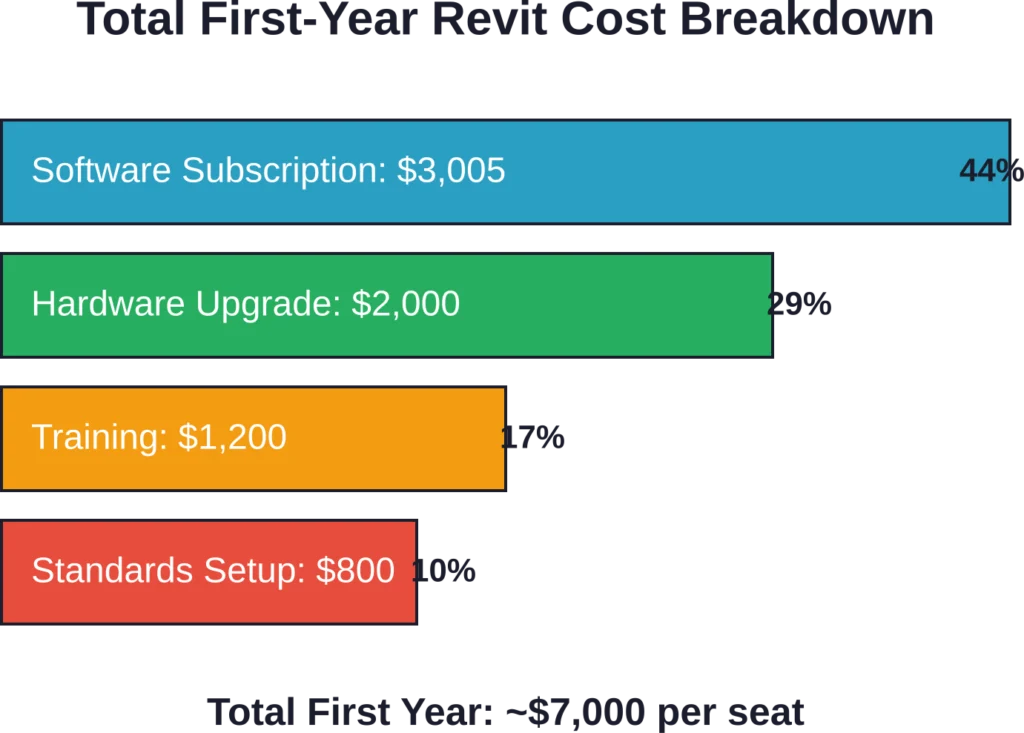
Option A: Annual Revit subscription at $3,005, plus $2,000 hardware upgrade and $1,000 training = $6,005 first year, $3,005 ongoing.
Option B: Outsource the two BIM projects at $6,000 each = $12,000 annually.
But wait—the architect only spends 40 hours total on those BIM projects personally. At $150/hour billing rate, that’s $6,000 of time. Outsourcing eliminates software costs but also eliminates 40 billable hours.
The math favors keeping it in-house if the architect can bill those hours elsewhere or prefers direct control over modeling. But if BIM work is non-billable coordination, outsourcing makes sense.
Scenario 2: Ten-Person Architecture Firm
A mid-sized firm runs 15-20 projects concurrently. Six staff need Revit daily; four others use it occasionally.
License strategy: Six annual subscriptions ($18,030) plus four Flex token pools for occasional users ($2,400) = $20,430 annually for software.
Add hardware ($12,000 for six workstations, amortized over three years = $4,000/year), training ($3,000 annually), and consulting support ($2,000 annually) = $29,430 total annual cost.
That’s roughly $2,450 per staff member for the Revit-enabled team, or about $240/month per seat all-in.
If those six staff generate $900,000 in annual billings and Revit-enabled workflows improve efficiency by an estimated 5%, that could represent significant additional capacity value compared to the annual cost.
Scenario 3: Contractor Needing One-Time Coordination Model
A general contractor needs a coordination model for a six-month project but doesn’t maintain ongoing BIM staff.
Option A: Hire a Revit coordinator at $70,000 prorated for six months ($35,000), plus license ($1,500 for six months of monthly subscriptions), hardware, and training = ~$38,000.
Option B: Outsource coordination modeling at $25,000 fixed fee.
Outsourcing wins clearly here. The contractor avoids hiring, training, and retaining specialized staff for temporary need.
Frequently Asked Questions
As of 2026, an annual Revit subscription costs approximately $3,005 per year in the United States. Monthly subscriptions run approximately $370 per month. The AEC Collection, which includes Revit along with AutoCAD, Civil 3D, and other tools, costs approximately $3,675-$3,775 per year and delivers better value for firms using multiple Autodesk products.
Outsourced 3D BIM modeling services typically charge $0.30 to $0.90 per square foot depending on complexity and level of detail. Market data shows small residential projects around $5,000 to $8,000, while medium commercial buildings range from $20,000 to $50,000. Large complex projects can exceed $150,000. Pricing depends on architectural complexity, MEP coordination requirements, turnaround time, and deliverable specifications.
Autodesk offers a 30-day free trial providing full Revit functionality for evaluation purposes. Students and educators qualify for free three-year education licenses through Autodesk’s Education Community, though these embed watermarks on output and cannot be used for commercial work. No permanently free commercial license exists.
Beyond subscription fees, budget for proper workstation hardware ($1,500-$3,000 per seat), formal training ($500-$2,000 per person), office standards development (40-120 hours of senior staff time or $5,000-$15,000 for consultants), and ongoing support and troubleshooting ($2,000-$5,000 annually). Third-party plugins add another $300-$500 per seat annually. Total first-year costs often reach $6,000-$8,000 per user.
For projects at design development and construction documentation phases, Revit typically delivers strong ROI through coordination failure reduction (80% fewer clashes according to BIM consulting firm data), material waste reduction (traditional projects waste approximately 33% of delivered materials), and quantity takeoff efficiency (significant portion of estimation time traditionally spent on manual takeoffs). A single prevented field coordination issue can save $10,000-$50,000, often justifying the entire BIM investment.
Outsourcing makes financial sense for firms with variable workloads, occasional BIM requirements (less than 60-70 days annually), small team sizes (under five people), or limited in-house BIM expertise. It works particularly well for overflow during peak periods and specialized modeling outside the team’s core skills. Compare outsourcing costs ($5,000-$50,000 per project) against full-time staff costs (salary $85,000-$115,000 plus benefits, license, hardware, and overhead).
Autodesk’s Flex plan charges approximately $300 for 100 tokens (minimum purchase), with each day of Revit access consuming tokens. This works well for sporadic use—500 tokens at $1,500 covers roughly 50 days of access. Firms needing Revit more than 60-70 days per year typically save money with the annual subscription at $3,005. Calculate expected usage days to determine which option costs less for specific usage patterns.
The Bottom Line: Planning Your Revit Modeling Budget
Revit modeling costs span a wide range depending on implementation approach, project volume, and team size. Software subscriptions start around $3,005 annually per seat, but realistic total costs including hardware, training, and support often reach $6,000-$8,000 per user in the first year.
Outsourced modeling services offer an alternative cost structure, typically ranging from $0.30 to $0.90 per square foot or $5,000 to $150,000+ per project depending on scope and complexity.
The investment makes strong financial sense for firms working on design development and construction documentation where coordination, clash detection, and model-based delivery provide measurable value. BIM consulting firm data shows 80% fewer coordination failures and significant material waste reduction for properly implemented BIM workflows.
However, the costs don’t make sense for every situation. Very small practices, early-stage design specialists, and occasional users often find better value in lighter tools or outsourcing specific BIM requirements.
Smart budgeting requires honest assessment of actual needs, careful license sizing, upfront investment in training and standards, and strategic decisions about what to keep in-house versus outsource. Firms that optimize their approach typically see strong returns, with efficiency gains and error reduction quickly offsetting the investment.
Before committing to Revit subscriptions or outsourced services, calculate expected usage, evaluate alternatives, factor in all hidden costs, and ensure the investment aligns with actual project delivery needs and client requirements.