
Quick Summary: Revit services cost between $3,005 and $3,675 per year for standalone subscriptions as of 2025, with monthly options ranging from $380 to $460. Factors influencing total cost include subscription type, team size, training needs, add-ins, and cloud rendering tokens. The AEC Collection at $3,675 annually offers the best value for multidisciplinary teams.
Revit isn’t just software. It’s the digital backbone of modern architecture, engineering, and construction workflows. But the question everyone asks before committing: what’s the actual cost?
The answer isn’t as simple as a single number. Revit service costs vary based on licensing model, team size, training requirements, third-party tools, and cloud usage. Some firms pay a few thousand dollars annually. Others spend tens of thousands when factoring in collaboration platforms, support, and hardware upgrades.
Here’s the thing though—understanding the full picture helps prevent sticker shock and ensures teams get real value from their investment. According to the Building Information Modeling Market Size Report 2025 by MarketsandMarkets, the BIM sector is expected to grow from USD 9.03 billion in 2025 to USD 15.42 billion by 2030 at a CAGR of 11.3%, reinforcing that BIM tools like Revit remain critical infrastructure for the industry.
This guide breaks down every cost component, from base subscriptions to hidden fees, so teams can budget accurately and choose the right plan.
Understanding Revit Subscription Options and Base Costs
Autodesk offers several licensing paths for Revit, each with distinct pricing structures. Prices reflect the US market as of August 2025, following Autodesk’s 3.3% price adjustment in May 2025.
Standalone Revit Subscription: Core Pricing
Standalone Revit provides full access to the BIM modeling environment without bundled extras. Two payment structures exist:
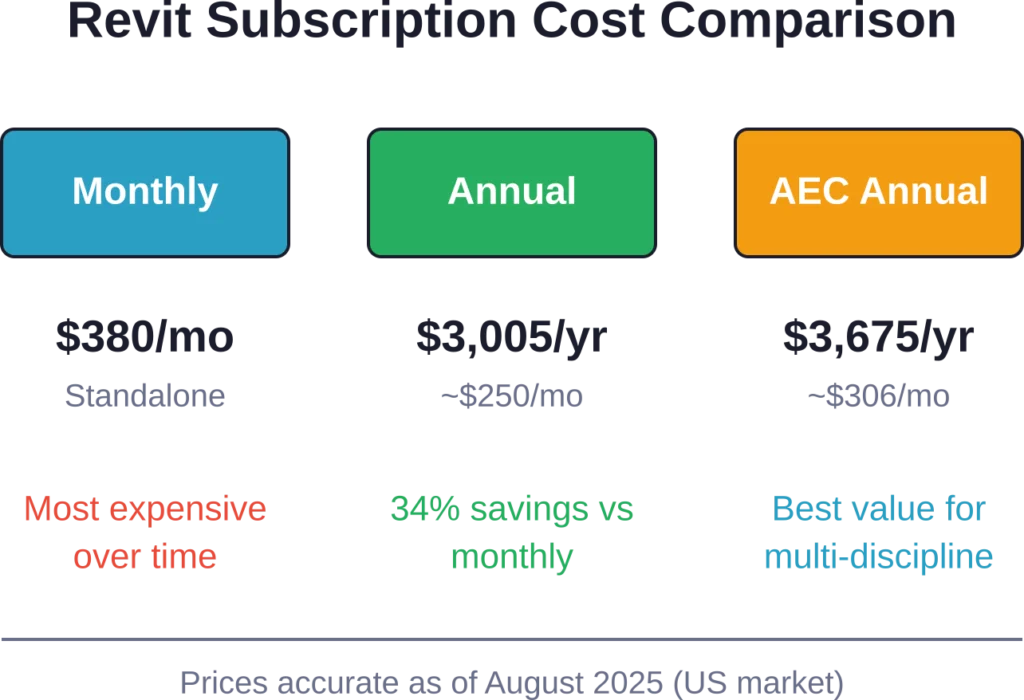
- Monthly: $380 per month. Flexible for short-term projects but the most expensive route over time.
- Annual: $3,005 per year (~$250/month). Saves approximately 34% compared to monthly billing and locks in pricing for 12 months.
The standalone license suits solo practitioners, small firms focused exclusively on architectural modeling, or teams that don’t require cross-discipline software integration.
AEC Collection: Bundled Value for Multidisciplinary Teams
The AEC Collection packages Revit with AutoCAD, Civil 3D, Navisworks, and additional tools. Pricing structure:
- Monthly: $460 per month
- Annual: $3,675 per year (~$306/month)
For firms running multidisciplinary workflows—architecture, structural engineering, MEP coordination—the AEC Collection delivers better value than buying standalone licenses separately. AutoCAD costs approximately $2,030 per year—roughly 32% less than standalone Revit ($3,005/year)—so bundling saves money while providing access to specialized tools.
Real talk: if more than one software package from Autodesk is needed, the AEC Collection is the financially sensible choice.
Flex Plan: Token-Based Pay-as-You-Go
Autodesk Flex allows occasional users to purchase tokens instead of committing to monthly or annual subscriptions. Token cost: $300 for 100 tokens (minimum purchase).
Tokens are consumed based on usage—opening Revit for a day might cost 10-15 tokens. This model works for consultants who touch Revit sporadically or firms keeping licenses available for overflow periods.
But wait. The math changes quickly. Frequent use makes Flex more expensive than annual subscriptions. Teams using Revit more than 10-15 days per month should opt for traditional licensing.
Free Access: Educational Licenses and Trials
Autodesk provides free educational licenses for students and educators through verified institutional email addresses. These licenses grant full Revit functionality for non-commercial use, typically renewable annually.
Additionally, Autodesk offers 30-day free trials for commercial users evaluating Revit. Trials include full feature access but require credit card information and automatically convert to paid subscriptions unless canceled.
Community discussions note that educational licenses sometimes carry file watermarks when opened in commercial versions, creating workflow friction when students transition to professional roles.
Get Revit Support for BIM Project Delivery
Powerkh provides Revit-based BIM support for architects, engineers, and contractors working on design and construction projects. Its services include modelling, coordination, detailing, and technical documentation support.
Need Revit Support for a Project?
Talk with Powerkh to:
- support BIM workflows in Revit
- prepare coordinated project documentation
- improve model readiness before construction
- extend delivery capacity for ongoing projects
Discuss your Revit BIM support requirements with Powerkh.
Training and Onboarding Costs
Software licenses represent just one cost layer. Training determines how quickly teams achieve productivity and ROI.
Self-Paced Learning Resources
Autodesk provides free learning paths through Autodesk University and help documentation. YouTube hosts thousands of tutorials covering basic to advanced techniques. For disciplined learners, self-paced resources cost nothing beyond time investment.
But here’s the reality: self-taught workflows often embed inefficient habits. Teams may achieve basic competency but miss advanced features that dramatically improve productivity.
Instructor-Led Training Programs
Formal training courses typically range from $500 to $2,000 per person depending on depth and delivery format. Live virtual training costs less than in-person sessions, while customized corporate training commands premium rates.
Many AEC firms budget $1,000-$1,500 per new user for initial training, then allocate ongoing education funds for advanced topics and version updates.
Certification Costs
Autodesk Certified Professional exams cost approximately $150 per attempt. Certification validates skills and can differentiate individuals in competitive job markets, though certification itself doesn’t teach—it tests existing knowledge.
For employers, certified staff signal competence, but certification shouldn’t replace structured training programs.
Cloud Services and Collaboration Platform Costs
Modern BIM workflows increasingly rely on cloud-based collaboration. Autodesk offers BIM Collaborate and BIM Collaborate Pro as add-ons to standard Revit licenses.
BIM Collaborate Pro Pricing
BIM Collaborate Pro adds model coordination, design collaboration, and cloud worksharing capabilities. According to community discussions, Revit + BIM Collaborate Pro pricing is around $490/month or $4,289/year per user when bundled with Revit.
That’s a significant jump over standalone Revit. For teams requiring real-time collaboration across offices or external consultants, the cost becomes unavoidable infrastructure.
Cloud Rendering Tokens
Autodesk cloud rendering operates on a credit system. Users purchase cloud credits (formerly tokens) to offload rendering tasks to Autodesk servers rather than tying up local workstations.
Pricing varies by region and render complexity, but community discussions reference costs that add up quickly for firms producing frequent high-quality visualizations. Heavy rendering users should evaluate whether investing in local render farms or third-party services offers better economics.
Data Storage and Transfer
Cloud collaboration requires adequate storage. Autodesk includes baseline storage with subscriptions, but large firms or projects with extensive linked files may incur additional storage fees.
Data egress charges—costs for downloading large file sets from cloud storage—rarely appear in marketing materials but can surprise teams migrating projects or conducting backups.
Third-Party Add-ins and Productivity Tools
Revit’s ecosystem includes hundreds of third-party add-ins that extend functionality. While not mandatory, many firms find certain add-ins essential for competitive workflows.
Productivity Plugin Suites
Tools like DiRootsOne bundle multiple productivity plugins—element filtering, parameter management, view automation, sheet generation—into single packages. Pricing for comprehensive plugin suites typically ranges from $300 to $800 per user annually.
Individual specialized add-ins might cost $50-$300 per year. Costs multiply across team sizes, so firms should audit which tools genuinely improve workflows versus nice-to-have features.
Analysis and Simulation Add-ins
Energy analysis, structural calculation, or computational design add-ins often carry premium pricing—$1,000 to $5,000+ per seat depending on sophistication. These tools target specialized workflows and justify their cost through capabilities Revit doesn’t provide natively.
Content Libraries and BIM Objects
Some manufacturers provide free BIM content, but curated libraries with standardized, high-quality objects cost money. Subscription-based content libraries range from $200 to $1,000+ annually depending on breadth and quality.
| Cost Category | Typical Range | Notes |
|---|---|---|
| Standalone Revit (annual) | $3,005/year | Single-discipline modeling |
| AEC Collection (annual) | $3,675/year | Includes AutoCAD, Civil 3D, Navisworks, etc. |
| BIM Collaborate Pro | ~$4,289/year | Cloud worksharing and coordination |
| Training per user | $500-$2,000 | Initial onboarding and skill development |
| Productivity add-ins | $300-$800/year | Plugin suites like DiRootsOne |
| Specialized analysis tools | $1,000-$5,000+ | Energy modeling, structural analysis |
Hardware and Infrastructure Costs
Revit demands capable hardware. While technically separate from software costs, inadequate hardware cripples productivity and forces upgrades.
Minimum vs Recommended Specifications
Autodesk publishes minimum specs, but community consensus holds that minimums deliver frustrating experiences on real projects. Recommended configurations for productive Revit work:
- CPU: Intel i7 or AMD Ryzen 7 (or better), prioritizing single-thread performance
- RAM: 32GB minimum for medium-to-large models; 64GB for complex projects
- GPU: Dedicated graphics card with 4GB+ VRAM (NVIDIA Quadro or RTX series preferred)
- Storage: NVmE SSD with 500GB+ capacity for OS, software, and active projects
A workstation meeting these specs costs $1,500 to $3,000. Laptops with equivalent performance command higher prices due to form-factor constraints.
Network Infrastructure for Collaboration
Teams using worksharing over local networks need robust server infrastructure. File server hardware, backup systems, and network switches add thousands to tens of thousands depending on team size.
Cloud collaboration reduces on-premise infrastructure requirements but shifts costs to subscription fees and internet bandwidth.
Regional Pricing Variations and Currency Considerations
Autodesk adjusts pricing by region, reflecting local market conditions, purchasing power, and currency fluctuations. North America represents the pricing benchmark, but other regions see variations.
Firms with international operations should verify region-specific pricing directly with Autodesk or authorized resellers rather than assuming US pricing translates directly.
Enterprise and Volume Licensing
Large organizations negotiate enterprise agreements that differ from published pricing. Enterprise licensing typically includes:
- Volume discounts based on seat count
- Flexible license assignment across teams
- Dedicated technical support
- Customized deployment and management tools
Enterprise agreements aren’t publicly priced—organizations work directly with Autodesk account teams. Generally speaking, discounts become meaningful at 25+ seats, with more significant breaks at 100+ seats.
Multi-year commitments may secure additional discounts but reduce flexibility if business needs shift.
Hidden Costs and Budget Surprises
Beyond headline subscription prices, several costs catch teams off-guard:
Version Upgrades and Compatibility
Autodesk shifts Revit to a new version annually. Subscriptions include access to the latest version, but upgrades create downstream costs: updated templates, plugin compatibility checks, and retraining on new features.
Mixed-version environments introduce file compatibility friction, sometimes forcing accelerated upgrades across entire teams to maintain workflow continuity.
IT Support and Administration
License management, user provisioning, software deployment, and troubleshooting consume IT staff time. For firms without dedicated IT, these tasks fall to billable staff, creating opportunity costs.
Network licensing servers require maintenance and monitoring. Cloud-based licensing simplifies some aspects but introduces new considerations around internet reliability and account security.
Project Delays from Learning Curves
The costliest surprise often comes from productivity gaps during adoption. Teams switching from AutoCAD or other tools experience learning curves that temporarily slow project delivery.
A study published in Automation in Construction indicates that workflows based on BIM can save 60% rework time, but achieving that proficiency requires investment. Under-budgeting training or rushing adoption creates false economies—short-term savings yield long-term inefficiencies.
Comparing Revit Costs Against Alternatives
Revit sits at the premium end of architectural BIM software pricing. How does it compare?
Revit vs ArchiCAD
ArchiCAD pricing varies by region and reseller but generally aligns closely with Revit’s standalone license costs. According to community discussions on Autodesk forums, ArchiCAD Collaborate pricing is around €3,200/year (~$3,400), though community members also reference €440-450/month or €3,200/year which converts to approximately $484/month or equivalent annual rates.
Feature parity varies—some workflows favor Revit’s parametric capabilities, while others prefer ArchiCAD’s intuitive interface. Cost alone rarely determines the choice; workflow fit and ecosystem compatibility matter more.
Revit vs AutoCAD
AutoCAD costs approximately $2,030 per year—roughly 32% less than standalone Revit ($3,005/year). But this comparison misses the point. AutoCAD excels at 2D drafting and technical detailing; Revit delivers 3D BIM with integrated data and coordination.
According to real-world project experience, projects using Revit as the BIM backbone often retain AutoCAD for specific details or legacy file work. The AEC Collection bundles both, making either-or comparisons less relevant for firms needing multidisciplinary tools.
Open-Source and Lower-Cost BIM Tools
FreeCAD, BlenderBIM, and other open-source options offer zero licensing costs but require significantly more technical expertise and lack industry-standard interoperability. For hobbyists or highly technical users willing to invest learning time, these tools provide alternatives.
For professional AEC firms, the productivity gap and collaboration friction generally outweigh licensing savings. Open-source tools suit niche cases rather than mainstream production workflows.
| Software | Approximate Annual Cost | Best For |
|---|---|---|
| Revit Standalone | $3,005 | Single-discipline architectural modeling |
| Revit AEC Collection | $3,675 | Multidisciplinary teams needing AutoCAD, Civil 3D, etc. |
| ArchiCAD | ~$3,000-$3,500 | Teams preferring alternative BIM interface |
| AutoCAD | ~$2,030 | 2D drafting, detailing, legacy workflows |
| Open-source (FreeCAD, etc.) | $0 | Hobbyists, highly technical niche users |
Maximizing Value and Controlling Revit Service Costs
Smart budgeting involves more than finding the lowest price—it means extracting maximum value per dollar spent.
Right-Sizing License Types
Not every team member needs a full Revit license. Firms can mix license types: full Revit for power users, AutoCAD for drafters, and viewer licenses for project managers who only need to review models.
Auditing actual usage patterns often reveals opportunities to optimize license allocation and reduce waste.
Investing in Training Up Front
Skimping on training to save a few hundred dollars per user creates productivity drag that costs thousands in delayed projects and inefficient workflows. According to a Springer study, firms using BIM tools like Revit have reduced project timelines by nearly 20%—but only when teams use tools effectively.
Structured training programs pay for themselves within months through improved efficiency.
Evaluating Add-in ROI
Third-party tools promise productivity gains, but not every add-in delivers value for every firm. Before purchasing, teams should trial tools in real project conditions and measure actual time savings.
Plugin costs multiply across seats, so a $500 add-in for a 20-person team represents $10,000 annually—worth it if it genuinely saves time, wasteful if it sits unused.
Negotiating Enterprise Agreements
Growing firms should explore enterprise agreements once seat counts justify negotiation. Even modest volume discounts compound over multi-year periods, and flexible licensing models reduce friction for temporary staff or fluctuating project demands.
Future Trends Affecting Revit Service Costs
The BIM software landscape continues evolving, with implications for costs and value propositions.
AI and Automation Integration
Autodesk increasingly embeds AI-driven features—generative design, automated clash detection, predictive analytics—into Revit and companion tools. These capabilities may justify premium pricing tiers in coming years, or Autodesk might gate advanced AI features behind higher subscription levels. Teams should monitor feature roadmaps to anticipate whether current pricing captures future capabilities or whether step-ups lie ahead.
Cloud-First Workflows
Autodesk’s strategic direction emphasizes cloud collaboration and SaaS delivery. This shift may gradually de-emphasize perpetual licensing (already phased out) in favor of subscription-only models with tighter cloud integration.
For firms, this means ongoing subscription costs become unavoidable infrastructure—no more one-time purchases. Budget planning should treat Revit costs as recurring operational expenses rather than occasional capital expenditures.
Modular Pricing and Micro-Subscriptions
Some software vendors experiment with modular pricing—pay only for features used. Whether Autodesk adopts similar models for Revit remains speculative, but industry trends lean toward flexibility and usage-based pricing.
Such models could reduce costs for light users but increase complexity in license management.
Making the Decision: Is Revit Worth the Cost?
Cost matters, but value determines ROI. For AEC firms committed to BIM workflows, Revit’s cost represents infrastructure investment rather than discretionary spending.
The software’s market dominance means project collaborators—consultants, contractors, clients—often expect Revit compatibility. Opting for cheaper alternatives may save licensing fees but introduce friction and conversion overhead that erodes those savings.
For solo practitioners or small firms doing straightforward projects, alternative solutions may offer better value. For multidisciplinary teams coordinating complex projects, Revit’s coordination capabilities and industry ecosystem dominance often justify the investment.
The real question isn’t whether Revit costs too much in absolute terms—it’s whether the productivity gains, error reduction, and collaboration efficiency outweigh the total ownership costs for specific use cases.
Frequently Asked Questions
Revit costs $380 per month for a standalone monthly subscription. The AEC Collection, which includes Revit plus AutoCAD and other tools, costs $460 per month. Annual subscriptions offer lower effective monthly rates: approximately $250/month for standalone Revit and $306/month for the AEC Collection.
Students and educators qualify for free educational licenses through Autodesk’s education program, valid for non-commercial use. For commercial use, annual subscriptions provide the best value at $3,005 per year for standalone Revit. The 30-day free trial allows short-term evaluation but converts to paid subscription afterward.
Active subscriptions include access to the latest Revit version releases, technical support through Autodesk channels, and cloud services within subscription limits. Major version updates release annually, and subscriptions grant automatic access without additional fees.
Formal instructor-led Revit training typically ranges from $500 to $2,000 per person depending on course depth, delivery format, and provider. Self-paced resources through Autodesk University and community tutorials are free but require significant self-directed learning time. Autodesk Certified Professional exams cost approximately $150 per attempt.
Autodesk discontinued perpetual license sales for Revit and most products, transitioning entirely to subscription-based licensing. Existing perpetual licenses continue functioning, but upgrades and support require active subscription maintenance plans. The subscription model ensures ongoing access to updates but eliminates one-time purchase options.
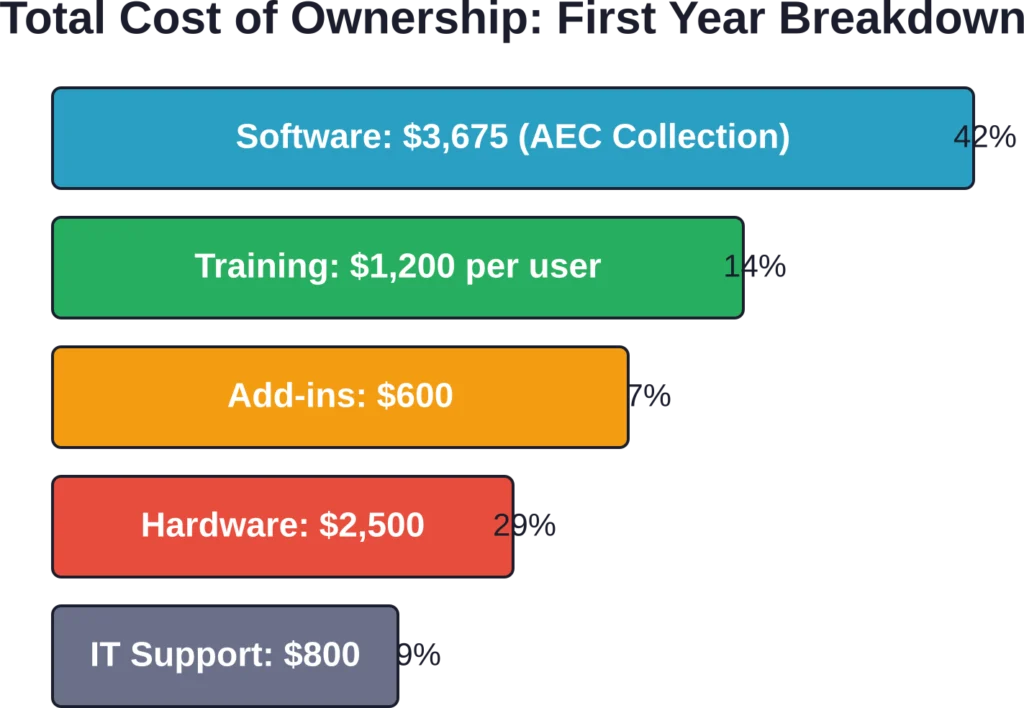
Beyond base licensing, budget for training ($500-$2,000 per user), third-party add-ins ($300-$800+ annually), collaboration platforms like BIM Collaborate Pro (~$4,289/year), cloud rendering credits (variable), capable workstation hardware ($1,500-$3,000), and IT support for deployment and management. First-year total cost per user often reaches $8,000-$12,000 including all components.
The AEC Collection costs $670 more annually than standalone Revit ($3,675 vs $3,005) but includes AutoCAD, Civil 3D, Navisworks, and additional tools. For firms needing any two of these applications, the Collection delivers better value than separate licenses. Multidisciplinary teams benefit most; architecture-only practices may not need the extra tools.
Conclusion
Revit service costs extend well beyond the $3,005 annual subscription headline. When factoring training, collaboration platforms, add-ins, hardware, and support, first-year costs per user commonly reach $8,000 to $12,000, settling into $4,000-$6,000 annually thereafter.
For AEC firms, these aren’t optional expenses—they’re the cost of remaining competitive in a BIM-centric industry. According to the Building Information Modeling Market Size Report 2025 by MarketsandMarkets, the global BIM market growth trajectory, from USD 9.03 billion in 2025 to a projected USD 15.42 billion by 2030, underscores that industry investment in these tools continues accelerating.
Smart cost management means right-sizing license types, investing in training up front, evaluating add-in ROI critically, and negotiating enterprise agreements at scale. The goal isn’t minimizing Revit costs—it’s maximizing value per dollar invested.
Ready to implement Revit effectively while controlling costs? Audit current workflows, identify genuine productivity gaps that Revit addresses, and build comprehensive budgets that account for the full ownership picture—not just licensing fees. The right investment today builds efficient workflows that pay dividends for years.