

Quick Summary: Restricting someone on Instagram limits their interactions with your account without them knowing. Their comments become visible only to them unless you approve them, direct messages move to message requests, and they can’t see when you’re active or if you’ve read their messages. The restricted person can still view your posts and profile if it’s public, but their ability to engage with you is significantly reduced.
Instagram’s restrict feature sits in an interesting middle ground. It’s not as aggressive as blocking someone, but it’s more protective than simply muting them.
The feature was designed specifically to help creators and everyday users deal with harassment, negativity, and unwanted interactions without causing drama or escalating conflicts. And it works quietly in the background.
Understanding what actually happens when restricting someone matters. The feature affects comments, direct messages, activity status, and more—but it does so in ways that keep the restricted person largely unaware of the change.
What Instagram Restrict Actually Does
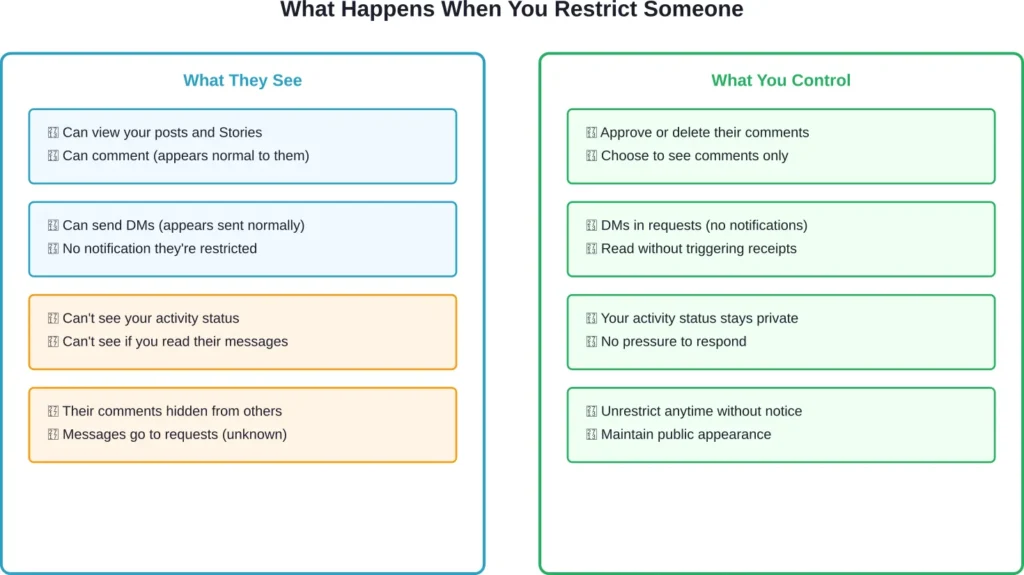
When restricting someone on Instagram, several changes take effect immediately. These changes are designed to protect the account holder while maintaining the appearance of normal interactions from the restricted person’s perspective.
Here’s the thing though—the restricted user won’t receive any notification. Instagram doesn’t alert people when they’ve been restricted, which makes this feature particularly useful for managing difficult situations without confrontation.
Comments Get Hidden Automatically
Comments from restricted accounts become visible only to the person who wrote them. Other followers scrolling through posts won’t see these comments at all.
The account holder can review these hidden comments and choose to approve them. If approved, the comment becomes visible to everyone. If ignored or deleted, it remains invisible to others while the restricted person believes their comment is public.
This system protects creators from negative comments appearing on their posts while avoiding the confrontation that comes with blocking or deleting comments where the user can see they’ve been removed.
Direct Messages Move to Requests
New direct messages from restricted accounts don’t appear in the primary inbox. Instead, they move automatically to message requests.
The restricted person can still send messages. They’ll see the messages in a normal conversation thread on their end. But the account holder doesn’t receive notifications for these messages and can choose whether to read them or not.
Messages can be read without triggering read receipts. The restricted person won’t know if their message has been seen, when it was read, or if the account holder is currently active on Instagram.
Activity Status Becomes Hidden
Restricted accounts can’t see when the account holder is active on Instagram. The green dot indicating online status disappears for them.
They also won’t see timestamps showing when messages were read. This removes the pressure to respond immediately and prevents restricted users from monitoring activity patterns.
How to Restrict Someone on Instagram
Restricting an account takes just a few taps. Instagram provides multiple methods depending on where someone encounters the person they want to restrict.
Method 1: From Their Profile
Navigate to the profile of the person to restrict. Tap the three dots in the upper right corner. Select “Restrict” from the menu that appears.
This method works best when proactively restricting someone before they’ve interacted negatively. It’s straightforward and takes about five seconds.
Method 2: From a Comment
On any comment the person has left, swipe left on the comment. Tap the exclamation mark icon that appears. Select “Restrict” from the options.
This method is particularly useful for dealing with negative comments in the moment. The comment gets hidden immediately after restriction.
Method 3: From Privacy Settings
Go to Settings, then Privacy, then Restricted Accounts. From here, search for accounts to add to the restricted list manually.
This method provides access to manage all restricted accounts in one place. Accounts can be unrestricted from this same menu.
Restrict vs Block vs Mute: The Key Differences
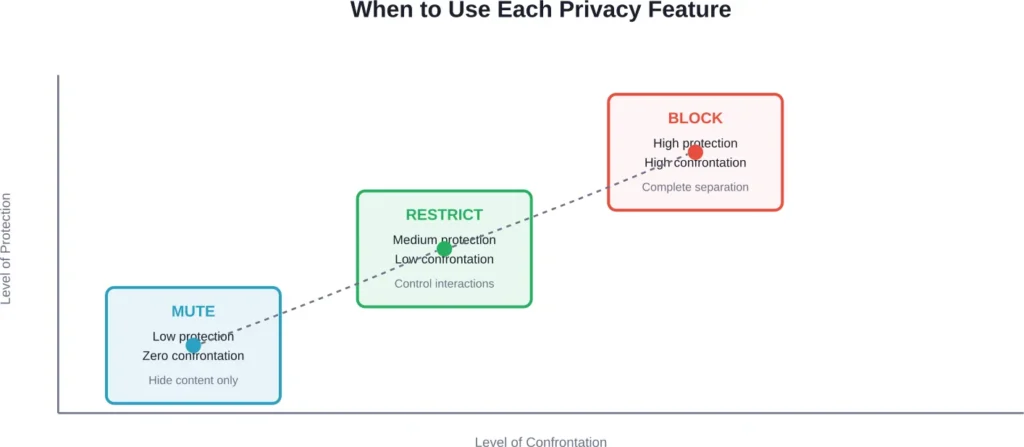
Instagram offers three different privacy tools, each serving distinct purposes. Understanding these differences helps determine which tool fits specific situations.
| Feature | Restrict | Block | Mute |
|---|---|---|---|
| They can see your profile | Yes (if public) | No | Yes |
| They can see your posts | Yes (if public) | No | Yes |
| You see their content | Yes | No | No (in feed) |
| They can comment | Yes (hidden from others) | No | Yes |
| They can DM you | Yes (goes to requests) | No | Yes |
| They know about it | No notification | They’ll notice | No notification |
| You see activity status | No (mutual hide) | N/A | Yes |
When to Use Restrict
Restriction works best for managing harassment or negativity without escalation. It’s ideal for situations involving acquaintances, colleagues, or family members where blocking would create social complications.
Creators often use restrict for handling trolls or overly negative followers. The feature lets them maintain their public presence while controlling how certain accounts interact with their content.
Community discussions highlight restrict as particularly useful for managing ex-partners, toxic friends, or people who leave passive-aggressive comments. The lack of notification prevents confrontation.
When to Use Block
Blocking makes sense for serious harassment, stalking, or when complete separation is needed. The blocked person can’t view the profile, posts, or Stories, and can’t contact the account holder through Instagram.
Blocked users will notice they’ve been blocked when they try to view the profile. This makes blocking more confrontational but more protective.
When to Use Mute
Muting simply hides someone’s posts and Stories from the feed without affecting their ability to interact. It’s useful for reducing content from acquaintances without unfollowing them.
Muted accounts don’t receive notifications and won’t know they’ve been muted. This feature focuses on content control rather than interaction management.
What Restricted Accounts Can and Cannot Do
Understanding the specific limitations helps set realistic expectations about what restricting someone accomplishes.
What They Can Still Do
Restricted accounts retain most viewing privileges. They can view public posts, Stories, Reels, and the profile itself if it’s set to public.
They can like posts. Likes from restricted accounts appear normally and aren’t hidden or filtered in any way.
They can tag the account holder in posts or Stories. These tags work the same way they would for any other follower.
They can share posts to their Stories or through direct messages to other accounts. The restrict feature doesn’t prevent content sharing.
What They Cannot Do (Or What Gets Hidden)
They can’t see when the account holder is active on Instagram or when messages have been read. Activity status becomes completely invisible to restricted accounts.
Their comments become invisible to other followers unless specifically approved. Only the restricted person sees their own comments as if they’re public.
Their direct messages don’t generate notifications and move to message requests. The account holder maintains complete control over whether to read or respond to these messages.
They can’t force their way into the primary inbox or bypass the message request filter that restriction creates.
Signs Someone Has Restricted Your Account
Instagram doesn’t notify users when they’ve been restricted, but certain patterns might indicate restriction has occurred.
The most noticeable sign involves comments. If comments consistently receive no responses or engagement from the account holder while other comments do, restriction might be the reason.
Activity status changes provide another clue. If someone who previously showed as active suddenly never appears online, they may have restricted the account or changed their activity status settings.
Message behavior shifts can indicate restriction. If messages consistently show as delivered but never as read, and the person used to respond regularly, restriction could explain the change.
But here’s the thing—these signs aren’t definitive. People change how they use Instagram. They might simply be less active, taking a break from responding to messages, or adjusting their privacy settings globally.
Managing Your Restricted Accounts List
Instagram provides tools for viewing and managing all restricted accounts in one centralized location.
Viewing Restricted Accounts
Navigate to Settings, then Privacy, then Restricted Accounts. This menu displays everyone currently restricted on the account.
The list shows usernames and profile pictures. Tapping any account opens options to unrestrict them or navigate to their profile.
Unrestricting Someone
Unrestricting works the same way as restricting. Visit the person’s profile, tap the three dots, and select “Unrestrict.”
Alternatively, go to Settings > Privacy > Restricted Accounts, find the person, and tap “Unrestrict” next to their name.
Unrestricting takes effect immediately. The person doesn’t receive a notification when unrestricted, just as they didn’t when restricted. Their comments and messages return to normal behavior.
The Psychology Behind Instagram Restrict
According to Medium contributor Amber Wardell, Ph.D, writing on October 22, 2023, the restrict feature stands out as “one of the smartest features out there right now for protecting creator’s spaces.”
The feature acknowledges a reality of modern social media: sometimes blocking creates more problems than it solves. As noted in community discussions, blocking can escalate conflicts, damage relationships, or trigger retaliation in certain contexts.
Restriction provides an alternative that prioritizes the account holder’s mental health and online experience without forcing confrontation. It recognizes that not all unwanted interactions require nuclear options.
For creators and public figures, the feature offers protection from harassment while maintaining audience accessibility. Followers don’t see negative comments derailing conversations in the comments section.
The discretion matters psychologically too. Knowing that managing boundaries doesn’t have to involve public conflict reduces the stress of dealing with difficult accounts.
Strategic Use Cases for Different Account Types
Different types of Instagram users benefit from the restrict feature in unique ways.
For Personal Accounts
Personal accounts often use restrict for managing complicated social relationships. Family members who leave critical comments, friends going through difficult periods, or ex-partners who can’t be blocked for social reasons all fit restriction well.
The feature lets personal account holders maintain social appearances while protecting their mental health. Nobody needs to know that certain accounts have reduced interaction privileges.
For Creators and Influencers
Creators face unique challenges with harassment and negative comments. Restriction helps maintain comment section quality without giving trolls the attention that comes from obviously deleted comments.
Many creators restrict accounts that repeatedly leave negative feedback but stop short of outright harassment. The feature keeps these comments from influencing other followers while avoiding the escalation that blocking might trigger.
For Business Accounts
Businesses use restriction carefully to manage difficult customers or competitors who leave negative comments. The feature prevents potentially damaging comments from being visible to other customers.
However, businesses must balance restriction with legitimate customer service concerns. Restricting customers who have valid complaints can backfire if those customers then share their experiences on other platforms.
Combining Restrict with Other Instagram Safety Features
Instagram provides multiple safety tools that work alongside restriction to create comprehensive protection.
Hidden Words Filter
The hidden words filter automatically hides comments and message requests containing specific words or phrases. This works independently from restrict but complements it well.
Combining hidden words with restriction creates layers of protection. Even if someone isn’t restricted, their comments can be filtered based on content.
Limit Interactions Feature
Instagram’s limit feature temporarily restricts interactions from accounts that don’t follow the user or became followers recently. This helps during harassment campaigns or coordinated attacks.
Limit works on a broader scale than restrict, affecting multiple accounts simultaneously based on criteria rather than individual selection.
Comment Controls
Comment controls let account holders turn off comments entirely, limit comments to followers only, or manually approve all comments before they appear.
These controls work differently than restrict but serve similar protective purposes. Using them together provides fine-grained control over who can interact and how.
Common Issues and Troubleshooting
Sometimes the restrict feature doesn’t work exactly as expected. Understanding common issues helps troubleshoot problems.
Comments Still Appearing from Restricted Accounts
If comments from restricted accounts still appear publicly, check whether they were posted before restriction occurred. Restriction only affects new comments, not existing ones.
Previously posted comments need manual deletion or approval. Restricting someone doesn’t automatically hide their comment history.
Messages Still Appearing in Primary Inbox
Existing message threads stay in the primary inbox. Only new messages after restriction move to message requests.
To move the entire conversation to message requests, manually move or delete the thread from the primary inbox after restricting the account.
Restricted Person Still Sees Activity Status
If activity status remains visible after restriction, check the general activity status settings. Activity status must be enabled globally for the hiding effect to work for restricted accounts.
Navigate to Settings > Privacy > Activity Status and ensure the feature is turned on. Restriction then hides activity status specifically from restricted accounts while keeping it visible to others.
Privacy Considerations and Ethics
Using restrict raises questions about transparency and relationship ethics, particularly in personal relationships.
Some argue that restricting someone without their knowledge is dishonest, especially in close relationships. Others counter that everyone has the right to manage their online boundaries without explaining or justifying those choices.
The feature exists specifically to avoid confrontation, which can be legitimate when dealing with harassment or manipulation. Requiring notification would defeat the purpose for many use cases.
For business accounts, transparency matters more. Restricting customers who have legitimate complaints, rather than addressing those concerns, can damage reputation and customer relationships.
The consensus from community discussions suggests restriction works best when used for protection rather than avoidance. Using it to dodge accountability differs from using it to prevent harassment.
Future of Instagram Privacy Tools
Instagram continues evolving its privacy and safety features. Restrict represents part of a broader trend toward giving users more granular control over their online experiences.
The platform regularly updates these features based on user feedback and changing harassment patterns. Expect continued refinements to how restriction works and what it controls.
Emerging trends suggest social platforms will offer even more nuanced control options in the future, potentially including temporary restrictions, scheduled restrictions, or restrictions that apply only to specific types of content.
Frequently Asked Questions
Instagram doesn’t send notifications when someone is restricted. However, restricted accounts might notice patterns like their comments never getting responses, activity status never showing, or messages never being read. These signs aren’t definitive proof though, as people might simply be inactive or have changed their general privacy settings.
Restricting hides comments from others and moves messages to requests while the restricted person still sees your profile and can interact normally from their perspective. Blocking prevents the person from seeing your profile, posts, or Stories entirely, and they can’t message you at all. Blocking is more noticeable to the blocked person, while restriction works quietly.
Yes, restricted accounts can view posts and Stories if the profile is public. Restriction doesn’t limit their ability to view content—it only controls how their interactions appear and whether they receive responses. For private accounts, restricted followers who were already following before restriction can still see posts.
Comments posted before restriction occurred remain visible to everyone. Restriction only affects new comments made after the account was restricted. Old comments need to be manually deleted or hidden individually if they should be removed from posts.
Yes, unrestricting happens silently without notification, just like restricting. Their comments and messages immediately return to normal behavior, appearing publicly and arriving in the primary inbox. There’s no indication to the unrestricted person that anything changed.
No, restriction doesn’t affect follower status. Restricted accounts remain followers if they were following before, and they can continue to follow the account. Restriction only changes how their interactions work, not whether they can follow the account.
Yes, after unrestricting someone, they regain the ability to see activity status immediately if that setting is enabled globally. All restrictions lift completely when unrestricting, returning the account to normal interaction capabilities.
Taking Control of Your Instagram Experience
Instagram’s restrict feature offers a middle path between allowing all interactions and completely blocking accounts. It acknowledges that online relationships and conflicts come in shades of gray, not just black and white.
The feature shines in situations where blocking would create more problems than it solves. Family drama, workplace complications, or harassment that hasn’t escalated to blocking-worthy levels all benefit from restriction’s quieter approach.
Understanding exactly what restriction does—and doesn’t do—helps set realistic expectations. It controls how people interact with content and limits their ability to demand attention through notifications and visible comments. But it doesn’t make anyone disappear entirely.
For creators, the feature provides essential protection for maintaining healthy comment sections. For personal accounts, it offers breathing room in complicated relationships. For businesses, it requires careful consideration to balance protection with customer service responsibilities.
Managing restricted accounts takes minimal effort once they’re on the list. The feature works automatically in the background, filtering interactions without requiring constant attention or moderation.
Ready to create healthier boundaries on Instagram? Review the accounts that drain energy or create stress, and consider whether restriction gives back control over those interactions. The feature exists precisely for these situations—protecting peace while maintaining presence.