
Executive Summary: iPhone 6 cannot be updated to iOS 16. According to Apple’s official documentation, iOS 16 requires iPhone 8 or newer. The maximum iOS version for iPhone 6 is iOS 12.5.7. If you own an iPhone 6S instead, you can update to iOS 15.8.1 (or iOS 15 generally).
The Short Answer: iPhone 6 Doesn’t Support iOS 16
If you’re searching for ways to update your iPhone 6 to iOS 16, we have straightforward news: it’s not technically possible. Apple has set specific hardware requirements for iOS 16, and unfortunately, the original iPhone 6 doesn’t meet them.
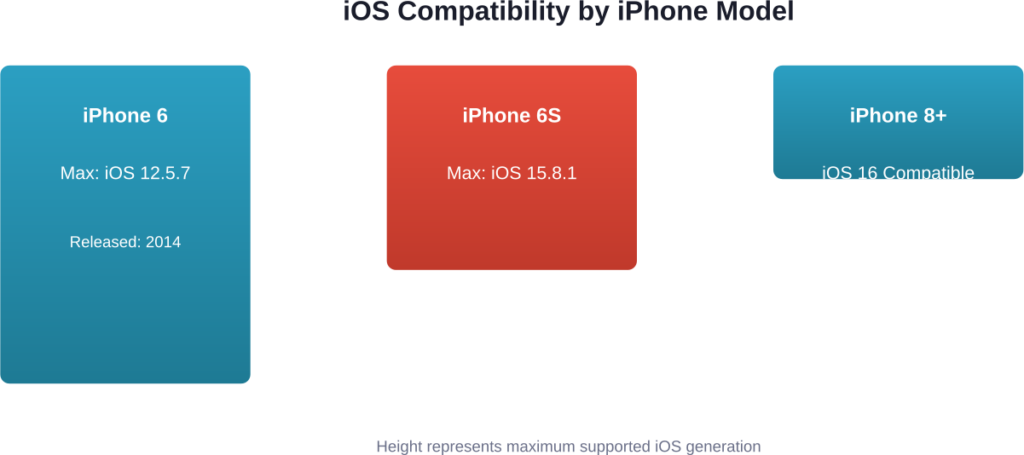
The official Apple Support documentation clearly states that iOS 16 is compatible with iPhone 8, iPhone 8 Plus, and newer models only. Your iPhone 6 simply predates the generation that iOS 16 supports.
What’s the Maximum iOS Version for iPhone 6?
The iPhone 6 can be updated to iOS 12.5.7—that’s the ceiling for this device. Released in 2014, the iPhone 6’s aging processor and hardware architecture cannot handle the demands of more recent iOS versions.
This limitation affects all standard iPhone 6 models regardless of storage capacity or color. If you have an iPhone 6 currently running an older version, updating to iOS 12.5.7 is the only path forward.
Why Can’t iPhone 6 Run iOS 16?
Hardware constraints drive this compatibility wall. iOS 16 introduced features requiring more powerful processors, increased RAM, and updated system architecture. The iPhone 6’s A8 processor simply can’t handle these modern demands.
Apple designs iOS versions to take full advantage of current hardware capabilities. Pushing iOS 16 onto an iPhone 6 would result in sluggish performance, battery drain, and instability—which is why Apple officially excludes older devices from support.
This isn’t unusual. Every major iOS release targets devices from roughly the past 5-6 years, leaving older phones behind.
iOS 16 Device Compatibility List
According to Apple’s official support documentation, iOS 16 is compatible exclusively with these iPhone models:
| iPhone Model | iOS 16 Support |
|---|---|
| iPhone 8 & 8 Plus | ✓ Yes |
| iPhone X & XR | ✓ Yes |
| iPhone 11 (all variants) | ✓ Yes |
| iPhone 12 (all variants) | ✓ Yes |
| iPhone 13 (all variants) | ✓ Yes |
| iPhone 14 (all variants) | ✓ Yes |
| iPhone SE (2nd & 3rd gen) | ✓ Yes |
Notice the gap: iPhone 6 and 6S are completely absent from this list. The earliest supported model is the iPhone 8, released three years after the iPhone 6.
iPhone 6S: A Different Story
Here’s where confusion often creeps in. The iPhone 6S (released in 2015) is NOT the same as iPhone 6. While it looks nearly identical, the 6S has a different processor and can support more recent software.
The iPhone 6S maxes out at iOS 15.8.1 (or iOS 15 generally), not iOS 16. Still, this represents three major iOS versions beyond what the iPhone 6 can achieve. If you have a 6S, updating to iOS 15.8.1 is worthwhile—Apple released iOS 15.8 with security fixes, including patches for over 40 security vulnerabilities.
What Should You Do With Your iPhone 6?
If iOS 16 is critical for your needs (perhaps a specific app requires it), upgrading to a newer iPhone is the only solution. Even the iPhone 8, which supports iOS 16, is several generations old at this point.
For security purposes, keeping your iPhone 6 on iOS 12.5.7 is essential. Don’t leave it on an older version—update to the maximum supported iOS to patch known vulnerabilities and maintain basic security.
How to Update iPhone 6 to iOS 12.5.7
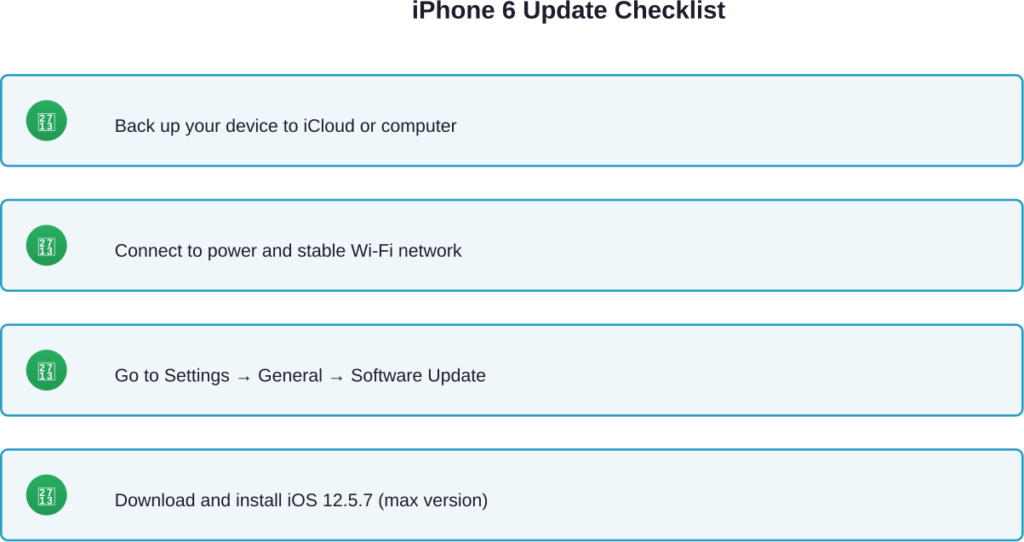
The process is straightforward. Connect your iPhone to a Wi-Fi network and plug it into power. Open Settings, tap General, then Software Update. If an update is available, tap Download and Install.
Your data and settings remain unchanged during the update. The entire process typically takes 15-30 minutes depending on your internet speed.
If the wireless update doesn’t work, you can use a Mac with macOS Catalina or later, or a Windows PC with iTunes, to update via computer connection.
Future-Proofing Your iPhone
This situation highlights why device age matters. The iPhone 6 was released in 2014, making it over 11 years old as of 2025. While it still functions, its inability to access modern iOS versions limits security updates and app compatibility.
When considering your next phone purchase, remember that Apple typically supports devices for 5-6 years of major iOS releases. This means an iPhone purchased today will receive OS updates well into the 2030s.
Frequently Asked Questions
No. The hardware incompatibility is absolute, not a soft restriction. The A8 processor cannot execute iOS 16 code. Even jailbreaking or using developer tools won’t bypass this limitation—the device simply lacks the necessary processing power.
iOS 12.5.7 is the latest security update available for iPhone 6. It includes patches for known vulnerabilities. However, it won’t receive new security patches indefinitely. For maximum protection, consider upgrading to a newer phone if you store sensitive information on this device.
Many modern apps now require iOS 13 or higher. Popular services like WhatsApp, banking apps, and newer games may not be available or may not function properly on iOS 12.5.7. Check the App Store compatibility before relying on specific applications.
iPhone 8 does support iOS 16, but it’s an older device (released 2017). Consider newer models like iPhone 11 or 12 for better long-term support. These will receive iOS updates for several more years and offer significantly better performance.
Older processors can’t efficiently run modern operating systems with their increased security features, AI capabilities, and performance optimizations. Supporting very old hardware would compromise the user experience for everyone and slow down development of new features.
No. Apple doesn’t allow downgrading to older iOS versions. Once you update to iOS 12.5.7, that’s your starting point. This policy prevents security regression.
Yes. The iPhone 6S maxes out at iOS 15.8.1, released in October 2023. It cannot run iOS 16 or later, though iOS 15.8.1 is still actively supported with security patches and remains relatively current for most applications.
The Bottom Line
iPhone 6 cannot be updated to iOS 16. Its maximum supported version is iOS 12.5.7. This isn’t a limitation you can work around—the hardware simply doesn’t support the requirements for iOS 16 and newer.
If you own an iPhone 6, ensure it’s running iOS 12.5.7 for security purposes. For access to iOS 16 and modern app support, you’ll need to upgrade to an iPhone 8 or newer device. If you have an iPhone 6S instead, you can reach iOS 15.8.1, which is more capable though still short of iOS 16 compatibility.