

Quick Summary: Yes, retrieving deleted text messages is possible in many cases. iPhone users with iOS 16 or later can recover messages within 30 days from the Recently Deleted folder, while Android users may need third-party apps or cloud backups. Digital forensics experts can also recover deleted data from device storage even after manual deletion, though success depends on timing and whether data has been overwritten.
Accidentally deleting an important text message ranks among the most panic-inducing moments for smartphone users. Whether it’s a crucial conversation for a court case, sentimental messages from a loved one, or critical business communications, that sinking feeling when texts disappear is universal.
The good news? Deleted doesn’t always mean gone forever.
Modern smartphones and digital forensics have made message recovery more accessible than ever. But the process differs dramatically depending on the device, timing, and what happened after deletion.
What Actually Happens When Text Messages Are Deleted
Here’s the thing—when a text message gets deleted, it doesn’t instantly vanish from existence. Understanding what happens behind the scenes explains why recovery remains possible.
According to research from Kent State University, deleted data often remains on device storage until new information overwrites it. The device essentially marks the space as available rather than immediately erasing everything. Think of it like removing a book’s index card from a library catalog while the book stays on the shelf.
Mobile device forensics specialists can extract this residual data using specialized tools. The National Institute of Standards and Technology (NIST) maintains standards for computer forensics testing programs specifically designed for mobile device imaging, highlighting how seriously the technical community treats data recovery.
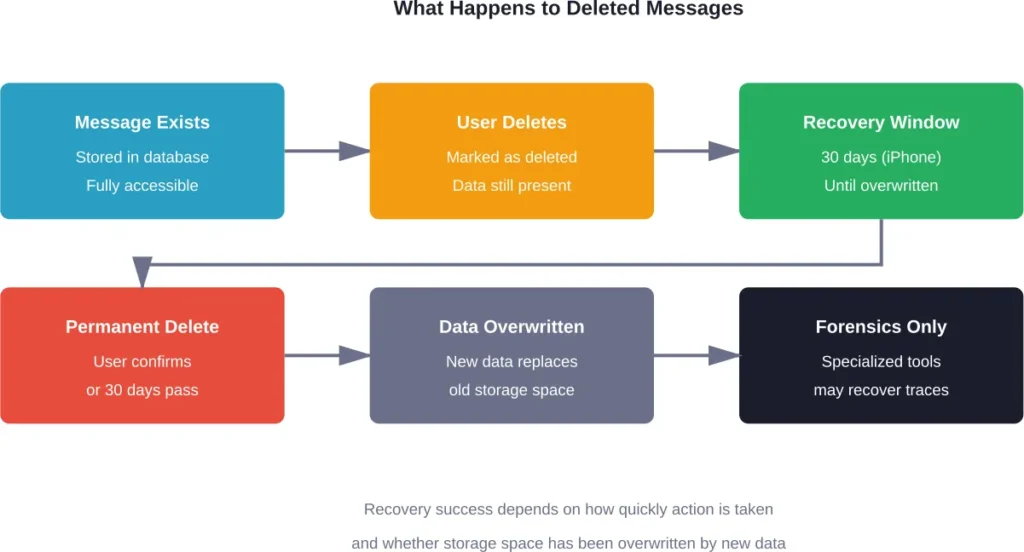
Time becomes the critical factor. The longer a phone continues normal operation after deletion, the higher the chance new data overwrites those message fragments. Every photo taken, app downloaded, or file saved increases the risk of permanent loss.
Recovering Deleted Messages on iPhone
Apple introduced built-in message recovery with iOS 16, fundamentally changing the recovery landscape for iPhone users. This feature represents the easiest path for most people.
The Recently Deleted Folder Method
Starting with iOS 16 and iPadOS 16.1, Apple implemented a Recently Deleted folder specifically for messages. This works similarly to the Photos app’s deleted album.
Messages remain in this folder for 30 days after deletion. During this window, recovery takes just a few taps. After 30 days pass, messages become permanently deleted from the folder.
To access this feature:
- Open the Messages app on iPhone
- Tap the Filters button (three horizontal lines) on the conversations page
- Select “Show Recently Deleted” from the menu
- Choose the conversations or specific messages to recover
- Tap Recover to restore them
According to Apple Support documentation, this method works across iPhone models from iPhone 11 onwards running compatible iOS versions. The feature also syncs across devices when Messages in iCloud is enabled.
Recovery Through iCloud Backup
For situations where the 30-day window has passed, iCloud backups offer another option. But there’s a catch—this requires restoring the entire device to a previous backup state.
This approach works when:
- iCloud backup was enabled before message deletion
- A backup exists from when the messages were still present
- Accepting that all data created after that backup will be lost
The all-or-nothing nature makes this method less practical for most situations. Losing weeks or months of recent photos, app data, and other information just to recover texts rarely makes sense.
Computer Backup Recovery
Messages backed up to a Mac or PC through Finder or iTunes provide another recovery avenue. Similar limitations apply—restoring from backup replaces current device data with the backup snapshot.
Mac users running macOS with Messages enabled can sometimes find deleted conversations synced across devices. The Recently Deleted folder appears in Messages on Mac as well, offering another access point for recovery.
Android Message Recovery Options
Android message recovery presents more complexity due to the platform’s fragmented nature. Different manufacturers implement varying message storage systems, and Android lacks a universal built-in recovery feature comparable to iPhone’s Recently Deleted folder.
Google Messages and Cloud Backup
For users of Google Messages (the default on many Android devices), message backup through Google Drive provides recovery options. This requires backup to have been enabled before deletion occurred.
Google Messages automatically backs up conversations, including SMS, MMS, and RCS texts. Restoring messages requires:
- Uninstalling and reinstalling Google Messages
- Signing in with the same Google account
- Selecting restore from backup during setup
Community discussions reveal this method works inconsistently. Some users report successful recovery while others find messages missing even with backups enabled.
Third-Party Recovery Applications
The Google Play Store hosts numerous apps claiming to recover deleted messages. These applications work by monitoring notifications and creating local copies before messages can be permanently deleted.
Important limitations exist with these apps:
- They only capture messages received after installation
- No app can recover messages deleted before installation
- Many require extensive permissions that raise privacy concerns
- Effectiveness varies dramatically between applications
Apps like “All Deleted Messages Recovery” and “Recover Deleted Messages” have garnered millions of downloads, but user reviews show mixed results. The fundamental constraint remains—these apps cannot access data already purged from system storage.
Manufacturer-Specific Solutions
Samsung, LG, and other manufacturers sometimes include their own message backup systems. Samsung Cloud, for instance, can backup and restore messages on Galaxy devices.
Check device settings under Backup or Cloud to determine what manufacturer-specific options might be available. These solutions work best when configured before messages are accidentally deleted.
Digital Forensics and Professional Recovery
When standard recovery methods fail, digital forensics represents the last resort. Law enforcement and legal professionals frequently use these techniques to retrieve deleted communications for investigations and court cases.
According to Kent State University research, law enforcement agencies view mobile phones as “a powerful resource in investigations and trials,” a perspective documented in academic literature on mobile device forensics. Digital forensics experts can recover deleted data from almost any device when given proper access.
Academia.edu publications on mobile device forensics confirm that specialized tools can extract data even after user-level deletion. The University of Texas at San Antonio’s digital forensics program teaches these recovery techniques as part of cybercrime investigation training.
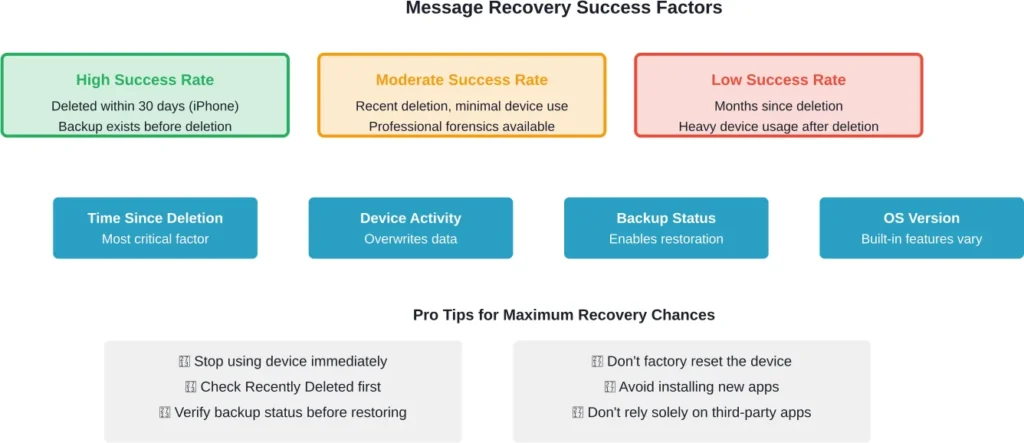
Professional forensics services typically cost hundreds to thousands of dollars. The process involves creating a complete forensic image of device storage, then using specialized software to scan for remnants of deleted data.
Success depends heavily on storage technology. Older devices with traditional storage sometimes yield better results than newer devices with advanced memory management systems that more aggressively overwrite deleted data.
Recovery Methods Comparison
| Recovery Method | Platform | Success Rate | Requirements | Data Loss Risk |
|---|---|---|---|---|
| Recently Deleted Folder | iPhone (iOS 16+) | High | Within 30 days of deletion | None |
| iCloud Backup Restore | iPhone | High | Backup exists from before deletion | High – loses recent data |
| Google Messages Backup | Android | Moderate | Backup enabled before deletion | None |
| Third-Party Apps | Android | Low | Installed before deletion | None |
| Computer Backup | Both | High | Backup synced before deletion | High – loses recent data |
| Digital Forensics | Both | Variable | Professional service, minimal device use after deletion | None |
Preventing Future Message Loss
Prevention beats recovery every time. Setting up proper backup systems before disaster strikes makes the difference between easy recovery and expensive forensics.
For iPhone users, enabling Messages in iCloud ensures conversations sync across all devices. This provides redundancy—deleting a message on one device doesn’t immediately remove it everywhere if other devices haven’t synced yet.
Android users should verify Google Messages backup is active. Navigate to Messages settings, select Chat features, and confirm backup is enabled. Set backup frequency to daily for maximum protection.
Consider these additional protective measures:
- Regular device backups to computer or cloud storage
- Archiving important conversations before deletion
- Taking screenshots of critical messages
- Using message export features when available
Some situations require extra caution. Messages needed for legal proceedings, business transactions, or important personal records deserve special handling. Export or back up these conversations separately rather than relying solely on automatic systems.
Common Recovery Mistakes to Avoid
Panic after accidental deletion leads people to make recovery harder. Understanding what not to do proves as important as knowing the correct steps.
Continuing heavy device use after deletion represents the biggest mistake. Every action potentially overwrites the deleted message data. Taking photos, downloading apps, or browsing the web all reduce recovery chances.
Factory resetting the device in frustration guarantees permanent loss in most cases. While this seems like it might help, it actually overwrites storage space systematically, destroying any chance of forensic recovery.
Installing multiple recovery apps simultaneously causes problems. These apps often conflict with each other and consume storage space that could contain recoverable message fragments.
Restoring from backup without verification creates disasters. People sometimes restore the wrong backup—one created after the messages were already deleted—losing additional recent data in the process.
Legal and Privacy Considerations
Message recovery intersects with legal and privacy concerns, especially in professional forensics contexts. Understanding these dimensions matters for anyone considering advanced recovery methods.
According to Kent State University research, law enforcement agencies view mobile phones as “a powerful resource in investigations and trials,” a perspective documented in academic literature on mobile device forensics spanning nearly two decades.
For personal recovery needs, device ownership and legal access become relevant. Attempting to recover messages from another person’s device without permission can create legal complications, even in family situations.
Digital forensics firms typically require proof of device ownership before providing services. This protects against unauthorized access attempts and ensures recovered data goes only to legitimate owners.
Privacy advocates raise concerns about how easily deleted data can be recovered. This reality underscores why truly sensitive information should be protected through encryption rather than simple deletion.
When Recovery Isn’t Possible
Sometimes messages simply can’t be recovered. Accepting this reality saves time and money better spent elsewhere.
Permanent loss occurs when:
- Months or years have passed since deletion
- The device has undergone factory reset
- Storage space has been thoroughly overwritten
- Messages were never backed up anywhere
- The physical device is damaged or destroyed
Modern smartphones with solid-state storage and aggressive memory management make recovery progressively harder. Manufacturer implementations of secure deletion features further complicate forensic extraction.
In these situations, focusing energy on prevention for the future makes more sense than pursuing expensive recovery methods with minimal success probability.
Frequently Asked Questions
Recovery of messages deleted years ago is extremely unlikely. The storage space has almost certainly been overwritten multiple times by new data. Even professional forensics services have minimal success rates with deletions older than a few months, and success decreases dramatically after the first few weeks.
Phone carriers typically don’t store the content of text messages long-term. While they maintain records of when messages were sent and received for billing purposes, the actual message content usually isn’t retained once delivered. Some carriers might store messages briefly, but this varies and isn’t accessible to individual users.
Factory reset significantly reduces recovery chances but doesn’t guarantee complete erasure. Digital forensics tools can sometimes extract fragments of data even after reset. For maximum security before selling a device, use the device’s secure erase feature if available, or encrypt the device before factory reset. This makes any residual data unreadable.
Most message recovery apps have severe limitations. They can only save messages received after installation by capturing notification content—they cannot recover messages deleted before installation. Effectiveness varies widely, and many apps with high download counts still receive mixed reviews. The most reliable recovery method remains cloud backups configured before deletion.
According to Apple Support, deleted messages remain in the Recently Deleted folder for 30 days. After this period, messages are permanently removed. The 30-day countdown begins immediately when messages are first deleted, so checking this folder should be the first recovery step for iPhone users.
Law enforcement agencies have access to advanced forensics tools that can sometimes recover deleted messages. Success depends on how much time has passed and device usage patterns after deletion. According to academic research from Kent State University, mobile phones serve as powerful resources in investigations, with specialists trained to extract deleted data. However, this capability varies based on device type and circumstances.
Standard backup restoration on both iPhone and Android restores all messages from that backup point—selective recovery of individual conversations isn’t supported natively. This all-or-nothing approach means restoring from backup replaces all current messages with the backed-up versions. Third-party computer software sometimes offers selective restoration, but compatibility and reliability vary.
Moving Forward After Message Loss
Losing important messages teaches valuable lessons about data management. Whether recovery succeeds or fails, implementing better protection systems prevents repeating the experience.
Enable automatic backups on both primary devices and computers. Schedule these to run regularly without requiring manual intervention. The small storage cost for cloud backup services pales in comparison to the value of irreplaceable communications.
Treat text messages like any other important data. Would you store critical business documents on a single device with no backup? The same principle applies to messages containing important information.
For messages with legal significance, create multiple redundant copies immediately. Screenshot important exchanges, export conversations to email, and save them to multiple secure locations. Don’t rely on device storage alone for anything that might matter in court or business disputes.
Consider communication platforms with better built-in archiving. Email and some messaging apps offer more robust search, backup, and restoration features compared to standard SMS/MMS text messages.
The question “is it possible to retrieve deleted text messages” has a nuanced answer: sometimes yes, often no, and success depends entirely on acting quickly with the right approach. Understanding the recovery landscape empowers better decisions both during emergencies and when setting up protective systems.
Recovery technology continues advancing, but so do deletion mechanisms. The arms race between forensics and security means what works today might fail tomorrow. The one constant remains that prevention through proper backup provides the most reliable protection against accidental deletion.
Take action now to protect messages. Check backup settings, enable cloud sync, and verify recovery features work correctly. The few minutes invested today could save hours of frustration and hundreds in recovery costs later.