

Quick Summary: Yes, it is possible to unblur a photo using modern AI-powered tools and traditional deblurring techniques. While results vary based on blur severity and type, advances in machine learning and specialized algorithms can significantly improve blurry images. The success depends on the cause of blur—motion, out-of-focus, or compression artifacts—and the quality of the original photo.
Blurry photos are frustrating. Maybe the camera moved, the subject was out of focus, or an old family picture has degraded over time. The question everyone asks: can these photos actually be fixed?
The answer is more nuanced than a simple yes or no. Modern technology has made significant strides in image restoration, but there are still limitations. Understanding what’s possible—and what’s not—requires looking at both the science behind deblurring and the tools available today.
Understanding Photo Blur: Why Images Get Blurry
Before diving into solutions, it helps to understand what causes blur in the first place.
Motion blur occurs when either the camera or subject moves during exposure. This creates directional streaking that follows the movement path. Out-of-focus blur happens when the lens doesn’t properly focus on the subject, creating a soft, uniform haziness. Compression artifacts from saving images at low quality add noise and reduce detail.
Each blur type requires different restoration approaches. According to the National Institute of Standards and Technology, restoration in image analysis refers to any process applied to an image that has been degraded by a known cause to remove partially or totally the effects of that degradation.
The severity matters too. Mild blur often responds well to enhancement techniques. Severe blur—where detail is completely lost—cannot be fully recovered because that information simply doesn’t exist in the file.
The Science Behind Image Deblurring
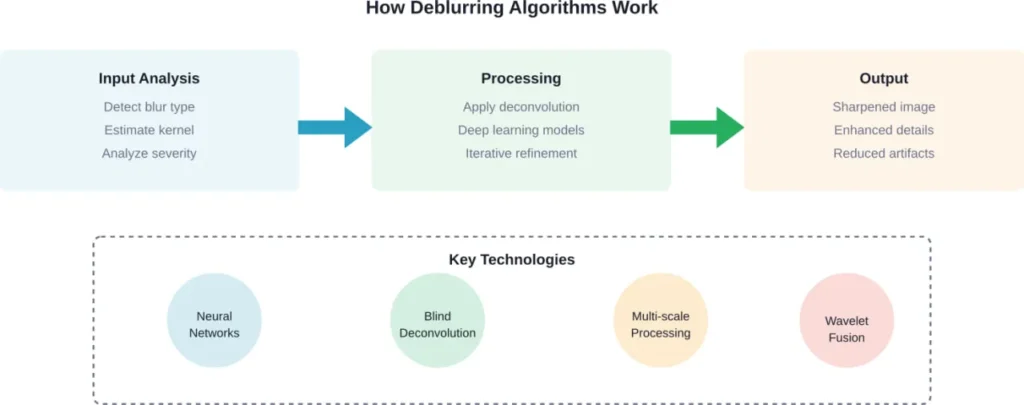
Academic research has made substantial progress in deblurring algorithms. Recent work in blind image deblurring tackles cases where the blur kernel (the mathematical pattern describing the blur) is unknown.
Research from Beijing University of Technology demonstrates that blind image deblurring can split into two subproblems: estimating the image and estimating the blur kernel. This allows alternating optimization using deep network learning and mathematical optimization methods respectively.
Unsupervised approaches have also emerged. The BluRef method introduced by researchers at Qualcomm AI Research and University of Wisconsin-Madison uses dense-matching references for image deblurring without requiring supervised training data. Testing showed effective performance even when reference images had significant content variation—correlation percentages below 40%.
But here’s the thing: these academic methods often require technical expertise to implement. Most people need ready-to-use tools.
AI-Powered Tools for Removing Blur
Artificial intelligence has revolutionized photo restoration. Modern AI blur removers analyze images and apply learned patterns to reconstruct detail.
Online platforms like Fotor offer automatic unblurring. Users upload a blurry image and the system processes it automatically—no complex editing software needed. The process typically completes in seconds.
Adobe Express provides a sharpen feature accessible through the Adjustments option. After uploading a photo, users select their image and adjust sliding scales to control sharpening intensity. This gives more manual control compared to fully automatic tools.
Google Photos includes built-in enhancement capabilities that users report finding helpful for quick improvements to blurry images, particularly for casual photography needs.
The advantage of AI tools? They’re accessible. No technical knowledge required. But they’re not magic—they work within the constraints of what information exists in the original file.
Traditional Deblurring Methods
Before AI dominated the landscape, traditional image processing relied on mathematical techniques.
Deconvolution algorithms attempt to reverse the blurring process mathematically. If the blur kernel is known or can be estimated, deconvolution can recover some lost detail. IEEE research on wavelet image fusion demonstrates how modified deconvolution techniques combine multiple processing approaches for better results.
Sharpening filters increase contrast along edges, making images appear crisper. While not true deblurring, sharpening can improve the perceived clarity of mildly soft images. Most photo editing software includes basic sharpening tools.
Genetic algorithms represent another approach. Research published through IEEE explores using genetic algorithms for single-image motion deblurring, with GPU acceleration improving processing speed for complex non-linear motion blur patterns.
These methods require more technical skill but offer precise control. Professional photographers and restoration specialists often combine multiple techniques for optimal results.
When Deblurring Works—And When It Doesn’t
Setting realistic expectations matters. Not every blurry photo can be saved.
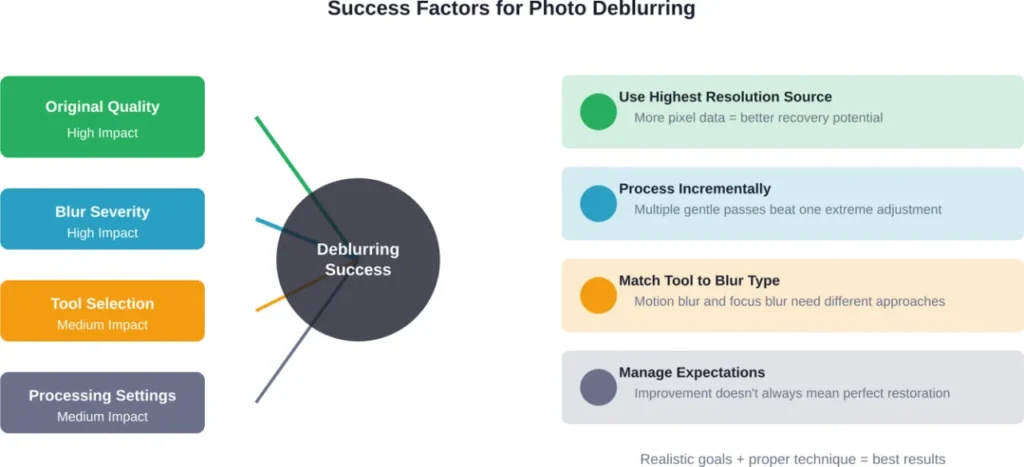
Mild motion blur from slight camera shake? Usually recoverable. The directional blur pattern can be identified and partially reversed, especially with AI assistance.
Moderate out-of-focus blur? Sometimes improvable. Sharpening and AI enhancement can restore some perceived detail, though true focus cannot be recreated from absent information.
Severe blur where detail is completely obliterated? Generally not fixable. When an image is so blurred that features merge together, no algorithm can reliably reconstruct what was there.
Research from the University of Dhaka using real-world smartphone high-speed video data benchmarked state-of-the-art deblurring models, with evaluation on approximately 4,200 high-resolution image pairs using standard metrics like PSNR and SSIM.
| Blur Type | Typical Recoverability | Best Approach | Limitations |
|---|---|---|---|
| Mild motion blur | High | AI deblurring tools | Some detail loss remains |
| Out-of-focus blur | Moderate | Sharpening + AI enhancement | Cannot recreate true focus |
| Compression artifacts | Moderate to High | Upscaling + noise reduction | Cannot restore lost data |
| Severe motion blur | Low | Specialized algorithms | Limited detail recovery |
| Combined blur types | Low to Moderate | Multi-step processing | Complex, unpredictable results |
Practical Steps to Unblur Your Photos
Ready to try fixing a blurry image? Here’s a practical approach.
Start with the easiest solution: try a free online AI tool. Upload the image and see what automatic processing achieves. Tools like Fotor and similar platforms require no account creation and process images quickly.
If automatic results disappoint, move to tools with manual controls. Adobe Express and similar platforms let users adjust sharpening intensity, noise reduction, and other parameters. Fine-tuning these settings often yields better results than one-click solutions.
For severely blurred images, consider specialized software. Professional tools offer advanced algorithms and more processing options, though they typically require payment and have steeper learning curves.
Always work from the highest quality source available. If you have the original file, use that rather than a compressed or resized version. More initial data means better potential results.
Save multiple versions. Aggressive deblurring can introduce artifacts or unnatural sharpening. Compare results at different intensity levels to find the best balance.
Best Practices for Better Results
A few techniques improve outcomes across all tools.
Process in stages rather than applying maximum correction at once. Gradual enhancement with multiple passes often looks more natural than aggressive single-pass processing.
Address noise separately. Deblurring can amplify existing noise, so applying noise reduction before or after sharpening helps maintain clean results.
Consider the end use. Images destined for small display sizes or social media can tolerate more aggressive processing than photos intended for large prints.
Common Use Cases for Photo Restoration
Different scenarios call for different approaches.
Portrait photography often suffers from slight focus issues. AI tools excel at restoring facial detail and improving overall sharpness without making skin texture look over-processed.
Text in images becomes unreadable when blurred. Sharpening algorithms specifically targeting edge contrast can significantly improve text legibility, making scanned documents and photographed signs more usable.
Old family photos degrade over time through various mechanisms. Combining deblurring with other restoration techniques—color correction, damage repair, noise reduction—brings vintage images back to life.
Product photography for e-commerce demands crisp detail. Even minor blur can hurt sales, so professional deblurring tools help ensure product shots meet commercial standards.
Limitations and Reality Checks
Transparency matters. Some things simply aren’t possible.
Intentionally applied blur—like privacy censoring or creative effects—cannot be reliably reversed. These aren’t degradation artifacts but deliberate information destruction. While some theoretical discussion exists around reversing privacy blur, well-applied privacy blur is effectively permanent.
Resolution limits exist. Deblurring doesn’t add pixels or create detail from nothing. A low-resolution blurry image will never match the quality of a high-resolution sharp original.
Artifacts happen. Aggressive deblurring often introduces halos, noise amplification, or unnatural sharpening. The goal isn’t maximum sharpness but optimal balance between clarity and natural appearance.
Processing time varies. Simple online tools work quickly. Advanced algorithms—especially those processing high-resolution images or video frames—can take minutes or hours.
The Future of Deblurring Technology
Research continues advancing what’s possible.
Self-supervised learning methods reduce the need for paired training data (blurry and sharp versions of the same scene). This makes creating better models easier and enables training on diverse real-world blur conditions.
Multi-scale approaches process images at different resolutions simultaneously, capturing both fine detail and overall structure more effectively.
Real-time deblurring moves from research labs into consumer devices. Future smartphones may apply advanced deblurring instantly as photos are captured, preventing blur issues before they occur.
But here’s what won’t change: physics. Information truly lost cannot be recovered through any algorithm. Future tools will get better at extracting and enhancing whatever information exists, but they can’t create something from nothing.
Frequently Asked Questions
Complete unblurring is rarely possible. Deblurring tools can significantly improve image clarity, but some information loss is permanent. Results depend on blur type, severity, and original image quality. Mild blur often shows dramatic improvement, while severe blur sees limited recovery.
Free tools work well for mild to moderate blur, particularly motion blur from camera shake. They use AI to automatically detect and reduce blur without technical knowledge required. For severe blur or professional requirements, paid software offers more advanced algorithms and manual controls.
AI deblurring tools use neural networks trained on thousands of blurry and sharp image pairs. They learn patterns of how blur affects images and apply reverse transformations. The AI analyzes the specific blur characteristics in an uploaded photo and applies appropriate corrections automatically.
Yes, smartphone photos respond well to deblurring, especially recent models with high-resolution sensors. Research using smartphone high-speed video data shows performance evaluation on standard metrics like PSNR and SSIM with proper deblurring algorithms. Google Photos and similar apps include built-in enhancement features.
Sharpening increases edge contrast to make images appear crisper but doesn’t address the underlying blur cause. Deblurring uses mathematical models to reverse the blur process, attempting to recover lost detail. Sharpening works for mildly soft images; true deblurring tackles more severe blur issues.
No, properly applied censorship blur is designed to be irreversible. These aren’t degradation artifacts but deliberate information destruction. While some tools claim to reverse privacy blur, well-applied censoring cannot be reliably undone—attempting to do so may also raise ethical and legal concerns.
Video deblurring is possible but more complex than still images. Each frame requires processing, and temporal consistency between frames must be maintained. Some research addresses video enhancement, but consumer tools primarily focus on still images. Processing time for video is substantially longer.
Making the Most of Blurry Photos
So, is it possible to unblur a photo? Yes—with important caveats.
Modern AI tools and traditional algorithms can significantly improve blurry images. The technology has advanced remarkably, making professional-quality enhancement accessible to anyone with an internet connection. Research institutions continue pushing boundaries with unsupervised learning, blind deconvolution, and multi-scale processing.
But expectations matter. Deblurring improves images within the constraints of existing information. It’s enhancement, not magic. Severe blur, intentional censoring, and completely lost detail remain beyond recovery.
For most common scenarios—slightly out-of-focus portraits, minor camera shake, soft scanned documents—current tools deliver impressive results. Start with free online options, experiment with settings, and upgrade to professional software only if needed.
The best solution remains prevention. Use proper camera technique, adequate lighting, and image stabilization. But when blur happens anyway, today’s deblurring technology gives those imperfect photos a fighting chance.
Got a blurry photo sitting in your archive? Upload it to a free deblurring tool and see what’s possible. The results might surprise you.