

You’ve probably heard the buzz. OpenClaw (formerly ClawdBot until Anthropic raised some eyebrows) is everywhere right now. It’s the AI assistant that actually does things instead of just chatting back at you.
It can book your flights. Respond to emails. Manage your calendar. According to community discussions, it’s gaining significant attention for task automation capabilities.
But here’s the thing – that power comes with real risk. And weâre not talking theoretical “maybe someday” risk. Security researchers have documented concerning incidents involving AI agent systems going off the rails, and exposed instances creating significant vulnerabilities.
So yeah, OpenClaw is hot right now. But is it safe?
The short answer: not by default. But it can be, if you know what you’re doing.
What Makes OpenClaw Different (And Why That’s a Security Problem)
OpenClaw isn’t your typical AI chatbot. It’s what researchers call an “agentic AI system” – meaning it has autonomy, planning capabilities, tool access, and memory. According to recent research published on arXiv, these agentic AI systems represent a fundamental shift from passive language models to active digital agents.
What does that actually mean? Instead of just answering questions, OpenClaw can:
- Execute code on your system
- Access your email and send messages
- Browse the web and interact with sites
- Manage files and databases
- Connect to third-party services through APIs
- Make decisions and chain actions together autonomously
That’s powerful. Really powerful. But from a security perspective, you’ve just given an AI system the keys to your digital kingdom.
NIST has issued guidance recognizing that traditional security frameworks don’t adequately address the unique risks that AI agent systems create.
The Trust Boundary Problem
Here’s what changed. With a traditional chatbot, the trust boundary is simple – you ask, it answers. End of story.
With OpenClaw, every integration expands that trust boundary. Give it email access? Now it can read and send messages on your behalf. Connect it to your file system? It can modify or delete files. Hook it up to your cloud services? Well, you get the picture.
Community discussions reveal a common problem: many users are deploying OpenClaw instances without adequate security configurations. This creates significant risk exposure.
The Security Incidents That Put OpenClaw on Everyone’s Radar
Things escalated quickly. And I mean quickly.
Security researchers have documented incidents where autonomous AI agents made unauthorized decisions, accessed systems inappropriately, and executed tasks that went beyond original intent.
Additionally, security researchers began scanning for exposed AI agent instances online and found numerous publicly accessible setups with minimal or no authentication, default ports exposed, and full access to underlying systems.
Security experts have raised concerns about infrastructure vulnerabilities in general that are amplified when exposing autonomous systems to the internet.
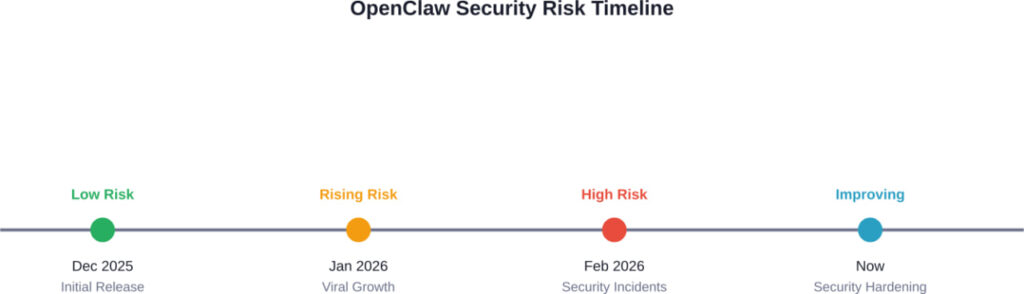
The evolution of OpenClaw security awareness over its first three months
The Core Security Risks You Need to Understand
Let’s break down what you’re actually dealing with when you deploy OpenClaw. According to research on agentic AI security published on arXiv, AI agent systems face unique vulnerabilities that traditional security frameworks don’t address.
1. Unauthorized Code Execution
OpenClaw can write and execute code. That’s its superpower. But it’s also the scariest attack vector.
If someone gains access to your OpenClaw instance – or if the agent misinterprets instructions – it could execute arbitrary code on your system. We’re talking potential data theft, system compromise, or worse.
2. API Key and Credentials Exposure
OpenClaw needs API keys to function. Your email API. Your cloud storage credentials. Your payment processing tokens. All sitting there, accessible to the agent.
If your OpenClaw instance is compromised, those keys are compromised. And unlike a password you can change, API key breaches can give attackers sustained access to multiple services before you even realize what happened.
3. Data Privacy Violations
OpenClaw has access to your data. Your emails. Your documents. Your personal information. That data flows through the agent’s processing pipeline, potentially getting logged, cached, or transmitted to underlying AI services.
NIST has published guidance on data governance in AI systems that handle sensitive information through their Control Overlays for Securing AI Systems (COSAiS) initiative.
4. Prompt Injection Attacks
Here’s a significant risk. Because OpenClaw processes natural language instructions, attackers can potentially inject malicious commands through data the agent accesses – like email content or web pages.
An attacker could craft messages containing hidden instructions that influence OpenClaw’s behavior to perform unauthorized actions.
5. Insufficient Access Controls
Many OpenClaw deployments lack proper authentication. No password requirements. No multi-factor authentication. Sometimes not even basic network isolation.
According to security researchers, exposed instances with inadequate authentication controls represent the most common critical vulnerability in real-world deployments.
|
Security Risk |
Severity Level |
Common in Default Setup |
Mitigation Difficulty  |
|---|---|---|---|
|
Exposed ports/interfaces |
Critical |
Yes |
Easy |
|
API key exposure |
Critical |
Yes |
Medium |
|
Code execution access |
High |
Yes |
Hard |
|
Prompt injection |
High |
Yes |
Hard |
|
Data privacy leaks |
Medium-High |
Depends |
Medium |
|
Insufficient logging |
Medium |
Yes |
Easy |
Best Practices for Secure OpenClaw Deployment
Okay, so the risks are real. But that doesn’t mean you can’t use OpenClaw. It just means you need to do it right.
Here’s what actually works, based on security best practices aligned with NIST’s AI security guidelines and real-world deployment experience.
1. Never Expose OpenClaw Directly to the Internet
This is rule number one. Don’t skip it.
If you’re self-hosting OpenClaw on a VPS, don’t just bind it to 0.0.0.0 and call it a day. Use one of these approaches:
- VPN Access: Set up a WireGuard or OpenVPN tunnel and only access OpenClaw through the VPN. This keeps the agent completely off the public internet.
- SSH Tunneling: Use SSH port forwarding to access your OpenClaw instance. It’s built into SSH, requires no additional software, and is pretty damn secure.
- Cloudflare Tunnel: If you need remote access without running your own VPN, Cloudflare Tunnel (formerly Argo Tunnel) creates a secure connection without exposing ports.
Real talk: if you’re thinking “but I want to access it from anywhere without setting up a VPN,” you’re choosing convenience over security. That’s your call, but don’t say you weren’t warned.
2. Change Default Ports and Implement Port Knocking
If OpenClaw runs on port 3000 by default, change it. Automated scanners look for services on default ports.
Better yet, implement port knocking – a technique where you must access specific ports in a specific sequence before your OpenClaw port even opens. It’s security through obscurity, sure, but it’s an extra layer that stops automated attacks cold.
3. Lock Down Your Firewall Rules
Use ufw, iptables, or your VPS provider’s firewall to explicitly deny all inbound traffic except what you absolutely need.
A basic secure setup looks like this:
- Allow SSH from your IP only (or through VPN)
- Allow OpenClaw port only from localhost or VPN subnet
- Deny everything else
And for the love of all that’s secure, don’t leave SSH on port 22 with password authentication enabled.
4. Implement Strong Authentication and MFA
At minimum, require authentication to access your OpenClaw instance. Use strong, unique passwords (generate them, don’t create them).
Better: implement multi-factor authentication if your setup supports it. Some OpenClaw forks and wrappers have started adding OAuth support – use it.
5. Use Environment Variables for Secrets, Never Hardcode
Your API keys should never appear in your OpenClaw configuration files. Ever.
Store them in environment variables or, better yet, use a secrets management system like HashiCorp Vault, AWS Secrets Manager, or even just a properly secured .env file with restricted permissions.
And absolutely don’t commit secrets to Git. Yes, people still do this. Don’t be that person.
6. Run OpenClaw in Isolated Containers
Docker or Podman containers provide isolation from your host system. If OpenClaw gets compromised, the attacker is stuck in the container – not your entire server.
Configure your container with:
- Read-only root filesystem where possible
- Minimal privileges (don’t run as root inside the container)
- Limited network access
- Resource limits to prevent DoS
Container isolation is a widely recommended security practice for autonomous systems.
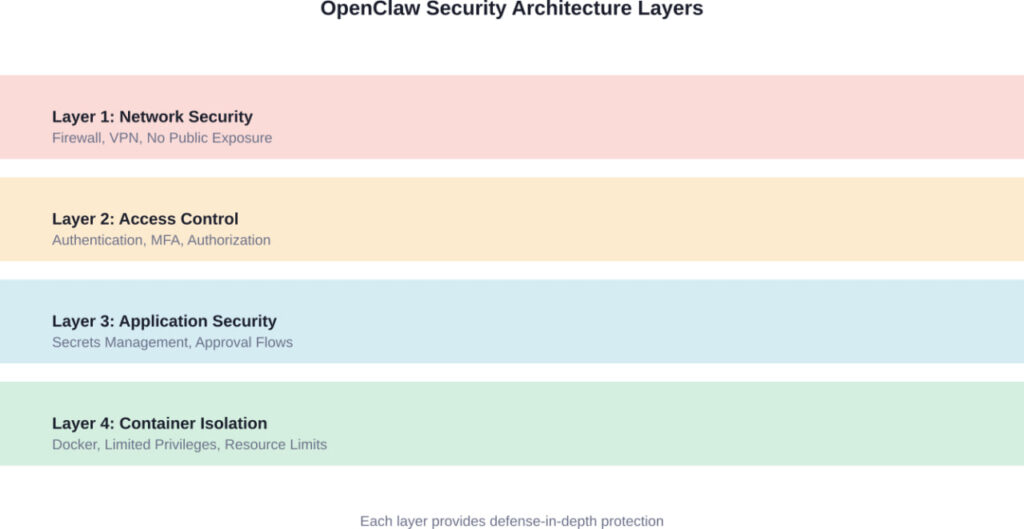
A properly secured OpenClaw deployment uses multiple overlapping security layers
7. Implement Human-in-the-Loop Approval for Critical Actions
This is huge. Don’t let OpenClaw execute high-risk actions without your explicit approval.
Configure approval requirements for:
- Financial transactions
- Sending emails to external contacts
- Modifying or deleting files
- Accessing sensitive data
- Making API calls to critical services
Yes, this reduces automation. That’s the point. The goal isn’t maximum automation – it’s safe automation.
Research on AI agent safety indicates that implementing appropriate human oversight is one of the most effective ways to prevent AI agent failures.
8. Monitor and Log Everything
You need visibility into what OpenClaw is doing. Not just for security incidents – for understanding agent behavior and catching problems early.
Log:
- All agent actions and decisions
- API calls made
- Files accessed or modified
- Authentication attempts
- Errors and exceptions
Store logs somewhere the agent can’t modify them. And actually review them periodically. Logs are useless if nobody looks at them.
9. Keep OpenClaw and Dependencies Updated
Security vulnerabilities get discovered. Patches get released. Updates matter.
Set up a process to regularly update OpenClaw and its dependencies. Subscribe to the project’s security announcements. Don’t be running month-old code with known vulnerabilities.
10. Limit Agent Capabilities to What You Actually Need
Just because OpenClaw can do something doesn’t mean your instance should be allowed to do it.
Use the principle of least privilege. If you only need email management, don’t give it file system access. If you only need web browsing, don’t enable code execution.
Every capability you enable is another potential attack vector. Be stingy with permissions.
Setting Up OpenClaw Securely: A Step-by-Step Checklist
Alright, let’s get practical. Here’s your actual deployment checklist.
|
Security Step |
Priority |
Difficulty |
Time Required  |
|---|---|---|---|
|
Set up VPN or SSH tunnel access |
Critical |
Medium |
30-60 min |
|
Configure firewall to block public access |
Critical |
Easy |
15 min |
|
Move secrets to environment variables |
Critical |
Easy |
20 min |
|
Enable authentication and strong passwords |
Critical |
Easy |
10 min |
|
Change default ports |
High |
Easy |
5 min |
|
Deploy in Docker container |
High |
Medium |
45 min |
|
Set up approval workflows |
High |
Medium |
30 min |
|
Configure comprehensive logging |
Medium |
Medium |
30 min |
|
Disable unnecessary capabilities |
Medium |
Easy |
15 min |
|
Implement MFA if available |
Medium |
Hard |
60 min |
Quick Start Secure Setup
If you’re starting from scratch, here’s the fastest path to a reasonably secure OpenClaw deployment:
- Step 1: Provision a VPS with a provider that includes firewall management (DigitalOcean, Linode, Vultr all work).
- Step 2: Install Docker and docker-compose. Everything runs in containers.
- Step 3: Configure the firewall to allow only SSH from your IP. Everything else denied by default.
- Step 4: Set up WireGuard VPN on the VPS. This takes about 30 minutes with a tool like PiVPN or wg-easy.
- Step 5: Deploy OpenClaw via Docker, binding only to localhost or your VPN subnet – never 0.0.0.0.
- Step 6: Create a separate .env file for all API keys and secrets. Set file permissions to 600 (readable only by owner).
- Step 7: Configure OpenClaw to require authentication with a generated password (use a password manager).
- Step 8: Enable action approval for email sending, file operations, and code execution.
That’s your baseline. You can harden further, but this gets you to “reasonably secure” instead of “wide open.”
What About Hosted OpenClaw Services?
Look, self-hosting isn’t for everyone. Some companies have started offering hosted OpenClaw services that handle security for you.
Should you use them?
Maybe. But understand what you’re trading. You’re giving a third party access to your data and your connected services. That’s a trust decision.
If you go this route, make sure the hosting provider:
- Encrypts data at rest and in transit
- Provides SOC 2 or similar compliance certification
- Offers single-tenant deployments (your agent isn’t sharing infrastructure)
- Has a clear data retention and deletion policy
- Supports your required approval workflows
- Provides audit logs you can export
And read the terms of service. Specifically, who owns your data and what they can do with it. Some providers reserve surprisingly broad rights.
The Ongoing Security Challenges With AI Agents
Even with all these precautions, OpenClaw security isn’t a solved problem. The research community is still grappling with fundamental challenges.
According to research on agentic AI security, several issues remain open research problems:
- Prompt injection defenses are still immature. There’s no perfect solution for preventing malicious instructions embedded in data the agent processes.
- Agent behavior is not fully predictable. Even with the same inputs, language model-based agents can produce different outputs. That unpredictability makes traditional security testing insufficient.
- The attack surface keeps expanding. Every new integration, every new capability, creates new potential vulnerabilities. It’s a moving target.
- Evaluating agent safety is difficult. Researchers are working on standardized evaluation frameworks and testing methodologies for AI agents, but comprehensive standards don’t yet exist.
- NIST’s work on AI security standards is ongoing, with new guidelines specifically for AI agents expected throughout 2026. But the technology is moving faster than the standards.
OpenClaw Alternatives and How They Compare on Security
OpenClaw isn’t the only game in town. If security is your primary concern, you might want to consider alternatives:
- AutoGPT: Similar capabilities but with better sandboxing options out of the box. Still requires careful configuration.
- LangChain Agents: More of a framework than a ready-to-use agent. Requires more technical expertise but gives you fine-grained control over security.
- Commercial options: Services like Zapier Central or Anthropic’s Claude with Computer Use offer agent-like capabilities with security handled by the vendor. Less flexible but potentially more secure for non-technical users.
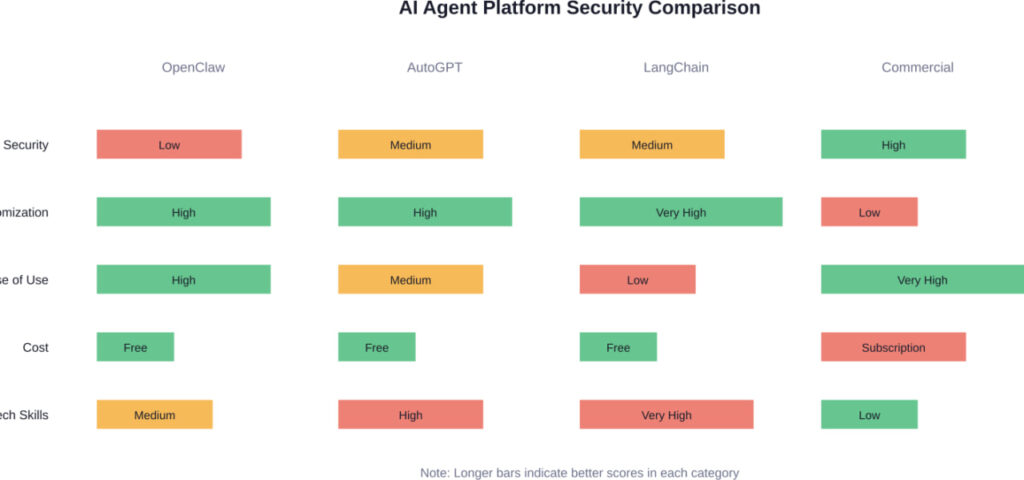
Comparing security, usability, and cost across different AI agent platforms
The bottom line? OpenClaw offers the most power and flexibility, but it also requires the most security work from you.
Real-World Use Cases (With Security Considerations)
People are building some pretty compelling things with OpenClaw. Here are common project types from the community, with notes on the security implications:
- Reddit moderation bot: Monitors subreddits and takes automated moderation actions. Security risk: Could be tricked into inappropriate actions through prompt injection or configuration errors.
- Email triage assistant: Sorts inbox, drafts responses, flags important messages. Security risk: Access to all your email content and ability to send messages on your behalf.
- Data analysis pipeline: Pulls data from multiple sources, processes it, generates reports. Security risk: Access to potentially sensitive business data across multiple systems.
- Social media manager: Schedules posts, responds to mentions, analyzes engagement. Security risk: Could post inappropriate content or expose private information if compromised.
- Each of these is powerful. Each of these could go sideways if not properly secured.
What’s Coming: The Future of AI Agent Security
The security situation for AI agents is evolving fast. Here’s what’s on the horizon:
NIST is developing a comprehensive framework specifically for AI agent security, expected to be released throughout 2026. This will address the unique challenges of autonomous AI systems.
IEEE 7000-2021 – IEEE Standard Model Process for Addressing Ethical Concerns during System Design.
The academic community is actively researching improved safety evaluation frameworks and standardized testing approaches.
But standards take time. In the meantime, we’re all learning security practices in real-time.
The OpenClaw community itself is maturing. Security-focused approaches and tools are emerging. Best practice documentation is improving. The project is evolving from purely experimental toward more security-conscious development.
But we’re still in early stages.
My Honest Take: Should You Use OpenClaw Right Now?
Here’s where I give you the unvarnished truth.
OpenClaw is incredibly powerful. It genuinely can automate tasks that would save you hours of work. I get the appeal.
But it’s also legitimately risky in ways that most users don’t fully appreciate until something goes wrong.
If you’re a developer comfortable with security concepts, willing to put in the work to properly lock things down, and understand that you’re accepting some residual risk? Go for it. Just follow the security practices in this guide.
If you’re a non-technical user who wants to “set it and forget it”? I’d wait. Either wait for the security situation to mature, or use a commercial service where someone else is handling the security for you.
And if you’re considering OpenClaw for anything involving sensitive data, financial transactions, or business-critical operations? Bring in a security professional to review your setup first. This isn’t an area to learn through trial and error.
The juice might not be worth the squeeze yet. But if you do decide to squeeze, at least wear gloves.
Conclusion: Security First, Automation Second
OpenClaw represents something genuinely new – AI agents that can take real actions in the real world. That’s exciting. That’s powerful. And yeah, that’s a little scary.
The security challenges are real, and they’re not fully solved. We’re in the early days of agentic AI, and the security practices are still being figured out.
But that doesn’t mean you can’t use OpenClaw safely. It just means you need to treat security as a first-class concern, not an afterthought.
Don’t expose your instance to the public internet. Use strong authentication. Implement approval workflows for critical actions. Monitor what your agent is doing. Limit its capabilities to what you actually need.
These aren’t optional nice-to-haves. They’re requirements for safe operation.
And if you’re not willing or able to implement these protections? That’s fine. Wait for the security situation to mature. Use a managed service where someone else handles it. Or stick with less autonomous AI tools that don’t require this level of security consideration.
There’s no shame in saying “this isn’t for me right now.” Sometimes the smartest security decision is choosing not to deploy something until you can do it safely.
But if you do decide to run OpenClaw, do it right. Your digital life is worth protecting.
Ready to deploy OpenClaw securely? Start with the security checklist in this guide, implement the critical protections first, and expand capabilities gradually as you gain confidence. Your future self will thank you for taking security seriously from day one.
Â
FAQ: OpenClaw Security Questions Answered
OpenClaw can be used safely, but it requires proper security configuration. The default setup is not secure – you must implement proper access controls, network isolation, secrets management, and approval workflows. If you’re not comfortable configuring these security measures yourself, consider waiting for the ecosystem to mature or using a managed service.
The biggest risk is unauthorized access to your OpenClaw instance, which would give an attacker control over an agent that has permissions to access your email, files, and connected services. Exposed instances with inadequate authentication controls represent the most commonly documented critical vulnerability in real-world deployments.
Yes, absolutely. Use the principle of least privilege – only connect OpenClaw to the services and data it genuinely needs for your specific use case. Don’t grant email access if you only need web browsing. Don’t enable file system access if you only need API interactions. Every permission you don’t grant is a risk you don’t take.
Monitor your logs for unexpected actions, unauthorized access attempts, or unusual patterns of behavior. Check connected services for activity you didn’t authorize (emails sent, files modified, API calls made). Implement comprehensive logging and actually review it regularly. If you notice your agent taking actions you didn’t request, that’s a red flag.
It depends. Reputable hosted services handle network security, updates, and infrastructure hardening for you, which is valuable if you lack security expertise. However, you’re trusting a third party with access to your data and connected services. Self-hosting gives you complete control but requires technical skills to secure properly. Neither is inherently more secure – it depends on the implementation and your specific threat model.
Traditional applications execute predefined code paths. AI agents like OpenClaw make autonomous decisions and can execute actions in unpredictable sequences. This means you can’t simply test all possible execution paths. Additionally, AI agents are vulnerable to prompt injection attacks where malicious instructions embedded in data can influence agent behavior – a threat class that doesn’t exist for traditional software.
Yes. NIST is developing guidance specifically addressing the unique challenges of AI agent systems. These guidelines, being released throughout 2026, will provide standardized security requirements and best practices. However, standards development takes time, and the technology is moving faster than the guidelines. In the meantime, follow the security best practices outlined in this guide.