

I’ve been running both OpenClaw and ChatGPT Agent for the past month. One runs 24/7 on my machine. The other lives in the cloud and costs me $20 monthly. They’re both called “AI agents,” but that’s where the similarity ends.
Here’s what I learned: these tools solve different problems. ChatGPT Agent is brilliant for quick tasks with your guidance. OpenClaw is built for persistent automation that runs without you. Understanding this distinction will save you time and money.
Let me break down what actually matters.
What They Actually Are
The marketing says “AI agent” for both. But look closer.
ChatGPT Agent, according to OpenAI’s documentation, is a mode within ChatGPT that thinks and acts, proactively choosing from a toolbox of agentic skills to complete tasks. You guide it through conversations. It researches, books things, creates presentations. But you’re there, directing the flow.
OpenClaw? Completely different animal. Originally called Clawdbot, this is a self-hosted TypeScript CLI that runs persistently on your machine. It connects to AI models like Claude or GPT-4, but the crucial part is its three-layer memory architecture and lane-based queue system that keeps everything serial and predictable.
One’s a powerful assistant. The other’s an autonomous worker.
The Autonomy Question
Let’s get technical for a second. OpenClaw’s 3-layer system (L3 Core Directives, L2 Distilled Knowledge, L1 Active Thread) lets it maintain context across days. This means it remembers your project structure across sessions. Community discussions on Reddit consistently mention this as a significant workflow difference, with users noting OpenClaw’s ability to maintain context across sessions versus tools that require re-explanation with each interaction.
ChatGPT Agent has memory features, sure. But they’re conversation-focused, not task-state-focused. There’s a fundamental architectural difference here.
Where Your Data Actually Goes
This matters more than most people think.
OpenClaw runs locally. Your data touches your machine and whatever AI API you point it at. That’s it. You control the keys, the logs, everything. For sensitive work – legal documents, proprietary code, health data – this is non-negotiable for many users.
ChatGPT Agent? Everything flows through OpenAI’s servers. Their privacy policy is transparent about this. They use conversations to improve models (unless you opt out). They store your data on their infrastructure. For many use cases, this is totally fine. But it’s not the same as local-first.
The GitHub repository for OpenClaw emphasizes architectural approaches to building safer AI agents. However, like any self-hosted system, implementing security properly requires careful configuration.
The Security Trade-Off Nobody Talks About
OpenClaw gives you privacy but introduces different risks. Community security discussions highlight that self-hosted systems require careful management of unpredictable LLM outputs, particularly when systems have network access and elevated permissions.
One experienced user noted considerations around giving unpredictable systems (like LLM-based agents) persistent access to infrastructure: such systems require significant guardrails and security architecture to operate safely.
ChatGPT Agent? OpenAI handles security infrastructure. You’re trusting a large organization with dedicated security teams versus managing it yourself.
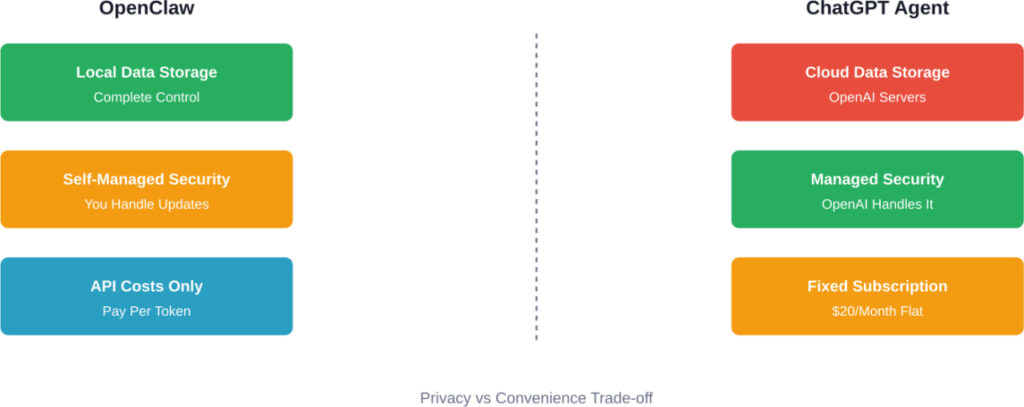
Privacy and security comparison between OpenClaw and ChatGPT Agent architectures
The Pricing Reality Check
ChatGPT Agent costs $20/month. That’s it. Fixed pricing, unlimited tasks within rate limits.
OpenClaw is “free” but not really. You pay for:
- Compute resources (runs on your machine constantly)
- API calls to Claude, GPT-4, or whatever model you connect
- Time to set up and maintain
Community reports suggest API costs range from $10-15/month for moderate use. Some users note electricity costs increase when running agents 24/7.
But here’s the thing: if you’re doing heavy automation – hundreds of tasks daily – OpenClaw becomes cheaper. You’re not constrained by ChatGPT’s rate limits. For light use? ChatGPT wins on total cost.
What You’ll Actually Spend
|
Use Case |
OpenClaw Monthly Cost |
ChatGPT Agent Monthly Cost  |
|---|---|---|
|
Light (10-20 tasks/day) |
$5-10 API + compute |
$20 flat |
|
Moderate (50-100 tasks/day) |
$15-25 API + compute |
$20 flat (may hit limits) |
|
Heavy (200+ tasks/day) |
$40-60 API + compute |
$20 + rate limit frustration |
|
Enterprise scale |
$100-500+ API |
Team pricing ($25-30/user) |
Architecture: Why OpenClaw Can “Act” Differently
This gets into the technical weeds, but it matters.
OpenClaw uses a lane-based queue system. Tasks stay serial instead of turning into complex async patterns. This predictability is crucial for multi-step workflows where order matters.
The three-layer memory I mentioned earlier? L1 is working memory (current task context), L2 is session memory (this work session), L3 is long-term memory (your preferences, project structures, past decisions). This isn’t just conversation history – it’s stateful task memory.
ChatGPT Agent works differently. According to OpenAI’s documentation, it uses a reasoning engine that proactively chooses from a toolbox of agentic skills. It’s more flexible in some ways, more conversational. But it’s fundamentally request-response, even in agent mode.
The Accessibility Tree Approach
OpenClaw can use accessibility trees to interact with web interfaces. This approach is noted in community discussions as more reliable than alternative methods. ChatGPT Agent uses its own methods for web interaction, but the specifics aren’t as openly documented. It works, but you have less visibility into how.
Real Use Cases: Where Each One Wins
Okay, enough theory. What do people actually use these for?
ChatGPT Agent Wins For:
- Research and summarization. You need to understand a complex topic fast. ChatGPT Agent can browse multiple sources, synthesize information, create a briefing document. All conversationally. It’s incredibly fast at this.
- One-off complex tasks. Book a trip that requires checking multiple sites for the best deal. Create a presentation with specific brand guidelines. Draft emails in your writing style. The back-and-forth guidance makes these smooth.
- When you need it right now. No setup. Open the app, start working. For most people, this convenience is worth the $20.
OpenClaw Wins For:
- Persistent monitoring and automation. Community users describe use cases like scanning research repositories for papers in their field, then auto-summarizing relevant ones. This runs continuously without intervention.
- Development workflows. Multiple users mentioned having OpenClaw watch code sessions, automatically run tests, and push passing code to repositories. Workflows like: “Write the script, test it in a Docker sandbox, and if it passes, push it to my GitHub repo.”
- Privacy-critical work. Legal documents, medical data, proprietary business intelligence. If data leaving your infrastructure is a non-starter, OpenClaw is your only option here.
- Custom integrations. The VoltAgent/awesome-openclaw-skills GitHub repository shows the extensibility. Community members have built custom skills for various monitoring and integration tasks.
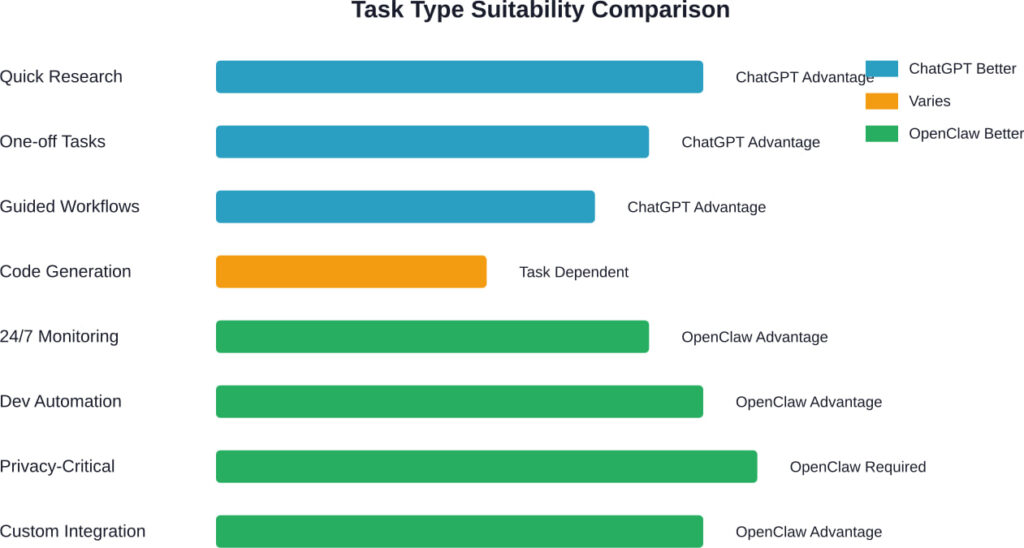
Task type suitability comparison based on tool capabilities
The Setup Experience Gap
Let’s be honest about this.
ChatGPT Agent: sign up, pay $20, start using. Maybe 5 minutes total.
OpenClaw: clone the repo, install dependencies, configure your gateway, connect to an AI model API, set up your memory layers, maybe spin up Docker if you want sandboxed execution. For a developer? Typically an hour or more. For a non-technical user? It’s a barrier.
Community feedback suggests initial setup can be challenging, particularly for users without technical backgrounds. The openclaw-studio dashboard (available on GitHub) helps make management easier, but you’re still self-hosting infrastructure.
Is the Setup Worth It?
Depends on your use case. If you’re running persistent automation that saves you hours weekly? Yes. If you need privacy? Yes. If you’re just curious? Probably start with ChatGPT Agent.
The Capability Boundaries Question
Both systems have limits. Understanding them matters.
ChatGPT Agent can’t run 24/7 without you. It needs your interaction to proceed through tasks. It’s bounded by OpenAI’s rate limits and content policies. It won’t help you with certain tasks OpenAI deems risky.
OpenClaw can theoretically run continuously, but that introduces the predictability problem. As experienced security-conscious practitioners note, the unpredictable nature of LLM outputs requires serious guardrails when given persistent access to systems and infrastructure.
Architecture patterns like multi-channel gateways and extensible tool systems help manage complexity, but you’re still responsible for security implementation.
What About Errors?
ChatGPT Agent fails gracefully. It asks for clarification. It stops and explains why something didn’t work. The conversational nature helps error recovery.
OpenClaw? It depends on your configuration. Serial task queues help prevent cascading failures. But if something breaks while it’s running autonomously, you’re debugging it later. Community feedback mentions that implementation complexity and fragility can be current limitations.
The Comparison Table Everyone Wants
|
Feature |
OpenClaw |
ChatGPT Agent  |
|---|---|---|
|
Deployment |
Self-hosted (your machine) |
Cloud (OpenAI servers) |
|
Privacy |
Complete local control |
Data sent to OpenAI |
|
Setup Time |
1-3 hours (technical) |
5 minutes |
|
Pricing |
API costs + compute ($5-60+/mo) |
$20/month flat |
|
Autonomy |
Runs 24/7 independently |
Requires your guidance |
|
Memory |
3-layer persistent state |
Conversation-focused |
|
Best For |
Dev automation, monitoring |
Research, one-off tasks |
|
Extensibility |
Fully customizable |
OpenAI’s toolset |
|
Rate Limits |
Only API provider limits |
ChatGPT Plus limits apply |
|
Maintenance |
You handle updates/security |
OpenAI handles everything |
Community Insights: What Real Users Say
Community discussions reveal patterns the marketing doesn’t.
Multiple users describe the workflow shift as significant when moving to persistent agents. However, they also acknowledge the learning curve and technical requirements.
ChatGPT users consistently praise the convenience. It “just works” for most common tasks. The $20 feels reasonable for the time saved.
OpenClaw users tend to be more technical and have specific use cases. They’re willing to invest setup time for the long-term automation payoff. Detailed use cases show the creative possibilities of persistent autonomous agents.
The Safety Conversation
There’s active discussion about agent safety in open-source communities. Users advocate for approaches with least-privilege tools, scoped tokens, and isolated execution environments. The broader point: as agents become more autonomous, safety architecture matters more. OpenClaw’s open-source nature means you can audit and modify it. ChatGPT Agent’s closed nature means you trust OpenAI’s safety measures.
Industry Context: The Agentic AI Shift
According to MIT Sloan research on agentic AI, we’re seeing the evolution of AI systems that can take actions autonomously. This represents a significant shift from conversational-only AI. Academic research is actively working on benchmarks and evaluation frameworks for these systems.
Major research institutions are developing benchmarks for evaluating AI agents on real-world tasks. NIST and other standards organizations are publishing guidance on evaluating and comparing agent capabilities. Stanford’s Digital Economy Lab is working on best practices for building and testing agent systems.
This standardization effort signals that agent AI is moving from novelty to mature infrastructure. As agents become more capable and autonomous, rigorous evaluation and safety standards matter increasingly.
Looking Forward: These Products Are Converging
Here’s what’s coming.
OpenAI is adding more agent-like features to ChatGPT. Their Agent Builder in the API lets you build multi-step agent workflows. This brings workflow automation into the ChatGPT ecosystem.
OpenClaw alternatives are getting easier to use. Managed dashboards and more templates reduce setup friction.
In a year, these categories might blur. You might run a hybrid: ChatGPT for conversational tasks, OpenClaw for background automation. Or OpenAI might launch a self-hostable option. Or OpenClaw might offer a managed cloud version.
But right now, the distinction is clear.
Making Your Choice: A Decision Framework
Choose ChatGPT Agent if:
- You want to start using AI agents today with zero setup
- Your tasks are interactive and benefit from back-and-forth guidance
- You’re doing less than 100 tasks daily
- You’re comfortable with cloud-based tools
- You’re a non-technical user
- You value professional support and SLAs
Choose OpenClaw if:
- You need true 24/7 autonomous operation
- Privacy and data control are requirements, not preferences
- You’re running high-volume automation (200+ tasks daily)
- You have technical skills or a dev team
- You need custom integrations with your tools
- You’re willing to manage infrastructure for lower long-term costs
Choose both if:
- You can afford $20/month plus API costs
- You want ChatGPT for daily interactive work and OpenClaw for background automation
- You’re a developer or technical team using agents heavily
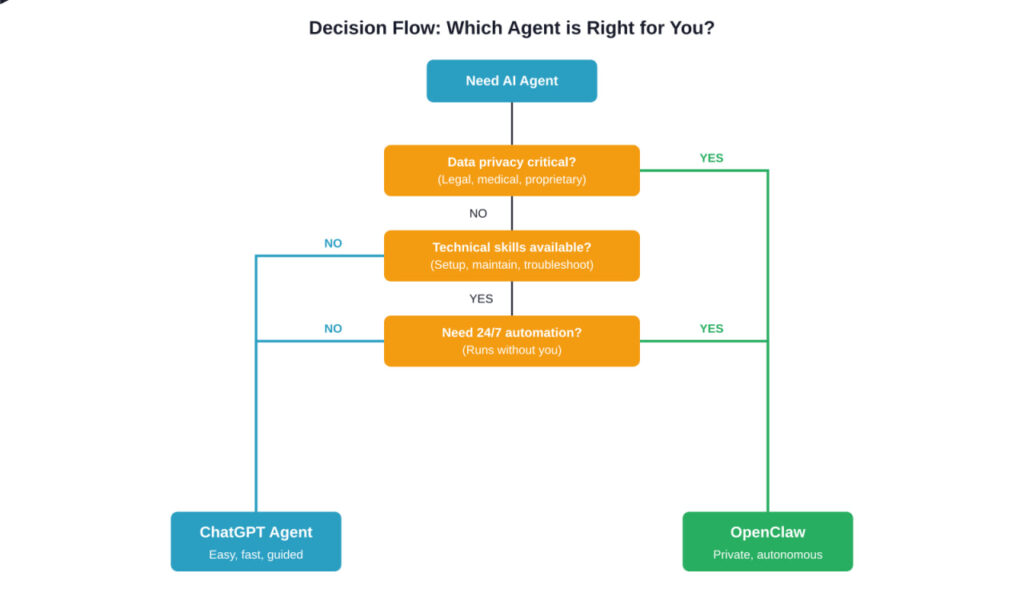
Decision framework to help choose between OpenClaw and ChatGPT Agent
What I Actually Use
Since we’re being honest: I use both.
ChatGPT Agent is my daily driver for research, drafting, quick problem-solving. When I need something done in the next 30 seconds and I’m actively working, ChatGPT wins every time.
OpenClaw runs on a dedicated machine handling three specific automations: monitoring GitHub issues for my projects, processing incoming research papers and flagging relevant ones, and running nightly checks on my deployed services. These tasks happen whether I’m at my desk or not.
Total monthly cost: $20 for ChatGPT Plus, roughly $12 in API costs for OpenClaw, $4 for a used Mac Mini running OpenClaw. $36 total. Worth it for the time saved.
Your math will be different. But that’s the real-world reality.
Conclusion: It’s About Matching Tool to Task
OpenClaw and ChatGPT Agent aren’t competitors. They’re different tools.
ChatGPT Agent is the Swiss Army knife – versatile, reliable, ready instantly. It’s perfect for the 90% of tasks where you need intelligent assistance on demand. The $20/month is reasonable for what you get.
OpenClaw is the specialized power tool – harder to master, but irreplaceable for specific jobs. If you need privacy, customization, or 24/7 autonomous operation, nothing else comes close.
Most people should start with ChatGPT Agent. It works immediately and handles most needs. If you hit its limitations – privacy concerns, rate limits, need for persistent automation – then explore OpenClaw.
Technical users and teams? Consider running both. Use ChatGPT for interactive work, OpenClaw for background automation. The combined cost is still less than many SaaS tools, and the capabilities stack multiplicatively.
The agentic AI revolution is happening now. These tools are your entry point. Choose based on your actual needs, not the hype. Try one, understand its limits, then decide if you need the other.
And whatever you choose, start building the automation habits that will define how you work in the years ahead.
Ready to get started? If you’re going with ChatGPT Agent, sign up at OpenAI’s website. If you’re exploring OpenClaw, start with the official GitHub repository and join the community discussions. Both paths lead to more productive, agent-assisted workflows.
The future of work isn’t about replacing yourself – it’s about extending what you can accomplish. Both OpenClaw and ChatGPT Agent make that possible. Now you know which one fits your situation.
Frequently Asked Questions
Not for most users. OpenClaw excels at autonomous background tasks but requires setup and technical knowledge. ChatGPT Agent’s conversational interface is better for interactive, guided work. They complement each other rather than directly replacing one another. If you only choose one, your decision should be based on whether you prioritize autonomous automation (OpenClaw) or interactive assistance (ChatGPT).
OpenClaw itself is open-source and free, but you’ll pay for compute resources (running it on your machine or a server) and API calls to AI models like Claude or GPT-4. Community reports suggest $5-60+ monthly depending on usage volume. You’ll also invest time in setup and maintenance. ChatGPT Agent is $20/month flat with no surprise costs.
It depends on your workflow. ChatGPT Agent is excellent for interactive coding sessions where you’re discussing approaches and iterating in real-time. OpenClaw is better for automated development tasks like watching your codebase, running tests in Docker sandboxes, and automatically pushing passing code. Many developers use ChatGPT for active coding and OpenClaw for automation.
OpenClaw gives you complete data control since everything runs locally, but you’re responsible for security management. Community discussions highlight security considerations inherent to self-managed systems. ChatGPT Agent sends data to OpenAI’s servers but benefits from their enterprise-grade security infrastructure. Choose based on whether you trust yourself or OpenAI more with security.
Technically yes, but it’s challenging. Setup requires command-line work, configuration files, and troubleshooting. Management dashboards help, but you’ll still face technical barriers. If you’re non-technical, ChatGPT Agent is the practical choice. That said, if you’re motivated to learn, OpenClaw’s documentation and community can help you get started.
According to OpenAI’s documentation, conversations flow through their servers and may be used to improve models unless you opt out in settings. Data is stored on OpenAI’s infrastructure. They have privacy policies and enterprise options with stronger guarantees, but fundamentally, you’re trusting OpenAI with your data. For sensitive work, this may not be acceptable.
Likely. OpenAI is adding more autonomous features to ChatGPT through workflow builders and agentic capabilities. OpenClaw alternatives are becoming more user-friendly. Within 1-2 years, the boundaries will probably blur significantly. But as of now, they remain distinct tools solving different problems.