
If you’re debating between OpenClaw and Claude Code, here’s a reality check – these two tools weren’t built to compete. One handles your life, the other writes your software. The confusion happens because they both speak natural language, run AI models, and claim to make you more productive. But dig a little deeper, and you’ll see they sit in totally different lanes.
Let’s break down how each one works, where it shines, and why the best answer might be to use both without doubling your overhead.
What Are These Tools, Exactly?
OpenClaw is a self-hosted AI gateway that connects your messaging apps (like WhatsApp, Telegram, Slack, and others) to intelligent agents. OpenClaw runs as a self-hosted gateway on your local machine or server. It can automate tasks, respond to messages, summarize emails, and even coordinate across services. It runs as a background daemon and has memory that persists across days.
Claude Code, on the other hand, is a terminal-based agentic coding tool developed by Anthropic. It integrates with your development tools (VS Code, JetBrains, CLI) and helps you write, refactor, debug, and test code. You describe what you want in plain English, and Claude Code takes care of the actual code editing, command execution, and task sequencing. It’s more like a code-savvy teammate that shows up when called.
Comparing Day-to-Day Use: Where OpenClaw and Claude Code Actually Fit
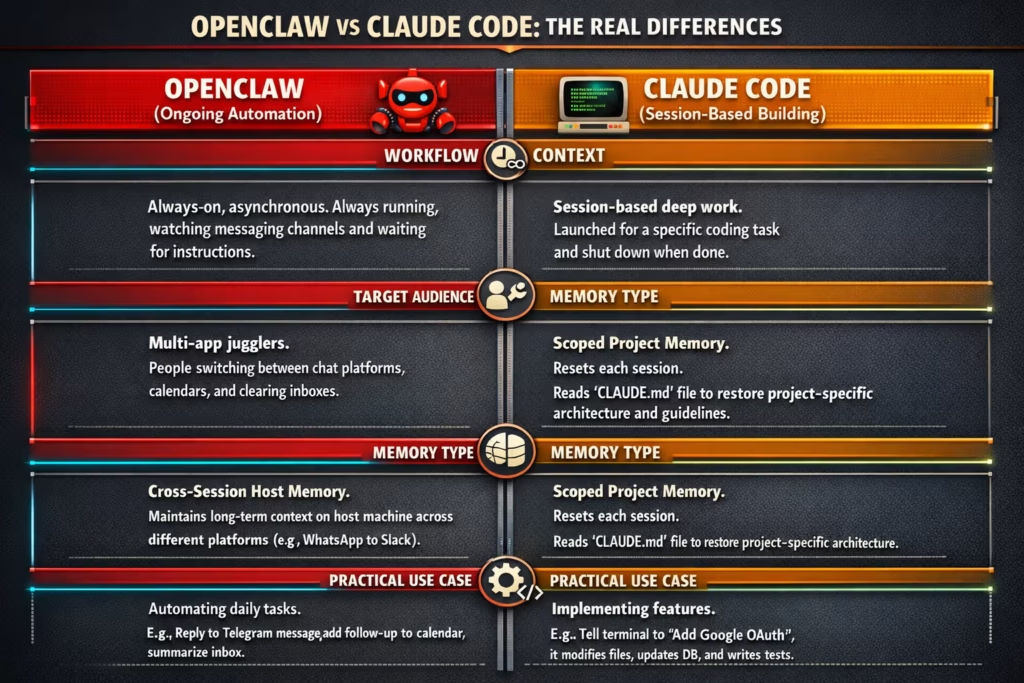
When you’re choosing between OpenClaw and Claude Code, the real difference shows up not in the feature list, but in how they interact with your daily workflow. These tools aren’t fighting for the same role. They operate in different lanes.
The Real Difference Is Context
What sets these tools apart isn’t just their interface. It’s how they fit into your daily work.
OpenClaw thrives on ongoing, asynchronous automation. It’s always running, watching, and waiting for instructions from your messaging channels. Claude Code, by contrast, is session-based. You launch it when you’re deep in a coding task and shut it down when you’re done. It doesn’t check your inbox or remind you of meetings. That’s not its job.
Each tool was built for a very different kind of interaction.
Who Each Tool Is For
Let’s not overthink this.
If you spend your day switching between chat platforms, managing calendars, clearing inboxes, or syncing actions across tools and people, OpenClaw will save you time.
If you spend your day building software, Claude Code will save you sanity.
Of course, a lot of us do both.
Practical Use Cases: Real-Life Scenarios
Here’s how you might use each one in practice.
OpenClaw in Action:
- You receive a Telegram message from a client at 7 AM. OpenClaw can reply automatically and add a follow-up task to your calendar.
- Later, it summarizes your inbox and highlights urgent emails.
- Throughout the day, it helps manage tasks and reminders within each messaging platform using session memory on your host machine.
Claude Code in Action:
- You open your terminal and tell Claude Code to “Add login via Google OAuth.”
- It finds the right files, adds the routes and handlers, updates your database, and writes tests.
- You ask it to clean up deprecated dependencies, and it does that too, suggesting modern replacements.
These aren’t overlapping use cases. They’re complementary.
What About Memory?
This is one of the most underappreciated differences.
OpenClaw maintains session memory on your host machine. It knows what you said on WhatsApp yesterday and can reference it in a Slack conversation today. That kind of cross-session memory makes it perfect for long-running automation.
Claude Code’s memory is more focused. It resets each session, but it does use a file (CLAUDE.md) to store project instructions, architecture decisions, and coding guidelines. So when you re-launch Claude in that project, it reads that file to restore context.
If you’re looking for longevity in task threads, OpenClaw wins. If you want scoped, high-accuracy memory inside a single codebase, Claude Code delivers.
Security: A Big Divider
This is where the gap gets serious.
Claude Code is sandboxed, controlled, and centrally managed by Anthropic. You can define exactly what it’s allowed to touch: which files, which tools, which commands.
OpenClaw gives you full control, but also full responsibility. It’s self-hosted, which means you manage everything: server updates, API keys, plugin security, firewall rules. If you’re not used to running servers safely, it can get risky fast.
So ask yourself: are you willing to manage your own infrastructure? If not, Claude Code is safer out of the box.
Cost Breakdown: Not as Simple as It Looks
On paper, OpenClaw is free. You install it, run it, and pay only for your API usage. But the real cost shows up in time: setup, configuration, hosting, and security maintenance.
Claude Code is bundled with Anthropic subscriptions. The entry point is $20/month (Claude Pro), with Max tiers going up to $200/month. Everything’s managed. You don’t have to think about servers or API tokens.
OpenClaw Cost Breakdown:

- Software: Free
- API usage: ~$10-50/month depending on volume
- Hosting (if needed): ~$5-20/month
- Maintenance time: High
Claude Code Cost Breakdown:
- Claude Pro: $17-$20/month
- Claude Max: From $100/month
- API access and memory: Included
- Maintenance: Minimal
If you’re optimizing for time and predictability, Claude Code is easier to budget for. If you love self-hosting and want full control, OpenClaw gives you more freedom.
OpenClaw vs Claude Code: Comparison Table
Here is a brief comparison to keep in mind.
| Feature | OpenClaw | Claude Code |
| Main Role | Messaging and life automation | AI-powered software development |
| Interface | WhatsApp, Telegram, Slack, etc. | Terminal, IDE (VS Code, JetBrains) |
| Execution Model | Runs 24/7 as a daemon | Launched per session |
| Memory | Persistent across days | Per session, plus project memory files |
| Supported Models | OpenAI, Claude, Gemini, local models | Anthropic models via API |
| Messaging Support | Native multi-platform support | None |
| Security Model | Self-hosted (you manage security) | Sandboxed with permission controls |
| Pricing | Free (open source) + API usage | Subscription-based (Claude Pro/Max) |
| Ideal Use Cases | Email, scheduling, smart home, tasks | Coding, debugging, refactoring, testing |
Is Using Both Together Available? Yes, It Works
Here’s the good news: you don’t have to choose.
Many engineers are already running both tools side by side. OpenClaw for the always-on assistant that handles messaging, email, scheduling, and personal automation. Claude Code for the moments when you sit down to write, test, or clean up code.
Moreover, users can configure OpenClaw to trigger Claude Code tasks via custom setup, but this is not a built-in feature. For example, you can message “fix broken tests” on Telegram, and OpenClaw will run a loop using Claude Code in the background. That kind of coordination makes both tools more powerful when used together.
When to Reach for Each Tool
If you’re trying to decide between OpenClaw and Claude Code, it helps to stop thinking in terms of “either/or” and start thinking about what kind of work you’re doing.
Reach for OpenClaw when you need to:
- Stay on top of messages across platforms like WhatsApp, Telegram, or Slack.
- Summarize and triage your inbox without opening it.
- Schedule meetings, follow up on reminders, or handle recurring tasks.
- Coordinate across apps or systems without jumping between them.
- Control smart devices or trigger routines with a single message.
It’s built for that ongoing, low-friction layer of life – stuff that doesn’t require deep focus but adds up when it’s unmanaged.
Use Claude Code when you want to:
- Spin up a new feature from a plain-language description.
- Refactor messy code without spending hours reading it first.
- Debug complex errors that span multiple files.
- Automate your Git workflow – commits, branches, PRs.
- Work on technical projects without writing every command manually.
It’s not trying to be your assistant. It’s trying to be your pair programmer.
And if your day flips between both kinds of work, which, let’s be honest, most days do, there’s no need to pick sides. Use OpenClaw for the chatter and clutter. Use Claude Code for the focused build sessions.
They don’t get in each other’s way. If anything, they help you stay in rhythm.
Final Thoughts
OpenClaw and Claude Code were never built to compete. They’re solving different problems with different approaches, and trying to pick a “winner” misses the point.
If your work is mostly development-focused, Claude Code will make you faster. If your biggest bottleneck is juggling too many small tasks across too many platforms, OpenClaw can take some of that off your plate.
And if you live in both worlds? It’s not overkill to run both. It’s just smart automation.
FAQ
Not really. OpenClaw can trigger dev tasks (like telling Claude Code to run a script), but it doesn’t understand your codebase. It’s built for automation and coordination, not file editing or code generation. If you’re writing or debugging software, Claude Code is still the right tool.
Not if you split their roles clearly. Use OpenClaw for day-to-day automation, like replying to messages or clearing your inbox. Use Claude Code when you’re in dev mode and need help inside a project. They complement each other more than overlap.
You’ll need to be comfortable with self-hosting. That means installing it on your machine (or server), plugging in your API keys, and handling basic security. It’s not hard, but it’s not a simple push-button either. If you don’t enjoy configuring things, it may not be for you.
It uses a CLAUDE.md file in your project folder. That file stores project-specific context like architecture choices, naming patterns, or pending tasks. So when you relaunch Claude Code, it can pick up those details again, even if the session itself doesn’t persist memory.
OpenClaw is free to install but you’ll pay for the model API usage and possibly hosting. Claude Code comes with an Anthropic subscription, starting at nearly $20/month, which bundles everything together. One gives you control and flexibility, the other gives you convenience.
Not exactly. Since it’s self-hosted, you’re on the hook for securing it – firewalls, updates, plugin hygiene, the whole deal. There have been real vulnerabilities in the past. It’s powerful, but it comes with responsibility.
For Claude Code, yes, it’s designed for developers or folks working inside codebases. For OpenClaw, not necessarily. You can get a lot done by sending it simple commands or connecting it to workflows, even without writing any code.