
The AI development tools market in 2026 has split into distinct categories, and nowhere is this clearer than when comparing OpenClaw and Cursor. Developers searching for “OpenClaw vs Cursor” often assume these tools compete directly. They don’t.
Here’s the thing though—they operate in completely different layers of your workflow. OpenClaw runs autonomous tasks on your machine, browser, and messaging platforms. Cursor edits your code with AI assistance inside an IDE. Understanding this distinction matters because choosing the wrong tool wastes time and money.
This guide breaks down what each tool actually does, where they excel, and when you’d use one over the other. Real talk: most developers end up using both.
What OpenClaw and Cursor Actually Do
OpenClaw is an open-source autonomous AI agent that executes tasks at the operating system level. It handles browser automation, scheduled jobs, API integrations, messaging workflows, and system operations. Think of it as an AI assistant that runs independently on your VPS or local machine, executing commands and workflows you’ve defined.
According to comparison data from AI Tool Discovery, OpenClaw’s primary function centers on “OS/browser/messaging automation” that operates “outside the IDE.” You deploy it once, configure your workflows, and it runs continuously.
Cursor is an AI-native code editor—essentially a fork of VS Code with deep AI integration. According to the official Cursor website, it’s “built to make you extraordinarily productive” with features like multi-file code editing, context-aware completions, and AI agents that understand your entire codebase.
The workflow location difference matters. OpenClaw automates infrastructure and external tasks. Cursor accelerates the actual code-writing process inside your development environment.
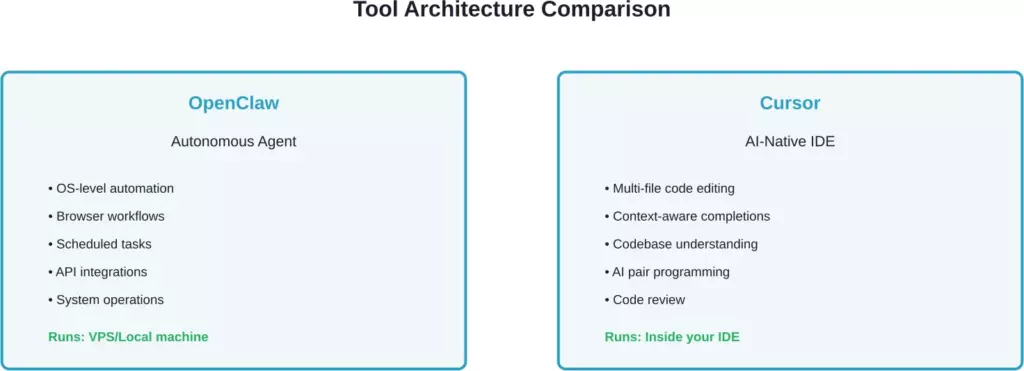
OpenClaw operates at the system level while Cursor works within your development environment
Core Functionality Breakdown
How OpenClaw Works
OpenClaw operates as a self-hosted or VPS-deployed agent. You write workflows defining what you want automated—API calls, browser scraping, data processing, file operations, scheduled reporting. The agent executes these tasks continuously without human intervention.
Being open-source, you control deployment, data privacy, and customization. But that means you handle infrastructure setup, maintenance, and scaling yourself.
Common OpenClaw use cases include automated testing across environments, periodic data syncing between services, monitoring dashboards that trigger alerts, and batch processing workflows. It’s infrastructure automation, not code writing.
How Cursor Works
Cursor integrates AI directly into the code editor. According to the official Cursor documentation, features include access to frontier models from OpenAI, Anthropic, and Google, with capabilities like multi-agent collaboration and semantic search published in 2026.
The IDE understands your codebase context. When you ask it to refactor a function, it sees related files, dependencies, and usage patterns. The AI suggests completions as you type, answers questions about your code, and can generate entire features across multiple files.
What makes Cursor different from traditional IDEs? The AI isn’t bolted on—it’s foundational. Shadow workspaces let the AI test changes without affecting your main code. Subagents handle specific tasks while you keep working.
Pricing Comparison: What You’ll Actually Pay
Cost structures differ fundamentally because these tools serve different functions.
| Cost Component | OpenClaw | Cursor |
|---|---|---|
| Base Software | Free (open-source) | Free (Hobby tier) |
| Hosting | $5-24/mo VPS required | Included |
| API Costs | $1-200+/mo (usage-based) | Included in paid tiers |
| Pro Tier | N/A | $20/mo per user |
| Business Tier | N/A | $40/mo per user |
| Enterprise | Self-hosted (your infra) | Custom pricing |
According to AI Tool Discovery, OpenClaw’s pricing model is “Free OSS + VPS $5-24/mo + API $1-200+/mo” while Cursor offers “Free trial, Pro $20/mo, Business $40/mo.”
Here’s what that means practically. With OpenClaw, you pay for hosting infrastructure and the AI models you call via API. A lightweight deployment might cost $10/month total. Heavy automation with frequent Claude or GPT-4 calls could hit $200+.
Cursor’s official pricing page lists four tiers. The free Hobby plan includes limited Agent requests and Tab completions. Pro at $20/month provides extended Agent limits, unlimited Tab completions, and cloud Agents. Pro+ at $60/month (labeled “Pro+ Recommended” on official pricing) offers 3x usage on all models. Ultra at $200/month includes 20x usage and priority feature access.
For teams, Cursor Teams costs $40 per user monthly and includes shared chats, centralized team billing, usage analytics and reporting, and role-based access control according to the official pricing page.
Feature Comparison: Where Each Tool Wins
Where OpenClaw Excels
OpenClaw dominates automation outside the development environment. Need to scrape competitor pricing daily? Pull data from five APIs, transform it, and post to Slack? Run integration tests across staging environments every hour? OpenClaw handles these workflows naturally.
The open-source nature means unlimited customization. You’re not constrained by a vendor’s roadmap—if you need specific functionality, you build it or integrate an existing library.
Data privacy sits entirely in your control. For regulated industries or sensitive codebases, self-hosting means no code leaves your infrastructure. According to Viable Edge’s comparison, OpenClaw provides “full system access” with a “self-hosted” deployment model.
Where Cursor Excels
Cursor wins decisively for actual code writing and editing. The multi-file awareness means you can say “add authentication to this API” and it modifies routes, middleware, database models, and tests across your codebase consistently.
Context window maximization matters. According to the official Cursor documentation, Pro users get “maximum context windows,” allowing the AI to understand larger portions of your project simultaneously.
The agent features published in 2024 and 2025—shadow workspaces, multi-agent collaboration, reinforcement learning—make Cursor particularly strong for complex refactoring and feature implementation that requires understanding intricate dependencies.

Each tool dominates different capability areas with minimal overlap
When to Choose OpenClaw Over Cursor
Choose OpenClaw when your primary need involves automation outside the code editor.
Scenarios include:
- Infrastructure monitoring: Continuous checks on server health, database performance, or API uptime with automated alerts
- Data pipeline automation: Scheduled ETL jobs, data syncing between services, or periodic report generation
- Browser automation: Web scraping, UI testing, or interaction workflows that require navigating actual web pages
- Cross-service orchestration: Workflows spanning multiple APIs, databases, and external services
- Maximum privacy requirements: Regulated industries where code and data cannot leave your infrastructure
OpenClaw Blog Space notes that OpenClaw is “an autonomous AI assistant that runs on your machine,” making it ideal for developers who need background automation running continuously.
When to Choose Cursor Over OpenClaw
Choose Cursor when your bottleneck is writing, refactoring, or understanding code.
Use cases include:
- Active development work: Building features, fixing bugs, or implementing new functionality
- Codebase refactoring: Modernizing legacy code, improving architecture, or updating dependencies across files
- Learning unfamiliar codebases: Understanding how a project works, finding relevant code sections, or documenting functionality
- Pair programming acceleration: Having an AI assistant suggest implementations, catch errors, or offer alternative approaches
- Team collaboration needs: Shared AI sessions, centralized billing, and usage analytics (Teams plan features)
According to authoritative comparison data, Cursor targets “Software Developers, Students, AI Enthusiasts” who need code assistance directly in their editor.
The Complementary Workflow: Using Both Together
Here’s where it gets interesting. Many developers deploy both because they solve different problems in the same workflow.
A typical complementary setup looks like this:
- Morning: Use Cursor to implement a new API endpoint with authentication, database models, and tests. The AI helps you write clean, well-structured code across multiple files.
- Afternoon: Deploy the code. OpenClaw takes over, running automated integration tests against your staging environment, checking performance metrics, and posting results to your team’s Slack channel.
- Overnight: OpenClaw monitors production, scrapes competitor feature updates, and generates a morning report. You wake up to compiled intelligence without lifting a finger.
- Next day: Back in Cursor, you use that intelligence to plan new features, with the AI helping you implement them efficiently.
This workflow combines Cursor’s code-writing strength with OpenClaw’s automation capabilities. They don’t compete—they amplify each other.
Security and Privacy Considerations
Security models differ significantly between these tools.
OpenClaw Security Profile
Self-hosted deployment means you control data flow completely. Code never leaves your infrastructure unless you explicitly configure external API calls. For enterprises with strict compliance requirements, this architecture provides the highest security posture.
But that security comes with responsibility. You manage access controls, secrets management, network security, and infrastructure hardening. There’s no vendor handling security updates—that’s on you.
Cursor Security Profile
Cursor operates as a cloud-connected IDE. Code and context get sent to AI models for processing. According to the official website, Enterprise plans include “org-wide privacy mode controls” and “SAML/OIDC SSO.”
The vendor manages infrastructure security, but you’re trusting them with code visibility. For open-source projects or non-sensitive work, this trade-off favors convenience. For proprietary algorithms or regulated data, evaluate carefully.
Performance and Scalability
Performance characteristics reflect architectural differences.
OpenClaw performance depends entirely on your hosting setup. A $5/month VPS handles lightweight automation fine. Heavy workloads need beefier infrastructure, but you scale exactly to your needs—no overpaying for unused capacity.
Cursor performance stays consistent across users since infrastructure is managed. The free tier has usage limits, but paid plans provide predictable performance. According to the official pricing page, Ultra plan users get “priority access to new features,” potentially including performance optimizations.
Integration Ecosystems
Integration capabilities align with each tool’s purpose.
OpenClaw integrates with anything that has an API or can be automated via scripts. Browser automation works with any web application. File system access means integration with local tools. The flexibility is nearly unlimited because you’re writing custom workflows.
Cursor integrates deeply with version control systems, terminals, and development workflows. According to official documentation, features like “Cursor CLI” and “code review” are available in Pro and higher tiers.
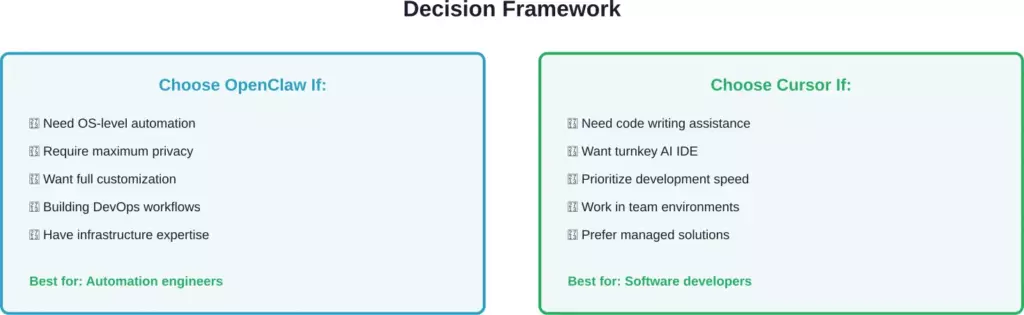
Decision criteria mapped to tool strengths and target users
Making Your Decision
The “OpenClaw vs Cursor” question assumes you need to pick one. You don’t.
These tools solve different problems. Cursor accelerates code writing and editing inside your development environment. OpenClaw automates operational tasks outside it. Most developers who try both end up keeping both because they’re complementary, not competitive.
Start by identifying your actual bottleneck. Is it writing code? Get Cursor. Is it repetitive automation and infrastructure tasks? Deploy OpenClaw. If both sound valuable, the free tiers let you experiment risk-free.
The AI development tools landscape continues evolving rapidly. According to official Cursor documentation, they published “secure codebase indexing” and “semantic search” (with semantic search published in 2026), showing active development. OpenClaw’s open-source nature means community-driven evolution.
Your workflow needs matter more than tool hype. Evaluate honestly what slows you down, test the tools that address those specific friction points, and build your stack around solving real problems rather than collecting trendy software.
Ready to try them? Download Cursor from the official website to get started with AI-assisted coding. For OpenClaw, check the open-source repository and deployment documentation to set up your first autonomous workflows. Both tools offer enough free tier access to determine if they fit your needs before committing financially.
Frequently Asked Questions
No. OpenClaw isn’t a code editor—it’s an automation agent. It can’t provide AI-assisted code completions, refactoring suggestions, or IDE features. For writing code, you still need an editor like Cursor, VS Code, or another IDE. OpenClaw handles automation tasks outside the editor.
Cursor requires internet connectivity for AI features since it calls cloud-based models. You can use it as a basic code editor offline, but the AI assistance—completions, agents, chat—won’t function without network access. OpenClaw’s connectivity needs depend on your workflows and whether they require external API calls.
Cursor provides built-in access to frontier models from OpenAI, Anthropic, and Google according to official documentation. OpenClaw uses whatever models you configure via API—you have complete flexibility but must set up and pay for API access separately. Cursor’s advantage is convenience; OpenClaw’s is unlimited choice.
Absolutely, and many developers do. Use Cursor for hands-on development work—writing features, refactoring, debugging. Use OpenClaw for background automation—testing, monitoring, data processing, integration workflows. They operate in different layers of your stack and complement each other naturally.
For OpenClaw, watch VPS costs as workloads scale and API expenses if you’re calling models frequently. A workflow making 10,000 API calls monthly with GPT-4 could cost $100+ just in API fees. For Cursor, the hidden cost is learning curve and potential vendor lock-in—your workflow becomes dependent on their platform and pricing.
Cursor wins for development team collaboration with its Teams plan at $40 per user monthly. According to the official pricing page, this includes shared chats, centralized team billing, usage analytics and reporting, and role-based access control. OpenClaw works for team automation but lacks built-in collaboration features—you’d handle coordination through your existing tools.
According to authoritative comparison sources, Windsurf and Claude Code are closer competitors to Cursor—they’re all AI-enhanced development environments. OpenClaw remains distinct as an autonomous agent rather than an IDE. Windsurf emphasizes flow state, Claude Code (formerly Claude.ai with code features) focuses on conversational coding, and Cursor prioritizes deep codebase understanding.