
Quick Summary: Deleting the App Store from your iPhone or iPad doesn’t permanently remove it from your device. The app moves to the App Library, where you can easily restore it to your home screen. According to Apple Support, with iOS 14 or later, iPadOS, and watchOS 9.4 or later, you can delete some built-in Apple apps, including the App Store in EU regions under the Digital Markets Act.
The panic that sets in when the App Store icon vanishes from your home screen is real. But here’s the thing—deleting the App Store isn’t the catastrophic mistake it might seem.
Thousands of iPhone users accidentally delete this essential app and wonder if their device is now permanently broken. The short answer? Not even close.
Let’s break down exactly what happens when you remove the App Store, how to get it back, and what this means for your device’s functionality.
Can You Actually Delete the App Store?
Yes, but with important caveats. According to Apple Support documentation, with iOS 14 or later, iPadOS, and watchOS 9.4 or later, you can delete some built-in Apple apps from their devices. The App Store is among them, though this capability varies by region.
In the European Union, the Digital Markets Act introduced new rules that give users more control over default apps. As reported by tech publications in April 2025, iPhone users in EU countries gained expanded abilities to remove core Apple apps, including the App Store.
Outside the EU, deleting the App Store works differently. The app doesn’t vanish completely—it just moves out of sight.
What Actually Happens When You Delete It
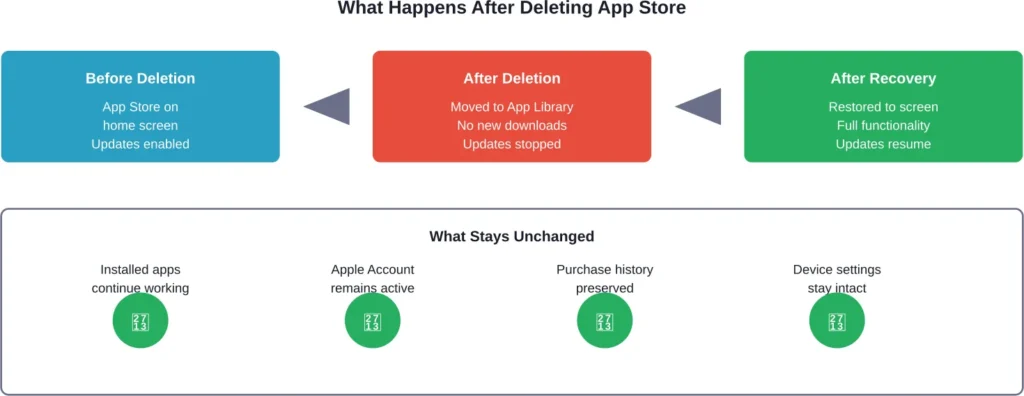
When you remove the App Store from your home screen, the app relocates to the App Library. This is the alphabetically organized collection of all your apps that lives on the rightmost screen of your iPhone or iPad.
Here’s what changes on your device:
- The App Store icon disappears from your home screen and dock
- You cannot download new apps or update existing ones
- Previously installed apps continue functioning normally
- Automatic app updates stop working
- In-app purchases may be affected for certain applications
According to Apple Support, when you delete a built-in app, you also remove any related user data and configuration files. This can affect related system functions.
But wait. There’s something crucial community discussions reveal that official documentation doesn’t emphasize—your Apple Account remains intact, and all your app purchase history stays connected to your account.
How to Recover the App Store
Recovery is quick. Apple Support documentation confirms multiple recovery methods that work across iOS versions.
Method 1: Use the App Library
The fastest approach is accessing the App Library directly. Swipe left past all your home screens until you reach the App Library. Look for the “Utilities” folder or use the search bar at the top.
Type “App Store” in the search field. When the icon appears, touch and hold it, then drag it back to your home screen. Recovery takes seconds using the App Library method.
Method 2: Spotlight Search
Swipe down from the middle of your home screen to open Spotlight. Type “App Store” and the app will appear in search results. Touch and hold the icon, then select “Add to Home Screen” from the menu that appears.
Method 3: Settings Reset
If the App Library method fails, navigate to Settings > General > Transfer or Reset iPhone > Reset > Reset Home Screen Layout. This returns all built-in apps to their default positions.
Real talk: this method resets your entire home screen organization, so use it as a last resort.
| Recovery Method | Time Required | Home Screen Impact | Best For |
|---|---|---|---|
| App Library | Seconds | None | Quick recovery |
| Spotlight Search | 15 seconds | None | Alternative method |
| Settings Reset | 30 seconds | Resets all icons | Last resort option |
Common Issues After Deletion
Community discussions on Apple forums reveal recurring problems users encounter after accidentally deleting the App Store.
Community discussions reveal users report concerns about device functionality after accidental deletion, though recovery is straightforward.
Another common issue involves automatic updates. Once the App Store is deleted, background updates stop completely. Apps with critical security patches won’t update until you restore the App Store.
Some users report that managing subscriptions becomes more difficult without direct App Store access. While active subscriptions continue charging, managing or canceling them requires using Settings > Your Name > Subscriptions, a workaround that many users don’t realize exists.
Why This Feature Exists
The ability to delete built-in apps wasn’t always available. Apple introduced this capability with iOS 14.
According to reporting from April 2025, the EU’s Digital Markets Act pushed Apple to offer even more flexibility. European users gained rights to remove core system apps, including the App Store itself, as part of broader efforts to reduce platform lock-in.
Outside the EU, the feature serves a different purpose—helping users declutter their home screens without permanently removing system functionality.
What About Android Devices?
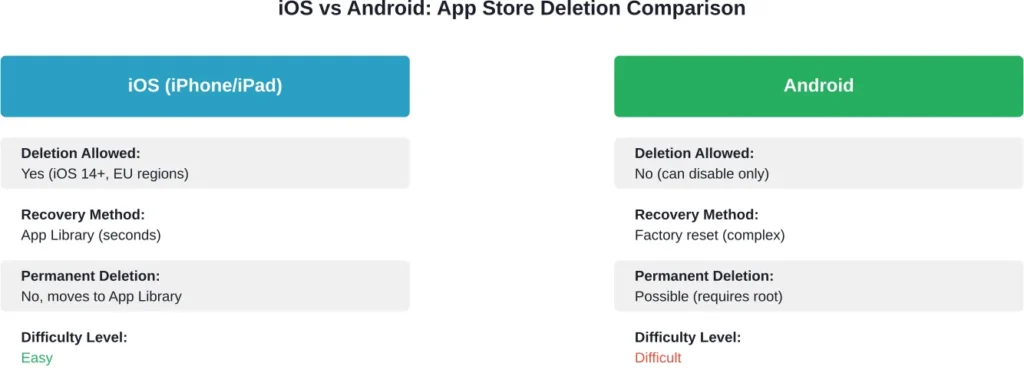
Google Play Store deletion works differently on Android devices. According to Google Play Help documentation, the Play Store cannot be deleted on most Android devices through normal methods.
Some Android manufacturers allow disabling the Play Store, which hides the icon and stops the app from running. However, this isn’t true deletion.
Community discussions on Google Support forums show that users who accidentally uninstalled the Play Store typically need to perform a factory reset or use developer tools to reinstall it—a much more complicated process than iOS recovery.
Frequently Asked Questions
No. When you delete the App Store on iOS devices, the app moves to the App Library but doesn’t actually remove the files from your device. Storage space remains unchanged.
No. According to Apple Support, all previously installed apps continue functioning normally after App Store deletion. Only new downloads and updates are affected.
Not on most iOS devices. The app relocates to the App Library rather than being completely removed. In EU regions with expanded deletion rights, the process may differ, but recovery options remain available.
Generally speaking, active in-app purchases and subscriptions continue working. However, initiating new purchases or managing existing subscriptions becomes more difficult without direct App Store access.
Recovery is quick using the App Library method. Simply swipe to the App Library, search for “App Store,” and drag the icon back to your home screen.
Automatic updates stop completely when the App Store is deleted. Apps won’t receive security patches or feature updates until you restore the App Store to your home screen.
According to Google Play Help documentation, the Play Store cannot be deleted through normal methods on most Android devices. Users can disable it, which hides the icon, but reinstalling requires more complex procedures than iOS recovery.
Final Thoughts
Deleting the App Store isn’t the disaster it appears to be. The app moves to your App Library, where it waits patiently for you to restore it.
Recovery is quick. Your apps keep working, your Apple Account stays active, and your purchase history remains intact.
That said, operating without the App Store limits your device’s functionality. Security updates stop, new app downloads become impossible, and subscription management gets complicated.
If you’ve accidentally deleted the App Store, use the App Library recovery method outlined above. If you’re considering deletion intentionally, understand that you’re sacrificing update capabilities for home screen minimalism.
Need to restore your App Store right now? Swipe left to the App Library, search for it, and drag it back. Problem solved.