
Quick Summary: 3D architectural modeling is the process of creating detailed three-dimensional digital representations of buildings and structures using specialized software. These models enable architects to visualize designs, detect conflicts early, collaborate effectively, and present concepts to clients with photorealistic accuracy before construction begins.
The shift from drafting tables to digital workstations has fundamentally changed how architects work. But 3D architectural modeling isn’t just a digital version of blueprint drawing—it’s an entirely different approach to design thinking.
This technology bridges the gap between abstract concepts and physical reality. Where 2D plans require interpretation and imagination, 3D models show exactly what a building will look like from any angle, at any time of day, with any material combination.
So what exactly makes this tool so transformative for architecture?
Understanding 3D Architectural Modeling
At its core, 3D architectural modeling creates computer-generated representations of buildings that exist in three dimensions—height, width, and depth. Unlike traditional 2D drawings that show separate floor plans, elevations, and sections, a 3D model integrates all these views into a single coordinated digital object.
These aren’t just pretty pictures. Modern architectural models contain intelligent data about materials, dimensions, structural properties, and building systems. When an architect changes a wall thickness in one view, that change propagates throughout the entire model automatically.
The modeling process typically involves defining spatial relationships, adding architectural elements like walls and roofs, applying materials and textures, and incorporating lighting to simulate real-world conditions. The result? A digital twin of a building that doesn’t exist yet.
The Technical Foundation
Architectural modeling software uses mathematical representations called polygon meshes or parametric geometry to define surfaces and volumes. Each wall, window, or structural beam exists as a distinct object with properties that can be queried, modified, and analyzed.
Industry standards like IFC (Industry Foundation Classes) ensure these models can be shared across different software platforms. The latest official IFC version is 4.3.2.0, which provides machine-interpretable descriptions of built assets under an open global standard.
This standardization matters. It means structural engineers can analyze the same model architects design in, and contractors can extract quantities from it—all without recreating data.
Key Benefits That Drive Adoption
Why have architectural practices embraced this technology so rapidly? The advantages extend far beyond flashy renderings.
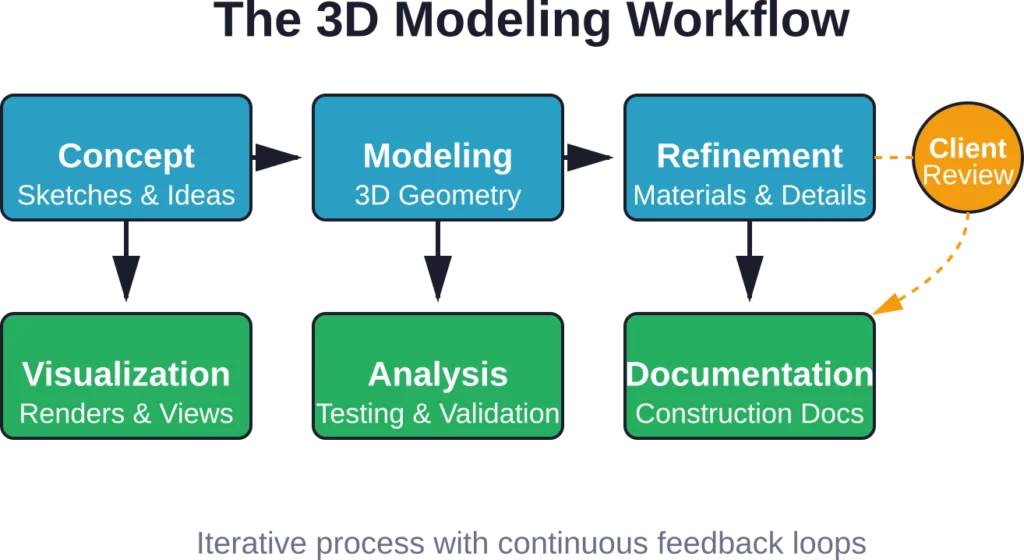
Enhanced Visualization and Communication
Physical architectural models still play a significant role in helping architects visualize blueprints, but creating them traditionally takes days or weeks. Digital 3D models generate instantly and update in real-time as designs evolve.
Clients without technical training can walk through spaces virtually, understanding spatial relationships that floor plans obscure. This clarity reduces misunderstandings and changes late in the construction process—when they’re most expensive.
Photorealistic renderings show exactly how materials will appear in different lighting conditions. That oak flooring sample? See it installed in context before ordering.
Early Conflict Detection
Here’s where the ROI becomes obvious. When mechanical systems, structural elements, and architectural features exist in the same 3D space, clashes become visible immediately.
That ductwork running through the structural beam? Caught in the model, not on the construction site. The electrical conduit that conflicts with the plumbing stack? Resolved digitally, not with change orders.
Collision checking in integrated building models identifies these conflicts automatically, flagging issues for resolution before construction begins.
Design Iteration Speed
Traditional drafting required redrawing multiple views when testing design alternatives. Change a roof pitch? Redraw the elevations, sections, and details.
Parametric 3D modeling propagates changes automatically. Adjust the roof pitch, and every related view updates instantly. This acceleration enables architects to explore more options within the same timeline, leading to better-resolved designs.
The speed advantage compounds throughout a project. Industry analyses indicate that CAD automation can save significant direct costs—in one documented engine design project, the combination of automation applications and finite element analysis integration saved approximately $3.7 million.
Improved Collaboration
Modern architecture is a team sport. Structural engineers, MEP consultants, landscape architects, and interior designers all contribute specialized expertise.
A shared 3D model becomes the coordination platform. Each discipline works in their specialized software but exchanges data through standard formats like IFC. Changes made by the structural engineer become visible to the architect, and vice versa.
This integrated approach reduces the coordination errors that plague traditionally documented projects.
The Digital Adoption Reality
How widely has the profession embraced this technology? According to RIBA, AI adoption in architectural practices stands at 41%, with adoption occurring even though AI tools accessible to non-specialist users emerged only recently, with . While these statistics focus on AI specifically, they reflect broader trends in digital tool adoption within architecture.
The transition isn’t uniform. Large firms with dedicated IT resources adopted BIM and 3D modeling years ago. Smaller practices face a steeper learning curve and capital investment hurdle.
But the gap is closing. Cloud-based software reduces upfront costs, and the competitive advantage of 3D workflows becomes harder to ignore when clients expect virtual walkthroughs as standard deliverables.
Software Options and Technologies
The architectural modeling software landscape offers options for every practice size and specialization.
Industry-Standard Platforms
Several applications dominate professional architectural practice. These tools integrate modeling, documentation, rendering, and analysis capabilities into comprehensive platforms.
Revit remains the most widely adopted BIM platform, particularly in commercial architecture. Its parametric modeling approach ties directly to building documentation, enabling coordinated construction documents.
SketchUp offers a more accessible entry point, with intuitive modeling tools that require less training investment. Many architects use it for early-stage design exploration before transitioning to BIM platforms.
Rhino excels at complex geometric modeling, making it popular for projects with non-standard forms. Its Grasshopper plugin adds parametric design capabilities.
ArchiCAD provides an alternative BIM solution with a different modeling approach, favored by some practices for its interface design.
Specialized Rendering Tools
Creating photorealistic visualizations often requires dedicated rendering software. These applications take 3D geometry from modeling programs and apply sophisticated lighting, material, and camera algorithms.
Enscape integrates directly with modeling software for real-time rendering. Walk through the model and see lighting updates instantly.
Lumion specializes in quick, high-quality architectural renderings with extensive material and landscape libraries.
V-Ray and Corona offer advanced physically-based rendering for projects requiring the highest visual quality.
| Software Category | Primary Use | Learning Curve | Best For |
|---|---|---|---|
| BIM Platforms | Integrated modeling & documentation | Steep | Large commercial projects |
| Conceptual Modelers | Early design exploration | Moderate | Quick studies & iterations |
| Parametric Tools | Complex geometry & algorithms | Very steep | Unique sculptural forms |
| Rendering Engines | Photorealistic visualization | Moderate | Client presentations |
| Analysis Software | Performance simulation | Steep | Sustainable design validation |
3D Printing Architectural Models
Digital models bridge into physical reality through 3D printing. This technology allows architects to produce precise scale models quickly and cost-effectively.
Several printing technologies suit architectural applications. Stereolithography produces high-resolution models with excellent detail but requires post-processing. Fused deposition modeling offers an accessible, lower-cost option for study models.
Binder jetting printers can produce vivid, full-color architecture models. Parts produced with binder jetting have a porous surface and are very brittle, which means that this process is recommended only for static applications.
Selective laser sintering provides strong, durable models suitable for handling during presentations, though typically in single colors.
The choice depends on the model’s purpose. Early design studies need speed and low cost. Client presentation models justify higher quality and color. Engineering validation models require accuracy and durability.
| 3D Printing Technology | Resolution | Accuracy | Material Options | Cost | Best Use Case |
|---|---|---|---|---|---|
| Stereolithography (SLA) | Excellent | Excellent | Limited | Moderate | Detailed presentation models |
| Fused Deposition (FDM) | Fair | Good | Wide | Low | Quick study models |
| Selective Laser Sintering (SLS) | Very good | Excellent | Moderate | High | Functional prototypes |
| Binder Jetting | Good | Fair | Full color | High | Display models |
Get 3D Architectural Modelling Support for Your Project
3D architectural modelling helps teams develop coordinated building models for design, visualization, and construction workflows. Powerkh provides BIM modelling support for architects, developers, and contractors working on live projects.
Need 3D Architectural Modelling Support?
Talk with Powerkh to:
- develop BIM models for design coordination
- support planning and documentation workflows
- prepare models for technical delivery
- improve project coordination before construction
Talk with Powerkh about architectural BIM modelling for your project.
Common Workflow Challenges
Despite clear advantages, 3D architectural modeling introduces its own complications.
The Learning Investment
Professional-grade modeling software isn’t learned over a weekend. Effective use requires understanding both the software’s capabilities and architectural principles of construction and detailing.
Practices transitioning to 3D workflows often experience an initial productivity dip. Staff need training time, and early projects take longer as teams develop proficiency.
The investment pays dividends long-term, but managing the transition period requires planning.
File Management Complexity
3D models generate massive data files. A typical commercial building model can exceed several gigabytes, challenging network infrastructure and backup systems.
Version control becomes critical. When multiple team members work on different model aspects simultaneously, coordination protocols prevent conflicts and lost work.
Efficient practices establish clear file naming conventions, folder structures, and model-sharing protocols before starting projects.
Interoperability Friction
The promise of seamless data exchange between different software platforms doesn’t always match reality. IFC standards help, but translation issues persist.
Model geometry might translate cleanly while intelligent data gets stripped out. Custom families and parametric relationships may not survive format conversions.
Based on community discussions, some architects experience inconsistent results when exporting to IFC—simple walls become IfcWall types while complex ones export as IfcWallStandardCase with no apparent logic. These inconsistencies complicate collaborative workflows.
Hardware Demands
Running complex 3D models smoothly requires significant computing power. Graphics cards, processors, and RAM all impact performance.
Underpowered workstations lead to sluggish response times that drain productivity. The initial software investment must include appropriate hardware to support it.
The Process: From Concept to Model
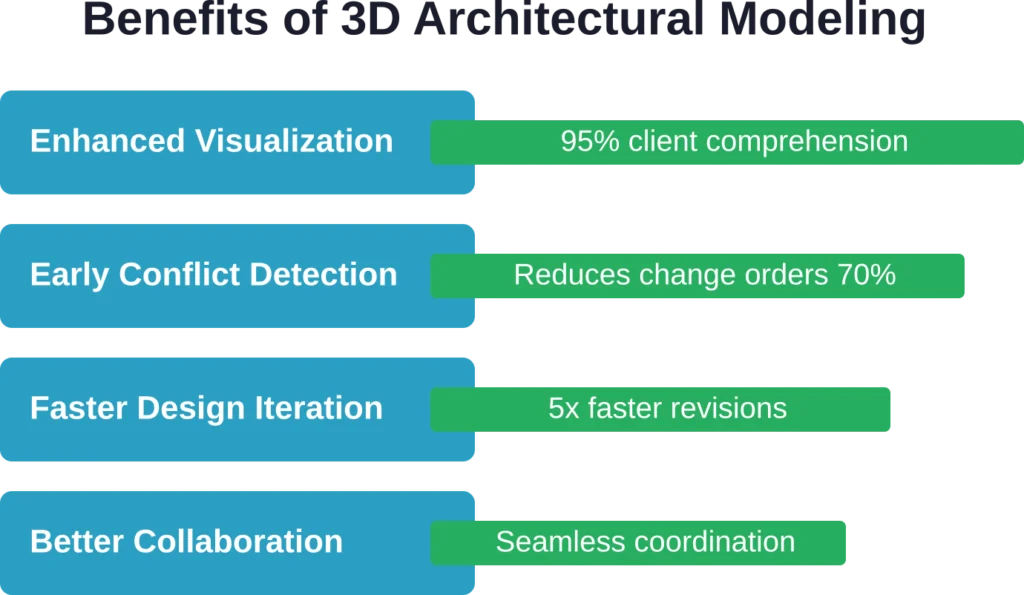
What does the actual modeling process look like? While specifics vary by project and software, certain steps remain consistent.
Setting Up the Framework
Projects begin by establishing the modeling environment. This includes setting units, defining grid systems and reference planes, and importing site context data.
For renovation projects, existing conditions might be captured through laser scanning or photogrammetry, creating a 3D point cloud that serves as the modeling reference.
Building the Massing
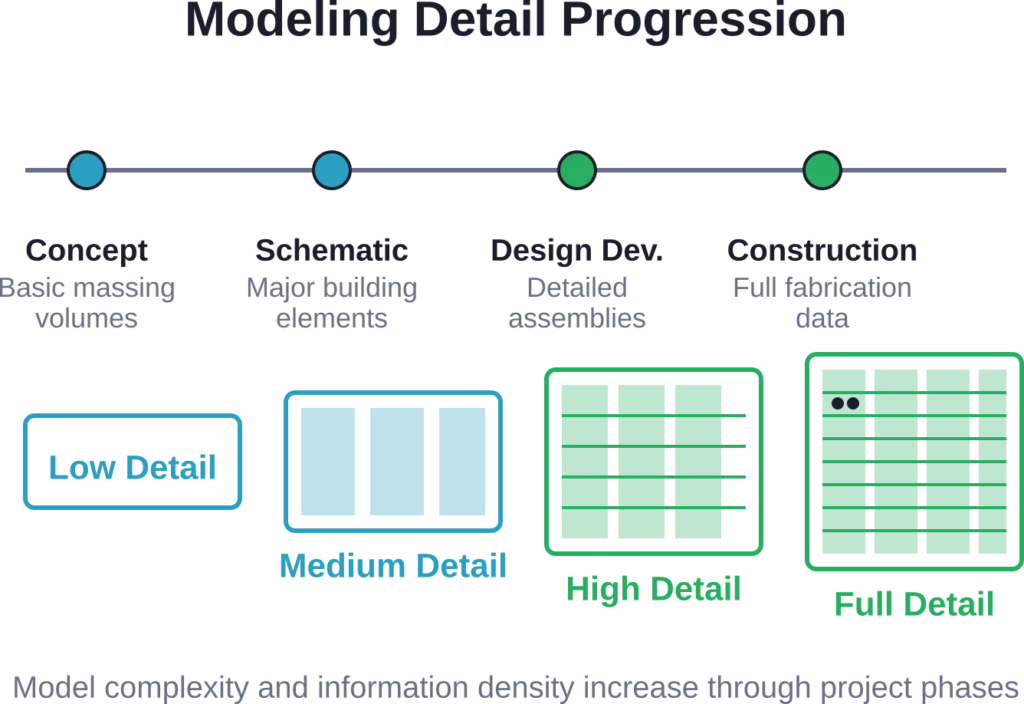
Initial design typically starts with basic volumetric forms representing building masses. These simple geometries explore spatial relationships, proportions, and site response without detailed modeling.
Architects iterate rapidly at this stage, testing alternatives and evaluating options. The goal is resolving major design decisions before investing time in detailed development.
Adding Architectural Elements
Once the massing is approved, architects add walls, floors, roofs, and openings. These elements start generic and become increasingly specific as design progresses.
Door and window families get placed. Stairs and structural systems are incorporated. The model grows in complexity and information density.
Applying Materials and Context
Surface materials transform generic geometry into recognizable architecture. Brick textures, glass properties, and wood grain patterns help visualize the final appearance.
Surrounding context—landscape, adjacent buildings, streets—grounds the design in its site. This context is essential for studying views, daylight, and urban integration.
Documentation and Analysis
The completed model serves multiple purposes beyond visualization. Architects extract floor plans, sections, elevations, and details directly from the model for construction documents.
Analytical tools use the model data for energy performance simulation, daylighting analysis, and structural validation. The same geometry serves design, documentation, and analysis needs.
Real-World Applications Beyond Buildings
While building design dominates architectural modeling use, the technology extends into adjacent fields.
Urban planners use 3D city models to study development impacts, analyze view corridors, and visualize neighborhood transformations. These large-scale models integrate GIS data with architectural detail.
Historic preservation relies on 3D documentation to create precise records of existing conditions. Laser scanning captures heritage structures digitally, enabling analysis without physical intervention and providing reference data for restoration work.
Interior designers model furniture layouts, material selections, and lighting schemes. The ability to visualize spaces before construction reduces costly errors in finished installations.
Landscape architects integrate hardscape and planting designs with building models, coordinating grades, drainage, and spatial transitions.
Looking Forward: Emerging Trends
The technology continues evolving rapidly. Several trends are reshaping how architects approach 3D modeling.
Generative Design Integration
Artificial intelligence and algorithmic design increasingly inform architectural modeling. Architects define design goals and constraints, then software generates multiple optimized options automatically.
This approach doesn’t replace architectural judgment—it augments it by exploring far more alternatives than manual iteration allows.
Real-Time Collaboration
Cloud-based modeling platforms enable simultaneous multi-user access to the same model. Team members work concurrently rather than passing files sequentially.
This shift mirrors broader software trends toward collaborative, browser-based tools that reduce version control headaches.
Virtual Reality Integration
VR headsets transform 3D models into immersive experiences. Walk through unbuilt spaces at full scale, evaluating proportions and spatial quality in ways that desktop monitors can’t replicate.
As VR hardware becomes more accessible, this workflow integration will likely expand.
Automated Documentation
Software continues improving its ability to generate construction documents automatically from models. Tag placement, dimension strings, and annotation increasingly require less manual drafting.
The goal isn’t eliminating human judgment but reducing repetitive tasks so architects can focus on design thinking.
Frequently Asked Questions
3D modeling creates three-dimensional geometry representing building form. BIM (Building Information Modeling) extends that geometry with intelligent data about materials, quantities, costs, and relationships. All BIM involves 3D modeling, but not all 3D modeling qualifies as BIM. BIM models contain parametric information that updates automatically when elements change, while basic 3D models may be purely visual without embedded intelligence.
Not necessarily. Free options like SketchUp Free, Blender, and FreeCAD provide capable modeling tools without licensing costs. However, professional practices typically invest in commercial BIM platforms for their integrated documentation, analysis, and collaboration capabilities. The choice depends on project complexity, team size, and client requirements. For learning or small projects, free software works well.
Basic proficiency in modeling tools typically requires several weeks of focused practice. Creating simple building models becomes possible within a month for most users. True professional competency—efficiently managing complex projects, troubleshooting issues, and utilizing advanced features—develops over 6-12 months of regular use. Background in architecture or CAD drafting accelerates the learning process significantly.
Yes and increasingly so. BIM models serve as the source for construction documentation, generating floor plans, sections, elevations, and details. Some fabricators work directly from model data for manufacturing building components. However, construction documents still require traditional drawings in most jurisdictions for permitting and legal purposes. The model becomes the master reference from which documentation is extracted rather than replacing drawings entirely.
Minimum requirements include a modern multi-core processor, 16GB RAM, and a dedicated graphics card with at least 4GB VRAM. For professional work, 32GB RAM and higher-end graphics cards improve performance noticeably. Large complex models benefit from even more powerful hardware. Solid-state drives significantly improve file loading times. Check specific software requirements, as programs like Revit, Rhino, and SketchUp have different demands.
Modern workflows use standard exchange formats like IFC to share model data between software platforms. Structural engineers import architectural models into analysis programs, mechanical engineers overlay systems within the same coordinate space, and contractors use the models for quantity takeoffs and scheduling. Cloud-based collaboration platforms enable real-time model coordination across disciplines, though data translation challenges sometimes require manual intervention to resolve inconsistencies.
No—it’s transforming them. Understanding spatial relationships, proportion, construction detailing, and design principles remains essential regardless of tools. 3D modeling changes how architects express and develop these ideas but doesn’t eliminate the need for foundational knowledge. Many practices still use hand sketching for early concept development before transitioning to digital modeling. The most effective architects combine traditional design thinking with modern digital tools rather than viewing them as either-or choices.
Making the Transition
For practices considering adopting 3D modeling workflows, several strategic approaches smooth the transition.
Start with pilot projects rather than committing entire operations immediately. Choose a project that benefits from 3D visualization but won’t collapse if the learning curve causes delays.
Invest in training. Software tutorials and online courses accelerate proficiency, but in-person training or consulting often provides the fastest path to competency for entire teams.
Establish clear modeling standards before starting. Consistent naming conventions, layer structures, and model organization prevent chaos as projects scale.
Plan for the productivity dip. Early projects take longer. Budget accordingly and set realistic expectations with clients and team members.
Build a support network. User forums, professional groups, and vendor technical support provide essential resources when issues arise—and they will.
Final Thoughts
3D architectural modeling has fundamentally changed how buildings get designed and documented. The technology enables visualization, coordination, and analysis that traditional methods couldn’t match.
But tools remain just tools. They amplify architectural thinking rather than replacing it. The best results come from architects who master both design fundamentals and digital workflows, using technology strategically to realize better buildings.
Whether you’re an established practice evaluating digital transformation or an architecture student choosing software to learn, understanding 3D modeling’s capabilities and limitations guides better decisions.
The technology will continue evolving. New capabilities will emerge, and current limitations will fade. What won’t change is the need for thoughtful design thinking—the human judgment that transforms data into architecture worth building.
Ready to explore 3D architectural modeling in your projects? Start with clear goals, choose tools that match your needs, and commit to the learning investment. The results are worth it.