

Quick Summary: Architectural rendering is the process of creating realistic visual representations of buildings or spaces before they’re constructed. It transforms 3D models into photorealistic images, animations, or interactive experiences that help architects, designers, and clients visualize and refine design concepts. Modern rendering leverages advanced software and AI technology to produce compelling visuals that communicate design intent, support decision-making, and market unbuilt projects effectively.
Walk into any architectural firm today and you’ll see stunning images of buildings that don’t exist yet. These aren’t photographs—they’re architectural renderings, the digital magic that brings unbuilt designs to life.
But what exactly is architectural rendering? And why has it become absolutely essential to modern architectural practice?
This guide breaks down everything from the basics of rendering to cutting-edge AI tools reshaping how architects visualize their work.
Understanding Architectural Rendering
Architectural rendering is the process of creating a realistic image or animation of a proposed building or space. Think of it as a bridge between technical drawings and the finished structure.
Where blueprints and floor plans show measurements and specifications, renderings show experience. They answer the question: what will this actually look like?
The rendering process takes a 3D model—created in software like Revit, SketchUp, or ArchiCAD—and applies materials, lighting, and environmental context to generate photorealistic visualizations. The result? Images so convincing they’re often mistaken for photographs of completed buildings.
Why Rendering Matters
Before architectural rendering became widespread, architects relied on hand-drawn illustrations and physical models. These methods were time-consuming and offered limited flexibility.
Digital rendering changed everything. Now architects can show clients exactly what a space will look like at different times of day, test multiple material options, and even create virtual walkthroughs—all before breaking ground.
Real talk: rendering has become a non-negotiable part of the design process. Clients expect it. Investors demand it. And architects use it to refine their own ideas.
How Architectural Rendering Works
The rendering workflow typically follows these stages, though exact processes vary depending on software and project needs.

Stage One: Building the 3D Model
Everything starts with geometry. Architects create a digital 3D model that defines the structure’s form, dimensions, and spatial relationships.
This model often comes from BIM software like Revit or modeling tools like SketchUp. The level of detail varies—early concept renderings might use simplified geometry, while final presentations require meticulous modeling down to door handles and light fixtures.
Stage Two: Applying Materials and Textures
Once the geometry exists, materials bring surfaces to life. Rendering software lets designers apply textures that mimic real-world materials—the grain of wood, the reflection of glass, the roughness of concrete.
Advanced rendering engines calculate how light interacts with each material, accounting for properties like reflectivity, transparency, and surface imperfections.
Stage Three: Setting Up Lighting
Lighting makes or breaks a rendering. Designers place light sources—sunlight, artificial lights, ambient illumination—and configure their intensity, color, and direction.
The best renderings capture specific atmospheric conditions. Morning light streaming through east-facing windows. The warm glow of evening. Dramatic shadows that emphasize form.
Stage Four: Rendering the Image
Here’s where the software does heavy computational work. The rendering engine traces light rays through the scene, calculates how they bounce between surfaces, and generates the final image pixel by pixel.
Rendering time varies wildly. Simple scenes might render in minutes. Complex photorealistic images can take hours—even days for large-scale projects with advanced lighting calculations.
Stage Five: Post-Processing
Raw renders rarely represent the final product. Post-processing in software like Photoshop adds finishing touches—color correction, atmospheric effects, context elements like people and cars, and subtle adjustments that enhance realism.
Prepare Accurate Models for Architectural Rendering

Architectural rendering relies on coordinated models and accurate project information during design development. Powerkh supports rendering workflows with BIM modelling, technical coordination, and model preparation services.
Need Support with Architectural Rendering?
Talk with Powerkh to:
- prepare coordinated BIM models for rendering
- support visualization during design development
- improve model accuracy before presentation stages
- update project models during coordination workflows
Talk with Powerkh about BIM support for rendering and visualization workflows.
Types of Architectural Rendering
Not all renderings serve the same purpose. Different project stages and presentation contexts call for different rendering approaches.
| Rendering Type | Use Case | Typical Detail Level |
|---|---|---|
| Exterior Rendering | Marketing, presentations, design review | High—includes landscaping, context |
| Interior Rendering | Space planning, material selection | Very high—furniture, fixtures, finishes |
| Aerial/Bird’s Eye | Site planning, urban design | Medium—emphasizes massing, site relations |
| Section Rendering | Technical communication | Medium—shows spatial relationships |
| Animation/Walkthrough | Client presentations, marketing | Variable—balances quality with render time |
Popular Rendering Software and Tools
The architectural rendering landscape offers dozens of software options, each with strengths for specific workflows and output styles.
Traditional Rendering Engines
V-Ray remains an industry standard, particularly for architects who need maximum control over lighting and materials. It produces exceptional photorealistic quality but demands powerful hardware and technical expertise.
Lumion takes a different approach, prioritizing speed and ease of use. It’s particularly popular for real-time visualization and quick design iterations, though some professionals find its output less refined than V-Ray for final presentations.
Enscape bridges the gap as a real-time rendering plugin that integrates directly with design software. When architects modify their Revit or SketchUp model, the rendering updates instantly—no manual export required.
AI-Powered Rendering Tools
Artificial intelligence is rapidly transforming architectural visualization. AI rendering platforms can generate photorealistic images from sketches, apply different design styles instantly, and dramatically reduce rendering time.
These tools use machine learning trained on thousands of architectural images to understand how buildings should look. Upload a rough 3D model or even a hand sketch, select a style, and the AI generates a polished rendering in minutes.
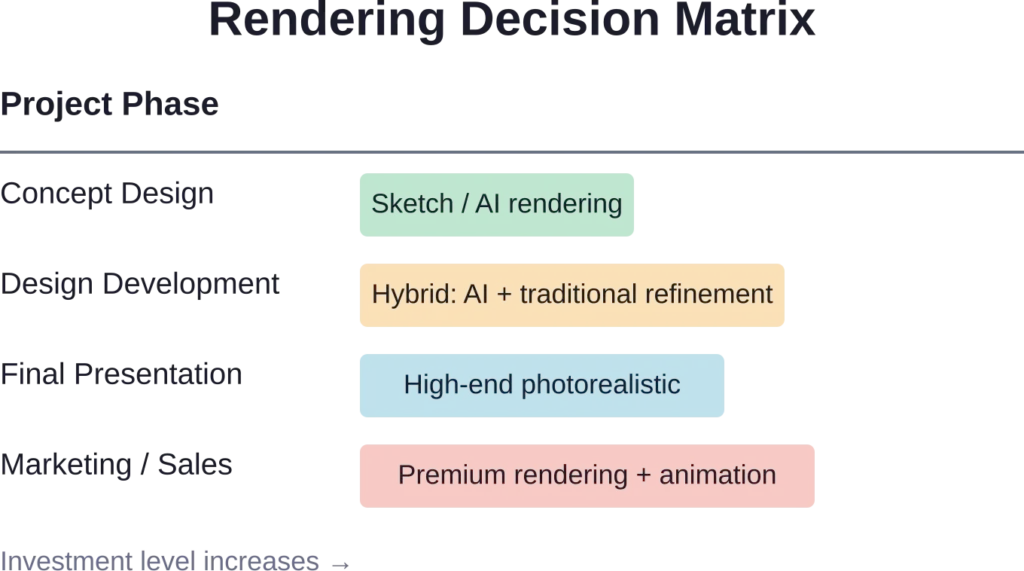
The technology isn’t perfect—AI sometimes produces architecturally impossible details or inconsistent perspectives—but it’s improving rapidly. Many architects now use AI tools for early concept exploration, then switch to traditional rendering for final deliverables.
Architectural Rendering Styles
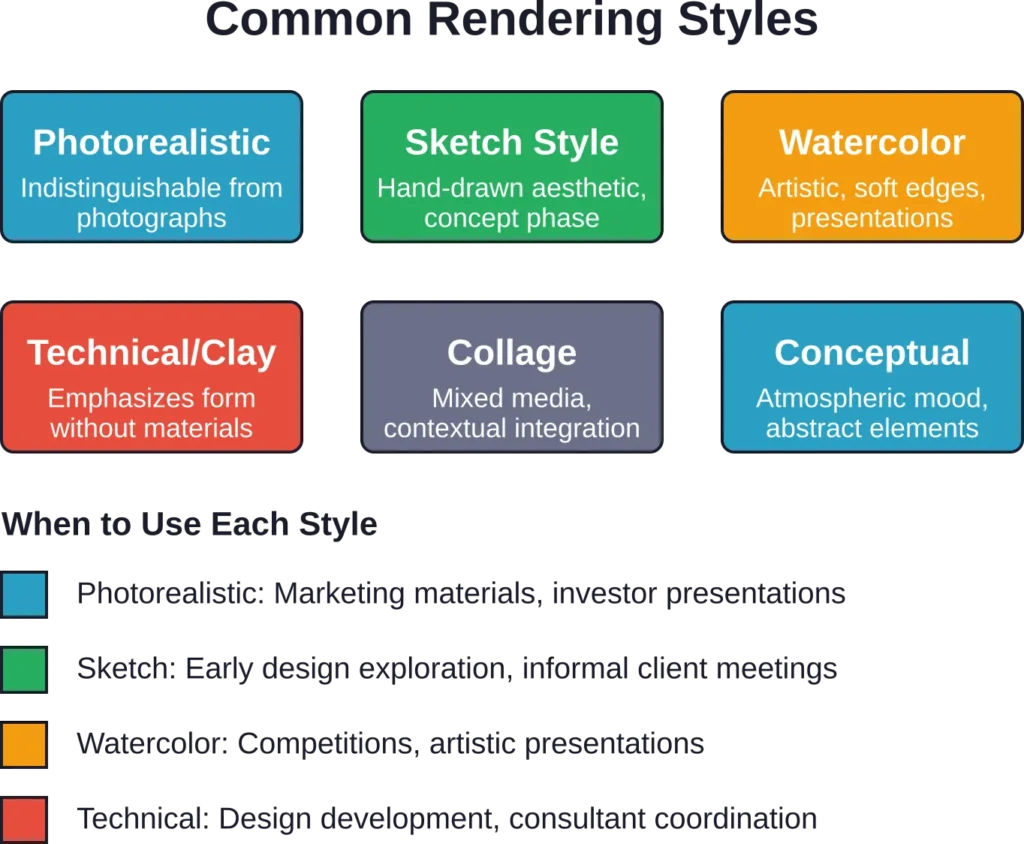
Beyond photorealism, architects employ various rendering styles to communicate different aspects of their designs or create specific visual moods.
Photorealistic Rendering
Photorealistic rendering aims to create images indistinguishable from photographs. This style dominates marketing materials, developer presentations, and final client deliverables.
The goal? Make viewers forget they’re looking at something that doesn’t exist yet.
Sketch and Line-Art Styles
Sketch-style renderings mimic hand-drawn illustrations, often with visible line work and loose, artistic qualities. They’re particularly effective during early design phases when architects want to communicate concepts without suggesting the design is finalized.
Clients respond differently to sketchy renderings—they feel more comfortable suggesting changes when the visualization doesn’t look “finished.”
Conceptual and Atmospheric Rendering
Some renderings prioritize mood over literal accuracy. These conceptual visualizations use dramatic lighting, abstract elements, or artistic techniques to communicate the emotional experience of a space rather than its exact appearance.
Who Creates Architectural Renderings?
The responsibility for producing renderings varies widely across the profession.
In smaller firms, architects often create their own renderings as part of the design process. In larger practices, specialized visualization teams or dedicated rendering artists handle this work.
Many firms also outsource rendering to specialized visualization studios, particularly for high-stakes presentations or when internal resources are stretched thin.
Architectural visualization skills have become increasingly valued in the profession. Many industry observers suggest that architectural visualization capabilities remain highly valued in hiring decisions.
Benefits of Architectural Rendering
Beyond creating pretty pictures, rendering delivers concrete advantages throughout the design and construction process.
Enhanced Client Communication
Technical drawings confuse most clients. Renderings don’t. They provide an immediate, intuitive understanding of what’s being proposed.
This clarity accelerates decision-making and reduces misunderstandings that lead to expensive changes during construction.
Design Refinement and Problem-Solving
Renderings reveal design issues that aren’t obvious in plans or sections. That window placement that seemed fine on paper? The rendering shows it creates an awkward proportion on the facade.
Architects use rendering as a design tool, not just a presentation medium.
Marketing and Pre-Sales
For developers, renderings are essential marketing tools. High-quality visualizations help sell residential units, lease commercial space, and attract investors—all before construction begins.
The investment in quality rendering typically pays for itself many times over in accelerated sales and higher prices.
Stakeholder Approval and Permitting
Planning commissions, design review boards, and community stakeholders respond more positively to compelling visualizations that show how a project fits its context.
Renderings that demonstrate neighborhood compatibility, environmental sensitivity, or urban design principles smooth the approval process.
The Impact of AI on Architectural Rendering
Artificial intelligence represents the biggest shift in architectural visualization since the move from hand-drawing to digital rendering.
AI rendering tools can generate photorealistic images from basic inputs in a fraction of traditional rendering time. Some platforms create professional visualizations from simple sketches or text descriptions.
The technology excels at certain tasks—applying consistent lighting across multiple views, generating entourage elements like people and cars, exploring style variations instantly.
But wait. AI isn’t replacing human expertise—at least not yet. The technology struggles with architectural accuracy, sometimes producing impossible geometries or inconsistent details. It works best as an augmentation tool, handling routine visualization tasks while architects focus on design quality and technical precision.
Current Industry Trends and Pricing
The rendering market continues to evolve rapidly, with new tools and workflows emerging constantly.
Real-time rendering has become table stakes. Clients expect to see design changes visualized instantly during meetings, not days later after renderings are processed.
Virtual reality integration is growing, particularly for large institutional and commercial projects where stakeholders want immersive spatial experiences.
Regarding professional development, architectural professionals can expect competitive compensation for visualization skills. Full-time positions emphasizing visualization in major markets show salary ranges around $125,000 to $145,000 as of May 2026, as noted in architectural career listings.
Choosing the Right Rendering Approach
Not every project needs the same rendering strategy. Budget, timeline, audience, and project phase all influence the appropriate approach.
Consider Your Audience
Technical audiences like engineers or contractors may need different visualizations than clients or the general public. A construction team might value section renderings that show assembly sequences. Marketing to end users demands emotional, lifestyle-focused imagery.
Balance Quality and Timeline
Premium photorealistic renderings require significant time investment. When project schedules are tight, faster rendering methods—including AI tools—deliver acceptable results without delay.
The question isn’t always “what’s the best rendering?” but rather “what’s the best rendering we can produce within our timeline and budget?”
Match Style to Design Intent
Modern minimalist architecture often benefits from clean, stark renderings with simple backgrounds. Contextual urban projects might need collage-style visualizations that show the building integrated into its existing neighborhood.
Common Rendering Challenges
Even experienced visualization specialists encounter recurring difficulties in the rendering process.
The Realism Paradox
Ironically, renderings can look “too perfect.” Real buildings accumulate weathering, exhibit construction tolerances, and exist in imperfect contexts. Renderings that show pristine surfaces and flawless execution sometimes feel uncanny rather than convincing.
Skilled artists add subtle imperfections—slight variations in material color, realistic weathering, human presence—that make scenes feel authentic.
Managing Expectations
Renderings set expectations. When the built reality doesn’t match the visualization—because materials changed, budgets shifted, or construction compromised the design—clients feel disappointed or deceived.
Responsible rendering practice means creating accurate representations while acknowledging that visualizations remain predictions, not guarantees.
Technical Synchronization
Keeping renderings aligned with evolving design models creates workflow headaches. When architects update their BIM model but forget to update the rendering model, presentations show outdated designs.
Integrated real-time rendering plugins solve this by linking directly to the source model, ensuring visualizations always reflect current design decisions.
The Future of Architectural Rendering
Where is rendering technology headed? Several trends are reshaping the field.
Real-time rendering will become universal. The days of waiting hours for a single image are ending as GPU technology and optimized algorithms enable instant visualization.
AI integration will deepen. Beyond generating images, artificial intelligence will suggest design improvements, automatically populate scenes with contextual elements, and even predict which visualization angles will be most effective for specific audiences.
Virtual and augmented reality will move from novelty to standard practice. Clients will routinely “walk through” unbuilt buildings, experiencing spatial qualities impossible to convey in static images.
But the fundamental purpose remains unchanged: helping people understand what hasn’t been built yet.
Frequently Asked Questions
Timeline varies dramatically based on complexity, quality expectations, and rendering method. Simple AI-generated renderings can be ready in minutes. Standard photorealistic images typically require 4-12 hours of work. Complex, high-end architectural visualizations with detailed environments might take 40+ hours per final image when including modeling refinement, material setup, lighting development, rendering time, and post-processing.
3D modeling creates the digital geometry—the shapes, forms, and spatial relationships of a building. Rendering takes that geometry and generates a realistic image by adding materials, lighting, and visual effects. Think of modeling as building a stage set and rendering as photographing it with proper lighting and camera settings. Most projects require both, though they’re distinct skills that different specialists sometimes handle separately.
Not entirely, at least not yet. AI rendering excels at speed and style exploration, generating compelling visuals from minimal input in seconds rather than hours. Traditional rendering software maintains advantages in precision, control, and technical accuracy. Current best practice often combines both—using AI for early concept exploration and quick iterations, then switching to traditional tools for final presentation-quality images that require exact material specification and lighting control.
Pricing spans an enormous range. Simple exterior renderings from freelancers might start around $500-1,000 per image. High-quality photorealistic renderings from established visualization studios typically run $2,000-5,000 per still image. Complex interior renderings with detailed furnishing and lighting can reach $5,000-10,000+ each. Animations and virtual reality experiences represent separate pricing tiers, often starting at $10,000 and scaling up based on duration and complexity. Many firms offer package pricing for multiple views.
Both approaches work, and many architects use a hybrid strategy. Basic rendering literacy helps architects communicate effectively with visualization specialists and make informed decisions during the design process. Smaller firms often handle rendering internally to control costs and maintain quick iteration cycles. Larger practices frequently outsource to specialized studios for major presentations while maintaining in-house capability for day-to-day design visualization. The profession increasingly values rendering skills—portfolios with strong visualization work stand out in competitive job markets.
Hardware requirements depend on rendering software and workflow. Traditional rendering engines benefit from powerful multi-core processors, 32GB+ RAM, and high-end graphics cards—professional workstations often start around $3,000-5,000. Real-time rendering and AI tools increasingly leverage GPU acceleration, making graphics cards the priority investment. Cloud rendering services offer an alternative, letting architects use modest local hardware while offloading computation to remote servers. Entry-level rendering is possible on standard laptops, but professional production work benefits significantly from dedicated rendering workstations.
Common 3D model formats include .SKP (SketchUp), .RVT (Revit), .DWG (AutoCAD), .OBJ, .FBX, and .3DS for geometry transfer between applications. Rendered output typically saves as .JPG or .PNG for standard images, .TIFF for high-quality print work, .EXR for images with extended dynamic range used in post-processing, and .MP4 or .MOV for animations. Most rendering software supports multiple input and output formats to accommodate various workflows and downstream uses in presentations, websites, and print materials.
Getting Started with Architectural Rendering
For architects new to rendering, the learning curve can feel steep. Start with user-friendly tools rather than the most powerful ones.
SketchUp paired with simple rendering plugins provides an accessible entry point. Many architectural students and professionals begin here before progressing to more advanced software.
Online tutorials, YouTube channels, and course platforms offer extensive rendering education—often free or low-cost. The rendering community tends to be generous with knowledge sharing.
Most importantly, practice on real projects. Academic exercises have value, but nothing accelerates learning like producing renderings that actual clients will see and critique.
Conclusion
Architectural rendering has evolved from a specialized luxury to an essential component of contemporary practice. It shapes how architects design, how clients make decisions, and how the public engages with proposed buildings.
The technology continues advancing rapidly. AI tools are democratizing access to quality visualization. Real-time engines are eliminating the wait between design change and visual feedback. Virtual reality is creating immersive spatial experiences that static images can’t match.
Yet the core purpose remains timeless: helping people see and understand spaces before they exist. Whether created through traditional rendering engines, AI platforms, or hybrid workflows, architectural renderings bridge imagination and reality.
Ready to explore architectural rendering for projects? Start experimenting with accessible tools, study exceptional visualization work, and remember that effective rendering serves design—it doesn’t replace it. The best visualizations don’t just look beautiful; they communicate clearly, support decision-making, and ultimately help create better buildings.