

Quick Summary: Deleting the Snapchat app from your device doesn’t deactivate or delete your account — it simply removes the application. Your account, friends, messages, and Memories remain stored on Snapchat’s servers. However, deleting the app will cause you to lose Snapstreaks if you don’t respond within 24 hours, and you won’t receive notifications.
The confusion around deleting the Snapchat app versus deleting an account trips up thousands of users every month. Some think removing the app wipes their data. Others worry their friends will notice they’re gone.
Here’s the thing though — deleting an app and deleting an account are two completely different actions with vastly different consequences.
This guide breaks down exactly what happens when you delete the Snapchat app from your phone, what data remains safe, what you’ll lose, and how to get everything back when you reinstall.
Understanding the Difference: App Deletion vs. Account Deletion
Before diving into what happens, it’s crucial to understand this distinction.
When someone deletes the Snapchat app, they’re removing the software from their device. The phone no longer has the application installed. But that’s it.
Deleting an account, on the other hand, is a completely separate process that requires logging into Snapchat’s account portal and initiating a deactivation request. According to Snapchat’s official support documentation, deactivating an account initiates a 30-day deactivation period, after which the account will be permanently deleted after 30 more days (total 60 days).
Tech specialist Luigi Oppido confirms: “Deleting the Snapchat app from your phone, tablet, or device doesn’t do anything besides exactly that — deleting the app.”
So what actually happens when that app disappears from the home screen?
What Stays Safe When You Delete the App
The good news? Almost everything remains intact on Snapchat’s servers.
Your Account Remains Active
The account continues to exist exactly as it did before deletion. Friends can still see the profile. The username remains claimed. Login credentials stay valid.
Nobody receives a notification that the app was deleted. From the outside, nothing appears different.
All Memories Are Preserved
Memories — the photos and videos saved within Snapchat — remain stored on Snapchat’s servers. According to the official Privacy Policy, Snapchat maintains this content “as long as you need it” until explicitly deleted.
When the app gets reinstalled, all Memories reappear instantly after logging back in.
Friends List Stays Intact
Every friend connection persists. The friends list doesn’t change. Blocked users remain blocked.
Snapchat stores this relationship data server-side, not locally on the device.
Saved Messages Remain Available
Any messages marked as “saved” in conversations stay preserved. These gray-highlighted messages remain in the chat history because Snapchat stores them on servers until manually deleted.
According to official support documentation, Snapchat keeps saved messages until users explicitly unsave or delete them.
Account Settings and Preferences
Privacy settings, notification preferences, Bitmoji connections, and all other account configurations remain unchanged. These settings live server-side.
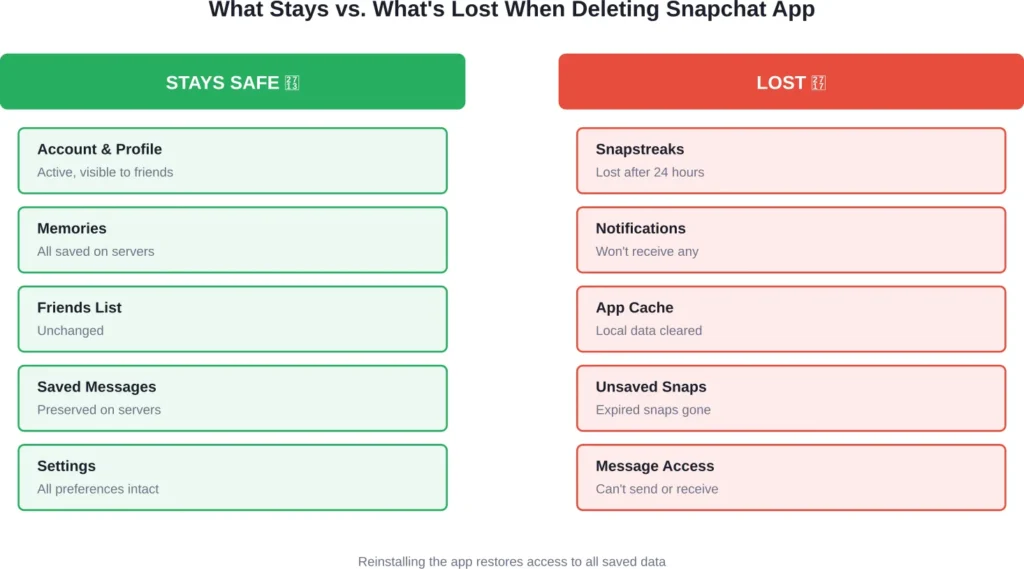
What You’ll Lose When Deleting Snapchat
Now, this is where it gets interesting. While most data stays safe, certain things do get lost.
Snapstreaks Will Break
The biggest consequence for most users? Snapstreaks disappear if not maintained.
Snapstreaks require both users to send snaps within a 24-hour window. Without the app installed, sending snaps becomes impossible. After 24 hours without exchanging snaps, the streak breaks and the fire emoji vanishes.
Reinstalling the app won’t restore broken streaks. They’re gone permanently unless Snapchat support intervenes (which rarely happens).
Push Notifications Stop
Without the app installed, the device can’t receive Snapchat notifications. Incoming snaps, messages, friend requests, and Story updates arrive silently.
Friends might think messages are being ignored when really, the notifications just aren’t coming through.
Local Cache Gets Cleared
The app’s local cache — which includes temporary files, some downloaded lenses, and certain UI elements — gets removed with the app.
This doesn’t affect important data, but it means the app will need to re-download certain elements when reinstalled.
Unsaved Snaps Expire Normally
According to Snapchat’s official documentation, unopened one-on-one snaps get automatically deleted after 31 days. Opened snaps delete immediately after viewing.
Without the app to open incoming snaps, they’ll eventually expire and delete based on these standard timelines.
Can’t Send or Receive Messages
This seems obvious, but bears mentioning. Without the app, communication stops completely. The account exists but remains inaccessible.
| Data Type | Stored Location | Status After App Deletion |
|---|---|---|
| Account Profile | Snapchat Servers | ✓ Remains Active |
| Memories | Snapchat Servers | ✓ Fully Preserved |
| Friends List | Snapchat Servers | ✓ Unchanged |
| Saved Messages | Snapchat Servers | ✓ Intact |
| Snapstreaks | Snapchat Servers | ✗ Break After 24hrs |
| App Cache | Local Device | ✗ Deleted |
| Notifications | Push Service | ✗ Stop Completely |
| Unsaved Snaps | Snapchat Servers | ✗ Expire Per Policy |
What Friends See When You Delete the App
From a friend’s perspective, nothing changes visually.
The profile remains visible in their friends list. The Bitmoji (if enabled) continues showing on the Snap Map at the last known location before app deletion.
Friends can still send snaps and messages. Those messages will deliver to the account — they just won’t be opened or read.
The only hint something might be different? The lack of response and the eventual disappearance of Snapstreaks.
But wait. There’s no “offline” indicator or special status. Friends won’t receive any notification about the app deletion.
How to Delete the Snapchat App (Different Devices)
The process varies slightly depending on the device.
Deleting Snapchat on iPhone
Long press the Snapchat app icon until the menu appears. Tap “Remove App” then confirm by selecting “Delete App.” The app and its local data get removed immediately.
Alternatively, go to Settings > General > iPhone Storage > Snapchat > Delete App.
Deleting Snapchat on Android
Long press the Snapchat icon, drag it to “Uninstall” at the top of the screen, and confirm. Or navigate to Settings > Apps > Snapchat > Uninstall.
Some Android devices use slightly different paths, but the general process remains consistent.
What About iPad or Tablets?
The same process applies. iOS tablets follow iPhone steps. Android tablets follow Android phone steps.
Reinstalling Snapchat: Getting Everything Back
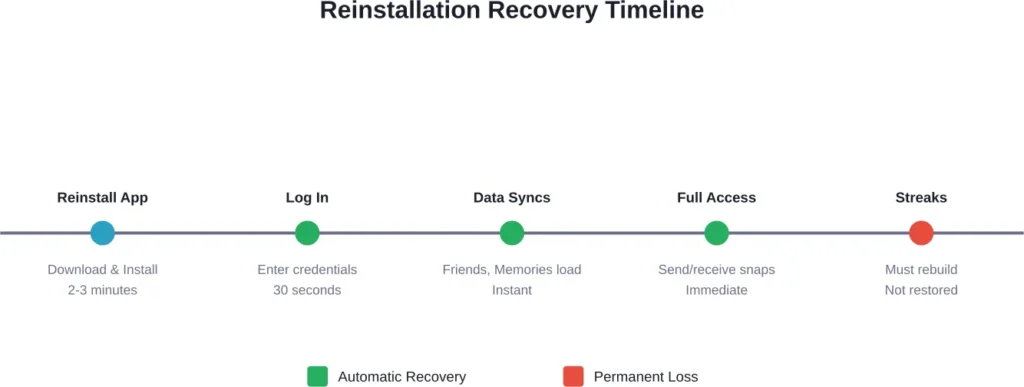
Real talk: reinstalling Snapchat is straightforward, and nearly everything returns instantly.
The Reinstallation Process
Download Snapchat from the App Store (iOS) or Google Play Store (Android). Install it like any other app. Open it and log in with the existing username and password.
That’s it.
What Returns Immediately
Upon logging back in, the following reappear instantly:
- Complete friends list
- All Memories (photos and videos)
- Saved messages in conversations
- Account settings and preferences
- Bitmoji connection
- Story subscriptions
- Snap Map preferences
The account looks exactly as it did before deletion.
What Doesn’t Come Back
Broken Snapstreaks won’t restore automatically. While some users have reported attempting to contact Snapchat support for streak recovery after app deletion, Snapchat does not officially guarantee restoration of broken streaks.
Unopened snaps that expired during the app’s absence are gone permanently, as Snapchat’s servers would have deleted them according to standard retention policies.
Deleting the App vs. Deactivating Your Account
These are fundamentally different actions with different outcomes.
App Deletion
Removes the software from the device. Account remains active. Data stays on servers. Reversible instantly by reinstalling.
Account Deactivation
According to Snapchat’s official support documentation, deactivating an account initiates a 30-day deactivation period, after which the account will be permanently deleted after 30 more days (total 60 days). During this time, the account becomes invisible to friends but data remains recoverable.
After 30 days, the account deletes permanently along with all associated data including Memories, messages, and friends.
Which One Should You Choose?
Taking a temporary break from Snapchat? Just delete the app. The account stays ready for when the app gets reinstalled.
Permanently leaving Snapchat and want all data removed? Deactivate the account through Snapchat’s account portal, then delete the app.
| Action | Account Status | Data Retention | Reversibility |
|---|---|---|---|
| Delete App Only | Active | Everything saved | Instant (reinstall) |
| Deactivate Account | Deactivated | Saved 30 days | Reactivate within 30 days |
| Delete Account | Deleted | Permanent removal | Not reversible after 30 days |
Common Scenarios and What Happens
Let’s walk through some real-world situations.
Scenario 1: Taking a Social Media Break
Someone decides to disconnect from social media for a month. They delete Snapchat along with other apps.
What happens: The account remains active. Friends can still see the profile. Snapstreaks break after 24 hours. Memories stay safe. When they return and reinstall, everything except broken streaks comes back.
Scenario 2: Phone Storage is Full
The device runs out of storage space. Snapchat gets deleted to free up space temporarily.
What happens: Identical to Scenario 1. The account stays active, data remains on servers, and reinstallation brings everything back. Streaks might break depending on how long the app stays deleted.
Scenario 3: Switching to a New Phone
Someone gets a new phone and hasn’t transferred apps yet.
What happens: Installing Snapchat on the new device and logging in provides immediate access to all account data. The old device no longer needs to have the app installed. Only one active session per account is required.
Scenario 4: Account Got Compromised
Suspicious activity leads someone to delete the app while changing passwords.
What happens: Deleting the app doesn’t log out active sessions elsewhere. The compromised party could still access the account if they have login credentials. Better solution: change the password through Snapchat’s website, enable two-factor authentication, then reinstall the app.
Privacy Considerations When Deleting Snapchat
Deleting the app doesn’t erase the digital footprint from Snapchat’s systems.
According to Snapchat’s official Privacy Policy, Snapchat retains user data for various periods depending on the data type and legal obligations.
The policy states: “As a general rule, we keep information as long as you tell us to, and otherwise as long as we need it to provide our Services, or as required by law.”
What Data Snapchat Keeps
Even without the app installed, Snapchat maintains account information, relationship data (friends list), and any content stored in Memories. The company also retains metadata about account usage for security and operational purposes.
Requesting Data Deletion
For complete data removal, account deletion is required — not just app deletion. Users can request their data through Snapchat’s “Download My Data” feature before deleting to see exactly what information exists.
Technical Details: What Happens on Device vs. Server
Understanding the technical split helps clarify what stays and what goes.
Device-Level Changes
When the app gets deleted, the device removes:
- Application binary files
- Local cache and temporary files
- Downloaded lenses and filters
- App preferences and settings stored locally
- Login tokens (requiring re-authentication on reinstall)
Server-Level Persistence
Snapchat’s servers continue maintaining:
- User account credentials and profile information
- All Memories content
- Friend relationships and connections
- Saved chat messages
- Account settings and preferences
- Subscription data and purchase history
The server doesn’t know or care whether the app is installed on any device. The account exists independently.
Frequently Asked Questions
No, friends receive no notification when the app gets deleted from a device. The profile remains visible in their friends list and appears no different than before. The only clue might be a lack of response to messages or broken Snapstreaks.
Saved messages remain on Snapchat’s servers and reappear when the app is reinstalled. However, unsaved messages that disappeared before deleting the app are gone permanently. According to Snapchat’s official documentation, “Delete is our default” and opened or expired snaps cannot be retrieved from servers.
Indefinitely. Simply deleting the app doesn’t trigger any account deletion timeline. The account remains active for years if needed. However, Snapchat reserves the right to reclaim inactive usernames, though this typically only happens for accounts that haven’t logged in for extremely long periods.
No. Memories are stored on Snapchat’s servers, not on the device. All Memories remain intact and accessible after reinstalling the app and logging back in. This storage persists according to Snapchat’s retention policy until explicitly deleted by the user.
Deleting the app removes the software from the device while keeping the account active. Deactivating the account (through Snapchat’s website) begins a 30-day deletion process that makes the account invisible and eventually removes all data permanently. App deletion is instant and reversible; account deactivation has lasting consequences.
Reinstalling the app doesn’t automatically restore broken Snapstreaks. Once a streak breaks due to missing the 24-hour window, it resets to zero. Some users have reported attempting to contact Snapchat support for streak recovery, but this isn’t guaranteed. The best approach is maintaining streaks before deleting the app or accepting they’ll break.
No. App deletion only removes the software from the device. All account data, including profile information, friends, Memories, and settings, remains on Snapchat’s servers. For complete data deletion, formal account deletion through Snapchat’s account portal is required, followed by a 30-day waiting period.
Making the Right Choice for Your Situation
So, should you delete the Snapchat app or deactivate the account?
The answer depends entirely on the goal.
For temporary breaks, digital detoxes, or freeing up phone storage, deleting the app makes perfect sense. Everything stays safe on Snapchat’s servers. Reinstallation takes minutes and restores full access.
For permanent departure with privacy concerns, account deactivation followed by app deletion provides complete removal. Remember the 30-day window though — decisions made in haste can’t be undone after that period.
For those worried about streaks, consider warning friends before deleting the app. Or accept that streaks will break and rebuild them later. Most friends understand these situations.
Final Thoughts
Deleting the Snapchat app is not the same as deleting an account. This distinction matters enormously.
The app removal is temporary, reversible, and leaves all data intact. Account deletion is permanent, irreversible after 30 days, and removes everything.
For most people taking a break from social media or needing storage space, deleting the app provides the perfect solution. The account waits patiently on Snapchat’s servers, ready to spring back to life upon reinstallation.
Just remember: Snapstreaks will break. Notifications will stop. But Memories, friends, and saved messages? Those stick around.
Ready to delete or reinstall Snapchat? The choice now comes with full knowledge of exactly what happens either way.