

Quick Summary: Muting someone on Instagram hides their posts and stories from your feed without unfollowing them. The muted person receives no notification and can still view your content, send messages, and interact with your profile normally. It’s a private way to reduce content you see while maintaining the connection.
Instagram’s mute feature solves a common social media dilemma: how to take a break from someone’s content without the awkwardness of unfollowing. But what actually happens when that mute button gets tapped?
The answer isn’t as straightforward as it might seem. Muting operates differently from blocking or restricting, and understanding these distinctions matters for managing digital boundaries effectively.
What Does Mute Mean on Instagram
Muting is Instagram’s stealth mode for managing feed content. It allows users to hide posts, stories, or both from specific accounts without severing the social connection.
Think of it as a one-way filter. The muted account continues functioning normally on their end—they can still follow, like, comment, and message. They just won’t appear in the muter’s feed anymore.
According to Instagram’s official help resources, mute was designed to help users control their experience without creating social friction. No notifications get sent. No indicators appear. The relationship remains intact on the surface while the content flow stops behind the scenes.
What Happens When Someone Gets Muted
When an account gets muted, several specific changes occur immediately:
Their Posts Disappear From the Feed
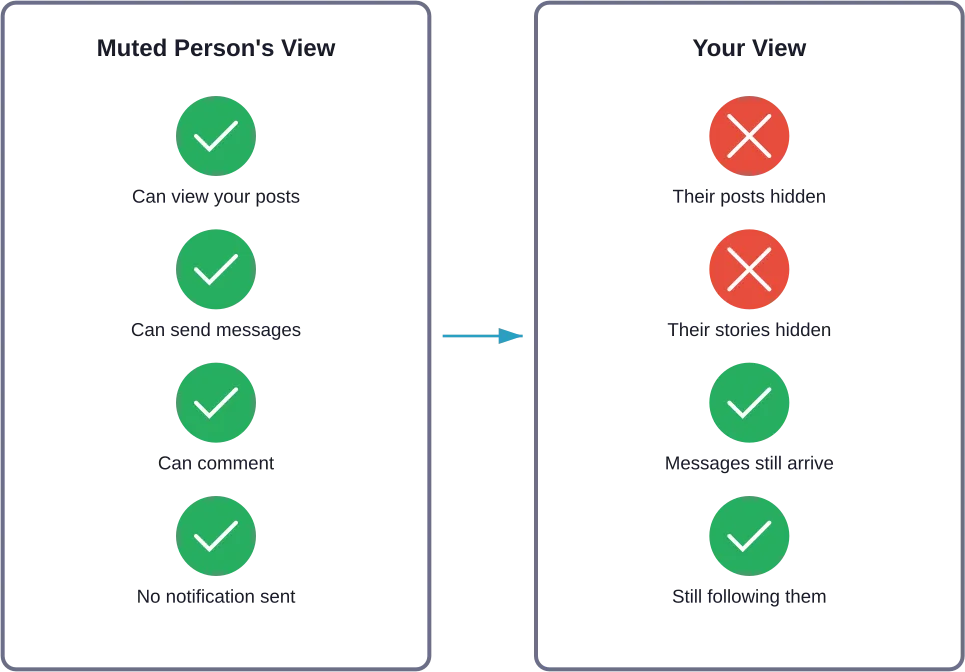
Muted posts no longer show up in the main feed. Scroll all day, and nothing from that account will appear—even if they’re posting constantly.
But here’s the thing. Their content isn’t deleted or hidden from them. It simply stops routing to one specific viewer’s feed. Everyone else still sees their posts normally.
Their Stories Get Hidden
Stories from muted accounts vanish from the stories bar at the top of Instagram. No profile picture circle. No story updates. Complete silence.
Users can choose to mute just stories, just posts, or both. The flexibility matters for situations where someone’s stories feel overwhelming but their grid posts are fine, or vice versa.
Messages Still Work Normally
Muting doesn’t affect direct messages at all. Muted accounts can still send DMs, and those messages appear in the inbox just like any other conversation.
Notifications for these messages come through unless specifically disabled separately. Mute only controls feed content—not communication channels.
Profile Visits and Interactions Continue
Muted accounts can still visit profiles, like old posts, and leave comments. All normal Instagram interactions remain available to them.
The only change is visibility in one person’s feed. Everything else about the account relationship stays identical to before the mute.
How Mute Differs From Block and Restrict
Instagram offers three distinct privacy controls that often get confused. Each serves different purposes.
| Feature | What Gets Hidden | Can They Message You | Do They Know |
|---|---|---|---|
| Mute | Posts and stories from your feed | Yes, normally | No notification |
| Restrict | Their comments become private | Yes, but filtered to requests | No notification |
| Block | Everything—total separation | No, completely blocked | They can tell if they check |
Mute is the gentlest option. It controls content visibility without affecting any other functionality or creating detectable changes for the other person.
Restrict, according to Instagram’s official resources, is designed for handling harassment while maintaining some connection. Comments from restricted accounts only become visible to them unless approved.
Block is the nuclear option—complete disconnection. The blocked person can’t find the profile, see any content, or make any contact.
How to Mute Someone on Instagram
The muting process takes seconds and can be done from multiple places within the app.
From the feed, tap the three dots on any post from the account to mute. Select “Mute” and choose posts, stories, or both.
From their profile, tap “Following” and select “Mute” from the menu. The same options appear—posts, stories, or both.
From stories, press and hold on their profile picture in the stories bar, then tap “Mute” when the menu appears.
The settings stick until manually reversed. Muted accounts stay muted indefinitely unless unmuted through the same menus.
Can Someone Tell If They’ve Been Muted
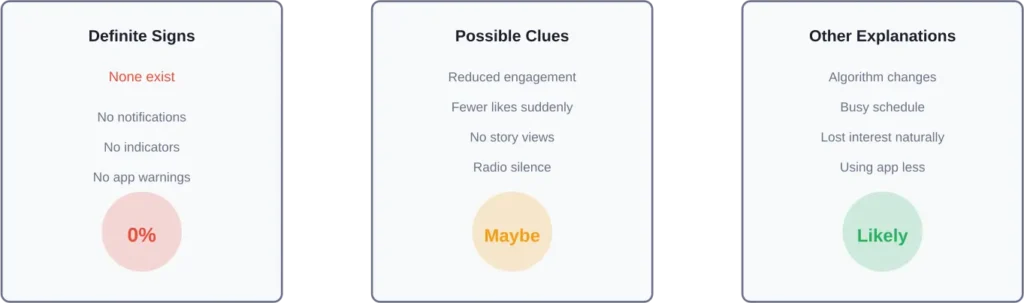
Instagram doesn’t send notifications when someone gets muted. No alert. No indicator. No way to know for certain through the app itself.
That said, according to community discussions, some people speculate they notice indirect signs. If someone who usually likes and comments on posts suddenly goes silent, they might wonder. But these are just suspicions, not proof.
The reality? Most muted accounts never realize it happened. Instagram designed the feature specifically to be undetectable to maintain social comfort.
Why People Mute on Instagram
The reasons for muting vary widely. Sometimes it’s personal. Sometimes it’s just content overload.
According to community discussions, common motivations include:
- Taking a break from someone’s content without unfollowing
- Reducing feed clutter from serial posters
- Avoiding spoilers for shows or events
- Managing uncomfortable social situations
- Decreasing exposure to content that causes negative feelings
Research on Instagram behavior suggests that muting often happens for mundane reasons—not dramatic ones. Sometimes people just post too much about topics that don’t interest their followers.
Managing Muted Accounts
Instagram’s interface does not display a centralized list of muted accounts in settings.
To check if a specific account is muted, visit their profile and tap “Following.” If “Mute” shows options to mute (rather than unmute), they’re not currently muted. If it shows options to unmute posts or stories, they are muted.
Unmuting works the same way as muting—just reverse the selection in the same menu. Posts and stories from that account will immediately resume appearing in the feed.
Frequently Asked Questions
No. Muting only affects what appears in the feed—their posts and stories. Comments from muted accounts still appear normally on other people’s posts, including mutual friends’ content.
Yes. If someone manually navigates to a muted account’s profile and views their story there, it registers as a view and appears in the viewer list. Muting prevents stories from appearing in the feed, but doesn’t make profile visits invisible.
No. Muting has zero impact on direct messages. Conversations continue normally, and message notifications still arrive unless separately disabled in notification settings.
It depends on which option was selected when muting. Instagram allows muting posts and stories independently. Someone can mute just stories while still seeing posts, or vice versa.
The algorithm doesn’t show content from muted accounts in the feed, but that’s the intended function of muting. Beyond that, muting doesn’t signal negative feedback to Instagram’s recommendation systems the way unfollowing might.
Absolutely. Muting isn’t permanent and can be reversed anytime through the same menus used to enable it. Many people mute temporarily during events they want to avoid spoilers for, then unmute afterward.
Tags work normally regardless of mute status. If a muted account tags someone in a post, that person receives a notification and can see the post—muting doesn’t block tags or mentions.
Making the Right Choice for Digital Boundaries
Muting offers a middle ground between staying connected and protecting mental space. It’s particularly useful for maintaining professional or family relationships when unfollowing might create awkwardness.
The feature works best when used intentionally rather than impulsively. Consider whether the issue is temporary (like someone posting excessively during a trip) or ongoing. Temporary situations might benefit from a short-term mute. Ongoing problems might warrant a different approach.
For situations involving harassment or unwanted contact, restrict or block provide stronger protections than mute alone. Instagram’s official resources recommend using the appropriate tool for the specific situation rather than relying solely on mute for serious safety concerns.
Understanding what mute does—and doesn’t do—helps in managing Instagram relationships effectively. The person being muted continues their normal Instagram experience while the muter gains control over feed content. No drama. No notifications. Just a quieter feed customized to personal preferences.