

Quick Summary: Free Amazon FBA tools help sellers research products, track prices, estimate revenue, and optimize listings without upfront costs. Top options include WisePPC, Unicorn Smasher for product hunting, Keepa and CamelCamelCamel for price tracking, Keyword Tool for search optimization, and Amazon’s own Seller University for comprehensive training. These tools provide essential functionality for new and budget-conscious sellers, though most offer paid upgrades for advanced features.
Starting an Amazon FBA business doesn’t require thousands in software subscriptions. While premium tools offer powerful features, free alternatives provide solid functionality for sellers testing the waters or operating on tight budgets.
The challenge? Sorting through dozens of tools that promise the world but deliver little. Some free versions are so limited they’re practically useless. Others hide their best features behind paywalls that appear the moment things get interesting.
Here’s the thing though—several genuinely useful free tools exist for Amazon sellers. They won’t replace a comprehensive paid platform, but they’ll handle core tasks like product research, price tracking, and revenue estimation without costing a cent.
Why Free Amazon FBA Tools Matter for New Sellers
Budget constraints hit new sellers hard. Between inventory costs, shipping fees, and Amazon’s referral charges, software subscriptions often get pushed to the bottom of the priority list.
Free tools solve this problem by providing baseline functionality across critical areas. Product research tools help identify profitable niches. Price trackers monitor competitor movements and historical trends. Revenue calculators estimate potential profits before committing to inventory purchases.
The real value? Testing different approaches without financial commitment. A seller can experiment with five free tools to understand their workflow before investing in a paid solution that fits their specific needs.
That said, free tools come with limitations. Search caps restrict how many products can be analyzed daily. Data depth rarely matches paid alternatives. Customer support ranges from minimal to nonexistent. But for validating business ideas and handling routine tasks, they’re more than adequate.
Sales Analytics & PPC Optimization Tools for Amazon Sellers
Once your products are live and generating sales, the real challenge shifts from finding opportunities to understanding performance and maximizing profitability. These free tools help sellers analyze real sales data, optimize advertising spend, and gain long-term insights that Amazon’s native reports don’t provide.
WisePPC – Advanced Sales & PPC Analytics Dashboard

WisePPC is a powerful Amazon advertising and sales analytics platform designed specifically for FBA sellers. Currently in open beta, the tool is completely free for early users and offers deep visibility into both organic and sponsored performance.
The platform combines long-term historical data (far beyond Amazon’s 60–90 day limit) with advanced PPC campaign management in one clean dashboard. Sellers can track dozens of metrics including ACoS, TACoS, ROAS, Average Selling Price (ASP), profit trends, and campaign efficiency over months or even years.
What makes it valuable? Speed and clarity. WisePPC allows you to view up to 6 metrics simultaneously on interactive charts, use bulk actions for campaigns, and quickly identify underperforming keywords or placements with smart gradient highlighting. It’s especially useful for sellers running multiple campaigns who need to understand true profitability after ad spend.
The catch? As a relatively new tool still in beta, it focuses primarily on sales analytics and PPC optimization rather than product research or competitor price tracking. Full inventory forecasting and dynamic repricing features are planned for future updates but are not yet available.
WisePPC is an excellent choice for sellers who have already launched products and want professional-level advertising insights without paying for premium tools like Helium 10 Advertising Console or Jungle Scout Ads.
Contact Information:
- Website: wiseppc.com
- Facebook: www.facebook.com/people/Wise-PPC/61573154427547
- LinkedIn: www.linkedin.com/company/wiseppc
- Instagram: www.instagram.com/wiseppc
Top Free Product Research Tools for Amazon Sellers
Product research separates successful sellers from those burning through capital on inventory that won’t move. These free tools provide the data needed to make informed sourcing decisions.
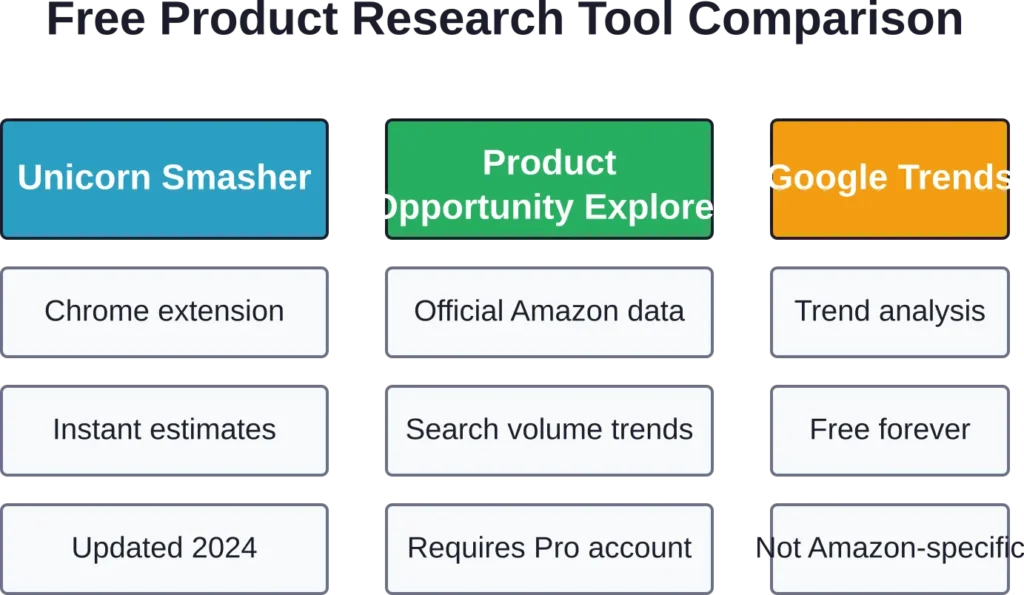
Unicorn Smasher – Chrome Extension for Quick Analysis
Unicorn Smasher remains one of the most accessible free product research tools available. This Chrome extension overlays sales estimates, revenue projections, and competitive metrics directly on Amazon product pages.
The Unicorn Smasher free Chrome extension continues to receive updates, with recent updates ensuring improved stability and functionality. Installation takes seconds, and data appears instantly when browsing Amazon listings.
What makes it valuable? Speed. Instead of switching between multiple tabs or platforms, sellers get instant feedback on any product they’re evaluating. The extension estimates monthly sales, calculates potential revenue, and highlights key metrics like review counts and seller types.
The catch? Accuracy varies. Community discussions note that free sales estimators, including Unicorn Smasher, should be cross-referenced with other data sources. The tool provides directional guidance rather than precise figures.
A Pro version exists with a paid tier, but the free Chrome extension continues receiving updates and serves most casual research needs.
Amazon’s Product Opportunity Explorer
Amazon provides its own product research tool free to Professional sellers through Seller Central. Product Opportunity Explorer surfaces trending niches, search volume data, and customer demand insights based on actual Amazon search behavior.
This tool carries significant advantages over third-party alternatives. The data comes directly from Amazon’s internal systems rather than estimates. Sellers get visibility into what customers are actively searching for but not finding adequate products to purchase.
The interface shows search volume trends, top-clicked ASINs, and conversion metrics. For sellers willing to dig through the data, it reveals genuine market opportunities without guessing at algorithm interpretations.
Access requires a Professional selling account at $39.99 monthly, but that subscription provides Seller Central access regardless. The tool itself doesn’t carry additional costs beyond the base subscription sellers already need for FBA operations.
Price Tracking Tools That Actually Work
Price intelligence separates reactive sellers from strategic ones. Tracking competitor pricing, historical trends, and seasonal fluctuations enables better inventory timing and pricing strategies.
Keepa – Comprehensive Price History Tracking

Keepa dominates price tracking for Amazon sellers. The free version provides historical price charts, sales rank graphs, and availability tracking for millions of products.
Installation works through a browser extension or direct website access. Once active, Keepa embeds detailed graphs on every Amazon product page showing price fluctuations over time, sales rank changes, and Buy Box ownership patterns.
The data reveals critical insights. Seasonal pricing patterns emerge from year-over-year comparisons. Competitor pricing strategies become visible through historical tracking. Out-of-stock periods highlight supply chain vulnerabilities or demand spikes.
Free users face some limitations. Advanced features like detailed tracking, alerts for specific price points, and API access require a paid subscription. But the core price history and sales rank graphs remain free indefinitely.
CamelCamelCamel – Simple Price Monitoring

CamelCamelCamel offers a more streamlined approach to price tracking. The interface focuses on price alerts and historical charts without the data density of Keepa.
Setting up alerts takes seconds. Enter a product URL, specify a target price, and the system sends email notifications when prices drop to that threshold. This works particularly well for arbitrage sellers monitoring specific deals or wholesale buyers waiting for restocking opportunities.
The tool tracks Amazon’s direct prices, third-party seller prices, and sales prices separately. This granularity helps identify which channel offers the best procurement opportunity at any given moment.
Completely free with no premium tier pushing upgrades, CamelCamelCamel serves sellers who want straightforward price monitoring without feature bloat.
Free Keyword Research Solutions for Amazon Listings
Keywords determine whether products get found or languish in obscurity. These free tools help optimize listings for Amazon’s search algorithm.
Keyword Tool – Search Term Discovery

Keyword Tool generates keyword suggestions based on Amazon’s autocomplete data. Enter a seed keyword, and the tool returns related searches that actual customers type into Amazon’s search bar.
The free version provides keyword ideas without search volume or competition metrics. That data requires upgrading to paid plans for more advanced features.
Still, the keyword suggestions alone provide value. Sellers discover long-tail variations, question-based searches, and related terms they wouldn’t have considered. These insights inform listing titles, bullet points, and backend search terms.
The tool supports multiple Amazon marketplaces, including US, UK, Germany, France, and Japan, making it useful for sellers operating internationally.
Google Trends – Seasonality and Demand Patterns

Google Trends doesn’t focus specifically on Amazon, but it reveals broader market interest in product categories and keywords. The tool shows search volume trends over time, geographic distribution, and related queries.
For Amazon sellers, this data highlights seasonality. A product category showing consistent December spikes suggests holiday demand. Steady year-round interest indicates evergreen potential. Declining trends over multiple years signal a dying market.
Regional data helps sellers understand where demand concentrates geographically, potentially informing FBA inventory distribution strategies or targeted advertising campaigns.
Completely free with no restrictions, Google Trends complements Amazon-specific tools by providing macro-level market validation.
Revenue Calculators and Profit Estimation Tools
Understanding true profitability requires accounting for Amazon’s fee structure. These calculators prevent costly pricing mistakes.
Amazon Revenue Calculator (Official Tool)

Amazon provides its own FBA Revenue Calculator directly in Seller Central. The tool calculates referral fees, FBA fulfillment costs, storage fees, and net proceeds for any product.
Sellers can compare FBA fulfillment against merchant fulfillment to see cost differences. Adjusting product dimensions and weight shows how packaging changes affect fees. Experimenting with different price points reveals margin impacts instantly.
The calculator uses Amazon’s actual fee schedules, making it the most accurate free option available. Third-party calculators rely on estimated or outdated fee structures that may not reflect current rates.
Access requires a Seller Central account, but the tool itself carries no additional cost. It’s an official Amazon resource that sellers should bookmark and reference frequently.
Jungle Scout Sales Estimator (Free Web Tool)

Jungle Scout offers sales estimation tools as part of its platform. Enter a product’s Best Sellers Rank (BSR) and category, and the tool estimates monthly sales volume.
The estimator helps validate product opportunities during research. High BSR numbers indicate slow sales. Lower BSR values suggest strong demand. Combined with price data, sellers can estimate potential monthly revenue.
Accuracy limitations apply to all sales estimators. BSR fluctuates throughout the day, and conversion from rank to unit sales involves assumptions. The tool provides helpful directional guidance rather than precise forecasts.
Jungle Scout’s full platform requires a paid subscription, but the free estimator remains available to everyone.
Amazon’s Free Native Tools for FBA Sellers
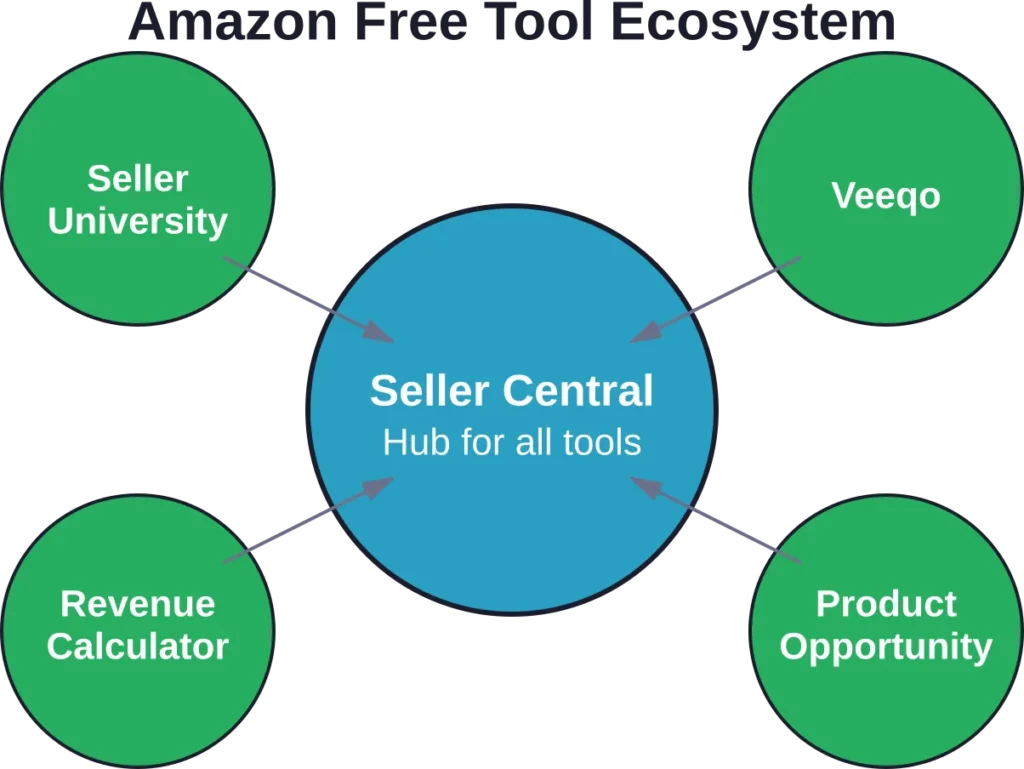
Before exploring third-party solutions, sellers should master Amazon’s built-in free resources. These official tools provide functionality that many sellers overlook.
Seller University – Comprehensive Free Training

Amazon offers a complete learning platform called Seller University at no cost. The resource includes video tutorials, step-by-step guides, and policy documentation covering every aspect of selling on Amazon.
Topics span product listing creation, FBA inventory management, advertising strategies, performance optimization, and policy compliance. The content comes directly from Amazon rather than third-party interpretations that may be outdated or incorrect.
Forum moderators note a concerning trend where sellers spend significant money on external courses that provide inaccurate information, sometimes leading to account deactivations and policy violations. Seller University eliminates this risk by teaching official best practices directly from the source.
The platform includes modules on using Seller Central tools effectively, resolving performance issues, and developing holiday season strategies. Content updates regularly to reflect policy changes and new feature releases.
Veeqo – Free Multichannel Shipping Software

Veeqo is provided as free multichannel shipping software by Amazon. The platform handles pick, pack, and ship operations with smart automations and inventory management tools.
The standout feature? Sellers earn up to 5% back on eligible shipments when using Veeqo for fulfillment. This cashback applies to shipping labels purchased through the platform, providing tangible cost savings on logistics operations.
The tool supports inventory synchronization across multiple sales channels, preventing overselling when operating on Amazon plus other marketplaces. Automated workflows reduce manual tasks in the fulfillment process.
Access requires an Amazon seller account, and the software remains free for all users.
Send to Amazon Workflow (FBA Inventory Management)
Amazon’s FBA inventory system includes the Send to Amazon workflow for managing shipments to fulfillment centers. The tool calculates optimal distribution across Amazon’s warehouse network, generates shipping labels, and tracks inventory as it moves through receiving.
Recent Seller University modules explain how to use the FBA Inventory page to manage excess or aged inventory, improve inventory health metrics, and maintain stock levels across multiple warehouses.
The system provides visibility into historical days of supply, restock recommendations, and low inventory warnings. While the data updates weekly rather than in real-time, it helps sellers maintain healthy inventory levels without stockouts or excessive storage fees.
All functionality integrates directly into Seller Central at no additional cost beyond the standard Professional selling subscription.
Combining Free Tools for Maximum Effectiveness
No single free tool provides everything a seller needs. Strategic combinations create a functional toolkit without subscription costs.
A practical workflow might look like this: Use Google Trends to validate broad market interest in a product category. Run potential products through Unicorn Smasher for quick sales estimates. Check Keepa for historical pricing and sales rank patterns. Analyze keywords with Keyword Tool to optimize listings. Calculate profitability with Amazon’s Revenue Calculator before committing to inventory.
This approach covers product research, competitive analysis, keyword optimization, and profit validation without spending money on software. The workflow requires more manual effort than all-in-one paid platforms, but it delivers results for sellers willing to invest time instead of capital.
The key lies in understanding each tool’s strengths and limitations. Keepa excels at price tracking but doesn’t estimate sales. Unicorn Smasher provides sales estimates but shouldn’t be the sole decision factor. Keyword Tool discovers search terms but requires manual volume research through other sources.
Sellers who master this multi-tool approach often continue using some free solutions even after adopting paid platforms. Why pay for price tracking when Keepa handles it perfectly? The official Revenue Calculator remains more accurate than third-party alternatives regardless of subscription tier.
When to Upgrade from Free to Paid Tools
Free tools serve specific purposes and seller stages. Recognizing upgrade triggers prevents outgrowing tools at critical moments.
Volume limitations hit first. Free product research tools cap daily searches. Sellers analyzing hundreds of potential products weekly run into these walls quickly. At that scale, upgrading to paid tools with unlimited searches becomes a time-saving necessity.
Data depth matters as search volume grows. Free keyword tools show suggestions without volume metrics. Paid versions reveal monthly searches, competition levels, and trend data. This deeper intelligence improves decision quality when stakes increase.
Automation becomes valuable as operations scale. Managing ten products manually works fine. Managing a hundred products demands automated repricing, inventory alerts, and performance tracking that free tools don’t provide.
The transition point varies by business model. Private label sellers launching a few products annually may never need paid research tools. Arbitrage sellers analyzing dozens of products daily hit free tool limitations within weeks.
Many sellers adopt a hybrid approach. Keep using free tools for functions they handle well, like price tracking and profit calculation. Invest in paid subscriptions for areas requiring advanced features, like comprehensive keyword research or review monitoring.
Common Mistakes with Free Amazon Tools
Free tools enable success, but common misuses create problems.
Over-reliance on single data sources tops the list. A product showing strong sales estimates in one tool may reveal warning signs elsewhere. Cross-referencing multiple sources prevents costly mistakes based on incomplete information.
Ignoring data freshness causes issues. Sales estimators and keyword tools rely on data that ages. A tool showing outdated information leads to decisions based on market conditions that no longer exist. Checking when data was last updated matters.
Treating estimates as facts creates unrealistic expectations. Free sales estimators provide approximations, not guarantees. Building business plans around estimated monthly sales of 500 units when reality delivers 200 causes cash flow problems and excess inventory.
Neglecting Amazon’s official resources in favor of third-party tools wastes available functionality. Seller University, the Revenue Calculator, and Product Opportunity Explorer provide authoritative data many sellers never explore. Start with official tools before adding third-party alternatives.
Failing to validate free tool outputs against actual results undermines learning. Track how estimated sales compare to reality. Note when price predictions prove accurate or miss the mark. This feedback loop improves judgment over time.
Advanced Free Tool Strategies
Strategic sellers extract more value from free tools through creative applications.
Keepa’s sales rank graphs reveal stockout patterns. When sales rank suddenly spikes to millions, the product went out of stock. Frequent stockouts suggest demand exceeds supply—a potential opportunity for new sellers to capture abandoned customers.
Google Trends comparative analysis identifies substitute products. Comparing search interest for related terms shows which variations gain traction. A declining trend for one product type with rising interest in an alternative signals market shifts worth following.
CamelCamelCamel price alerts enable arbitrage opportunities. Setting alerts below typical wholesale costs catches lightning deals or pricing errors. Fast-moving sellers capitalize on these windows before competition notices.
Amazon’s Revenue Calculator supports pricing experiments. Testing different price points shows margin changes and break-even volumes. This analysis prevents launching products at prices that can’t sustain the business after accounting for all fees.
Combining Unicorn Smasher with Keepa provides temporal context. Current sales estimates from Unicorn Smasher gain meaning when compared against historical sales rank trends in Keepa. Stable long-term performance indicates reliable demand. Recent spikes may represent temporary trends unlikely to continue.
Frequently Asked Questions
The best completely free tools include Keepa for price tracking, Amazon’s official Revenue Calculator for profit estimation, CamelCamelCamel for price alerts, Unicorn Smasher Chrome extension for quick product analysis, and Amazon Seller University for comprehensive training. Google Trends adds valuable market validation. All these tools provide core functionality without requiring paid upgrades, though some offer premium tiers for advanced features.
Accuracy varies by tool and data type. Amazon’s official tools like the Revenue Calculator use exact fee schedules and provide the most accurate cost estimates. Third-party sales estimators like Unicorn Smasher offer directional guidance rather than precise figures—community discussions recommend cross-referencing multiple sources. Price tracking tools like Keepa provide accurate historical data since they record actual Amazon prices over time. For critical business decisions, validate free tool outputs against multiple sources.
Running an Amazon business entirely on free tools is possible, especially for new sellers testing the market or those with limited budgets. Free tools cover essential functions like product research, price tracking, keyword discovery, and profit calculation. The tradeoff involves more manual work and some data limitations compared to paid platforms. Many successful sellers start with free tools and upgrade selectively as their business scales and specific needs emerge.
Common limitations include daily search caps on product research tools, missing data depth like search volume metrics in free keyword tools, lack of automation for repricing or inventory alerts, minimal or no customer support, and less frequent data updates compared to paid versions. Free tools also typically exclude advanced features like API access, bulk analysis, detailed competitor tracking, and comprehensive reporting dashboards that paid platforms provide.
Seller University is available free to all Amazon sellers through Seller Central. Log into a seller account, navigate to the Help section, and select Seller University from the menu. The platform includes video tutorials, written guides, and documentation covering product listing, FBA management, advertising, policy compliance, and performance optimization. All content comes directly from Amazon and updates regularly to reflect current policies and features.
Keyword Tool generates keyword suggestions based on Amazon’s autocomplete data and works well for discovering search terms customers actually use. The free version provides keyword ideas without volume metrics—those require paid plans. Google Trends complements this by showing broader search interest and seasonality patterns. For completely free alternatives with some volume indication, Amazon’s own search bar autocomplete and Product Opportunity Explorer (available to Professional sellers) reveal actual customer search behavior.
Several free tools replicate core functions of premium platforms, though not as comprehensively. Unicorn Smasher provides product research similar to Jungle Scout’s estimator. Keepa offers price tracking comparable to Helium 10’s price modules. Amazon’s Revenue Calculator handles profit estimation. Keyword Tool discovers search terms like premium keyword research tools. The free Jungle Scout Sales Estimator and Amazon Product Opportunity Explorer add research capability. While no single free tool matches full premium platforms, combining multiple free resources covers essential seller needs without subscription costs.
Taking Action with Free FBA Tools
The tools exist. The data is available. What separates sellers who succeed from those who spin their wheels? Consistent application and willingness to validate assumptions against reality.
Start with Amazon’s official resources. Master Seller University modules relevant to the current business stage. Learn the Revenue Calculator inside and out—understanding true costs prevents margin-eroding mistakes. Explore Product Opportunity Explorer to understand what customers search for but can’t find.
Add targeted third-party tools based on specific needs. Product research requires Unicorn Smasher or similar estimators. Price intelligence demands Keepa or CamelCamelCamel. Keyword optimization needs Keyword Tool or careful analysis of Amazon autocomplete suggestions.
Build a research workflow that combines these tools systematically. Define the specific questions each tool answers. Create a checklist that ensures every product idea passes through appropriate validation steps before capital commitment.
Track results against tool predictions. When estimated sales don’t match reality, understand why. When keyword research drives traffic that doesn’t convert, analyze the disconnect. This feedback loop builds judgment that transcends any individual tool.
Remember that tools enable decisions but don’t make them. The most sophisticated software can’t replace seller judgment about product quality, market positioning, or competitive advantage. Free tools provide the data foundation—strategic thinking converts that data into profitable action.
The Amazon marketplace changes constantly. New tools emerge. Existing ones add features or fade into obsolescence. Sellers who stay current on available resources maintain advantages over those locked into outdated workflows. Revisit tool options quarterly to discover new capabilities worth adopting.
Free tools democratize access to Amazon selling by removing financial barriers to entry. They won’t guarantee success, but they eliminate the excuse that starting requires thousands in software subscriptions. The opportunity exists for sellers willing to invest time learning these resources and applying insights consistently.