

Quick Summary: Free Amazon PPC tools help sellers track ad performance, optimize bids, and manage campaigns without spending on premium software. This guide covers the best no-cost options including Amazon’s native tools, community extensions, and limited free tiers from established platforms—plus how to build an effective workflow using only free resources.
Running Amazon ads without proper tools feels like flying blind. Bids climb, budgets drain, and figuring out what’s actually working becomes a full-time job.
Premium PPC platforms promise automation and insights. But what if you’re testing a new product, running lean, or just want to validate spend before committing to $49/month or more?
Free tools won’t replace full-featured platforms at scale. But they can absolutely help spot wasted spend, test new keywords, and track campaign health—especially when stacked together smartly.
This guide breaks down the best free Amazon PPC tools available in 2026, what they actually offer, and where their limits kick in.
Amazon’s Native PPC Tools
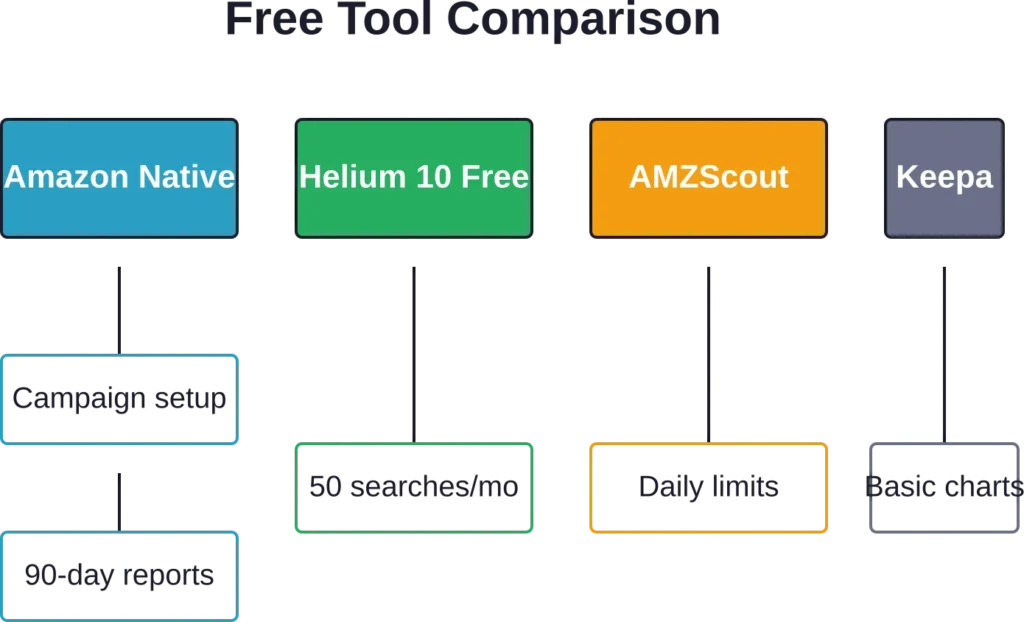
Before looking elsewhere, understand what Amazon provides for free inside Seller Central.
WisePPC (Amazon Ads Verified Partner)

WisePPC is a third-party Amazon PPC platform and official Amazon Ads Verified Partner that connects directly via the Advertising API. It gives sellers deeper data and faster bulk tools than native Amazon options.
What it does well: WisePPC stores years of historical data (beyond Amazon’s 60–90 day limit), offers clean visual dashboards with trend tracking, and enables extremely fast bulk editing of thousands of campaigns, keywords, and placements. It also excels at deep placement analysis, profit tracking, and anomaly detection.
What it lacks: Advanced rule-based automation is still in development. It uses a freemium model (paid plans needed for larger accounts) and has a small learning curve.
Real talk: Great for sellers spending $5K+ monthly on ads. It saves significant time and reveals budget leaks that Campaign Manager hides. A strong next step after outgrowing native tools.
Contact Information:
- Website: wiseppc.com
- Facebook: www.facebook.com/people/Wise-PPC/61573154427547
- LinkedIn: www.linkedin.com/company/wiseppc
- Instagram: www.instagram.com/wiseppc
Campaign Manager (Free, Built-In)
Every seller gets access to Amazon’s Campaign Manager. It’s the foundation—where you create Sponsored Products, Sponsored Brands, and Sponsored Display campaigns.
What it does well: bulk operations, basic reporting, search term analysis, bid adjustments.
What it lacks: historical trend visualization, cross-campaign analytics, anomaly detection, automated rules.
Real talk: Campaign Manager is clunky for multi-SKU sellers. Pulling useful insights takes manual work. But for accounts under $5K monthly ad spend, it’s serviceable paired with spreadsheet discipline.
Advertising Console Reporting
Amazon added more robust reporting tabs in recent years. Download custom date ranges, filter by ASIN or campaign type, export to CSV.
Useful features: conversion tracking over time, impression share metrics (helps identify when you’re losing visibility), targeting reports broken out by keyword or ASIN.
The catch: data only goes back 90 days in the UI. Historical analysis requires manual CSV archiving.
Search Query Performance Dashboard
Buried under the Brand Analytics section (must be brand-registered), this free tool shows top search terms in your category, click share, and conversion share.
Why it matters for PPC: identifies high-volume keywords competitors are winning on. Use it to discover new targets or validate existing ones.
Limitation: aggregate category data only—doesn’t show your specific campaign performance against those terms.
Browser Extensions and Community Tools
Several free Chrome/Edge extensions fill gaps Amazon’s native tools leave open.
Helium 10 Chrome Extension (Free Tier)

Helium 10 offers a limited free tier through their browser extension with usage caps of 50 uses per month on most tools.
For PPC specifically: reverse ASIN lookup shows what keywords competitors rank for. Run this on top performers in your niche to build negative keyword lists or find expansion opportunities.
Usage caps: 50 uses per month on most tools in the free version.
AMZScout (Free Plan)

Another extension with PPC utility. The free plan includes product database searches and basic keyword tracking.
Best use case: validating search volume before adding expensive broad-match keywords. Avoid bidding $2+ on terms with only 100 monthly searches.
The free tier resets monthly but has daily limits that can block heavy users mid-research.
Keepa (Freemium Model)

Keepa tracks price and Best Seller Rank history. While primarily a product research tool, savvy PPC managers use it to correlate ad spend with BSR movement.
Free accounts see basic charts. Premium unlocks API access and deeper data, but the free version is enough to eyeball if your campaigns are moving the needle on organic rank.
Spreadsheet-Based PPC Management
Sound old-school? Google Sheets paired with disciplined reporting is how many seven-figure sellers managed PPC before automation became affordable.
Building a Free PPC Dashboard
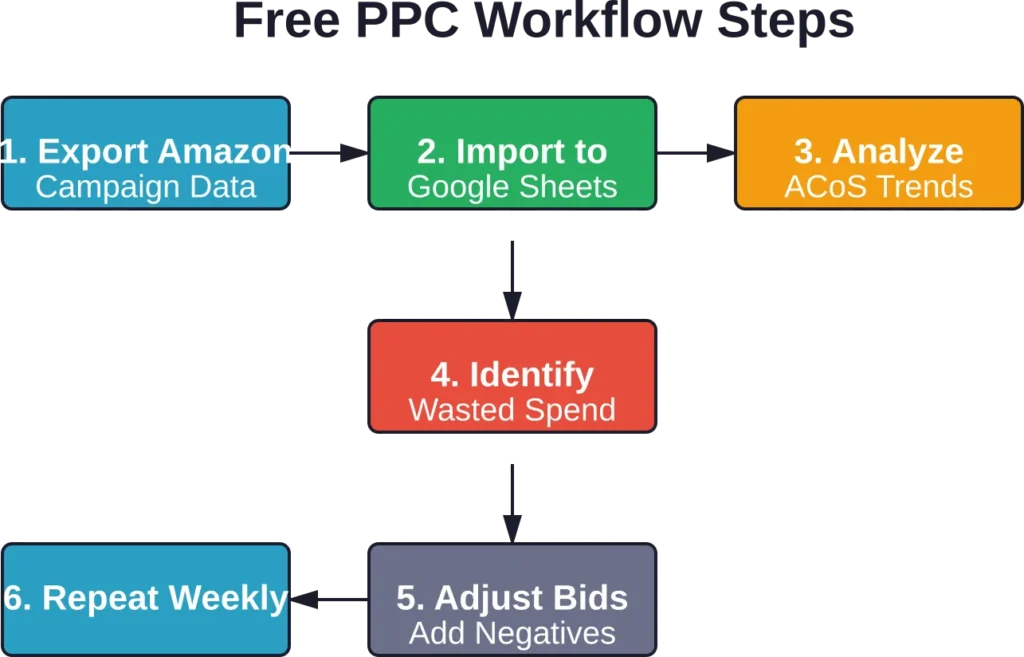
Export campaign data weekly from Amazon’s Campaign Manager. Import into a master Google Sheet with tabs for:
- Weekly spend and ACoS by campaign
- Top spending keywords with conversion rates
- Search term harvesting log (approved/negatived)
- Budget pacing tracker
Set up conditional formatting to flag campaigns exceeding target ACoS or keywords burning budget without conversions.
This approach scales to about $10K monthly spend before manual work becomes a bottleneck.
Automated Alerts with Google Sheets Scripts
Google Sheets supports free scripts (Apps Script) that can email alerts when thresholds are breached.
Example: trigger an email if any campaign spends over $100 in a day with ACoS above 50%. Prevents runaway spend on weekends or during sales spikes.
Scripts require basic JavaScript knowledge. Community templates exist—search “Amazon PPC Google Sheets script” for starter code.
Limited Free Tiers from Paid Platforms
Several premium tools offer constrained free plans. These work for single-product sellers or testing before upgrading.
SellerApp (Free Trial + Limited Free Plan)

SellerApp appears in Amazon’s Selling Partner Appstore. The platform offers a free trial and maintains a limited free tier for small accounts.
Free tier typically includes: keyword tracking for one product, basic PPC reporting, alerts on stock or review changes.
Enough to monitor a hero SKU. Multi-product catalogs hit limits quickly.
Perpetua (Free Setup Consultation)

Perpetua doesn’t offer a free ongoing plan but provides free initial account audits. Submit campaign data and receive a report identifying wasted spend and structure issues.
Useful one-time optimization even if ongoing automation is cost-prohibitive. Just expect sales follow-up.
Daniks.AI (Free Trial Period)

Daniks.AI focuses on full autopilot PPC management and is priced transparently for accounts spending $1K to $100K monthly on ads. While not permanently free, the trial period allows testing automated bid adjustments and goal-based optimization (set target ACoS and let AI adjust).
For sellers considering automation but wanting to validate performance before committing to monthly fees, trial periods like this provide a no-risk proof of concept.
Community Resources and Calculators
Reddit and seller forums host free tools built by the community.
ACoS and TACoS Calculators
Simple web-based calculators that compute Advertising Cost of Sale (ACoS) and Total Advertising Cost of Sale (TACoS) from your revenue and spend inputs.
Why bother? These metrics contextualize ad efficiency. A 30% ACoS might look bad until TACoS shows ads are driving organic rank lift, lowering blended costs.
Keyword Bid Estimator Sheets
Community members share Google Sheets templates that estimate optimal bids based on conversion rate and target ACoS.
Input: your product price, conversion rate, target profit margin. Output: max bid per click before ACoS exceeds target.
Found on subreddits like r/FulfillmentByAmazon and seller Facebook groups.
Negative Keyword Lists
Curated lists of commonly wasted terms (“free,” “cheap,” “alternatives to”) shared freely. Import these as negative keywords to prevent junk traffic from day one.
Saves the $50-$100 burn most sellers experience learning which terms convert poorly.
Limitations of Free PPC Tools
Free tools get you started. But understand where they fall short so expectations stay realistic.
No Real-Time Automation
Amazon updates campaign metrics with a delay. Free tools rely on manual exports, adding another lag layer.
Result: bid adjustments happen days after performance shifts. In competitive niches, that delay costs margin or visibility.
Shallow Historical Data
Amazon’s native reporting caps at 90 days. Free extensions don’t store data long-term.
Without year-over-year comparisons, spotting seasonal trends or measuring long-term ROAS becomes guesswork.
Single-Account Focus
Managing multiple Seller Central accounts (say, US + EU marketplaces or separate brand entities) requires juggling logins and separate tracking.
Free tools rarely offer multi-account dashboards. Each account becomes its own silo.
Limited Support and Updates
Free tier users sit at the bottom of the priority queue. When Amazon’s API changes or bugs appear, fixes come slower—if at all.
No Advanced Features
Dayparting (adjusting bids by hour), portfolio-level budget optimization, anomaly detection, automated A/B testing—these require paid platforms.
Free tools handle the basics. Scaling beyond $20K monthly spend without advanced features means leaving money on the table.
When to Upgrade from Free Tools
Here’s the thing though—free stops making sense at certain thresholds.
Upgrade when:
- Monthly ad spend exceeds $5K and manual management takes over 10 hours weekly
- You’re managing 50+ active campaigns or 500+ keywords
- ACoS variance between campaigns suggests bid inefficiency costing more than tool fees
- You need API-level integrations with inventory or accounting software
At that point, a $49/month tool pays for itself by saving time and tightening margin. According to Marketplace Pulse, sellers using AI-powered ad optimization saw up to 30% higher ROAS during Q4 2024—an improvement that quickly offsets platform costs for mid-sized accounts.
Building a Cost-Effective Stack
Combine free tools strategically to cover most PPC needs without subscriptions.
The Lean Seller Stack (Under $5K Monthly Ad Spend)
Core: Amazon Campaign Manager + weekly Google Sheets dashboard
Keyword research: Helium 10 free extension (50 uses/month)
Rank tracking: Keepa free account
Alerts: Google Sheets script for budget overruns
Negative keywords: Community lists from Reddit
Total cost: $0/month. Time cost: 3-5 hours weekly.
The Growing Seller Hybrid (5K-$15K Monthly Spend)
Core: Amazon Campaign Manager + detailed tracking sheet
Optimization: Free trial rotation (test Perpetua, Daniks.AI, SellerApp trials sequentially for audits)
Keyword expansion: Paid tier of one tool (Helium 10 Platinum at $99/month unlocks deeper data)
Automation: Manual for now, but budget set aside for paid tool once spend crosses $20K
Partial paid stack starts making sense here. One $99 subscription beats 10 hours of manual keyword research monthly.
| Spend Level | Recommended Stack | Monthly Cost | Time Investment |
|---|---|---|---|
| Under $3K | Amazon native + Sheets | $0 | 2-3 hrs/week |
| $3K-$10K | Native + Helium free + Keepa | $0 | 4-6 hrs/week |
| $10K-$25K | Add one paid keyword tool | $49-$99 | 5-8 hrs/week |
| $25K+ | Full automation platform | $299+ | 1-2 hrs/week |
Common Pitfalls Using Free Tools
Free doesn’t mean foolproof. Watch for these mistakes.
Over-Reliance on Stale Data
Checking campaigns once weekly worked when spend was $50/day. At $500/day, a broken auto campaign can burn $1K before the next check-in.
Set a review cadence that matches spend velocity. Over $200 daily spend? Check at least every other day.
Ignoring Search Term Reports
Amazon shows exactly what queries triggered your ads. Ignoring this goldmine means paying for clicks from “used,” “knockoff,” or competitor brand terms.
Weekly search term harvesting should be non-negotiable, even with free tools.
Chasing Too Many Metrics
Free dashboards tempt users to track everything: impressions, CTR, CVR, ACoS, TACoS, ROAS, CPC.
Focus on two: ACoS (is this campaign profitable?) and conversion rate (are clicks turning into sales?). Everything else is secondary until spend scales.
Not Archiving Data
Amazon purges detailed reports after 90 days. Export and save monthly snapshots to Google Drive or Dropbox.
Sellers benefit from archiving monthly snapshots to enable year-over-year performance comparisons.
Frequently Asked Questions
Yes, up to about $10K monthly ad spend. Beyond that, the time cost of manual management typically exceeds the cost of paid automation. For new sellers or single-product accounts, free tools provide enough functionality to optimize bids, harvest keywords, and track performance without subscriptions.
No single free tool replicates Helium 10’s full suite. Combine Amazon’s native Campaign Manager for reporting, Google Sheets for tracking, and AMZScout’s free tier for keyword validation. The Helium 10 Chrome extension itself offers 50 free monthly uses, enough for light competitive research.
Minimum once weekly for accounts under $3K monthly spend. Daily checks become necessary above $5K monthly spend or during product launches and sales events. Free tools lack real-time alerts, so manual vigilance prevents runaway costs.
Amazon’s native tools work across all marketplaces where you have active seller accounts. Third-party free extensions often support US, UK, DE, FR, ES, IT, and CA. Newer marketplaces like AU, JP, or IN may have limited free tool support—check each tool’s marketplace compatibility before relying on it.
Lack of automation. Free tools require manual data exports, analysis, and bid adjustments. This works fine at low scale but becomes a bottleneck as campaigns grow. Paid tools automate bid changes based on performance rules, saving hours weekly and often improving efficiency enough to offset their cost.
Not truly free for ongoing use. Some platforms like Daniks.AI or Perpetua offer free trials where automation runs temporarily. Amazon’s native tools include basic bid automation (dynamic bidding strategies) at no extra cost, but lack the sophistication of third-party AI. For sustained automation, budget for paid software once ad spend justifies it.
Export campaign performance reports from Amazon Seller Central weekly. Import CSV data into Google Sheets, create tabs for campaigns, keywords, and search terms. Use formulas to calculate ACoS, total spend, and conversion rates. Set conditional formatting to highlight campaigns exceeding target thresholds. Apps Script can automate imports and send email alerts, though this requires basic coding knowledge or using community templates.
Final Thoughts
Free Amazon PPC tools serve a real purpose—just not forever.
They let new sellers test campaigns without upfront software costs. They work for lean operations where time is more available than budget. And they teach fundamentals better than any paid platform because manual analysis forces deeper understanding.
But scaling on free tools alone hits a ceiling. That ceiling appears around $10K-$15K monthly spend, when opportunity cost (lost margin from delayed optimizations) exceeds the cost of automation.
Start free. Learn the mechanics. Track everything manually for at least three months so the data tells a story when tools eventually surface it automatically.
Then upgrade strategically—one paid tool at a time, choosing software that solves your current biggest bottleneck.
To tighten up PPC without spending a dollar: Sellers can pick one free tool, export campaign data, and identify wasted spend. Many sellers discover campaigns burning budget on non-converting terms within their first audit. That’s money back in your pocket with zero software fees.