

Quick Summary: Amazon optimization tools help sellers boost sales through listing enhancement, keyword research, inventory management, and performance analytics. The market offers both comprehensive suites like WisePPC, Helium 10 and SellerSprite (starting at $39-$49/month) and specialized tools for specific tasks, plus Amazon’s native tools like Compute Optimizer for AWS cost management. Choosing the right mix depends on your business stage, budget, and whether you sell products (Seller Central) or operate AWS infrastructure.
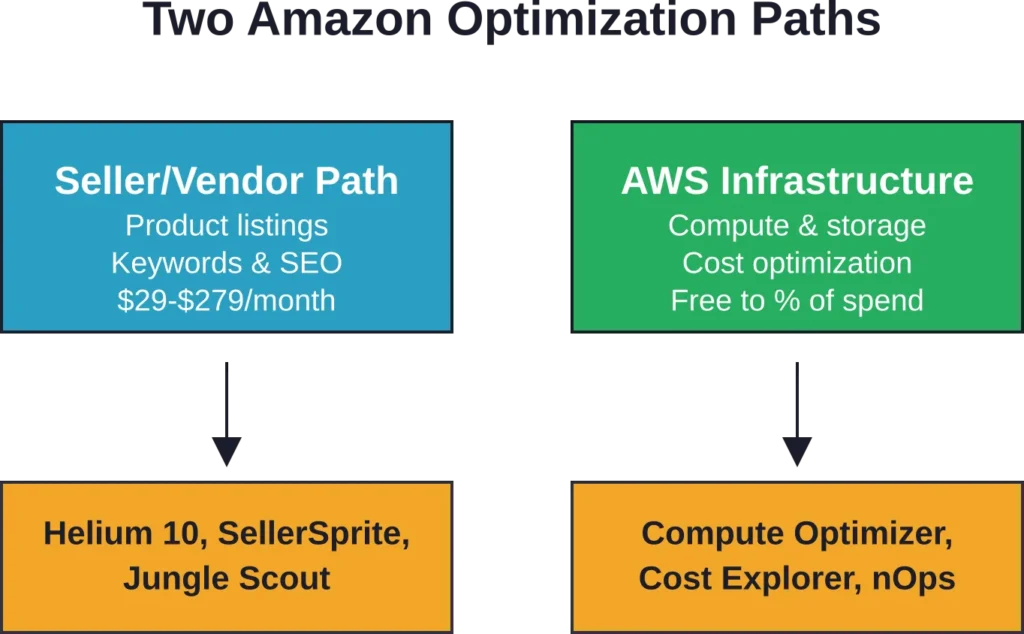
The Amazon ecosystem splits into two distinct worlds. Product sellers navigate Seller Central and Vendor Central, hunting for high-converting keywords and optimizing bullet points. Meanwhile, AWS infrastructure teams wrangle EC2 instances and Lambda functions, chasing down wasteful spending.
Both groups face the same core challenge: Amazon’s platforms are massive, data-rich, and unforgiving to guesswork. Manual optimization breaks at scale.
That’s where optimization tools come in. But the market’s crowded, pricing varies wildly, and feature overlap creates confusion. Some tools promise everything and deliver dashboards that just repackage what Amazon already shows you. Others find real waste and tell you exactly how to fix it.
Here’s what actually works in 2026.
Understanding the Two Amazon Ecosystems
Before diving into specific tools, recognizing which Amazon you’re optimizing matters. The platforms serve different users with different needs.
Amazon Seller Central and Vendor Central
Third-party sellers manage their own inventory through Seller Central. They control pricing, fulfillment choices, and listing content. Vendors sell wholesale to Amazon through Vendor Central—Amazon buys the inventory, owns it, and manages the customer relationship.
According to Amazon’s own listing management updates from October 2025, the Manage All Inventory page now groups tasks into three categories: complete drafts, activate listings, and optimize listings. This workflow shift acknowledges what sellers already knew—optimization isn’t a one-time task.
The tools sellers need focus on keyword discovery, listing quality scores, competitor tracking, and conversion optimization. Pricing typically runs $29 to $279 per month depending on feature depth.
AWS Infrastructure Optimization
AWS customers face a different challenge. They’re optimizing compute resources, storage costs, and data transfer expenses. The official AWS documentation describes Compute Optimizer as a service that analyzes configuration and utilization metrics across EC2 instances, Auto Scaling groups, Lambda functions, EBS volumes, and ECS services on Fargate.
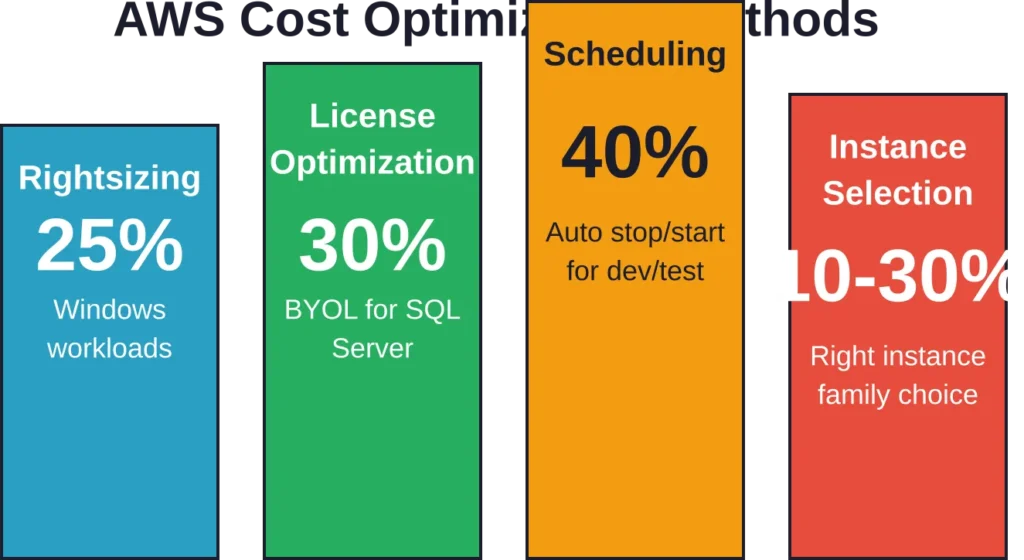
AWS cost optimization focuses on four main methods: purchasing discounts, deleting unused resources, rightsizing compute to actual demand, and hibernating resources during off-hours. According to AWS’s own recommendations, rightsizing Windows workloads saves an estimated 25%, while automating stop/start schedules can save up to 40%.
The pricing model differs completely. AWS native tools are mostly free or usage-based. Third-party AWS cost tools typically charge a percentage of cloud spend or flat monthly fees ranging from a few hundred to several thousand dollars.
Top Amazon Seller Optimization Tools
Product sellers need tools that solve specific workflow problems. The best ones automate keyword research, track competitor changes, and identify listing weaknesses before they tank your conversion rate.
WisePPC: Amazon PPC Deep Dive

WisePPC carved out a strong niche as a specialized Amazon PPC optimization tool. Instead of being another all-in-one suite, it focuses exclusively on advertising — delivering deep analytics, long-term data storage, and powerful bulk management.
Key features include 30+ metrics with hourly granularity, true bulk actions (edit thousands of campaigns, bids, and targets in seconds), gradient highlighting of anomalies, multi-metric charts (up to 6 metrics at once), placement performance breakdowns, and inline editing directly in tables. A major advantage is storing historical data for years, far beyond Amazon’s 60–90 day limit.
Pricing is currently in beta — free access with an option for a 25% lifetime discount after official launch. Future plans are expected to be usage-based or tied to ad spend, making it significantly more affordable than most enterprise PPC tools at the start.
Users praise the tool for real-time insights, extremely convenient bulk operations, and the ability to spot long-term trends that Amazon hides.
Contact Information:
- Website: wiseppc.com
- Facebook: www.facebook.com/people/Wise-PPC/61573154427547
- LinkedIn: www.linkedin.com/company/wiseppc
- Instagram: www.instagram.com/wiseppc
Helium 10: The All-in-One Suite

Helium 10 dominates the all-in-one category. The platform bundles keyword research, listing optimization, inventory management, and analytics into one subscription.
Key modules include Keyword Processor (cleans and organizes keyword lists), Scribbles (ensures you use target keywords in titles and bullets), Listing Analyzer (scores listing quality), and Listing Builder (assembles optimized listings from templates).
Pricing starts at $39 per month for basic plans. Reviews highlight the learning curve—the interface packs in features, which means new users spend time figuring out which tools matter for their specific needs.
The platform works best for sellers managing 10+ ASINs who need centralized workflow. Single-product sellers often find they’re paying for features they don’t use.
SellerSprite: Asian Market Focus

SellerSprite carved out a niche with strong Asian marketplace data, particularly for sellers operating across Amazon US, Europe, and Japan simultaneously.
The product research module filters opportunities by category, brand, and keyword performance. Keyword research shows search volume trends and competing ASIN counts. Pricing starts at $33 per month, positioning it slightly below Helium 10.
User discussions note SellerSprite’s keyword data for non-US marketplaces often surfaces terms that broader tools miss. The tradeoff: US-only sellers don’t benefit from that specialization.
Jungle Scout: Product Research First

Jungle Scout built its reputation on product research—helping sellers identify profitable niches before they commit inventory budget.
The tool estimates sales volume for any ASIN, analyzes competitive intensity by category, and tracks product launches over time. Listing optimization features exist but take a back seat to the research workflow.
Pricing begins at $29 per month. The 47-day money-back guarantee (longer than the industry-standard 30 days) reflects confidence in the onboarding experience.
Best fit: sellers still in product selection mode or those launching new ASINs quarterly.
Pacvue: Enterprise-Scale Management

Pacvue targets brands and agencies managing large catalogs or multiple client accounts. The platform combines listing optimization with advertising campaign management and performance analytics across all Amazon marketplaces.
Pricing isn’t published—enterprise software rarely is. The value proposition targets teams managing significant multi-brand Amazon operations.
The value proposition: unified reporting when you’re running 50+ campaigns across multiple brands and geographies.
Specialized Listing Optimization Tools
Not every seller needs a full suite. Specialized tools solve single problems well, often at lower price points.
Keyword Research Tools
Specialized keyword research tools exist that focus on listing-focused optimization, pulling keyword suggestions, showing search volume, and estimating difficulty scores.
The narrow focus means the interface is simpler than Helium 10’s sprawling dashboard. Sellers who already have product research and inventory tools locked down often prefer this approach—pay for what you actually use.
Listing Quality Analyzers
Tools in this category score listing quality against Amazon’s A9 algorithm requirements. They flag missing attributes, weak bullet points, and images that don’t meet technical specs.
Integration quality between listing quality analyzers and Seller Central varies. The best ones provide clear explanations for recommended changes.
Review Management
Review tools monitor new feedback, alert sellers to negative reviews requiring responses, and track review velocity compared to competitors.
Amazon’s terms of service prohibit incentivizing reviews, so legitimate tools focus on monitoring and damage control rather than artificial inflation. Sellers operating in competitive categories where a single one-star review tanks conversion rate find dedicated review monitoring worth the cost.
AWS Cost Optimization Tools
AWS infrastructure optimization requires a completely different toolkit. The goal: reduce cloud spending without sacrificing performance or reliability.
AWS Native Tools (Free)

AWS provides several built-in optimization tools at no additional cost.
AWS Compute Optimizer uses machine learning to analyze utilization metrics and recommend optimal instance types. According to official AWS documentation, AWS Compute Optimizer analyzes configuration and utilization metrics across EC2 instances, Auto Scaling groups, Lambda functions, EBS volumes, and ECS services on Fargate.
The service generates recommendations for rightsizing—moving from over-provisioned instances to appropriately sized alternatives. It also identifies idle resources and suggests Lambda memory configurations that balance cost and performance.
AWS Cost Explorer visualizes spending patterns over time, breaks down costs by service and region, and forecasts future spending based on historical trends.
Cost Optimization Hub, introduced at re:Invent 2023, consolidates optimization recommendations from multiple AWS services into a single dashboard. It pulls findings from Compute Optimizer, Trusted Advisor, and Cost Explorer.
The catch: these tools show you what’s wrong but don’t fix anything automatically. Implementation still requires engineering time.
AWS Trusted Advisor
Trusted Advisor scans AWS accounts against best-practice checks across five categories: cost optimization, performance, security, fault tolerance, and service limits.
The free tier includes basic checks. Business and Enterprise Support plans unlock the full set. Cost-specific checks identify idle RDS instances, underutilized EBS volumes, and unassociated Elastic IPs.
Like Compute Optimizer, Trusted Advisor recommends—it doesn’t remediate. Teams still need runbooks to act on findings.
Third-Party AWS Cost Tools
Tools like nOps, CloudZero, and Vantage extend AWS’s native capabilities with automation, custom alerting, and team collaboration features.
According to CostPatrol testing, third-party AWS cost tools vary significantly in approach, from visualization platforms to those providing actionable recommendations with remediation guidance.
nOps, an AWS Cloud Management Tools Competency Partner, offers automated rightsizing and scheduling. The platform integrates with the AWS Well-Architected Framework, mapping findings to specific pillars.
Pricing models vary. Third-party AWS cost tools use different approaches to pricing, from percentage-of-spend models to flat monthly fees, with some offering free tiers for smaller accounts.
Choosing between native and third-party tools comes down to team size and engineering capacity. Small teams with limited AWS expertise often get faster ROI from third-party platforms that automate implementation. Larger engineering organizations with dedicated FinOps teams sometimes prefer stitching together native tools with custom automation.
How to Choose the Right Optimization Tools
Tool selection depends on three variables: business stage, budget, and workflow maturity.
Business Stage Considerations
Sellers just launching their first product don’t need enterprise analytics. Start with product research (Jungle Scout or similar) and basic keyword tools. Total cost: $50-$80 per month.
Sellers managing 5-10 ASINs benefit from all-in-one platforms. The workflow integration—keyword research feeding directly into listing builder feeding into performance tracking—saves enough time to justify $100-$150 monthly spend.
Large catalogs (50+ ASINs) or multi-brand operations need enterprise platforms with bulk editing, role-based permissions, and API access. Budget shifts from hundreds to thousands per month, but the alternative is hiring additional staff.
Budget Reality Check
Subscription costs add up fast. Three tools at $50 each costs $1,800 annually. That’s reasonable if those tools drive an incremental $20K in revenue (a 10:1 return). It’s wasteful if you’re doing $5K monthly in total sales.
A working benchmark: tool costs shouldn’t exceed 2-3% of monthly Amazon revenue for established sellers, or 5-7% for sellers in growth/launch phase actively investing in market share.
On the AWS side, analysis from CostPatrol notes that engineer time to implement optimizations carries hidden costs. At a fully loaded cost of approximately $94-$140 per hour for a US engineer, according to MIT E-Club and Hadzima research, manual optimization quickly becomes expensive. Tools that automate implementation can pay for themselves in the first month if they save even a few hours of engineering time.
Workflow Maturity
New sellers often buy tools, get overwhelmed by data, and abandon them. The pattern: subscribe to everything, use 20% of features, let the rest sit idle.
A better approach: identify your current bottleneck, buy the tool that solves that specific problem, master it, then add the next tool.
Running out of product ideas? Product research tool first. Listings converting poorly? Listing optimizer next. Ads spending too much? Advertising analytics after that.
Stacking tools before you have repeatable workflows for each just creates expensive clutter.
Amazon’s Native Optimization Features
Amazon provides built-in optimization features that sellers often overlook. These aren’t third-party tools—they’re native to Seller Central and AWS.
Manage All Inventory Enhancements
According to Amazon’s listing management updates from October 2025, the Manage All Inventory page organizes tasks by workflow stage. Quick Filters help identify search-suppressed listings, zero-inventory items, and pricing issues.
The optimization tab offers specific listing improvement suggestions, including missing attributes and bulk optimization options. For sellers managing dozens of SKUs, this native functionality covers many use cases that previously required third-party tools.
Amazon Brand Registry
Brand-registered sellers on Amazon have access to enhanced features including A+ Content and Brand Analytics. A+ Content allows richer product descriptions with comparison charts and lifestyle images. Brand Analytics shows search terms customers used before purchasing, top-clicked ASINs, and conversion rates.
This data powers keyword strategy without paying for third-party tools, assuming your brand qualifies for registry.
AWS Cost Anomaly Detection
AWS Cost Anomaly Detection uses machine learning to identify unusual spending patterns and alert teams before small issues become budget disasters.
AWS Cost Anomaly Detection is a free AWS service feature that integrates with AWS Budgets. AWS Cost Anomaly Detection can send alerts when spending deviates from expected patterns, with configurable notification options.
This doesn’t replace comprehensive cost optimization platforms, but it catches runaway instances or accidental resource creation before the next bill arrives.
Integration and Workflow Automation
Tools work best when they connect to each other and to Amazon’s platforms. Integration quality often matters more than feature count.
API Access and Data Export
Many tool providers offer API access through premium plans, allowing custom integrations with internal systems. Teams running Amazon alongside other sales channels (Shopify, WooCommerce, brick-and-mortar) need unified inventory and performance data.
Look for tools that export raw data in standard formats (CSV, JSON). Vendor lock-in happens when data lives in proprietary dashboards with no export path.
Automation Opportunities
The most valuable automation: tasks that must happen frequently and follow consistent logic.
Examples include repricing based on competitor changes, inventory reorder triggers when stock falls below thresholds, and PPC bid adjustments when ACOS exceeds targets.
But watch for over-automation. Automated repricing that ignores profit margins can win the Buy Box while losing money on every sale. Automated PPC rules that don’t account for seasonal patterns waste budget.
Automation should amplify good decisions, not replace decision-making entirely.
Common Pitfalls and How to Avoid Them
Tool adoption fails in predictable ways. Recognizing these patterns saves money and frustration.
Subscription Sprawl
It’s easy to accumulate tool subscriptions faster than you cancel them. Monthly charges for tools you haven’t logged into in 90 days add up to thousands annually.
Set quarterly reviews: audit every subscription, check last login date, and cancel anything not delivering ROI. No sunk cost fallacy—if you’re not using it, the money you already spent doesn’t justify continuing to spend.
Analysis Paralysis
More data doesn’t automatically produce better decisions. Some sellers spend hours analyzing keyword search volume and competitor prices, then never actually update their listings.
Tools should reduce decision time, not expand it. If a tool consistently gives you data you look at but don’t act on, that’s a signal to cancel or simplify.
Ignoring Native Features
Third-party tools often charge for capabilities Amazon already provides. Brand Analytics keyword data, for instance, is free for brand-registered sellers but also sold by tool vendors who repackage it with light analysis.
Check what’s available natively before paying for duplicated functionality.
Measuring Tool ROI
Every optimization tool should tie to measurable outcomes. Without clear ROI tracking, it’s impossible to know which subscriptions justify their cost.
Attribution Models for Seller Tools
Track revenue before and after tool implementation. For listing optimization tools, look at organic session growth, conversion rate changes, and sales lift for optimized ASINs compared to control groups.
For keyword tools, measure the increase in indexed keywords and search term ranking improvements. For inventory tools, track stockout frequency and lost sales due to unavailability.
Assign dollar values: if a listing tool improves conversion rate by 0.5% and you do $50K monthly sales on affected ASINs, that’s $250/month in incremental revenue. A $79/month tool with that impact delivers 3:1 ROI.
AWS Cost Tool Measurement
AWS cost tools should generate savings that exceed their cost by at least 3-5x. As a benchmark, a tool costing $500/month should ideally identify recommendations for at least $1,500-$2,500 in monthly potential savings.
Track implemented recommendations separately from identified recommendations. Tools that surface 100 optimization opportunities but require manual implementation often show low actual savings because teams lack bandwidth to execute.
Analysis of AWS cost optimization approaches notes that engineer opportunity cost—time spent manually analyzing bills and implementing fixes—often exceeds tool subscription costs. For example, if a tool saves four hours of engineering time monthly at $100/hour fully-loaded cost, that represents $400 in avoided cost before counting actual AWS savings.
Future Trends in Amazon Optimization Tools
The optimization tool market continues evolving. Several trends shape where investment and development focus.
AI-Driven Listing Creation
Generative AI increasingly powers listing creation. Tools now generate bullet points, product descriptions, and even A+ Content based on competitor analysis and keyword targets.
Initial implementations of AI-generated listing content suggest performance comparable to human-written copy for functional products in some cases. But brand-differentiated products still benefit from human creative input. Many practitioners find that AI-generated first drafts refined by humans for brand voice and differentiation optimize the content creation process.
Predictive Analytics
Tools are shifting from descriptive analytics (what happened) to predictive analytics (what will happen). Modern optimization tools increasingly incorporate machine learning capabilities for sales forecasting, demand prediction, and inventory optimization.
Amazon Redshift Serverless optimization, detailed in AWS’s March 2025 blog post, demonstrates this trend. The system adjusts compute capacity by analyzing query complexity and data volume, not just queue times. Testing of Amazon Redshift Serverless optimization showed configuration differences in query performance, with the Optimized for Performance configuration showing 0 long queries (over 10 minutes) compared to 204 in the cost-optimized configuration.
Multi-Channel Unification
Sellers increasingly operate across Amazon, their own DTC sites, and other marketplaces. Tools that unify inventory, analytics, and optimization across channels gain market share over Amazon-only solutions.
The complexity: each platform has unique algorithms, content requirements, and best practices. True multi-channel optimization requires platform-specific expertise, not just data aggregation.
| Trend | Current State | Impact on Tool Selection |
|---|---|---|
| AI content generation | Functional but generic | Good for commodity products; limited for brands |
| Predictive analytics | Improving accuracy | Valuable for inventory planning and demand forecasting |
| Multi-channel unification | Early adoption | Essential for sellers on 3+ platforms |
| Automation depth | Growing capabilities | Reduces manual work but requires monitoring |
Frequently Asked Questions
Amazon Seller tools optimize product listings, keywords, inventory, and sales performance on Amazon’s retail marketplace. AWS optimization tools reduce infrastructure costs and improve performance for cloud computing resources. They serve completely different users—product sellers versus cloud infrastructure teams—despite both operating within the Amazon ecosystem.
Product sellers typically spend $50-$300 monthly depending on business size. A working benchmark: keep tool costs below 2-3% of monthly Amazon revenue for established sellers, or 5-7% during growth phases. AWS teams using third-party cost tools often pay 2-5% of monthly cloud spend, though native AWS tools (Compute Optimizer, Cost Explorer) are free.
Amazon’s native tools—Manage All Inventory, Brand Analytics (for registered brands), and performance dashboards—provide substantial value at no cost. Start with these before adding paid subscriptions. Free third-party tools typically limit features or data access, making them useful for validation but insufficient for ongoing optimization at scale.
No. According to official AWS documentation, Compute Optimizer analyzes utilization and generates recommendations, but implementation requires manual action or custom automation. Tools like AWS Systems Manager can help automate implementation, but that requires additional configuration. Third-party platforms like nOps offer more automated remediation.
Jungle Scout offers the gentlest learning curve with its focus on product research and straightforward interface. Pricing starts at $29 monthly with a 47-day money-back guarantee. Helium 10 provides more comprehensive features but takes longer to master. For sellers only needing keyword optimization, Keywords.am’s narrow focus at $49 monthly reduces complexity.
Track specific metrics before and after implementation. For listing tools: organic sessions, conversion rate, indexed keywords, and search ranking for target terms. For AWS tools: month-over-month cost changes, implemented recommendations count, and engineering hours saved. Calculate ROI by dividing incremental revenue (or cost savings) by tool cost—aim for at least 3:1 returns.
Eventually, yes—but not immediately. If organic sales are converting poorly, listing optimization takes priority. If listings convert well but lack traffic, advertising becomes more valuable. Most sellers start with listing optimization, then add advertising tools once conversion rates reach 12-15% or higher.
Building Your Optimization Stack
The right tool combination depends on where your business operates and what specific challenges slow growth.
For new Amazon sellers: start with Jungle Scout for product research ($29/month) and Amazon’s native listing optimization features. Total investment: under $30 monthly plus time learning the platform. Add keyword and listing tools only after validating product-market fit.
For established sellers (5-20 ASINs, $20K-$100K monthly revenue): graduate to an all-in-one platform like Helium 10 or SellerSprite ($39-$69/month). The workflow integration justifies the higher cost. Add specialized tools for weak spots—review monitoring if feedback management lags, inventory management tools if stockouts affect sales.
For large operations (50+ ASINs, multiple brands, $500K+ annual revenue): enterprise platforms like Pacvue or custom-built solutions make sense. Budget shifts from hundreds to thousands monthly, but the alternative—hiring additional staff—often costs more.
AWS teams face a different calculus. Small deployments ($1K-$5K monthly spend) often find AWS’s native tools (Compute Optimizer, Cost Explorer, Trusted Advisor) sufficient. The learning investment pays off, and there’s no subscription cost.
Medium AWS deployments ($10K-$50K monthly) benefit from third-party platforms that automate recommendation implementation. The engineering time saved plus incremental savings typically exceed platform costs within 30-60 days.
Large AWS environments ($100K+ monthly) often build custom FinOps teams and tooling. Off-the-shelf solutions provide starting points, but unique architectures require purpose-built automation.
The pattern holds across both ecosystems: match tool sophistication to business maturity. Overspending on enterprise features before you have enterprise-scale problems wastes money. Underinvesting in automation as complexity grows creates operational drag that costs more than the tools would.
Taking Action
Tool research doesn’t drive results. Implementation does.
Start by identifying your single biggest optimization bottleneck right now. Not the most interesting problem or the one with the flashiest solution—the actual constraint limiting growth or profitability today.
For sellers, that might be search visibility (keyword tool), conversion rate (listing optimizer), inventory stockouts (forecasting tool), or ad efficiency (campaign analytics). For AWS teams, it’s typically idle resources, oversized instances, inefficient storage, or lack of spend visibility.
Pick one tool that solves that specific problem. Not three tools. One.
Master it. Implement the recommendations. Measure results. Calculate ROI.
Only then consider adding the next tool to your stack.
Evidence suggests that successful optimization outcomes correlate more with methodical implementation and rigorous measurement than with the number of tools deployed.
Amazon’s ecosystems reward optimization. The platforms are too complex and data-rich for manual management at scale. But tools are only as valuable as the decisions they inform and the actions they enable.
Choose deliberately. Implement completely. Measure honestly. That’s how optimization compounds into competitive advantage.