

Quick Summary: Amazon sellers can access several powerful free tools directly from Seller Central, including Product Opportunity Explorer, Revenue Calculator, and Growth Opportunities. Third-party free options like WisePPC, Keepa price tracking, Unicorn Smasher product research, and Amazon’s own AI-powered Seller Assistant provide additional capabilities without subscription costs. These tools help sellers research products, estimate profitability, track competitors, and optimize listings without upfront investment.
Smart Amazon sellers don’t win with more effort. They win with the right tools.
The challenge? Most powerful seller tools cost $50–$200 per month. That’s brutal when you’re just starting out or testing new product lines.
Here’s the thing though—Amazon provides genuinely useful free tools right inside Seller Central. And several third-party options offer free tiers that deliver real value. Not trial gimmicks. Actual functionality.
This guide covers 14 free Amazon selling tools that solve real problems: finding profitable products, calculating accurate fees, tracking competitor prices, and optimizing listings. Each tool below is either completely free or has a robust free tier that doesn’t require a credit card.
Free Third-Party Amazon Seller Tools
Several third-party tools provide excellent free or freemium options that deliver real value to Amazon sellers. These go beyond short trials and offer meaningful functionality even on free plans
1. WisePPC (Amazon PPC Optimization)

WisePPC is a specialized tool designed exclusively for Amazon advertising management and PPC optimization. It helps sellers deeply analyze, efficiently manage, and scale their Sponsored Products, Sponsored Brands, and Sponsored Display campaigns.
The platform delivers advanced advertising analytics with 30+ metrics, bulk campaign editing for thousands of items, long-term historical data storage (years instead of Amazon’s 60–90 days), powerful segmentation, gradient-based performance highlighting, multi-metric charts, and on-spot inline editing.
WisePPC is an official Amazon Ads Verified Partner. It stands out especially for sellers who run active PPC campaigns and need better visibility, faster optimization, and more control than what Seller Central provides.
Contact Information:
- Website: wiseppc.com
- Facebook: www.facebook.com/people/Wise-PPC/61573154427547
- LinkedIn: www.linkedin.com/company/wiseppc
- Instagram: www.instagram.com/wiseppc
2. Keepa (Price History & Tracking)

Keepa tracks historical prices for every Amazon product. See pricing trends over weeks, months, or years. Track competitor price changes. Set alerts when specific products drop below target prices.
The browser extension is free. It adds price history charts directly to every Amazon product page. Invaluable for product research—you instantly see if a product maintains stable pricing or fluctuates wildly.
Keepa introduced paid premium features in 2019, priced at €19/month. But the free tier still provides core price tracking functionality that most sellers need.
3. Unicorn Smasher (Product Research)
Unicorn Smasher estimates monthly sales volume, revenue, and review velocity for any product. The free Chrome extension adds this data directly to Amazon search results.
Community discussions warn about accuracy concerns—estimates can be off by 20–40%. Despite this, Unicorn Smasher remains valuable for comparing relative product performance. Product A showing 3,000 monthly sales versus Product B showing 300 monthly sales is directionally accurate even if absolute numbers aren’t precise.
The free extension continues to receive regular updates. A Pro version launched at $49, but the free extension continues to receive maintenance updates.
4. Jungle Scout Sales Estimator

Jungle Scout’s full platform is premium-priced, but their Sales Estimator tool is completely free. No registration required.
Enter a product’s Best Seller Rank and category. The estimator calculates approximate monthly sales volume. It’s surprisingly accurate for top-selling products (within 15–20% of actual sales based on community testing).
Accuracy degrades for products ranked below 100,000 in their category. Still useful for ballpark estimates when evaluating product opportunities.
5. Helium 10 Free Tier

Helium 10 offers a perpetual free plan with limited daily usage. You get keyword research, listing optimization suggestions, and basic product tracking.
The catch: usage caps. 2 product searches per day. 5 keyword lookups per day. For serious sellers, that’s constraining. For someone testing products occasionally or managing a small catalog, it’s adequate.
6. AMZScout Sales Calculator

Similar to Amazon’s Revenue Calculator but with a cleaner interface and additional features. Calculate profit margins, compare FBA versus FBM costs, and estimate ROI.
The free calculator adds bulk calculation capabilities—analyze multiple products simultaneously. Useful when comparing several product options.
7. SellerSprite Free Tools

SellerSprite provides free keyword research and product tracking tools with no registration. Their keyword tool shows search volume, competition level, and related keywords for any search term.
The free tier limits results to 10 keywords per search. Still useful for quick research without committing to a paid subscription.
Free Tools Built Into Amazon Seller Central
Amazon builds tools directly into Seller Central that many sellers never discover. These aren’t hidden—they’re just not heavily promoted. But they’re powerful.
8. Amazon Revenue Calculator

The Revenue Calculator answers the most fundamental question every seller asks: “What’s my actual profit after Amazon takes its cut?”
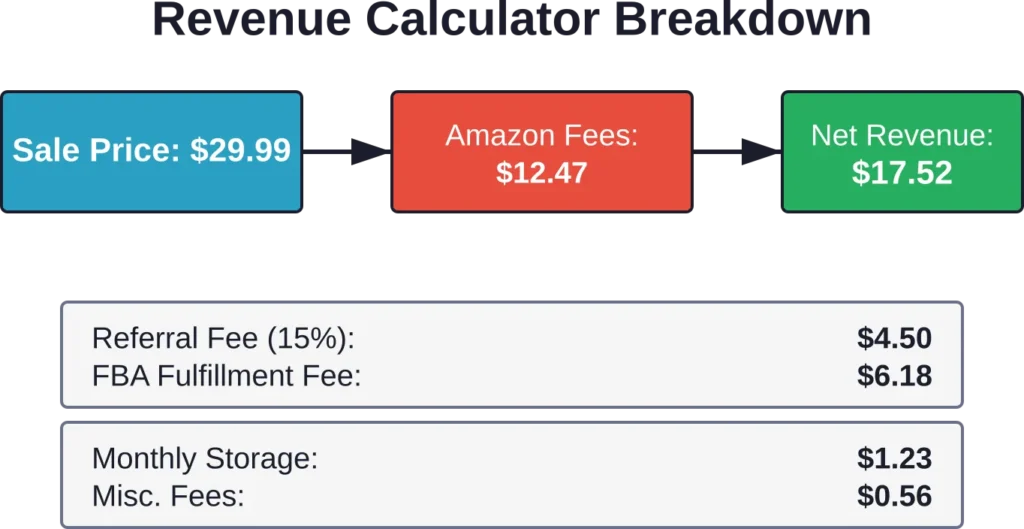
This calculator breaks down FBA fees, referral fees, and storage costs for any product. You input your product cost and selling price. Amazon shows you exactly what you’ll net per unit.
Why it matters: Amazon’s fee structure is complex. Referral fees range from 6% to 45% depending on category. FBA fees vary by size tier and weight. Storage costs fluctuate by season. Without accurate calculations, sellers consistently overestimate profit margins.
The tool is available to everyone—no seller account required. Just search “Amazon Revenue Calculator” or find it in the FBA section of Seller Central.
9. Product Opportunity Explorer
Product Opportunity Explorer identifies niches with customer demand but manageable competition. It’s Amazon’s answer to expensive product research subscriptions.
The tool shows search volume, average price points, and how many products compete in each niche. You can filter by category, price range, and customer demand level.
Best of all, it’s free for all Professional sellers. No additional cost beyond your monthly selling plan.
Real talk: the data updates weekly, not real-time. For initial product research, though, that’s perfectly adequate. You’re looking for trends, not minute-by-minute changes.
10. Growth Opportunities Dashboard
Growth Opportunities analyzes your existing catalog and suggests specific actions to increase sales. It’s like having a consultant review your account—except it’s automated and costs nothing.
The dashboard highlights products eligible for Subscribe & Save, items that need listing improvements, and opportunities to expand to international marketplaces. Each recommendation includes estimated impact.
Many sellers ignore this tool. That’s a mistake. Some sellers report implementing Growth Opportunities recommendations lifts revenue, though specific impact varies.
11. FBA Enrollment Opportunities
This tool identifies which of your merchant-fulfilled products would perform better with FBA. It compares your current sales velocity to similar FBA products and estimates the lift you’d see.
Why it works: products with the Prime badge typically convert better than non-Prime offers. But FBA isn’t free. This tool helps you prioritize which products justify the fulfillment costs.
12. Seller Assistant (Conversational AI)

Amazon launched this AI assistant in late 2025. It answers questions about account health, policy compliance, fee structures, and troubleshooting in natural language.
Ask “Why did my listing get suppressed?” or “How do I appeal a policy warning?” and get specific answers with links to relevant help pages.
The assistant learns from millions of seller interactions. It’s not perfect—complex cases still need Seller Support—but it resolves 60–70% of common questions instantly.
Specialized Free Tools Worth Knowing
13. Canva (Image Design)

Product images determine conversion rates more than any other listing element. Canva provides free design tools specifically for creating Amazon product images, infographics, and A+ Content graphics.
Templates designed for Amazon’s image requirements (2000×2000 pixels minimum, white background for main image) make it easy to create professional-looking photos without hiring a designer.
The free plan includes thousands of templates and design elements. Premium stock photos cost extra, but plenty of free options exist.
14. Grammarly Free (Listing Quality)

Grammarly catches grammar mistakes, awkward phrasing, and tone issues in your product listings. The free browser extension works directly in Seller Central’s listing editor.
Listings with grammar errors may convert worse than clean copy according to seller research. Grammarly eliminates that penalty at no cost.
How to Build a Free Tool Stack
Combining free tools creates a surprisingly capable system for starting and growing an Amazon business. Here’s a practical workflow:
Product Research Phase:
- Use Product Opportunity Explorer to identify high-potential niches
- Check Keepa for price stability and trends
- Estimate sales with Jungle Scout’s free calculator
- Calculate profit margins with Amazon Revenue Calculator
Listing Creation Phase:
- Design images in Canva
- Write product descriptions with Grammarly checking for errors
- Use Growth Opportunities for optimization suggestions
Ongoing Management:
- Monitor FBA Enrollment Opportunities for expansion candidates
- Track competitor prices with Keepa alerts
- Ask Seller Assistant for policy and troubleshooting questions
That said, free tools have limitations. Daily usage caps restrict heavy research. Data accuracy varies. Advanced features require paid upgrades.
But for sellers starting out, testing product ideas, or managing small catalogs, this free stack handles 80% of essential functions.
Common Mistakes With Free Tools
Sellers often misuse free tools in predictable ways:
Over-relying on single data points. Sales estimators provide ballpark figures, not gospel truth. Always validate with multiple sources and your own market analysis.
Ignoring usage limits. Free tiers exist to showcase paid features. Hitting daily caps repeatedly signals you’ve outgrown the free tier. Upgrade or accept the constraints.
Skipping Amazon’s built-in tools. Sellers pay for third-party subscriptions while ignoring Product Opportunity Explorer and Growth Opportunities—both genuinely useful and completely free.
Assuming “free” means “inferior.” Amazon’s Revenue Calculator matches paid alternatives for accuracy. Keepa’s free price tracking rivals premium services. Use free tools properly before assuming you need paid upgrades.
Mobile-First Selling Considerations
Mobile-first shopping is on the rise, with significant traffic to Amazon’s seller platform originating from phones or tablets. Free tools must work on mobile.
Amazon’s Seller Central tools work reasonably well on mobile browsers. Product Opportunity Explorer, Revenue Calculator, and Growth Opportunities all adapt to smaller screens.
Third-party tools vary. Keepa’s mobile site is functional but cramped. Helium 10 requires their mobile app for decent usability. Jungle Scout’s estimator works fine on mobile browsers.
Test tools on the devices you actually use. A tool that’s powerful but unusable on your phone creates friction in your daily workflow.
Frequently Asked Questions
For small-scale sellers and those just starting out, yes. Amazon’s built-in tools (Revenue Calculator, Product Opportunity Explorer, Growth Opportunities) combined with Keepa price tracking and Jungle Scout’s sales estimator provide solid foundational capabilities. Sellers with fewer than 20 SKUs and monthly revenue under $10,000 typically find free tools adequate. Beyond that scale, paid tools offer efficiency gains that justify their cost.
Product Opportunity Explorer ranks first for identifying viable niches because it uses Amazon’s actual internal data. Combine it with Keepa for price history and Jungle Scout’s free estimator for sales volume. This three-tool combination costs nothing and covers the essential product research bases.
Data accuracy varies by tool and metric. Amazon’s first-party tools (Revenue Calculator, Product Opportunity Explorer) use authoritative data and match paid alternatives. Third-party free estimators like Jungle Scout and Unicorn Smasher are directionally accurate (within 20–40% of actual figures) but shouldn’t be treated as precise. Always validate estimates with multiple sources before making significant inventory commitments.
Yes, but with caveats. Free tools provide 70–80% of essential functionality that paid tools offer. However, sellers using advanced tools report higher profit margins due to better product selection and faster competitive response. You can absolutely launch and grow using only free tools, but expect to work harder for data insights that paid tools surface automatically.
Start with Amazon’s Revenue Calculator to understand actual profit margins after fees. Most new sellers overestimate profitability because they underestimate Amazon’s fee structure. Once you understand margin realities, move to Product Opportunity Explorer for niche identification, then add Keepa for competitive price intelligence. This sequence builds knowledge progressively without overwhelming yourself with too many tools simultaneously.
Genuinely free tools like Amazon’s built-in suite, Keepa’s basic tier, and Jungle Scout’s estimator have no hidden costs or credit card requirements. Tools with “free tiers” like Helium 10 impose strict usage limits designed to encourage upgrades—that’s the real cost. Read terms carefully: some “free trials” require credit cards and auto-convert to paid subscriptions unless you cancel.
Upgrade when free tool limitations actively cost you money or time. Specific triggers: hitting daily usage caps regularly, spending 5+ hours weekly on tasks paid tools automate, managing more than 30–50 SKUs, or running PPC campaigns. A practical rule: allocate 2–3% of monthly gross revenue toward paid tools once you’re consistently profitable. That might mean staying free for months, or upgrading after your first successful product launch.
What Actually Matters With Free Tools
Free Amazon seller tools solve the cold-start problem. You don’t need $150/month in subscriptions to launch your first product or test business viability.
Amazon’s built-in tools provide legitimate value—Product Opportunity Explorer, Revenue Calculator, Growth Opportunities, and the new AI Seller Assistant handle core functions that cost $40–$80/month from third-party providers. Use them.
Third-party free options like Keepa, Jungle Scout’s estimator, and Helium 10’s limited tier fill gaps in Amazon’s native tools. Combined thoughtfully, they create a complete starter stack.
The limitation isn’t tool quality. It’s scale and automation. Free tools require more manual work. They cap usage. They don’t integrate into unified dashboards.
Start free. Learn what you actually use. Upgrade strategically when specific limitations cost you revenue or excessive time.
Ready to zero in on your first profitable product? Use Product Opportunity Explorer inside Seller Central to identify high-demand niches with manageable competition. New sellers may be eligible for promotional benefits—check Amazon’s current offers for launching your selling account.