

Quick Summary: Free Amazon research tools give sellers and FBA entrepreneurs access to product data, keyword analysis, and price tracking without upfront costs. Popular options include WisePPC for PPC, Unicorn Smasher for sales estimates, Keepa for price history, Camelcamelcamel for tracking, and Amazon’s native Brand Analytics. While free tools help validate ideas, serious sellers often graduate to paid platforms for deeper insights and automation.
Launching an Amazon business in 2026 doesn’t require a massive upfront investment in software. Dozens of free research tools now offer product data, keyword insights, and competitor intelligence—no credit card needed.
But here’s the thing: not all free tools deliver equal value. Some hide their best features behind paywalls. Others serve outdated data or clunky interfaces that waste time.
This guide walks through the most reliable free Amazon research tools available right now, what they’re good for, and how to combine them into a lean research workflow.
Why Free Research Tools Matter for Amazon Sellers
According to Jungle Scout (2024), 82% of Amazon sellers use Fulfillment by Amazon (FBA) to manage logistics. That same cohort overwhelmingly relies on research software to scout profitable niches before committing inventory dollars.
Free tools lower the barrier to entry. New sellers can validate product ideas, assess competition, and track pricing trends without monthly subscription fees eating into thin margins.
Real talk: free tools won’t replace premium platforms forever. Growth eventually demands deeper data, bulk analysis, and automation. But for early-stage research and budget-conscious sellers, free options provide enough signal to make informed decisions.
Top Free Amazon Research Tools (2026 Breakdown)
Here are the most useful free tools for Amazon product research, organized by what they do best.
1. WisePPC – Amazon PPC Optimization & Long-Term Analytics

WisePPC is a powerful tool built specifically for managing and optimizing Amazon Advertising (Sponsored Products, Display, and Brands). As an official Amazon Ads Verified Partner, it stores years of historical data (far beyond Amazon’s 60–90 day limit) and continues to receive regular updates. It is currently in beta with fully free access for early users, plus a 25% lifetime discount after the official launch.
The platform delivers deep analytics across 30+ metrics, hourly granularity for every targeting and placement, bulk editing of thousands of campaigns in just a few clicks, gradient highlighting, multi-metric charts, and inline editing directly in tables. This makes it easy to quickly identify losing and winning campaigns, optimize bids, and understand the real contribution of advertising to overall sales.
Limitations? No permanent free plan after the beta ends (a freemium model is expected), and some advanced features like AI bidding and repricing are still in development. It works best for mid-to-large sellers who already have active ad campaigns and want deep analysis and scaling, rather than complete beginners focused on initial product research.
Contact Information:
- Website: wiseppc.com
- Facebook: www.facebook.com/people/Wise-PPC/61573154427547
- LinkedIn: www.linkedin.com/company/wiseppc
- Instagram: www.instagram.com/wiseppc
2. Unicorn Smasher – Sales Estimation Chrome Extension
Unicorn Smasher remains one of the most downloaded free Chrome extensions for quick sales estimates on Amazon product pages. Despite launching a paid Pro version, the free extension continues receiving updates—ensuring improved stability and functionality.
The tool overlays estimated monthly sales, revenue, and review velocity directly on Amazon search results. Accuracy varies, and the data shouldn’t replace paid tools for final validation, but it’s fast enough for initial screening.
Limitations? The free version doesn’t offer historical trends or bulk export. For one-off product checks during casual browsing, though, it’s hard to beat.
3. Keepa – Price History and Tracking

Keepa tracks Amazon product prices, sales rank history, and buy box changes over time. The browser extension and website show historical charts going back months or years, helping sellers spot seasonal patterns and pricing anomalies.
The free tier includes price tracking alerts and basic rank graphs. Premium features (detailed seller data, API access) cost extra, but the free version covers most casual research needs.
Keepa’s real strength: identifying products with consistent demand (flat or rising sales rank over time) versus flash-in-the-pan trends that spike and crash.
4. Camelcamelcamel – Price Drop Alerts
Camelcamelcamel offers price history tracking similar to Keepa, with a focus on alerting users when prices drop below a set threshold. The interface is straightforward—paste an Amazon URL, view historical price charts, set an alert.
It’s particularly useful for online arbitrage sellers hunting temporary price drops on branded products. The tool doesn’t estimate sales volume, so pair it with Unicorn Smasher or another sales estimator for full context.
5. Amazon Brand Analytics (Native Seller Central Tool)

Sellers enrolled in Amazon Brand Registry get free access to Brand Analytics inside Seller Central. This native tool provides search frequency rank, click share, and conversion share for top keywords in any category.
Brand Analytics data comes directly from Amazon—no third-party estimation involved. That makes it one of the most accurate free keyword research resources available.
The catch: Brand Registry requires a registered trademark. If that’s already in place, Brand Analytics becomes a no-brainer addition to the research stack.
6. Google Trends – Demand Validation
Google Trends isn’t Amazon-specific, but it’s invaluable for validating whether search interest in a product niche is growing, stable, or declining. Compare multiple keywords, filter by region, and review seasonal patterns over the past five years.
Use it early in research to rule out dying categories before diving into Amazon-specific data.
7. Amazon Best Sellers Page – Manual Reconnaissance
Sometimes the simplest tool is the most overlooked. Amazon’s Best Sellers lists update hourly and show top products by category. Browse subcategories to spot trending items, then cross-reference with Keepa and Unicorn Smasher for sales and price context.
Manual reconnaissance takes longer than automated tools, but it’s free, always current, and occasionally surfaces opportunities that algorithms miss.
Building a Free Research Workflow (2026 Best Practice)
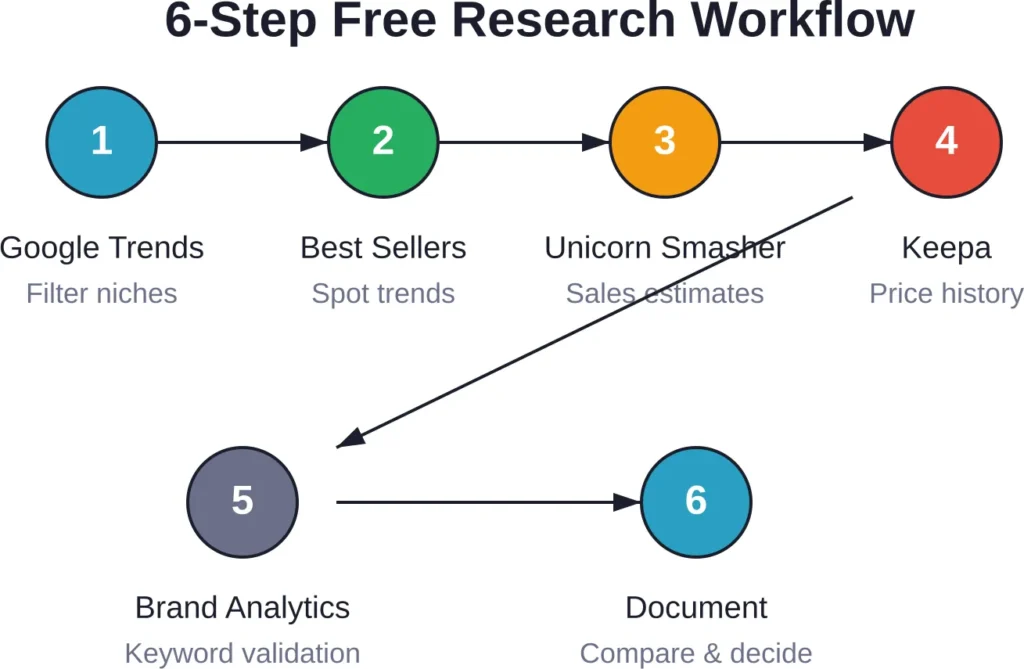
Combining free tools into a repeatable workflow helps validate product ideas without paying for premium software. Here’s a practical sequence many budget-conscious sellers follow.
Step 1: Brainstorm and Filter with Google Trends
Start with broad niche ideas. Plug related keywords into Google Trends to confirm rising or stable interest. Reject niches showing long-term decline.
Step 2: Browse Amazon Best Sellers
Navigate to relevant subcategories on Amazon’s Best Sellers page. Identify 5-10 products with strong sales rank (top 10,000 in main category) and reasonable review counts (50-500 reviews suggests new entrants can compete).
Step 3: Check Sales Estimates with Unicorn Smasher
Install the Unicorn Smasher Chrome extension. Visit each product page and note the estimated monthly sales. Look for products moving 200+ units per month with enough demand to sustain multiple sellers.
Step 4: Review Price and Rank History with Keepa
Open each product in Keepa. Examine the sales rank graph for stability. Avoid products with wild rank swings (indicates inconsistent demand or one-time promotions). Check price history to ensure margins remain viable during competitive pricing.
Step 5: Validate Keywords with Brand Analytics
If enrolled in Brand Registry, cross-reference top keywords in Brand Analytics. Confirm the product category aligns with high-volume search terms. This step helps ensure organic discoverability post-launch.
Step 6: Document and Compare
Compile findings in a spreadsheet. Compare estimated revenue, competition level, and keyword difficulty across shortlisted products. Prioritize niches with the best balance of demand and manageable competition.
Comparing Free vs. Paid Research Tools
Free tools cover basic research needs, but paid platforms unlock features that matter for scaling. Here’s how they stack up.
| Feature | Free Tools | Paid Tools (e.g., Helium 10, Jungle Scout) |
|---|---|---|
| Sales Estimates | Basic (Unicorn Smasher) | Accurate historical data, bulk export |
| Keyword Research | Limited (Brand Analytics if enrolled) | Full keyword lists, search volume, PPC costs |
| Competitor Tracking | Manual reconnaissance | Automated alerts, share-of-voice metrics |
| Price Tracking | Yes (Keepa, Camelcamelcamel) | Advanced alerts, repricing automation |
| Bulk Analysis | No | Yes (analyze hundreds of ASINs simultaneously) |
| Support & Tutorials | Community forums | Dedicated support, video courses |
Community discussions on Reddit’s r/AmazonFBA frequently highlight that free tools suffice for validating the first 5-10 product ideas. Once revenue starts flowing, most sellers invest in paid software to streamline research and stay ahead of competition.
AWS Data Tools for Advanced Amazon Research
Sellers with technical chops can tap into AWS resources for deeper analysis. While not traditional “Amazon seller tools,” these platforms offer powerful data manipulation and business intelligence—often with generous free tiers.
Amazon QuickSight (AI-Powered BI)
Amazon QuickSight delivers AI-powered business intelligence. Amazon Q Business offers a 60-day free trial for up to 50 Amazon Q Business Pro or Lite users per application, along with 1,500 index hours to be used within that period, according to the official AWS pricing page.
Sellers can connect QuickSight to Seller Central data exports, build custom dashboards, and leverage natural language queries to explore sales trends. It’s overkill for casual sellers but valuable for brands managing large catalogs.
Amazon Redshift and RDS with ScaiPlatform
ScaiPlatform is a free business intelligence, data analytics, reporting, and SQL data management web platform for Amazon Redshift, Amazon RDS (Aurora, MySQL, Postgres, SqlServer, etc.) and Snowflake for up to 30 users.
This setup suits sellers who already store sales data in a database and want real-time analytics without monthly BI subscription fees.
AWS Open Data
AWS Open Data hosts publicly available datasets that can supplement market research. AWS Data Exchange makes it easy to find datasets made publicly available through AWS services, allowing data users to spend more time on analysis rather than acquisition.
Use cases include demographic data for target market analysis or economic indicators for demand forecasting. Access is free; compute costs apply only if running large-scale queries.
Common Pitfalls When Using Free Amazon Research Tools
Free tools deliver value, but they come with traps that catch inexperienced sellers off guard.
Over-Reliance on Estimated Data
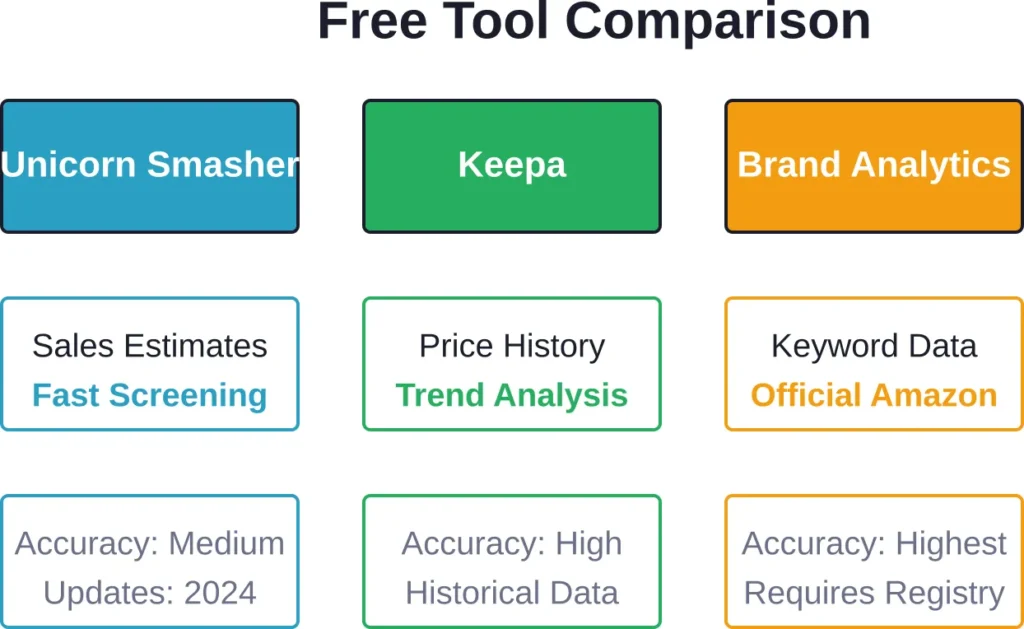
Sales estimators like Unicorn Smasher use algorithmic guesses based on sales rank. Actual sales can vary by 20-30%. Always cross-check estimates with multiple tools and treat numbers as rough guides, not gospel.
Ignoring Seasonality
A product showing strong sales in December might tank in February. Review at least six months of price and rank history in Keepa before committing to inventory. Google Trends helps identify seasonal patterns at the category level.
Skipping Manual Verification
Automated tools miss qualitative factors—poor listing quality, negative review trends, intellectual property risks. Read product reviews, examine competitor listings, and verify trademark status before finalizing product selection.
Neglecting Keyword Depth
Free keyword tools (including Brand Analytics) show top terms but rarely surface long-tail keywords that drive conversions. Paid tools fill this gap. If sticking with free options, supplement with manual autocomplete scraping and competitor reverse-ASIN lookups.
When to Upgrade to Paid Research Software
Most sellers hit a point where free tools become a bottleneck. Signals it’s time to upgrade include spending more than five hours per week on manual research, launching multiple products simultaneously, or needing PPC keyword data for campaign optimization.
Popular paid platforms like Helium 10 offer plans starting from $39 per month. SmartScout offers plans from $29 with AI-powered features. like visibility monitoring and listing optimization.
The ROI calculation is straightforward: if paid software saves research time and improves product selection, the cost may be justified within the first month or two of operation.
Frequently Asked Questions
Brand Analytics (available through Amazon Brand Registry) provides the most accurate data because it comes directly from Amazon. For third-party tools, Keepa’s sales rank history offers high reliability when interpreting trends, though it doesn’t display exact unit counts. Unicorn Smasher works for quick estimates but accuracy varies.
Yes, especially in the early stages. Many sellers validate their first few products using Unicorn Smasher, Keepa, and manual Best Sellers reconnaissance. Growth and scale eventually benefit from paid tools, but free options suffice for initial launches and low-volume operations.
No. Most free tools (Unicorn Smasher, Keepa, Camelcamelcamel, Google Trends) require no Brand Registry. However, Brand Analytics—one of the most valuable free resources—is only available to Brand Registry members, which requires a registered trademark.
Review at least six months of data to capture seasonal trends and competitive pricing cycles. If the product launched recently and lacks six months of history, proceed cautiously or wait for more data before committing large inventory orders.
Reputable extensions like Keepa and Unicorn Smasher have large user bases and receive regular updates. Always install extensions from the official Chrome Web Store, read recent reviews, and verify the developer’s identity. Avoid obscure extensions with few downloads or outdated maintenance.
Both track Amazon price history and sales rank. Keepa offers more granular data visualization, faster updates, and a paid API for advanced users. Camelcamelcamel focuses on price drop alerts with a simpler interface. Many sellers use both—Keepa for research depth, Camelcamelcamel for shopping alerts.
Free options are limited for PPC. Brand Analytics shows top search terms but not bid costs or competition levels. Manual autocomplete scraping and reviewing competitor sponsored ads provide some insight, but paid tools like Helium 10’s Cerebro or Jungle Scout’s Keyword Scout deliver comprehensive PPC data.
Wrapping Up: Build a Free Research Stack That Works
Free Amazon research tools in 2026 provide more capability than ever. Unicorn Smasher offers fast sales screening. Keepa and Camelcamelcamel track price trends. Brand Analytics (for registered brands) delivers official Amazon keyword data. Google Trends validates niche demand.
Combine these tools into a repeatable workflow: filter niches with Google Trends, scout products on Best Sellers, estimate sales with Unicorn Smasher, review history with Keepa, and validate keywords through Brand Analytics. Document findings in a spreadsheet and compare opportunities side by side.
Free tools won’t replace premium platforms forever. As sales grow, invest in paid software for deeper data, automation, and PPC insights. But for initial validation and budget-conscious research, the free stack outlined here delivers enough signal to launch smart.
Start with these tools today, validate a handful of product ideas, and graduate to paid platforms once revenue justifies the expense. The barrier to entry has never been lower—use that advantage.