

Quick Summary: Shopify merchants can now integrate AI tools to automate Meta ad campaigns, optimize ROAS, and reduce manual workload. Agency AI, ROASCraft, and AdScale offer end-to-end automation for Meta and Google ads, while tools like Promify and Clawify provide AI-powered workflows. These integrations handle targeting, budget allocation, creative testing, and performance tracking directly from your Shopify dashboard.
Running Meta ads for a Shopify store used to mean late nights toggling between Ads Manager, analytics dashboards, and spreadsheets. Budget shifts, creative testing, audience segmentation—all manual.
Not anymore.
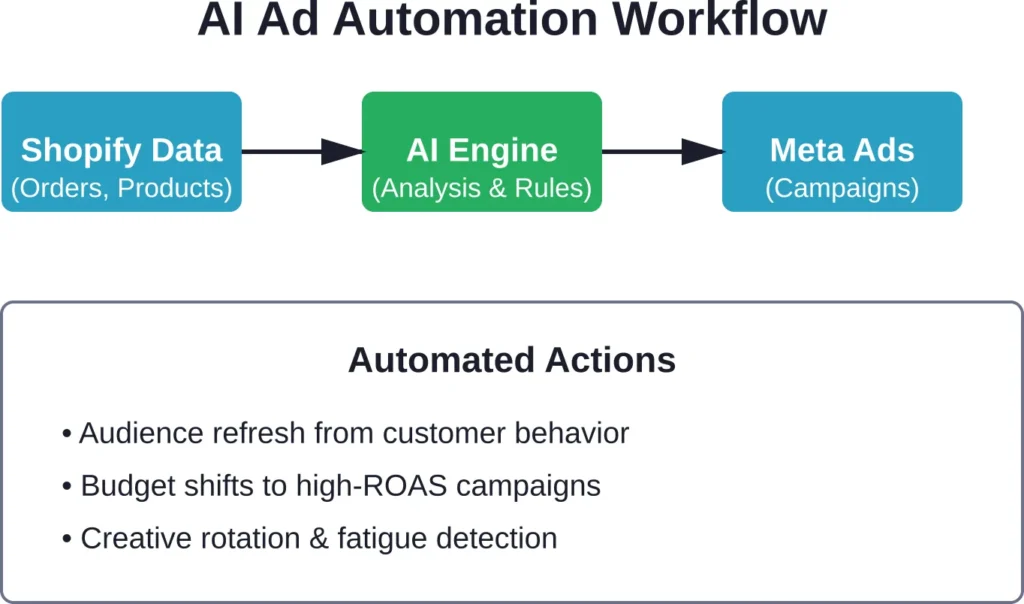
AI-powered platforms now sit between Shopify and Meta Ads, automating the decisions that used to burn hours every week. They pull product data, customer behavior, and campaign performance into one system, then adjust targeting, budgets, and creatives in real time.
Agency AI claims to cut ad management time by 80%. Others promise to handle everything from campaign launch to ROAS optimization without touching Ads Manager.
Here’s what actually works in 2026, based on official app store data, user reviews, and verified platform features.
Why Shopify Stores Need AI for Meta Ads
Meta Ads Manager gives you control. But control without time or expertise turns into guesswork.
Shopify stores face specific challenges when scaling Meta campaigns:
- Product catalog sync issues between Shopify and Meta
- Manual audience segmentation based on purchase behavior
- Creative fatigue tracking across dozens of ad variations
- Budget reallocation decisions every 24-48 hours
- Attribution gaps between Meta reporting and Shopify analytics
AI tools bridge these gaps by connecting directly to both platforms. They read Shopify order data, customer lifetime value, and inventory levels, then feed that context into Meta campaign decisions.
The result? Ads that promote bestsellers when stock is high, retarget cart abandoners with the exact products they viewed, and shift budgets toward audiences that actually convert.
What AI Automation Actually Handles
Modern AI platforms for Meta Ads don’t just schedule posts. They manage the full campaign lifecycle:
- Campaign setup: Auto-generate campaign structures based on product categories, customer segments, or sales goals
- Audience targeting: Build custom and lookalike audiences from Shopify customer data, then refresh them as behavior changes
- Creative rotation: Test multiple ad formats (single image, carousel, video, Reels), pause underperformers, scale winners
- Budget optimization: Shift spend daily toward campaigns, ad sets, or individual ads hitting ROAS targets
- Performance monitoring: Flag anomalies (spend spikes, conversion drops, CPC increases) and recommend or execute fixes
Some tools go further. They generate ad copy, resize product images for different placements, or even scrape competitor ads to identify creative trends.
Extuitive: Predictive Ad Intelligence Before Launch
Extuitive positions itself as a pre-launch prediction engine that forecasts ad performance using AI, helping Shopify brands stop testing losers and validate creatives before spending any ad budget. It generates ads and tests them against 150k+ simulated AI consumer agents modeled on real behavior.
Core Features
- Predictive scoring: Analyzes visuals, copy, hooks, and messaging to forecast CTR, ROAS, and purchase intent before campaigns go live.
- AI ad generation: Automatically creates images, videos/Reels, headlines, body copy, and full creatives pulled directly from your Shopify product catalog.
- Consumer simulation testing: Runs thousands of simulated interactions with AI agents trained on real consumer data for highly accurate pre-launch validation.
- Shopify-native integration: Pulls products, customer data, and historical performance to create brand-specific prediction models.
- Audience & campaign insights: Suggests targeting, identifies winning angles, and supports one-click export to Meta (Facebook/Instagram), TikTok, Google, etc.
- Performance tracking: Monitors live results and refines future predictions based on real outcomes.
What Sets Extuitive Apart
Its core differentiator is the preemptive predictive layer: instead of automating live campaigns, it acts as an intelligent filter that kills weak creatives before any money is spent.
- Tests 100k–150k+ AI consumer agents per creative set.
- Builds custom models from your own historical ad data + broad consumer patterns.
- Focuses on creative-market fit early in the funnel, dramatically reducing wasted test spend.
- Works alongside existing ad workflows rather than replacing the entire Meta Ads Manager.
Pricing
Extuitive uses flat monthly pricing with usage limits on scored ads and generations (no percentage of ad spend).
- Starter: $1,000/month (or $10,000/year) — for brands spending >$10K/month on ads. Includes 500 ads scored and 200 AI creations per month.
- Professional: $2,500/month (or $25,000/year) — for brands spending >$30K/month. Includes 2,500 ads scored and higher creation limits.
- Enterprise: Custom billing — for large portfolios spending >$100K/month with unlimited usage and tailored features.
Annual billing offers significant discounts. Includes onboarding and email support.
User Reception
Limited public reviews on major platforms (0 reviews on Capterra/Shopify App Store as of recent data).
Testimonials directly from the site highlight speed, innovation, and real results:
- “We’ve never seen ads come together this fast—or convert this well… higher engagement and stronger conversions.” — Adam Licht, VP at All Fresh Seafood.
- “The platform created some really exciting product concepts I wouldn’t have considered.” — Elena Chenokalskaya, Founder at Terra Florens.
The recurring theme is massive time and budget savings on creative development and testing. However, the low number of independent reviews means real-world performance at high ad spend volumes still needs broader validation.
Who It’s Built For
Extuitive is ideal for Shopify merchants and teams who run frequent Meta (and multi-platform) campaigns and want to cut wasted creative testing spend significantly. Best suited for stores spending $10K+ monthly on ads, where creative fatigue and high test costs become painful. It complements automation tools rather than fully replacing daily campaign management.
Contact Information
- Website: extuitive.com
- Email: [email protected]
- LinkedIn: www.linkedin.com/company/extuitive
- Twitter: x.com/Extuitive_Inc
- Instagram: www.instagram.com/extuitiveinc
Agency AI: Meta & Google Ads on Autopilot
Agency AI positions itself as the all-in-one replacement for hiring a paid ads agency. The pitch? Automated campaign creation, optimization, and scaling across both Meta and Google Ads.
According to the official Shopify app listing, Agency AI handles the full spectrum: campaign launches, AI-optimized targeting, budget adjustments, creative testing, and real-time performance recommendations that adapt to ROAS signals.
Core Features
The platform automates several tasks that traditionally require daily manual oversight:
- Omnichannel setup: Connects Meta Ads (Facebook, Instagram) and Google Ads (Search, Shopping, Display) from one dashboard
- Targeting automation: Builds and refreshes custom audiences using Shopify customer data
- Budget scaling logic: Increases spend on campaigns hitting ROAS thresholds, pauses or reduces budget on underperformers
- Creative management: Tests multiple ad formats and placements, then allocates impressions to top performers
- Performance alerts: Flags drops in conversion rate, CTR, or ROAS and suggests corrective actions
According to the official app listing, Agency AI claims to cut ad management time by 80% with features like automated campaign optimization.
Pricing & Availability
As of the official listing, Agency AI charges $59 per month with a free trial available. The subscription covers both Meta and Google Ads automation with no additional usage-based fees mentioned.
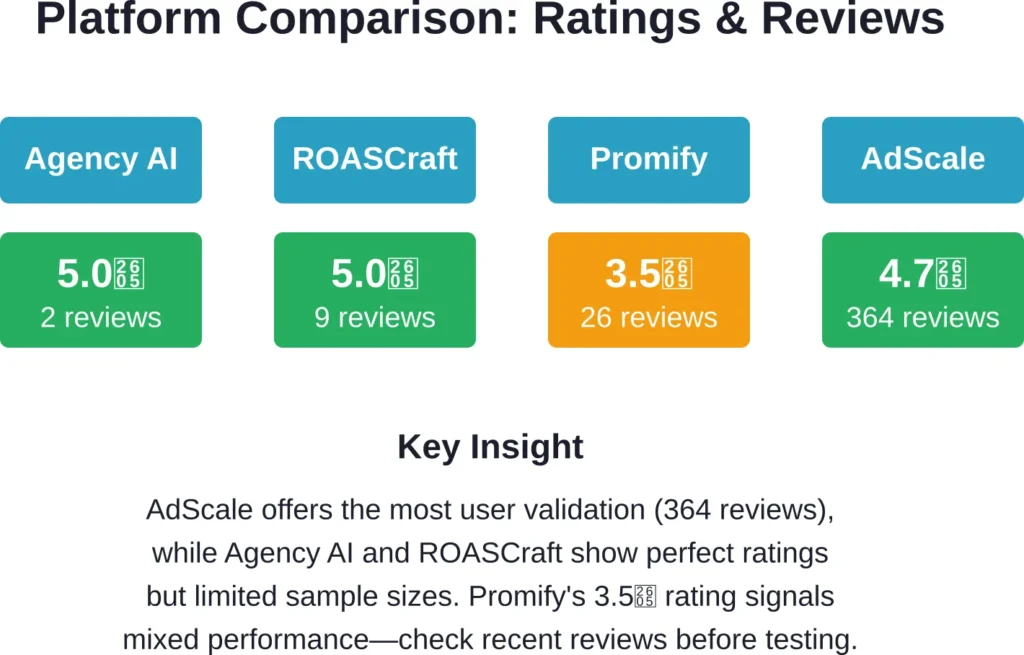
It holds a 5.0-star rating based on 2 reviews, both awarding 5 stars (100% five-star rating).
Who It’s Built For
Agency AI targets Shopify merchants who want to run paid ads without hiring an agency or dedicating internal resources to campaign management. The automation depth suits stores scaling from $5K to $50K+ monthly ad spend, where manual optimization becomes a bottleneck.
But the low review count means limited real-world validation. Two reviews don’t reveal how the platform performs under heavy catalog complexity or fluctuating seasonal demand.
ROASCraft: End-to-End Meta Campaign Builder

ROASCraft takes a different approach. Instead of positioning as a multi-channel tool, it focuses exclusively on Meta Ads (Facebook and Instagram) with deep automation for campaign structure, audience grouping, and budget reallocation.
The official app description emphasizes one-click campaign creation that auto-groups SKUs by persona or use case, then builds full-catalog Advantage+ Shopping Campaigns (ASC) to surface winning products automatically.
What Sets ROASCraft Apart
The platform’s core differentiator is its SKU-level intelligence:
- Product discovery: Full-catalog ASC campaigns let Meta’s algorithm test products across the catalog, identifying bestsellers without manual selection
- Auto-grouping: Segments products by customer persona, use case, or purchase intent, then creates separate ad sets for each segment
- Retargeting automation: Builds retargeting audiences for cart abandoners, product viewers, and past purchasers, then serves dynamic product ads
- Daily budget shifts: Reallocates spend toward ROAS leaders while giving underperforming campaigns “room to rebound” before pausing entirely
- Funnel metrics dashboard: Displays stage-by-stage conversion data and product-level insights without switching to Meta Ads Manager
According to the app listing, ROASCraft “removes guesswork and grows ROAS” by centralizing campaign logic and performance data in one interface.
Pricing Tiers
ROASCraft uses a tiered pricing model based on monthly ad spend, with usage-based fees on top of the base subscription:
| Tier | Ad Spend Managed | Usage-Based Fee | Starting Price |
|---|---|---|---|
| Starter | Up to $3,000/month | 10% | $49/month |
| Growth | $3,000–$5,000/month | 8% | Contact for pricing |
| Scale | $5,000+/month | 5% | Contact for pricing |
The usage-based fee structure means costs scale with ad spend. A store spending $3,000 monthly on Meta Ads pays $49 + $300 (10% of $3,000) = $349 total. At $10,000 monthly spend (Scale tier), the cost would be approximately $500 in usage fees plus the base subscription.
User Reception
ROASCraft holds a 5.0-star rating with 9 reviews, all awarding 5 stars (100% five-star rating). A verified review from February 10, 2026 states: “I was running Meta ads myself earlier, and honestly it became too time-consuming. At one point last year, I even paused ads for months because managing everything on my own wasn’t sustainable.”
A review from March 19, 2026 states: “I personally had a great experience with Roascraft and can vouch for them. Their AI enabled ad logic works pretty well. Very easy setup and they took care of the rest.”
The recurring theme across reviews: time savings and hands-off optimization. But nine reviews still represent a limited sample size.
Promify: Free Plan with AI Marketing Automation

Promify differentiates itself by offering a free plan alongside paid tiers, lowering the barrier for Shopify merchants testing AI-powered Meta Ads automation for the first time.
The official app description positions Promify as an “AI-powered ads marketing automation platform built to run Meta Ads automatically for Facebook and Instagram.” It automates campaign setup, audience targeting, budgets, creatives, and optimization across Facebook Feed, Instagram Feed, and Reels.
Automation Scope
Promify handles the same core tasks as Agency AI and ROASCraft—campaign structure, audience building, budget optimization—but with a heavier emphasis on “structured automation workflows and monitoring.”
Key capabilities include:
- Automated campaign creation for Facebook and Instagram placements
- AI-driven audience targeting using Shopify customer data
- Creative testing across static images, carousels, and Reels formats
- Budget allocation based on performance signals
- Ongoing campaign monitoring with alerts for performance drops
The app listing doesn’t specify advanced features like competitor research, SKU-level grouping, or multi-channel support beyond Meta platforms.
Pricing & Performance
Promify offers a free plan with limited features, plus paid tiers starting from an unspecified monthly fee. A free trial is available for paid plans.
The app holds a 3.5-star rating based on 26 reviews. Breaking down the distribution:
- 62% five-star ratings (16 reviews)
- 31% one-star ratings (8 reviews)
- Remaining 7% distributed across 2-4 stars
This bipolar rating pattern—strong positive reviews mixed with significant negative feedback—suggests inconsistent performance or a learning curve that some merchants navigate successfully while others struggle.
The free plan lowers risk for testing, but the 31% one-star rate warrants caution. Check recent reviews on the official Shopify App Store before committing ad spend.
AdScale: The Veteran with Proprietary Data Signals

AdScale has operated since 2018, according to its official app listing which states “Since 2018, AdScale AI has been revolutionizing ecommerce advertising”. The platform markets itself as an “AI advertising platform that creates personalized ads across Google, Facebook, Instagram, SMS & Email using data & images pulled from your store.”
According to the official app listing, the app listing states: “This clear advantage enables more precise targeting, smarter ad campaigns, and ongoing optimization, delivering great results for ecommerce businesses.”
Multi-Channel Scope
Unlike tools that focus exclusively on Meta Ads, AdScale spans multiple channels:
- Paid ads: Meta (Facebook, Instagram) and Google (Search, Shopping, Display)
- Owned channels: Email and SMS campaigns
The platform pulls product data and images directly from Shopify, then auto-generates creatives and messaging tailored to each channel. For Meta Ads specifically, AdScale automates targeting, budgets, and creative rotation similar to competitors.
Proprietary Data Claims
AdScale’s pitch centers on “cutting-edge AI technologies and proprietary data signals.” The app listing states these signals deliver “more precise targeting” and “great results for ecommerce businesses,” but doesn’t specify what the proprietary signals are or how they differ from standard Meta pixel data and Shopify customer attributes.
Without technical documentation or third-party validation, it’s difficult to verify whether AdScale’s data layer offers a measurable advantage over platforms using standard Shopify and Meta integrations.
Pricing & Reviews
AdScale charges $169 per month with a free trial available. This positions it at the higher end compared to $49-$59 entry points from ROASCraft and Agency AI.
The app holds a 4.7-star rating based on 364 reviews—the largest review sample among tools covered here. Breaking down the distribution:
- 93% five-star ratings (338 reviews)
- 5% one-star ratings (approximately 18 reviews)
- Remaining 2% distributed across 2-4 stars
The high review count and 93% five-star rate suggest consistent performance across a broad merchant base. AdScale’s longevity (since 2018) and large user base provide more validation than newer platforms with single-digit review counts.
That said, the $169 monthly fee may not justify the cost for stores spending under $5,000 monthly on ads, where lower-priced alternatives offer similar core automation.
Clawify: AI Assistant with Workflow Integrations

Clawify breaks the mold by offering an AI assistant that “actually runs your store” rather than focusing exclusively on ad management.
The platform gives every Shopify store a hosted OpenClaw AI assistant that manages orders, customers, and products via plain-English commands. For Meta Ads specifically, Clawify connects workflows to external tools including Klaviyo (email), Notion (project management), and Google Sheets (reporting).
How It Works
According to the official app listing, merchants interact with Clawify through conversational prompts. Instead of navigating dashboards, users can type requests like “show me cart abandoners from the last 7 days” or “schedule a 20% discount campaign for next Friday.”
For Meta Ads integration, Clawify automates workflow connections:
- Push Meta Ads performance data to Google Sheets for custom reporting
- Trigger Klaviyo email sequences based on Meta Ads audience behavior (e.g., clicked ad but didn’t purchase)
- Update Notion project boards when campaigns launch or hit ROAS milestones
- Schedule theme changes or product promotions tied to ad campaign timing
The platform also supports web browsing for competitor research, letting the AI assistant scrape competitor ads and surface creative trends.
Pricing & Use Case
Clawify charges $29.99 per month with a free trial available. The app holds a 5.0-star rating based on 1 review (100% five-star rating).
The single review provides minimal validation, but the low price point and workflow automation focus suggest a different target user: merchants who want an AI layer across their entire Shopify operation, not just Meta Ads.
If you’re already using Klaviyo, Notion, or Google Sheets and want to automate cross-platform workflows triggered by ad performance, Clawify offers more breadth than depth. For merchants focused exclusively on optimizing Meta Ads campaigns, dedicated platforms like ROASCraft or Agency AI provide deeper campaign-level automation.
AI Workflow Automation & Flow (Mechanic)
Mechanic positions itself as an enterprise-grade automation platform powered by Shopify Flow and Liquid scripting. It’s not a Meta Ads tool in the traditional sense—it doesn’t create campaigns or optimize budgets. Instead, it automates store-side workflows that support ad campaigns.
What Mechanic Automates
The official app listing highlights several automation categories relevant to ad management:
- Customer tagging: Automatically tag customers based on purchase behavior, lifetime value, or ad interaction (e.g., “Meta-Ad-Clicker”), then sync those segments to Meta Ads custom audiences
- Order handling: Send email alerts for unpaid orders, flag fraudulent purchases, or trigger follow-up sequences after ad-driven conversions
- Inventory visibility: Hide out-of-stock products from Meta catalog feeds, then republish automatically when stock returns
- VIP & blacklist management: Tag high-value customers for exclusion from discount campaigns or add repeat refunders to suppression lists
- Loyalty credits & discounts: Apply credits or discounts to customers who convert from specific ad campaigns
Mechanic doesn’t touch Meta Ads Manager directly. Instead, it prepares Shopify data and customer segments so Meta Ads campaigns run on clean, up-to-date inputs.
Technical Depth
Mechanic uses Liquid (Shopify’s templating language) and Shopify Flow for automation logic. This gives advanced users granular control over workflow conditions and actions, but creates a steeper learning curve than visual automation builders.
The platform offers 355+ pre-built workflows, covering scenarios from simple email alerts to complex multi-step customer journeys. No usage limits apply—merchants can run unlimited workflows regardless of subscription tier.
Pricing & Reviews
Mechanic offers a free plan with limited features. The app holds a 5.0-star rating based on 10 reviews (100% five-star rating).
The ten reviews focus on workflow reliability and customization depth, not Meta Ads performance. Mechanic suits technical merchants or those working with developers who want to build custom automation around ad campaigns rather than delegating campaign management entirely to AI.
Picking the Right Tool for Your Store
Choosing an AI platform for Shopify Meta Ads depends on three factors: ad spend level, technical comfort, and how much control you want to retain.
By Monthly Ad Spend
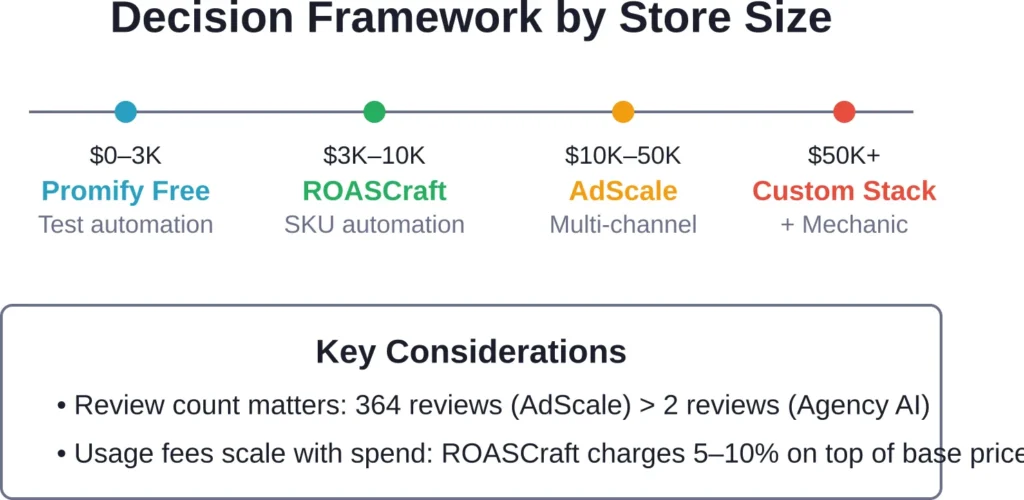
| Ad Spend Range | Recommended Tools | Why |
|---|---|---|
| Under $3,000/month | Promify (free plan), Clawify | Lower costs, testing phase, free tiers available |
| $3,000–$10,000/month | ROASCraft, Agency AI | Balanced pricing, strong automation, proven ROAS optimization |
| $10,000–$50,000/month | AdScale, ROASCraft (Scale tier) | Multi-channel support, proprietary data signals, large user base |
| $50,000+/month | AdScale, custom integrations with Mechanic | Enterprise features, deep workflow customization, dedicated support |
By Automation Preference
Some merchants want full autopilot. Others prefer AI recommendations with manual approval.
Full automation (hands-off): Agency AI, ROASCraft, and AdScale all execute campaign changes automatically—budget shifts, audience updates, creative rotation—without requiring daily approvals. These suit time-constrained merchants comfortable delegating optimization decisions to algorithms.
Workflow automation (hands-on): Mechanic and Clawify automate store-side tasks and data prep but leave campaign decisions to the merchant. These suit users who want to retain control over ad strategy while offloading repetitive Shopify tasks.
Hybrid (recommendations with approval): None of the platforms reviewed here offer a pure recommendation-only mode. Most execute changes automatically by default, though some allow toggling specific automations on or off in settings.
By Feature Priority
Different tools excel in different areas:
- SKU-level intelligence: ROASCraft’s auto-grouping and product discovery logic
- Multi-channel reach: AdScale’s integration across Meta, Google, email, and SMS
- Cross-platform workflows: Clawify’s connections to Klaviyo, Notion, Google Sheets
- Enterprise customization: Mechanic’s Liquid scripting and Flow automations
- Lowest barrier to entry: Promify’s free plan (though mixed reviews warrant caution)
No single platform dominates across all dimensions. ROASCraft offers the deepest Meta Ads-specific automation. AdScale provides the broadest channel coverage. Mechanic delivers the most technical flexibility.
Common Setup & Integration Steps
Most Shopify Meta Ads AI tools follow a similar installation and configuration process. Here’s what to expect during onboarding.
Initial Installation
- Install from Shopify App Store: Search for the app by name, click Install, and authorize permissions (usually includes order data, customer data, product catalog access)
- Connect Meta Ads account: Authenticate via Facebook Business Manager, select the ad account to link, and grant the app permission to create and manage campaigns
- Import product catalog: The app syncs your Shopify product feed to Meta’s catalog system (may take 15-60 minutes for full sync)
- Configure conversion tracking: Install or verify Meta pixel and Conversions API (CAPI) integration to ensure accurate attribution
Campaign Configuration
After installation, most platforms prompt for campaign setup preferences:
- Campaign objectives: Sales, traffic, or engagement (most merchants select Sales for conversion-focused campaigns)
- Budget parameters: Daily or lifetime budget limits, ROAS targets, minimum spend thresholds before pausing underperformers
- Audience settings: Use Shopify customer data for custom audiences (past purchasers, cart abandoners), or let the AI build lookalikes automatically
- Creative preferences: Upload brand assets (logo, colors, messaging guidelines), or allow the tool to pull product images directly from Shopify
- Placement selection: Facebook Feed, Instagram Feed, Stories, Reels—most tools default to automatic placements for broader reach
Automation Rules
Platforms like ROASCraft and Agency AI let merchants define automation rules or use default logic:
- Budget scaling: Increase spend by X% when ROAS exceeds target, decrease by Y% when it falls below threshold
- Creative rotation: Pause ads with CTR below Z% after N impressions, scale ads exceeding benchmarks
- Audience refresh: Update custom audiences every 24-48 hours based on new Shopify order and visitor data
Some merchants accept default rules. Others tweak thresholds based on historical performance data or seasonal trends.
Monitoring & Adjustments
Once campaigns launch, AI tools handle daily optimization. But merchants should still review dashboards weekly to:
- Verify budget pacing aligns with monthly targets
- Check for creative fatigue (declining CTR on winning ads)
- Confirm product catalog sync accuracy (new products appearing in feeds, discontinued items removed)
- Monitor ROAS trends across customer segments or product categories
Full autopilot doesn’t mean zero oversight. Seasonal shifts, inventory changes, and competitive dynamics still require strategic adjustments that algorithms alone can’t anticipate.
What AI Can’t Replace (Yet)
AI tools automate execution and optimization. They don’t replace strategic thinking.
Here’s what still requires human input in 2026:
Creative Strategy
AI platforms test and rotate creatives. But they don’t conceptualize new creative angles, brand messaging, or storytelling approaches.
Merchants still need to:
- Develop unique selling propositions that differentiate products from competitors
- Craft brand narratives that resonate with target audiences
- Produce original photo and video assets that align with brand identity
Some tools auto-generate ad copy or resize images. None replace a skilled creative team that understands positioning and emotional triggers.
Market & Competitive Intelligence
Clawify offers web browsing for competitor research. But interpreting competitive moves—pricing shifts, new product launches, creative trends—requires strategic judgment.
AI can surface data. It can’t decide whether to match a competitor’s discount, pivot to a new audience segment, or double down on premium positioning.
Attribution & Incrementality
Meta Ads reporting shows conversions attributed to ads. It doesn’t prove ads caused those conversions. Some customers would have purchased anyway (organic demand). Others converted due to combined touchpoints across email, organic social, and paid ads.
Understanding true incrementality—the lift ads deliver beyond baseline sales—requires controlled experiments (holdout tests, geo-based splits) that AI tools don’t automate. Brands scaling past $50K monthly spend should invest in incrementality measurement alongside ROAS optimization.
Seasonal & Inventory Planning
AI adjusts budgets based on performance signals. But it doesn’t anticipate seasonal demand shifts, plan inventory for Q4, or coordinate ad campaigns with product launch timelines.
Merchants still own the roadmap: which products to promote when, how to allocate total marketing budget across channels, and when to pull back spend during inventory constraints.
Integration with Broader Marketing Stacks
Meta Ads don’t exist in isolation. Effective ecommerce marketing coordinates paid ads with email, SMS, organic social, influencer partnerships, and retention programs.
AI tools that integrate beyond Meta Ads unlock cross-channel synergies.
Email & SMS Coordination
Platforms like AdScale and Clawify connect Meta Ads performance to email/SMS tools like Klaviyo. Use cases include:
- Retargeting coordination: Suppress customers receiving email win-back campaigns from Meta retargeting ads to avoid message fatigue
- Conversion attribution: Track whether a customer clicked a Meta ad, received a follow-up email, then purchased—crediting the full journey rather than last-click attribution
- Lifecycle triggers: Automatically pause Meta ads to high-LTV customers already enrolled in VIP email nurture sequences
Analytics & Attribution Platforms
Tools like Triple Whale (mentioned in competitor content but not detailed here) centralize data from Meta Ads, Google Ads, email, and Shopify into unified dashboards. This solves the “8 different tools” problem documented in industry research: marketers using fragmented platforms with conflicting metrics.
Integrating AI ad automation with a centralized analytics layer ensures optimization decisions use accurate, cross-channel data rather than Meta’s self-reported attribution alone.
Content & Product Feeds
Mechanic’s workflow automation shines here. Examples:
- Automatically tag new product launches in Shopify, then trigger a workflow that adds them to priority Meta catalog sets
- Hide seasonal products from Meta feeds during off-season, republish when inventory restocks
- Sync custom product labels (bestseller, high-margin, clearance) from Shopify to Meta catalog attributes for campaign segmentation
These workflows ensure Meta Ads campaigns always promote the right products at the right time, without manual catalog edits.
Real-World Performance Benchmarks
How much ROAS lift should merchants expect from AI automation?
Based on competitor content and official app claims (not independent controlled studies):
- Time savings: Agency AI claims an 80% reduction in ad management time. Translated: tasks taking 10 hours weekly drop to 2 hours.
- ROAS improvements: According to competitor content, Adwisely delivers an average 6x ROAS (600%) across Meta and Google, with pricing starting from $49/month.
- Budget efficiency: ROASCraft’s daily budget reallocation logic shifts spend toward ROAS leaders while “giving underperformers room to rebound,” suggesting reduced waste on low-performing ad sets.
These figures come from platform marketing claims or individual testimonials, not peer-reviewed research. Treat them as directional indicators, not guarantees.
In practice, results depend heavily on:
- Product-market fit (great ads can’t fix products nobody wants)
- Competitive intensity (saturated niches have higher CPCs and lower ROAS ceilings)
- Creative quality (AI optimizes distribution; it doesn’t create scroll-stopping video content)
- Baseline conversion rate (stores converting under 1% on-site will struggle to scale profitably regardless of ad optimization)
Privacy, Data Access, & Compliance
AI tools require deep data access to automate effectively. Merchants should understand what permissions they’re granting and how platforms handle customer data.
Shopify Permissions
Most Meta Ads AI apps request:
- Read access to orders, customers, products, and store analytics
- Write access to customer tags and order notes (for workflow automation)
- Access to Shopify Pixel and conversion events
These permissions let apps sync product catalogs, build custom audiences, and track conversions. They’re standard for ad automation tools.
Meta Ads Permissions
When connecting a Facebook Business Manager account, apps typically request:
- Manage ad accounts (create, edit, and delete campaigns, ad sets, ads)
- Access to audience data (view and create custom audiences)
- Read access to ad performance metrics
Merchants should verify apps only access the specific ad account intended for Shopify campaigns, not unrelated accounts under the same Business Manager.
Data Retention & Privacy
AI platforms process customer PII (names, emails, purchase history) to build retargeting audiences and lookalikes. Before installing, review each app’s:
- Privacy policy (how customer data is stored, used, and shared)
- Data retention period (whether data is deleted if the app is uninstalled)
- GDPR & CCPA compliance (for merchants serving EU or California customers)
Reputable platforms state compliance clearly in app listings or documentation. Absence of privacy details warrants caution.
Troubleshooting Common Integration Issues
Even well-designed AI tools hit snags during setup. Here’s how to resolve the most frequent problems.
Product Catalog Sync Failures
Symptom: New products don’t appear in Meta Ads catalog, or out-of-stock items remain active in feeds.
Causes: Missing product images, incomplete product data (missing titles or descriptions), Shopify-to-Meta sync delays.
Fix: Verify all products have at least one image, complete title, description, and price. Re-sync the catalog manually from the app dashboard. For persistent issues, check Meta Commerce Manager for error logs.
Conversion Tracking Discrepancies
Symptom: Shopify reports 50 orders, but Meta Ads shows 30 conversions attributed to campaigns.
Causes: Incomplete Conversions API (CAPI) setup, customers blocking Meta pixel via ad blockers, multi-touch attribution differences.
Fix: Ensure CAPI is active (Shopify App Store has official Meta integration). Compare total Meta-reported conversions (including view-through and click-through) to Shopify orders with UTM parameters matching Meta campaigns. Some gap is normal due to attribution windows and privacy blockers.
Budget Pacing Issues
Symptom: Daily budget exhausts in first few hours, or spend significantly under target by day’s end.
Causes: AI scaling logic set too aggressively, audience size too small (rapid saturation), or bid caps limiting delivery.
Fix: Adjust automation rules to cap daily budget increases at 20-30% rather than doubling overnight. Expand audience size by broadening targeting or adding lookalike tiers. Remove manual bid caps to let Meta’s auction optimize delivery.
Creative Fatigue Acceleration
Symptom: Winning ads see CTR drop by 30%+ within 7-10 days.
Causes: Small audience size (frequent ad exposure), lack of creative variety, over-reliance on single format (e.g., static images only).
Fix: Rotate 5-10 creative variations per campaign, mixing static images, carousels, and video. Expand audience pools to reduce frequency. Use AI tools’ creative testing features to identify and scale new winners before fatigue sets in.
Future Trends: Where AI Ad Automation Is Heading
AI ad tools in 2026 automate execution. The next wave will automate strategy.
Generative Creative at Scale
Current platforms test existing creatives. Emerging tools will generate new ad concepts on demand—writing unique headlines, producing product lifestyle images via diffusion models, even scripting short video ads based on top-performing patterns.
Expect AI creative studios integrated directly into Shopify Meta Ads platforms within 12-18 months. Merchants input brand guidelines once, then let AI produce hundreds of on-brand variations for testing.
Predictive Budget Allocation
Today’s tools react to performance signals. Tomorrow’s will predict them.
Machine learning models trained on historical seasonality, inventory cycles, and competitor activity will forecast demand spikes and allocate budgets preemptively. Instead of scaling budgets after ROAS improves, AI will increase spend days before a predicted conversion surge.
Cross-Channel Orchestration
Fragmented tools force merchants to manually coordinate Meta Ads, Google Ads, email, and SMS. Unified AI platforms will orchestrate messaging across channels automatically.
Example: A customer clicks a Meta ad, visits the site but doesn’t purchase. The AI suppresses that customer from additional Meta impressions for 48 hours while triggering an email sequence. If no conversion after 48 hours, Meta retargeting resumes with a different creative angle. All orchestrated by one system, zero manual rules.
Incrementality Measurement Built-In
Advanced AI platforms will run continuous incrementality tests in the background—geo-based holdouts, matched-market experiments—then adjust budgets based on true lift rather than last-click attribution.
This shifts optimization from “maximize attributed ROAS” to “maximize incremental revenue,” a more accurate measure of ad effectiveness.
Frequently Asked Questions
For stores spending under $10,000 monthly on Meta Ads, AI automation can replace most tactical ad management tasks—campaign setup, audience building, budget adjustments. Strategic decisions (creative direction, positioning, multi-channel coordination) still benefit from human expertise. Beyond $20,000 monthly spend, combining AI automation with specialist oversight delivers better results than either alone.
Most platforms require 7-14 days of learning period during which algorithms gather performance data and refine targeting. Expect initial ROAS to match or slightly trail manual campaigns, then improve as the AI identifies winning combinations. Significant lifts (20%+ ROAS improvement) typically materialize 30-60 days after installation, assuming sufficient ad spend volume ($1,000+ monthly) for the algorithms to optimize effectively.
Technically possible but not recommended. Running two platforms that both auto-adjust budgets or pause ads creates conflicting instructions sent to Meta Ads Manager, often resulting in campaigns turning off unexpectedly or budgets fluctuating erratically. Choose one primary platform for Meta Ads automation. Complementary tools (like Mechanic for Shopify workflows or Klaviyo for email) can run alongside without conflict since they manage different systems.
Campaigns created by the AI tool remain active in Meta Ads Manager after uninstalling the Shopify app. However, automated optimizations stop immediately—no more budget adjustments, audience refreshes, or creative rotation. Merchants must either manage campaigns manually going forward or migrate to a different AI platform. Some apps delete custom audiences upon uninstall; check the app’s data retention policy before removing.
Free plans typically limit features (fewer automation rules, manual campaign creation, basic reporting) but charge no subscription fee. The actual ad spend paid to Meta is separate—merchants always pay Meta directly for impressions and clicks regardless of which automation tool they use. Hidden costs are rare, but free plans often cap monthly ad spend managed (e.g., up to $1,000) or number of active campaigns (e.g., maximum 3 campaigns). Exceeding these limits requires upgrading to a paid tier.
Platforms use Meta’s Conversions API (CAPI) to send server-side conversion data directly from Shopify to Meta, bypassing browser-based pixel tracking affected by Apple’s App Tracking Transparency. This recovers some lost attribution, though gaps remain. AI tools optimize based on the conversion data Meta receives via CAPI, which is more complete than pixel-only tracking but still imperfect. Merchants should verify CAPI is active (Shopify’s official Meta app handles this) before expecting accurate attribution.
Agency AI and AdScale both support Meta and Google Ads from one dashboard, automating campaigns across both platforms simultaneously. This simplifies management but may reduce optimization depth compared to platform-specific tools. ROASCraft and Promify focus exclusively on Meta Ads, offering deeper Facebook/Instagram-specific features. For stores heavily invested in both channels (allocating 40%+ of ad budget to each), a unified platform reduces complexity. For Meta-dominant budgets, a dedicated Meta tool often performs better.
Conclusion: Automation That Actually Scales
AI tools for Shopify Meta Ads have moved past the hype phase. Platforms like ROASCraft, Agency AI, and AdScale deliver measurable time savings and ROAS improvements—when matched to the right store size and use case.
The data points toward clear patterns:
Stores spending under $3,000 monthly should test free or low-cost options (Promify, Clawify) before committing to premium platforms. Limited ad spend means limited data for AI to optimize, so expensive tools won’t justify their cost.
Between $3,000 and $10,000 monthly, ROASCraft and Agency AI offer the best balance of automation depth and pricing. Both provide hands-off optimization, strong user ratings (within small sample sizes), and pricing that scales reasonably with budget growth.
Beyond $10,000 monthly, AdScale’s multi-channel reach and large review base (364 reviews, 93% five-star) provide more validation than newer competitors. The $169 monthly fee becomes negligible relative to total ad spend, and the proprietary data signals—whatever they are—may deliver incremental lifts that justify the premium.
For technical users or those building custom workflows, Mechanic adds a layer of Shopify-side automation that complements any Meta Ads tool. It won’t manage campaigns, but it ensures product feeds, customer segments, and order data stay clean and current.
No platform eliminates the need for strategy, creative excellence, or market understanding. But the right AI tool reclaims 10-15 hours weekly previously lost to manual campaign tweaks—time better spent on product development, customer experience, or strategic planning.
Ready to automate your Meta Ads? Start by auditing your current ad spend and identifying which tasks consume the most time. Then pick the tool that automates those specific bottlenecks rather than chasing the most features or lowest price.
Automation works when it solves real problems. Everything else is just software.