

Quick Summary: The best analytics tools for Facebook Ads integration in 2026 include Socialinsider, Sprout Social, Google Analytics 4, HubSpot, Whatagraph, Rival IQ, Motion, and Extuitive. These platforms help marketers track cost, clicks, impressions, ROI, and creative performance across campaigns. Choosing the right tool depends on team size, budget, reporting needs, and whether multi-channel analytics are required.
Running Facebook ads without proper analytics is like navigating in the dark. Meta’s native reporting gives some visibility, but it’s often not enough—especially when teams need to track ROI across multiple channels, attribute conversions accurately, or share insights with clients and stakeholders.
That’s where third-party analytics tools come in. They pull data from Facebook Ads Manager, enrich it with additional metrics, and present everything in dashboards that actually make sense. Some focus purely on Facebook; others integrate Google Ads, Instagram, LinkedIn, and more into one unified view.
This guide breaks down the best analytics tools for Facebook Ads integration in 2026, comparing features, pricing, and use cases so teams can pick the right fit.
Why Meta’s Native Analytics Fall Short
Facebook Ads Manager offers built-in reporting—campaign spend, impressions, clicks, conversions. But there’s a reason so many marketers turn to third-party tools instead.
The native interface is clunky. Finding specific data means navigating through multiple tabs and dropdowns. Building custom reports takes time, and exporting data for presentations or client reviews is a multi-step process every single time.
Meta’s analytics also lack cross-channel visibility. If campaigns run on Facebook, Instagram, Google Ads, and LinkedIn simultaneously, Ads Manager only shows the Meta side. There’s no way to compare cost per lead across platforms or see which channel drives the highest ROI without manual spreadsheet work.
Historical data access is limited. Meta purges older data after a certain period, making year-over-year comparisons difficult. Third-party tools store historical metrics indefinitely, preserving trends and benchmarks.
And then there’s collaboration. Sharing insights with team members or clients means granting access to Ads Manager itself—or exporting static PDFs. Neither option scales well for agencies managing dozens of accounts.
Predict Winning Ad Performance Before You Launch
Extuitive is an AI-powered prediction engine designed to eliminate the trial and error of Facebook advertising. Instead of spending budget on unproven creatives, it uses models validated against over 150,000 real-world simulations to forecast how ads will perform before they go live.
- Pre-Launch Validation: Evaluates ad creatives and copy using AI consumer models to identify winners before spending a dollar on testing.
- Performance Forecasting: Provides specific CTR and ROAS projections based on historical data and current campaign objectives.
- Intelligent Targeting: Analyzes product and audience data to identify the most profitable segments for Facebook and Shopify integration.
- Creative Scaling: Generates and validates large volumes of ad variations instantly to maintain high performance without creative fatigue.
Book a demo with Extuitive to start predicting your ad results and scaling your growth with technical precision.
What to Consider When Choosing a Facebook Analytics Tool
Not all analytics platforms are built the same. Some excel at creative-level analysis; others shine in multi-channel reporting or automation. Here’s what matters most when evaluating options.
Integration Depth
The best tools connect directly to Facebook’s Marketing API, pulling campaign, ad set, and individual ad performance automatically. Look for platforms that support both tracking and reporting for the ad types in use—Lead Ads, Newsfeed Ads, Stories, and others.
According to HubSpot’s official documentation, supported ad types for tracking and reporting include Lead Ads, Newsfeed Ads, and ads using Instant Article placement. Some ad formats, like Messenger Ads and Collection Ads, support reporting but not tracking. Confirm the tool handles the specific formats in the campaign mix.
Metrics That Matter
Basic metrics—impressions, clicks, spend—are table stakes. The real value comes from calculated metrics: cost per acquisition, return on ad spend, customer lifetime value attribution, and creative fatigue indicators.
Industry reports suggest that the average click-through rate on Facebook Ads across all industries is 0.89% in 2025. Tools that surface performance relative to benchmarks help teams quickly identify underperforming campaigns.
Reporting and Visualization
Dashboards should be intuitive. Drag-and-drop report builders, pre-made templates, and automated scheduling save hours every week. White-label branding matters for agencies presenting insights to clients.
Some platforms focus on beautiful visuals; others prioritize raw data exports for teams that prefer custom analysis in spreadsheets or BI tools.
Multi-Channel Support
For teams running ads across multiple platforms, unified analytics are a game-changer. Instead of logging into Facebook Ads Manager, Google Ads, LinkedIn Campaign Manager, and TikTok Ads separately, one dashboard shows everything side by side.
But here’s the thing: not every business needs this. If 100% of ad spend goes to Meta properties, a Facebook-specific tool might deliver deeper insights at a lower price.
Budget and Pricing Structure
Pricing varies wildly. Some tools start at $49 per month for small businesses; enterprise platforms run $500+ per month with custom pricing. Watch for hidden costs—per-seat fees, data refresh limits, or charges based on ad spend volume.
Top Analytics Tools for Facebook Ads Integration
Here’s a breakdown of the leading platforms, organized by strength and use case.
1. Socialinsider

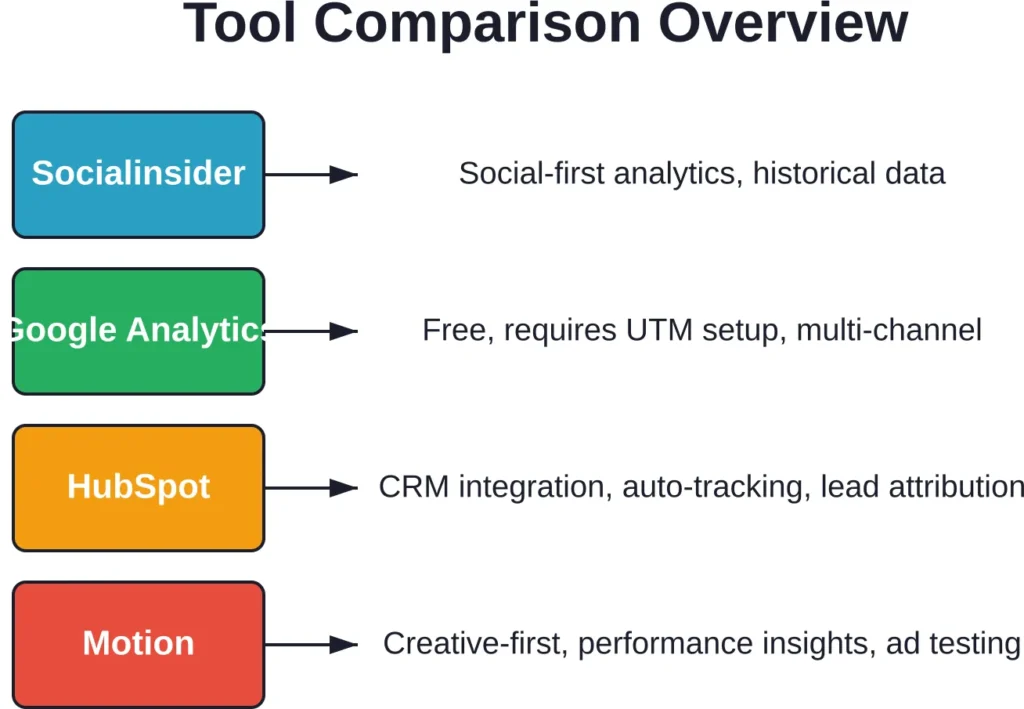
Socialinsider focuses on social media analytics, with strong Facebook and Instagram support. It pulls comprehensive data for up to three or four years depending on the plan, making historical analysis straightforward.
The platform includes AI and automation features to speed up data collection and report generation. Teams can compare performance across organic and paid content, track competitor activity, and measure engagement trends over time.
According to verified sources, Socialinsider offers a 14-day free trial, and monthly plans start from $99. The pricing structure makes it accessible for small to mid-sized businesses that need deep social analytics without breaking the budget.
User reviews highlight the layout and ease of use. Gathering data from Meta manually is time-consuming, and Socialinsider automates much of that work. The main limitation is that it’s built for social-first analysis—teams running heavy search or display campaigns elsewhere might need supplementary tools.
2. Sprout Social

Sprout Social is a multi-channel powerhouse. It handles Facebook, Instagram, Twitter, LinkedIn, and more, combining analytics with publishing, scheduling, and team collaboration features.
The analytics suite includes sentiment analysis, demographic breakdowns, and engagement tracking. Custom reports can be built with a drag-and-drop interface, and automated scheduling ensures stakeholders receive updates without manual intervention.
Pricing ranges from $199 to $599 per seat per month, with custom pricing available for larger teams, according to the competitor research. That puts Sprout on the higher end, but the feature set justifies the cost for marketing teams and agencies managing multiple clients or brands across several social platforms.
The tool shines when teams need an all-in-one solution—posting, responding, analyzing—all from one place. For those focused solely on Facebook Ads analytics, it might be overkill.
3. Google Analytics 4 with Meta Ads Data Import
Google Analytics isn’t just for website traffic anymore. GA4 supports campaign data import from Meta Ads, pulling cost, clicks, and impressions directly into the Analytics interface.
According to Google’s official support documentation, importing Meta Ads data requires setting up specific UTM parameters. The required parameters are utm_source and utm_medium. Optional but highly recommended parameters include utm_id and utm_campaign for granular tracking.
One critical note: Meta Ads Data Import sources will attempt to pull at least 24 months of historical Meta Ads data into your Analytics property. If existing Meta campaign data overlaps, Google recommends deleting prior datasets before proceeding to avoid duplication.
The currency of imported campaign data should match the Google Analytics property currency. If mismatched (e.g., EUR vs USD), either change the Meta Ads account currency or use Google Sheets to manually convert before importing.
GA4 is free, which is a huge advantage. For teams already using Google Analytics for website performance, adding Meta Ads data creates a unified view of acquisition, behavior, and conversion across all channels.
The downside? Setup requires technical knowledge. UTM parameters need to be configured correctly in Facebook Ads Manager, and troubleshooting data mismatches can be frustrating without developer support.
4. HubSpot Ads Management
HubSpot integrates Facebook Ads directly into its CRM, connecting ad performance to lead generation and customer lifecycle stages. When campaigns drive form submissions or conversions, HubSpot attributes them to specific ads, ad sets, and campaigns.
Auto-tracking is a standout feature. Once the Facebook ad account is connected, HubSpot automatically applies UTM parameters to all supported ad types. This eliminates manual tagging and ensures consistent tracking across campaigns.
Supported ad types for both tracking and reporting include Lead Ads, Newsfeed Ads, Promoted Facebook Instant Articles, and ads using Instant Article placement. Other formats like Messenger Ads and Collection Ads support reporting but not tracking, according to HubSpot’s official knowledge base.
HubSpot’s pricing varies by plan, but the Ads Management functionality is available across all product tiers. For teams already using HubSpot for marketing automation and CRM, the native integration is seamless. Outside that ecosystem, standalone alternatives might offer better value.
5. Whatagraph

Whatagraph specializes in marketing reporting, pulling data from Facebook Ads, Google Ads, LinkedIn, and dozens of other platforms into visual dashboards.
The drag-and-drop report builder is intuitive, with pre-made templates for common reporting needs—campaign performance, ROI analysis, client overviews. Automated report scheduling sends updates via email or shared links, and white-label branding allows agencies to customize reports with their own logos and color schemes.
Pricing starts around $249 per month. That’s mid-range compared to competitors, positioning Whatagraph as a solid choice for agencies and mid-sized teams that need polished reports without spending hours building them manually.
The focus is more on reporting than deep analysis. Teams looking for advanced features like predictive analytics or creative testing might need to layer Whatagraph with other tools.
6. Rival IQ

Rival IQ emphasizes competitive analysis and benchmarking. It tracks Facebook Ads performance alongside competitors’ social media activity, giving context to campaign results.
The platform measures engagement, reach, posting frequency, and content types across competitors, identifying trends and opportunities. For paid campaigns, it tracks standard metrics—spend, clicks, conversions—and compares performance against industry averages.
Pricing starts at $239 per month. The competitive intelligence features make Rival IQ valuable for brands in crowded markets where understanding the competition is just as important as tracking internal performance.
The trade-off is that Rival IQ is overkill if basic analytics are the only need. Teams that don’t care about competitor activity can get similar core features elsewhere for less.
7. Motion

Motion takes a creative-first approach to Facebook Ads analytics. Instead of focusing on campaign-level metrics, it highlights which ad creatives drive results—and which don’t.
The platform surfaces key performance indicators for ad creative, helping teams cut vanity stats and focus on what actually moves the needle. Instead of sifting through spreadsheets, Motion presents actionable insights: which images, videos, headlines, and calls to action perform best.
According to Motion’s platform, Dara Denney is a respected voice in direct-to-consumer advertising with over $100 million in ad spend managed. The methodology Motion uses aligns with industry best practices for creative testing and iteration.
Pricing details are available on Motion’s official website. The tool is built for performance marketers and agencies obsessed with creative optimization, making it less relevant for teams focused on broader channel analytics.
8. Extuitive
Extuitive brings AI-assisted creative validation to Facebook Ads analysis. The platform predicts which ad creatives are likely to perform before they even launch, helping teams validate concepts and reduce wasted spend on underperforming assets.
Once campaigns are live, Extuitive tracks performance and provides automated recommendations for optimization. The focus is on execution efficiency—test smarter, launch faster, and iterate based on data rather than gut feel.
For teams running high volumes of creative tests, Extuitive accelerates the feedback loop. Instead of waiting weeks to see which ads work, predictions and early signals guide decisions in real time.
Check Extuitive’s official website for current pricing and feature availability, as the platform continues to evolve with new AI capabilities.
Comparing Pricing and Value
Budget matters. Here’s how the pricing landscape breaks down across different tool categories.
| Tool | Starting Price | Best For | Key Feature |
|---|---|---|---|
| Socialinsider | $99/month | Small to mid-sized businesses | 3-4 years of historical data |
| Sprout Social | $199–$599/seat/month | Agencies and large teams | Multi-channel management |
| Google Analytics 4 | Free | Budget-conscious teams | Website + ad data integration |
| HubSpot | Varies by plan | HubSpot CRM users | Lead attribution and auto-tracking |
| Whatagraph | ~$249/month | Agencies needing client reports | White-label reporting |
| Rival IQ | ~$239/month | Competitive benchmarking | Competitor social tracking |
Pricing ranges from free basic tools to $500+ per month for advanced platforms. The right choice depends on team size, reporting frequency, and whether multi-channel analytics are necessary.
Free tools like Google Analytics 4 work well for teams with technical resources to handle setup and maintenance. Paid platforms trade cost for convenience—faster setup, better support, and more polished interfaces.
Understanding Facebook Ads Benchmarks
Context matters when evaluating campaign performance. Knowing industry averages helps teams identify whether results are on track or need adjustment.
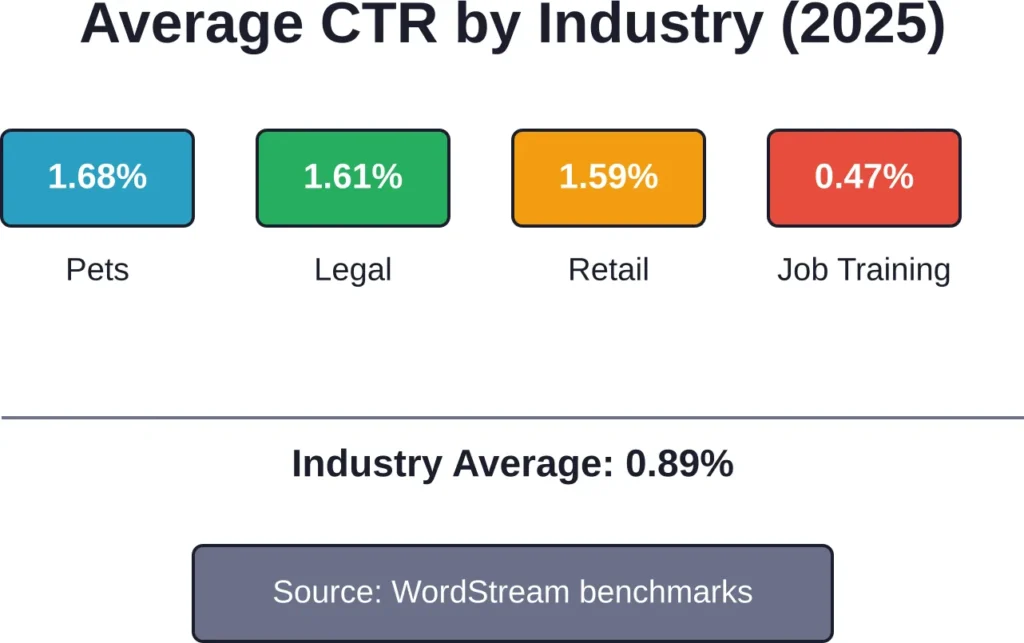
According to WordStream’s benchmarks, the average click-through rate on Facebook Ads across all industries is 0.89%. But performance varies significantly by sector.
High-performing industries include Pets & Animals with approximately 1.68% CTR, Legal at 1.61%, and Retail at 1.59%. Apparel sits at 1.24%, Beauty at 1.16%, and Fitness at 1.01%. On the lower end, Employment & Job Training averages just 0.47%.
Cost per click also fluctuates. For Facebook Lead Ads, cost per click data from 2025 shows increases year-over-year compared to 2024. However, 67% of industries saw stable or decreased CPCs, so the trend isn’t universal.
Cost per lead data for Facebook Ads in 2025 shows variation across industries. Industry data indicates many sectors experienced increased CPL for the Leads objective, signaling tightening competition.
Traffic objective campaigns showed improvement year over year, with both higher CTR and lower CPC compared to 2024, according to 2025 benchmark data. This makes traffic campaigns a cost-effective option for businesses focused on driving website visits rather than immediate conversions.
How to Choose the Right Tool for Your Business
There’s no universal best tool—only the best tool for a specific situation. Here’s a framework for deciding.
Start With Goals
What’s the primary objective? Tracking ROI across multiple channels? Optimizing creative performance? Generating polished client reports? The answer narrows the field immediately.
Teams focused on creative testing should prioritize Motion or Extuitive. Those needing multi-channel dashboards fit better with Sprout Social or Whatagraph. Businesses running lean can start with Google Analytics 4 and upgrade later if needs expand.
Evaluate Team Resources
Does the team have developers or technical marketers who can handle UTM configuration and API integrations? If so, free or lower-cost tools become viable.
If not, paying for a platform with built-in automation and support makes more sense. Time saved on setup and troubleshooting often justifies higher subscription costs.
Consider Scale
Small businesses with one or two campaigns don’t need enterprise-grade analytics. A simple dashboard with basic metrics—spend, clicks, conversions—is enough.
Agencies managing dozens of client accounts need scalability, white-label reporting, and robust permission controls. That’s where higher-tier platforms earn their price tags.
Test Before Committing
Most tools offer free trials. Take advantage of them. Import actual campaign data, build reports, and see whether the interface feels intuitive. A tool that looks great in a demo might be clunky in daily use—or vice versa.
Watch for Hidden Costs
Some platforms charge per user seat, others per connected ad account or data source. A tool that seems affordable at first glance might balloon in cost as the team or client roster grows.
Read pricing pages carefully. If details are vague, reach out to sales teams for clarity before signing contracts.
Setting Up Facebook Ads Tracking Correctly
Even the best analytics tool fails if tracking isn’t configured properly. Here’s what matters most.
UTM Parameters Are Essential
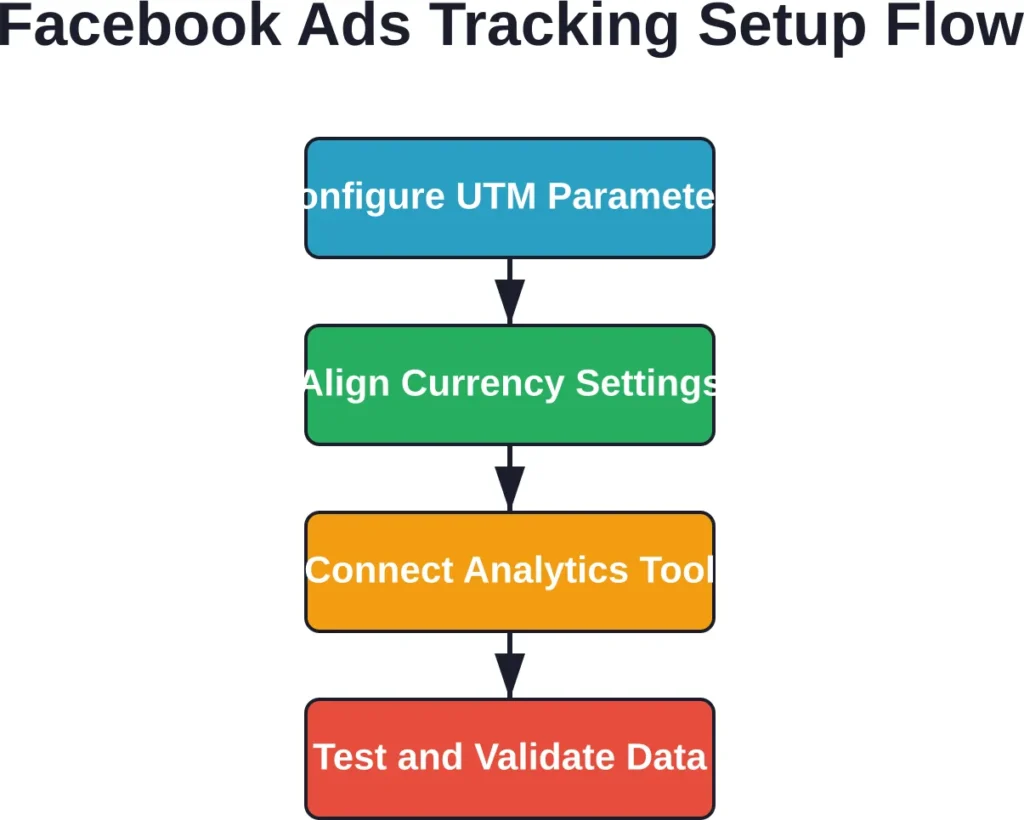
For tools like Google Analytics 4, UTM parameters are required to match ad clicks to campaign data. The required parameters are utm_source and utm_medium. Optional but highly recommended parameters include utm_id and utm_campaign for granular tracking.
Consistent naming conventions across campaigns prevent data fragmentation and make reporting cleaner.
Currency Alignment
The currency of imported campaign data should match the Google Analytics property currency. If mismatched (e.g., EUR vs USD), either change the Meta Ads account currency or use Google Sheets to manually convert before importing.
Set the Google Analytics property currency to match the Meta Ads account currency before starting the import process.
Avoid Data Duplication
Meta Ads Data Import sources will attempt to pull at least 24 months of historical Meta Ads data into your Analytics property. If existing data overlaps, delete prior datasets before proceeding to avoid duplicate entries that inflate metrics.
Test Tracking Before Scaling
Before launching large campaigns, test tracking with small budgets. Confirm that clicks, conversions, and spend are recording accurately in the analytics platform. Catching tracking issues early prevents wasted spend and bad data.
Common Pitfalls and How to Avoid Them
Even with the right tool and proper setup, analytics projects can go sideways. Here are the most common mistakes.
Ignoring Attribution Windows
Facebook uses a default attribution window—typically 7-day click and 1-day view. Third-party tools might use different windows, causing discrepancies between Meta’s reported conversions and the analytics platform’s numbers.
Align attribution windows across tools, or at least understand the differences when comparing data. Mismatched windows lead to confusion and mistrust in reporting.
Overlooking Creative Fatigue
Ad creatives wear out. An ad that performed well for three weeks might see declining CTR and rising CPC in week four as the target audience grows tired of seeing it.
Analytics tools that track frequency and engagement trends over time help catch creative fatigue early, signaling when it’s time to refresh assets.
Focusing Only on Vanity Metrics
Impressions and reach feel good, but they don’t pay the bills. The metrics that matter are conversions, cost per acquisition, return on ad spend, and customer lifetime value.
Configure dashboards to surface business outcomes, not just activity. If a campaign drives high engagement but low conversions, it’s not working—no matter how impressive the engagement numbers look.
Not Segmenting Data
Aggregate data hides insights. A campaign with an average CPA of $50 might include one ad set at $30 and another at $80. Without segmentation, the high-performing set gets lumped in with the underperformer.
Break down performance by campaign, ad set, individual ad, audience, placement, and creative. Granular data reveals optimization opportunities that aggregates obscure.
The Role of AI in Facebook Ads Analytics
Artificial intelligence is reshaping how marketers analyze and optimize campaigns. Platforms like Extuitive predict creative performance before ads launch, using historical data and machine learning to identify patterns.
AI-powered tools also automate anomaly detection. Instead of manually reviewing dashboards for performance drops, the platform alerts teams when metrics fall outside expected ranges—catching issues before they drain budgets.
Predictive analytics take it further. By analyzing past campaign performance, AI models forecast future results, helping teams allocate budgets more effectively and set realistic goals.
That said, AI isn’t magic. It needs clean data to work. Poor tracking, inconsistent naming conventions, and data gaps reduce model accuracy. Treat AI as a powerful assistant, not a replacement for strategic thinking.
Integrating Facebook Ads Data with Broader Marketing Analytics
Facebook Ads don’t exist in a vacuum. Most businesses run campaigns across multiple channels—Google Ads, email, organic social, content marketing. Unified analytics bring everything together.
Tools like Google Analytics 4, Sprout Social, and Whatagraph pull data from multiple sources into one dashboard. This enables cross-channel attribution, showing which touchpoints contribute to conversions and how channels influence each other.
For example, a customer might first discover a brand through an organic Facebook post, click a Google Ad weeks later, and finally convert after receiving an email offer. Multi-touch attribution reveals this journey; single-channel analytics miss it.
Integration also simplifies reporting. Instead of exporting data from five different platforms and manually combining it in spreadsheets, one dashboard shows the full picture.
Frequently Asked Questions
Google Analytics 4 is the strongest free option. It supports Meta Ads data import and integrates seamlessly with website performance tracking. Setup requires technical knowledge, but the cost savings are substantial for budget-conscious teams.
Yes, most major platforms support Lead Ads tracking and reporting. According to HubSpot’s official documentation, Lead Ads support both tracking and reporting when integrated with their system. Confirm that the specific tool handles the ad formats in use before committing.
If 100% of ad spend goes to Meta properties, a Facebook-specific tool like Socialinsider or Motion might offer deeper insights at a lower price. If campaigns run across Facebook, Google, LinkedIn, and other channels, a multi-channel platform like Sprout Social or Whatagraph provides better value by consolidating reporting.
Attribution windows are the most common culprit. Facebook uses default windows—typically 7-day click and 1-day view—while third-party tools might use different settings. Time zone differences, data refresh delays, and tracking pixel issues also cause discrepancies. Align attribution settings and confirm that tracking is configured correctly.
Pricing ranges from free (Google Analytics 4) to $500+ per month for enterprise platforms. Small businesses typically spend $49 to $249 per month; agencies and larger teams might invest $199 to $599+ per seat. Evaluate based on team size, reporting needs, and whether multi-channel analytics are necessary.
Most Facebook Ads analytics tools also support Instagram Ads, since both run through Meta’s Ads Manager. Confirm that the platform explicitly lists Instagram support, and check which Instagram ad formats—Feed Ads, Story Ads, Reels Ads—are included in tracking and reporting.
Yes, many tools offer automated report scheduling. Whatagraph, Sprout Social, and Socialinsider allow teams to create custom reports and schedule them to send via email or shared links at regular intervals—daily, weekly, or monthly. White-label branding is available on most platforms for agencies presenting reports to clients.
Final Thoughts
The best analytics tool for Facebook Ads integration depends on specific needs, budget, and team capabilities. Socialinsider excels in social-first analytics with historical data. Google Analytics 4 offers unbeatable value for free. HubSpot shines for teams already using its CRM. Motion and Extuitive lead in creative optimization. Sprout Social dominates multi-channel management.
Choosing the right platform starts with clear goals. Teams focused on ROI and multi-channel attribution need different tools than those optimizing creative performance or generating client reports. Evaluate features, test platforms, and watch for hidden costs before committing.
Proper setup matters as much as tool selection. Configure UTM parameters correctly, align currency settings, and validate tracking before scaling campaigns. Even the most advanced platform delivers garbage insights if the data feeding it is wrong.
And remember: analytics are only useful if they drive action. The goal isn’t to build the prettiest dashboard—it’s to identify what’s working, kill what’s not, and allocate budget toward campaigns that generate real returns. Pick a tool, set it up right, and use the insights to make better decisions every day.