

Quick Summary: 3D architectural visualization is the process of creating digital, photorealistic representations of buildings and spaces before they’re built. Using specialized software, artists transform architectural plans and CAD models into detailed images, animations, and virtual walkthroughs that help architects, developers, and clients visualize designs, make informed decisions, and market properties effectively.
Walk into any modern architectural firm and there’s a good chance someone’s working on a rendering. Not drafting. Not sketching. Rendering.
3D architectural visualization has become the universal language architects use to communicate with clients, developers, and contractors. It’s replaced foam models and watercolor sketches as the go-to method for presenting design ideas before construction starts.
But what exactly is it? How does the process work? And why has it become so indispensable to the architecture and real estate industries?
This guide breaks down everything about 3D architectural visualization—from basic definitions to the detailed workflow that creates those stunning images.
Understanding 3D Architectural Visualization
At its core, 3D architectural visualization is the art and science of creating lifelike digital representations of buildings and interior spaces. Think of it as digital photography for structures that don’t exist yet.
The process takes architectural drawings, blueprints, or CAD models and transforms them into photorealistic images or animations. These visuals show exactly how a finished project will look—down to the texture of the concrete, the way light filters through windows, and the reflection of surrounding buildings in glass facades.
Architectural visualization goes by several names in the industry. Some call it archviz. Others refer to it as architectural rendering or CGI (computer-generated imagery) for architecture. All these terms describe the same fundamental process.
According to research from Mississippi State University, computer 3D visualization technology emerged as a design aid in architectural practice. Until the mid-1980s, CAD meant Computer-Aided Drafting because architects primarily used computers for electronic drafting of construction drawings.
Now? The technology has evolved into a dynamic design representation tool that impacts every phase of the architectural design process.
The Three Main Components
Every 3D architectural visualization combines three essential elements:
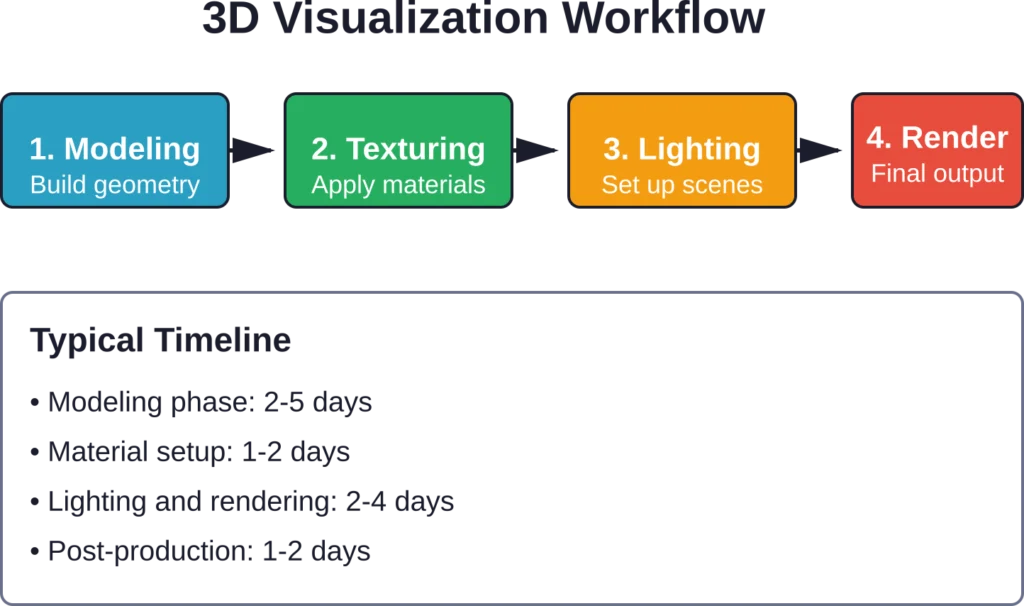
Modeling creates the three-dimensional geometry. Artists build digital versions of walls, floors, furniture, and every structural element from architectural plans. This forms the skeleton of the visualization.
Texturing and materials add realism by applying surface properties. Wood gets grain patterns. Glass becomes reflective. Concrete shows subtle imperfections. These details make the difference between a basic 3D model and a convincing visualization.
Lighting and rendering bring everything to life. Virtual lights simulate natural sunlight, artificial fixtures, and environmental lighting. The rendering engine then processes all this information to produce the final image—calculating how light bounces, creates shadows, and interacts with different materials.
Why Architects and Developers Use 3D Visualization
Architectural visualization isn’t just about creating pretty pictures. It serves practical purposes throughout the design and construction process.
The most obvious benefit? Communication. Clients who can’t read blueprints can immediately understand a photorealistic rendering. A single image conveys more information than dozens of technical drawings for most people.
But the advantages go deeper than that.
Design Development and Problem-Solving
Research from Mississippi State University’s thesis on computer 3D visualization technology highlights how these tools help solve design and communication problems in the early phases of architectural design.
When architects create 3D models of their designs, they spot issues that aren’t obvious in 2D drawings. Spatial relationships become clearer. Proportions that looked fine on paper might feel off when viewed in three dimensions.
This early detection saves time and money. It’s far cheaper to adjust a digital model than to modify construction plans—or worse, fix problems during actual construction.
Client Relationships and Approval
Research on computer 3D visualization technology has examined how these tools impact the client-architect relationship. The findings showed improved design service quality and stronger working relationships when visualization was used.
Here’s why: clients feel more involved in the design process when they can see and understand what they’re getting. They provide better feedback. They make decisions with more confidence. And they’re less likely to request major changes late in the project.
Marketing and Pre-Sales
For real estate developers, architectural visualization has become an essential marketing tool. High-quality renderings let them market properties before construction starts—sometimes before breaking ground.
Potential buyers or tenants can visualize themselves in spaces that don’t physically exist yet. They can choose finishes, compare floor plans, and commit to purchases based on these visualizations.
The impact on sales timelines is significant. Developers who use quality visualization often secure buyers or tenants earlier in the construction process, improving project financing and reducing risk.
The Architectural Visualization Process
Creating a quality architectural visualization follows a structured workflow. Understanding this process helps architects and clients set realistic expectations about timelines and deliverables.
Stage 1: Project Briefing and Planning
Every visualization project starts with gathering information. The visualization artist or studio needs specific inputs from the architect or client.
Essential materials include architectural drawings (floor plans, elevations, sections), CAD files if available, material specifications, and reference images showing the desired aesthetic. The more detailed the input, the more accurate the output.
This stage also establishes technical requirements. How many images? What resolution? Which angles? Interior views, exterior views, or both? Will the project need animations or just static images?
Clear communication during briefing prevents revision loops later in the process.
Stage 2: 3D Modeling
Modeling builds the digital foundation. Artists create three-dimensional representations of every element in the architectural design.
This phase has two approaches. Some studios model everything from scratch based on architectural drawings. Others start with CAD files provided by architects and refine them for visualization purposes.
Architectural CAD models focus on technical accuracy for construction. Visualization models prioritize visual quality. The modeling approach differs because the end goals are different.
Artists add detail where it matters for the visual—window frames, door handles, furniture, landscape elements. They might simplify elements that won’t be visible in the final images.
Stage 3: Materials and Texturing
This is where surfaces come alive. Artists apply materials that define how different elements look—the roughness of concrete, the sheen of polished marble, the transparency of glass.
Modern rendering software uses physically-based rendering (PBR) materials. These materials simulate how surfaces interact with light in the real world, creating more convincing results.
Texturing involves more than just applying a wood pattern to a floor. It includes normal maps that add surface detail, roughness maps that control reflectivity, and displacement maps that create actual geometric variation.
High-quality texture and 3D model services provide resources specifically made for architectural visualization.
Stage 4: Lighting Setup
Lighting determines the mood, atmosphere, and realism of the final image. It’s arguably the most important technical aspect of architectural visualization.
Artists set up multiple light sources—natural sunlight, artificial fixtures, ambient environmental lighting. They consider time of day, season, and geographic location for exterior scenes.
Interior visualization requires careful balance between natural light from windows and artificial lighting from fixtures. The goal is to showcase the space while maintaining photorealistic lighting conditions.
This stage involves technical decisions about light intensity, color temperature, and shadow quality. Small adjustments to lighting can dramatically change the feel of a visualization.
Stage 5: Camera Setup and Composition
Just like photography, architectural rendering requires thoughtful camera placement and composition. The camera angle determines what viewers see and how they experience the space.
Common views include eye-level perspectives for realistic human viewpoints, aerial views for site context, and specific detail shots highlighting architectural features.
Artists apply composition principles—the rule of thirds, leading lines, framing. They consider what story each image should tell and set up cameras accordingly.
Stage 6: Rendering
Rendering is the computational process that generates the final image. The software calculates how light interacts with every surface, creating the photorealistic result.
This is the most time-intensive step computationally. A single high-resolution architectural rendering might take hours to render, depending on scene complexity and quality settings.
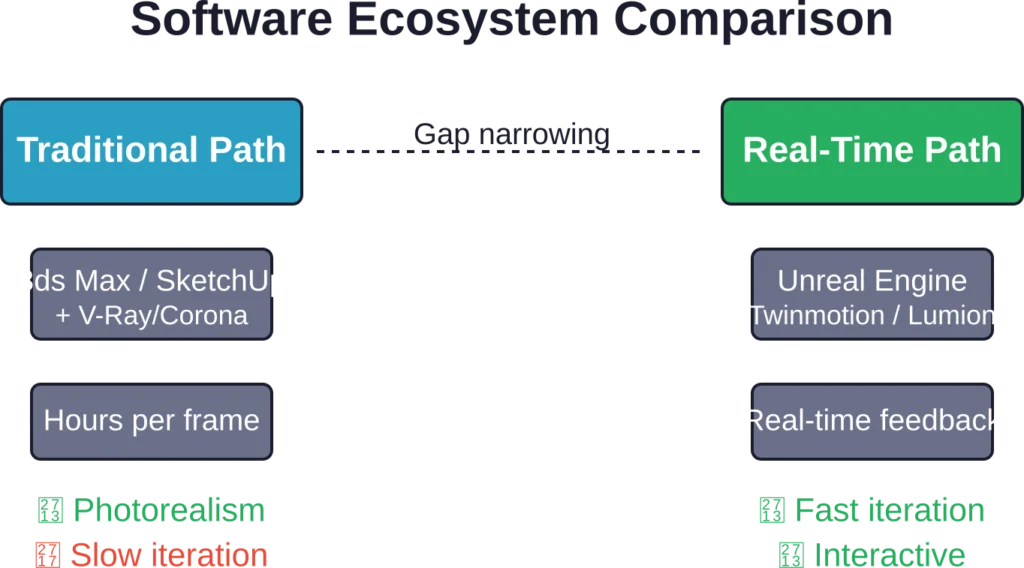
Modern rendering uses two main approaches. Ray tracing physically simulates light paths through the scene, producing highly realistic results but requiring significant processing time. Real-time rendering engines like those used in gaming provide faster feedback but traditionally with lower quality—though this gap has narrowed considerably.
Stage 7: Post-Production
The final step refines the rendered image. Artists use photo editing software to adjust colors, contrast, and atmospheric effects.
Post-production might add environmental elements like people, cars, or vegetation. It fine-tunes the image to match the desired aesthetic and corrects any rendering artifacts.
This stage also includes final quality checks and preparing files in the required formats and resolutions for delivery.
Types of Architectural Visualization
Architectural visualization takes many forms. Each serves different purposes in the design and marketing process.
Exterior Renderings
These show the outside of buildings—the most common type of architectural visualization. Exterior renderings place buildings in their surrounding context, showing how they relate to neighboring structures, streets, and landscapes.
They’re essential for planning approvals, where committees need to assess visual impact. They’re also powerful marketing tools for real estate projects.
Quality exterior renderings include realistic lighting (usually golden hour or blue hour for attractive results), accurate materials, and environmental context like trees, sky, and surrounding buildings.
Interior Renderings
Interior visualization shows what spaces feel like from inside. These images focus on room layouts, material choices, furniture arrangements, and how natural and artificial light fills the space.
Interior renderings help clients understand spatial relationships and make decisions about finishes and furnishings. They’re particularly valuable for residential projects and hospitality design.
The challenge with interior visualization is creating spaces that feel lived-in and authentic rather than sterile showrooms. Strategic placement of accessories, books, plants, and personal items adds warmth.
Aerial and Bird’s-Eye Views
Aerial renderings show projects from above, providing context for site layouts, master planning, and large developments. They’re particularly useful for mixed-use projects, campus planning, and urban development.
These views help stakeholders understand circulation patterns, building relationships, and how projects integrate with surrounding areas.
Virtual Tours and 360-Degree Views
Interactive visualization lets viewers explore spaces at their own pace. 360-degree panoramas allow looking around in all directions from fixed viewpoints.
Full virtual tours let users navigate through spaces, moving from room to room. These are increasingly popular for real estate marketing, letting potential buyers explore properties remotely.
Animations and Walkthroughs
Animated architectural visualization brings designs to life through movement. Walkthroughs simulate the experience of moving through a building or around a site.
Flythrough animations work well for showcasing large developments or complex sites. They provide a cinematic presentation that static images can’t match.
Animation requires significantly more time and resources than static rendering. Each second of video needs multiple frames rendered, often 24 or 30 frames per second.
| Visualization Type | Best Used For | Typical Timeline | Relative Cost |
|---|---|---|---|
| Exterior Rendering | Marketing, approvals, presentations | 3-7 days | $$ |
| Interior Rendering | Design decisions, sales materials | 3-7 days | $$ |
| Aerial View | Master planning, site context | 4-8 days | $$$ |
| 360° Panorama | Virtual showrooms, web presentations | 5-10 days | $$$ |
| Animation/Walkthrough | High-end marketing, competitions | 3-6 weeks | $$$$ |
Support Architectural Visualization with Accurate BIM Models
Architectural visualization depends on accurate geometry, coordinated models, and reliable project information. Powerkh supports visualization workflows with BIM modelling, coordination, and technical model preparation.
Need Support with Architectural Visualization?
Talk with Powerkh to:
- prepare BIM models for visualization workflows
- support architectural presentations and reviews
- improve model coordination before rendering
- develop accurate project geometry and documentation
Discuss visualization-ready BIM workflows with the Powerkh team.
Software and Tools for Architectural Visualization
Creating professional architectural visualization requires specialized software. Different tools handle different parts of the workflow.
3D Modeling Software
Several programs dominate architectural modeling. Each has strengths for different workflows.
SketchUp offers an accessible entry point with an intuitive interface. Many architects use it for early design exploration and quick visualization studies. The software integrates well with rendering plugins.
Autodesk Revit combines BIM (Building Information Modeling) capabilities with visualization potential. Since many architectural firms already use Revit for design and documentation, it provides a direct path from design to visualization.
Rhinoceros 3D excels at complex geometric modeling. Its flexibility makes it popular for projects with challenging forms and custom architectural elements.
Blender has gained significant traction in architectural visualization. As free, open-source software, it offers professional-grade modeling, rendering, and animation capabilities without licensing costs.
Rendering Engines
Rendering engines process the 3D scene to produce the final image. They handle the complex calculations that create photorealistic results.
V-Ray remains an industry standard for architectural rendering. It produces high-quality results and integrates with most major 3D software packages.
Corona Renderer has become popular for its user-friendly approach and fast, predictable results. Many architectural visualization studios have adopted it for production work.
Lumion focuses on real-time rendering with an emphasis on speed. It lets artists see results immediately while adjusting settings, making it valuable for quick iterations and client presentations.
Unreal Engine and Unity represent the gaming engine approach to architectural visualization. Real-time rendering technology has evolved significantly in 3D visualization. These engines now produce results that rival traditional ray-traced rendering while offering instant feedback and interactive experiences.
Post-Production Software
Adobe Photoshop dominates post-production for architectural rendering. Artists use it to enhance colors, add atmospheric effects, composite multiple render passes, and add entourage elements like people and vehicles.
Some workflows also incorporate Lightroom for batch processing multiple images with consistent adjustments.
Skills Required for Architectural Visualization
Creating professional archviz work requires a combination of technical and artistic abilities. It’s not just about knowing software—though that’s essential.
Technical Skills
Proficiency with 3D modeling software is fundamental. Artists need to understand how to build clean, efficient geometry that renders well.
Understanding rendering technology matters. Knowledge of how light works, how materials behave, and how rendering engines calculate results helps artists work more efficiently and troubleshoot problems.
Basic architectural knowledge helps visualization artists interpret drawings correctly and understand building systems. They don’t need to be licensed architects, but familiarity with architectural terminology and conventions is valuable.
Artistic Abilities
Composition and framing skills borrowed from photography make visualizations more compelling. Artists need to understand what makes an effective image—balance, focal points, visual hierarchy.
Color theory and lighting design knowledge separates good visualization from great visualization. Understanding how different lighting scenarios affect mood and how colors interact creates more sophisticated results.
An eye for detail makes the difference between convincing and unconvincing imagery. Real spaces have imperfections, wear, and subtle variations that make them feel authentic. Visualization artists need to know when and how to add these details.
Communication and Project Management
Research from Mississippi State University emphasized that architectural visualization impacts client relationships. This means visualization artists need communication skills to understand client needs and explain technical concepts.
Project management abilities help professionals deliver work on time and within budget. Visualization projects involve multiple stages and often multiple revisions based on feedback.
Common Challenges in Architectural Visualization
Creating quality architectural visualization isn’t without obstacles. Understanding common challenges helps set realistic expectations.
Balancing Realism with Idealization
Architectural visualization walks a fine line. The images should look realistic, but they also need to present the design in its best light—literally and figuratively.
Too much realism can be unflattering. Perfect lighting conditions might not accurately represent how the building looks on an overcast Tuesday morning. But clients and developers want marketing images that showcase the design appealingly.
Finding this balance requires judgment and communication about the visualization’s purpose. Is it a technical presentation or a marketing piece? The answer guides artistic decisions.
Managing Client Expectations
Clients sometimes expect changes to be as simple as “just move that wall” or “make it more modern.” But 3D modeling doesn’t work like that. Significant changes often require substantial rework.
Setting clear expectations upfront about revision processes and timelines prevents frustration. Defining what’s included in the base scope and what constitutes additional work protects both the visualization artist and the client.
Technical Limitations and Render Times
High-quality rendering takes time. Complex scenes with detailed geometry, sophisticated materials, and realistic lighting might take hours per image to render.
Hardware limitations can bottleneck projects. Rendering is computationally intensive, requiring powerful processors and ample RAM. Many studios invest in dedicated render farms—multiple computers working together to process renders faster.
Cloud rendering services have emerged as an alternative, letting artists rent computing power on demand rather than maintaining expensive hardware.
Keeping Up with Technology
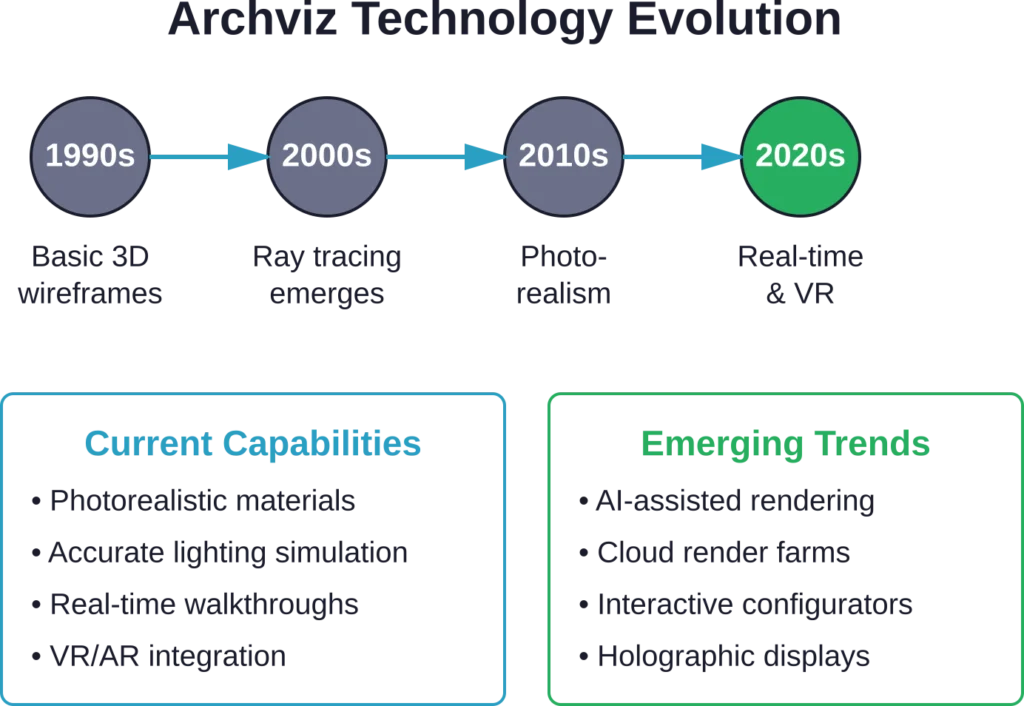
According to Autodesk Expert Elite Rob Holmes, comparing 3D visualization projects from the 1990s to current work shows dramatic technological advancement.
This rapid evolution means continuous learning. New software versions, new rendering techniques, new workflows—professionals in this field need to stay current or risk falling behind.
The Business of Architectural Visualization
Architectural visualization has grown into a substantial industry. Understanding the business aspects helps both service providers and clients.
Service Models
Visualization services operate through several business models. Large specialized studios handle multiple projects simultaneously with teams of artists. They often work with major developers and architectural firms on significant projects.
Freelance visualization artists offer flexibility and often lower costs for smaller projects. They might work remotely and take on projects from architects and designers worldwide.
Some architectural firms maintain in-house visualization capabilities. This gives them direct control over the process but requires investment in staff, software, and hardware.
Pricing Structures
Visualization pricing varies widely based on project complexity, quality level, timeline, and geographic location.
Per-image pricing is common for defined projects. A single high-quality exterior rendering might range from a few hundred to several thousand dollars, depending on complexity and the studio’s expertise.
Some studios work on retainer arrangements with regular clients, providing ongoing visualization services for a monthly fee.
Animation and virtual reality projects typically command higher rates due to the additional complexity and time required.
Project Timelines
Typical timelines for architectural visualization depend on project scope and complexity. A single exterior rendering might take three to seven days from briefing to delivery, including modeling, rendering, and one round of revisions.
More complex projects with multiple views, detailed interiors, or animations can take several weeks or even months.
Rush projects are possible but usually carry premium pricing. The rendering process has inherent time requirements that can’t be eliminated, though additional resources can be applied.
Quality Indicators in Architectural Visualization
Not all architectural renderings are created equal. Certain qualities separate professional work from amateur attempts.
Realistic Lighting
Lighting is the single most important factor in convincing visualization. Professional work uses physically accurate lighting that mimics how light behaves in reality.
Shadows should have appropriate softness. Direct sunlight creates sharp shadows; overcast conditions create soft, barely visible ones. Indoor spaces should show realistic contrast between natural window light and artificial fixtures.
Color temperature matters too. Sunlight is cooler (more blue) than most people expect, while incandescent bulbs are warm (orange). Getting these relationships right makes images feel authentic.
Material Accuracy
Materials should behave correctly in the rendering. Glass should be transparent and reflective. Metal should show appropriate reflectivity for its finish. Wood grain should look natural, not repetitive or plastic.
High-quality visualization uses proper material values based on real-world measurements. This attention to physical accuracy creates more convincing results.
Composition and Framing
Professional visualization shows design with thoughtful camera placement. The framing should highlight key architectural features and create visual interest.
Vertical lines should generally be vertical (not converging), unless the perspective is deliberately dramatic. Horizons should be level. These technical details matter.
Context and Entourage
Buildings don’t exist in isolation. Quality visualization includes appropriate context—surrounding buildings, landscape, sky conditions.
People, vehicles, and environmental elements should be present but not distracting. They add scale and life to the image without pulling focus from the architecture.
The context should match the design’s location and purpose. A desert resort shouldn’t have lush greenery. An urban high-rise should show appropriate city context.
Technical Quality
Resolution and image quality matter for professional use. Marketing materials need high-resolution images that reproduce well in print and at large sizes.
The rendering should be free of technical artifacts—flickering in animations, fireflies in ray-traced images, visible polygon edges in curved surfaces.
The Future of Architectural Visualization
Architectural visualization continues to evolve rapidly. Several trends are shaping where the industry is heading.
Real-Time and Interactive Visualization
Real-time rendering technology has improved dramatically. Game engines now produce results that rival traditional ray-traced rendering while offering instant feedback.
This enables interactive experiences where clients can walk through designs, change finishes in real-time, and see modifications immediately. The technology removes the traditional waiting period between requesting a visualization and seeing results.
Virtual Reality and Augmented Reality
VR headsets let clients experience architectural designs at full scale before construction. Walking through a virtual building provides spatial understanding that flat images can’t convey.
Augmented reality overlays proposed designs onto real-world views, showing how new buildings will look in their actual context. This technology is particularly valuable for renovation projects and urban planning.
IEEE standards work on mixed reality frameworks and holographic visualization, including IEEE 2888.3-2024 for orchestration of digital synchronization between cyber and physical worlds. These technical standards lay groundwork for more sophisticated AR and VR applications in architecture.
Artificial Intelligence and Machine Learning
AI is beginning to impact architectural visualization. Machine learning can accelerate certain processes—automatically generating furniture layouts, optimizing lighting setups, or enhancing rendered images.
Some tools use AI for style transfer, allowing visualization artists to apply artistic styles to renderings or match the look of reference images more easily.
However, AI hasn’t replaced the need for skilled visualization artists. The technology assists with specific tasks but still requires human judgment for composition, artistic decisions, and understanding client needs.
Cloud Rendering and Distributed Processing
Cloud-based rendering services continue to grow. Artists can access massive computing power without investing in expensive hardware, paying only for actual usage.
This democratizes high-quality visualization, making it accessible to smaller studios and independent artists who couldn’t afford dedicated render farms.
Integration with BIM and Design Workflows
The line between design tools and visualization tools continues to blur. BIM software increasingly includes visualization capabilities, letting architects generate quality renderings directly from their working models.
This integration streamlines workflows. Changes to the design model automatically update in visualizations, reducing manual rework and keeping images synchronized with current design intent.
Getting Started with Architectural Visualization
For those interested in entering the field or commissioning visualization work, understanding the entry points helps.
For Aspiring Visualization Artists
Educational paths vary. Some visualization artists have formal architecture degrees. Others come from 3D animation, game design, or graphic design backgrounds.
Academic programs in architectural visualization exist at institutions like NTNU (Norwegian University of Science and Technology), which offers the AAR4810 Architectural Visualization course (7.5 credits, second degree level) starting Autumn 2020.
Self-taught paths are also viable. Quality online tutorials, courses, and resources make it possible to learn visualization skills independently. Building a strong portfolio matters more than formal credentials in many cases.
Starting artists should focus on mastering one software ecosystem thoroughly before branching out. Understanding the complete workflow from modeling through rendering and post-production is more valuable than superficial knowledge of many tools.
For Architects and Designers
Architects have choices about handling visualization. Developing in-house capabilities gives control and immediacy but requires investment in training, software licenses, and hardware.
Outsourcing to specialized studios or freelancers provides access to expertise and production capacity without maintaining it internally. This works well for firms with sporadic visualization needs.
Hybrid approaches are common—handling simple visualization internally while outsourcing complex or high-stakes projects to specialists.
For Clients and Developers
When commissioning architectural visualization, clear communication about expectations prevents problems. Providing complete reference materials—architectural drawings, material specifications, mood images showing desired aesthetics—helps visualization artists deliver what clients actually want.
Understanding the process and typical timelines prevents frustration. Quality visualization takes time. Rushing the process usually compromises results.
Looking at a studio’s portfolio before engaging them helps ensure their style and quality level match project needs. Different studios specialize in different types of work—residential, commercial, interior, exterior.
Frequently Asked Questions
These terms are often used interchangeably and generally mean the same thing—creating digital images of architectural designs. Some practitioners use “rendering” specifically for the technical process of generating images from 3D models, while “visualization” encompasses the entire creative process including modeling, composition, and post-production. In practice, both terms refer to creating realistic representations of unbuilt architecture.
Pricing varies significantly based on project complexity, quality level, and deliverables. A single high-quality exterior rendering typically ranges from several hundred to several thousand dollars. Interior renderings fall in similar ranges. Animations and virtual reality experiences cost substantially more due to the additional work involved. Location and studio experience also affect pricing. For accurate quotes, contact visualization studios with specific project details.
A single high-quality architectural rendering typically takes three to seven days from initial briefing to final delivery, including one round of revisions. This timeline covers modeling, material application, lighting setup, rendering, and post-production. More complex scenes or projects requiring multiple views take longer. Rush projects are possible with premium pricing, but the rendering process has inherent time requirements that can’t be completely eliminated.
Professional workflows typically combine multiple software packages. Common modeling tools include SketchUp, Autodesk Revit, Rhinoceros, and Blender. Popular rendering engines include V-Ray, Corona Renderer, Lumion, and Unreal Engine for real-time work. Adobe Photoshop handles post-production. Many professionals use different combinations based on project requirements and personal preference. The specific software matters less than the artist’s skill in using their chosen tools effectively.
Yes, though basic architectural knowledge helps. Many successful visualization artists come from 3D animation, game design, or graphic design backgrounds rather than architecture. Understanding architectural terminology, being able to read construction drawings, and recognizing how buildings work improves efficiency and reduces errors. However, the core skills are 3D modeling, lighting, composition, and rendering technique rather than architectural design itself.
Traditional rendering uses ray tracing to physically simulate light paths, producing highly realistic results but requiring significant processing time—often hours per image. Real-time rendering uses game engine technology to generate images instantly as cameras and settings change, enabling interactive experiences but traditionally with lower quality. However, this quality gap has narrowed considerably. Real-time engines now produce results comparable to traditional rendering for many applications while offering immediate feedback and interactive capabilities.
Architectural visualizations represent design intent rather than guarantees of the finished product. They show how buildings should look if constructed exactly as designed, with ideal conditions and finishes. Actual construction involves variables—material availability, construction tolerances, budget constraints, weather effects over time. Quality visualizations accurately represent the design, but some differences between rendered images and finished buildings are inevitable. They’re best understood as sophisticated design communication tools rather than exact predictions.
Conclusion
3D architectural visualization has transformed how architects communicate ideas, how clients understand designs, and how real estate gets marketed. What started as a specialized service has become standard practice in architecture and development.
The technology continues advancing rapidly. Real-time rendering, virtual reality, and AI-assisted workflows are reshaping what’s possible and how quickly it can be delivered. Yet the fundamental purpose remains constant—helping people see and understand buildings before they exist.
For architects and designers, visualization has become an essential tool for design development and client communication. For developers and marketers, it’s invaluable for pre-selling properties and securing project financing. For clients, it provides confidence in design decisions by making abstract plans tangible and understandable.
The field offers opportunities for technically and artistically skilled professionals. As research from Mississippi State University noted, computer 3D visualization technology impacts architectural design processes, service quality, and professional relationships. These impacts continue growing as the technology becomes more accessible and capable.
Whether you’re considering entering the field, commissioning visualization work, or just curious about how those stunning architectural images get made, understanding the process, tools, and workflow helps set realistic expectations and appreciation for the craft.
The buildings shaping our cities increasingly exist as digital visualizations before the first foundation is poured. That transformation from pixels to concrete starts with the work of architectural visualization artists combining technical skill, artistic vision, and architectural understanding to make the invisible visible.
Ready to bring your architectural project to life? Start by gathering your design documents, identifying which views best communicate your vision, and reaching out to visualization professionals who can transform your plans into compelling images that move your project forward.