

Quick Summary: Amazon provides powerful native and third-party tools to craft winning product listings in 2026, from AI-powered listing generators and A+ Content builders to keyword research platforms and bulk upload utilities. According to Amazon’s official data, well-implemented A+ Content alone can increase sales by up to 20%, while the introduction of buybox algorithms has driven transaction volume increases of 78%.
Product listings on Amazon don’t just describe what something is. They determine whether a shopper clicks, reads, trusts, and buys. With more than 1 million third-party sellers competing in the U.S. alone, the difference between a converting listing and one that gets ignored often comes down to the tools used to create it.
The landscape shifted hard in 2026. Amazon rolled out generative AI features across listing creation, A+ Content Manager now offers free AI modules for Brand Registered sellers, and third-party platforms added automation layers that compress what used to take weeks into minutes.
Here’s the thing though—not every tool fits every workflow. Sellers operating at different scales need different solutions. This guide breaks down the most effective Amazon tools for crafting product listings, organized by function and seller type, with real data on performance impact.
Why the Right Listing Tools Matter in 2026
Manual listing creation breaks at scale. Sellers listing dozens or hundreds of ASINs face a repeatable problem: how to maintain quality while keeping velocity high.
Amazon’s internal data shows that conversion rates jumped 23% when the buybox feature was introduced, with transaction volume climbing 78%. That’s the impact of algorithmic curation on a single page element. Listings themselves carry similar leverage.
Basic A+ Content drives sales increases of up to 8%, while Premium A+ Content pushes that to 20% when implemented well. But creating this content historically required design teams, copywriters, and weeks of iteration. The 2026 toolset changes that math.
Mobile-first shopping compounds the urgency. Mobile-first shopping is growing, with significant traffic from mobile devices. Listings must work on small screens, load fast, and communicate value in compressed visual real estate. Tools that optimize for mobile conversion aren’t optional anymore.
Enhance Listing Performance with Technical Precision

Developing a winning product listing in 2026 requires more than just keywords; it demands a deep understanding of how those listings convert into actual profit. WisePPC provides the analytical backbone to ensure that optimized content translates directly into measurable growth and sustainable advertising efficiency.
- Conversion Rate Monitoring: The platform tracks how listing changes impact real-time conversion metrics, allowing for precise adjustments based on buyer behavior.
- Integrated Keyword Strategy: By linking listing data with advertising performance, it identifies which high-performing terms should be prioritized in titles and descriptions.
- Profit-Centric Analytics: Sellers can view the direct relationship between listing quality and total net profit, moving beyond simple vanity metrics.
- Scalable Content Management: Technical expertise helps brands manage and synchronize high-quality data across massive product catalogs without losing accuracy.
To turn optimized product listings into a scalable engine for growth, register at WisePPC.
Amazon’s Native AI Listing Tools

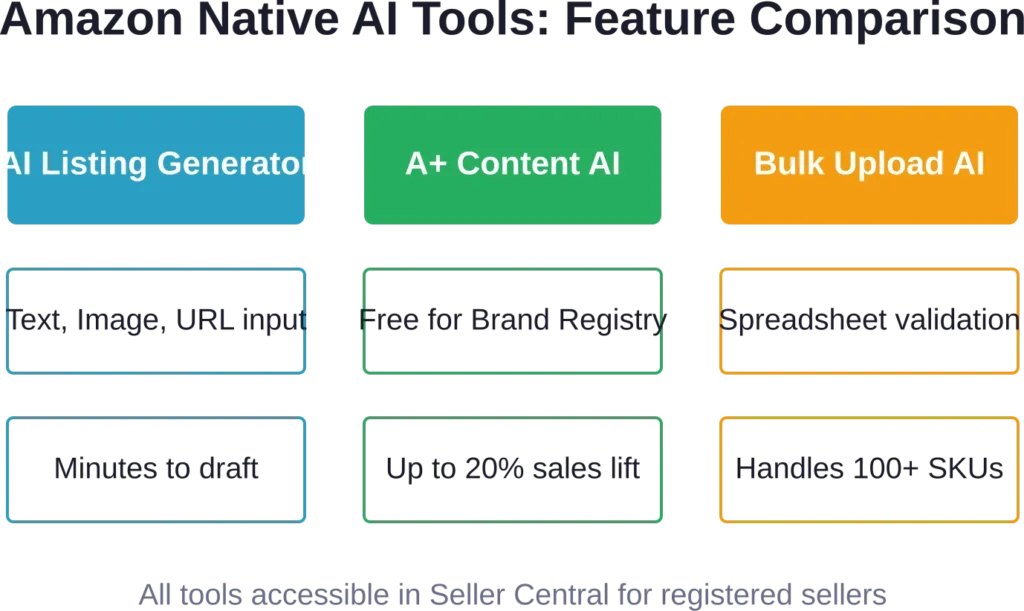
Amazon launched generative AI tools inside Seller Central that Brand Registered sellers can access at no additional cost. These tools cover listing creation, A+ Content generation, and bulk workflows.
AI-Powered Listing Generator
Sellers can create product listings using three input methods: a text description, an uploaded product image, or a URL from an existing product website.
The text-based workflow prompts sellers to describe the product in natural language. Amazon’s AI then generates a title, bullet points, and product description optimized for search and readability. Titles stay under 200 characters, bullets are structured for scannability, and descriptions integrate relevant keywords without stuffing.
The image-based workflow analyzes uploaded product photos to extract features, materials, dimensions, and use cases. This works well for straightforward physical goods where visual details are prominent.
The URL-based workflow scrapes content from a seller’s existing website—product pages on Shopify, BigCommerce, or standalone ecommerce sites—and adapts the copy for Amazon’s format. This saves time for brands that already have polished product content elsewhere.
All three methods produce drafts that sellers review and edit before publishing. The AI doesn’t auto-publish; it accelerates the drafting phase.
Generative AI in A+ Content Manager
A+ Content Manager now includes AI-ready modules for Basic and Premium A+ Content. Brand Registered sellers in the U.S. can access these modules for free in select English-language templates.
The workflow is straightforward: navigate to A+ Content Manager, find modules with the “AI Ready” badge, generate content using a brand-owned ASIN, review the output, and publish. The AI pulls from existing product data—titles, bullets, descriptions, images—to create comparison charts, feature callouts, and brand story blocks.
This eliminates the need for external designers or copywriters for many standard A+ layouts. Sellers can now produce A+ Content in minutes instead of weeks, a compression that matters when launching seasonal products or responding to competitor moves.
Bulk Listing Creation with AI
For sellers managing large catalogs, Amazon’s bulk listing tools integrate AI to process spreadsheets at scale. Sellers upload a spreadsheet template with product data—titles, features, SKUs, pricing—and the AI validates formatting, suggests keyword improvements, and flags missing fields.
This is where automation compounds. A seller with 200 SKUs can generate and refine listings in a single session rather than tackling them one by one. The time saved is measurable: Listing appearance times vary based on category approval workflows and seller account status due to increased category restrictions and approval gates.
Third-Party Amazon Listing and Research Tools
While Amazon’s native tools handle listing creation and A+ Content, third-party platforms extend into product research, keyword strategy, competitor tracking, and pricing optimization. These tools integrate data Amazon doesn’t surface directly in Seller Central.
AI Product Research Platforms
Product research tools help sellers identify demand trends, validate niche opportunities, and spot gaps in competitive listings. In 2026, the leading platforms integrated AI layers to automate pattern recognition and trend forecasting.

SmartScout starts at $29 per month and offers category trend analysis, market share visibility, TrafficGraph for traffic estimation, and SellerMap for geographic seller distribution. The platform added AI Visibility Monitor, which tracks how often a product appears in AI-generated search results and recommendations, and AI Listing Architect, which suggests structural improvements to listings based on high-performing competitors.

Helium 10 starts at $39 per month and bundles keyword research, sales estimation, listing optimization, and inventory forecasting. The AI integration focuses on keyword discovery: the platform analyzes search query patterns to surface long-tail keywords that traditional tools miss.

SellerSprite provides product discovery filters, keyword research modules, and traffic analytics. The workflow is designed for repeatability: sellers can shortlist products the same way each week, build keyword lists systematically, and track ranking changes over time.
These platforms don’t replace Amazon’s native tools—they complement them. Sellers use third-party research tools to identify what to sell, then use Amazon’s AI generators to create the listings.
Keyword and SEO Tools
Amazon’s internal search algorithm prioritizes relevance and conversion. Listings that match search intent and convert visitors into buyers rank higher. Keyword tools help sellers identify which terms to target and where to place them.
Most keyword platforms analyze Amazon’s autocomplete data, competitor listings, and historical search volume to generate keyword lists. The best tools also estimate competition level and suggest placement strategy—whether a keyword belongs in the title, bullets, backend search terms, or A+ Content.
The practical application is straightforward: sellers input a seed keyword, receive a list of related terms ranked by search volume and competition, filter for terms with commercial intent, and integrate them into listing drafts. The AI-enhanced versions of these tools also predict seasonal shifts and emerging trends, flagging keywords gaining momentum before they peak.
Pricing and Profit Calculators
Pricing tools track competitor prices in real time and calculate profit margins after Amazon fees, shipping costs, and ad spend. Sellers set pricing rules—match the lowest competitor, stay within a margin threshold, adjust based on inventory levels—and the software reprices automatically.
Profit calculators integrate data from multiple sources: purchase cost from suppliers, FBA fees from Amazon’s rate cards, PPC spend from campaign dashboards, and sales velocity from Seller Central reports. The output is a per-unit profit figure that accounts for all variable costs.
This matters because Amazon’s fee structure is complex. Referral fees, FBA storage fees, long-term storage charges, and return processing fees all vary by category, size tier, and time of year. Manual calculation breaks at scale. Automated tools keep margin visibility current.
| Tool | Starting Price | Core Features | AI Integration |
|---|---|---|---|
| SmartScout | $29/month | Category trends, market share, traffic analysis | AI Visibility Monitor, Listing Architect |
| Helium 10 | $39/month | Keyword research, sales estimates, inventory tools | AI keyword discovery, trend forecasting |
| SellerSprite | Varies | Product research, keyword tracking, competitor monitoring | Workflow automation, ranking alerts |
| Analyzer Tools | $49/month (web app) | Bulk analysis, profit calculation | Data-driven decision workflows |
Best-Practice Workflow for Using Amazon Listing Tools
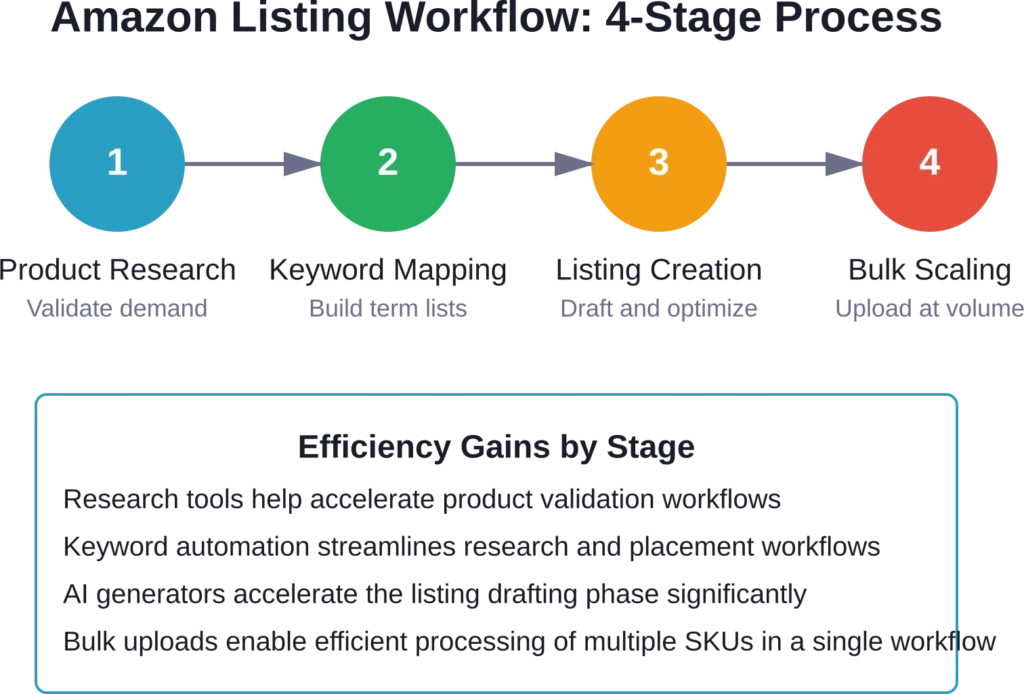
Tools are enablers, not strategies. The workflow matters more than the software. Here’s a repeatable process that compounds over time.
Stage 1: Product Research and Validation
Start with demand validation. Use third-party research tools to identify products with consistent search volume, moderate competition, and margin potential. Filter by category, price range, and seller count. Shortlist 5-10 product ideas per research session.
Cross-reference demand data with competition analysis. Check how many sellers offer similar products, what their ratings are, how complete their listings are, and whether they use A+ Content. Look for gaps: products with high demand but weak listings.
Validate margin potential using profit calculators. Input estimated purchase cost, shipping, and Amazon fees. Set a minimum margin threshold—typically 30% for private label, 15-20% for wholesale. Drop products that don’t clear the threshold even at optimistic volume.
Stage 2: Keyword Research and Mapping
Once a product is validated, build its keyword map. Use keyword tools to generate a list of 50-100 related search terms. Rank them by search volume and commercial intent.
Classify keywords into tiers: primary keywords (highest volume, most competitive), secondary keywords (moderate volume, easier to rank), and long-tail keywords (low volume, high intent). Allocate placement accordingly: primary keywords go in the title and first two bullets, secondary keywords fill remaining bullets and backend search terms, long-tail keywords appear in A+ Content and product descriptions.
This structure maximizes indexing coverage without keyword stuffing. Amazon’s algorithm rewards relevance, not repetition.
Stage 3: Listing Creation and Optimization
Draft the listing using Amazon’s AI generator or manually if customization is needed. For AI-generated drafts, review for accuracy, tone, and keyword integration. Edit as needed—AI outputs are starting points, not final copy.
Structure titles to frontload the most important information: brand, product type, key feature, size/quantity. Keep titles under 200 characters. Avoid promotional language like “best” or “#1″—Amazon suppresses those terms.
Write bullets that answer specific customer questions. Each bullet should address a feature, benefit, or use case. Use natural language, not keyword lists. Mobile shoppers scan bullets quickly, so prioritize clarity over cleverness.
Add A+ Content if Brand Registered. Use Amazon’s AI modules to generate comparison charts, feature callouts, and brand story blocks. Focus on visual hierarchy—customers should be able to extract key information at a glance.
Stage 4: Bulk Upload and Scaling
For sellers managing large catalogs, bulk workflows compress timeline. Prepare a spreadsheet template with all required fields: SKU, title, bullets, description, price, images, category, keywords. Use Amazon’s bulk listing tool to upload and validate.
The AI validation catches formatting errors, missing data, and keyword issues before submission. Fix flagged items and reupload. This iterative process is faster than correcting individual listings after they go live.
Scaling isn’t just about volume—it’s about consistency. Repeatable workflows ensure that listing quality stays high even as SKU count grows. Sellers who nail this process can launch 50+ products in a quarter without sacrificing conversion rates.
Tool Selection by Seller Type
Not every seller needs the same stack. Budget, catalog size, and growth stage all influence which tools make sense.
New Sellers (0-10 Products)
Start with Amazon’s native tools exclusively. The AI listing generator, A+ Content Manager, and basic keyword guidance in Seller Central are enough to launch and iterate. Avoid paying for third-party platforms until revenue justifies the expense.
Focus on learning Amazon’s requirements: category-specific style guides, image standards, restricted keywords, and approval workflows. Manual experience at this stage builds pattern recognition that accelerates later scaling.
Growing Sellers (10-50 Products)
Add one research tool and one keyword tool. SmartScout or SellerSprite cover product validation, while a dedicated keyword platform improves search visibility. Budget around $50-80 per month total.
At this stage, repeatability matters more than sophistication. Build templates for listing creation, standardize keyword research workflows, and document what works. The goal is to compress time per listing without sacrificing quality.
Scaling Sellers (50+ Products)
Invest in a full tool stack: research platform, keyword suite, pricing automation, and inventory management. Budget $150-300 per month depending on feature tiers.
Automation becomes critical at this scale. Manual workflows break when managing dozens of active SKUs, ongoing PPC campaigns, and inventory reorders. Tools that integrate data across functions—research, pricing, ads, inventory—reduce context switching and decision fatigue.
Real talk: the ROI on tools at this stage is measurable. A pricing tool that prevents stockouts or a keyword platform that lifts organic rank can pay for itself in a single week.
Common Pitfalls and How to Avoid Them
Tools amplify process. If the underlying strategy is weak, automation just scales the problem faster.
Over-Reliance on AI Drafts
AI-generated listings are starting points, not finished products. Sellers who publish AI drafts without editing often end up with generic copy that doesn’t differentiate. Review every AI-generated element for accuracy, tone, and brand alignment.
Keyword Stuffing
Amazon’s algorithm penalizes listings that cram keywords unnaturally into titles and bullets. Write for humans first, optimize for search second. If a sentence feels awkward, rewrite it even if it costs a keyword placement.
Ignoring Mobile Optimization
With 75% of Amazon traffic coming from mobile devices, listings must work on small screens. Test every listing on a phone before publishing. Check that titles are readable, bullets are scannable, and images display clearly at thumbnail size.
Neglecting A+ Content
Sellers who skip A+ Content leave conversion lift on the table. Even basic A+ modules drive measurable sales increases. With AI-generated content now available at no cost, there’s no excuse to skip this step.
Tracking Performance and Iterating
Listing optimization isn’t one-and-done. Track performance metrics—click-through rate, conversion rate, organic rank, PPC cost-per-click—and iterate based on data.
Run A/B tests on high-traffic listings. Change one element at a time—title structure, primary image, first bullet—and measure impact over 2-4 weeks. Small improvements compound: a 2% conversion lift across 20 products adds up fast.
Monitor competitor changes. If a competitor launches A+ Content or adjusts pricing, assess whether to match or differentiate. Tools that track competitor listings automate this surveillance, flagging changes that might require a response.
Seasonal adjustments matter too. Keywords that perform well in Q4 might underperform in Q2. Refresh keyword maps quarterly and adjust listings to match search behavior shifts.
Frequently Asked Questions
Amazon’s native AI tools focus on listing creation, A+ Content generation, and bulk uploads. They’re free for Brand Registered sellers and integrate directly with Seller Central. Third-party platforms extend into product research, keyword strategy, competitor tracking, and pricing automation—functions Amazon doesn’t surface directly. Most sellers use both: third-party tools to decide what to sell and how to position it, Amazon’s tools to create and publish the listings.
Brand Registry is required for A+ Content and some AI features. The basic AI listing generator is available to all Professional sellers, but the most powerful features—A+ Content AI modules, enhanced brand analytics, and additional A/B testing capabilities—require Brand Registry. Registering a brand is straightforward if the seller owns a trademark.
Amazon’s official data indicates that Basic A+ Content can increase sales by up to 8%, while Premium A+ Content can drive increases up to 20% when well-implemented. The actual lift depends on category, product type, and content quality. Products with complex features or differentiation benefit more than commodity items. Testing shows that A+ Content also reduces return rates by improving product understanding before purchase.
Yes. Amazon’s bulk listing tool accepts spreadsheet uploads and validates data using AI. Sellers prepare a template with all required fields—SKU, title, bullets, description, price, images, keywords—then upload the file. The AI flags formatting errors, missing data, and keyword issues before submission. This workflow handles dozens or hundreds of SKUs in a single session, making it essential for catalog scaling.
For new sellers with tight budgets, SmartScout at $29 per month offers strong ROI. It covers product research, category trends, and competitor analysis—the core functions needed to validate product ideas and identify gaps. Once revenue reaches consistent levels, adding a dedicated keyword tool like Helium 10 or SellerSprite improves search visibility and organic rank.
Refresh listings quarterly or when performance metrics decline. Track click-through rate, conversion rate, and organic rank weekly. If any metric drops 15% or more over two weeks, investigate and adjust. Common triggers for updates include new competitor listings, seasonal keyword shifts, changes in Amazon’s search algorithm, or customer feedback highlighting confusion or missing information.
For sellers with competitive categories or fluctuating inventory, pricing automation pays for itself quickly. Tools that reprice based on competitor activity, inventory levels, and margin thresholds prevent stockouts and maintain buybox eligibility. Sellers managing 20+ SKUs typically see ROI within the first month. Smaller catalogs can handle manual repricing, but automation becomes essential at scale.
Conclusion
Amazon listing tools in 2026 compress timelines, improve consistency, and unlock data that manual workflows can’t access. Native AI generators handle drafting and A+ Content creation at no cost, while third-party platforms provide research, keyword strategy, and competitive intelligence that drive positioning decisions.
The workflow matters more than the individual tools. Sellers who validate demand systematically, map keywords strategically, optimize listings iteratively, and scale through bulk automation build compounding advantages. Small improvements—better titles, clearer bullets, stronger A+ Content—multiply across dozens of products and thousands of customer interactions.
Start with Amazon’s native tools to build foundational skills, add third-party platforms as revenue and catalog size justify the expense, and track performance metrics to guide iteration. The right tool stack isn’t the most expensive or feature-rich—it’s the one that fits workflow, budget, and growth stage while delivering measurable improvements in conversion and rank.
Ready to craft listings that convert? Log into Seller Central, explore the AI listing generator and A+ Content Manager, and start optimizing. The tools are available. The data is accessible. The only variable left is execution.