

Quick Summary: BIM software costs vary widely depending on the solution and deployment model. Autodesk Revit costs $262/month or $3,150/year, while Archicad and other alternatives offer competitive pricing. Beyond software licenses, expect to budget $3,000+ per workstation for hardware, $5,000-$10,000 for training and implementation, and ongoing subscription fees that replaced perpetual licenses in 2026.
Building Information Modeling has become non-negotiable for modern construction and architecture firms. But the question everyone asks before adopting BIM tools is simple: what’s this actually going to cost?
The answer isn’t straightforward. Software licenses are just the starting point.
When firms calculate the real cost of BIM adoption, they’re looking at hardware upgrades, training programs, implementation consulting, and ongoing subscription fees. In 2026, the landscape shifted further as perpetual licenses disappeared—Graphisoft announced the termination of all Archicad perpetual licenses at the end of 2026, pushing the industry fully into subscription models.
This guide breaks down every cost component with real 2026 pricing data. Whether you’re a solo architect evaluating options or a firm planning full-scale BIM implementation, here’s what you’ll actually spend.
The Four Core Cost Categories
BIM adoption involves four primary expense categories. Most firms underestimate at least two of them.
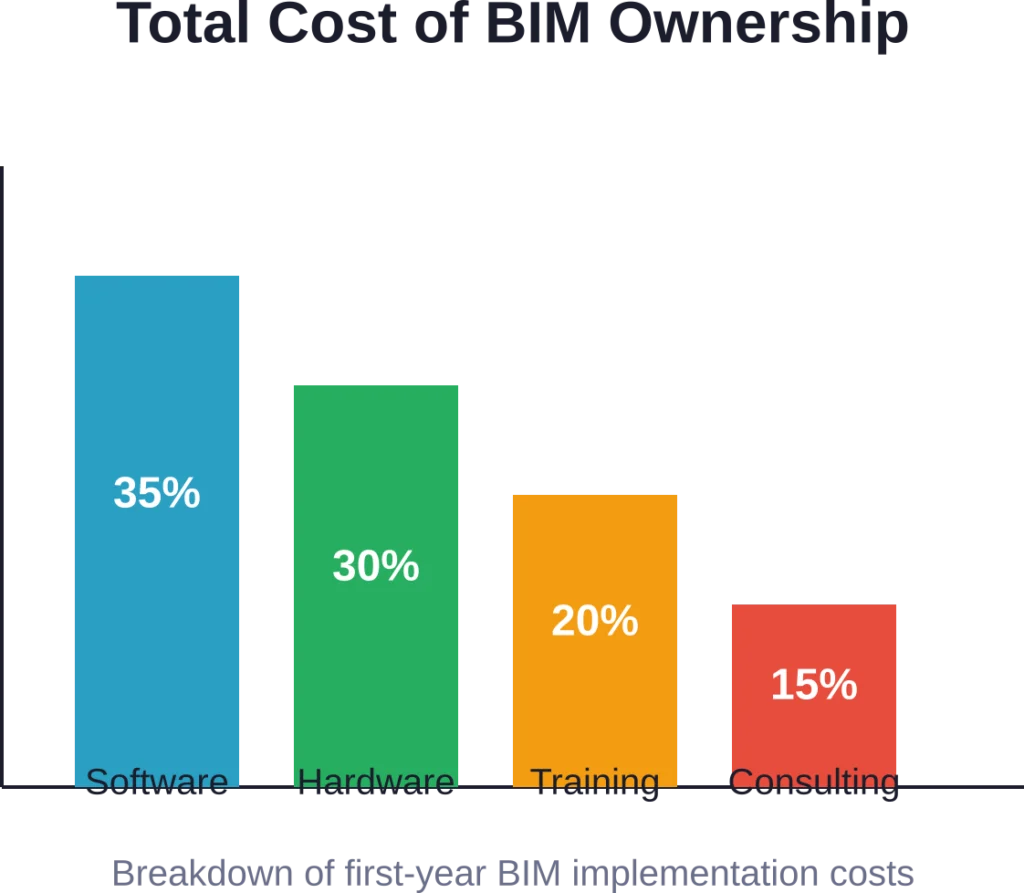
Software licenses get all the attention, but hardware requirements, training programs, and implementation support often equal or exceed the software cost itself. Here’s what each category involves and what firms typically spend.
Software Licenses: The Foundation Cost
BIM software pricing has standardized around subscription models. Perpetual licenses have essentially vanished from the market.
Autodesk Revit, the industry standard, costs $262 per month or $3,150 annually for the full version. Revit LT, the lighter version with reduced functionality, runs $70 monthly or $560 per year.
Archicad pricing isn’t publicly listed on a per-month basis in the same way, but annual subscriptions remain competitive with Revit. Other tools occupy different price tiers entirely.
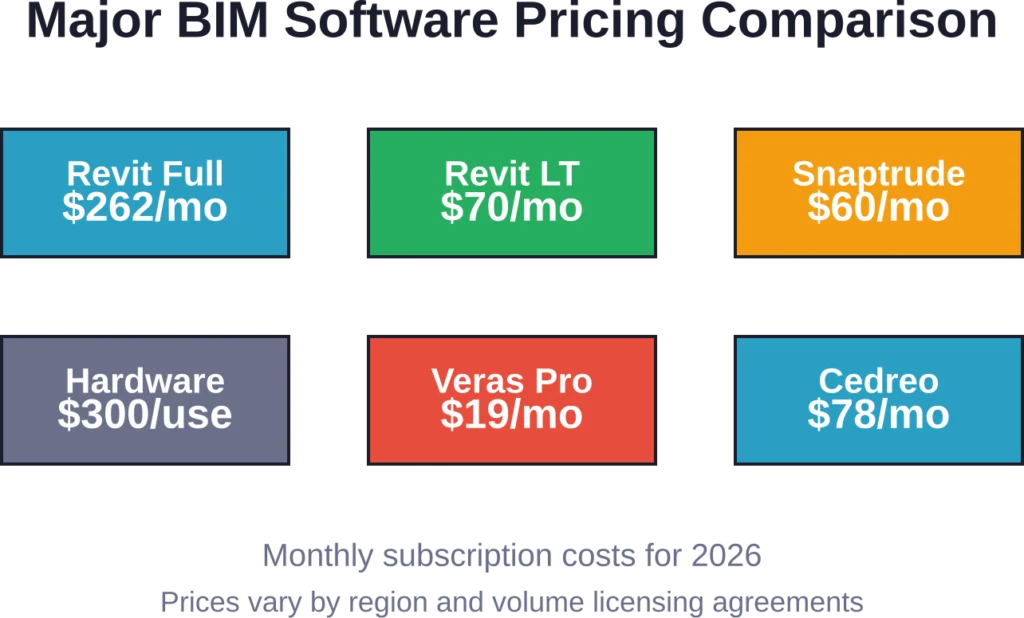
Smaller, specialized tools target different budgets. Snaptrude offers individual plans starting at $60 per month and organization plans at $100 monthly. Veras Pro, focused on visualization, costs just $19 monthly or $149 annually. Cedreo Studio starts at $78 per month.
Here’s the thing though—most firms don’t run just one BIM tool. Architects might use Revit for documentation, Rhino for complex geometry, and Enscape for rendering. Contractors add Navisworks for coordination. Each license stacks.
Hardware Requirements: The Hidden Multiplier
BIM software pushes hardware hard. Real-time 3D modeling, clash detection across multiple disciplines, and rendering demand serious computing power.
A typical BIM workstation setup runs around $3,000 per unit, according to implementation data from firms actively deploying BIM systems. That includes a capable processor, 32GB+ RAM, dedicated graphics cards, and sufficient storage for large model files.
Some firms go higher. Complex projects with large assemblies or real-time rendering workflows justify $4,000-$5,000 workstations. Solo practitioners sometimes start with less, but performance bottlenecks emerge quickly on underpowered machines.
The hardware cost multiplies by the number of simultaneous users. A five-person team needs five workstations. Simple math, but the total adds up fast: $15,000 in hardware before anyone opens the software.
Cloud workstations offer an alternative model. Rather than buying physical machines, firms rent virtual workstations that scale up or down. This shifts hardware from capital expenditure to operating cost, which helps with cash flow but doesn’t eliminate the expense.
Training and Enablement Programs
Software and hardware won’t deliver value without trained users. Training represents a substantial—and often underestimated—cost component.
Training for BIM tools typically ranges from $200 to $1,500 per course based on 2026 data. The Graduate School USA offers an Introduction to Revit course that includes 30 hours of project-based training. In-house training costs depend on whether firms hire external trainers or develop internal training programs. External BIM consultants typically charge $8,000-$10,000 for strategic planning and BIM Execution Plan development. Ongoing training and enablement add to that baseline.
But wait. Training isn’t a one-time cost.
Software updates, new team members, and evolving project requirements create continuous training needs. Firms that treat training as a one-time expense consistently struggle with BIM adoption. Those that budget for ongoing enablement see better returns.
Implementation and Consulting Services
Large firms rarely implement BIM tools without outside help. Implementation consultants help with workflow design, template creation, standards development, and change management.
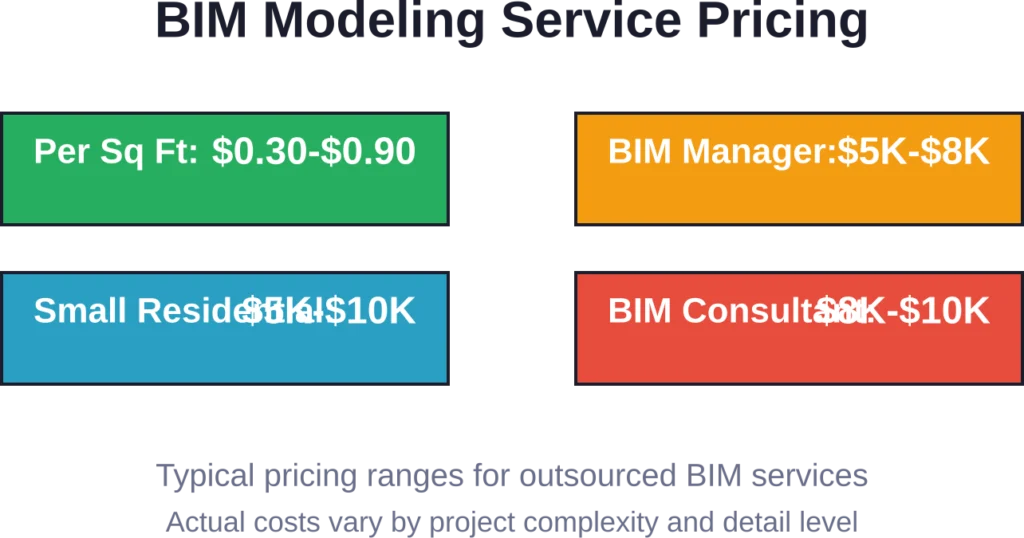
BIM consultants handling strategic planning and standards implementation charge $8,000-$10,000 for foundational work. BIM managers providing team coordination and clash resolution oversight typically cost $5,000-$8,000, depending on project scope and duration.
Smaller firms sometimes skip formal consulting, but they pay in other ways—longer adoption timelines, inconsistent standards, and team frustration. The question isn’t whether implementation has a cost, but whether firms pay consultants or pay through inefficiency.
BIM Modeling Service Costs
Not every firm builds BIM models in-house. Outsourcing to specialized BIM modeling services offers an alternative cost structure.
Service providers typically price BIM modeling on a per-square-foot basis or fixed project fees. Standard 3D BIM modeling runs approximately $0.30 to $0.90 per square foot, depending on the level of detail required.
Small residential projects might cost $5,000 to $10,000 for complete BIM modeling. Larger commercial projects scale up from there, with costs reaching $15,000 or more for complex buildings requiring detailed MEP coordination.
The per-square-foot model works well for straightforward projects with predictable scope. Fixed-fee arrangements suit projects with clear deliverables and minimal scope creep.
Service costs depend heavily on the required level of detail. Basic architectural models cost less than fully coordinated MEP models with clash detection. Models intended for construction sequencing or facility management require additional detail and cost more accordingly.
Get BIM Support Without Expanding Your Internal Team
Powerkh supports project teams with BIM modelling, coordination, detailing, and technical delivery support across design and construction stages. Its services help companies manage BIM workflows more efficiently on live projects.
Need BIM Support for a Project?
Talk with Powerkh to:
- support BIM delivery across multiple disciplines
- prepare coordinated models and documentation
- improve design and construction workflows
- extend project delivery capacity when needed
Discuss BIM delivery workflows and project support with Powerkh.
Comparing Top BIM Software Options
The BIM software market offers dozens of tools, each targeting different disciplines and workflows. Here’s how the major players compare.
| Software | Best For | Monthly Cost | Annual Cost | Key Strength |
|---|---|---|---|---|
| Autodesk Revit | Architects, engineers | $262 | $3,150 | Industry standard, comprehensive |
| Revit LT | Small firms, freelancers | $70 | $560 | Affordable Revit subset |
| Graphisoft Archicad | Architects | Varies | Competitive | Intuitive interface, Mac support |
| Snaptrude | Early-stage design | $60-$100 | — | Real-time collaboration |
| Veras Pro | Visualization | $19 | $149 | AI-powered rendering |
| Cedreo Studio | Residential designers | $78 | — | Speed for home design |
Autodesk Revit dominates the market, particularly in North America. Its comprehensive toolset covers architectural design, structural engineering, and MEP coordination. The software’s ubiquity means better interoperability with project partners and more available training resources.
Graphisoft Archicad offers strong competition, especially in Europe. The interface feels more intuitive to many architects, and Mac support matters for firms standardized on Apple hardware. Graphisoft announced the termination of all Archicad perpetual licenses at the end of 2026, pushing the platform fully into subscription pricing.
Specialized tools address specific needs. Snaptrude excels at early-stage design with parametric modeling and real-time collaboration. Its pricing—$60 for individuals, $100 for organizations—positions it as an accessible entry point or complementary tool rather than a Revit replacement.
Veras Pro targets visualization workflows at $19 monthly, making AI-powered rendering accessible. Cedreo Studio at $78 per month focuses on residential design speed.
The right choice depends on project types, team skills, and collaboration requirements. Firms working with partners on large projects gravitate toward Revit for compatibility. Smaller practices with residential focus find better value in specialized tools.
Total Cost of Ownership Example
Abstract numbers don’t tell the full story. Here’s what BIM adoption actually costs for a mid-sized firm.
Consider a five-person architecture firm implementing BIM:
- Software licenses: Five Revit subscriptions at $3,150 annually = $15,750
- Hardware: Five workstations at $3,000 each = $15,000 (one-time)
- Training: Formal certification for two lead users at $2,399 each = $4,798
- Implementation consulting: BIM consultant for standards and workflow setup = $10,000
- First-year total: $45,548
Year two and beyond drop the one-time hardware and consulting costs, leaving primarily software subscriptions and ongoing training. Annual recurring costs settle around $18,000-$20,000 for software and incremental training.
Solo practitioners face a different equation:
- Software: Revit LT at $560 annually
- Hardware: One workstation at $3,000
- Training: Online course at $799
- First-year total: $4,359
The per-person cost drops dramatically for solo practitioners using lighter tools, but they also have less ability to spread costs across billable projects.
Subscription Models Have Changed the Economics
The shift from perpetual licenses to subscriptions fundamentally altered BIM software economics. Perpetual licenses allowed firms to buy once and use indefinitely, paying only for upgrades. Subscriptions require continuous payment.
Autodesk moved fully to subscriptions years ago. Archicad maintained perpetual licensing longer, but that ended in 2026. Graphisoft announced the termination of all Archicad perpetual licenses at the end of 2026, requiring all users to move to subscriptions.
Real talk: firms have mixed feelings about this shift.
Subscriptions lower the barrier to entry—no large upfront license purchase. They guarantee access to updates and support. Cash flow becomes more predictable.
But subscriptions never end. Firms that previously paid for software every few years now pay forever. Total cost over a decade is higher with subscriptions than perpetual licenses were.
The industry has moved this direction regardless of user preference. Software vendors prefer predictable recurring revenue. Fighting the subscription model means limiting software options.
Hidden Costs and Ongoing Expenses
The obvious costs—software, hardware, training—are just the beginning. Several less obvious expenses emerge during BIM adoption and operation.
IT Infrastructure and Support
BIM models generate large files. A complex Revit project might exceed several gigabytes. Multiply that across active projects, and storage requirements grow quickly.
Cloud storage and backup systems add recurring costs. Network infrastructure needs sufficient bandwidth for team members accessing central models. IT support—whether in-house staff or external providers—must handle BIM-specific technical issues.
Software Integration and Add-ons
Few firms run BIM software in isolation. Rendering engines, energy analysis tools, structural calculation software, and specialty plugins extend core BIM platforms.
Each add-on has its own cost. Some are free, many are not. Enscape rendering costs several hundred dollars annually. Structural analysis plugins can run $1,000+. The total software stack often costs significantly more than the base BIM license.
Template Development and Standards Maintenance
Effective BIM implementation requires firm-specific templates, families, and standards. Someone has to create and maintain them.
This work takes time—often substantial time. Whether done by internal staff or external consultants, it has a cost. Firms that skip template development pay later in inconsistent outputs and coordination problems.
Model Management and Quality Control
As BIM adoption matures, firms need dedicated model management. BIM managers or coordinators ensure quality, run clash detection, maintain standards, and troubleshoot issues.
This isn’t a one-time setup cost—it’s an ongoing staffing requirement. BIM manager oversight typically costs $5,000-$8,000 per project, but many firms eventually hire full-time BIM managers as project volume grows.
Choosing the Right BIM Software for Your Budget
Cost matters, but cost alone shouldn’t drive software selection. The cheapest option that doesn’t meet project requirements wastes money just as surely as overbuying unnecessary capabilities.
Match Software to Project Types
Residential designers working on single-family homes don’t need Revit’s full capabilities. Cedreo or similar specialized tools deliver better value. Large commercial firms coordinating multiple disciplines need the comprehensive toolsets that Revit or Archicad provide.
Project complexity and collaboration requirements should guide software selection more than price alone.
Consider Team Skills and Learning Curves
Switching BIM platforms means retraining staff. A firm with experienced Revit users faces substantial cost and productivity loss moving to Archicad, even if Archicad’s features are theoretically better.
Existing skills have value. Factor retraining costs into any software switch decision.
Evaluate Long-Term Scalability
Firms grow. Today’s solo practitioner might lead a five-person team in three years. Software that works now might not scale.
Cloud-based platforms with flexible user licensing scale more easily than workstation-bound software. But they often cost more per user initially. The right balance depends on growth expectations.
Test Before Committing
Most BIM software offers trial periods. Use them. Test real workflows with actual project requirements before making long-term financial commitments.
Trial periods reveal interface fit, performance issues, and workflow gaps that specifications sheets miss.
Frequently Asked Questions
For basic BIM functionality, Veras Pro at $19 per month offers the lowest entry point, though it’s specialized for visualization rather than full BIM modeling. For comprehensive BIM capabilities, Revit LT at $70 monthly ($560 annually) provides the most affordable access to the Revit ecosystem. Free options exist but typically have significant limitations on features, file formats, or commercial use.
Perpetual licenses have been phased out across the BIM software industry. Autodesk eliminated perpetual licensing several years ago, and Graphisoft announced the termination of all Archicad perpetual licenses at the end of 2026. All major BIM platforms now operate on subscription models requiring ongoing annual or monthly payments. While this increases long-term cost, it ensures continuous access to updates and support.
A small firm with three to five users should budget approximately $30,000-$50,000 for first-year BIM implementation. This includes software subscriptions ($10,000-$15,000), hardware for multiple workstations ($9,000-$15,000), formal training ($2,000-$5,000), and basic implementation consulting ($5,000-$10,000). Subsequent years drop to $15,000-$20,000 primarily for software subscriptions and incremental training.
Cloud-based BIM tools shift costs from capital expenditure to operating expense but don’t necessarily reduce total cost. Hardware costs decrease since cloud workstations replace physical machines, but subscription costs remain comparable. Cloud platforms offer better scalability—adding users for a few months doesn’t require buying new hardware—making them potentially more cost-effective for firms with variable team sizes or project-based staffing.
Revit costs $262 monthly or $3,150 annually for the full version with comprehensive BIM capabilities including worksharing, advanced MEP tools, and parametric components. Revit LT costs $70 monthly or $560 annually but has significant limitations—no worksharing, limited parametric capabilities, and reduced tool sets. Revit LT suits solo practitioners or small projects, while collaborative work typically requires full Revit.
BIM modeling services use multiple pricing models. Per-square-foot pricing typically runs $0.30 to $0.90 per square foot depending on detail level. Fixed project fees work better for clearly defined scopes—small residential projects might cost $5,000-$10,000 total. Hourly billing suits projects with uncertain scope or ongoing modeling support. The best model depends on project clarity, complexity, and whether scope is likely to change during modeling.
Beyond obvious software and hardware costs, expect expenses for IT infrastructure (storage, backup, network upgrades), software add-ons and plugins, template and standards development, and ongoing model management. Many firms underestimate the staffing requirement for BIM coordination—dedicated BIM managers become necessary as project volume grows. Integration with existing project management systems, document management, and accounting software can also require custom development or middleware.
Making the Investment Decision
BIM software costs money. That’s not going away.
The question isn’t whether BIM is expensive—it is. The question is whether the value exceeds the cost. For most firms working on complex projects with multiple stakeholders, BIM delivers measurable returns through better coordination, fewer construction errors, and more efficient workflows.
But those returns require proper implementation. Buying software without investing in training, hardware, and process changes wastes money. Firms that approach BIM as a comprehensive workflow change rather than just software purchase see better outcomes.
Start with clear goals. What problems is BIM supposed to solve? Better client visualization? Improved coordination? Faster documentation? Different goals justify different software investments.
Budget realistically. Plan for software, hardware, training, and implementation support. Underfunding any category compromises the others.
And remember—the cheapest option rarely delivers the best value. Match software capabilities to actual project requirements, consider long-term scalability, and factor in team skills and learning curves.
BIM adoption is a significant investment. For firms committed to modern project delivery, it’s also a necessary one. Understanding the complete cost picture helps ensure that investment pays off.