

Quick Summary: Revit Architecture costs $380/month or $3,005/year for a standalone subscription as of 2026, with discounts of around 34% on annual plans. The AEC Collection bundles Revit with other tools for roughly $490/month or $4,289/year, while Flex tokens start at $300 for 100 tokens. Free trials and educational licenses offer temporary access for students and those testing the platform.
Architects, engineers, and BIM professionals face a hard truth: Revit isn’t cheap. But if precision modeling, clash detection, and coordinated documentation matter to the work—and they do—then the question isn’t whether Revit costs money. It’s whether the price delivers enough value to justify the check.
As of August 2025, Autodesk adjusted its pricing (a 3.3% bump landed in May 2025), and the current numbers reflect that. Standalone Revit now runs $380 a month or $3,005 per year in the U.S. market. That’s the headline figure. But the real story involves bundles, flex tokens, free options, and a handful of hidden expenses that can catch teams off guard.
Here’s the breakdown—no fluff, no sales pitch. Just the costs, what’s included, and how to pick the subscription that won’t bleed the budget dry.
Understanding Revit’s Subscription Model
Autodesk killed perpetual licenses years ago. Now, Revit lives entirely on subscription. Monthly, annual, or multi-year—those are the options. And each comes with trade-offs.
The monthly plan offers flexibility. Short-term projects, one-off contracts, or firms testing Revit for the first time can pay as they go. But that flexibility costs. At $380 per month, teams spending more than eight months on the software will overpay compared to an annual plan.
Annual subscriptions lock in savings. At $3,005 per year, the effective monthly rate drops to around $250—a 34% discount over the month-to-month option. For studios with consistent workloads, this is the standard choice.
Multi-year plans push the discount further. Three-year commitments can shave another few percentage points off the annual rate, though the upfront commitment ties capital for the long haul. That works for established firms with stable pipelines. Startups and freelancers? Not so much.
Standalone Revit Subscription: The Core Offering
The standalone subscription gets one thing: Revit. No AutoCAD, no Civil 3D, no cloud collaboration tools beyond the basics. Just the modeling, documentation, and BIM coordination features that define the platform.
For solo practitioners or small teams that don’t need a full suite, standalone Revit makes sense. The price—$3,005 annually—covers unlimited installations on the same machine, access to the latest updates, and basic support. Cloud worksharing through Autodesk’s BIM 360 integration works, but advanced collaboration features cost extra.
What’s included? Parametric modeling, family creation, schedules, rendering with built-in tools, and Dynamo for automation. That’s the meat of the package. What’s missing? Multi-discipline coordination tools like Navisworks, advanced rendering engines like 3ds Max, and infrastructure design modules.
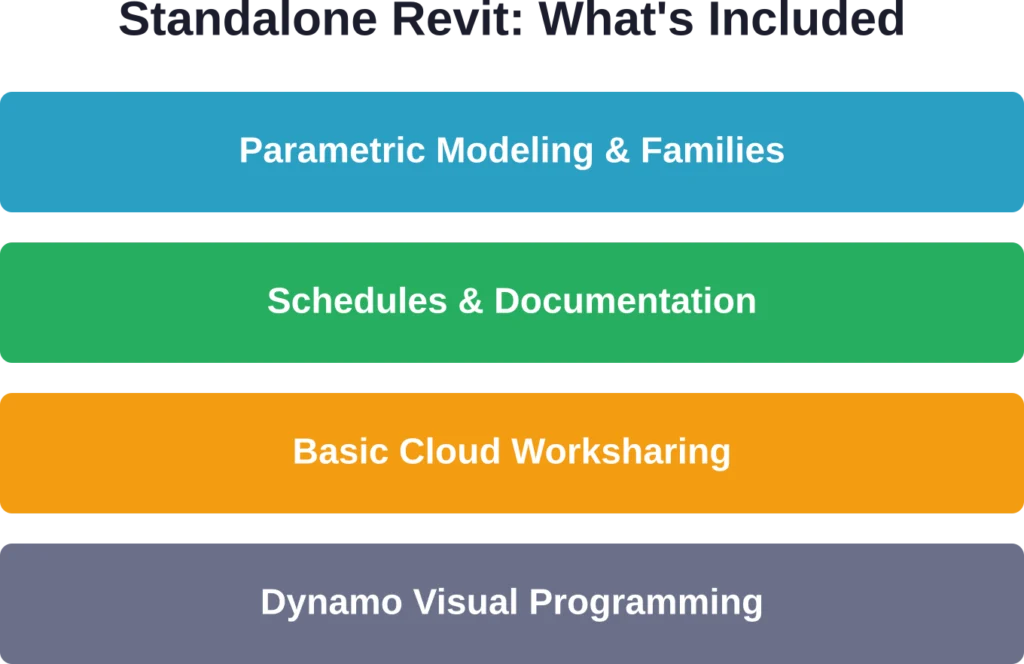
The standalone option works best for firms that already own other Autodesk products or rely on third-party tools for rendering and collaboration. Adding those piecemeal can cost less than jumping to the AEC Collection—if the needs are narrow.
Get Revit Architecture Support for Design Delivery
Revit Architecture costs can depend on project size, BIM scope, coordination requirements, and documentation deliverables. Powerkh supports architectural BIM delivery with Revit modelling, coordination reviews, and technical documentation workflows.
Need Revit Architecture Support?
Talk with Powerkh to:
- develop architectural BIM models in Revit
- support coordination and drawing production
- prepare documentation for construction stages
- improve collaboration across project teams
Discuss your Revit Architecture workflow with Powerkh.
AEC Collection: Bundled Power for Multidisciplinary Teams
The AEC Collection bundles Revit, AutoCAD, Civil 3D, Navisworks, InfraWorks, and a dozen other tools into one subscription. The price? Around $490 per month or $4,289 per year per user, according to community discussions.
That’s a premium over standalone Revit, but the math works if the team needs more than one Autodesk tool. Two standalone products—say, Revit and AutoCAD—would cost more combined than the AEC Collection. Throw in advanced collaboration features like BIM Collaborate Pro, and the bundle starts looking like a bargain.
BIM Collaborate Pro is the kicker. It adds real-time co-authoring, model coordination, and issue tracking across disciplines. For firms managing MEP, structural, and architectural teams on the same project, that coordination layer prevents costly rework. The standalone Revit subscription doesn’t include it.
| Feature | Standalone Revit | AEC Collection |
|---|---|---|
| Revit Architecture | Yes | Yes |
| AutoCAD | No | Yes |
| Civil 3D | No | Yes |
| Navisworks | No | Yes |
| BIM Collaborate Pro | No | Yes |
| Annual Cost (per user) | ~$3,005 | ~$4,289 |
Teams working on infrastructure, site design, or large-scale commercial projects often need the full collection. Residential architects or interior designers? Probably not. The decision hinges on whether the extra tools earn their keep.
Flex Plan: Pay-as-You-Go for Occasional Use
The Flex plan flips the subscription model. Instead of paying monthly or annually, users buy tokens—$300 for 100 tokens, as noted in corroborated data. Each token unlocks 24 hours of access to Revit or any other Autodesk product in the Flex catalog.
One day of Revit access costs one token. So $300 buys 100 days of access, spread out however needed. For consultants who touch Revit a few days a month or firms ramping up for a single project, Flex avoids the commitment of a full subscription.
But the unit economics favor subscriptions for regular use. A standalone annual plan costs $3,005, or roughly $8.24 per day over 365 days. Flex tokens cost $3 per day. That’s cheaper per day—until the usage crosses about 100 days per year. After that, the annual subscription wins.
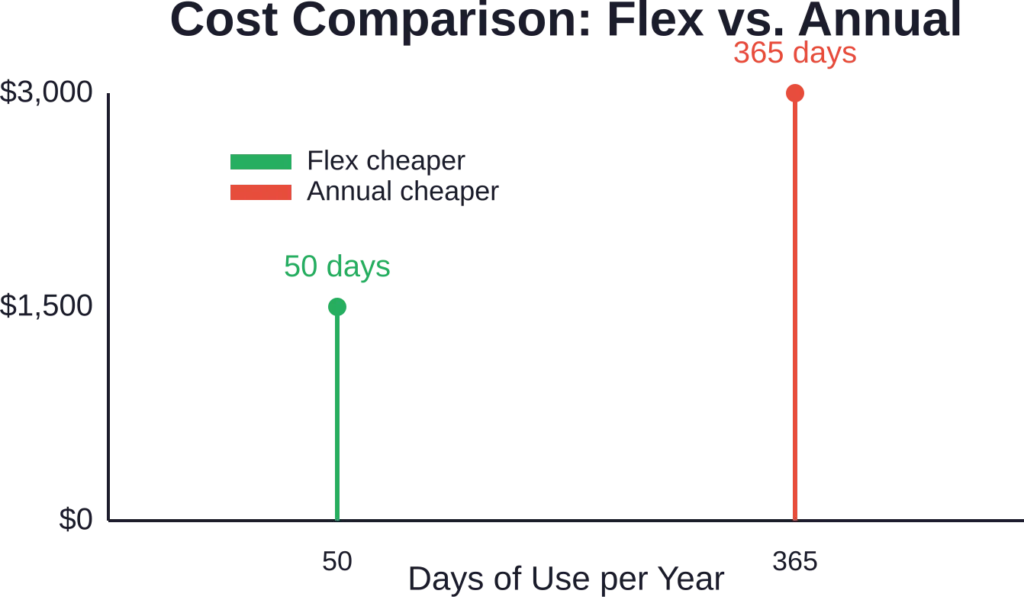
Flex makes sense for sporadic work. Firms with steady Revit needs should stick with annual subscriptions. The token model shines in edge cases: emergency project support, short-term hires, or testing a workflow before committing.
Free Options: Trials, Student Access, and Workarounds
Autodesk offers a 30-day free trial for Revit. No credit card required, full feature access. That’s enough time to learn the basics, test a workflow, or finish a small project. After 30 days, the trial expires and the paywall drops.
Students and educators get a better deal. Autodesk’s educational licenses grant free access to Revit—and the entire AEC Collection—for up to three years. The catch? Educational licenses watermark all output files. Those watermarks flag the work as non-commercial. Using an educational license for client work violates the terms of service and opens legal risk.
Educational licenses restrict output to non-commercial use, which limits access for hobbyists seeking to use Revit for personal projects. Community discussions on Autodesk forums reflect frustration with the cost barrier, with users calling Revit’s subscription expensive for solo practitioners.
Workarounds exist. Some professionals rotate between trials using different email addresses—technically against terms of service. Others explore Revit LT, a stripped-down version that lacks in-place modeling and other advanced features, though Autodesk’s current offerings have largely phased out LT in favor of full subscriptions.
What’s Included Beyond the Software
The subscription fee covers more than the application. Updates arrive automatically—no upgrade fees when Autodesk ships a new version. That’s been the norm since subscriptions replaced perpetual licenses.
Technical support comes bundled. Basic plans include community forums and knowledge base access. Premium support—live agents, priority responses—costs extra but ships with some AEC Collection tiers.
Cloud storage varies by plan. Standalone Revit includes limited cloud credits for BIM 360 worksharing. The AEC Collection with BIM Collaborate Pro bumps that storage and adds collaboration features like model coordination and issue management.
Training resources live behind the subscription, too. Autodesk University content, help documentation, and sample files come with every plan. They’re not comprehensive courses, but they’re enough for self-directed learning.
Regional Pricing and Currency Adjustments
The prices listed here reflect U.S. pricing in USD as of August 2025. Other regions see different numbers due to currency exchange, local taxes, and market adjustments. European users often pay more in euros than the straight currency conversion would suggest. VAT adds another layer.
For example, Archicad’s comparable collaboration tier costs around €440-450 per month or €3,200 per year—roughly $484/month or $3,424/year at mid-2024 exchange rates, according to community comparisons. Revit’s AEC Collection at $490/month or $4,289/year sits in the same ballpark, though direct comparisons get muddy with regional pricing.
Autodesk adjusts pricing annually. The 3.3% increase in May 2025 wasn’t an outlier—it’s part of a pattern. Teams budgeting for multi-year commitments should bake in an assumption of 2-4% annual increases.
Hidden Costs and Budget Surprises
The subscription price is the start, not the finish. Hardware requirements for Revit demand capable workstations. A machine with a multi-core processor, 16-32 GB RAM, and a dedicated GPU runs $1,500-$3,000. Laptops at the low end struggle with large models.
Training eats budget, too. Revit’s learning curve is steep. Firms hiring new graduates or retraining CAD drafters need to account for weeks of ramp-up time. Third-party courses—like the Revit Architecture Professional Fast-Track Program, which includes 150 hours of training and costs $3,000 tuition plus a $150 registration fee—offer structured paths but add to the total investment.
Plugins and extensions fill gaps in Revit’s native toolset. Popular add-ons for rendering (Enscape, V-Ray), energy analysis (Insight), or automation (Dynamo scripts from third-party developers) cost anywhere from $500 to $2,000 per year per seat. Some workflows depend on them.
| Hidden Cost | Typical Range |
|---|---|
| Workstation Hardware | $1,500 – $3,000 per seat |
| Third-Party Training | $500 – $3,000 per person |
| Plugins (Enscape, V-Ray) | $500 – $2,000 annually |
| Cloud Storage Overages | $50 – $300 per month |
| IT Support & Setup | $500 – $2,000 one-time |
Cloud storage overages hit teams working on large projects. BIM 360 includes a base allocation, but high-resolution models with linked files can blow through that quickly. Extra storage costs vary by tier but can add $50-$300 per month for firms with heavy usage.
Comparing Revit to Alternatives
Revit isn’t the only BIM tool on the market. Archicad, Vectorworks, and SketchUp all compete, each with different pricing and feature sets. The question isn’t whether Revit is objectively better—it’s whether the cost matches the workflow.
Archicad’s pricing sits close to Revit’s AEC Collection. Its collaboration tier runs around $484/month or $3,424/year, as noted in community discussions. Feature-wise, Archicad leans toward architectural design with a shallower learning curve. Revit offers tighter integration across disciplines—MEP, structural, and civil—making it the default for large multidisciplinary firms.
Vectorworks costs less upfront but charges separately for add-ons. A perpetual license still exists for Vectorworks, unlike Revit, though the subscription model is pushing that out. For small studios prioritizing flexibility, Vectorworks can underbid Revit’s total cost.
SketchUp sits at the low end. A SketchUp Pro subscription costs around $300 per year—one-tenth the price of Revit. But SketchUp isn’t a BIM platform. It’s a surface modeler with limited documentation and coordination features. Teams comparing SketchUp to Revit are usually comparing the wrong tools for the job.
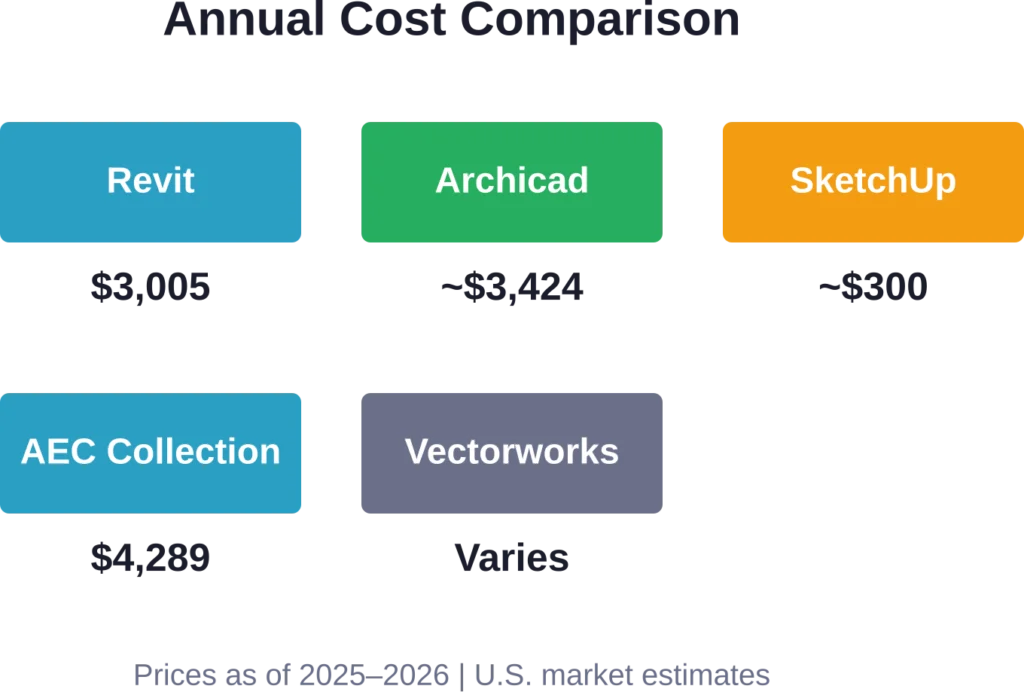
The decision often hinges on industry norms. Architecture, engineering, and construction firms in North America and Europe default to Revit because clients and collaborators expect it. Switching to Archicad or Vectorworks means dealing with file compatibility headaches and retraining staff. That switching cost keeps Revit entrenched even when alternatives cost less.
Choosing the Right Plan for Different Firm Sizes
Solo practitioners and freelancers usually start with standalone Revit. The $3,005 annual cost is steep, but the flexibility to take on BIM projects without partnering with a larger firm justifies it. Flex tokens make sense for consultants working on Revit only a few weeks per year.
Small firms—two to ten people—often split between standalone Revit and the AEC Collection depending on project types. Residential design firms lean standalone. Commercial and mixed-use studios need the AEC Collection for coordination across disciplines.
Mid-sized firms (10-50 employees) almost always buy the AEC Collection. The cost per seat drops with volume licensing, and the bundled tools—AutoCAD, Navisworks, Civil 3D—earn their keep across multiple project types. BIM Collaborate Pro becomes essential once more than five people work on the same model.
Large firms and enterprises negotiate custom pricing. Autodesk offers Enterprise Business Agreements (EBAs) that bundle hundreds of seats with premium support, training credits, and dedicated account management. Those deals aren’t publicly priced, but they typically discount per-seat costs by 15-25% compared to standard annual subscriptions.
Tips for Reducing Revit Costs
Teams can trim expenses without sacrificing capability. Here’s how.
Buy annual, not monthly. The 34% discount on annual plans pays for itself in eight months. Multi-year commitments push savings higher—but only if the firm’s pipeline supports locking in for three years.
Audit seat usage. Firms often pay for more licenses than active users need. Autodesk’s named-user model ties each license to one person, but not every team member touches Revit daily. Rotating licenses or using Flex tokens for occasional users can free up budget.
Leverage educational licenses—legally. Students and educators can access Revit for free. Firms hiring recent graduates can onboard them with their educational licenses for personal learning before transitioning to commercial licenses. The watermark restriction prevents client work, but internal training projects stay clean.
Negotiate with resellers. Authorized Resellers may have flexibility on bundled offerings and add-on costs.
Skip the plugins until needed. Third-party tools like Enscape and V-Ray deliver value, but not every project demands photorealistic rendering. Native Revit rendering handles basic visualization. Adding plugins later—when a project budget covers them—avoids carrying annual costs for underused tools.
When Revit’s Cost Doesn’t Make Sense
Revit isn’t always the right answer. Small-scale residential projects, interior renovations, and conceptual design work often don’t need BIM’s complexity. SketchUp, AutoCAD, or even hand sketches can get the job done faster and cheaper.
Firms working in jurisdictions that don’t require BIM deliverables face a tougher calculus. If clients don’t demand coordinated models and the competition still uses 2D CAD, paying $3,005 per year for Revit becomes hard to justify. The software is overkill when the market doesn’t value the output.
Hobbyists and DIY designers hit the hardest cost barrier. Educational licenses restrict output to non-commercial use, which limits access for hobbyists seeking to use Revit for personal projects. Alternatives like FreeCAD, Blender (not BIM, but parametric with add-ons), or subscription-free Vectorworks perpetual licenses serve that audience better.
How Revit’s Pricing Has Changed Over Time
Revit shifted to subscription-only in 2016. Historical perpetual license costs varied based on configuration.
Subscriptions flipped the model. Revit pricing has increased from 2016 to 2025. Inflation accounts for some of that, but not all. Autodesk’s margins on subscriptions exceed the old perpetual model because recurring revenue is predictable and harder to skip.
Community discussions on Autodesk forums reflect frustration with the climb. A March 2019 post called the cost “exorbitant” and noted that professional standards force firms to subscribe even when budgets strain. The sentiment hasn’t shifted much since—Revit is essential, but expensive.
The Value Proposition: Does Revit Earn Its Price?
The cost of Revit isn’t just the subscription—it’s the time saved, errors avoided, and coordination headaches prevented. BIM workflows reduce rework. Parametric modeling catches design conflicts before construction. Coordinated documentation keeps drawings in sync when changes hit late in a project.
Quantifying that value is tricky. Firms report anecdotal savings—fewer RFIs, shorter construction timelines, reduced change orders—but hard numbers vary by project. Industry practitioners report that BIM workflows can improve project delivery efficiency through reduced rework and better coordination. That’s a big deal when time is money.
But the value only materializes if the team uses Revit well. A firm that treats Revit like glorified AutoCAD—drawing in plan and elevation without leveraging families, schedules, or coordination—won’t see the benefits. Training, workflow design, and discipline matter as much as the software.
For firms already fluent in BIM, Revit’s cost is the price of doing business. For firms on the fence, the decision hinges on project complexity, client expectations, and whether competitors are already using BIM. Falling behind isn’t an option when the industry moves forward.
Frequently Asked Questions
Revit Architecture costs $380 per month for a standalone subscription as of 2026. Annual subscriptions drop the effective monthly cost to around $250 per month, or $3,005 per year, offering a 34% discount over the monthly plan.
Autodesk offers a 30-day free trial of Revit with full features. Students and educators can access free licenses for up to three years through Autodesk’s educational program, though these licenses watermark all output and are restricted to non-commercial use.
The AEC Collection bundles Revit with AutoCAD, Civil 3D, Navisworks, InfraWorks, and other Autodesk tools, plus BIM Collaborate Pro for real-time coordination. Pricing runs around $490 per month or $4,289 per year per user, as noted in community discussions.
Flex tokens cost $300 for 100 tokens (minimum purchase). Each token grants 24 hours of access to Revit or other Autodesk products. Flex makes sense for occasional use—under 100 days per year—but annual subscriptions cost less for regular users.
No. Autodesk discontinued perpetual licenses for Revit in 2016. All new licenses are subscription-based, with monthly, annual, or multi-year options. Existing perpetual licenses still function, but they no longer receive updates without a subscription.
Hidden costs include workstation hardware ($1,500-$3,000 per seat), training ($500-$3,000 per person), plugins like Enscape or V-Ray ($500-$2,000 annually), and cloud storage overages ($50-$300 per month). IT setup and ongoing support can add another $500-$2,000 one-time.
For small firms working on complex projects or collaborating with larger teams, Revit delivers value through coordination and documentation efficiency. But for simple residential work or projects that don’t require BIM deliverables, the cost may outweigh the benefits—alternatives like SketchUp or AutoCAD can serve better.
Conclusion: What the Cost Really Means
Revit Architecture costs between $3,005 and $4,289 per year per user, depending on whether a firm needs the standalone software or the full AEC Collection. Flex tokens offer a pay-as-you-go alternative for light usage, and free trials or educational licenses provide temporary access for learning and testing.
The price isn’t low. But the cost isn’t just for software—it’s for the coordination, documentation, and error-prevention that BIM workflows enable. For firms where those capabilities matter, Revit earns its keep. For everyone else, the decision comes down to client expectations, project complexity, and whether the competition has already made the jump.
Budget for more than the subscription. Training, hardware, plugins, and cloud storage add up. But teams that plan for the full investment—and use the tools well—find that Revit’s cost becomes a line item, not a barrier.
Check Autodesk’s official pricing page for current rates in specific regions, and consider reaching out to an Authorized Reseller to explore volume discounts or bundled support options. The right plan depends on the firm’s size, project types, and how much of the AEC toolset the work demands.