

Quick Summary: Analytics tools for Facebook Ads integration management help marketers track campaign performance beyond Meta’s native dashboard. Top tools in 2026 include SegmentStream for AI-driven attribution, Madgicx for creative optimization, Triple Whale for e-commerce metrics, and Supermetrics for data aggregation. The right tool depends on your attribution needs, budget, and whether you manage single or multi-channel campaigns.
Facebook Ads Manager gives basic metrics—impressions, clicks, conversions. But if campaigns run across multiple channels or need deeper attribution modeling, the native dashboard falls short.
That’s where specialized analytics tools come in. They connect Facebook’s data with other marketing platforms, recover conversions lost beyond Meta’s 7-day attribution window, and surface insights that manual reporting simply can’t catch.
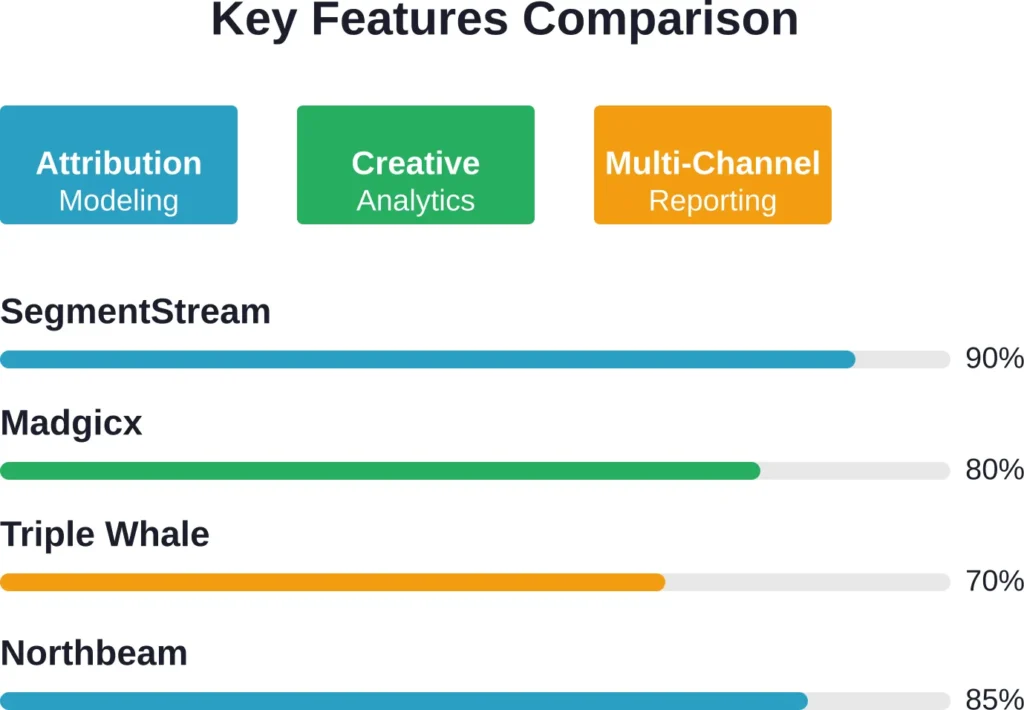
The best Facebook ads analytics tools in 2026 are Extuitive, SegmentStream, Madgicx, Triple Whale, Northbeam, Funnel.io, Supermetrics, Whatagraph, Smartly, Hunch, and Superads.ai. Each solves different problems—attribution modeling, creative analytics, multi-channel reporting, or budget optimization.
This guide breaks down what each tool does, who it’s built for, and how to pick the right one for your campaigns.
What Are Analytics Tools for Facebook Ads Integration?
Facebook Ads integration analytics tools pull campaign data from Meta’s advertising platform and combine it with other marketing data sources. Instead of manually exporting CSVs from Ads Manager, these platforms automate data collection and layer on reporting, attribution modeling, and optimization features.
Some tools focus purely on Facebook and Instagram. Others treat Meta as one channel in a broader marketing mix, blending Facebook performance with Google Ads, email campaigns, CRM data, and offline conversions.
The core functions include:
- Data extraction via Meta Marketing API
- Cross-channel data unification
- Custom attribution modeling beyond Meta’s last-click default
- Automated reporting dashboards
- Budget allocation recommendations
- Creative performance analysis
Meta’s native dashboard doesn’t tell teams that the last $10K in Meta spend generated $800 in marginal revenue while shifting that budget to YouTube would’ve generated $4,500. Third-party analytics platforms solve that gap.
Why Facebook Ads Manager Isn’t Enough
Ads Manager works fine for basic campaigns. But it has limitations that become painfully clear at scale.
First, attribution. Meta defaults to a 7-day click, 1-day view attribution window. If someone sees a Facebook ad, waits nine days, then converts through Google search, Meta doesn’t connect those dots. For products with longer consideration cycles, this undercounts Facebook’s contribution.
Second, cross-channel visibility. When running Facebook alongside Google, TikTok, and email, Ads Manager only shows Facebook’s slice. There’s no way to compare marginal ROAS across channels or identify where the next dollar should go.
Third, creative insights. Ads Manager shows which ad sets perform best but doesn’t systematically analyze why. It won’t surface that videos under 15 seconds consistently outperform longer formats, or that testimonial hooks drive 40% higher CTR than product shots.
Fourth, reporting automation. Building weekly performance decks from Ads Manager means manual exports, pivot tables, and screenshot hell. Analytics platforms automate that grind.
Top 11 Analytics Tools for Facebook Ads Integration Management
Here’s a detailed breakdown of the best tools available in 2026, based on feature depth, attribution capabilities, and real-world marketer feedback.
1. Extuitive
Extuitive is an AI-powered predictive analytics platform focused on forecasting Facebook and Instagram ad performance before launch. It simulates real audience reactions using thousands of AI consumer profiles to predict key metrics such as CTR, ROAS, and purchase intent.
The platform integrates directly with Shopify to automatically pull product data and generates, tests, and ranks ad creatives at scale. This allows brands to identify winners and reduce wasted ad spend on weak concepts significantly faster than traditional testing methods.
Best for: Shopify DTC e-commerce brands and teams looking to optimize creative testing and launch higher-performing Meta ads with predictive data.
Key features:
- Pre-launch predictive scoring of creatives and campaigns
- AI consumer simulation with 150,000+ behavioral profiles
- Automatic ad creative generation and variation testing
- Direct Shopify integration for product and audience data
- Performance forecasting (CTR, ROAS, purchase intent)
- Evolutionary ranking of ad concepts
Pricing: Tiered plans starting at $1,000/month. Higher tiers scale with ad spend and usage. Annual contracts offer discounts. Custom enterprise pricing available.
Contact Information:
- Website: extuitive.com
- Email: [email protected]
- LinkedIn: www.linkedin.com/company/extuitive
- Twitter: x.com/Extuitive_Inc
- Instagram: www.instagram.com/extuitiveinc
2. Madgicx
Madgicx focuses heavily on creative analytics and automation. It breaks down ad performance by creative elements—hooks, formats, audience signals—and automates budget shifts between winning and losing ad sets.
The platform integrates directly with Meta’s API and provides AI-driven recommendations for which creatives to scale, pause, or iterate. For brands testing dozens of ad variations weekly, Madgicx cuts the manual analysis time significantly.
It also includes audience targeting tools that layer demographic and interest data beyond what Ads Manager surfaces natively.
Best for: E-commerce brands and agencies running high-volume creative testing on Facebook and Instagram.
Key features:
- Creative analytics with performance breakdowns by hook, format, and length
- Automated ad set budget allocation
- Audience insights and lookalike modeling
- Real-time performance alerts
- Multi-account management dashboard
Pricing: Plans vary by ad spend tier—contact for current pricing. Designed for teams spending five figures or more monthly on Meta.
3. Triple Whale

Triple Whale built its reputation in the DTC e-commerce space. It combines Facebook Ads data with Shopify, Klaviyo, Google Analytics, and other e-commerce platforms into a single dashboard.
The tool emphasizes speed. Metrics update in near real-time, and the interface prioritizes the numbers e-commerce operators care about most—blended ROAS, customer acquisition cost by channel, contribution margin after ad spend.
Triple Whale doesn’t focus on deep attribution modeling. Instead, it delivers fast, actionable dashboards for operators who need quick answers.
Best for: Shopify store owners and DTC brands running Facebook Ads alongside email and Google shopping campaigns.
Key features:
- Real-time dashboard syncing with Shopify and Meta
- Blended ROAS tracking across channels
- Customer cohort analysis
- Pixel and Conversions API health monitoring
- Mobile app for on-the-go tracking
Pricing: Tiered plans available for smaller stores, scaling based on monthly orders and integrations.
4. Northbeam
Northbeam targets DTC brands with a strong emphasis on attribution. It uses a blended attribution model that combines pixel data, Conversions API events, and first-party purchase data to construct a more complete view of the customer journey.
The platform integrates with Facebook, Google, TikTok, Snapchat, and major e-commerce platforms. It’s particularly strong for brands struggling with iOS 14+ tracking limitations.
Northbeam also offers creative analytics, though not as deep as Madgicx’s feature set. The focus remains on attribution accuracy and multi-channel budget allocation.
Best for: DTC brands spending $100K+ monthly across Meta and other paid social channels.
Key features:
- Blended attribution model combining pixel and server-side data
- Customer journey visualization
- Creative performance tracking
- Budget recommendation engine
- Integration with Shopify, WooCommerce, and other e-commerce platforms
Pricing: Pricing available based on ad spend and data volume. Contact for specific quotes.
5. Funnel.io

Funnel.io is a data aggregation platform first, analytics tool second. It connects to 500+ marketing data sources—including Facebook—and funnels everything into a centralized warehouse or BI tool like Tableau, Looker, or Google Data Studio.
The platform doesn’t provide its own dashboards. Instead, it handles the messy work of data extraction, transformation, and loading. Marketing teams build custom reports in their BI tool of choice, knowing the underlying data is clean and current.
For organizations with dedicated analytics teams and complex tech stacks, Funnel.io offers maximum flexibility.
Best for: Enterprise marketing teams and agencies managing dozens of data sources who prefer building custom reports in BI platforms.
Key features:
- 500+ pre-built connectors including Facebook Ads
- Automated data pipeline management
- Data transformation and normalization
- Direct integration with data warehouses and BI tools
- Historical data backfill
Pricing: Contact for enterprise pricing. Infrastructure-level tool with corresponding costs.
6. Supermetrics
Supermetrics pulls data from Facebook and 100+ other platforms into Google Sheets, Excel, Google Data Studio, Looker Studio, Power BI, and other reporting tools. It’s the budget-friendly option for teams that want automated data feeds without paying for a full analytics platform.
The tool doesn’t do attribution modeling or optimization. It’s purely a data connector. Teams still need to build their own dashboards and analysis frameworks.
But for agencies managing multiple clients or small teams with basic reporting needs, Supermetrics delivers solid value.
Best for: Agencies and small marketing teams needing affordable data extraction for basic reporting.
Key features:
- Data connectors for Facebook, Google, LinkedIn, and 100+ platforms
- Direct export to Google Sheets, Data Studio, and Excel
- Scheduled automatic refresh
- Template dashboards for common use cases
- Historical data access
Pricing: Plans available starting at competitive rates per data source for basic integrations. Agency plans available with volume discounts.
7. Whatagraph

Whatagraph focuses on automated client reporting for agencies. It pulls Facebook Ads data alongside other marketing channels and generates branded PDF or live dashboard reports.
The platform emphasizes ease of use. Drag-and-drop report builders, pre-built templates, and white-label options make it fast to set up client-facing dashboards.
Attribution and optimization features are minimal. The value is in report automation, not deep analysis.
Best for: Marketing agencies needing fast, client-ready reporting dashboards.
Key features:
- Drag-and-drop report builder
- White-label branding for agency reports
- Pre-built templates for Facebook and multi-channel campaigns
- Automated PDF report generation
- Live dashboard sharing links
Pricing: Plans available starting at affordable rates and scale based on data sources and report volume.
8. Smartly

Smartly is an enterprise-grade platform designed for large advertisers and agencies managing substantial Facebook and Instagram budgets. It combines creative automation, campaign management, and analytics in one suite.
The creative automation features let teams build templates and dynamically generate hundreds of ad variations. Campaign management tools automate budget pacing, bid adjustments, and performance-based scaling.
Analytics capabilities include cross-account reporting, custom dashboards, and API-level access to Meta data. The platform targets organizations spending millions annually on Meta.
Best for: Enterprise brands and large agencies managing seven-figure Meta budgets.
Key features:
- Creative automation and dynamic ad generation
- Automated campaign management and budget pacing
- Cross-account performance dashboards
- Custom API integrations
- Dedicated account support
Pricing: Enterprise pricing based on ad spend and feature requirements. Typically reserved for organizations spending $500K+ annually on Meta.
9. Hunch
Hunch positions itself as an AI-powered analytics assistant for Facebook Ads. Instead of building dashboards, users ask questions in natural language and the platform returns data-driven answers.
The tool integrates with Meta’s API and uses machine learning to surface anomalies, trends, and optimization opportunities. It’s designed for marketers who want insights without spending hours building reports.
Hunch works best as a supplement to native Ads Manager, not a full replacement. It excels at quick checks and anomaly detection.
Best for: Solo marketers and small teams who want fast insights without dashboard setup.
Key features:
- Natural language query interface
- AI-driven anomaly detection
- Automated insight recommendations
- Slack and email alert integration
- Quick performance snapshots
Pricing: Check the official website for current subscription tiers. Designed for smaller teams with modest budgets.
10. Superads.ai

Superads.ai applies AI specifically to creative analysis. It scans ad creatives, extracts visual and copy elements, and correlates them with performance data to identify patterns.
The platform answers questions like: Do ads with user-generated content outperform studio shots? Do captions increase watch time? Does red CTA button color drive more clicks than blue?
Superads.ai integrates with Facebook’s creative library and pulls performance metrics to build these correlations. It’s narrowly focused but useful for brands running creative-heavy campaigns.
Best for: Brands testing dozens of creative variations weekly and needing systematic creative insights.
Key features:
- AI-powered creative element extraction
- Performance correlation analysis by visual and copy elements
- Creative benchmarking against industry standards
- Automated creative performance scoring
- Integration with Meta’s Ad Library
Pricing: Free tier available with limited features. Paid plans range from free to $99/month based on analysis volume.
11. SegmentStream

SegmentStream positions itself as the most Facebook-focused tool for teams running multi-channel campaigns. It recovers conversions that Meta’s native attribution misses, particularly beyond the 7-day window.
The platform uses custom attribution modeling and incrementality testing to validate whether Facebook’s reported conversions are actually incremental. According to research from Stanford, Carnegie Mellon, and Meta scholars, a long-running field experiment beginning in 2013 analyzed a random 0.5% subset of Facebook’s user base of nearly 3 billion people assigned to a group that never sees ads. That foundational research underpins why third-party validation matters—reported conversions don’t always equal real lift.
SegmentStream integrates with Facebook, Google Analytics, CRM systems, and server-side tracking implementations. It blends first-party data with Meta’s Conversions API to fill gaps in browser-based tracking.
Best for: Marketing teams managing $50K+ monthly ad spend across Facebook, Google, and other channels who need advanced attribution.
Key features:
- AI-native measurement with multi-touch attribution
- Incrementality testing to validate Meta’s reported conversions
- Automated budget optimization across channels
- Server-side tracking integration
- Custom attribution window configuration
Pricing: Enterprise pricing—contact for quote. Exact pricing not publicly disclosed.
Key Features to Look for in Facebook Ads Analytics Tools
Not all tools solve the same problems. Here’s what matters most when evaluating options.
Attribution Modeling
Meta’s default 7-day click attribution undercounts conversions for products with longer consideration cycles. Third-party tools extend attribution windows, use multi-touch models, or run incrementality tests to validate true lift.
For businesses where customers research for weeks before buying, extended attribution makes a material difference in reported performance.
Cross-Channel Data Integration
Facebook rarely runs in isolation. Most campaigns span Google, email, organic social, and sometimes offline channels. Tools that unify data across channels let teams compare marginal ROAS and shift budgets to the highest-performing channel.
Single-channel tools optimize Facebook in isolation. Multi-channel tools optimize the entire marketing mix.
Creative Performance Analytics
Ads Manager shows which ad sets win. Creative analytics tools show why. They break down performance by hook type, video length, color palette, caption style, and other creative elements.
For brands testing dozens of creatives weekly, systematic creative analysis saves hours of manual review.
Automation and Optimization
Some platforms automate budget shifts, pause underperforming ad sets, and scale winners based on performance rules. Automation reduces manual campaign management time and ensures budgets flow to the best opportunities quickly.
The tradeoff: less manual control. Teams comfortable with algorithmic decision-making benefit most.
Reporting and Visualization
Dashboards should surface the metrics that matter most to each stakeholder. Executives need high-level ROAS and CAC. Media buyers need granular ad set performance. Agencies need white-labeled client reports.
The best tools offer flexible dashboards that adapt to different user needs without requiring SQL or coding skills.
API Reliability and Data Freshness
Marketing decisions lose value when data is stale. Tools that sync hourly or in real-time enable faster response to performance shifts. Platforms that rely on daily batch imports lag behind.
API reliability matters too. When Meta’s API changes—and it does—tools with dedicated engineering teams adapt faster.
How to Choose the Right Facebook Ads Analytics Tool
Start by clarifying what problem needs solving. The right tool depends on team size, budget, ad spend volume, and whether Facebook is the only channel or part of a broader mix.
Define Your Primary Use Case
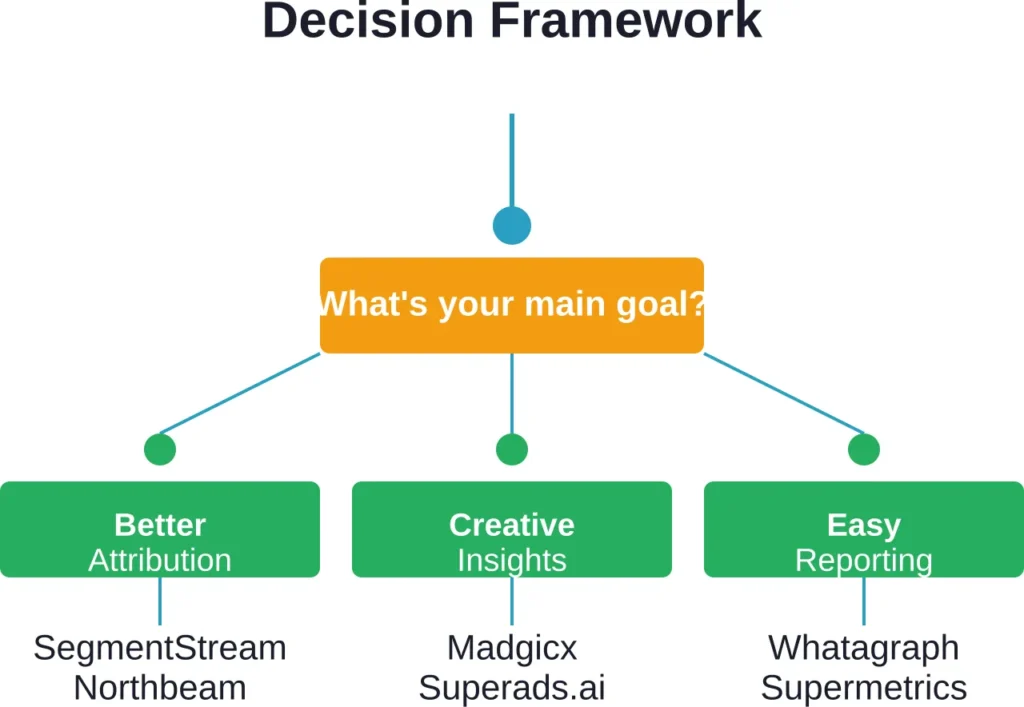
Different tools excel at different jobs. Madgicx optimizes creative. SegmentStream fixes attribution. Supermetrics extracts data cheaply. Whatagraph automates client reports.
Teams trying to solve multiple problems with one tool often end up disappointed. Better to pick the tool that nails the most critical need and supplement with other tools as required.
Assess Your Attribution Needs
For products with short consideration cycles—impulse buys, low-ticket items—Meta’s default attribution works fine. Extended attribution windows and multi-touch models add complexity without much value.
For high-ticket products, B2B services, or anything with a multi-week sales cycle, attribution modeling becomes essential. Meta’s 7-day window misses too much.
Consider Team Size and Expertise
Enterprise platforms like SegmentStream and Smartly assume teams have dedicated analysts, engineers, and substantial budgets. Solo operators and small teams drown in those platforms.
Simpler tools—Triple Whale, Supermetrics, Hunch—trade feature depth for ease of use. They’re better fits for lean teams.
Evaluate Integration Requirements
What other platforms need to connect? Shopify? Google Analytics? Salesforce? Email platforms?
Check integration lists carefully. Many tools claim “integrations” that turn out to be limited or require custom API work. Pre-built, maintained connectors save months of engineering time.
Calculate Total Cost of Ownership
Subscription fees are just part of the cost. Add setup time, training, ongoing maintenance, and potential need for additional tools to fill gaps.
A $49/month tool that requires 10 hours of monthly manual work costs more than a $500/month platform that runs itself.
Common Mistakes When Implementing Facebook Analytics Tools
Even the best tools fail when implemented poorly. Here are the most common pitfalls.
Ignoring Data Quality Issues
Garbage in, garbage out. If Facebook’s pixel isn’t firing correctly, Conversions API isn’t set up, or UTM parameters are inconsistent, no analytics tool will produce reliable insights.
Fix tracking infrastructure before investing in analytics platforms. Otherwise, teams optimize based on bad data.
Over-Relying on Last-Click Attribution
Most tools default to last-click attribution because it’s simple. But last-click systematically undervalues top-of-funnel channels and overvalues bottom-funnel conversions.
For any product with a multi-touch journey, experiment with other attribution models. Position-based, time-decay, or data-driven models often paint a more accurate picture.
Choosing Tools Based on Features, Not Needs
The platform with the longest feature list isn’t always the best choice. Features teams don’t use just clutter the interface and slow down workflows.
Start with the core problem. Pick the tool that solves that problem best, even if it’s simpler than alternatives.
Underestimating Setup Time
Enterprise analytics platforms take weeks or months to configure properly. Custom attribution models, data warehouse integrations, and dashboard builds require engineering resources.
Teams that expect plug-and-play setups end up frustrated. Budget time for proper implementation.
Failing to Train the Team
Powerful tools are useless if the team doesn’t know how to use them. Budget time for training, documentation, and ongoing support.
Most platforms offer onboarding resources. Use them.
Emerging Trends in Facebook Ads Analytics for 2026
The analytics landscape keeps evolving. Here’s what’s changing in 2026.
AI-Powered Insights and Automation
More platforms integrate large language models to surface insights automatically. Instead of building reports manually, marketers ask questions and get data-driven answers.
Automation extends to optimization too. AI systems adjust budgets, pause underperformers, and scale winners faster than human operators.
Incrementality Testing Goes Mainstream
Attribution models estimate which channel deserves credit. Incrementality testing measures actual lift through controlled experiments.
More tools now offer built-in incrementality testing features, making it easier to validate whether reported conversions are truly incremental.
Privacy-First Tracking
Browser tracking continues to degrade. Third-party cookies are gone. iOS tracking restrictions tighten. Tools that rely solely on pixel data struggle.
The shift toward server-side tracking, first-party data, and Conversions API integration accelerates. Tools that handle server-side implementations well gain market share.
Creative Analytics Becomes Standard
As competition for attention intensifies, creative quality matters more. Analytics platforms increasingly offer creative-specific features—performance scoring, element extraction, and automated A/B testing.
What was once a niche feature now becomes table stakes.
Real-World Use Cases: Which Tool for Which Scenario
Here’s how different types of businesses should approach tool selection.
Small E-Commerce Store ($5K–$20K Monthly Ad Spend)
Budget is tight. Team is lean. Simplicity matters more than feature depth.
Recommended: Triple Whale or Supermetrics. Both offer affordable pricing and focus on the metrics e-commerce operators care about most—ROAS, CAC, conversion rates. Setup is fast, learning curve is gentle.
Growing DTC Brand ($50K–$200K Monthly Ad Spend)
At this scale, attribution gaps start costing real money. Creative testing ramps up. Manual reporting becomes a bottleneck.
Recommended: Madgicx for creative-heavy strategies or Northbeam for attribution-focused needs. Both handle mid-market complexity without enterprise-level costs.
Large E-Commerce Brand ($500K+ Monthly Ad Spend)
Attribution modeling is critical. Multi-channel optimization drives material revenue gains. Engineering resources are available for complex setups.
Recommended: SegmentStream or Smartly. Both offer enterprise-grade attribution, multi-channel optimization, and advanced automation. Cost is high, but so is the potential impact.
Marketing Agency Managing 10+ Clients
Client reporting automation is the priority. White-label dashboards matter. Cost per client needs to stay reasonable.
Recommended: Whatagraph for reporting or Supermetrics for data extraction into custom dashboards. Both scale across multiple clients without requiring separate setups for each account.
B2B SaaS Company with Long Sales Cycles
Attribution windows need to extend months, not days. Facebook awareness campaigns influence pipeline weeks or months later.
Recommended: SegmentStream or Funnel.io integrated with CRM data. Standard Facebook attribution will dramatically undercount Meta’s contribution to pipeline.
| Business Type | Monthly Ad Spend | Top Priority | Recommended Tool |
|---|---|---|---|
| Small e-commerce | $5K–$20K | Simple, affordable dashboards | Triple Whale, Supermetrics |
| Growing DTC | $50K–$200K | Attribution or creative insights | Northbeam, Madgicx |
| Large e-commerce | $500K+ | Advanced attribution + optimization | SegmentStream, Smartly |
| Marketing agency | Varies | Client reporting automation | Whatagraph, Supermetrics |
| B2B SaaS | $20K+ | Long attribution windows | SegmentStream, Funnel.io |
Integration Best Practices for Facebook Ads Analytics Tools
Getting the most value from analytics platforms requires thoughtful implementation. Here’s how to do it right.
Audit Your Tracking Setup First
Before connecting any third-party tool, verify that Facebook’s pixel and Conversions API are working correctly. Check event match quality scores in Meta Events Manager. Fix any errors.
Most analytics problems trace back to bad input data, not tool limitations.
Start with One Platform, Add Others Later
Resist the urge to implement five tools simultaneously. Start with the platform that solves the most critical need. Get it working well. Then layer on additional tools as needed.
Multiple platforms with overlapping features create confusion and wasted spend.
Establish Clear Reporting Cadences
Decide who needs which reports, how often. Executives might need weekly summaries. Media buyers need daily or hourly dashboards. Clients might need monthly reports.
Configure automation for each audience. Overreporting creates noise. Underreporting leaves stakeholders in the dark.
Document Your Attribution Model Choices
When using custom attribution windows or multi-touch models, document the choices and rationale. Different models produce different numbers. Stakeholders get confused when ROAS changes without underlying performance changing.
Clear documentation prevents “why did the numbers change” questions six months later.
Review and Iterate Quarterly
Analytics needs evolve. A tool that worked perfectly six months ago might not fit current needs. Schedule quarterly reviews to assess whether the current setup still serves the team well.
Be willing to switch platforms if priorities shift.
Frequently Asked Questions
Facebook Ads Manager provides native campaign management and basic reporting. Third-party analytics tools extend functionality with advanced attribution modeling, cross-channel data integration, automated optimization, creative analytics, and customized reporting. Ads Manager works for simple campaigns, but scaled operations and multi-channel strategies need additional tools.
For campaigns under $5K monthly spend with simple conversion goals, Ads Manager might suffice. But if attribution matters, if multiple channels run simultaneously, or if reporting takes significant manual time, even small campaigns benefit from analytics tools. Supermetrics and similar affordable platforms cost less than the time saved on manual reporting.
Meta defaults to 7-day click, 1-day view attribution and uses last-click models. Third-party tools extend attribution windows (14, 30, or 90 days), support multi-touch models (linear, time-decay, position-based), and some run incrementality tests to measure true lift. For products with longer consideration cycles, extended attribution reveals conversions Meta’s native tracking misses.
Partially. Tools that integrate server-side tracking and Conversions API can capture events browser-based pixels miss. Attribution modeling helps estimate true impact when direct tracking fails. But no tool fully recovers what Apple’s App Tracking Transparency removed. The best approach combines first-party data, server-side tracking, and statistical modeling.
Simple tools like Supermetrics or Triple Whale take hours to days—connect accounts, configure dashboards, done. Mid-tier platforms like Madgicx or Northbeam need one to two weeks for proper setup and team training. Enterprise tools like SegmentStream or Smartly require weeks to months, including custom attribution configuration, data warehouse integration, and complex dashboard builds.
Agencies prioritize multi-client management, white-label reporting, and cost efficiency per client. Tools like Whatagraph, Supermetrics, and Funnel.io fit agency needs well. In-house teams optimize for a single brand and can invest in deeper platform knowledge. Attribution and creative analytics tools like SegmentStream or Madgicx make more sense for dedicated in-house operators.
It depends on decision-making cadence. Media buyers optimizing daily need hourly or real-time data. Executives reviewing weekly need daily updates at most. Over-refreshing creates alert fatigue. Under-refreshing delays responses to performance changes. Match refresh frequency to how often the data informs actual decisions.
Conclusion: Choosing Your Facebook Ads Analytics Stack
The right analytics tool depends entirely on what problems need solving. SegmentStream excels at attribution for multi-channel marketers. Madgicx optimizes creative at scale. Triple Whale delivers fast e-commerce dashboards. Supermetrics extracts data affordably.
No single platform does everything well. Most teams eventually use two or three tools—one for data extraction, another for attribution, maybe a third for client reporting.
Start by identifying the single biggest analytics gap costing time or money. Pick the tool that solves that specific problem best. Implement it properly. Get value flowing. Then assess what’s next.
Research on using analytics to improve customer engagement demonstrates that organizations leveraging data from multiple sources improve engagement. The same principle applies to Facebook Ads analytics—connecting data across platforms surfaces insights single-source reporting misses.
For small operations, simple tools work. Supermetrics or Triple Whale provide immediate value without overwhelming lean teams. For scaled advertisers spending six or seven figures monthly, enterprise platforms justify their costs through better attribution and optimization.
One pattern holds across all scenarios: better data leads to better decisions. Facebook Ads Manager provides a starting point, but serious advertisers outgrow it quickly. The tools covered here fill those gaps.
Ready to level up Facebook Ads performance? Start by auditing current tracking setup, identifying the biggest analytics blind spot, and testing one platform that directly addresses it. Check official websites for current pricing and features, since subscription tiers change frequently.
The difference between guessing and knowing shows up in ROAS, CAC, and contribution margin. Analytics tools turn Facebook’s raw data into actionable intelligence.