

Quick Summary: Amazon developer tools encompass AWS SDKs, CI/CD services, code editors, and DevOps utilities that accelerate cloud application development. Key tools include AWS Cloud9, CodeBuild, CodePipeline, Amazon Q Developer, and SDKs for multiple programming languages. These services integrate seamlessly with AWS infrastructure to streamline building, testing, and deploying applications.
Building applications on Amazon Web Services requires the right toolkit. AWS provides a comprehensive ecosystem of developer tools designed to accelerate software delivery and automate DevOps workflows.
From integrated development environments to continuous deployment pipelines, these tools address every stage of the software lifecycle. The challenge isn’t finding tools—it’s knowing which ones matter.
Here’s what developers actually use when building on AWS in 2026.
Optimize Your Amazon Advertising Strategy

For businesses looking to enhance the performance of their Amazon campaigns, integrating professional-grade analytics is essential for maintaining a competitive edge. Tools like WisePPC provide the necessary infrastructure to move beyond manual reporting and take data-driven action across marketplace operations.
Key capabilities for scaling Amazon advertising include:
- Long-Term Data Retention: Accessing historical performance metrics that extend well beyond Amazon’s default 60-90 day window to identify long-term trends and seasonality.
- Bulk Campaign Management: Executing updates to budgets, bids, and campaign statuses across large product catalogs in a single action.
- Granular Performance Analysis: Utilizing deep-dive segmentation to evaluate metrics at the keyword, placement, and ad group levels.
- Unified Marketplace Reporting: Centralizing sales and advertising data to clearly differentiate between organic growth and paid ad impact.
To begin optimizing your ad performance and access advanced analytics, sign up for a trial at WisePPC.
Why AWS Developer Tools Matter
AWS developer tools solve a fundamental problem: managing infrastructure complexity while maintaining development velocity. The platform provides services that handle code storage, automated builds, testing, and deployment.
The real benefit? Integration. These tools work together without custom scripting or third-party connectors. Code commits trigger builds automatically. Builds feed deployments. Deployments report metrics back to monitoring dashboards.
According to the official AWS documentation, these tools support DevOps practices, continuous integration, and continuous delivery workflows. Teams using AWS developer tools report faster release cycles and fewer manual deployment errors.
Core AWS Developer Tools
AWS Cloud9: Browser-Based IDE
AWS Cloud9 delivers a cloud-based integrated development environment accessible through any browser. No local setup required—just open a URL and start coding.
The IDE includes a code editor with syntax highlighting, a debugger, and a built-in terminal. It supports direct AWS service integration, so developers can invoke Lambda functions or interact with S3 buckets without leaving the editor.
Cloud9 proves particularly useful for remote teams. Multiple developers can share environments, review code in real-time, and troubleshoot together. The environment runs on EC2 instances, which scale based on project requirements.
AWS CloudShell: Command-Line Access
AWS CloudShell provides browser-based shell access to AWS resources. It comes pre-configured with the AWS CLI, SDKs, and common development tools.
There’s no configuration overhead. Sign into the console, launch CloudShell, and execute commands. Storage persists between sessions, so scripts and data remain available.
CloudShell handles authentication automatically using your existing console credentials. This eliminates the need to manage access keys or configure CLI profiles on local machines.
AWS CodeArtifact: Package Management
AWS CodeArtifact functions as a managed artifact repository for software packages. It stores dependencies from npm, PyPI, Maven, NuGet, and other package managers.
Teams use CodeArtifact to host internal libraries and cache public packages. This creates a single source for all dependencies, improving build reliability and reducing reliance on external repositories.
The service integrates with existing package management workflows. Developers point their package manager to CodeArtifact, and it handles upstream repository connections, caching, and access control.
AWS CodeBuild: Automated Building
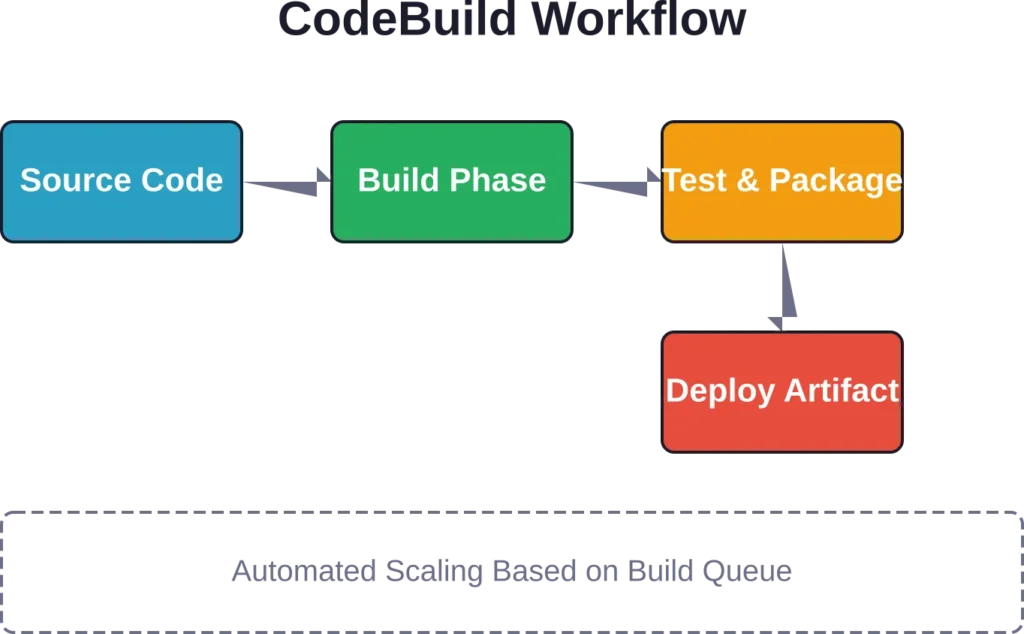
AWS CodeBuild compiles source code, runs tests, and produces deployment-ready artifacts. It scales automatically based on build queue depth.
CodeBuild operates on a pay-per-use model—charges apply only for actual build minutes consumed. No need to provision or maintain build servers.
Build specifications live in a buildspec.yml file within the project repository. This defines build phases, environment variables, and artifact outputs. Teams can customize build environments using pre-built Docker images or create custom containers.
Amazon CodeCatalyst: Unified Development Platform

Amazon CodeCatalyst combines project management, source control, build pipelines, and deployment automation into a single unified platform.
It provides issue tracking, wiki pages, and sprint planning tools alongside CI/CD capabilities. Teams get an all-in-one workspace for software development activities.
CodeCatalyst includes pre-built blueprints for common application patterns. These blueprints generate project structure, CI/CD pipelines, and infrastructure definitions based on technology stack selections.
AWS CodeCommit: Git Repository Hosting

AWS CodeCommit provides managed Git repositories hosted on AWS infrastructure. It supports standard Git operations—clone, commit, push, pull, merge.
Repositories scale automatically to handle any size codebase. CodeCommit encrypts repositories at rest and in transit, meeting security compliance requirements for regulated industries.
Integration with IAM enables fine-grained access control. Teams can restrict repository access by user, role, or IP address range.
AWS CodeDeploy: Deployment Automation

AWS CodeDeploy automates application deployments to EC2 instances, Lambda functions, ECS services, and on-premises servers.
The service supports multiple deployment strategies: all-at-once, rolling, blue/green, and canary. Teams choose strategies based on application requirements and risk tolerance.
CodeDeploy monitors deployments and automatically rolls back if errors exceed defined thresholds. This prevents bad code from reaching production environments.
AWS CodePipeline: Continuous Delivery Orchestration

AWS CodePipeline orchestrates the entire release process from code commit to production deployment. It connects source control, build services, test frameworks, and deployment targets into automated workflows.
Pipelines consist of stages—source, build, test, deploy. Each stage contains actions that execute in sequence or parallel. Developers customize pipeline behavior using conditional logic and approval gates.
CodePipeline integrates with third-party tools including GitHub, Jenkins, and Terraform. This allows teams to incorporate existing tools into AWS-managed workflows.
| Tool | Primary Function | Key Benefit |
|---|---|---|
| Cloud9 | Cloud IDE | Browser-based development environment |
| CloudShell | Command-line access | Pre-configured AWS CLI with persistent storage |
| CodeArtifact | Package repository | Centralized dependency management |
| CodeBuild | Build automation | Scalable, pay-per-use build service |
| CodeCatalyst | Unified platform | Integrated project management and CI/CD |
| CodeCommit | Git hosting | Secure, scalable repositories |
| CodeDeploy | Deployment automation | Multi-strategy deployment with rollback |
| CodePipeline | CI/CD orchestration | End-to-end release automation |
AWS SDKs: Language-Specific Development Kits
SDKs for multiple programming languages including C++, Go, Java, JavaScript, Kotlin, .NET, PHP, PowerShell, Python, and Ruby. According to the official AWS documentation, additional SDKs are available.
SDKs abstract API complexity behind language-native interfaces. Instead of crafting HTTP requests manually, developers call typed methods that handle authentication, retry logic, and error handling.
Each SDK includes service client libraries, code examples, and documentation. The AWS SDK for JavaScript, for instance, provides modules for every AWS service with TypeScript definitions for type safety.
Real talk: SDKs save enormous amounts of development time. They handle AWS signature version 4 signing, credential management, region configuration, and service endpoint discovery automatically.
SDK vs API: Understanding the Difference
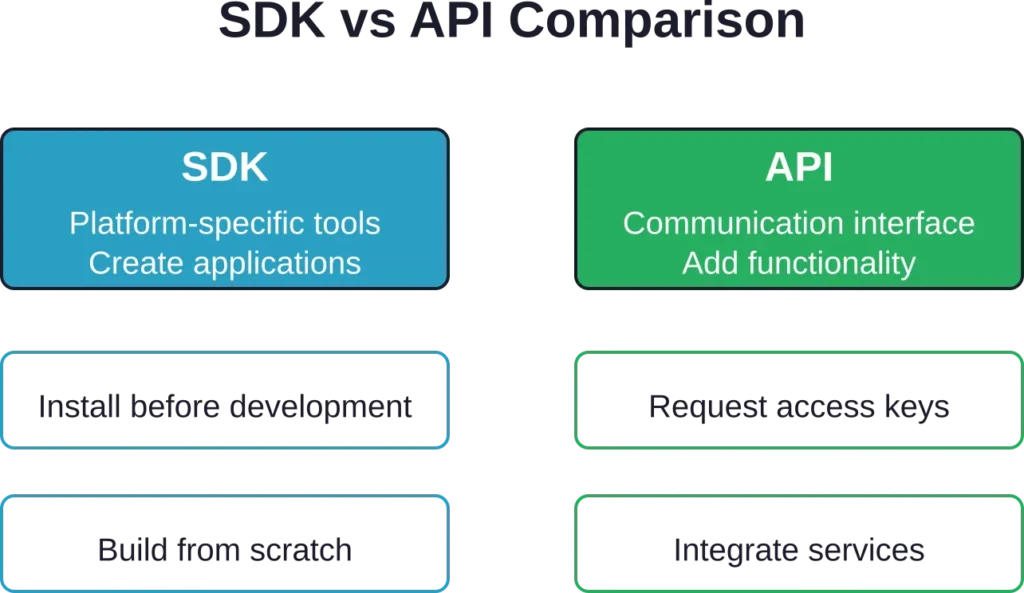
According to official AWS documentation, an SDK is a set of platform-specific building tools including debuggers, compilers, and libraries. An API is a mechanism enabling two software components to communicate.
Developers install SDKs before creating applications. SDKs create new applications by providing language-native tools and abstractions. APIs add third-party functionality to existing applications by exposing service interfaces.
The workflow differs: SDKs require installation into the development environment, while APIs require obtaining access keys from service providers.
Specialized AWS Developer Tools
Amazon Q Developer: AI-Powered Coding Assistant
Amazon Q Developer provides AI-driven code suggestions, debugging assistance, and chat-based guidance directly within the development workflow.
The tool integrates with VS Code, JetBrains, Eclipse, and Visual Studio. As developers write code, Q Developer suggests completions based on context, comments, and existing patterns.
Q Developer understands AWS service patterns. It generates infrastructure-as-code templates, suggests security improvements, and explains AWS SDK usage through natural language conversations.
Amazon Corretto: Production-Ready OpenJDK

Amazon Corretto is a no-cost, production-ready distribution of OpenJDK. AWS maintains Corretto with long-term support, security patches, and performance enhancements.
Corretto passes the Java SE Technology Compatibility Kit, ensuring full compatibility with Java applications. Organizations use it to run Java applications without Oracle licensing fees.
AWS tests Corretto extensively against internal workloads handling billions of transactions daily. Performance optimizations from these tests flow back into the public distribution.
AWS X-Ray: Distributed Tracing

AWS X-Ray analyzes and debugs distributed applications by tracing requests across microservices. It generates service maps showing how components interact and where latency occurs.
X-Ray instruments applications automatically when using supported AWS services. For custom code, developers add the X-Ray SDK to capture trace data.
The service identifies performance bottlenecks, error hotspots, and dependency failures. Trace timelines show exactly where requests spend time, down to individual service calls.
AWS Fault Injection Service: Chaos Engineering

AWS Fault Injection Service conducts controlled chaos engineering experiments on AWS workloads. Teams inject failures—latency, throttling, instance terminations—to verify resilience.
Experiments run according to predefined templates with safety guardrails. If metrics exceed thresholds, the service automatically stops the experiment and restores normal operation.
This validates disaster recovery procedures, tests auto-scaling behavior, and identifies single points of failure before real incidents occur.
AWS Cloud Development Kit (CDK): Infrastructure as Code

The AWS Cloud Development Kit enables infrastructure definition using familiar programming languages instead of JSON or YAML templates.
Developers can use TypeScript, Python, Java, or C# to define cloud resources with AWS CDK. The CDK synthesizes these definitions into CloudFormation templates.
CDK constructs provide high-level abstractions for common patterns. A single construct might define a load balancer, auto-scaling group, and security groups—dozens of CloudFormation resources from a few lines of code.
The documentation emphasizes letting CDK manage roles and security groups automatically. The construct library includes convenience methods that create IAM permissions and security rules based on resource relationships.
| Specialized Tool | Use Case | Integration Point |
|---|---|---|
| Amazon Q Developer | AI code assistance | IDE plugins (VS Code, JetBrains, Eclipse) |
| Amazon Corretto | Java runtime | Drop-in OpenJDK replacement |
| AWS X-Ray | Application tracing | Service instrumentation and SDK |
| Fault Injection Service | Chaos engineering | Controlled failure injection |
| AWS CDK | Infrastructure as code | Programming language abstractions |
AWS Tools for PowerShell

AWS Tools for PowerShell provide cmdlets for managing AWS resources from PowerShell scripts and console sessions. The toolkit includes modules for every AWS service.
Windows administrators use these tools to integrate AWS management into existing automation workflows. PowerShell’s pipeline model works naturally with AWS resource operations—list instances, filter by tag, stop matching instances.
The aws-lambda-dotnet repository on GitHub contains libraries and tools to support development of Lambda functions using .NET.
Fire TV Developer Tools

Amazon provides specialized developer tools for Fire TV application development. These tools differ from AWS cloud services—they target consumer devices rather than cloud infrastructure.
The Developer Tools Menu on Fire TV provides real-time metrics, debugging information, and performance monitoring for apps running on Fire devices. According to Amazon Fire TV developer documentation, the System X-Ray tool provides diagnostic capabilities for Fire TV development.
Vega Developer Tools support Fire TV Stick 4K development using React Native or web technologies. The Vega SDK documentation covers building apps for the responsive Vega OS platform.
Choosing the Right AWS Developer Tools
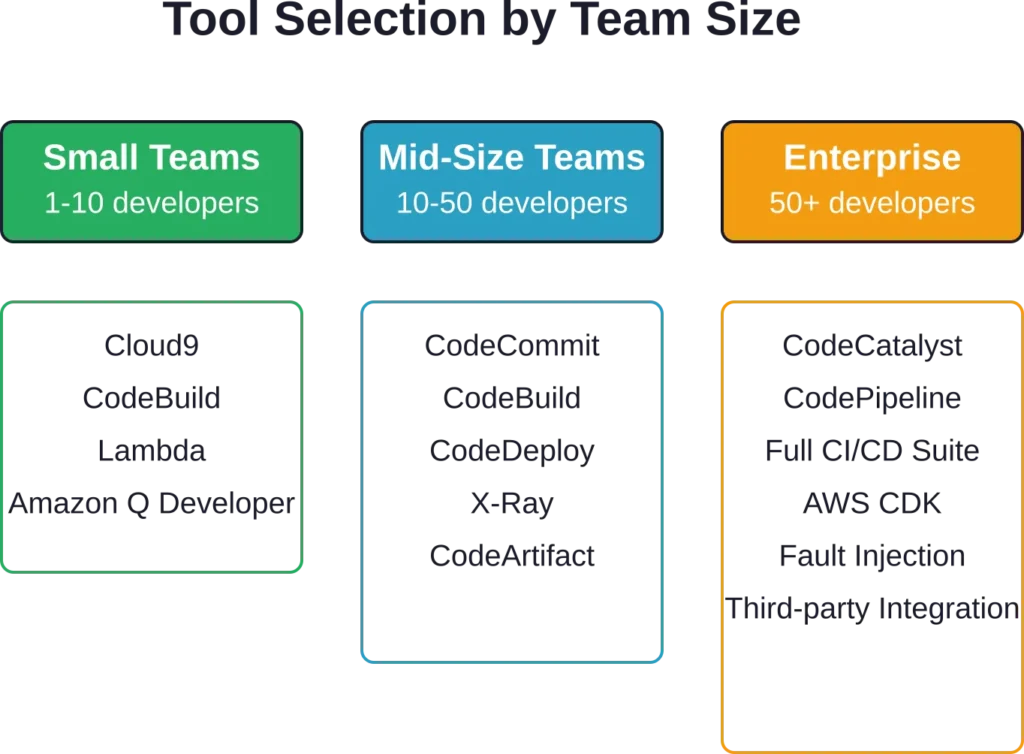
Tool selection depends on team size, application architecture, and development workflow maturity.
Small teams building serverless applications might use Cloud9 for development, CodeBuild for CI/CD, and Lambda deployment—skipping repository management entirely for simple projects.
Large enterprises typically adopt the full CI/CD suite: CodeCommit for source control, CodeBuild for compilation, CodeDeploy for releases, and CodePipeline orchestrating everything. Amazon Q Developer accelerates development across all team sizes.
Organizations with existing toolchains can integrate AWS services selectively. CodePipeline works with GitHub repositories. CodeBuild consumes artifacts from third-party tools. This allows gradual migration rather than wholesale replacement.
Getting Started with AWS Developer Tools
Start by creating an AWS account if one doesn’t exist. The AWS console provides access to all developer services.
For immediate experimentation, launch CloudShell from the console. It provides instant command-line access without local software installation. Execute AWS CLI commands to explore services and understand capabilities.
Next, try Cloud9 for a development project. Create an environment, write code that interacts with AWS services, and deploy directly from the IDE. This demonstrates the integrated workflow AWS tools provide.
Then implement a basic CI/CD pipeline. Commit code to CodeCommit, configure a CodeBuild project to compile it, and create a CodePipeline to automate the flow. Even a simple pipeline reveals how these services connect.
AWS provides extensive documentation for each tool. The AWS Developer Tools Console Documentation includes user guides and API references. Code examples demonstrate common patterns across multiple programming languages.
Frequently Asked Questions
AWS SDKs are language-specific libraries that provide programmatic access to AWS services through code. Developer tools are services like CodeBuild, CodePipeline, and Cloud9 that facilitate the development process itself. SDKs help write code that uses AWS; developer tools help build, test, and deploy that code.
No. AWS developer tools work independently and integrate with third-party solutions. Organizations commonly use CodeBuild with GitHub repositories or CodePipeline with Jenkins. Select tools based on specific needs rather than adopting the entire suite.
Pricing varies by service and usage. CodeBuild charges per build minute consumed. CodeCommit charges per active user per month. Cloud9 charges for the underlying EC2 instance. CloudShell is free. Check the official AWS pricing pages for current rates, as costs change based on region and usage tier.
Yes, with limitations. CodeDeploy supports on-premises servers. CodePipeline integrates with external Git repositories and deployment targets. However, tools work most seamlessly within the AWS ecosystem. Hybrid approaches are common during cloud migrations.
Use the SDK that matches your primary development language. AWS maintains official SDKs for multiple languages including Python (boto3), JavaScript (AWS SDK for JavaScript), Java, .NET, Go, and Ruby. All SDKs provide similar functionality with language-appropriate interfaces.
Basic functionality is accessible quickly—CloudShell and Cloud9 require minimal learning. CI/CD pipelines demand understanding of DevOps concepts and AWS service integration. Teams familiar with similar tools (Git, Jenkins, Docker) adapt faster. AWS provides extensive documentation, tutorials, and code samples to accelerate learning.
AWS tools integrate more deeply with AWS infrastructure and services. GitHub Actions and GitLab CI excel at flexibility and third-party integrations. Teams heavily invested in AWS often prefer CodePipeline for native integration. Organizations using multiple clouds might choose platform-agnostic CI/CD tools. Both approaches work—the choice depends on existing infrastructure and workflow preferences.
Conclusion
AWS developer tools provide a comprehensive toolkit for cloud application development. From IDEs to deployment automation, these services address every stage of the software lifecycle.
The real advantage lies in integration. Tools connect seamlessly, sharing context and reducing configuration overhead. Code commits trigger builds. Builds produce artifacts. Artifacts deploy automatically. Monitoring feeds back into development.
Start small. Pick one or two tools that solve immediate pain points. CloudShell for command-line access. CodeBuild for automated compilation. Amazon Q Developer for AI-assisted coding. Expand the toolkit as workflows mature.
Check the official AWS documentation for current tool capabilities, pricing, and integration options. The platform evolves rapidly—new features and services launch continuously.