

Quick Summary: Facebook Ads integration tools extend Meta’s native analytics with cross-channel attribution, creative-level insights, and automated reporting. Leading platforms in 2026 include Extuitive, Improvado for enterprise data unification, Segwise for AI-powered creative analysis, and Whatagraph for client-ready dashboards. These solutions address post-iOS 14 tracking gaps and deliver actionable performance data.
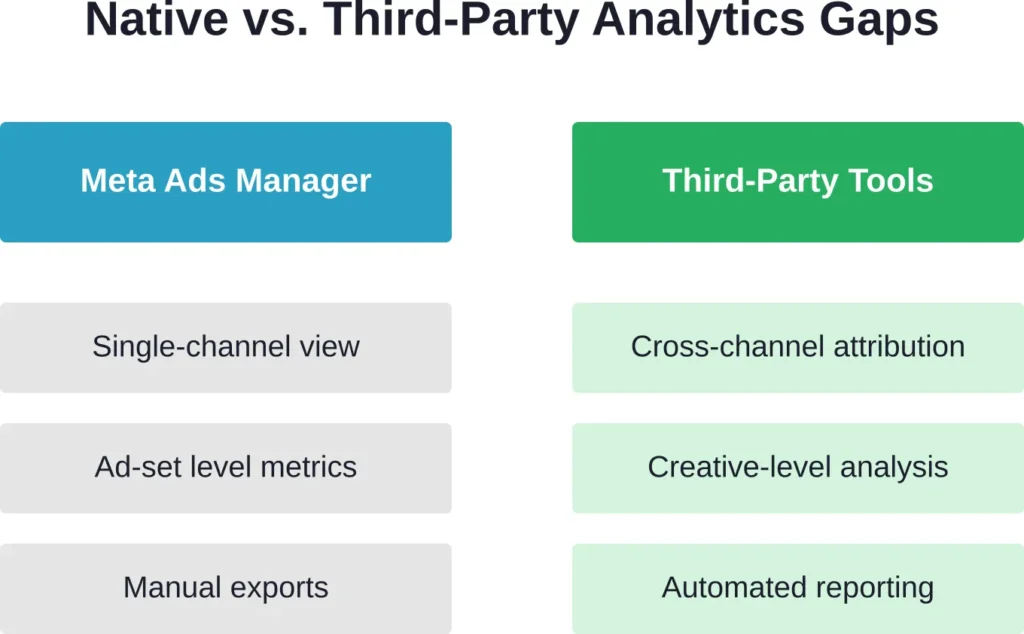
Meta Ads Manager shows the basics—spend, clicks, conversions. But when someone asks which creative actually drove that spike in conversions last week, native analytics falls silent.
That’s the gap third-party Facebook Ads analytics tools fill. They track what Meta can’t or won’t show: attribution across channels, creative-level fatigue signals, and consolidated reporting that includes Google, TikTok, and every other platform in one dashboard.
This guide breaks down the best Facebook Ads integration tools available in 2026, with verified pricing, feature comparisons, and honest assessments of where each platform shines.
Why Native Facebook Analytics Aren’t Enough
Facebook Ads Manager handles basic campaign monitoring. It’ll show impressions, click-through rates, and conversions attributed to Meta’s pixel.
But it stops there. Here’s what native analytics can’t do:
- Cross-channel attribution: Meta reports Meta conversions. If someone clicks a Facebook ad, then converts via Google search three days later, Facebook’s dashboard shows nothing.
- Creative-level insights: Which headline variant drives conversions? What image angle causes ad fatigue? Native tools don’t segment performance by creative element.
- Unified reporting: Running ads on Facebook, Google, and TikTok means three separate dashboards, three export processes, and manual spreadsheet reconciliation.
- Post-iOS 14 accuracy: Apple’s App Tracking Transparency framework, introduced in 2021, limits cross-app tracking. Meta’s pixel now misses conversions that happen outside its visibility window.
According to industry analyses, many e-commerce brands report seeing 20-30% more attributed conversions when using server-side tracking solutions compared to Meta’s native tracking alone.
That’s not a small gap. It’s the difference between thinking a campaign lost money and realizing it actually broke even.
Top Facebook Ads Analytics Tools for 2026
The following platforms represent the current state of Facebook Ads integration technology. Pricing and features are based on verified data as of early 2026.
1. Extuitive – AI Predictive Ad Performance Forecasting
Extuitive is an AI-powered platform that forecasts the performance of ad creatives before they launch on Meta (Facebook/Instagram) and TikTok. It combines brand-specific historical data with a Polyintelligence engine (150,000+ AI consumer agents modeled on real behavior) to score creatives for predicted CTR, ROAS, and purchase intent.
Where This Tool Shines:
Shopify brands and performance marketers waste huge budgets testing dozens of creatives live. Extuitive eliminates most losers upfront by predicting winners in minutes instead of weeks of expensive testing. This is ideal for teams that want to scale creative production without burning ad spend on guesswork.
Key Features:
- Pre-launch creative scoring (High/Medium/Low performance tiers)
- AI ad generation (copy, images, videos, angles, pricing)
- 150,000+ AI consumer agents for simulated testing
- Shopify store integration (automatic product & audience analysis)
- Predictive metrics: CTR, ROAS, purchase intent
- Model refreshes based on your live campaign results
- One-click export to Meta Ads Manager
Pricing:
- Starter: $1,000/month (or $10k/year) — 500 ads scored/month, 200 AI creations
- Professional: $2,500/month (or $25k/year) — 2,500 ads scored/month, higher limits
- Enterprise: Custom (for high-volume brands)
Best For:
Shopify e-commerce brands spending $10K–$100K+/month on Meta/TikTok ads. Perfect for performance marketers and direct-to-consumer teams focused on creative testing and optimization who want data-driven decisions before spending budget.
Contact Information:
- Website: extuitive.com
- Email: [email protected]
- LinkedIn: www.linkedin.com/company/extuitive
- Twitter: x.com/Extuitive_Inc
- Instagram: www.instagram.com/extuitiveinc
2. Improvado – Enterprise Data Unification

Improvado specializes in marketing data aggregation at scale. It pulls data from 500+ sources—including Facebook, Google, TikTok, CRM systems, and offline channels—into centralized dashboards or data warehouses.
Where This Tool Shines:
Enterprise teams running dozens of campaigns across multiple brands and geographies need unified reporting without hiring a data engineering team. Improvado automates ETL (extract, transform, load) processes that would otherwise require custom API scripts.
The platform handles data normalization automatically. Facebook calls it “CPC.” Google calls it “Avg. CPC.” Improvado maps both to a single “Cost Per Click” field, making cross-channel comparisons actually possible.
Key Features:
- 500+ marketing and sales data connectors
- Automated data transformation and normalization
- Direct integration with Tableau, Power BI, Looker, Google Sheets
- Data warehouse export (Snowflake, BigQuery, Redshift)
- Custom metric calculations and business logic
Pricing:
Custom enterprise pricing. Check Improvado’s official website for current rates.
Best For:
Marketing teams at mid-market and enterprise companies (typically $10M+ annual ad spend) that need a single source of truth for all marketing data.
3. Segwise – AI-Powered Creative Analytics

Segwise focuses on the creative performance question: which specific ad elements drive results, and when do they start to fatigue?
Where This Tool Shines:
Creative strategists and performance marketers running high-volume testing campaigns need granular insights. Segwise uses AI to analyze individual creative components—headlines, images, CTAs—and correlates them with conversion data.
The platform sends alerts based on custom business logic, such as a 30% drop in click-through rate over 7 days or ROAS decline below target thresholds. This prevents budget waste on fatigued creative before performance collapses.
Key Features:
- AI-driven creative element analysis
- No-code integrations with Meta, Google, TikTok, Snapchat, Unity Ads, IronSource
- Custom alert thresholds for performance metrics
- Creative fatigue detection
- Multi-account support
Pricing:
Plans start at $49 per month and scale to $2,999/month based on ad spend volume.
Best For:
Performance marketers and creative teams at e-commerce brands, mobile app companies, and agencies running iterative testing programs.
4. Whatagraph – Client-Ready Reporting

Whatagraph simplifies the reporting process with drag-and-drop dashboard builders and automated report scheduling. Agencies use it to deliver white-labeled client reports without manual data assembly.
Where This Tool Shines:
Marketing agencies managing multiple client accounts spend hours each week pulling data, formatting spreadsheets, and creating presentation-ready reports. Whatagraph automates this entirely.
The platform offers pre-built templates for common report formats and supports cross-channel data from Facebook, Google, LinkedIn, and 40+ other sources. Reports update automatically and can be scheduled for delivery via email or shared as live dashboards.
Key Features:
- Drag-and-drop report builder
- Cross-channel analytics (Facebook, Google, LinkedIn, and more)
- Automated report scheduling
- White-label branding for agency use
- Pre-made templates for common report types
Pricing:
Starts around $249/month. Whatagraph ratings: 4.5/5 on G2 (267 reviews)
Best For:
Marketing agencies and consultants that need professional, client-ready reports without manual data wrangling.
5. Sprout Social – Multi-Channel Social Management

Sprout Social combines social media management with analytics across multiple platforms.
Where This Tool Shines:
Teams managing both organic social content and paid campaigns need a unified workspace. Sprout Social handles scheduling, community management, and performance analytics in a single interface.
The platform offers team collaboration features, approval workflows, and community management tools that support multi-platform social strategy.
Key Features:
- Multi-channel social media scheduling and publishing
- Unified social inbox for community management
- Cross-platform analytics and reporting
- Team collaboration and approval workflows
- Community management and social monitoring
Pricing:
Starts at $199–$599/seat/month; custom pricing available.
Best For:
Marketing teams and agencies managing both paid and organic social media across multiple platforms with team collaboration needs.
6. Hootsuite – Established Social Analytics

Hootsuite is one of the longest-running social media management platforms, offering scheduling, analytics, and team collaboration features.
Where This Tool Shines:
Organizations already invested in Hootsuite for social media management can extend their usage to paid ad analytics without adding another platform.
The tool provides basic Facebook Ads performance tracking alongside organic content metrics, making it suitable for teams that don’t need advanced attribution or creative-level analysis.
Key Features:
- Social media scheduling and publishing
- Basic Facebook Ads performance tracking
- Cross-platform analytics
- Team collaboration features
- Content calendar management
Pricing:
Starts at $99 per month.
Best For:
Small to mid-sized businesses and teams that prioritize social media management and need basic paid ad performance tracking as a secondary feature.
7. Socialinsider – Competitive Benchmarking

Socialinsider focuses on competitive analysis, allowing brands to benchmark their Facebook performance against competitors and industry standards.
Where This Tool Shines:
Brand managers and strategists need context for their performance data. Is a 2% engagement rate good or bad? Socialinsider answers that by showing how competitors perform.
The platform tracks competitor page performance, content strategies, and engagement patterns, providing actionable intelligence for content planning and ad creative direction.
Key Features:
- Competitor Facebook page tracking
- Industry benchmark comparisons
- Content performance analysis
- Engagement rate tracking
- Hashtag and post-type performance insights
Pricing:
Plans start at $99 per month and offer a 14-day free trial.
Best For:
Brand managers, strategists, and competitive intelligence teams that need context for their Facebook performance metrics.
8. Supermetrics – Data Connector for BI Tools

Supermetrics isn’t a standalone analytics platform. It’s a data connector that pulls Facebook Ads data into Google Sheets, Excel, Looker Studio, Tableau, Power BI, and data warehouses.
Where This Tool Shines:
Teams already using business intelligence tools or spreadsheets for analysis don’t need a new dashboard—they need a reliable data pipeline. Supermetrics provides that.
The platform handles API connections, data refresh scheduling, and field mapping, allowing analysts to work in their preferred environment without manual exports.
Key Features:
- Direct data transfer to Google Sheets, Excel, Looker Studio, BI tools
- Automated data refresh scheduling
- Support for 100+ marketing platforms
- Custom field selection and filtering
- Historical data backfill
Pricing:
Varies by destination platform. Check Supermetrics’ official website for current pricing based on specific use cases.
Best For:
Data analysts and marketing teams that prefer building custom dashboards in Google Sheets, Looker Studio, Tableau, or Power BI rather than using pre-built platforms.
Attribution Tools for Facebook Ads
Attribution is messy. Someone sees a Facebook ad on Monday, clicks a Google search result on Wednesday, and converts via email on Friday. Which channel gets credit?
Standard analytics platforms use last-click attribution—the final touchpoint before conversion gets 100% of the credit. That systematically undervalues upper-funnel awareness channels like Facebook.
Advanced attribution tools solve this with multi-touch models that distribute conversion credit across all touchpoints in the customer journey.
Triple Whale – E-Commerce Attribution

Triple Whale built its platform specifically for Shopify merchants running Facebook and Google ads.
The tool uses first-party pixel tracking combined with server-side data to capture conversions that standard browser pixels miss. E-commerce brands report seeing attribution improvements of 20-30% compared to Meta’s native tracking alone.
Triple Whale also provides blended ROAS calculations that show true profitability across all channels rather than siloed platform-specific metrics.
Best For: Shopify stores running multi-channel paid acquisition campaigns.
Northbeam – Multi-Touch Attribution

Northbeam specializes in multi-touch attribution modeling for direct-to-consumer brands.
The platform tracks every touchpoint in the customer journey—from first ad impression through conversion—and uses machine learning to assign fractional credit to each interaction.
This reveals which channels actually contribute to conversions rather than just which ones happen to be last-click.
Best For: DTC brands with complex customer journeys spanning multiple channels and longer consideration periods.
Cometly – Server-Side Tracking Focus

Cometly emphasizes server-side tracking accuracy for Facebook Ads, capturing conversion data that client-side pixels miss due to iOS privacy restrictions and ad blockers.
The platform integrates with Shopify, WooCommerce, and custom e-commerce platforms to track purchases, add-to-carts, and other conversion events directly from the server.
Best For: E-commerce brands concerned about attribution accuracy in the post-iOS 14 environment.
Choosing the Right Tool for Your Needs
No single platform solves every analytics challenge. The right choice depends on specific business requirements.
For Agencies Managing Multiple Clients
Whatagraph delivers client-ready reports with white-label branding and automated scheduling. Sprout Social adds team collaboration features if social media management is part of the service offering.
Both platforms handle multi-account management without requiring separate logins for each client.
For E-Commerce Brands Running Cross-Channel Campaigns
Attribution accuracy matters more than pretty dashboards. Triple Whale, Northbeam, or Cometly provide the server-side tracking and multi-touch attribution needed to understand true campaign profitability.
Segwise adds creative-level analysis for brands running high-volume testing programs.
For Enterprise Marketing Teams
Improvado handles data unification at scale, pulling data from hundreds of sources into centralized warehouses or BI tools. This matters when marketing technology stacks include dozens of platforms and consolidation requires engineering resources.
For Teams Already Using BI Tools
Supermetrics eliminates the need for a separate analytics platform by piping Facebook Ads data directly into Google Sheets, Looker Studio, Tableau, or Power BI. Analysts can build custom dashboards in familiar environments.
For Competitive Intelligence and Benchmarking
Socialinsider tracks competitor performance and provides industry benchmarks, answering the “is this good?” question that raw metrics can’t address.
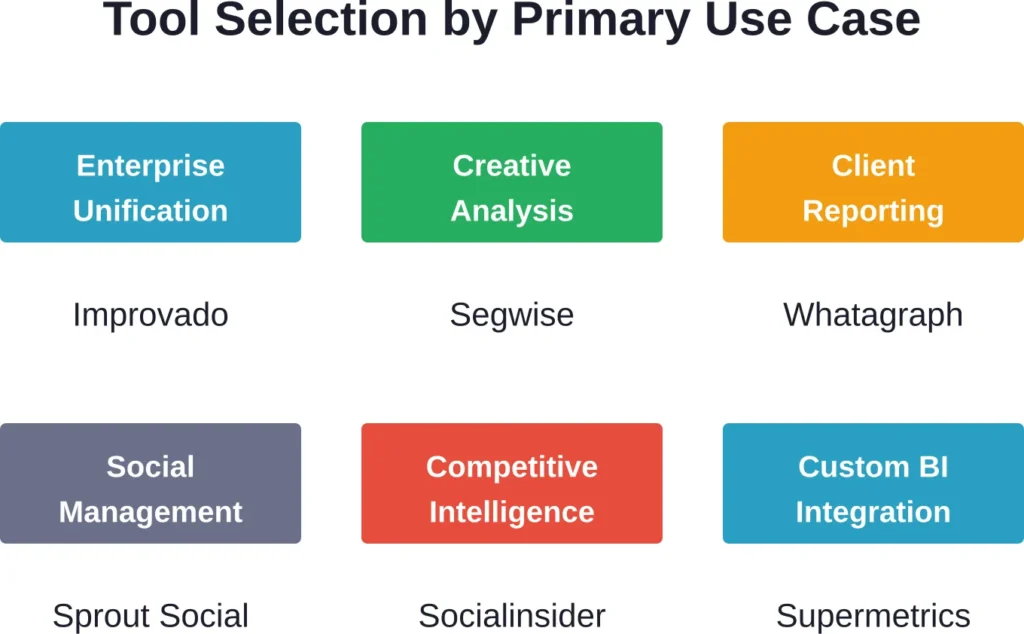
| Platform | Primary Use Case | Starting Price | Key Differentiator |
|---|---|---|---|
| Improvado | Enterprise data unification | Custom pricing | 500+ data source connectors |
| Segwise | Creative performance analysis | $49/month | AI-powered creative element tracking |
| Whatagraph | Agency client reporting | $249/month | White-label automated reports |
| Sprout Social | Social management + analytics | $199–$599/seat/month | Unified organic and paid workflow |
| Hootsuite | Social management | $99/month | Established platform with basic ad tracking |
| Socialinsider | Competitive benchmarking | $99/month | Competitor tracking and industry context |
| Supermetrics | BI tool data connector | Varies by use case | Direct pipeline to Google Sheets, Tableau, Power BI |
| Triple Whale | E-commerce attribution | Check official site | First-party pixel for Shopify |
| Northbeam | Multi-touch attribution | Check official site | ML-powered journey analysis |
| Cometly | Server-side tracking | Check official site | Post-iOS 14 accuracy focus |
Implementation Considerations
Selecting a tool is step one. Actually implementing it effectively requires planning.
Data Integration Complexity
Most platforms offer no-code connectors for Facebook Ads Manager. But what about other data sources?
E-commerce platforms, CRM systems, email marketing tools, and offline conversion data often require custom integration work. Evaluate whether the analytics platform handles these connections natively or if engineering resources are needed.
Historical Data Access
Some tools import historical data automatically. Others only track new data from the connection date forward.
Teams analyzing year-over-year trends or building long-term attribution models need platforms that can backfill historical performance data.
Team Training Requirements
Enterprise platforms like Improvado offer powerful capabilities but require training. Simpler tools like Whatagraph sacrifice some depth for ease of use.
Consider whether the team has dedicated analytics resources or if the tool needs to be intuitive enough for non-technical marketers to use independently.
Privacy and Compliance
Server-side tracking solutions handle customer data directly. Ensure the platform complies with GDPR, CCPA, and other relevant privacy regulations.
Data processing agreements, data residency options, and consent management integrations matter for organizations operating in regulated industries or multiple jurisdictions.
Common Implementation Mistakes
Even the best tools fail when implemented poorly. Here’s what to avoid:
Expecting Plug-and-Play Perfection
Analytics platforms require configuration. Custom metrics, conversion definitions, and attribution windows don’t set themselves.
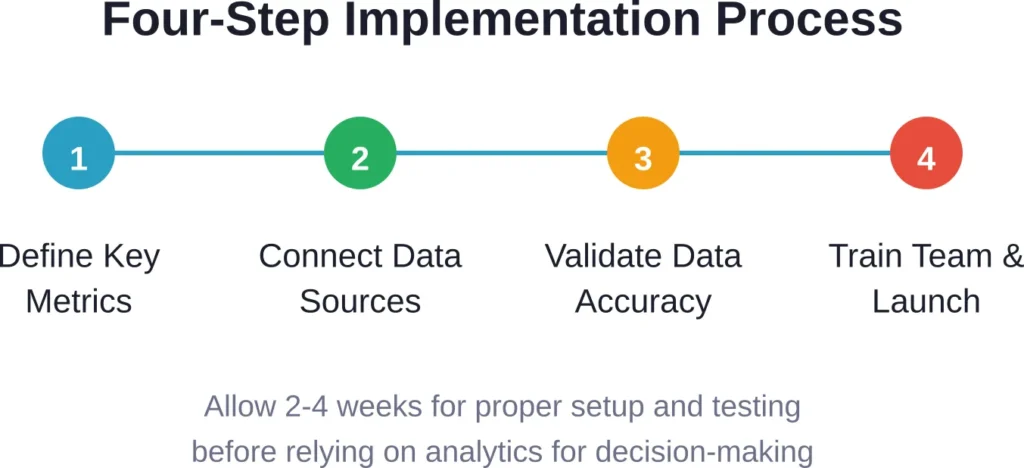
Allocate time for initial setup, testing, and validation before relying on the data for decision-making.
Ignoring Data Discrepancies
Facebook Ads Manager shows 100 conversions. The analytics tool shows 130. Which is right?
Both, potentially. Different attribution windows, conversion counting methodologies, and tracking implementations produce different numbers. Understand why discrepancies exist rather than assuming one source is “correct.”
Over-Relying on Automated Insights
AI-powered platforms flag anomalies and suggest optimizations. That’s helpful. But automated recommendations don’t understand business context.
A sudden ROAS drop might indicate poor performance—or it might reflect an intentional shift to prospecting campaigns during a product launch. Human judgment still matters.
Not Defining Success Metrics Upfront
What actually matters? Conversions? Revenue? Customer lifetime value? Brand awareness metrics?
Analytics tools track everything. But effective analysis requires focus on the metrics that drive business outcomes rather than vanity metrics that look impressive in reports.
The Future of Facebook Ads Analytics
Privacy regulations continue tightening. iOS 14 wasn’t the last disruption—it was the first in a series.
Server-side tracking and first-party data strategies become more critical as third-party cookies disappear and browser privacy protections expand. Analytics tools that rely on client-side pixels will continue losing accuracy.
Machine learning models improve attribution in data-sparse environments. When direct tracking fails, predictive models fill gaps by analyzing patterns across thousands of similar conversion paths.
Real-time optimization capabilities expand beyond simple alerts. Advanced platforms now recommend budget reallocation, creative refresh timing, and audience targeting adjustments based on performance signals invisible to human analysts.
Cross-channel identity resolution improves as platforms adopt unified ID frameworks. Understanding that the mobile app user, desktop website visitor, and Facebook ad clicker are the same person has been technically challenging. Emerging identity graphs solve this through deterministic matching and privacy-compliant probabilistic methods.
Frequently Asked Questions
Meta Ads Manager shows performance data for Facebook and Instagram campaigns only. Third-party analytics tools provide cross-channel attribution, creative-level insights, automated reporting, and often capture conversions that Meta’s pixel misses due to privacy restrictions. They’re complementary rather than replacements—most advertisers use both.
For e-commerce brands and anyone concerned about attribution accuracy post-iOS 14, server-side tracking typically captures 20-30% more conversions than browser-based pixels alone. If precise ROAS calculation matters for budgeting decisions, server-side tracking provides more complete data. For brand awareness campaigns where exact conversion attribution is less critical, standard pixel tracking may suffice.
Pricing varies widely. Entry-level tools start at $49-$99 per month for basic features. Mid-tier platforms range from $249-$599 per month. Enterprise solutions like Improvado use custom pricing based on data volume and complexity. Attribution-focused tools often price based on monthly ad spend or tracked conversion volume rather than flat fees.
Some platforms integrate with CRM systems and point-of-sale data to track offline conversions. Improvado specializes in this type of data unification. However, connecting online ad exposure to offline sales requires either direct customer matching (email, phone number) or probabilistic modeling. The accuracy depends on data quality and integration sophistication.
Small businesses typically need simple setup and clear insights without complex configuration. Hootsuite and Socialinsider offer the most accessible entry points with pricing starting at $99 per month. For businesses focused purely on Facebook Ads performance without broader social media management needs, Segwise provides creative-level insights starting at $49 per month.
Attribution tools (Triple Whale, Northbeam, Cometly) solve the “which channels actually drive conversions” question. Reporting platforms (Whatagraph, Sprout Social) solve the “how do I present this data clearly” question. E-commerce brands optimizing spend allocation need attribution. Agencies delivering client reports need reporting platforms. Many teams use both—an attribution tool for internal optimization and a reporting platform for stakeholder communication.
Most analytics platforms offer pre-built integrations with major ad networks, e-commerce platforms, and BI tools. Check the specific integrations list for each platform before committing. Improvado and Supermetrics offer the broadest integration catalogs (500+ and 100+ sources respectively). More specialized tools may require custom API work for non-standard data sources.
Making the Decision
Facebook Ads analytics tools solve different problems. Clarity on which problem matters most makes selection straightforward.
Need unified data from dozens of marketing platforms? Improvado handles enterprise-scale consolidation.
Running creative testing programs and need to understand which elements drive performance? Segwise provides AI-powered creative analysis.
Delivering client reports and want to eliminate manual assembly? Whatagraph automates white-labeled reporting.
Concerned about attribution accuracy and want to capture conversions that Meta’s pixel misses? Triple Whale, Northbeam, or Cometly provide server-side tracking and multi-touch attribution.
Already building custom dashboards in Looker Studio or Tableau? Supermetrics pipes data directly to existing BI tools.
The right tool matches business requirements, team capabilities, and budget constraints. Start with a clear definition of success metrics, evaluate which platforms best track those metrics, and allocate time for proper implementation and validation.
Analytics platforms provide data. But data becomes valuable only when it changes decisions. Choose tools that make the path from raw metrics to actionable insights as short as possible.