

Quick Summary: Free AI marketing tools now deliver enterprise-grade capabilities without subscription costs. From ChatGPT’s content generation and Canva’s design automation to specialized tools for email marketing, social media, and SEO, businesses can access powerful AI features that save hours daily. The best free options in 2026 include platforms offering substantial functionality in their no-cost tiers—not just limited trials—making professional marketing accessible to teams of any size.
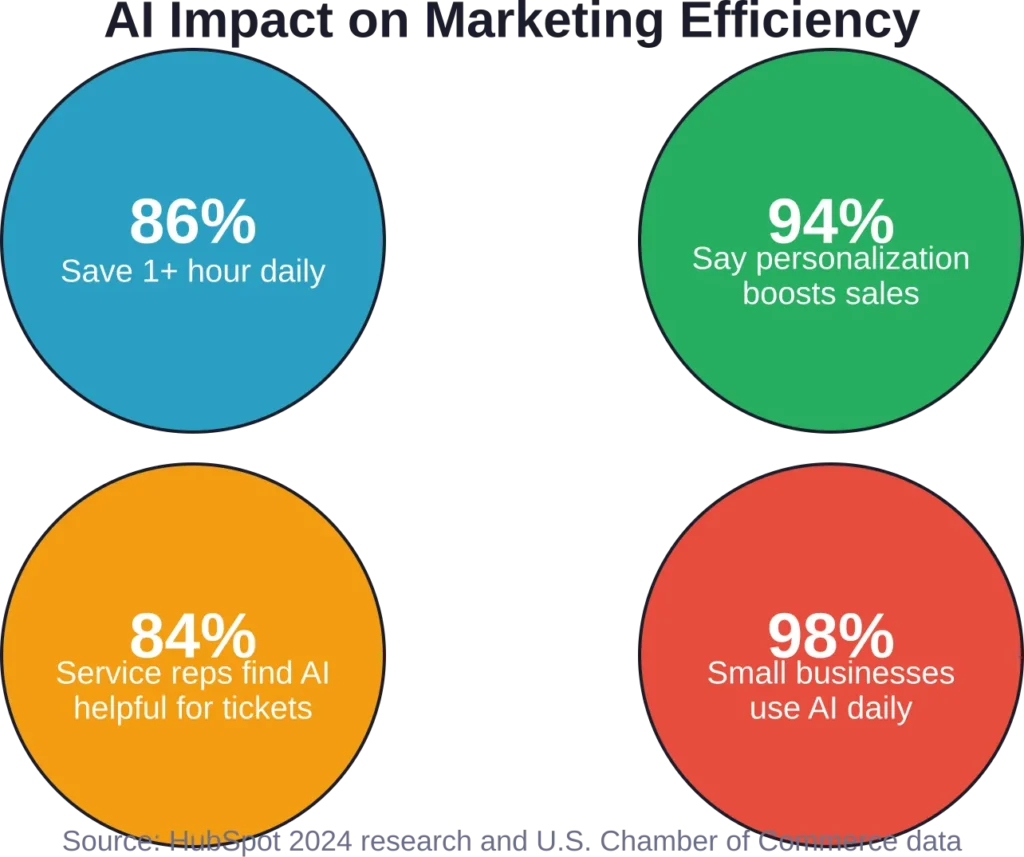
The marketing technology landscape has exploded. According to the U.S. Chamber of Commerce, 98% of small businesses already use AI in their day-to-day operations. (Note: This specific statistic appears in HubSpot source material citing Chamber of Commerce data.) That’s not just adoption—that’s a fundamental shift in how marketing gets done.
But here’s the thing. Not every AI marketing tool deserves a spot in your workflow. Many promise transformation and deliver glorified templates. Others lock their best features behind steep paywalls.
This guide cuts through the noise. The tools below offer genuine free functionality—not seven-day trials or feature-stripped demos. Real capabilities that solve real marketing problems without demanding credit card details upfront.
What Makes an AI Marketing Tool Actually Free
The term “free” gets thrown around loosely in software marketing. A truly free tool means usable core functionality without payment, not a limited trial that expires when projects hit their stride.
Genuinely free AI marketing tools share common characteristics. They provide substantial value in the no-cost tier. They don’t hide essential features behind upgrade walls. And they allow enough usage volume for small teams or solo marketers to accomplish real work.
That said, most free plans have reasonable limits. Storage caps, monthly usage quotas, or restrictions on advanced features. These boundaries make business sense for software companies while still delivering utility to users.
The sweet spot? Tools where the free tier handles 80% of what most marketers need most of the time.
Visual Design and Creative Tools
Visual content drives engagement. Social posts with images generate higher interaction. Landing pages with professional graphics convert better. Email campaigns with custom visuals stand out in crowded inboxes.
AI design tools democratized visual creation. Non-designers now produce professional-quality graphics that previously required specialized skills or freelance budgets.
Extuitive
Extuitive brings predictive intelligence to advertising creatives, helping marketers test and optimize ads before spending a single dollar. The platform is especially powerful for Shopify merchants and performance-driven brands.
The free/freemium tier includes AI generation of ad copy, images, and short videos, plus predictive performance scoring that forecasts CTR, ROAS, and conversion rates using AI agents modeled on over 150,000 real consumers. After connecting your Shopify store, it automatically analyzes products and suggests high-potential audience segments.
The intuitive dashboard removes guesswork from creative testing. Generate dozens of variations, get instant performance predictions, and launch only the strongest performers. The entire process takes minutes instead of days of expensive trial-and-error in Meta or TikTok Ads.
Product and audience insights in the free plan help maintain strategic consistency across campaigns. While advanced features and higher volume require a paid plan, the starter credits and 30-day trial give enough room to validate real results.
Extuitive paid plans start at higher-tier pricing (typically enterprise-oriented), but for brands spending $10k+ monthly on ads, the upgrade often pays for itself through reduced wasted spend and higher ROAS.
Contact Information:
- Website: extuitive.com
- Email: [email protected]
- LinkedIn: www.linkedin.com/company/extuitive
- Twitter: x.com/Extuitive_Inc
- Instagram: www.instagram.com/extuitiveinc
Canva Free
Canva revolutionized graphic design for non-designers. The free tier provides generous access to thousands of templates, fonts, and design assets.
AI tools within the free plan include Magic Write for generating text content and Magic Media for creating AI images—albeit with strict monthly limits. The platform covers social media graphics, presentations, documents, and basic video editing.
The drag-and-drop interface removes technical barriers. Choose a template, customize colors and text, export. The entire process takes minutes instead of hours.
Brand kit features in the free version allow consistent colors and fonts across designs. Not as robust as paid tiers, but sufficient for maintaining visual cohesion.
Canva Pro starts at $120/year and unlocks all premium AI features. For teams producing high volumes of visual content, the upgrade often pays for itself in time savings.
Adobe Express Free

Adobe brought its design heritage to a simplified, accessible platform. Adobe Express free tier includes thousands of templates and basic AI features for quick content creation.
The tool excels at social media content, flyers, and simple animations. Integration with Adobe’s Creative Cloud means seamless handoffs to Photoshop or Illustrator for advanced editing when needed.
Generative AI features in the free plan allow text-to-image creation, though with usage caps. Template customization remains unlimited.
Udio

Audio content marketing grew significantly. Podcasts, video soundtracks, social media reels—all demand background music or sound effects.
Udio generates custom music using AI. Describe the mood, genre, and length; the tool produces original tracks. The free tier allows up to 600 songs monthly, sufficient for most small business needs.
Legal clarity matters here. Check terms regarding commercial use of AI-generated audio, as copyright questions around training data remain under litigation.
Paid plans: Standard $10/month, Pro $30/month (plus free tier at up to 600 songs/month).
Content Creation and Writing Tools
Content remains the backbone of digital marketing. AI writing tools have matured significantly, moving from curiosity to necessity for teams producing blogs, social posts, and marketing copy at scale.
ChatGPT

OpenAI’s ChatGPT transformed how marketers approach content generation. The free version handles everything from blog outlines to email sequences to social media captions.
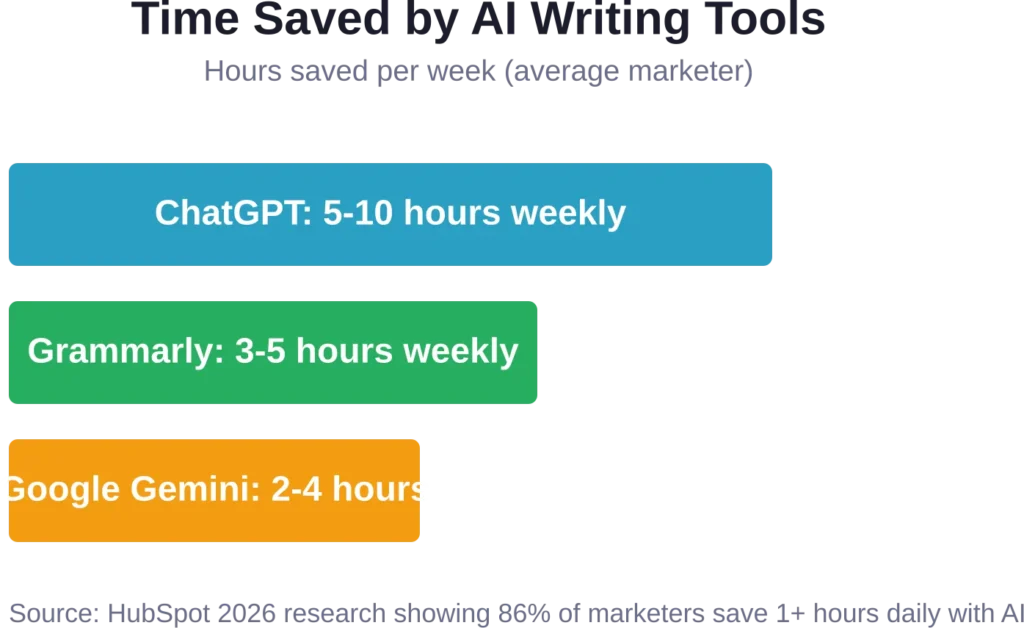
Research from the University of Pennsylvania estimates that “19% of workers may see at least 50% of their tasks impacted.” For marketers specifically, HubSpot data shows 86% of marketers report AI saves one or more hours daily.
The free tier offers a generous context capacity of 32,000 tokens (roughly 24,000 words per conversation). That’s enough for detailed brand guidelines or product specifications.
Real-world application? A home services business can use ChatGPT to instantly generate responses to new leads, helping them reply faster and win more jobs. Typical time savings range from five to ten hours per week on writing and communication tasks.
Limitations exist. The free version provides access to GPT-4o mini, not the most advanced models. Response times may slow during peak usage. And commercial rights to generated content warrant review depending on your use case.
Paid tiers start at $20/month for ChatGPT Plus (Plus tier), $200/month for Pro, $30/user/month for Business, and custom pricing for Enterprise.
Google Gemini

Google’s AI assistant integrates tightly with the company’s ecosystem—Drive, Docs, Gmail. That integration becomes valuable when content workflows already live in Google Workspace.
The free tier includes 15GB of storage across Google Photos, Drive, and Gmail. The AI itself handles research, summarization, and content drafting with access to Google’s search index for up-to-date information.
Where Gemini shines? Research-heavy content that requires current data. The tool pulls recent information more reliably than models trained on static datasets.
The interface feels familiar to anyone who uses Google products. No learning curve, no separate login, no context switching between tools.
Grammarly Free

Grammarly built its reputation on grammar and spell-checking. The AI-powered free version now extends to tone detection, clarity suggestions, and basic style recommendations.
Every piece of marketing content benefits from error-free writing. Grammarly catches mistakes that slip past manual proofreading—especially valuable when producing high-volume content or writing quickly.
The browser extension works everywhere: email clients, content management systems, social media platforms. Write anywhere, get corrections everywhere.
Free limitations center on advanced features. Plagiarism detection, genre-specific style suggestions, and tone adjustments require Grammarly Pro at $30/member/month and Enterprise (custom pricing).
Email Marketing Platforms
Email remains one of marketing’s highest-ROI channels. Email marketing is recognized as a high-ROI channel for B2C businesses.
Free email marketing tools with AI capabilities handle automation, segmentation, and campaign optimization without upfront costs.
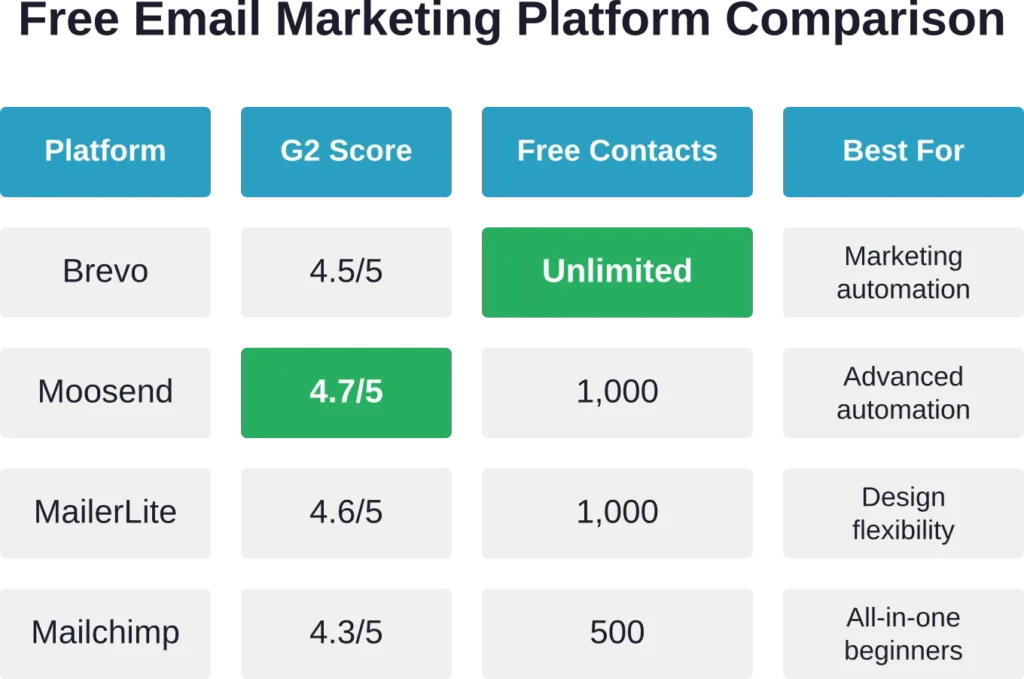
| Platform | G2 Rating | Free Plan Contacts | AI Features | Paid Plan From |
|---|---|---|---|---|
| Brevo | 4.5/5 | Unlimited | Send time optimization, subject line AI | $8.08/month |
| MailerLite | 4.6/5 | 1,000 | Smart sending, content suggestions | $7/month |
| Moosend | 4.7/5 | 1,000 | Advanced automation, AI recommendations | $9/month |
| Mailchimp | 4.3/5 | 500 | Creative Assistant, send time optimization | $6.35/month |
| Zoho Campaigns | 4.3/5 | 2,000 | Zia AI assistant, predictive analytics | $3/month |
Brevo (formerly Sendinblue)

Brevo stands out with unlimited contact storage in the free tier—rare among email platforms. The limitation sits on daily sending volume (300 emails per day), not list size.
AI features include marketing automation workflows, send time optimization, and subject line recommendations. The platform also provides SMS marketing, chat, and CRM functionality in the free plan.
G2 reviewers rate Brevo at 4.5/5, praising its beginner-friendly interface and automation capabilities.
MailerLite
Simplicity defines MailerLite. The free plan supports up to 1,000 contacts and 12,000 monthly emails with access to automation, landing pages, and website builders.
AI-powered features handle smart sending (optimal delivery times) and content suggestions. The drag-and-drop editor makes template customization straightforward.
With a 4.6/5 G2 rating, MailerLite earns consistent praise for design flexibility and ease of use. Paid plans begin at $7 monthly.
Moosend
Moosend delivers advanced automation in its free tier—unusual for no-cost plans. The platform supports up to 1,000 subscribers with unlimited email sends.
AI recommendations optimize send times, subject lines, and content elements based on subscriber behavior. The automation builder handles complex workflows including e-commerce integrations.
At 4.7/5 on G2, Moosend scores highest among free email platforms for automation sophistication.
Social Media Management and Scheduling
Consistent social media presence demands time—time most small teams lack. Scheduling tools with AI assistance solve this problem by batching content creation and optimizing posting times.
Buffer Free

Buffer offers a free plan with social media scheduling capabilities.
AI-powered features suggest optimal posting times based on when audiences engage most. The analytics dashboard tracks performance across platforms.
Landing page functionality integrates with social profiles, creating a simple link-in-bio solution without additional tools.
Later

Visual planning defines Later’s approach. The free tier has limitations on post scheduling capacity.
The visual content calendar shows how posts appear together—particularly valuable for Instagram aesthetics and brand cohesion. Basic analytics track engagement and reach.
TikTok and Instagram Reels support in the free plan addresses short-form video’s growing importance in social strategy.
SEO and Content Optimization
Search visibility drives organic traffic. AI-powered SEO tools identify opportunities, optimize content, and track rankings—capabilities that traditionally required expensive enterprise software.
Google Search Console

Completely free and essential. Google Search Console shows exactly how the search engine sees your site: which queries drive traffic, which pages rank where, and what technical issues need fixing.
AI doesn’t directly power the tool, but the insights guide AI-assisted content optimization. See which keywords already generate impressions but few clicks? Create optimized content targeting those terms.
Performance reports, coverage analysis, and Core Web Vitals monitoring provide data that informs every other marketing decision.
Ubersuggest Free

Neil Patel’s Ubersuggest offers limited free searches daily—three queries with basic keyword data, backlink information, and site audit reports.
The free tier suffices for occasional research or small sites with focused keyword strategies. Daily search limits prevent comprehensive competitor analysis, but the quality of data matches paid tools.
AI-generated content ideas suggest blog topics based on keyword research, bridging the gap between SEO data and content planning.
AnswerThePublic Free

Understanding search intent requires knowing what questions people ask. AnswerThePublic visualizes search queries as questions, prepositions, and comparisons.
The free version allows several daily searches, displaying query data in both visual maps and sortable lists. The tool reveals content gaps—topics your audience searches for that existing content doesn’t adequately address.
Content calendars practically build themselves from AnswerThePublic data. Each question represents a potential blog post, FAQ section, or social media post.
Analytics and Insights
Data without insights wastes time. AI-powered analytics tools transform raw numbers into actionable recommendations.
Google Analytics 4

The standard for web analytics. GA4’s free tier handles millions of events monthly—more than sufficient for most businesses.
Machine learning within GA4 predicts future actions: which visitors likely to convert, which segments show purchase intent, which campaigns drive valuable traffic. These insights used to require data science teams.
Anomaly detection automatically flags unusual traffic patterns or conversion rate changes. Instead of manually monitoring dashboards, alerts arrive when something significant happens.
Microsoft Clarity

Session recordings and heatmaps reveal how visitors actually use websites. Clarity offers both, completely free, with no traffic limits.
AI-powered insights identify rage clicks (frustrated repeated clicking), dead clicks (clicks on non-interactive elements), and excessive scrolling—all signals of user experience problems.
The tool integrates with Google Analytics, combining quantitative data with qualitative behavior observation. See that a page has high bounce rates in GA? Watch Clarity recordings to understand why visitors leave.
Customer Support and Chatbots
Customer expectations shifted. Fast responses matter. Customer service teams report improved efficiency with AI support tools.
AI chatbots handle common questions 24/7, freeing human agents for complex issues requiring empathy and judgment.
Tidio Free

Tidio combines live chat with chatbot automation. The free plan includes one live chat seat and basic chatbot flows responding to up to 100 unique visitors monthly.
AI features help route conversations to appropriate agents and suggest responses based on conversation context. Integration with major e-commerce platforms makes setup straightforward.
Chatbase

Custom AI chatbots trained on your specific content. Upload documents, website pages, or FAQs; Chatbase creates a conversational AI that answers questions based on that information.
The free tier allows limited messages monthly but demonstrates the technology’s value. For businesses with extensive documentation or product catalogs, this approach ensures accurate, brand-specific responses.
CRM and Lead Management
Relationships drive revenue. Customer relationship management platforms organize contacts, track interactions, and identify sales opportunities.
HubSpot CRM Free
HubSpot’s free CRM provides unlimited users and up to one million contacts—essentially no practical limit for small to mid-size businesses.
AI features include lead scoring (predicting which contacts most likely to convert), email tracking, and meeting scheduling. The platform integrates with Gmail and Outlook, capturing email conversations automatically.
Marketing automation in the free tier handles simple workflows: welcome emails, task assignments, contact property updates. Enough to automate repetitive tasks without paying for marketing automation platforms.
Zoho CRM Free

Zoho’s free CRM supports up to three users with basic sales automation, contact management, and mobile apps.
Zoho CRM includes Zia, its AI assistant, with features including predictive analytics and workflow automation. The assistant learns from your data, improving recommendations over time.
Video Creation and Editing
Video dominates social media engagement. Video content has become increasingly important in social media marketing strategies.
AI video tools remove technical barriers, enabling marketers without video production experience to create professional content.
CapCut

TikTok’s CapCut brings professional editing capabilities to mobile and desktop, completely free. AI features include auto-captions, background removal, and smart reframing that adapts widescreen content to vertical formats.
The tool understands video content well enough to suggest cuts, transitions, and effects based on what appears in footage. Batch processing handles multiple clips simultaneously.
For social media marketers producing short-form content at volume, CapCut’s free tier handles most needs without limitation.
Descript Free

Text-based video editing transformed workflows. Descript transcribes video automatically; editing the transcript edits the video. Delete a sentence from the transcript? That segment disappears from the video.
The free tier includes limited transcription hours monthly and basic editing features. AI Studio Sound improves audio quality, removing background noise and echo.
Screen recording functionality makes tutorial and demo creation straightforward—record your screen, edit the transcript, export polished video.
Project Management and Collaboration
Marketing requires coordination. Multiple campaigns, team members, deadlines, and deliverables demand organization.
Notion Free

Notion combines documents, databases, and project management in one flexible workspace. The free plan supports unlimited pages and blocks for individuals.
AI features within Notion assist with writing, summarizing content, and extracting action items from meeting notes. The AI understands context from your workspace, providing relevant suggestions.
Template galleries offer pre-built marketing workflows: content calendars, campaign trackers, social media planners. Duplicate a template and customize rather than building from scratch.
Trello Free
Visual boards organize tasks and projects. Trello’s free plan provides unlimited cards and up to ten boards—adequate for small marketing teams or solo practitioners.
Butler automation (Trello’s AI-powered feature) handles repetitive tasks: moving cards between lists when conditions meet, adding due dates based on labels, creating cards from templates.
Integration with other tools (Slack, Google Drive, Dropbox) centralizes work without platform switching.
How to Choose the Right Free AI Marketing Tools
More tools don’t equal better marketing. Each additional platform adds complexity, learning curves, and context switching.
Start with your biggest pain point. Where does manual work consume the most time? Content creation? Social media scheduling? Lead follow-up? Choose one tool addressing that specific problem.
Test thoroughly before committing. Most free tiers allow genuine evaluation. Use the tool for two weeks in real workflows. Does it actually save time? Does output quality meet standards? Does it integrate with existing processes?
Consider the upgrade path. Many free tools offer smooth transitions to paid tiers as needs grow. Others lock essential features behind expensive enterprise plans. Understand the pricing trajectory before investing time in a platform.
Integration matters more than features. A tool with fewer features that connects to your existing stack often beats a powerful standalone platform. Data silos waste time and create inconsistencies.
Check the roadmap. And 91% of small businesses believe AI tools will help them reach their growth goals. (Note: This statistic appears in HubSpot source material.) That means rapid evolution in this space. Choose platforms actively developing AI capabilities, not resting on initial feature sets.
| Marketing Function | Recommended Free Tool | Time Savings | Best Alternative |
|---|---|---|---|
| Content Writing | ChatGPT | 5-10 hours/week | Google Gemini |
| Graphic Design | Canva | 3-6 hours/week | Adobe Express |
| Email Marketing | Brevo | 2-4 hours/week | MailerLite |
| Social Scheduling | Buffer | 1-3 hours/week | Later |
| SEO Research | Google Search Console | 2-5 hours/week | Ubersuggest |
| Web Analytics | Google Analytics 4 | 1-2 hours/week | Microsoft Clarity |
| CRM | HubSpot CRM | 3-5 hours/week | Zoho CRM |
Common Pitfalls When Using Free AI Marketing Tools
Free tools come with trademarks, sometimes literally. Many free plans display “Powered by [Tool Name]” on output—emails, landing pages, social posts. For established brands, this appears unprofessional.
Usage limits sneak up. Monthly quotas feel generous initially but shrink as adoption grows. A tool that works perfectly for three campaigns monthly becomes restrictive when scaling to ten.
Data ownership and privacy deserve scrutiny. Some free platforms retain rights to content created using their tools or train AI models on user data. Read terms of service, particularly for confidential client work or proprietary strategies.
Feature restrictions sometimes hide in details. The free plan might allow a capability but limit it severely—50 AI-generated images monthly sounds generous until five campaigns need visuals.
Platform lock-in creates problems later. Easy data export matters. Before investing months building contacts in a CRM or content in a project management tool, verify export functionality. Can you leave with your data if needs change?
The Future of Free AI Marketing Tools
Competitive pressure drives free tier expansion. As more companies enter the AI marketing space, free plans become marketing tools themselves—proving value before asking for payment.
Research from the University of Pennsylvania indicates that “19% of workers may see at least 50% of their tasks impacted.” For marketing specifically, that percentage likely runs higher given the field’s content-heavy nature.
Consolidation seems inevitable. Platforms adding AI features to existing products create all-in-one solutions. Email platforms add landing page builders. Design tools add video editing. CRMs add marketing automation.
That consolidation benefits users by reducing tool count but complicates selection. Choosing between specialized best-in-class tools and integrated good-enough platforms becomes the central decision.
Expect free tiers to remain substantial. The economics favor generous free plans: cloud infrastructure costs drop continuously while user acquisition costs rise. Providing free value at scale costs less than alternative marketing channels.
Building Your Free AI Marketing Stack
An effective free marketing technology stack might include five to eight core tools covering essential functions. More than that, and coordination overhead cancels productivity gains.
A sample starter stack for small businesses:
- Content creation: ChatGPT for writing, Canva for visuals
- Distribution: Brevo for email, Buffer for social media
- Optimization: Google Search Console for SEO, Google Analytics for measurement
- Management: HubSpot CRM for contacts, Notion for project coordination
This eight-tool stack covers content production, multi-channel distribution, performance tracking, and organizational infrastructure—all without monthly costs.
Integration requires attention even with free tools. Zapier’s free tier connects apps with basic automation. A simple integration: new HubSpot contacts automatically added to Brevo email lists. Or social media mentions saved to Notion for response tracking.
Review the stack quarterly. Usage patterns emerge. Tools that seemed essential go unused. Others hit free-tier limits repeatedly. Adjust based on actual adoption, not theoretical utility.
Frequently Asked Questions
The tools listed here offer genuine free functionality without credit card requirements or automatic trial expirations. However, most include limitations—usage caps, feature restrictions, or branding on output. These aren’t hidden costs but clearly documented boundaries of free tiers. Paid upgrades exist for higher volume or advanced features, but the free versions provide real utility indefinitely.
Absolutely. According to the U.S. Chamber of Commerce, 98% of small businesses already use AI in daily operations, many relying heavily on free tools. A strategic combination of free platforms—ChatGPT for content, Canva for design, Brevo for email, Buffer for social media, Google Analytics for tracking—covers core marketing functions without subscription costs. Limitations appear at scale, but small teams typically operate well within free-tier boundaries.
Quality differences vary by tool and use case. ChatGPT’s free version produces identical quality to paid tiers for most tasks; the upgrade brings speed and advanced features, not better writing. Canva free creates professional graphics, though paid tiers unlock premium templates and assets. Email platforms deliver emails identically regardless of plan; paid features affect automation sophistication and volume capacity. Test free versions against your standards—quality often surprises.
Fewer than you think. Five to eight carefully chosen tools typically cover essential marketing functions without creating coordination overhead. More tools mean more logins, more interfaces to learn, more places where data lives. Start with one tool per major function—writing, design, email, social media, analytics. Add specialized tools only when clear gaps appear in workflows.
Business models evolve, but major free tiers tend to persist. Platforms use free plans for user acquisition and market share, making sudden elimination unlikely. Restrictions tighten occasionally—usage limits drop or features move to paid tiers. However, grandfathering often protects existing users. The bigger risk is dependency on a single tool; maintaining basic familiarity with alternatives provides insurance against unexpected changes.
Integration quality varies. Major platforms (Google, HubSpot, Mailchimp) offer robust free-tier integrations with each other and popular tools. Smaller platforms may limit integrations to paid plans. Zapier’s free tier provides basic automation between apps, though with monthly task limits. Before committing to a free tool, verify it connects with your existing stack—check integration directories or test during evaluation.
Hitting free-tier limits validates tool value—a good problem. Evaluate three paths: upgrade to paid tier if the tool proves essential and pricing aligns with budget, switch to an alternative with more generous free limits if the current platform becomes prohibitively expensive, or optimize usage to stay within free boundaries if limits are soft caps rather than hard blocks. Most tools make upgrading straightforward, preserving existing data and configurations.
Taking Action with Free AI Marketing Tools
The barrier to entry for sophisticated marketing technology vanished. Tools that cost thousands monthly five years ago now offer free tiers with similar capabilities.
But tools alone accomplish nothing. Implementation determines results. The best free AI marketing stack in the world generates zero value sitting unused.
Start small. Choose one tool addressing your biggest time drain. Use it consistently for two weeks. Measure the impact—hours saved, quality improvements, additional output produced.
Then add a second tool once the first becomes habit. Build gradually rather than attempting comprehensive transformation overnight.
The research is clear. HubSpot data shows 86% of marketers report AI saves one or more hours daily. That time compounds—an hour daily becomes 260 hours yearly, or more than six work weeks recovered.
What could your marketing accomplish with an extra six weeks each year?
The tools exist. They’re free. They work. The only remaining question is whether you’ll use them.