

Quick Summary: Free Amazon keyword research tools help sellers discover high-volume search terms without upfront costs. Top free options include Amazon’s autocomplete, WisePPC, Sonar by Sellics, Helium 10’s limited free tier, Keyword Tool Dominator, and Google Keyword Planner adapted for Amazon research. These tools provide search volume estimates, competitor insights, and keyword suggestions that optimize product listings for better visibility and conversions.
Amazon keyword research separates sellers who struggle from those who dominate their categories. The right keywords drive organic traffic, improve conversion rates, and reduce advertising costs. But here’s the thing—effective keyword research doesn’t require expensive subscriptions.
Free Amazon keyword tools have evolved significantly. What started as basic autocomplete scrapers now includes sophisticated platforms offering search volume data, competitor analysis, and backend optimization suggestions. The catch? Understanding which free tools actually deliver actionable insights versus those that waste time with surface-level data.
This guide breaks down the best free Amazon keyword research tools available in 2026, comparing features, limitations, and strategic applications for sellers at different stages.
Why Amazon Keyword Research Differs from Google SEO
Amazon’s A10 algorithm prioritizes different signals than traditional search engines. Purchase intent matters more than raw traffic volume. A keyword generating 2,000 monthly searches with 10% conversion outperforms one with 20,000 searches and 0.5% conversion.
Amazon weighs these ranking factors:
- Sales velocity and conversion rate history
- Relevance between search terms and product attributes
- Customer behavior signals (click-through rate, time on page, bounce rate)
- Pricing competitiveness within the search results
- Fulfillment method and shipping speed
Backend search terms carry weight too. Amazon allocates specific character limits for hidden keywords that don’t appear in titles or bullet points but still influence search visibility. Smart sellers use backend fields for synonyms, alternate spellings, and secondary keywords without cluttering customer-facing content.
The Best Free Amazon Keyword Research Tools
Not all free tools offer equal value. Some provide genuine competitive intelligence; others deliver recycled autocomplete suggestions. Here’s what actually works.
WisePPC

One of the strongest free options currently available for Amazon keyword intelligence is WisePPC. Sign up for their open beta (no credit card required) to get full access to advanced keyword performance tracking and bulk management tools.
It connects directly to your Amazon Advertising account and delivers deep keyword-level data, search term reports, and long-term historical metrics that Amazon normally deletes. You can analyze, filter, and optimize thousands of keywords with visual charts. Limitations exist though. It excels at PPC performance analytics rather than new keyword discovery and lacks external search volume data or broad suggestion lists. The full feature set is free during beta but will become paid afterward.
Strategic application: Use it after gathering initial keywords from autocomplete or other tools. Connect your account, identify high-performing long-tails, pause weak ones, and optimize bids in bulk for better campaign results over time.
Contact Information:
- Website: wiseppc.com
- Facebook: www.facebook.com/people/Wise-PPC/61573154427547
- LinkedIn: www.linkedin.com/company/wiseppc
- Instagram: www.instagram.com/wiseppc
Amazon’s Built-In Autocomplete

The most overlooked free tool sits directly in Amazon’s search bar. Type a seed keyword and watch the dropdown reveal actual customer search queries ranked by popularity.
This autocomplete data reflects real-time search behavior. Amazon prioritizes suggestions based on search frequency, seasonality, and trending patterns. The method costs nothing and requires no account setup.
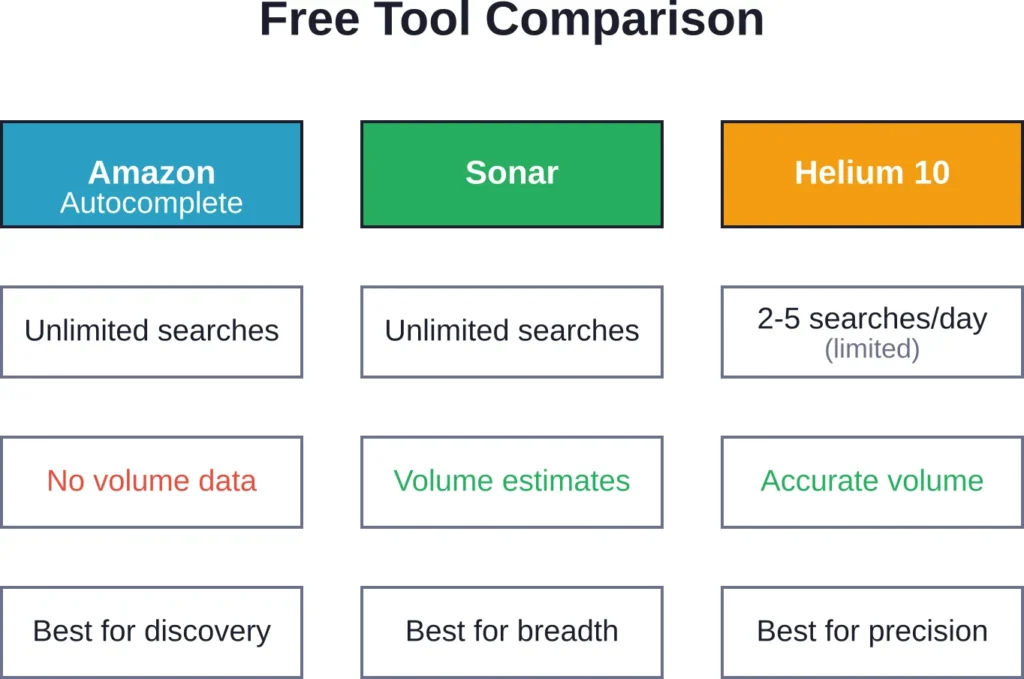
Limitations exist though. Autocomplete shows only 10-12 suggestions per query, provides no numerical search volume, and doesn’t indicate competition levels. Sellers need to manually test variations and record results.
Strategic application: Start broad, then narrow. Search “yoga mat” to see top-level categories, then drill into “yoga mat extra thick” or “yoga mat non-slip” for long-tail variations. Test different word orders—Amazon treats “yoga mat thick” differently from “thick yoga mat.”
Sonar by Sellics

Sonar operates as a dedicated free Amazon keyword database. The tool aggregates millions of search terms across Amazon marketplaces, providing keyword suggestions without requiring payment or even registration for basic searches.
Enter a seed keyword or ASIN to generate related terms. Sonar displays search volume estimates (though not always current), filters by relevance, and shows keyword match types. The reverse ASIN lookup reveals which keywords competitors rank for organically.
The free version doesn’t limit daily searches. Sellers can export keyword lists for offline analysis. The interface stays simple—no overwhelming dashboards or feature bloat.
Real talk: search volume numbers should guide direction, not dictate strategy. Sonar’s estimates come from historical data and may lag seasonal trends by 30-60 days. Cross-reference high-volume keywords with actual Amazon searches to verify current demand.
Helium 10’s Free Tier

Helium 10 built its reputation as a premium Amazon toolkit, but the free plan offers legitimate functionality. Users get limited daily uses of Magnet (keyword research) and Cerebro (reverse ASIN lookup) without entering payment information.
The free tier allows approximately 2-5 keyword searches daily, depending on current promotional limits. That’s enough for targeted product research but insufficient for catalog-wide optimization.
What sets Helium 10 apart: the Cerebro reverse ASIN tool reveals organic and sponsored keywords competitors target. Input up to two ASINs (in free mode) to see their keyword portfolios side-by-side, identifying overlap and gaps.
Magnet generates keyword suggestions with search volume, competing products count, and purchase intent signals. The data quality exceeds most free alternatives because Helium 10 maintains its own Amazon search database updated weekly.
The downside? Aggressive upgrade prompts and artificial limits that reset daily. Power users hit free-tier caps quickly. But for sellers researching 1-2 products monthly, the free version delivers professional-grade insights.
Keyword Tool Dominator

Keyword Tool Dominator scrapes Amazon autocomplete at scale. Instead of manually typing variations, the tool systematically queries Amazon with alphabetical and numerical suffixes (“yoga mat a,” “yoga mat b,” etc.) to extract hundreds of suggestions per seed keyword.
The free version allows three searches daily. Each search generates 10-20 keyword ideas depending on the seed term’s breadth. Results download as CSV files for spreadsheet analysis.
This tool excels at uncovering long-tail variations humans wouldn’t think to test manually. Searching “coffee maker” might surface “coffee maker with grinder and thermal carafe” or “coffee maker for camping no electricity”—specific buyer intents that indicate strong purchase consideration.
Limitations: zero search volume data, no competition metrics, and daily search caps. Keyword Tool Dominator functions best as a discovery tool, not a complete research solution. Find keywords here, then validate them with volume-focused tools.
Google Keyword Planner (Adapted for Amazon)
Google Keyword Planner wasn’t built for Amazon research, but clever sellers adapt it. The tool reveals general search demand for product categories, helping validate market size before diving into Amazon-specific terms.
The strategy: research broad product terms in Keyword Planner to gauge overall interest, then translate high-volume Google keywords into Amazon-optimized variations. Someone searching “best wireless earbuds under 50” on Google likely uses similar terms on Amazon, possibly shortened to “wireless earbuds under 50.”
Keyword Planner requires a Google Ads account but doesn’t demand active campaigns or ad spend for basic access. The interface shows monthly search ranges (“1K-10K,” “10K-100K”) rather than exact numbers unless campaigns are running, but ranges suffice for market validation.
Cross-reference Google trends with Amazon’s autocomplete. If “ergonomic keyboard wireless” shows 10K-100K monthly Google searches and appears in Amazon autocomplete, demand exists. If the term ranks high on Google but doesn’t autocomplete on Amazon, competition may be lower—an opportunity gap.
Advanced Free Techniques for Keyword Research
Tools provide data. Strategy transforms data into rankings.
Competitor ASIN Analysis
Identify top competitors in the target category. Copy their ASINs and run reverse lookups through Sonar or Helium 10’s free tier. This reveals which keywords competitors rank for organically and which they bid on for sponsored ads.
Look for patterns. If five competitors in “camping lantern” all rank for “camping lantern rechargeable usb,” that keyword drives category sales. If only one competitor owns “camping lantern mosquito repellent,” it might represent untapped differentiation.
Document competitor keyword strategies in spreadsheets. Track which keywords overlap (high competition, high value) versus unique terms (potential gaps). Prioritize keywords where 3-4 strong sellers rank but the category leader doesn’t—these indicate proven demand with winnable positioning.
Backend Keyword Optimization
Amazon allocates backend search term fields for keywords that don’t fit naturally into titles or bullets. The limit for backend search terms is approximately 249 bytes (characters including spaces) depending on category.
Backend optimization rules:
- Never repeat keywords already in the title, bullets, or description—Amazon ignores duplicates
- Include common misspellings if customers genuinely search them (“excercise” for “exercise”)
- Add synonyms and related terms (“sofa” in backend if “couch” appears in the title)
- Use abbreviations customers might search (“BT” for Bluetooth, “USB-C” and “USB Type-C”)
- Skip filler words (“and,” “the,” “for”)—they consume character limits without ranking value
Test backend terms by searching them on Amazon. If the product doesn’t appear in results after 24-48 hours, the term either lacks search volume or faces too much competition to rank. Replace non-performers with alternatives.
Seasonal Keyword Monitoring
Search demand fluctuates throughout the year. “Halloween costumes” peaks in September-October, then collapses in November. “Tax software” surges January-April. “Pool floats” dominates May-July.
Free tools don’t always surface seasonal patterns clearly, but sellers can track them manually. Run the same keyword searches monthly through Sonar or Amazon autocomplete. Screenshot or record which terms appear and their relative positions. Rising autocomplete suggestions signal growing demand; disappearing terms indicate seasonal decline.
Plan content updates 60-90 days before peak seasons. If “Christmas lights outdoor” starts appearing in August autocomplete, optimize listings by September to capture early shoppers. Delay until November and established competitors own the rankings.
Common Free Tool Limitations and Workarounds
Free tools impose restrictions. Understanding limitations helps sellers extract maximum value within constraints.
Search Volume Accuracy
Free tools estimate search volume using various methodologies—some scrape autocomplete frequency, others sample clickstream data, many extrapolate from limited datasets. Accuracy varies wildly.
Sonar’s volume estimates can lag reality by weeks or show numbers from previous years. Helium 10’s free tier sometimes displays outdated cached data. Keyword Tool Dominator provides no volume metrics whatsoever.
The workaround: treat volume numbers as directional indicators, not absolute truth. A keyword showing 5,000 monthly searches might actually generate 3,000 or 8,000, but it definitely outperforms one showing 200 searches. Use volume data to rank keywords relatively, then validate demand by checking:
- Number of search results (“1-16 of over 50,000 results” indicates competition and demand)
- Sponsored product count (if 8+ ads appear, sellers find the term profitable enough to bid on)
- Best Sellers Rank of top organic results (lower BSR indicates higher sales velocity)
Daily Usage Caps
Helium 10 and Keyword Tool Dominator limit free users to 2-5 searches daily. That sounds restrictive, but strategic sellers make it work.
The approach: front-load research into product launch phases. Spend a week running daily searches across different keyword angles, building a comprehensive list. Then use that list for 30-60 days while monitoring performance. When launching the next product, repeat the research cycle.
Alternatively, create separate accounts with different email addresses. (Check each tool’s terms of service first—some prohibit this, others allow one account per user.)
Missing Competitor Intelligence
Free tiers rarely include full competitor tracking. Paid plans monitor competitor keyword rankings daily, alert when competitors launch new products, and track pricing changes. Free versions offer snapshots at best.
Build manual tracking systems. Every two weeks, run reverse ASIN lookups on top three competitors using the free Helium 10 searches. Export results to spreadsheets. Compare exports month-over-month to spot new keywords competitors target or old keywords they’ve abandoned.
This manual process consumes time but costs nothing. For sellers managing 1-5 products, the investment makes sense. Beyond that scale, paid tools justify their cost through time savings.
Combining Free Tools for Maximum Insight
No single free tool delivers complete keyword intelligence. Stack them strategically.
The three-tool method:
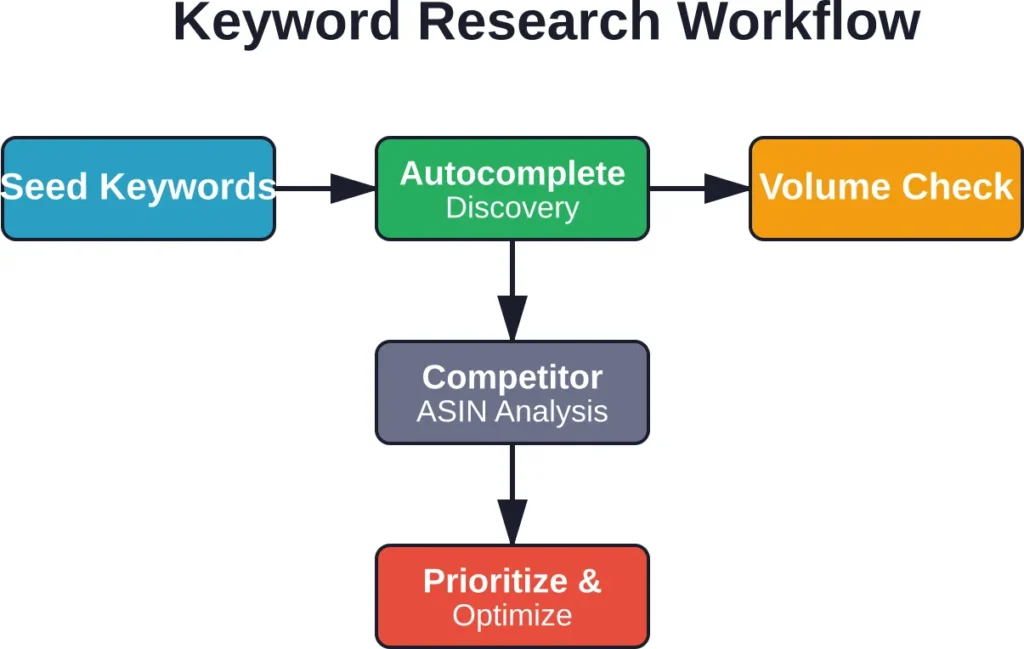
Start with Amazon autocomplete for seed keyword discovery. Type the main product term, record all suggestions, then test variations (plurals, modifiers, synonyms). Build a list of 30-50 seed keywords.
Run top seed keywords through Sonar to expand the list and get rough volume estimates. Sonar might suggest related terms the autocomplete missed. Add high-volume suggestions to the master keyword list.
Use Helium 10’s free daily searches for competitor ASIN analysis. Input the top-selling ASIN in the category. Review which keywords they rank for organically. Cross-reference competitor keywords against the master list. Keywords appearing in both places deserve priority—they reflect actual buyer searches and proven ranking potential.
| Tool | Primary Function | Best Used For | Daily Limit |
|---|---|---|---|
| Amazon Autocomplete | Seed discovery | Finding real customer language | Unlimited |
| Sonar | Volume estimation | Expanding keyword lists | Unlimited |
| Helium 10 Free | Competitor analysis | Validating keyword potential | 2-5 searches |
| Keyword Tool Dominator | Long-tail mining | Discovering specific variations | 3 searches |
| Google Keyword Planner | Market sizing | Validating category demand | Unlimited |
When Free Tools Aren’t Enough
Free tools serve specific seller segments well. New sellers testing product concepts don’t need $99/month subscriptions. Small catalog sellers (1-10 products) can manage with free-tier research.
But limitations accumulate at scale. Managing 50+ products with manual keyword tracking becomes untenable. Sellers spending $5,000+ monthly on Amazon PPC need accurate bid optimization data that free tools can’t provide. Agencies handling multiple client accounts require bulk processing and white-label reporting.
The transition point typically hits around $10,000-$15,000 monthly revenue. At that stage, a $99-$199 monthly tool subscription represents 1-2% of revenue—minor compared to the time savings and incremental sales lift from better keyword targeting.
According to G2 analysis, professional SEO tools like Ahrefs start at $129/month for backlink analysis, Moz Pro starts at $99/month for all-purpose organic SEO tasks, and SE Ranking offers options at $99/month for reporting and analytics. Amazon-specific tools follow similar pricing tiers.
Community discussions suggest sellers often test free tools for 30-90 days, then upgrade when they hit either research volume limits or need features like automated rank tracking, PPC bid optimization, or inventory forecasting tied to keyword performance.
Frequently Asked Questions
Free tools provide directional accuracy rather than precision. Search volume estimates may vary 20-40% from actual numbers, and data updates lag by days or weeks. Paid tools invest in larger datasets, more frequent updates, and proprietary algorithms that improve accuracy. For product launches and category research, free tool accuracy suffices. For optimizing high-spend PPC campaigns, paid tools justify their cost through better data quality.
Absolutely. Thousands of sellers build profitable Amazon businesses using exclusively free keyword tools. The core ranking factors—conversion rate, sales velocity, customer reviews—matter more than keyword research tool sophistication. Free tools identify the right keywords; product quality, pricing, and listing optimization determine whether those keywords convert into sales and rankings.
Keyword Tool Dominator excels at long-tail discovery by systematically scraping Amazon autocomplete with alphabetical variations. It surfaces specific multi-word phrases that manual searches miss. Amazon’s own autocomplete also reveals long-tail terms when you test detailed product attributes—typing “yoga mat extra thick non slip” generates more specific suggestions than just “yoga mat.”
Review keywords quarterly for evergreen products, monthly for seasonal products, and weekly during peak seasons. Amazon’s search trends shift as customer preferences evolve, competitors launch new products, and seasonal demand fluctuates. Set calendar reminders to re-run keyword research at regular intervals. Even if the core keywords remain stable, new long-tail variations emerge as the market matures.
Backend keywords absolutely influence rankings when used correctly. Amazon’s algorithm indexes backend search terms and matches them against customer queries, even though shoppers never see these hidden fields. The key: avoid repeating frontend keywords, use all available character limits, and focus on synonyms or alternate phrasings customers might search. Products often rank for 30-50% more keywords after proper backend optimization.
Reverse ASIN lookup is completely legal. These tools analyze publicly available data—specifically, which keywords return a given ASIN in search results. No private data is accessed, no Amazon terms are violated, and no seller accounts face risk from using these tools. Amazon itself doesn’t provide reverse ASIN functionality, but third-party tools fill that gap by crawling search results just as Google crawls websites.
New sellers should prioritize low-competition, medium-volume keywords initially. High-volume terms attract established sellers with thousands of reviews and optimized supply chains—ranking against them as a newcomer proves difficult. Target keywords with 500-2,000 monthly searches where top results have under 100 reviews. Build sales velocity and review count there, then expand into higher-volume, higher-competition keywords as the product gains traction.
Moving Forward with Free Keyword Research
Free Amazon keyword research tools provide genuine competitive advantages when used strategically. The limitations—daily caps, delayed data, missing features—matter less than execution quality.
Start with clear research objectives. Don’t just collect keywords; understand which terms indicate high purchase intent versus casual browsing. A searcher typing “coffee maker” might be researching; someone searching “coffee maker with thermal carafe and timer” is ready to buy.
Layer multiple free tools to compensate for individual weaknesses. Use autocomplete for discovery, Sonar for volume context, Helium 10 for competitor validation, and Google Keyword Planner for market sizing. The combined dataset rivals many paid alternatives.
Track results religiously. Build spreadsheets documenting which keywords drive impressions, clicks, and conversions. Free tools won’t automatically track performance, so manual monitoring becomes essential. Review this data monthly to identify which keyword types convert best, then double down on those patterns.
The Amazon marketplace rewards sellers who understand customer search behavior better than competitors. Free keyword tools provide that understanding without subscription costs—the rest comes down to product quality, pricing strategy, and optimization execution.