

Quick Summary: Amazon analytics tools help sellers track sales, optimize listings, and understand customer behavior. The best tools include Amazon’s native Business Reports and Brand Analytics (free for registered brands), Helium 10 for keyword research and market intelligence, and specialized profit trackers like Sellics and SellerBoard. Choose your stack based on your selling model—private label brands need different insights than wholesale resellers or arbitrage sellers.
Most Amazon sellers drown in data but starve for insights.
Seller Central hands over dozens of reports. Third-party tools promise competitive intelligence. Spreadsheets pile up with numbers that never quite answer the basic question: which products actually make money?
The difference between sellers who scale and those who plateau isn’t access to data. Everyone has access. The gap comes down to using the right analytics tools for the right questions—profit tracking when margins matter, keyword tools when visibility drops, market intelligence before launching new ASINs.
This guide breaks down Amazon analytics tools by what they actually do, not marketing fluff. Some are built into Seller Central at no cost. Others require subscriptions but deliver specific advantages. A few handle tasks Amazon’s native tools can’t touch.
Here’s what matters for your business in 2026.
What Amazon Analytics Tools Actually Measure
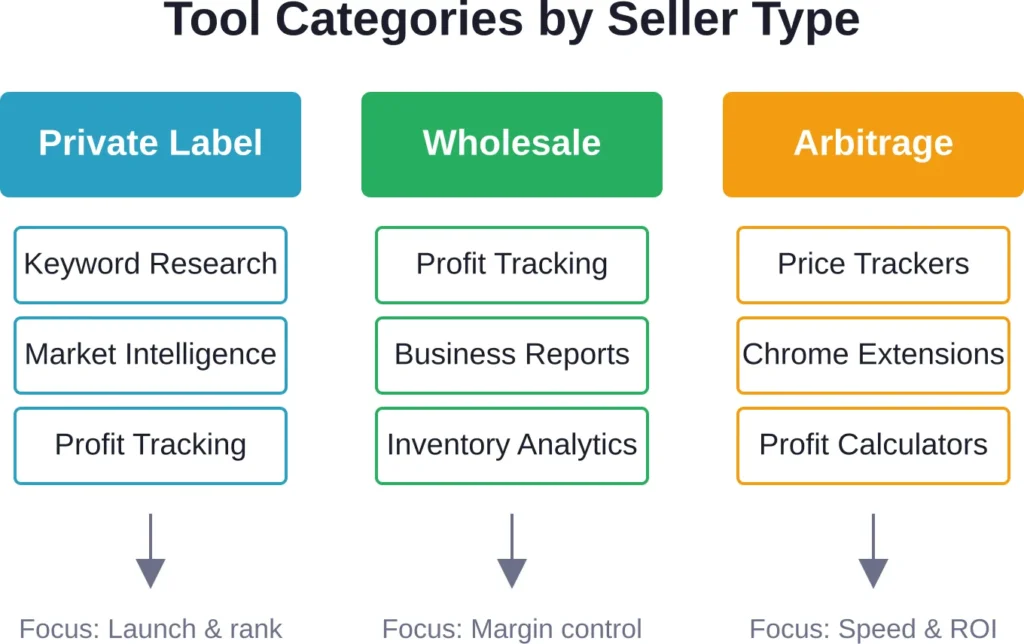
Analytics tools fall into three categories based on the questions they answer.
Profit and financial analytics track revenue, costs, fees, and net margins. These tools connect advertising spend, FBA fees, cost of goods, and refunds into one dashboard. Without accurate profit tracking, sellers mistake revenue growth for business health—a dangerous assumption when Amazon fees and ad costs climb.
Keyword and SEO analytics reveal what customers search, which terms convert, and where listings rank. Amazon doesn’t show most search terms that trigger sales. Third-party keyword tools fill that gap, exposing opportunities competitors miss and helping sellers optimize titles, bullet points, and backend keywords.
Market intelligence tools analyze competitor pricing, inventory levels, review counts, and bestseller rank fluctuations. Before launching a product or adjusting strategy, sellers need to understand niche saturation, seasonal patterns, and how established brands behave. Market tools provide that context.
Most successful sellers use tools from all three categories. The right combination depends on selling model—private label, wholesale, arbitrage, or hybrid.
Best Keyword Research and SEO Analytics Tools
Amazon provides roughly 60-70% of search term data through Brand Analytics. Third-party keyword tools fill the gap, revealing untapped search volume and reverse-engineering competitor keyword strategies.
1. WisePPC

WisePPC offers a suite of tools, but its keyword and search term analytics capabilities stand out. The platform delivers deep historical data on every keyword and target with hourly granularity — far beyond Amazon’s 60–90 day limit. Advanced filters and segmentation by match type, placement, and bid strategy help quickly spot high-performing and wasteful keywords.
Sellers can track thousands of keywords in real time, identify low-ROAS terms or rising opportunities, and instantly adjust bids, add negatives, or scale budgets.
WisePPC also includes detailed placement analysis and multi-metric charts that reveal exactly how keywords drive sales and efficiency.
The platform suits Amazon sellers and agencies focused on scaling PPC campaigns and boosting both paid and organic visibility.
Contact Information:
- Website: wiseppc.com
- Facebook: www.facebook.com/people/Wise-PPC/61573154427547
- LinkedIn: www.linkedin.com/company/wiseppc
- Instagram: www.instagram.com/wiseppc
2. Helium 10

Helium 10 offers a suite of tools, but its keyword research capabilities stand out. Cerebro reverse-engineers competitor ASINs to show which keywords drive their sales. Magnet discovers high-volume, low-competition keywords in any niche.
Keyword Tracker monitors ranking positions daily for target search terms. Sellers track up to thousands of keywords across multiple ASINs, identifying when rankings drop so they can adjust bids or listing content.
Helium 10 also includes listing optimization tools that analyze keyword density, readability, and compliance with Amazon’s guidelines.
The platform suits private label sellers launching new products or optimizing existing catalogs for better organic visibility.
3. Jungle Scout

Jungle Scout combines product research with keyword analytics. Its Keyword Scout tool shows search volume, competition level, and suggested bid ranges for any keyword.
The Rank Tracker monitors daily position changes. Jungle Scout also estimates sales volume for competitor ASINs, helping sellers gauge niche size before committing to product launches.
Best for sellers in the research phase who want keyword data integrated with product validation metrics.
4. AMZScout

AMZScout provides keyword research alongside a Chrome extension that displays niche metrics directly on Amazon search results pages. The keyword tracker shows volume, competition, and related terms.
The tool focuses on simplicity and speed. Sellers get quick keyword insights without navigating complex dashboards.
Ideal for arbitrage sellers or those who need lightweight keyword data without full SEO suites.
Top Amazon’s Native Analytics Tools (Free for All Sellers)
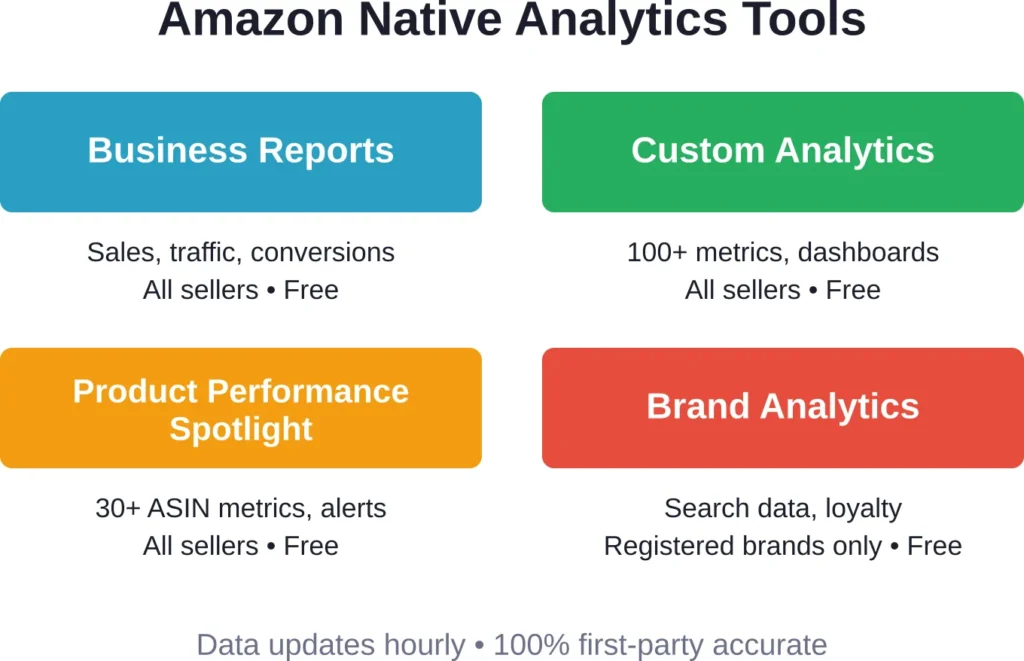
Amazon provides powerful analytics built into Seller Central. These tools cost nothing and update hourly with first-party data direct from Amazon’s systems.
1. Business Reports
Business Reports form the foundation of Amazon seller analytics. Navigate to Reports > Business Reports in Seller Central to access sales dashboards, traffic metrics, and detail page performance.
The Sales Dashboard shows daily revenue, units sold, and order counts with year-over-year comparisons. Drill down by ASIN to identify which products drive growth and which underperform.
Detail Page Sales and Traffic reports reveal page views, sessions, conversion rates, and buy box percentage for each listing. High traffic with low conversions signals pricing or listing issues. Low traffic despite good conversion means visibility problems—time for keyword optimization or advertising.
As of October 2024, sellers can now search Business Reports by ASIN. Enter up to 100 ASINs in the search bar to filter reports instantly. Previously, this required downloading data and filtering offline—a time-consuming process now streamlined.
2. Custom Analytics
Launched fully in October 2025 after a pilot phase, Custom Analytics brings over 100 metrics into customizable dashboards. Instead of piecing together multiple reports, sellers build views tailored to their specific needs.
Custom Analytics offers heat maps for seasonal patterns, funnel diagrams to identify customer drop-off points, column charts, and multi-axis trend charts. Drag and drop data points to create reports comparing different time periods.
New metrics include account health data, promotion performance, product ratings, and customer reviews—all in one tool. Pre-built dashboard templates help new users start quickly, with options to customize based on unique business goals.
Early users report saving hours weekly with clearer visibility into business performance. The tool updates hourly, providing near real-time insights.
3. Product Performance Spotlight
Product Performance Spotlight (PPS) launched in 2025 as a centralized dashboard for tracking ASIN performance across 30+ metrics. Access it through Reports > Business Reports > By Child ASIN Report, then click into any ASIN.
PPS monitors sales, traffic, inventory, pricing, costs, and promotions in one view. It also compares individual products against similar items, revealing competitive positioning.
The standout feature: proactive alerts. Sellers create custom alerts for significant performance changes—inventory running low, conversion rate drops, pricing inconsistencies. According to Amazon internal data from June-July 2025, sellers using PPS performance alerts recovered from metric declines in half the time—three days versus nearly six days for those without alerts.
4. Brand Analytics (Registered Brands Only)
Brand Analytics requires enrollment in Amazon Brand Registry. For registered brands, it unlocks aggregate customer data across several dashboards.
Search Query Performance shows top search terms customers use to find products, along with click share, conversion share, and cart add rates. This reveals which keywords drive actual purchases versus mere clicks.
Search Catalog Performance displays how specific ASINs perform in search results for different queries. Identify where listings rank high but convert poorly—signals to adjust pricing or images.
As of March 2023, sellers can download Brand Analytics data in four formats: Simple view (current filters), Comprehensive view (all queries for selected brand and date range), Amazon’s Choice badge data (monthly performance with and without the badge), and Search funnel outliers data (top and bottom performing queries without reviewing thousands of rows).
Customer Loyalty Analytics tracks repeat purchase behavior, a critical metric for understanding customer lifetime value and brand loyalty. This data helps brands focus on products that generate repeat buyers, not just one-time transactions.
Best Profit and Financial Analytics Tools
Amazon’s native reports show revenue but struggle with true profit calculation. FBA fees, advertising costs, promotions, refunds, and cost of goods scatter across multiple reports. Profit-focused tools consolidate everything into net margin views.
1. SellerBoard

SellerBoard specializes in real-time profit tracking. It connects directly to Seller Central and automatically imports all fees, advertising spend, refunds, and returns.
The dashboard shows net profit per product, per day, and per marketplace. Sellers input cost of goods once; SellerBoard calculates true margins accounting for every expense Amazon charges.
The tool also tracks PPC profitability by campaign, showing which ads generate profit versus which burn budget. It monitors refund rates and alerts when products show unusual return patterns.
Best for sellers who need accurate profit data without manual spreadsheet work.
2. Sellics (Now Perpetua)

Sellics merged with Perpetua, combining profit analytics with AI-powered advertising optimization. The platform tracks financial performance while automating bid adjustments based on profitability targets.
Sellics shows profit margins by ASIN, factoring in all Amazon fees, ad spend, and customizable COGS entries. The advertising engine adjusts bids hourly to hit target ACoS or maximize total profit.
The tool suits sellers managing significant ad budgets who want automation tied directly to profit metrics rather than revenue targets.
3. HelloProfit

HelloProfit focuses on simplicity. Connect Seller Central, enter product costs, and the dashboard displays profit trends without overwhelming detail.
It tracks inventory levels alongside profitability, alerting when stock runs low on profitable items. The tool also monitors hijackers and buy box status changes that affect revenue.
Best for newer sellers or those running smaller catalogs who want clean profit visibility without enterprise complexity.
Best Market Intelligence Tools
Market intelligence tools track competitor behavior, niche trends, and historical data that inform launch decisions and pricing strategies.
1. Keepa

Keepa tracks price history, sales rank fluctuations, and buy box ownership for any ASIN. The Chrome extension displays charts directly on Amazon product pages.
Sellers use Keepa to identify seasonal trends, spot price wars, and determine optimal pricing windows. The tool shows when competitors run promotions and how those promotions affect sales rank.
Keepa also sends alerts when tracked ASINs hit specific price thresholds or rank milestones—useful for arbitrage sellers hunting deals.
Best for sellers who need historical pricing context before making buy or launch decisions.
2. Viral Launch

Viral Launch combines market research with keyword tracking and listing optimization. Its Market Intelligence tool estimates monthly revenue, reviews per month, and niche saturation.
The platform helps sellers evaluate product ideas before committing inventory capital. It shows average review counts, pricing distribution, and sales trends over time.
Viral Launch also offers a Competitor Intelligence feature that monitors specific competitor ASINs for pricing changes, review spikes, and rank movements.
Ideal for private label sellers in the validation stage who need confidence before ordering inventory.
3. AMZScout PRO Extension
AMZScout’s PRO Extension installs in Chrome and displays niche metrics on Amazon search pages. It estimates monthly sales, revenue, and competition level for visible products.
Sellers scan niches quickly without opening dozens of tabs or exporting data. The extension also calculates FBA fees and estimated profit margins based on user-entered COGS.
Best for sellers doing rapid niche research who want instant feedback without switching tools.
Choosing the Right Analytics Stack
No single tool handles every need. The right stack combines Amazon’s native tools with one or two specialized platforms.
Start with Amazon’s free tools—Business Reports, Custom Analytics, and Product Performance Spotlight. These cover sales tracking, traffic analysis, and basic performance monitoring without cost.
Add Brand Analytics if enrolled in Brand Registry. The search data alone justifies enrollment for most private label sellers.
Then evaluate gaps. Struggling with profit visibility? Add a dedicated profit tracker like SellerBoard. Launching new products? Invest in keyword research tools like Helium 10 or Jungle Scout. Running arbitrage? Keepa and AMZScout extensions deliver speed.
Most sellers overpay for features they ignore. A $100/month tool that sits unused wastes more than a $20/month tool checked daily.
| Tool Category | Best For | Cost Range | Key Benefit |
|---|---|---|---|
| Amazon Business Reports | All sellers | Free | Foundation sales/traffic data |
| Custom Analytics | Data-driven sellers | Free | Customizable dashboards, 100+ metrics |
| Brand Analytics | Registered brands | Free | Search query data, customer loyalty |
| Profit Trackers | Margin-focused sellers | $15–50/month | Accurate net profit per ASIN |
| Keyword Tools | Private label, SEO-focused | $30–100/month | Organic ranking, untapped keywords |
| Market Intelligence | Product launchers, researchers | $20–80/month | Competitor data, niche validation |
Common Pitfalls When Using Analytics Tools
Sellers make predictable mistakes with analytics platforms.
Tracking vanity metrics wastes time. Page views and sessions matter less than conversion rate and net profit. A product with 10,000 monthly sessions and 1% conversion underperforms one with 2,000 sessions and 8% conversion.
Ignoring data freshness leads to bad decisions. Some tools update hourly; others lag by days. Acting on stale data means reacting to problems that already resolved or missing opportunities that already closed.
Over-reliance on estimates causes miscalculations. Third-party tools estimate search volume, sales, and revenue using algorithms. Estimates guide decisions but shouldn’t replace first-party data from Amazon’s native reports.
Switching tools constantly prevents mastery. Learning a new platform takes weeks. Jumping between tools every month means perpetual beginner status. Pick a stack, commit for at least 90 days, and learn it deeply.
How AI Is Changing Amazon Analytics in 2026
Artificial intelligence now powers significant portions of Amazon analytics tools. According to Statista data from January 2024, 34% of Amazon sellers use AI for writing and optimizing listings, while 14% use AI for creating marketing and social media content.
As of 2023, only one-third of B2C e-commerce companies fully implemented AI in operations, with nearly half still in experimental phases. B2B organizations lagged with full implementation at 25%.
In practice, AI features now surface in several tool categories. Helium 10 uses machine learning to predict keyword ranking difficulty. Perpetua (formerly Sellics) automates bid adjustments based on profitability algorithms. Jungle Scout employs AI to identify emerging product trends before they saturate.
Amazon itself integrates AI into Custom Analytics, using pattern recognition to flag unusual metric changes and suggest dashboard configurations based on business type.
The trend accelerates. Tools without AI-assisted insights fall behind competitors that surface actionable recommendations automatically.
Frequently Asked Questions
Amazon offers Business Reports, Custom Analytics, Product Performance Spotlight, and (for registered brands) Brand Analytics—all at no cost. Business Reports cover sales, traffic, and conversions. Custom Analytics provides 100+ metrics in customizable dashboards. Product Performance Spotlight tracks 30+ ASIN-level metrics with proactive alerts. Brand Analytics reveals search query performance and customer loyalty data. These native tools update hourly with first-party data directly from Amazon’s systems.
Amazon’s native tools provide strong foundational data but lack depth in profit tracking, keyword discovery, and competitive intelligence. Third-party tools calculate true net profit by consolidating all fees, ad spend, and costs. Keyword research platforms reveal search terms Amazon doesn’t expose. Market intelligence tools track competitor pricing and historical trends. Most successful sellers combine Amazon’s free reports with one or two specialized third-party platforms to fill specific gaps.
SellerBoard, Sellics (now Perpetua), and HelloProfit specialize in profit tracking. SellerBoard offers real-time profit calculations with automatic fee imports and PPC profitability analysis. Sellics combines profit metrics with AI-powered advertising optimization. HelloProfit focuses on simplicity with clean dashboards and hijacker monitoring. The best choice depends on catalog size and advertising budget—larger catalogs with significant ad spend benefit from Sellics’ automation, while smaller operations prefer HelloProfit’s straightforward approach.
Accuracy varies by data type. First-party data pulled directly from Seller Central APIs (sales, fees, ad spend) is highly accurate—essentially identical to Amazon’s own reports. Estimated data (competitor sales volume, search traffic, keyword rankings) relies on algorithms and sampling, making it less precise. Use estimates for directional insights and trend analysis, not exact figures. Always validate critical decisions with first-party data from Amazon’s native reports when possible.
Brand Analytics requires enrollment in Amazon Brand Registry. Sellers without registered trademarks cannot access the tool. However, Amazon’s Business Reports, Custom Analytics, and Product Performance Spotlight remain available to all sellers regardless of brand registration status. These tools provide substantial analytics capabilities including sales tracking, traffic metrics, conversion rates, and performance alerts—enough for most wholesale and arbitrage sellers who don’t qualify for Brand Registry.
Both platforms offer keyword research, but with different strengths. Helium 10 provides deeper keyword analytics through Cerebro (reverse ASIN lookup) and Magnet (keyword discovery), plus extensive listing optimization tools. Jungle Scout integrates keyword data with product research and sales estimation, making it stronger for validation during the product selection phase. Helium 10 suits sellers optimizing existing catalogs for better organic rankings. Jungle Scout fits those researching new product opportunities. Many advanced sellers use both for different purposes.
Check profit dashboards weekly to spot margin erosion early. Monitor keyword rankings daily during product launches or major listing changes, then reduce to weekly once rankings stabilize. Review market intelligence tools monthly when planning inventory orders or evaluating new product opportunities. Check Amazon’s Business Reports and Product Performance Spotlight whenever alerts trigger or sales patterns shift unexpectedly. Avoid obsessive daily checking of metrics that change slowly—it creates anxiety without actionable insights. Set a consistent review schedule and stick to it.
Building Your Analytics Stack for 2026
Analytics tools don’t fix broken businesses. They expose problems and opportunities—what sellers do with that information determines results.
Start with Amazon’s native tools. Business Reports and Custom Analytics handle the majority of tracking needs without monthly fees. Add Product Performance Spotlight for ASIN-level monitoring with automated alerts.
Registered brands should immediately enable Brand Analytics. The search query data alone justifies the Brand Registry enrollment effort.
From there, identify specific gaps. Unclear on true profit margins? Add a dedicated profit tracker. Struggling with organic visibility? Invest in keyword research platforms. Planning new product launches? Market intelligence tools reduce validation risk.
The right analytics stack grows with the business. Solo sellers launching their first private label product need different tools than established brands managing 50+ ASINs across multiple marketplaces. Wholesale distributors prioritize different metrics than arbitrage flippers.
Match tools to selling model. Avoid feature bloat. Cancel subscriptions for platforms gathering dust. Every tool in the stack should answer specific, recurring questions that drive profitable decisions.
Data without action stays data. The tools matter less than consistent review, pattern recognition, and willingness to adjust strategy based on what the numbers reveal.