

Quick Summary: When you unfollow someone on Facebook, their posts disappear from your feed but you remain friends. They won’t receive any notification about it, can still see your posts, and your friendship stays intact—only your view of their content changes.
Facebook’s unfollow feature sits quietly in the platform’s toolkit, solving a problem that’s been around since the early days. Back when University of Michigan students were saying “Facebook me” in fall 2007, as documented by The Verge, nobody imagined we’d need ways to stay connected without actually staying connected.
But here’s the thing—social media evolved faster than our friend management strategies.
The unfollow button emerged as Facebook’s answer to a delicate social dilemma: how to reduce content overload without the awkwardness of unfriending. Research from Harvard T.H. Chan School of Public Health emphasizes the importance of managing social media feeds for mental well-being, noting that curating what appears in feeds directly impacts user experience.
So what actually happens when that button gets clicked?
The Immediate Effects of Unfollowing Someone
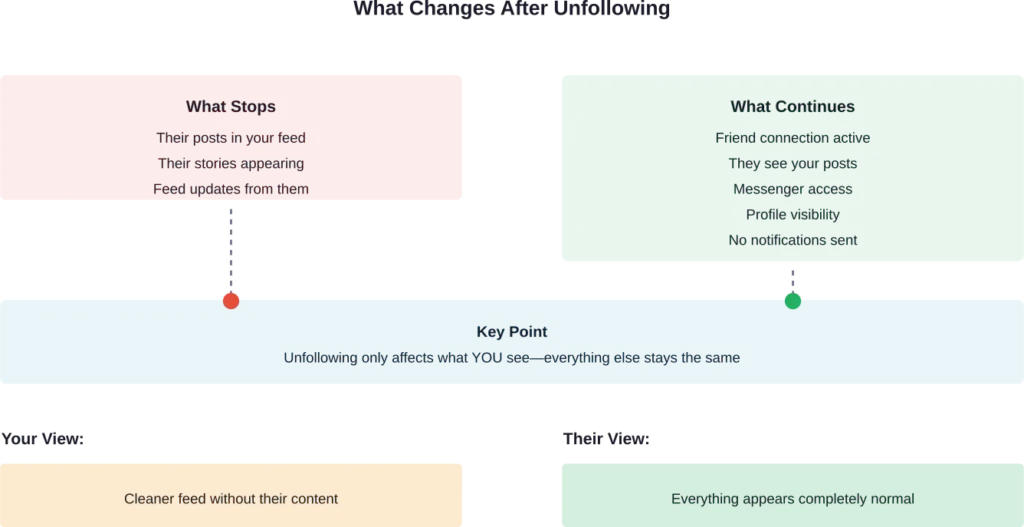
The moment someone gets unfollowed on Facebook, a specific set of changes kicks in. Their posts stop appearing in the News Feed. Stories vanish from the feed. Updates they share won’t show up anymore.
That’s it. Really.
The relationship status doesn’t change. The friend connection remains intact. Both profiles stay linked, and all the technical aspects of the friendship continue functioning normally.
Here’s what doesn’t happen: Facebook doesn’t send notifications. The unfollowed person receives zero alerts about the action. There’s no “so-and-so unfollowed you” message waiting in their notifications tab.
Think of it as a one-sided adjustment. The person doing the unfollowing experiences a cleaner feed, while the other party continues as if nothing changed.
Can They Still See Your Posts and Stories
Yes. Absolutely.
Unfollowing creates a one-way filter. The unfollowed person maintains full access to posts, stories, and profile updates—assuming the content matches whatever privacy settings are in place.
If posts are set to “Friends,” unfollowed friends still see them. If stories go out to friends, those unfollowed connections can still view them. The friend status determines visibility, not the follow status.
This catches some people off guard. Community discussions across platforms reveal confusion about this asymmetry. Many assume unfollowing works both ways, but it doesn’t.
The privacy settings control who sees content. Following status controls whose content appears in feeds. Two separate systems, two different functions.
Unfollow vs. Unfriend: Understanding the Difference
These two options solve different problems, and confusing them leads to unintended consequences.
| Feature | Unfollow | Unfriend |
|---|---|---|
| Friend Status | Remains friends | Removes friendship |
| Their Posts in Feed | Hidden from feed | Hidden from feed |
| Your Posts Visible to Them | Yes (based on privacy) | No (unless public) |
| Profile Access | Full access | Limited to public only |
| Messenger | Fully functional | Still works but shows unfriended |
| Notification Sent | No | No |
| Can Be Reversed | Yes, instantly | Requires new friend request |
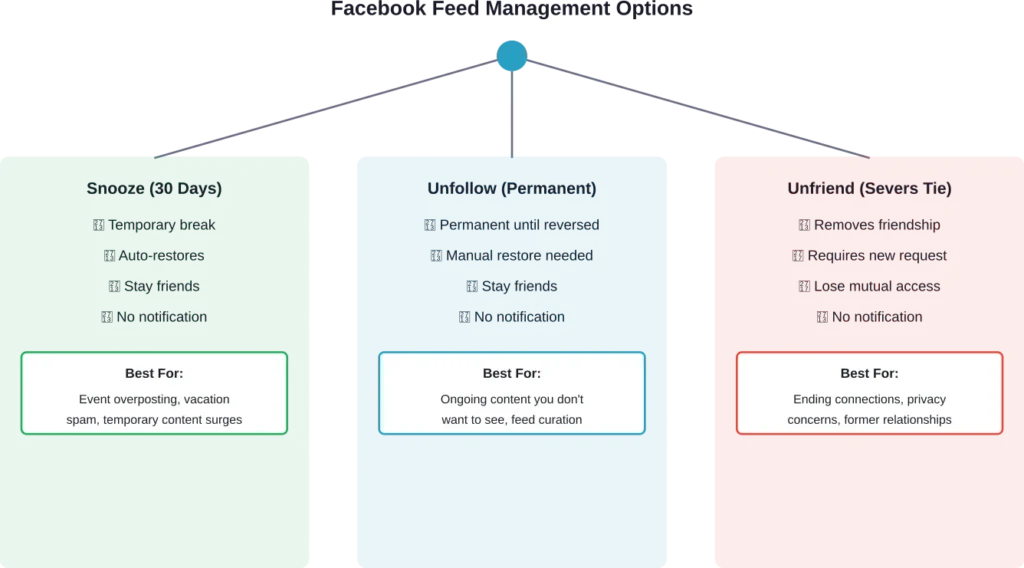
Unfollowing maintains the social connection while adjusting the content flow. Unfriending severs the connection entirely, restricting mutual visibility to whatever each person makes public.
The no-notification aspect applies to both. Facebook doesn’t alert people when they’re unfollowed or unfriended. The unfriended person might notice eventually—when they try to view a non-public post or notice the friend count changed—but no direct message arrives.
How to Unfollow Someone on Facebook
The process takes seconds and works similarly across different parts of Facebook.
For Individual Profiles
Navigate to the person’s profile. Look for the “Following” button near the top of their page (it appears after becoming friends). Click it, then select “Unfollow.”
Alternatively, when their post appears in the feed, click the three dots in the post’s upper-right corner. Select “Unfollow” from the dropdown menu. Done.
For Pages
Pages work slightly differently since the relationship isn’t “friendship.” Visit the page, find the “Following” button, and toggle it off. The “Like” can remain—following and liking function independently for pages.
For Groups
Group posts can flood feeds quickly. In the group itself, click the notification bell icon and adjust settings. Options include turning off all notifications, highlighting specific types, or using the “Snooze” feature temporarily.
Facebook doesn’t make unfollowing obvious, but it’s never hidden either. The option consistently appears in post menus and profile settings.
The Snooze Alternative: Temporary Relief
Sometimes the issue isn’t permanent—maybe someone’s posting excessively about a political event, a new relationship, or vacation photos. For these situations, Facebook offers “Snooze.”
According to competitor sources, snoozing hides someone’s posts for 30 days. After that period, they automatically reappear in the feed. No manual reversal needed.
Access it the same way as unfollow: through the three dots on any post from that person, or through their profile settings. Select “Snooze” and confirm.
This works well for temporary content surges without making permanent changes to the connection. Harvard research on healthy social media use suggests taking breaks from certain content streams helps maintain positive platform experiences.
Messenger and Muting: Another Layer
Unfollowing handles feed content, but Messenger operates separately. Someone can be unfollowed while messages continue flowing normally.
For Messenger-specific control, muting notifications offers targeted relief. Muting stops push notifications, banners, and badges for that conversation without blocking the person or changing friend status.
Duration options for muting include 15 minutes, 1 hour, 8 hours, 24 hours, or indefinitely. Open the conversation, tap the person’s name at the top, select “Mute” from the menu, and choose the timeframe.
Messages still arrive—they just don’t trigger alerts. This works perfectly for group chats that explode with activity during certain times or friends who message frequently throughout the day.
Managing Feed Content for Mental Health
Research from University of Utah Health emphasizes the importance of setting boundaries with social media content. Research indicates that exposure to certain types of content can significantly impact mood and mental well-being.
Research on social media wellness from Iowa emphasizes that determining the real impact of social media is complex and highly individual, though curated feeds may improve some users’ experiences. Managing who and what appears in feeds directly affects how social media impacts daily life.
Research on combating negative social media effects suggests active curation and taking control of what appears in feeds as important strategies. Tools like unfollow, snooze, and mute enable this active approach.
Real talk: feeds filled with content that triggers stress, comparison, or negativity serve nobody well. The platforms provide management tools—using them isn’t unfriendly, it’s practical.
Reversing an Unfollow
Changing course after unfollowing someone takes just as little effort as the initial action.
Visit their profile and look for the “Follow” button (it replaced “Following” when they were unfollowed). Click it. That’s the entire process.
Their posts immediately start appearing in the feed again. No notification goes out about the re-follow either. The whole cycle operates quietly.
This reversibility makes unfollowing low-risk. Testing it out to see if feed quality improves costs nothing and can be undone instantly if the decision doesn’t feel right.
When Unfollowing Makes Sense
Several scenarios make unfollowing the practical choice over other options.
Content overload from someone who posts multiple times daily dilutes the feed’s usefulness. Unfollowing restores balance without ending the friendship.
Diverging interests mean some friends post content that simply isn’t relevant anymore. Professional connections might share industry-specific material that doesn’t apply. Old classmates might focus on topics outside current interests.
Emotional triggers matter too. Research from Harvard T.H. Chan School of Public Health highlights how certain content streams can negatively affect mental well-being. Someone posting content that consistently causes stress, anxiety, or negative comparison becomes a candidate for unfollowing.
The algorithm also plays a role. Facebook prioritizes engaging content, which often means controversial or emotionally charged posts. If someone’s feed contribution skews heavily toward content that Facebook’s algorithm amplifies for the wrong reasons, removing them from the feed improves the overall experience.
Privacy Implications and Detection
The question of whether unfollowed people can detect the action comes up repeatedly in community discussions.
Technically, no direct method exists for someone to receive confirmation they’ve been unfollowed. Facebook doesn’t provide this information through notifications or profile indicators.
However, circumstantial clues might emerge. If someone religiously interacted with posts before and suddenly stops, that change could raise questions. If they mention not seeing recent posts when referenced in conversation, they might investigate.
But these clues require active attention and investigation. Most people don’t monitor who views or interacts with their content closely enough to notice individual changes in behavior.
For practical purposes, unfollowing operates invisibly to the other party.
Frequently Asked Questions
Yes. Unfollowing only affects what appears in the feed of the person doing the unfollowing. The unfollowed person still sees posts based on privacy settings and Facebook’s algorithm. If they’re friends and posts are set to “Friends,” those posts appear in their feed normally.
Absolutely. That’s exactly what the unfollow feature does. The friendship remains intact, Messenger works normally, and both people maintain profile access. Only the feed content changes for the person who clicked unfollow.
Go to Settings & Privacy, then Settings. Select News Feed in the left menu (or News Feed Preferences on mobile). Click “Reconnect with people you unfollowed” to see the complete list. From there, individuals can be refollowed with one click.
Yes, indirectly. Facebook’s algorithm learns from unfollow actions. Removing someone from the feed signals that their content type doesn’t match preferences. Over time, this contributes to algorithm adjustments about what content to prioritize from other sources.
No. Facebook never notifies users about unfollow actions, whether immediately or later. No setting, menu, or report shows who unfollowed whom. The action remains completely private to the person who performed it.
Facebook doesn’t provide a public “following” list that others can browse. The following relationships aren’t visible to other users the way friend lists can be. There’s no mechanism for someone to check who follows or doesn’t follow them.
Nothing changes with past interactions. All previous comments, likes, reactions, and tagged photos remain exactly as they were. Unfollowing only affects future content visibility in the feed—it doesn’t retroactively modify any historical interactions or content.
Taking Control of the Facebook Experience
The unfollow feature exists as Facebook’s acknowledgment that not all friendships translate to desired content consumption. Relationships operate on multiple levels, and feed preferences represent just one dimension.
Managing social media feeds actively rather than accepting whatever the platform serves improves the overall experience. Research from multiple academic institutions confirms this: curated feeds aligned with actual interests and mental well-being needs lead to healthier platform engagement.
Unfollowing doesn’t signal relationship failure or social rejection. It represents practical boundary-setting in a digital environment where content can quickly become overwhelming.
The feature works silently, doesn’t damage relationships, and reverses instantly if needed. For anyone feeling overwhelmed by feed content but hesitant about more drastic measures like unfriending, unfollowing provides the perfect middle ground.
Start evaluating the feed critically. Which accounts consistently add value? Which ones trigger stress, boredom, or irritation? The unfollow button exists specifically for this curation process. Use it.