

Quick Summary: Deleting the Instagram app from your phone only removes the software—your account, photos, messages, and all data remain completely intact on Instagram’s servers. When you reinstall the app and log back in, everything reappears exactly as you left it. Deleting the app is not the same as deactivating or deleting your account, which are separate actions accessed through Instagram’s settings.
There’s a massive misconception floating around about what happens when someone removes Instagram from their phone. The confusion usually stems from mixing up three completely different actions: deleting the app, deactivating an account, and permanently deleting an account.
Let’s clear this up right now.
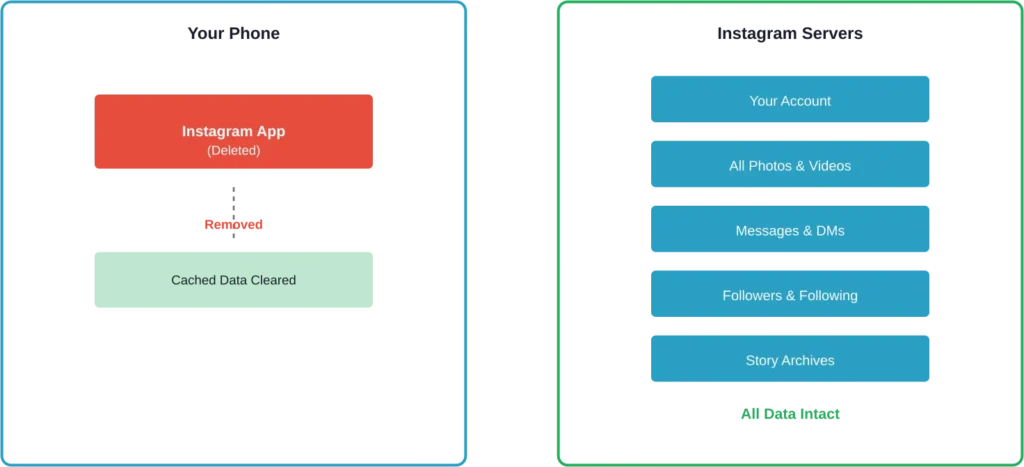
When the Instagram app gets removed from a device, the account itself continues existing on Instagram’s servers. Think of it like removing a window to a house—the house is still there, just the view is gone.
The Technical Reality of App Deletion
Uninstalling Instagram removes the application software from the device. That’s it. The removal process affects only the local files stored on the phone—cached images, temporary data, and the app’s programming files.
According to Instagram’s official guidance, deleting an app doesn’t erase personal data stored on their servers. Photos uploaded last week? Still there. Direct messages sent months ago? Still accessible. Followers, posts, stories archive, saved collections—all of it remains untouched.
Here’s what actually gets deleted from the device when the app is removed:
- The Instagram application itself (approximately 200-400MB depending on the device)
- Cached photos and videos stored temporarily on the phone
- Login session data (meaning a fresh login is required upon reinstall)
- App preferences and local settings
What stays completely intact on Instagram’s servers:
- Account profile and all biographical information
- Every photo and video ever posted
- Direct messages and conversation history
- Follower and following lists
- Saved posts and collections
- Story highlights and archives
- Activity data and search history
What Happens When You Reinstall Instagram
Downloading Instagram again after deletion brings back immediate access to everything. The login screen appears, credentials get entered, and the account loads exactly as it existed before removal.
No photos disappear. No followers vanish. Direct message conversations pick up right where they left off.
The only noticeable difference might be the need to reconfigure app-specific preferences—notification settings, data usage preferences, or accessibility options stored locally on the device rather than in the account itself.
Community discussions on platforms like Reddit report users reinstalling Instagram weeks or even months after deletion, only to find their accounts completely unchanged.
The Critical Difference: Delete App vs Delete Account
This distinction trips up more people than any other aspect of Instagram management.
Deleting the app affects only the phone. Deleting the account affects Instagram’s servers and actually removes data.
Instagram offers two account-level options beyond simple app removal:
Temporarily Deactivating an Account
Deactivation hides an account from public view. The profile becomes invisible to other users, posts disappear from feeds, and the account can’t be found through search. But Instagram preserves all data, allowing reactivation at any time by simply logging back in.
This option lives in Instagram’s settings, not in the phone’s app management system.
Permanently Deleting an Account
Permanent deletion initiates a process that removes the account and all associated data from Instagram’s servers. According to Instagram’s official documentation, this action cannot be undone.
There’s typically a 30-day grace period during which the account can be recovered. After that window closes, the data becomes permanently inaccessible.
Again, this happens through Instagram’s web interface or app settings—it has nothing to do with removing the app from a device.
| Action | Account Visibility | Data Retained | Reversible |
|---|---|---|---|
| Delete App | Fully visible and active | 100% on servers | Instant (just reinstall) |
| Deactivate Account | Hidden from everyone | 100% preserved | Yes, anytime |
| Delete Account | Permanently removed | Deleted after 30 days | Only within 30 days |
Data Persistence and Digital Forensics
Research into mobile app data retention reveals something interesting about what happens behind the scenes. According to a Medium article published October 2, 2023, examining Instagram data persistence, digital forensics tools can recover user data even after app deletion or uninstallation.
Researchers used Autopsy, a digital forensics platform, to analyze backup data and identified various data artifacts that persist on devices. These include cached images, metadata, and usage patterns stored in system-level directories that the app itself doesn’t directly control.
The practical implication? Even after removing Instagram from a phone, traces of usage may remain in device storage until overwritten by other data. This matters more for privacy-conscious users than for everyday situations.
On Instagram’s servers, data retention follows the platform’s privacy policy and applicable regulations. The company maintains user data for business purposes, legal compliance, and service improvement—regardless of whether someone currently has the app installed.
Why People Delete Instagram (Temporarily)
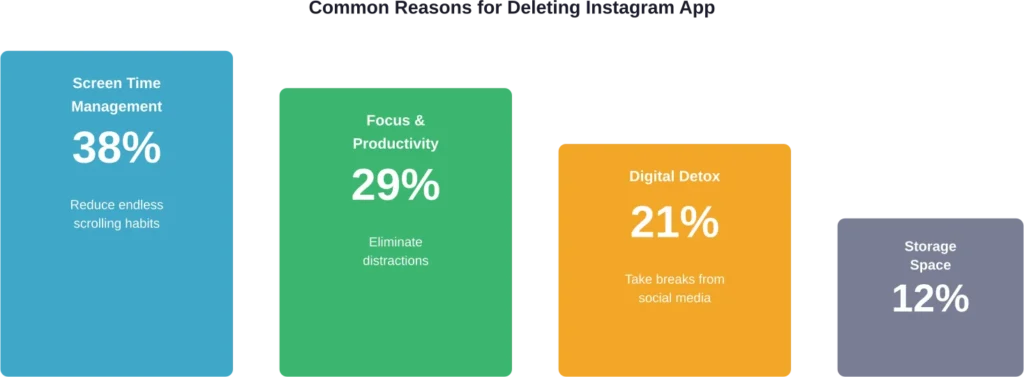
Understanding motivations helps contextualize the question. Based on user experiences shared across various platforms, reported reasons for temporarily removing the Instagram app include:
Managing screen time and digital wellness. Removing the app creates friction that reduces unconscious scrolling. The extra steps required to reinstall and log in provide natural breaking points for habit interruption.
Reclaiming focus and attention. Constant notifications and the pull of the feed fragment concentration. App removal eliminates these interruptions without sacrificing the account itself.
Temporary digital detox. Taking breaks from social media has become increasingly common. Deleting the app while preserving the account allows for periodic disconnection without losing years of content and connections.
Storage space management. Instagram’s cache can grow substantially over time. Removing and reinstalling the app clears this accumulated data, freeing up device storage.
What Actually Changes After App Deletion
From a practical standpoint, removing Instagram creates specific changes to the daily experience while leaving the account infrastructure untouched.
Notification silence. No more pings about likes, comments, or direct messages. The constant interruption stream stops completely.
Reduced impulse checking. The absence of that familiar icon on the home screen eliminates unconscious tapping. Muscle memory might still trigger the gesture, but the app isn’t there to open.
Continued account activity. Here’s something worth emphasizing—the account remains fully functional from everyone else’s perspective. People can still tag the account, send messages, comment on posts, and view the profile. The account holder simply can’t access any of it without reinstalling.
Messages accumulate. Direct messages continue arriving. They sit unread until the app gets reinstalled, at which point they all appear in the inbox.
Browser access remains possible. Instagram’s web interface at instagram.com provides full account access through any browser. Deleting the mobile app doesn’t affect web-based usage whatsoever.
The Reinstallation Process
Getting Instagram back after deletion takes less than two minutes in most cases.
The process follows standard app installation procedures:
- Open the device’s app store (Apple App Store or Google Play Store)
- Search for “Instagram”
- Tap the download or install button
- Wait for installation to complete
- Open the app and enter login credentials
- Access the account exactly as it existed before deletion
The app might require permission grants for camera, photos, notifications, and other features. These requests appear during first-use scenarios for specific features rather than all at once during installation.
Privacy Considerations and Data Control
Deleting the app provides minimal privacy benefits because the data never leaves Instagram’s servers. For anyone concerned about data collection, usage tracking, or information retention, app removal addresses only a small fraction of the issue.
Instagram collects and retains substantial information about user behavior, connections, and interests. This data collection happens at the server level during account usage, not through the app’s presence on a device.
Meaningful privacy control requires account-level actions:
- Reviewing and adjusting privacy settings within the app
- Limiting data sharing with third-party apps
- Downloading a copy of personal data through Instagram’s data download tool
- Deactivating the account to pause all data collection
- Permanently deleting the account to request data removal
The difference between client-side (app on phone) and server-side (Instagram’s systems) data storage explains why app deletion has limited privacy impact.
Alternative Approaches to App Management
For those seeking middle ground between full access and complete removal, several strategies offer more granular control.
App limits and screen time tools. Both iOS and Android provide built-in features to restrict app usage to specific time windows or daily limits. These keep the app installed while constraining when and how long it can be used.
Notification management. Disabling all Instagram notifications eliminates interruptions while maintaining app access. This reduces the attention-grabbing aspect without creating reinstallation friction.
App hiding or folder burial. Moving Instagram into a deeply nested folder or using iOS’s App Library to hide it from the home screen increases friction without requiring deletion and reinstallation cycles.
Scheduled deletion routines. Some users adopt patterns of deleting the app on weekdays and reinstalling on weekends, or removing it during work hours and restoring it in evenings. These rhythms create structured boundaries around usage.
| Method | Effectiveness | Convenience | Data Impact |
|---|---|---|---|
| Delete App | High barrier to access | Requires reinstall | None on servers |
| Screen Time Limits | Moderate (can be overridden) | Automatic | None |
| Disable Notifications | Low (app still accessible) | Instant | None |
| Deactivate Account | Complete removal from platform | Reactivate anytime | Preserved, hidden |
Frequently Asked Questions
No, followers cannot tell whether someone has the app installed. The account remains visible and active to everyone else. Posts stay published, the profile remains accessible, and there’s no indication that the account holder has removed the app from their device.
Messages remain completely intact on Instagram’s servers. When the app gets reinstalled, all message threads, photos, and conversation history reappear exactly as they existed. Other users can still send messages during the period when the app is deleted—those messages simply accumulate unread until reinstallation.
There’s no time limit. An account remains active indefinitely regardless of whether the app is installed. Instagram doesn’t delete accounts due to app removal or even prolonged inactivity. The account persists until someone takes explicit action to deactivate or permanently delete it through Instagram’s settings.
Logging out keeps the app installed but requires credentials to access the account again. Deleting the app removes the software entirely, requiring both reinstallation and login. Logging out is faster to reverse but doesn’t free up device storage or create as much friction against impulsive usage.
Absolutely. The account remains fully functional from other users’ perspectives. People can tag the account in posts, stories, and comments. These tags appear on the profile and in notifications once the app gets reinstalled. There’s no way for other users to know the account holder currently doesn’t have the app installed.
Yes, removing the app frees up storage space. Instagram typically occupies 200-400MB for the app itself, plus additional space for cached data that can reach several gigabytes over time. Deleting the app removes all of this, though the exact amount varies based on usage patterns and how long the app has been installed.
Active stories continue their 24-hour lifecycle normally. Stories posted before app deletion expire on schedule. Story highlights and archives remain saved to the account. When the app gets reinstalled, all story highlights and archived stories reappear unchanged.
Making the Right Choice for Digital Wellbeing
The decision to delete Instagram’s app—temporarily or in recurring patterns—reflects a growing awareness about attention management and intentional technology use. Understanding that this action affects only device-level access while preserving all account data empowers more informed choices.
For genuine breaks from the platform, account deactivation offers a more complete solution. For privacy concerns, account deletion (after the 30-day grace period) provides the strongest protection. For managing screen time and reducing compulsive usage, app deletion creates meaningful friction without permanent consequences.
The key insight? Deleting the Instagram app is a reversible, low-stakes action that affects how someone accesses their account without touching the account itself. Everything stays exactly where it was—photos, followers, messages, and all the rest—waiting on Instagram’s servers for whenever that next login happens.
Whether that reinstallation comes tomorrow, next month, or never, the choice remains entirely in the hands of the account holder. And that’s precisely the point.