

Quick Summary: When you unadd someone on Snapchat, they won’t receive a notification. However, they’ll lose access to your private Stories and Charms, can’t see your Snap Score, and messages may appear as pending. They might notice indirectly through these changes, but Snapchat doesn’t alert them directly.
Managing friendships on social media can get complicated. Sometimes people drift apart, or privacy concerns make it necessary to trim the friends list. Snapchat handles friend removal differently than other platforms.
Snapchat has millions of daily users and remains one of the most popular messaging apps. Understanding what happens when you remove someone helps maintain control over digital boundaries.
Here’s what actually happens behind the scenes when you unadd someone on Snapchat.
Does Snapchat Notify Someone When You Remove Them?
No. Snapchat does not send notifications when you remove someone from your friends list.
According to the official Snapchat Help Center, the platform stays silent about friend removals. The person won’t get an alert, push notification, or message indicating they’ve been removed. This differs from platforms like Facebook, which sometimes suggest when friendships change.
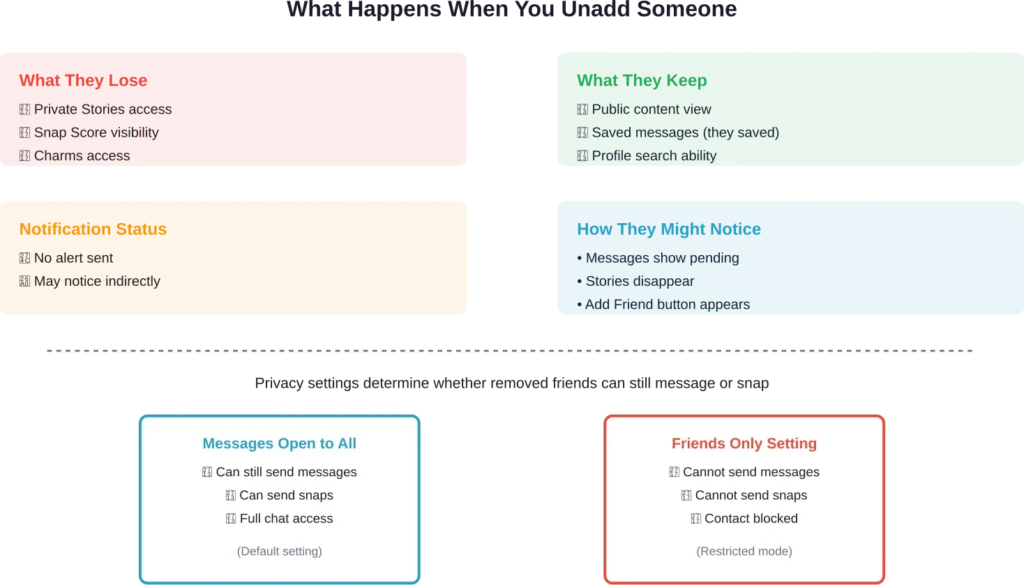
That said, the removed person might notice through indirect signs. Several changes occur immediately after removal that could tip them off.
What Changes Happen After You Unadd Someone
According to official Snapchat documentation, when you remove a friend from your friends list, several things change instantly.
Story Access Gets Restricted
They can no longer view any private Stories or Charms. If content is set to public, they’ll still see it. But anything marked for friends only becomes invisible to them.
This is often the first thing people notice. Regular story viewers who suddenly can’t see content may realize something changed.
Snap Score Disappears
The removed person can’t see Snap Score anymore. When they search for the profile, that number vanishes.
For people who track Snap Scores, this absence becomes obvious quickly. It’s one of the clearest indicators of friend removal.
Messages Might Show as Pending
If they try sending a message, it may appear as pending rather than delivered. This depends on privacy settings.
Based on community discussions, many users notice pending messages as the first red flag. Messages that previously delivered instantly now hang in limbo.
Profile Search Results Change
They can still find the profile through search. But the friendship status changes from mutual friends to something different.
The “Add Friend” button reappears where it previously showed as already connected. This visible change signals the friendship ended.
Can They Still Message After Being Removed?
This depends entirely on privacy settings.
According to official Snapchat support documentation, by default, people can contact anyone on Snapchat. Even non-friends can send messages and snaps unless specific settings block them.
If the “Who Can Contact Me” setting remains on the default (“Everyone”), removed friends can still send messages. Those messages arrive normally, though they might appear in a different section of the chat feed.
However, changing settings to “Friends Only” prevents removed people from making contact. According to Snapchat’s privacy documentation, this setting blocks messages from anyone not on the friends list.
Many users don’t realize this distinction exists. Community discussions show confusion about why some removed friends can still make contact while others can’t.
What Happens to Saved Messages
Messages saved in the chat remain visible to whoever saved them. This works independently of friendship status.
If the removed person saved messages in the conversation, they can still see those saved items. If content was saved before removal, it stays accessible afterward.
Chat history itself doesn’t automatically disappear. Previous conversations remain until manually deleted. The friendship status doesn’t erase message history.
That said, new messages work differently. Depending on privacy settings, new messages from removed friends may appear as pending or not deliver at all.
Removing vs. Blocking Someone on Snapchat
These are two different actions with different consequences.
| Action | They Can Message | They Can View Public Content | They Can Search Profile | They Know |
|---|---|---|---|---|
| Remove Friend | Depends on settings | Yes | Yes | Not directly |
| Block User | No | No | No | May notice profile missing |
Removing someone keeps them at a distance. They lose friend privileges but can still find the profile.
Blocking creates a complete barrier. According to community discussions, blocked users can’t send messages, view any content, or find the profile through search. The account essentially becomes invisible to them.
Blocking also prevents them from adding the account as a friend again unless unblocked first. It’s the stronger privacy measure.
How Someone Might Figure Out They’ve Been Removed
Even without notifications, several telltale signs exist.
Stories Suddenly Disappear
Someone who regularly viewed Stories notices when they vanish. This is especially obvious if they checked Stories daily.
Snap Score Becomes Unavailable
Profile searches show different information. The missing Snap Score raises immediate questions.
Messages Stay Pending
Messages that don’t deliver signal a problem. If privacy settings changed to friends-only, pending messages become obvious.
Profile Shows Add Friend Button
When searching for the account, the “Add Friend” option reappears. This clearly indicates the friendship ended.
Based on user experiences, checking these signs helps confirm removal. But Snapchat never makes it completely obvious.
How to Remove Someone on Snapchat
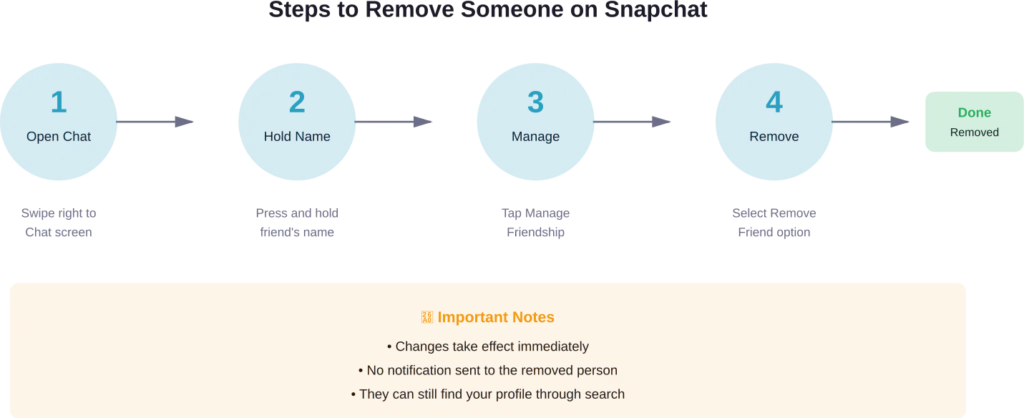
The process takes just a few taps. According to official Snapchat documentation:
- Swipe right to open the Chat screen
- Press and hold on the friend’s name
- Tap “Manage Friendship”
- Select “Remove Friend”
- Confirm the action
Alternatively, open their profile directly, tap the three dots at the top, select “Manage Friendship,” then choose “Remove Friend.”
The action takes effect immediately. All the changes described above happen the moment removal confirms.
Privacy Settings to Adjust After Removing Someone
Removing someone creates distance, but adjusting privacy settings ensures complete control.
Change Who Can Contact
Navigate to Settings, then “Who Can Contact Me.” Switch from “Everyone” to “Friends Only.” This prevents removed people from sending new messages.
Adjust Story Viewing Permissions
Set Stories to “Friends Only” rather than public. This ensures removed people can’t view any Stories.
Review Location Sharing
Check Snap Map settings. Even after removing someone, location might still be visible if set to public. Switch to Ghost Mode or Friends Only.
According to Snapchat’s privacy documentation, these settings work independently of the friends list. Adjusting them provides additional privacy layers.
When to Remove vs. When to Block
Choosing between removal and blocking depends on the situation.
Remove someone when the relationship simply faded. Maybe old classmates, former coworkers, or casual acquaintances don’t need access anymore. Removal creates distance without burning bridges.
Block someone when stronger boundaries are needed. According to community discussions, blocking makes sense for harassment situations, unwanted contact, or toxic relationships. Blocking prevents all contact attempts.
The key difference: removal is subtle, blocking is absolute.
Frequently Asked Questions
Snapchat doesn’t send notifications, but they might notice through indirect signs. Missing Stories, unavailable Snap Score, and pending messages all signal removal. The “Add Friend” button reappearing on the profile confirms it.
Messages saved in the chat remain visible to whoever saved them. Friendship status doesn’t erase saved content. Both parties keep access to anything they individually saved before removal.
It depends on privacy settings. If “Who Can Contact Me” is set to “Everyone,” removed friends can still send messages. Changing it to “Friends Only” blocks messages from anyone not on the friends list.
No. Chat history remains until manually deleted. Removing someone from the friends list doesn’t automatically erase previous conversations or saved messages.
Yes. Search for their username or scan their Snapcode to send a new friend request. They’ll receive a notification about the new request and can choose to accept or ignore it.
Removing someone keeps the profile searchable and may allow messaging depending on settings. Blocking prevents all contact, hides the profile from search, and stops them from viewing any content including public posts.
Yes, according to official Snapchat documentation. Removed friends can still view content set to public. Only private Stories and Charms become inaccessible after removal.
Managing Digital Boundaries Effectively
Social media requires active friendship management. Over 293 million people use Snapchat daily, and Some users report having removed a friend on Snapchat.
Understanding what happens during removal helps maintain privacy without unnecessary drama. The lack of notifications keeps things discrete, while the visible changes serve as natural indicators for those paying attention.
Whether removing old contacts or creating distance from current ones, Snapchat’s friend removal system balances privacy with accessibility. Combining removal with proper privacy settings creates the exact boundaries needed.
Take time to review the friends list periodically. Digital friendships should reflect current relationships, not outdated connections. Removing inactive contacts or people who no longer fit improves the overall Snapchat experience.
Ready to clean up that friends list? The process takes just seconds, and the privacy benefits last indefinitely.