

Quick Summary: 3D modeling in architecture is the process of creating digital three-dimensional representations of buildings and structures using specialized software. This technology transforms flat 2D blueprints into interactive, photorealistic models that architects, designers, and clients can explore from any angle, enabling better visualization, improved collaboration, and more accurate construction planning before breaking ground.
The construction industry has long relied on 2D drawings and blueprints to communicate design intent. But here’s the thing—those flat sketches leave massive gaps for misinterpretation, leading to costly revisions and project delays.
3D modeling changes that equation entirely. Instead of asking clients and contractors to imagine what a building will look like from a flat plan, architects can now present photorealistic, navigable models that show exactly how spaces connect, how light moves through rooms, and how materials will appear in the finished structure.
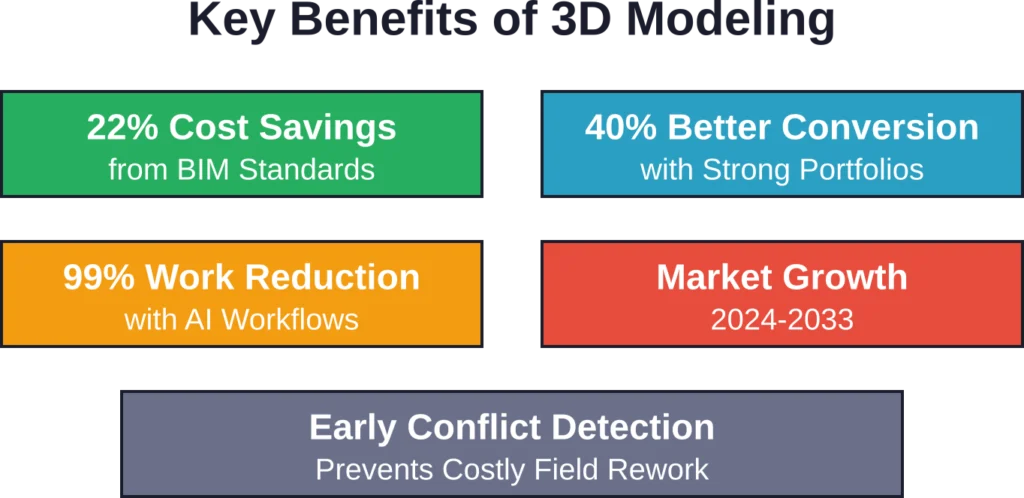
The technology has become essential across the industry. According to a recent report by DataHorizzon Research, the global 3D modeling services market is estimated at around $5.4 billion in 2024, with projections indicating it will grow to $22.3 billion by 2033.
That growth reflects a fundamental shift in how buildings get designed and built. Let’s explore what architectural 3D modeling actually involves, why it matters, and how it works in practice.
Understanding 3D Modeling in Architecture
At its core, 3D modeling creates digital representations of physical objects using specialized software. In architecture, this means constructing virtual buildings that exist as mathematical data defining every surface, edge, and dimension.
Unlike traditional 2D drawings that show only plan views, elevations, and sections, 3D models capture complete spatial information. Architects can orbit around the model, walk through interior spaces, and examine details from any perspective.
The process typically starts with basic geometry—walls, floors, and roofs—then adds layers of detail: windows, doors, fixtures, materials, and textures. Advanced models incorporate structural elements, MEP systems (mechanical, electrical, plumbing), and even furniture and landscaping.
But 3D modeling isn’t just about pretty pictures. These models serve as centralized databases containing dimensions, material specifications, cost data, and construction sequencing information. That’s where Building Information Modeling (BIM) comes in.
From Geometry to Information: BIM Integration
Building Information Modeling extends basic 3D geometry by embedding intelligent data into every component. A wall in a BIM model isn’t just a rectangular volume—it knows its material composition, thermal properties, fire rating, manufacturer details, and cost.
ISO published International Standards for BIM in 2019 based on tried-and-tested British standard BS 1192 and PAS 1192-2. These standards have already been shown to help users save up to 22% in construction costs.
The standardization matters because modern construction projects involve dozens of stakeholders—architects, engineers, contractors, fabricators—all working from the same digital model. When everyone references a single source of truth, coordination conflicts drop dramatically.
Benefits of Architectural 3D Modeling
The shift from 2D to 3D isn’t just about technology for technology’s sake. The benefits show up across every phase of a project.
Visualization That Actually Communicates
Most clients can’t read floor plans. They struggle to imagine spatial relationships from orthogonal projections. A 3D model solves this communication gap instantly.
When clients walk through a virtual model, they understand the design. They spot issues early: “That hallway feels too narrow,” or “The kitchen doesn’t get enough natural light.” These insights during design cost nothing to fix. The same changes during construction cost thousands.
According to Chaos, portfolios with only strong work convert 40% better than those padding with mediocre pieces. That conversion advantage extends to client presentations—clear visualization builds confidence and speeds approvals.
Coordination and Clash Detection
Traditional 2D workflows leave coordination to chance. The architect draws walls on one sheet, the structural engineer adds beams on another, and the MEP consultant routes ductwork on a third. When those sheets overlay in the field, conflicts emerge—a beam blocking a duct, a pipe penetrating a structural column.
3D modeling catches these clashes before construction begins. Specialized software compares the architectural, structural, and MEP models, flagging every intersection where components occupy the same space. Resolving conflicts digitally takes hours instead of weeks and avoids costly rework.
Faster Iteration and Design Exploration
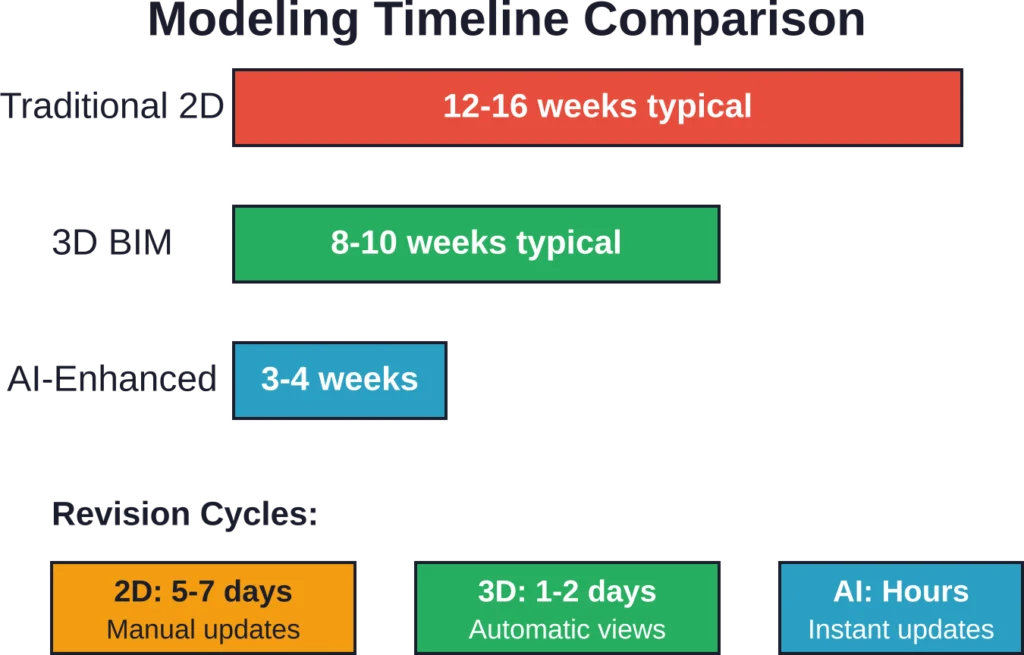
Revising 2D drawings is tedious. Change a wall location, and you manually update plans, elevations, sections, and details across dozens of sheets.
In a 3D model, move the wall once. Every view updates automatically. This responsiveness encourages experimentation. Architects test multiple design options, comparing layouts, materials, and massing alternatives without sacrificing weeks to redrafting.
AI-enhanced workflows can reduce manual modeling time by over 99% for repetitive tasks like generating texture variations, optimizing topology, and creating multiple lighting scenarios. This efficiency compounds across large projects as professionals focus on design decisions rather than technical execution.
Construction Accuracy and Cost Control
Accurate visualization helps avoid system conflicts and speeds up approvals. This minimizes changes during the building process, saves resources, and increases the reliability of project execution.
When contractors work from detailed 3D models, they understand complex geometries that would be ambiguous in 2D. Prefabrication becomes feasible for custom components. Material takeoffs extract directly from the model, reducing estimating errors.
Types of Architectural 3D Modeling
Not all 3D models serve the same purpose. Different project phases and stakeholder needs call for different modeling approaches.
Conceptual Massing Models
Early-stage design focuses on big moves: building orientation, overall form, height, setbacks. Conceptual models use simple volumes without detail, letting architects quickly test site configurations and volumetric relationships.
These models integrate with environmental analysis tools to study sun exposure, shadow patterns, and wind effects. Quick iterations help optimize building placement before investing time in detailed design.
Design Development Models
Once the concept solidifies, models gain architectural detail: wall assemblies, window types, door locations, ceiling configurations. Materials and textures approximate final finishes.
At this stage, models support coordination between disciplines. Structural grids align with architectural layouts. MEP systems route through designated zones. The model becomes a coordination platform, not just a visualization tool.
Construction Documentation Models
Construction-level models contain fabrication-ready information. Wall assemblies show every layer with thicknesses, materials, and connections. Components include manufacturer details and product specifications.
These models generate construction drawings automatically. Plans, sections, elevations, and details extract as 2D views that update whenever the model changes. Contractors reference the model for precise dimensions and assembly sequences.
Presentation and Marketing Models
Marketing-focused models prioritize photorealism over technical accuracy. They feature detailed materials, realistic lighting, entourage (people, cars, landscaping), and atmospheric effects.
Rendering engines use physically based rendering (PBR) workflows where light behaves according to real-world physics. The result: images indistinguishable from photographs, ideal for client presentations, public approvals, and sales materials.
Develop Coordinated 3D Models for Design and Construction
Architectural 3D modelling is used to support planning, coordination, and technical project delivery. Powerkh provides BIM modelling services for architects, engineers, and contractors across design and construction stages.
Need 3D Modelling Support?
Talk with Powerkh to:
- create BIM models for multi-disciplinary projects
- support design coordination workflows
- prepare technical drawings and documentation
- improve collaboration across project teams
Talk with Powerkh about BIM modelling support for project delivery.
Popular Software for Architectural 3D Modeling
The software landscape offers tools ranging from beginner-friendly applications to industry-standard professional platforms.
| Software | Best For | Key Strengths | Typical Users |
|---|---|---|---|
| Revit | BIM and documentation | Parametric components, multi-discipline coordination, automatic drawing generation | Professional firms, large projects |
| SketchUp | Conceptual design | Intuitive interface, fast modeling, extensive plugin library | Schematic design, small studios |
| Rhino | Complex geometry | NURBS modeling, parametric design (Grasshopper), fabrication output | Facade design, custom elements |
| ArchiCAD | BIM workflows | Intuitive BIM tools, visualization, MEP integration | Architectural firms, residential focus |
| 3ds Max | Visualization | Photorealistic rendering, animation, extensive material libraries | Rendering specialists, marketing |
Software selection depends on project requirements, team expertise, and collaboration needs. Many firms use multiple tools—SketchUp for early concepts, Revit for documentation, and 3ds Max for final renderings.
The trend toward open standards means models can transfer between platforms. IFC (Industry Foundation Classes) format enables cross-software compatibility, though translation isn’t always perfect. Community discussions highlight ongoing challenges where walls export inconsistently as IfcWall versus IfcWallStandardCase depending on complexity and software version.
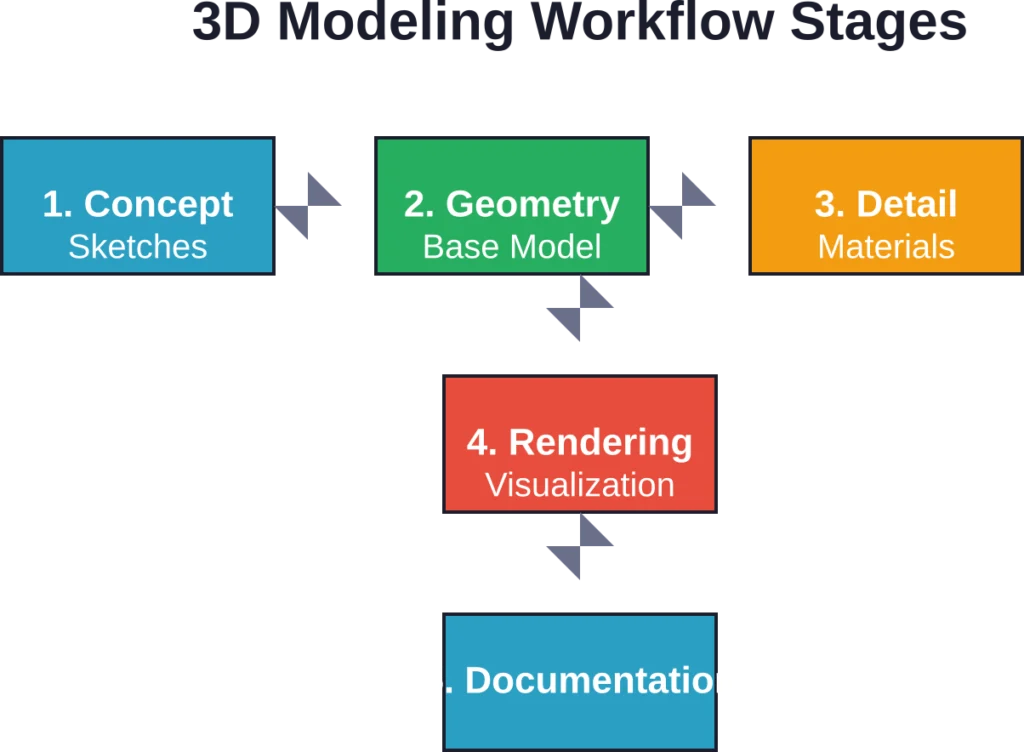
The 3D Modeling Process Step-by-Step
While every project differs, architectural 3D modeling typically follows a structured workflow.
Step 1: Gather Reference Information
Start with site surveys, existing drawings (if renovating), program requirements, and design sketches. Import site topography and context buildings to establish the project environment.
Reference images of materials, precedent projects, and inspirational details inform the modeling process. The more complete the reference set, the fewer assumptions during modeling.
Step 2: Establish the Base Geometry
Block out major forms using simple volumes. Define floor levels, exterior walls, primary interior partitions, and roof geometry. This skeleton establishes proportions and spatial relationships without detail clutter.
Parametric modeling tools like Revit use families and types, meaning a wall isn’t just a line—it’s an assembly with defined thickness, layers, and properties. Setting up these definitions early ensures consistency as the model develops.
Step 3: Add Architectural Elements
Insert doors, windows, stairs, and other building components. Position structural grids and columns. Define room boundaries and apply floor, wall, and ceiling finishes.
Component libraries accelerate this phase. Manufacturer-specific BIM objects include accurate geometry and product data, eliminating manual modeling of standard items.
Step 4: Coordinate with Consultants
Share the architectural model with structural and MEP engineers. They develop their systems within or alongside the architectural model. Clash detection software identifies conflicts automatically.
Coordination meetings review clashes, prioritize resolutions, and document changes. The model becomes the agenda—literally navigating through problem areas rather than flipping through drawing sheets.
Step 5: Apply Materials and Lighting
Assign realistic materials with textures, reflectivity, and bump maps. Place light sources: sun angles based on geographic location, artificial fixtures with measured intensities.
Modern rendering engines calculate light transport physically, simulating how photons bounce between surfaces. This produces accurate shadows, reflections, and color bleeding that sell the reality of the design.
Step 6: Generate Outputs
Extract construction drawings for permitting and bidding. Create photorealistic renderings for presentations. Export models to VR platforms for immersive client walkthroughs. Generate quantity takeoffs for cost estimating.
Each output serves a different audience, but all derive from the same source model, ensuring consistency across deliverables.
Real-World Applications and Use Cases
3D modeling impacts every building type and project scale, from single-family homes to complex institutional campuses.
Residential Design
Homeowners benefit enormously from 3D visualization. They see exactly how rooms flow, where furniture fits, and how finishes combine. Changes during design cost hundreds; changes during construction cost thousands.
Custom home builders use models to streamline client approvals, reducing decision fatigue and change orders. Real estate developers create marketing renderings before breaking ground to support sales materials and client presentations.
Commercial and Mixed-Use Projects
Complex programs—retail, office, residential, parking—stack vertically in mixed-use developments. 3D coordination prevents conflicts where different uses intersect: exhaust from restaurants impacting residential balconies, loading docks conflicting with pedestrian entries.
Projects like Brickell City Centre in Miami demonstrate facade complexity that would be nearly impossible to coordinate in 2D. Prototyp engineers created approval, manufacturing, and assembly drawings with structural calculations directly from 3D models, combining 2D engineering precision with 3D spatial coordination.
Renovation and Adaptive Reuse
Existing buildings rarely match their original drawings. Laser scanning captures as-built conditions as point clouds, which convert into 3D models showing actual field conditions.
Designers overlay new interventions onto the scanned reality, identifying structural modifications, system routing challenges, and preservation conflicts before demolition begins. This reduces surprises and costly field adjustments.
Infrastructure and Large-Scale Planning
Urban planning, campus master planning, and infrastructure projects use 3D models to study massing, view corridors, traffic flow, and pedestrian circulation at neighborhood scales.
Integration with GIS data layers environmental factors: flood zones, vegetation, utilities. Simulations test scenarios: how does traffic flow change with a new transit station? How do shadows from proposed towers affect public parks?
Emerging Trends: AI and Real-Time Visualization
The next wave of architectural 3D modeling leverages artificial intelligence and real-time rendering technologies.
AI-Assisted Design and Rendering
Machine learning algorithms now generate design options based on programmatic requirements and site constraints. Architects define parameters—square footage, room relationships, code requirements—and AI proposes dozens of layout alternatives.
Rendering workflows benefit too. AI-driven tools transform basic 3D models into photorealistic visuals in minutes rather than hours. Style transfer applies architectural precedent aesthetics to new designs. Texture synthesis creates realistic material variations automatically.
These capabilities don’t replace designers—they eliminate tedious tasks, freeing creative energy for higher-level decisions.
Real-Time Rendering and Virtual Reality
Game engine technology (Unreal Engine, Unity) brings cinematic-quality rendering at interactive framerates. Clients don VR headsets and walk through designs at full scale, experiencing spatial quality impossible to convey in static images.
Real-time rendering enables live design reviews. Adjust a wall location during the meeting, and see the result instantly. Change a material finish, and watch how it affects the entire space. This immediacy transforms collaboration.
Generative Design and Optimization
Generative algorithms test thousands of design variations against defined goals: minimize energy use, maximize natural light, optimize structural efficiency. The computer explores solution spaces no human could manually investigate.
Early applications focused on structural optimization, but the approach now extends to layouts, facades, and urban planning. Designers steer the process, selecting promising options and refining parameters rather than manually drafting every iteration.
Challenges and Considerations
Despite its advantages, 3D modeling introduces complexity and requires investment.
Software Learning Curves
Professional BIM software demands substantial training and investment of time to achieve proficiency. Revit-LT, ArchiCAD, and similar platforms require understanding parametric relationships, family creation, and phasing logic beyond basic drafting skills.
Smaller firms face a choice: invest time in mastering complex tools or stick with familiar but limited 2D workflows. Hybrid approaches use simple 3D tools for visualization while maintaining 2D documentation.
Hardware Requirements
Large models with detailed components strain computer resources. Rendering photorealistic images demands powerful GPUs. Real-time walkthroughs require gaming-grade graphics cards.
Cloud-based solutions shift processing to remote servers, but internet connectivity becomes critical. Firms must budget for workstation upgrades and cloud subscriptions.
Data Management and Collaboration
3D models generate massive file sizes. A mid-size building can exceed gigabytes. Version control becomes critical—who has the latest model? What changed since yesterday?
Cloud collaboration platforms (BIM 360, Trimble Connect) address this, but add subscription costs and require workflow adjustments. Teams must establish protocols for model ownership, check-in/check-out procedures, and clash resolution responsibilities.
Interoperability Headaches
IFC standards promise seamless data exchange, but reality disappoints. Models lose information during translation. Wall assemblies simplify. Custom parameters vanish. Community experiences document cases where similar walls export inconsistently between IfcWall and IfcWallStandardCase with no apparent logic.
Effective collaboration often requires all parties use the same software platform, limiting flexibility and creating vendor lock-in.
Building Your 3D Modeling Skillset
For architects and designers looking to develop 3D modeling capabilities, structured learning paths exist.
Educational programs increasingly integrate digital modeling. Cosumnes River College’s Architecture Design Technology program includes ADT 300 Architectural Sketching and Modeling I, a course with 3 units, 36 hours lecture, and 54 hours lab, providing foundational skills for architectural drafting and CADD technician roles.
Professional development follows multiple paths: software vendor tutorials, online courses, workshops, and hands-on practice. Many firms designate BIM champions who develop deep expertise then train colleagues.
Portfolio development matters. Curating 15-25 strong projects converts 40% better than padding with mediocre work. Show process—wireframes, material studies, lighting iterations—not just final renderings. Case studies of 150-200 words per project provide context without overwhelming viewers.
Technical considerations: optimize images for web delivery (portfolios receive 50% traffic from mobile devices), use formats that load quickly, and structure navigation intuitively. Large file sizes kill conversion rates—visitors bounce before experiencing the work.
Frequently Asked Questions
SketchUp offers the gentlest learning curve for architectural modeling, with intuitive push-pull geometry creation and a free web-based version. For those committed to BIM workflows, Revit-LT provides professional capabilities at lower cost than full Revit. Many educational institutions offer free student licenses for major platforms, making them accessible for learning.
Timeline varies dramatically by project complexity and detail level. A conceptual massing model for a small building might take hours. A fully detailed BIM model for documentation could require weeks. Typical ranges: residential schematic design 2-5 days, design development 1-2 weeks, construction documentation 3-6 weeks. AI-enhanced workflows reduce these timelines substantially, with some processes compressed to days or hours.
Not entirely—yet. Building codes and permitting processes still require 2D drawings. However, modern BIM workflows generate those drawings automatically from the 3D model, ensuring consistency. Some jurisdictions now accept 3D model submissions for permitting, but contractors on-site typically work from printed 2D sheets extracted from the model rather than tablets displaying 3D views.
Modeling creates the geometry—walls, windows, furniture—as mathematical data defining form and position. Rendering applies materials, lighting, and camera settings to generate photorealistic images from that geometry. Think of modeling as building the stage and props, while rendering is photographing them with proper lighting. Both are essential: models without rendering lack visual appeal; renderings without accurate models misrepresent the design.
Pricing varies and changes frequently—check official websites for current rates. Professional BIM platforms typically charge annual subscriptions ranging from hundreds to thousands of dollars per seat. Rendering software follows similar subscription models. Free options exist: SketchUp Free (web-based), Blender (open-source), and student versions of commercial software. For professional practice, budget for software subscriptions, hardware capable of running them, and ongoing training.
No. Most architectural 3D modeling uses visual interfaces—clicking, dragging, and parameter entry—no programming required. That said, parametric design tools like Grasshopper and Dynamo use visual scripting (connecting nodes) to create relationships and automate tasks. These require logical thinking similar to programming but don’t demand writing code. For advanced applications like custom plugins or generative design, programming skills (Python, C#) prove valuable but aren’t prerequisites for typical architectural modeling.
AI accelerates previously time-intensive tasks: generating design variations based on constraints, creating photorealistic materials and textures automatically, converting sketches to 3D geometry, and optimizing layouts for specific performance goals. AI-enhanced workflows can reduce manual modeling time by over 99% for repetitive tasks like generating texture variations, optimizing topology, and creating multiple lighting scenarios. Rather than replacing architects, these tools handle repetitive technical work, allowing designers to focus on creative decisions and client interaction.
Taking the Next Step
3D modeling has evolved from a specialized visualization tool to an essential component of architectural practice. The technology enables clearer communication, better coordination, and more informed decision-making across every project phase.
The market trajectory confirms this shift: growing from $5.4 billion in 2024 to a projected $22.3 billion by 2033 reflects industry-wide adoption. Firms that master these workflows gain competitive advantages through faster delivery, fewer errors, and more compelling presentations.
For those entering the field or expanding their skills, the path forward involves selecting appropriate software for your project types, investing in structured learning, building a portfolio that demonstrates both technical capability and design sensibility, and staying current with emerging technologies like AI-assisted design and real-time visualization.
The construction industry is digital now. The question isn’t whether to adopt 3D modeling—it’s how quickly you can leverage it to design better buildings.
Ready to transform how you visualize and communicate architectural designs? Start exploring 3D modeling tools today and discover how digital workflows can elevate your practice.