

Quick Summary: Free Amazon SEO tools including WisePPC, Helium 10’s free tier, Sonar by Sellics, Keyword Tool Dominator, and Google Keyword Planner help sellers optimize listings without upfront costs (Amazon Brand Analytics requires Brand Registry enrollment). These tools provide keyword research, competitor analysis, and ranking data essential for visibility. While limitations exist, combining multiple free tools creates a powerful research stack for budget-conscious sellers.
Selling on Amazon means fighting for visibility among millions of listings. When shoppers search, they rarely scroll past the first page—and if your product doesn’t show up there, it won’t sell.
That’s the brutal reality of Amazon’s marketplace in 2026.
But here’s the thing: boosting your rankings doesn’t require expensive software subscriptions. Free Amazon SEO tools exist that deliver real insights—keyword data, competitor analysis, search volume metrics—without the monthly fees.
The catch? Free tools come with limitations. Restricted searches. Fewer features. Daily caps. So the real skill isn’t just picking one tool. It’s knowing how to combine multiple free options into a workflow that actually moves the needle.
This guide breaks down the best free Amazon SEO tools available in 2026, what they’re genuinely good for, and how to build a zero-cost research stack that competes with premium solutions.
Why Amazon SEO Tools Matter for Sellers
Amazon’s A10 algorithm decides which products appear in search results. According to Amazon Seller Central’s official guidance, appearing in relevant search results is critical for success—when shoppers can’t find products, they can’t buy them.
The algorithm weighs keyword relevance heavily. Products with optimized titles, bullet points, descriptions, and backend search terms rank higher. But finding those keywords manually? Nearly impossible.
That’s where SEO tools come in. They reverse-engineer what shoppers actually search for, which terms competitors rank for, and which keywords convert browsers into buyers.
Real talk: 75% of shoppers never scroll past page one, according to Amazon marketplace analysis. If your listing sits on page two or three, your sales potential drops dramatically.
Amazon SEO tools help sellers:
- Discover high-converting keywords shoppers actually use
- Analyze competitor listings and find gaps
- Track ranking performance over time
- Optimize backend search terms within Amazon’s character limits
- Identify seasonal trends and search volume shifts
The right tools turn guesswork into strategy. And in 2026, several powerful options cost exactly nothing.
The 8 Best Free Amazon SEO Tools in 2026
Not all free tools deliver equal value. Some cap daily searches at five. Others provide solid data but hide advanced features behind paywalls. A few surprise with how much they offer at zero cost.
Here’s what actually works in 2026.
1. WisePPC

WisePPC is currently in open beta, offering completely free access (no credit card required) with powerful analytics that help connect Amazon PPC performance to overall sales and organic growth.
The free beta includes bulk campaign management, advanced filtering, placement performance analysis, multi-metric historical charts, gradient performance highlighting, and long-term data storage (years of history vs Amazon’s 60-90 days). It pulls real-time data from Seller Central and shows ad-driven vs organic sales attribution.
Limitations: Beta may have occasional performance tweaks or limited support.
What makes WisePPC stand out: It provides deep historical insights and ad impact on total sales that Amazon Seller Central doesn’t show natively — helping sellers understand which PPC efforts improve keyword performance and organic visibility over time.
Best for: Amazon sellers who want a free advanced tool to optimize PPC while gaining actionable insights for organic SEO strategy, especially those scaling multiple accounts and needing long-term data.
Contact Information:
- Website: wiseppc.com
- Facebook: www.facebook.com/people/Wise-PPC/61573154427547
- LinkedIn: www.linkedin.com/company/wiseppc
- Instagram: www.instagram.com/wiseppc
2. Helium 10 Free Tier

Helium 10 offers a genuinely useful free plan—not a trial, but ongoing access to core tools with usage limits.
The free tier includes Magnet (keyword research), Cerebro (reverse ASIN lookup), and Xray (Chrome extension product research). Magnet expands seed keywords into thousands of related terms, complete with search volume estimates and competition scores.
Limitations hit quickly though. Free users get limited searches per day and can’t access bulk analysis or advanced filtering. But for sellers just starting or validating product ideas, it’s solid.
What makes Helium 10 stand out: the IQ Score metric combines search volume, competition, and relevance into a single prioritization number for keyword prioritization, helping sellers focus on keywords that actually matter.
Best for: Sellers who need reliable keyword expansion and don’t mind daily search caps.
3. Sonar by Sellics

Sonar by Sellics offers basic keyword searches at no cost with no credit card required.
Enter a keyword and Sonar returns related terms, reverse ASIN lookups, and search volume estimates specific to Amazon. The database covers multiple marketplaces (US, UK, Germany, France, Italy, Spain), which helps sellers planning international expansion.
The interface feels stripped down compared to premium tools. No fancy dashboards or historical trend graphs. Just raw keyword data.
But that simplicity is an advantage. Sonar loads fast, returns results quickly, and doesn’t bury useful data behind upsell prompts.
One standout feature: reverse ASIN lookup shows what keywords competitors rank for. Plug in a top-selling ASIN in your niche, and Sonar reveals their keyword strategy.
Best for: Competitor research and multi-marketplace keyword discovery without spending a dollar.
4. Amazon Brand Analytics

If you’re enrolled in Amazon Brand Registry, Brand Analytics is the most underrated free tool available.
It’s not third-party data or estimates. Amazon Brand Analytics provides first-party Amazon search data, not estimates, but requires Amazon Brand Registry enrollment. The Search Terms report shows top search queries by department, including search frequency rank and click share distribution among the top three clicked ASINs. That’s gold for understanding real buyer behavior.
Brand Analytics also includes Market Basket Analysis (what customers buy together) and Item Comparison reports (what ASINs shoppers view while considering yours).
The downside? Access requires Brand Registry enrollment, which means trademark ownership. Resellers and private label sellers without registered brands can’t access it.
Best for: Brand-registered sellers who want first-party Amazon search data without estimates.
5. Keyword Tool Dominator

Keyword Tool Dominator scrapes Amazon’s autocomplete suggestions—the terms that appear when shoppers start typing in the search bar.
These autocomplete keywords reflect real searches with high enough volume for Amazon’s algorithm to surface them. That makes them inherently valuable.
The free version allows three searches per day. That’s tight, but strategic sellers use those three wisely—testing main product categories or validating core seed keywords.
Keyword Tool Dominator doesn’t provide search volume numbers or competition metrics. It’s purely keyword discovery. But the keywords come directly from Amazon’s live autocomplete, which means they’re current and relevant.
Best for: Quick validation of high-level keyword ideas using Amazon’s own suggestion data.
6. Google Keyword Planner

Wait—Google’s tool for Amazon SEO? Absolutely.
While Google and Amazon are different search ecosystems, consumer search behavior overlaps significantly. People research products on Google before buying on Amazon. Understanding what they search for on Google reveals intent and language patterns that translate to Amazon.
Google Keyword Planner is completely free (requires a Google Ads account, but no ad spend necessary). It provides search volume ranges, competition levels, and related keyword suggestions.
The trick: use it to find broader market demand and seasonal trends, then cross-reference those findings with Amazon-specific tools.
For example, if Google Keyword Planner shows “weighted blanket” spiking in October-December, that signals a seasonal opportunity on Amazon too.
Best for: Understanding broader market trends and validating product demand before diving into Amazon-specific keyword research.
7. SellerSprite Free Tools

SellerSprite offers several free tools alongside its premium plans, including keyword research, ASIN reverse lookup, and a Chrome extension for quick product data.
According to analysis of 2025 product research tools, SellerSprite excels at profit calculations tied to real-time cost data and FBA fee structures. The free tier provides limited daily searches but includes useful AI-powered features and safety checks for product validation.
The Chrome extension overlays data directly on Amazon search results pages, showing estimated sales, revenue, and review velocity without opening each listing.
Best for: Sellers wanting quick on-page insights while browsing Amazon search results.
8. Analyzer.Tools Free Trial
Analyzer.Tools isn’t permanently free, but the trial period offers substantial access to bulk keyword analysis, profit margin calculations, and FBA/MFN integration.
Analyzer.Tools is designed for bulk processing—capable of analyzing up to a million products per hour.
Compared to other tools’ free versions, Analyzer.Tools often delivers deeper data-driven insights during the trial—enough for sellers to conduct thorough product research before a launch.
After the trial, pricing starts lower than many competitors, making it an accessible step-up when free tools no longer suffice.
Best for: Sellers conducting intensive product research for a specific launch who can complete analysis within the trial window.
How to Build a Free Amazon SEO Workflow
Combining free tools creates a research system that rivals paid options—if done strategically.
Here’s a practical workflow that costs nothing:
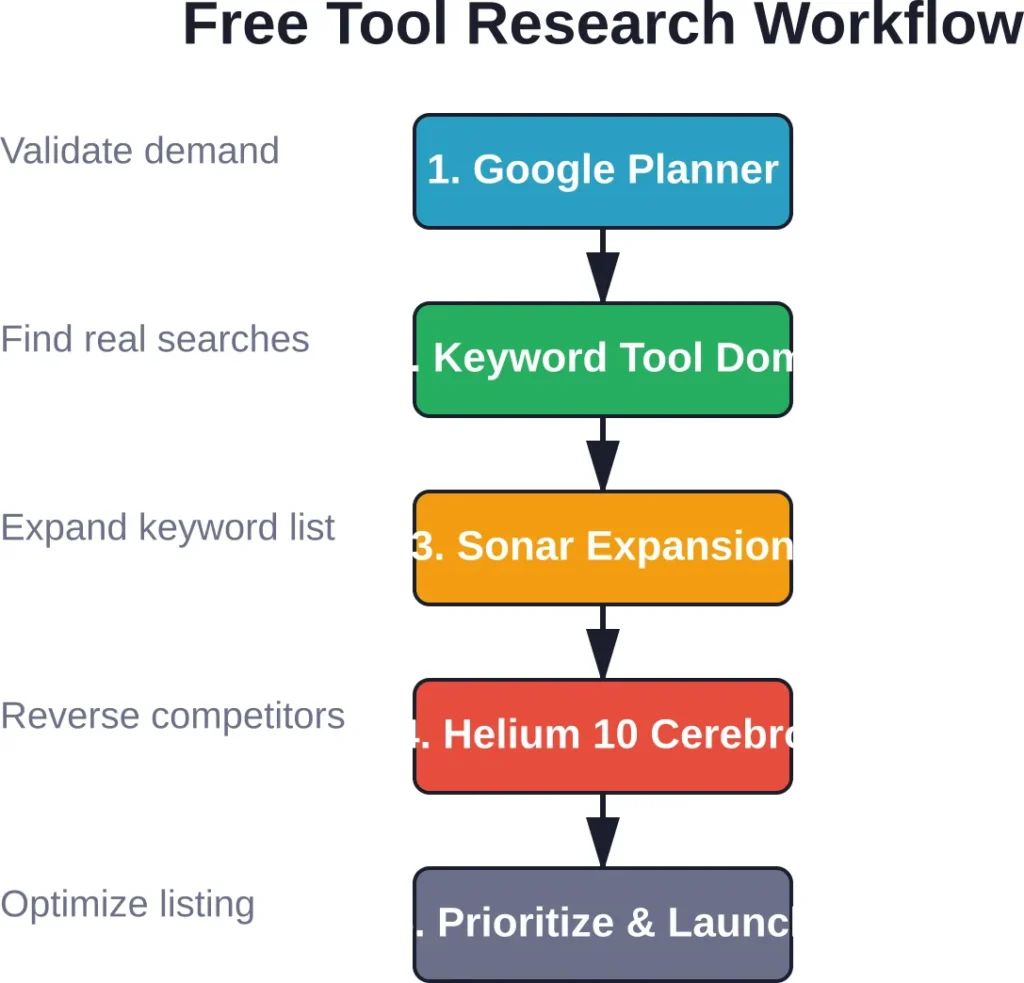
Step 1: Validate broad demand with Google Keyword Planner. Check if your product category shows meaningful search volume and identify seasonal patterns. Look for terms with at least moderate search volume year-round.
If Google shows weak demand, Amazon likely won’t be better.
Step 2: Discover Amazon-specific keywords with Keyword Tool Dominator. Use your daily searches to test your main seed keywords. The autocomplete results reveal what Amazon shoppers actually type.
Write down all suggested terms. These become inputs for the next step.
Step 3: Expand keywords with Sonar. Plug your autocomplete discoveries into Sonar. It’ll return hundreds of related keywords with search volume estimates. Export the results.
Because Sonar doesn’t cap searches, you can iterate freely here.
Step 4: Reverse-engineer competitors with Helium 10’s Cerebro (free tier). Find the top three ASINs ranking for your main keyword. Run each through Cerebro to see their full keyword portfolios.
Look for keywords you missed. Identify gaps where competitors rank but you don’t.
Step 5: Prioritize keywords with Helium 10’s Magnet. Take your expanded keyword list and run batches through Magnet to get IQ Scores. Focus on high-IQ keywords that balance volume and competition.
Step 6: Validate with Brand Analytics (if available). Cross-reference your keyword list against Brand Analytics’ Search Terms report. Confirm which terms drive actual clicks and conversions, not just searches.
This six-step workflow costs zero dollars. It combines five free tools, each covering the others’ weaknesses.
Optimizing Amazon Listings with Free Tool Data
Keyword research means nothing if the data doesn’t make it into your listing.
Amazon’s algorithm reads specific fields with different weight:
- Product Title: Highest weight. Include primary keyword early (within first 80 characters). Amazon officially recommends optimizing titles for search relevance.
- Bullet Points: High weight. Front-load each bullet with a relevant keyword. Don’t sacrifice readability, but fit keywords naturally.
- Description: Moderate weight. Use this for secondary keywords and longer-tail phrases.
- Backend Search Terms: Invisible to shoppers but indexed by Amazon. Backend search terms have a maximum character limit (typically 249 bytes across all fields). Don’t repeat keywords already in visible fields—use this space for synonyms, alternate spellings, and related terms.
Amazon Seller Central’s official guidance emphasizes keeping product content fresh and relevant while using backend search terms effectively. The path to better rankings isn’t a one-time fix—it requires ongoing optimization.
Here’s how to apply free tool data:
Take your top 5-7 keywords from Helium 10’s IQ Score rankings. Work them into your title and bullets. Prioritize keywords with both high search volume and conversion relevance (Brand Analytics confirms conversion).
Use Sonar’s expanded keyword list to fill backend search terms. Focus on terms you couldn’t fit in visible content—singular/plural variations, common misspellings, and category-adjacent terms.
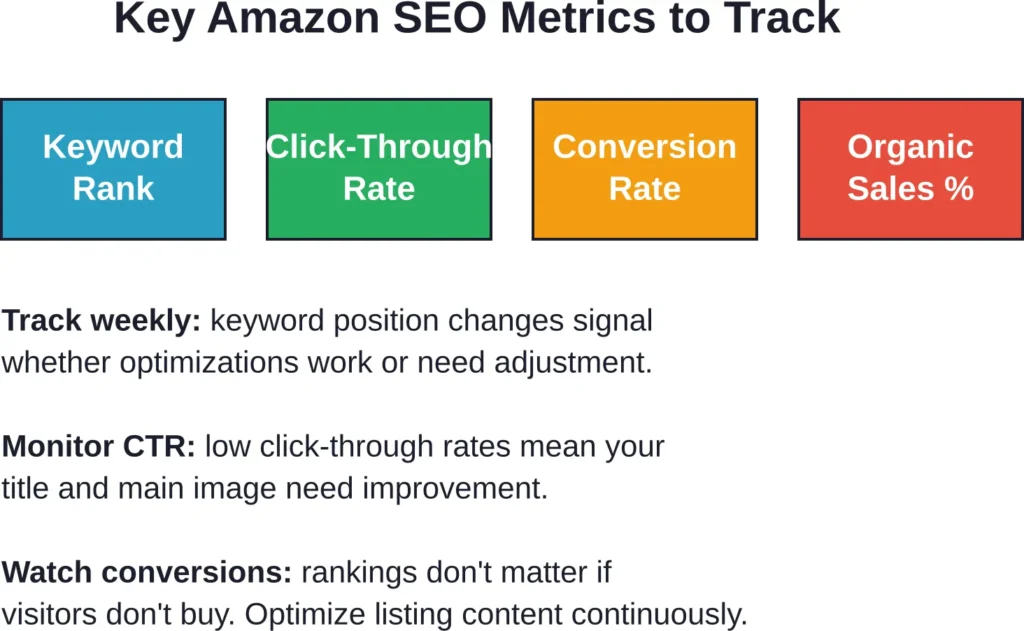
Monitor rankings weekly. Free tools limit tracking, but manually checking your position for core keywords costs nothing. Search Amazon in an incognito window, note where you rank, and adjust.
When Free Tools Aren’t Enough
Free tools work brilliantly for product validation, initial launches, and budget-constrained sellers. But they have real limits.
Daily search caps slow down bulk product research. Without historical trend data, spotting seasonal shifts takes longer. Limited competitor tracking makes it harder to react quickly to market changes.
Signs it’s time to consider paid tools:
- You’re researching 10+ products simultaneously
- Competitors outrank you despite similar listings (they likely use better data)
- You’re spending hours manually tracking rankings
- Daily search limits prevent thorough keyword expansion
- You need precise search volume numbers, not estimates
Paid tools like Jungle Scout, Helium 10’s full plans (starting around $39/month for Starter tier), and MerchantWords (subscriptions from $29 monthly) remove caps and add automation.
But start free. Validate demand, test listings, and prove your product works before committing to monthly software costs.
Common Mistakes Sellers Make with Free SEO Tools
Free tools are powerful, but sellers often misuse them.
Mistake 1: Relying on a single tool. Every free tool has gaps. Helium 10 caps searches. Sonar lacks trends. Keyword Tool Dominator omits volume. Using just one gives incomplete data.
The fix: layer multiple tools as outlined in the workflow above.
Mistake 2: Ignoring search intent. High search volume doesn’t always mean high buyer intent. “Yoga mat” gets massive searches, but “eco-friendly yoga mat for hot yoga” signals a buyer ready to purchase.
The fix: prioritize long-tail keywords that show specific intent, even if volume is lower.
Mistake 3: Keyword stuffing. Cramming every keyword into the title creates unreadable listings that convert poorly. Amazon’s algorithm penalizes poor user experience.
The fix: write for humans first, algorithms second. Include keywords naturally.
Mistake 4: Setting and forgetting. Amazon’s search landscape shifts constantly. New competitors emerge. Search trends change. Seasonal demand fluctuates.
According to Amazon Seller Central, monitoring search ranking performance regularly and testing different keyword combinations is essential for sustained success.
The fix: revisit keyword research quarterly. Update backend terms. Test new primary keywords.
Mistake 5: Neglecting competitor analysis. Sellers focus on their own keywords but ignore what’s working for top-ranking competitors.
The fix: use Sonar and Helium 10’s Cerebro to reverse-engineer competitor keyword strategies monthly.
Advanced Strategies Using Only Free Tools
Once the basics are covered, free tools enable more sophisticated tactics.
Reverse ASIN Analysis for Niche Domination
Find the top 10 sellers in your niche. Run each ASIN through Sonar’s reverse lookup. Export all keywords.
Compile the results into a spreadsheet. Sort by frequency—keywords appearing across multiple competitors are core niche terms. Keywords unique to one competitor might be gaps you can exploit.
Build content targeting the frequent keywords first (they’re proven). Then test the unique keywords to differentiate.
Seasonal Keyword Planning with Google Trends
Google Trends is free and reveals seasonal search patterns. Compare related keywords to see which spike during specific months.
For example, “pool floats” peaks May-July. “Space heater” spikes November-January.
Use Google Trends to identify your product’s seasonality, then adjust Amazon PPC budgets and inventory accordingly. Launch SEO optimization 2-3 months before seasonal peaks to build ranking momentum.
Backend Search Term Rotation
Amazon allows 249 bytes of backend keywords. Many sellers set them once and forget.
Instead, rotate backend terms quarterly. Test different keyword combinations, track ranking changes, and double down on what works.
Use Sonar to generate fresh keyword ideas each quarter. Remove underperforming terms from backend and replace them with new tests.
Staying Updated: Amazon’s Evolving SEO Landscape
Amazon’s algorithm changes regularly. What worked in 2024 may not work in 2026.
Amazon Seller Central posts official updates about search ranking factors and best practices. In April 2026, Amazon emphasized that search optimization remains one of the most powerful levers for business growth, with increasing weight on keyword relevance and customer engagement metrics.
Broader search trends matter too. As of March 2026, Google holds 90.01% of worldwide search traffic, according to StatCounter data. In the United States, Google holds 84.13% of search traffic, according to StatCounter data—meaning alternative search behaviors are growing.
For Amazon sellers, this means:
- Monitor Amazon’s official seller forums and updates for algorithm changes
- Track your core keyword rankings weekly to spot sudden drops (signals an update)
- Join seller communities where algorithm changes are discussed early
- Test continuously—what works today might not work tomorrow
Free tools keep pace with these changes because they pull live data. Sonar scrapes current autocomplete. Brand Analytics reflects today’s searches. That real-time data keeps you aligned with Amazon’s current algorithm, not outdated assumptions.
Building Long-Term Visibility Without Paid Tools
Amazon SEO isn’t a one-week project. It’s an ongoing process.
Sellers who win long-term treat optimization as a continuous cycle: research, implement, measure, refine, repeat.
Here’s a sustainable free-tool maintenance schedule:
Weekly: Check keyword rankings manually for top 5-7 terms. Note movement. If a core keyword drops five positions, investigate competitor changes.
Monthly: Run competitor reverse ASIN lookups through Sonar. Identify new keywords they’re targeting. Update your backend search terms with promising discoveries.
Quarterly: Conduct full keyword research using the six-step workflow. Refresh product title and bullets if better keywords emerge. Review Brand Analytics (if available) to validate what’s driving actual sales.
Annually: Evaluate whether your free-tool workflow still meets your needs or if business growth justifies paid software.
This schedule requires maybe two hours per month. But it keeps listings competitive without software subscriptions.
Frequently Asked Questions
Yes, when used strategically. Free tools provide real keyword data, competitor insights, and search volume estimates sufficient for product validation and initial optimization. Limitations include daily search caps and fewer advanced features, but combining multiple free tools creates a workflow that rivals paid options for basic to intermediate sellers.
Sonar by Sellics stands out because it offers unlimited basic keyword searches with no daily caps and no credit card required. It provides reverse ASIN lookup, multi-marketplace support, and search volume estimates. For sellers just starting or on tight budgets, Sonar delivers the most value at zero cost.
Absolutely. Thousands of sellers rank successfully using only free tools and manual optimization. The key is strategic keyword research, well-optimized listings, competitive pricing, and strong product reviews. Free tools provide the data needed to compete; execution determines success. Paid tools add convenience and speed but aren’t mandatory for ranking.
Focus on 5-7 primary keywords worked naturally into your title and bullets, plus 15-25 secondary keywords in your description and backend search terms. Quality beats quantity—better to rank well for 10 highly relevant keywords than poorly for 100 generic ones. Use free tools to identify the highest-intent keywords first.
Amazon SEO focuses on product discoverability and conversion within Amazon’s marketplace. The algorithm weighs sales velocity, conversion rate, and review quality alongside keyword relevance. Google SEO prioritizes content authority, backlinks, and page experience. Amazon shoppers have high purchase intent; Google users often research before buying. Keywords overlap, but optimization strategies differ significantly.
Review and update backend search terms monthly, testing new keyword combinations based on competitor research and seasonal trends. Adjust visible content (title, bullets) quarterly or when you discover significantly better keywords. Avoid changing too frequently—rankings need time to stabilize. Amazon Seller Central recommends ongoing optimization as search trends evolve.
No. Most free SEO tools (Helium 10 free tier, Sonar, Keyword Tool Dominator, Google Keyword Planner) work without Brand Registry. However, Brand Registry unlocks Amazon Brand Analytics, which provides first-party search data unavailable elsewhere. If you own a trademark, Brand Registry is worth enrolling for the free SEO data alone.
Final Thoughts: Making Free Tools Work for Your Amazon Business
Free Amazon SEO tools won’t do the work for you. But they provide the intelligence needed to compete.
The sellers who win aren’t necessarily the ones with the biggest software budgets. They’re the ones who combine smart research with consistent optimization and relentless testing.
Start with the workflow outlined here. Use Sonar for unlimited keyword expansion. Leverage Helium 10’s free tier for prioritization. Cross-reference with Google Keyword Planner for market validation. If you’re brand-registered, mine Brand Analytics for conversion data.
Track rankings weekly. Update keywords monthly. Refine listings quarterly.
That discipline—applied consistently over months—outperforms expensive tools used sporadically.
Amazon’s marketplace grows more competitive every year. Amazon is projected to reach $486.6 billion in annual web sales in 2026, an 8.6% increase from the previous year. That means more sellers, more products, and fiercer competition for page-one rankings.
But it also means more opportunity. Shoppers keep coming because Amazon delivers what they search for. If your product appears in those searches—because you’ve done the keyword research, optimized the listing, and stayed current with algorithm changes—you’ll get the sales.
Free tools make that possible without draining your budget. Use them strategically, and you’ll build visibility that compounds over time.
Start today. Pick one tool from this list. Research five keywords. Update your listing. Then do it again next week.
That’s how free tools become a competitive advantage.