

Quick Summary: As-built drawings are finalized architectural or engineering documents that accurately capture the completed construction of a project, including all modifications and deviations from the original design plans. These drawings serve as comprehensive records for future maintenance, renovations, and facility management, and are typically prepared by contractors during and after construction.
Walk onto any construction site and you’ll notice something interesting. The building taking shape rarely matches the original blueprints exactly. Materials get substituted. Pipes get rerouted. Walls shift a few inches.
These changes aren’t mistakes—they’re the reality of construction. But here’s the problem: if nobody documents these modifications, the original plans become fiction. That’s where as-built drawings come in.
As-built drawings represent the actual construction of a project, not the idealized version drafted months earlier. They’re the difference between guessing where electrical lines run and knowing exactly where they are. The difference between a smooth renovation and a costly surprise.
Real talk: most construction professionals will create or work with as-builts hundreds of times over their career. Yet confusion persists about who creates them, when they’re needed, and what separates a proper as-built from sloppy documentation.
This guide covers everything from the basic definition to advanced best practices, drawing on industry standards and professional insights.
What Are As-Built Drawings?
As-built drawings refer to the finalized set of architectural or engineering drawings that accurately depict the actual construction or installation of a project. These drawings serve as a comprehensive record of the completed structure, documenting any modifications or deviations from the original design plans.
Think of them as the translation between what was planned and what actually exists. Original construction documents represent intent. As-builts represent reality.
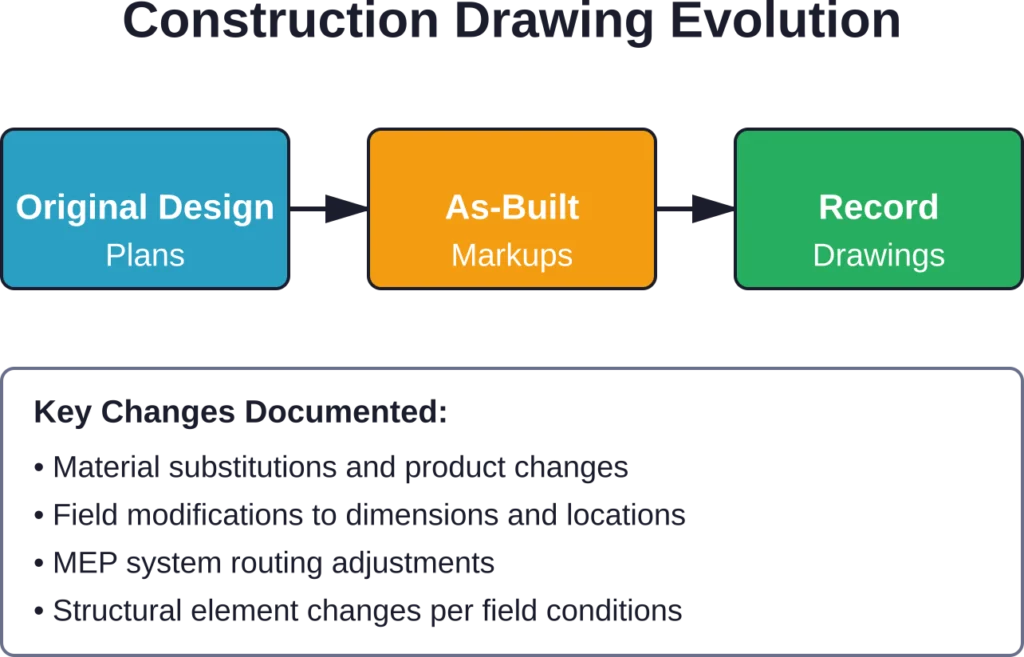
During construction, the general contractor typically marks up a set of drawings with red lines showing every change. A beam that moved six inches east. A door that switched from swinging left to swinging right. HVAC ducts that couldn’t fit where shown and got rerouted through a different chase.
These marked-up drawings get compiled into a final as-built set at project completion. They become the official record of what was built, where it was built, and how it was built.
As-Built Drawings vs. Record Drawings
Here’s where terminology gets messy. Industry discussions often use “as-built drawings” and “record drawings” interchangeably, but technical differences exist.
As-built drawings are the contractor’s marked-up construction documents showing field changes. They’re created during construction, typically with red markings on the original plans. They capture what the contractor actually installed.
Record drawings take those contractor markups and incorporate them into clean, professionally drafted documents. The architect or engineer typically produces record drawings by redrafting the originals to reflect all changes. According to community discussions among AIA professionals, record drawings represent the final, polished documentation derived from contractor as-builts.
That said, many projects use the terms interchangeably. The critical point isn’t the label—it’s ensuring accurate documentation of the completed work.
Why As-Built Drawings Matter
Construction projects generate mountains of paperwork. Why do as-builts deserve special attention?
The importance becomes obvious the moment someone needs to work on the building after construction wraps up. A facility manager planning an electrical upgrade. An architect designing a renovation. A plumber hunting for a leak.
Without accurate as-builts, these professionals are working blind. They’re making assumptions about what’s behind walls, under floors, and above ceilings. Those assumptions cost time and money when they’re wrong.
Facility Management and Maintenance
Building maintenance teams rely on as-built drawings constantly. Where does the main water shutoff connect? Which circuit breaker controls which areas? How is the HVAC system zoned?
As-builts answer these questions definitively. They eliminate guesswork and reduce diagnostic time when systems fail. For large facilities with complex infrastructure, this documentation becomes essential for efficient operations.
Future Renovations and Expansions
Every renovation project starts by understanding existing conditions. As-built drawings provide that baseline.
Architects and engineers designing additions or modifications need to know exactly what’s there. Load-bearing walls can’t be removed without structural analysis. Electrical capacity must be verified before adding circuits. HVAC systems have limits on additional zones.
Accurate as-builts prevent costly design errors and field conflicts. They also reduce the time spent on existing condition surveys—according to one case study, digital documentation methods reduced time spent documenting existing conditions by 60–70%.
Legal and Compliance Documentation
As-built drawings serve legal purposes too. They document compliance with building codes and approved permits. They verify that the contractor built what was specified in the contract.
When disputes arise about whether work was completed correctly, as-builts provide evidence. When insurance claims involve building damage, as-builts help establish what existed before the loss.
Many jurisdictions and agencies require as-built submission for project closeout. State-funded projects often mandate record drawing delivery as a condition of final payment, according to discussions among architects working with government agencies.
What Information Do As-Built Drawings Include?
Comprehensive as-built drawings document multiple building systems and components. The exact scope depends on the project type and contract requirements, but certain elements appear consistently.
| Category | Typical Information Documented |
|---|---|
| Building Layout and Structure | Floor plans, elevations, structural components such as beams, columns, foundations, and load-bearing walls with actual dimensions and locations |
| Design Features | Doors, windows, walls, finishes, built-in fixtures, and architectural details with specifications and placement |
| Mechanical Systems | HVAC equipment locations, ductwork routing, pipe sizing, equipment specifications, control sequences |
| Electrical Systems | Panel locations and schedules, circuit routing, fixture locations, switch and outlet positions, voltage and amperage |
| Plumbing Systems | Pipe routing and sizing, fixture locations, valve positions, drain and vent configurations, equipment specifications |
| Site Work | Grading and drainage, utility connections, paving and landscaping, property boundaries, easements |
The level of detail matters. Vague markups like “moved slightly” don’t help future users. Precise dimensions and specific product information do.
As-builts should note not just that a wall moved, but that it moved 4 inches west from the plan location. Not just that a valve was added, but what type, size, and pressure rating. Not just that an electrical panel changed, but the complete circuit directory and specifications.
Who Creates As-Built Drawings?
Responsibility for as-built documentation typically falls to the general contractor and subcontractors. This assignment makes sense—contractors perform the work and observe the field conditions firsthand.
Most construction contracts specify that contractors must maintain as-built markups throughout construction. As changes occur, the superintendent or project manager marks them on a dedicated set of plans. These marked sets stay current, not compiled frantically at project end.
Subcontractors handle as-built documentation for their scope. The mechanical contractor marks changes to HVAC and plumbing. The electrical contractor marks electrical modifications. The general contractor coordinates and compiles these markups into a complete set.
The Architect’s Role
Architects don’t typically create as-built drawings. But they often create record drawings based on the contractor’s as-built markups.
This distinction matters contractually. If the owner wants professionally drafted record drawings, that’s additional architectural work beyond basic services. According to AIA guidance on architectural services, the level of detail in construction documents may vary depending on owner preferences, and record drawing preparation is typically a supplemental service.
Some architects review and certify as-built drawings for accuracy and completeness. Others simply archive the contractor’s marked-up sets without redrafting. The scope depends on the contract and owner requirements.
Here’s the thing though—architects generally can’t certify that as-builts are 100% accurate without extensive site verification. They didn’t build the project. Professional discussions among AIA members highlight that architects are often asked to certify as-builts they didn’t produce, creating liability concerns.
When Are As-Built Drawings Created?
As-built documentation isn’t a one-time task at project completion. It’s an ongoing process throughout construction.
Best practice involves continuous documentation. When a change order alters the design, the contractor marks it immediately. When a field condition forces an adjustment, it gets documented that day. When a substitution gets approved, the as-built notation includes the actual product installed.
This continuous approach prevents the “reconstruction” problem at project end. Trying to remember and document months of changes from memory guarantees errors and omissions.
Formal as-built drawing submission typically occurs at substantial completion or final completion. The contract specifies the deadline—often a condition precedent to final payment. The contractor can’t receive their final check until they deliver complete as-built documentation.
Many projects require digital as-built submission in specific CAD formats. Some require both marked paper sets and digital files. The specifications should clearly state deliverable requirements to avoid disputes.

Prepare Accurate As-Built Drawings for Construction and Handover
Powerkh supports project teams with as-built drawings, model updates, and site verification during construction and close-out stages. Its services include laser scanning, BIM updates, deviation checks, and existing conditions documentation.
Need Support with As-Built Drawings?
Talk with Powerkh to:
- update drawings based on installed site conditions
- verify changes between design and construction
- prepare coordinated as-built BIM models
- support project handover with reliable documentation
Contact Powerkh for a project review and consultation.
Best Practices for Creating As-Built Drawings
Quality as-built documentation requires discipline and attention to detail. These practices improve accuracy and usefulness.
Maintain a Dedicated Markup Set
Designate specific drawing sets for as-built markups. Don’t mark up working drawings mixed with other notes and sketches. Keep the as-built set clean and organized.
Use consistent markup methods. Red pen or pencil is traditional and reproduces well. Digital markup tools work too, but ensure compatibility with the required deliverable format.
Document Changes Immediately
Mark changes the day they happen. Memory fades quickly on construction sites. Waiting until the end of the project guarantees incomplete and inaccurate documentation.
When field personnel notice discrepancies between plans and actual construction, they should report them immediately for as-built notation. This includes not just deliberate changes, but also “differing site conditions” that weren’t anticipated in the design.
Include Precise Dimensions and Details
Vague markups waste everyone’s time. “Moved wall” doesn’t help. “Wall moved 6 inches west, verified dimension from gridline A to face of stud is 24′-6\”” provides actionable information.
Document product substitutions completely. Model numbers, manufacturers, specifications, colors, finishes—whatever information someone might need later. “Different door” is useless. “Substituted Acme Model 3000 Steel Door, 3′-0\” x 7′-0\” x 1-3/4\”, 90-minute fire rating per Change Order 012″ is useful.
Coordinate Across Trades
Systems interact and overlap. The electrical contractor’s conduit affects the mechanical contractor’s duct routing. Regular coordination meetings should review as-built documentation from all trades.
The general contractor should establish a process for collecting subcontractor markups weekly or bi-weekly. Last-minute compilation at project end creates conflicts and gaps.
Photograph Complex Conditions
Some situations are hard to capture on two-dimensional drawings. Complex MEP coordination, structural connections, or unusual field conditions benefit from photographic documentation.
Include photos as supplements to the marked drawings, with clear references connecting images to plan locations. Date and label photos clearly.
Review for Completeness Before Submission
Don’t wait for the architect or owner to identify gaps. Review as-built drawings internally before formal submission. Walk through the drawings systematically. Does every change get documented? Are dimensions clear? Is information complete?
Many specifications require a cover letter certifying that as-builts accurately reflect the completed work. Take that certification seriously—it carries professional and legal weight.
Common Challenges and How to Solve Them
As-built documentation sounds straightforward in theory. In practice, several challenges consistently arise.
Incomplete or Missing Markups
The most common problem is simply incomplete documentation. Changes don’t get marked, or markups lack sufficient detail.
Solution: Make as-built documentation a weekly agenda item in project meetings. Require subcontractors to submit marked drawings regularly, not just at project end. Consider tying partial payment to current as-built submission.
Inconsistent Markup Methods
Different people mark changes differently. One person notes dimensions from gridlines, another from adjacent walls. One uses abbreviations nobody else understands. Inconsistency creates confusion.
Solution: Establish markup standards at the pre-construction meeting. Provide a written guide showing acceptable markup methods, dimension references, and notation standards. Distribute to all subcontractors and field staff.
Digital File Management Issues
Projects increasingly require digital as-built submission. But file formats vary, CAD versions change, and layers get disorganized. Submitting usable digital files requires more than just scanning marked paper.
Solution: Clarify digital deliverable requirements in the specifications. What CAD format? What version? How should layers be organized? Should files include changes in a separate layer or integrate them into the base drawings? Establish these requirements before construction starts.
Conflicting Responsibilities
Confusion about who documents what leads to gaps. The general contractor thought the mechanical contractor was marking equipment locations. The mechanical contractor thought the general contractor was doing it. Neither did.
Solution: Define responsibilities explicitly in the contract and subcontracts. Create a matrix showing which party documents which systems. Review the matrix at pre-construction meetings.
As-Built Drawings in the Digital Age
Technology is transforming as-built documentation. Traditional red-pen markups are giving way to digital tools that streamline the process.
Digital Documentation Methods
3D laser scanning captures existing conditions with remarkable accuracy. Scanners create point clouds representing every surface in the space. These point clouds can be translated into CAD drawings or used directly in design software.
Building Information Modeling (BIM) platforms enable contractors to update 3D models directly during construction. Instead of marking 2D drawings, they adjust the model to reflect actual construction. The model automatically generates updated drawings.
Mobile apps let field staff photograph conditions and add markups on tablets. GPS coordinates and timestamps automatically document when and where photos were taken. Cloud sync keeps everyone working from current information.
Benefits and Considerations
Digital methods offer significant advantages. They’re faster and more accurate than manual measurement. They capture complete spatial data, not just what someone thought to measure. They integrate seamlessly with design software.
But wait. Digital tools also bring challenges. They require investment in equipment and training. File sizes can be enormous. Not all projects have the budget or technical sophistication for advanced digital documentation.
The right approach depends on project complexity and requirements. A small renovation might need only traditional marked drawings. A major hospital or data center might justify full laser scanning and BIM integration.
As-Built Drawings vs. Shop Drawings
Confusion sometimes arises between as-built drawings and shop drawings. These are completely different documents serving different purposes.
Shop drawings are detailed drawings prepared by contractors or fabricators showing how they plan to construct specific components. They’re submitted before construction for design team review. They show fabrication details, dimensions, connections, and installation methods for items like structural steel, mechanical equipment, or curtain walls.
As-built drawings document what actually got built across the entire project. They’re compiled during and after construction, not before. They cover all systems and components, not individual fabricated elements.
Think of it this way: shop drawings are a proposal (“here’s how we intend to build this”), while as-builts are a record (“here’s what we actually built”).
Frequently Asked Questions
As-built drawings are the contractor’s marked-up construction documents showing field changes, typically created with red markings during construction. Record drawings are professionally drafted documents incorporating those contractor markups into clean, updated plans, usually prepared by the architect or engineer. Many people use the terms interchangeably, though technical distinctions exist in professional practice.
The general contractor and subcontractors are typically responsible for creating as-built drawings as part of their contract obligations. Contractors mark changes during construction because they perform the work and observe field conditions directly. Architects may later convert these contractor markups into clean record drawings if contracted to do so, but the primary documentation responsibility rests with the construction team.
As-built documentation should happen continuously throughout construction, with changes marked immediately when they occur. Formal submission typically occurs at substantial completion or final completion as specified in the contract. Waiting until project end to compile markups from memory leads to incomplete and inaccurate documentation. The best practice is ongoing documentation with regular reviews and coordination across trades.
Requirements vary by jurisdiction and project type. Many building departments require as-built drawings for certain systems like fire protection or structural modifications. Government-funded projects often mandate as-built submission as a condition of final payment and project closeout. Even when not legally required, as-builts are typically required contractually and are essential for building operations and future work.
Comprehensive as-builts document all deviations from the original design including dimensional changes, material substitutions, equipment specifications, system routing changes, and field modifications. They should cover architectural layouts, structural elements, mechanical systems, electrical systems, plumbing systems, and site work. The key is precision—specific dimensions, product details, and clear notation that future users can understand and rely upon.
Building owners can document existing conditions themselves, but this differs from contractor-prepared as-builts created during construction. Measuring existing buildings after construction requires considerable expertise to ensure accuracy. For major projects or complex systems, hiring a professional surveyor, architect, or specialized documentation firm is advisable. For simple documentation needs, careful measurement and drafting can work, but accuracy is critical since others will rely on these drawings.
Digital technologies like 3D laser scanning, BIM, and mobile documentation apps are revolutionizing as-built creation. These tools capture spatial data faster and more accurately than manual methods, with some analyses suggesting 60-70% time reduction for existing condition documentation. Digital methods create comprehensive spatial records and integrate seamlessly with design software. However, they require investment in equipment and training, making the appropriate method dependent on project complexity and budget.
Conclusion
As-built drawings transform construction documentation from idealized plans into accurate records of reality. They capture the countless adjustments, substitutions, and field changes that occur on every project, creating reliable references for facility management, future renovations, and legal compliance.
Quality as-built documentation requires discipline. It means marking changes immediately, not months later. It means documenting details precisely, not vaguely. It means coordinating across trades and reviewing for completeness before submission.
The construction industry continues evolving toward digital documentation methods that improve accuracy and efficiency. But whether using red pens or laser scanners, the fundamental principle remains: document what actually got built, not what was planned.
For contractors, comprehensive as-builts fulfill contractual obligations and demonstrate professionalism. For owners, they protect facility investments and enable informed decision-making. For architects and engineers, they provide the foundation for future design work.
Sound familiar? Every construction professional encounters as-built drawings regularly. Understanding them thoroughly—their purpose, creation methods, and best practices—makes projects run smoother and buildings easier to maintain for decades.
Start implementing better as-built documentation practices on your next project. Establish clear requirements in contracts. Create markup standards. Document continuously. The investment in quality as-builts pays dividends throughout a building’s entire lifecycle.