

Quick Summary: Facebook Lead Ads testing tools allow developers to verify form integrations, debug webhook connections, and simulate lead submissions without launching live campaigns. The official Meta testing tool, combined with platforms like Extuitive, Postman, GitHub sample repositories, and automation tools, forms a complete testing stack for validating Lead Ads implementations before production deployment.
Running lead ads on Meta often looks simple from the outside. Create a campaign, choose an audience, launch a form, and wait for leads. In practice, it rarely works that smoothly.
Small details like form field mapping, webhook verification, and CRM integration can break silently. Developers discover issues only after campaigns are live and leads are already lost.
That’s where proper testing tools become essential. Testing Facebook Lead Ads before production prevents data loss, saves debugging time, and ensures marketing teams can trust their lead pipeline. But which tools actually help developers validate integrations effectively?
This guide covers the testing tools Meta developers rely on—from the official testing interface to webhook debugging platforms and sample code repositories. Here’s what works in 2026.
Why Testing Facebook Lead Ads Matters
Lead ads collect user information directly inside Facebook’s platform. The form never leaves the app. Users tap, fill, submit—then that data travels through Meta’s Graph API to wherever the developer configured it to land.
The chain involves multiple points of failure. Form configuration errors, webhook subscription issues, API version mismatches, and integration bugs can all silently drop leads. And because users never see an external confirmation page, they won’t report problems.
Testing catches these issues before real leads enter the system. Developers can verify that form fields map correctly, webhooks receive payloads, and downstream systems process data as expected.
Some teams skip testing and rely on production monitoring. That approach costs money—every lost lead represents wasted ad spend. Real talk: testing isn’t optional for professional implementations.
Extuitive as a Lead Ads Testing Tool for Developers

Extuitive is an AI-powered predictive testing platform designed specifically for developers and marketing teams working with Facebook Lead Ads. It enables pre-launch performance evaluation without spending budget.
Extuitive Predictive Testing Platform
The official Extuitive platform provides full pre-launch simulation for Lead Ads using AI models trained on 150k+ real consumer profiles. It analyzes creatives, lead forms, headlines, visuals, and messaging to predict CTR, lead conversion, and potential ROAS.
The platform automatically integrates with Shopify stores, generates creative variations, and runs bulk tests in minutes. Developers receive webhook-compatible predictions, payload structure validation, and edge-case analysis without creating real campaigns.
Because the tool is built for modern Meta campaigns, it continuously improves predictions as live data is fed back into the system.
Key Features for Developers
Extuitive includes several capabilities that make it valuable for technical Lead Ads workflows. The platform supports predictive scoring of complete ad setups before they go live in Meta.
It runs audience behavior simulations based on real interaction patterns and allows bulk testing of dozens of creative and form combinations simultaneously. AI creative generation with direct export to Meta Ads Manager is included.
The tool integrates with account historical data to increase prediction accuracy and supports structured A/B testing of messaging, visuals, and individual lead form fields.
Integration and API Capabilities
Extuitive fits directly into developer environments through its API access to prediction results. Developers can automate creative validation before creating any Lead Ads in Meta.
For lead flow testing, the platform allows generation of predictions for new forms, comparison of different payload structures, and analysis of how creative changes impact form completion probability. Top variants can be exported directly into Ads Manager.
It also supports testing of edge cases such as minimal/maximal form fields, multilingual setups, and mobile versus desktop user behavior.
Practical Usage for Lead Ads Testing
Developers connect their Meta and Shopify accounts, upload or generate creatives, run the AI simulation, and receive detailed scores with recommendations. After identifying winners, they create test leads in Meta and verify webhooks with high-confidence variants.
This workflow significantly reduces wasted ad spend and shortens iteration cycles. Extuitive is especially useful for teams managing large volumes of creatives who want to rely less on live budget testing.
Contact Information
- Website: extuitive.com
- Email: [email protected]
- LinkedIn: www.linkedin.com/company/extuitive
- Twitter: x.com/Extuitive_Inc
- Instagram: www.instagram.com/extuitiveinc
GitHub Sample Repositories for Lead Ads

Meta and the developer community maintain several open-source repositories with sample webhook implementations. These repositories provide working code that developers can deploy and modify for testing.
fbsamples/lead-ads-webhook-sample
The official Meta repository at fbsamples/lead-ads-webhook-sample includes sample implementations in multiple languages. The repository was archived in June 2025 but remains valuable as reference code.
The fbsamples/lead-ads-webhook-sample repository includes implementations in multiple languages: C#, Java, Node.js, Python, Ruby, and PHP. This diversity reflects the languages Meta developers commonly use for Lead Ads integrations.
The repository includes a complete Visual Studio project for C#, a Node.js Express server example, and framework-specific implementations for other languages. Each implementation demonstrates webhook verification, payload parsing, and basic error handling.
Because the repository is archived, it won’t receive updates for newer Graph API versions. Developers should check the code against current API documentation and adjust as needed.
supasate/facebook-realtime-lead-ads-demo
This community-maintained repository offers realtime lead retrieval demonstrations across six languages. The repository includes 18 commits and provides straightforward examples without framework dependencies.
The demos focus on webhook endpoint creation and lead data extraction. Each language implementation follows a similar structure: verify the webhook challenge, parse incoming POST requests, extract lead data from the payload, and respond with a 200 status.
Developers can clone the repository, configure their Facebook app credentials, deploy to a public URL, and subscribe the webhook to test lead flow end-to-end.
machouz/facebook_leads.md Gist
This GitHub Gist provides a minimal webhook implementation without dependencies on third-party services like Zapier. Documentation in the machouz Gist provides webhook implementation guidance for Lead Ads.
The example includes essential security checks—verifying that the hub_verify_token matches the expected value before responding to Meta’s challenge request. This verification prevents unauthorized webhook subscriptions.
The Gist also shows how to log incoming lead data to a file for debugging. That approach helps developers inspect raw payloads when integrations behave unexpectedly.
Postman Collections for API Testing

Postman enables developers to test Facebook Graph API endpoints directly without building a full application. Collections can store authentication tokens, form IDs, and common request templates.
Testing Lead Ads through Postman requires a valid access token with leads_retrieval and pages_manage_ads permissions. Developers generate tokens through the Graph API Explorer or Facebook app settings.
Setting Up a Lead Ads Collection
A functional Postman collection for Lead Ads typically includes requests for several common operations. Retrieving all forms on a page requires a GET request to /{page_id}/leadgen_forms. Fetching leads from a specific form uses /{form_id}/leads.
Each request needs the access token in the query parameters. Postman environments help manage tokens across multiple requests without repetitive copying.
Developers can also test webhook subscription management through Postman. Subscribing a webhook involves a POST to /{page_id}/subscribed_apps with the appropriate fields specified.
Testing Edge Cases
Postman excels at testing scenarios the official testing tool doesn’t support. Developers can manually construct API requests with unusual parameters, test deprecated API versions, or simulate rate limiting responses.
For example, testing how an integration handles leads with missing optional fields requires manually creating a payload with those fields omitted. Postman collections let developers save and rerun these edge case tests during development.
Webhook Debugging Tools

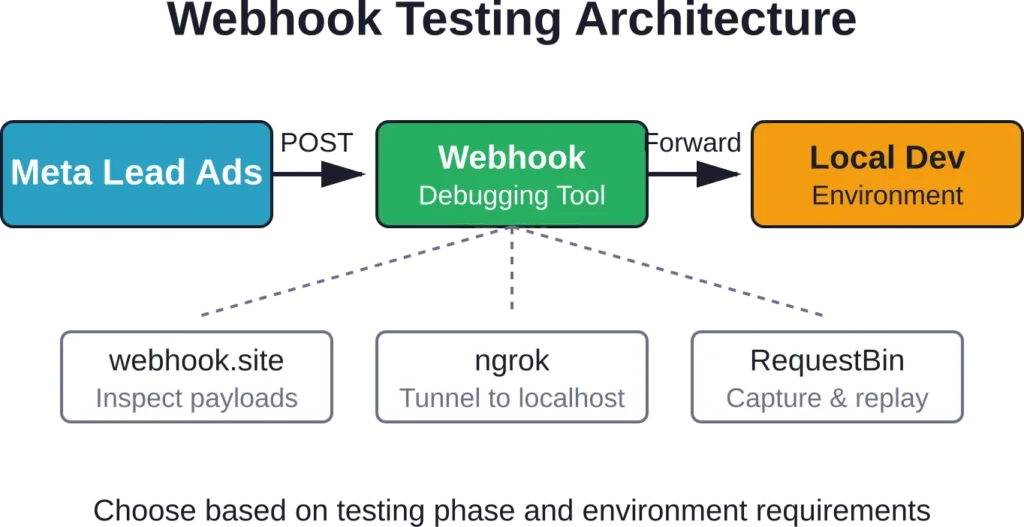
Webhook debugging requires visibility into the actual HTTP requests Meta sends to the integration endpoint. Several tools capture and display webhook payloads for inspection.
webhook.site
Webhook.site provides temporary URLs that log all incoming HTTP requests. Developers can use these URLs as webhook endpoints during testing to see exactly what Meta sends.
The service displays request headers, body content, and timing information. This visibility helps debug issues like payload structure mismatches or encoding problems.
The tool works well for initial integration testing but shouldn’t be used for production webhooks. The URLs are public and don’t support custom domain configuration.
ngrok for Local Testing
ngrok creates secure tunnels from public URLs to localhost, enabling developers to test webhook integrations on their development machines without deploying to a public server.
After installing ngrok and running it with a local port, it generates a temporary public URL. Developers configure that URL as their webhook endpoint in Facebook, then watch requests arrive at their local application.
This approach speeds up development significantly. Developers can modify webhook handling code, restart their local server, and test again immediately without deployment delays.
RequestBin and Similar Services
RequestBin and similar request inspection tools offer features comparable to webhook.site. They capture HTTP requests, display formatted payloads, and provide replay functionality.
Some services retain request history longer or offer team collaboration features. The core functionality remains the same—capturing webhook payloads for inspection.
Meta’s Official Lead Ads Testing Tool

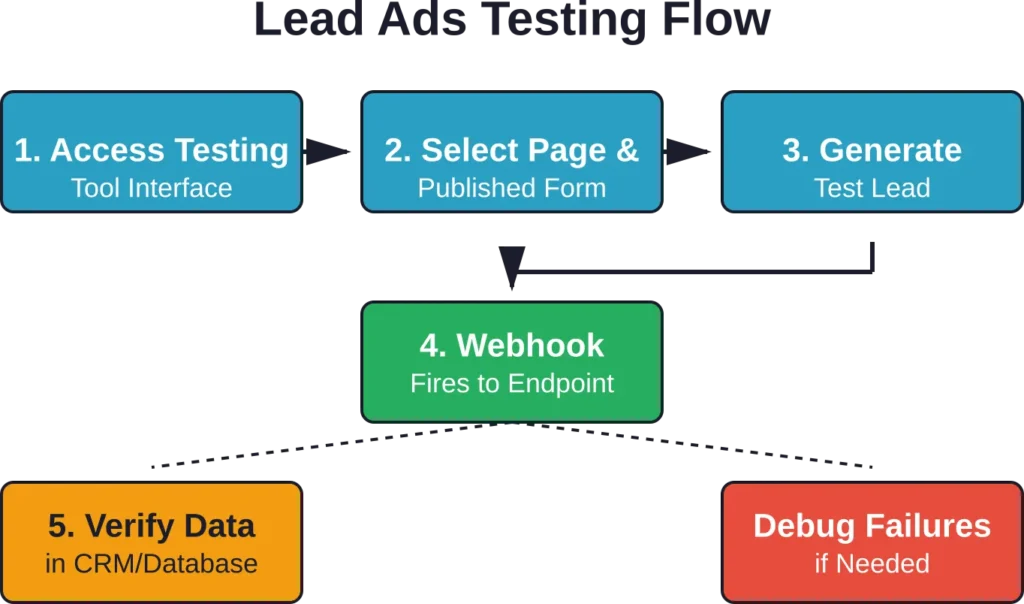
Meta provides a dedicated testing interface at developers.facebook.com/tools/lead-ads-testing. This tool lets developers generate test leads without running actual campaigns.
The interface requires three things: a Facebook page, a published lead generation form, and appropriate permissions on the page. Once configured, developers can create sample submissions that flow through the same API paths as real leads.
How the Official Tool Works
The testing tool interface loads with a page selection dropdown. After selecting a page, any published lead forms on that page become available for testing.
Developers choose a form, then the tool generates a test lead with sample data. That submission triggers webhooks exactly like a real form submission would. The test lead includes all configured form fields with placeholder values.
Generated test leads sometimes fail to reach integrations. Common causes include webhook subscription errors, SSL certificate issues on the receiving endpoint, or firewall rules blocking Meta’s servers.
Publishing the form makes it available for testing immediately. Some users report that newly created forms take time to propagate through Meta’s systems. Waiting 15-30 minutes after publishing a form can resolve availability issues.
Step-by-Step Testing Process
Testing follows a predictable sequence that developers can automate once familiar with the flow.
| Step | Action Required | Expected Result |
|---|---|---|
| 1. Access Tool | Navigate to developers.facebook.com/tools/lead-ads-testing | Testing interface loads with page selection |
| 2. Select Page | Choose Facebook page with published forms | Available forms populate in dropdown |
| 3. Choose Form | Select specific lead generation form to test | Form details display with field configuration |
| 4. Generate Lead | Click button to create test submission | Confirmation appears; webhook fires |
| 5. Verify Receipt | Check integration endpoint for payload | Test lead data arrives in downstream system |
The entire process takes under two minutes once forms are published and webhook subscriptions are active.
Limitations of the Official Tool
The official testing tool works for basic integration validation but has constraints. It doesn’t support custom test data—developers can’t specify field values or test edge cases like unusual characters or extremely long inputs.
The tool also won’t help debug webhook response issues. If the receiving endpoint returns an error, developers won’t see detailed feedback about what went wrong.
For those scenarios, developers typically supplement the official tool with API testing platforms and direct Graph API calls.
Automation Platforms for Testing
Marketing automation platforms often include built-in testing features for Lead Ads integrations. These tools handle the complexity of webhook management and provide user-friendly testing interfaces.
Zapier

Zapier connects Facebook Lead Ads to thousands of downstream applications without custom code. The platform’s testing interface lets developers trigger test runs of their automation workflows.
When configuring a Lead Ads trigger in Zapier, the platform automatically retrieves recent form submissions for testing. Developers can select a sample lead and run it through their entire workflow to verify each step executes correctly.
Zapier’s approach works well for no-code integrations but adds a dependency on their platform. Teams building custom integrations typically prefer direct API access.
Make (formerly Integromat)
Make offers visual workflow building with more granular control than Zapier. The platform supports complex branching logic and error handling scenarios.
Make’s Lead Ads module includes a test feature that pulls real submissions from Facebook for workflow testing. Developers can also manually inject test data to simulate edge cases.
The platform displays detailed execution logs showing exactly what data passed through each step and where failures occurred. This visibility accelerates debugging compared to webhook-only approaches.
LeadsBridge

LeadsBridge specializes in lead data synchronization across advertising platforms and CRMs. The platform includes testing tools specifically designed for Lead Ads validation.
LeadsBridge can generate test leads that mirror real form structure and field types. These synthetic leads flow through the same processing pipeline as production data.
The platform also monitors integration health continuously and alerts developers when lead flow stops or error rates increase.
Custom Testing Scripts
Many development teams build custom testing scripts tailored to their specific integration requirements. Scripts provide repeatability and can integrate into continuous integration pipelines.
Python Testing Scripts
Python’s requests library makes API testing straightforward. A basic testing script authenticates with Facebook, retrieves form data, subscribes webhooks, and validates responses.
Scripts can also simulate webhook payloads by making POST requests to the integration endpoint with mock lead data. This approach tests webhook handling logic without requiring Meta to send actual payloads.
Python scripts work particularly well for regression testing—verifying that code changes don’t break existing Lead Ads functionality.
Node.js Testing with Jest
Teams building Node.js integrations often use Jest for automated testing. Tests can mock Facebook Graph API responses and verify that webhook handlers parse data correctly.
Jest’s snapshot testing feature helps catch unexpected changes in payload structure. When Meta updates their API, snapshot tests fail and alert developers to review and update handling code.
Continuous Integration Testing
Integrating Lead Ads tests into CI/CD pipelines ensures that every code deployment maintains working integrations. Tests run automatically on each commit, catching regressions before production deployment.
CI testing typically uses a combination of mocked API responses for fast unit tests and real API calls for slower integration tests. The balance depends on test execution time constraints and API rate limits.
Testing Conversion Lift
Beyond technical integration testing, measuring actual campaign effectiveness requires conversion lift testing. This approach compares outcomes between users who saw ads and a control group who didn’t.
Conversion lift testing, also known as ‘lift tests’ or ‘lift studies,’ helps measure the incremental impact of advertising efforts on conversions. Several ad platforms offer built-in lift testing capabilities, though implementation varies by platform.
For Facebook Lead Ads specifically, lift testing involves creating test and control groups, running campaigns only to the test group, and comparing lead generation rates. This methodology isolates the ad’s true contribution from organic conversions that would have happened regardless.
Proper lift testing requires sufficient sample sizes and statistical rigor. Small campaigns may not generate enough data for statistically significant results.
Common Testing Challenges
Even with good tools, developers encounter recurring issues when testing Lead Ads integrations. Understanding these patterns speeds up troubleshooting.
Webhook Subscription Failures
Webhooks fail to subscribe when the endpoint doesn’t respond correctly to Meta’s verification challenge. The endpoint must return the exact hub_challenge value Meta sends with a 200 status code.
SSL certificate errors also prevent webhook subscriptions. Meta requires valid HTTPS endpoints with certificates from trusted authorities. Self-signed certificates won’t work.
Missing Leads
Test leads generated through the official tool sometimes don’t reach webhook endpoints. Common causes include incorrect webhook field subscriptions, app permission issues, or firewall rules blocking Meta’s IP ranges.
Developers should verify that their Facebook app has leads_retrieval permission and that webhook subscriptions include the leadgen field. Without that specific subscription, Meta won’t send lead data.
Field Mapping Errors
Form fields don’t always map cleanly to CRM or database schemas. Custom questions, multiple choice fields, and conditional logic create complexity.
Testing should include forms with all supported field types to ensure the integration handles each correctly. The Graph API represents different field types with distinct JSON structures, and parsing code needs to accommodate that variation.
| Issue | Symptoms | Solution |
|---|---|---|
| Webhook won’t subscribe | Subscription requests fail; no error details provided | Verify endpoint returns hub_challenge with 200 status; check SSL cert validity |
| Test leads not arriving | Official tool generates leads but webhook never fires | Confirm leadgen field subscription; check app permissions; verify firewall rules |
| Fields missing from payload | Some form fields don’t appear in received lead data | Review field mapping; ensure all field types are handled; check API version compatibility |
| Authentication errors | API calls return permission or token errors | Regenerate access token; verify required permissions; check token expiration |
| Rate limiting | Requests fail with rate limit errors during testing | Implement exponential backoff; reduce test volume; use batch API calls |
Best Practices for Lead Ads Testing
Effective testing follows patterns that catch issues early and maintain integration reliability over time.
Test Early and Often
Start testing during development, not after deployment. Early testing identifies integration issues when they’re cheapest to fix.
Run tests after every significant code change. Automated tests catch regressions immediately, while manual testing only finds issues when someone remembers to check.
Use Production-Like Data
Test data should mirror real lead variations. Include long names, special characters in email addresses, phone numbers with different formatting, and all custom question types the forms use.
Synthetic test data that’s too clean masks issues that only surface with real-world input diversity.
Monitor Production Continuously
Testing validates code before deployment, but monitoring catches issues in production. Webhook delivery can fail for reasons unrelated to code—network issues, DNS problems, downstream service outages.
Implement alerting that triggers when lead volume drops unexpectedly or error rates spike. React to issues before marketing teams notice missing leads.
Document Test Procedures
Testing procedures should be documented so any developer can validate integrations. Documentation prevents knowledge silos and ensures consistent testing standards.
Include step-by-step instructions, expected results for each test case, and troubleshooting guides for common failures.
Version Control Test Cases
Store test cases, scripts, and sample payloads in version control alongside integration code. This practice maintains testing assets as the codebase evolves.
When API versions change or form configurations update, version-controlled test cases make it easy to update tests consistently.
Integrating Testing Into Development Workflows
Testing shouldn’t be an isolated activity disconnected from regular development. Integrating testing into standard workflows makes it routine rather than exceptional.
Pull Request Testing
Require Lead Ads integration tests to pass before merging pull requests. This gate prevents broken code from reaching the main branch.
Tests run automatically in CI when developers open pull requests. Failed tests block merging and immediately notify the developer what broke.
Staging Environment Validation
Deploy changes to a staging environment that mirrors production configuration. Run integration tests against staging before promoting to production.
Staging environments should use separate Facebook apps with test pages and forms. This isolation prevents test activity from interfering with production lead flow.
Production Smoke Tests
After deploying to production, run basic smoke tests that verify critical paths still work. These tests catch deployment issues immediately.
Smoke tests don’t need to be exhaustive—just enough to confirm that webhooks still receive leads and critical integrations function.
Tools for Specific Use Cases
Different development scenarios benefit from specialized testing approaches and tools.
Testing Multi-Platform Campaigns
Teams running lead generation across multiple advertising platforms need tools that support unified testing. AdVantage-Campaign-Management-Multi-Platform-App, a multi-platform campaign management platform referenced in GitHub, demonstrates cross-platform campaign management architectures.
Cross-platform testing requires validating that lead data from Facebook, Google, and other sources flows into a unified system with consistent formatting and processing.
Testing A/B Campaign Variations
A/B testing marketing campaigns requires statistical analysis tools to determine significance. Repositories like battina7125/A-B-Testing-Marketing-Campaigns provide frameworks for campaign testing and analysis.
Testing tools for A/B scenarios need to support splitting lead volume across variations and tracking conversion outcomes for each.
High-Volume Lead Processing
Applications processing high lead volumes need load testing and performance validation. Standard testing tools work for functional validation but don’t stress-test systems under realistic load.
Load testing tools like Apache JMeter or Locust can simulate thousands of concurrent webhook deliveries to verify system capacity and identify bottlenecks.
Graph API Version Considerations
Facebook regularly releases new Graph API versions and deprecates old ones. Testing must account for version differences.
Developers should verify which API version their integration uses and test against that specific version. Documentation in the machouz Gist provides webhook implementation guidance for Lead Ads.
When Meta announces a new API version, allocate time to test integrations against it before the current version reaches deprecation. This proactive approach prevents forced updates under time pressure.
Version Migration Testing
Migrating between API versions requires testing that verifies functionality remains consistent. Response payload structures sometimes change between versions.
Compare responses from the old and new API versions side-by-side. Document any differences and update parsing code accordingly before switching production traffic to the new version.
Security Testing
Lead data contains personally identifiable information that requires protection. Security testing validates that integrations handle data safely.
Webhook Signature Verification
Meta signs webhook payloads with an app secret. Integrations should verify signatures before processing payloads to prevent spoofed requests.
Test that the integration correctly rejects payloads with invalid signatures. This validation prevents attackers from injecting fake lead data.
Data Transmission Security
All lead data transmission must occur over HTTPS. Test that the integration refuses to send data over unencrypted connections.
Certificate validation should be enabled and enforced. Self-signed certificates or expired certificates should cause connection failures rather than silently accepting insecure connections.
Access Control Testing
Verify that only authorized users and systems can access lead data. Test authentication mechanisms, authorization checks, and audit logging.
Attempt to access lead data without proper credentials. The system should deny access and log the attempt.
Frequently Asked Questions
Use Meta’s official Lead Ads Testing Tool at developers.facebook.com/tools/lead-ads-testing. Select a page with published lead forms, choose a form, and generate test leads. These test submissions flow through webhooks exactly like real leads but don’t require running paid campaigns. The tool generates sample data for all form fields automatically.
Test leads fail to reach endpoints for several common reasons. First, verify that the webhook subscription includes the leadgen field—without it, Meta won’t send lead data. Second, check that the endpoint responds to Meta’s verification challenge correctly by returning the hub_challenge value with a 200 status. Third, ensure the endpoint uses valid HTTPS with a trusted SSL certificate. Finally, confirm firewall rules allow connections from Meta’s IP ranges.
Meta’s official testing tool generates test leads with predetermined sample data and doesn’t support custom values. For testing with specific data, use direct Graph API calls through tools like Postman, or build custom scripts that make POST requests to the webhook endpoint with mock payloads that match the Lead Ads webhook structure. This approach allows testing edge cases with unusual characters, extremely long inputs, or specific field combinations.
Lead Ads integrations require leads_retrieval permission to access lead data through the Graph API. For managing webhook subscriptions programmatically, the pages_manage_ads permission is also needed. Generate access tokens through the Graph API Explorer or Facebook app settings, ensuring these permissions are included. Tokens must remain valid for the duration of testing—short-lived tokens expire quickly and need refreshing.
Use ngrok or similar tunneling tools to expose localhost to the internet. Install ngrok, run it with the local port where the application listens, and configure the generated public URL as the webhook endpoint in Facebook. Webhooks will then reach the local development environment, allowing immediate testing after code changes without deploying to remote servers. Remember to update the webhook URL whenever ngrok restarts, as it generates new URLs each session.
The official Meta testing tool generates test leads through the standard Lead Ads interface and triggers webhooks, validating the end-to-end integration from Facebook to the endpoint. Sample code repositories like fbsamples/lead-ads-webhook-sample or supasate/facebook-realtime-lead-ads-demo provide reference implementations showing how to build webhook endpoints correctly. Use the official tool to validate that working integrations receive data properly. Use sample repositories as starting points when building new integrations or debugging webhook handling logic.
Implement monitoring that tracks lead volume, webhook delivery success rates, and downstream processing errors. Set alerts that trigger when lead volume drops below expected thresholds or error rates spike. Tools like LeadsBridge include built-in monitoring for Lead Ads integrations. For custom implementations, log webhook receipts with timestamps and set up automated checks that verify recent lead activity. Production monitoring catches issues that testing might miss, like intermittent network problems or downstream service outages.
Conclusion
Testing Facebook Lead Ads integrations properly prevents data loss, saves debugging time, and ensures marketing spend produces actual leads rather than disappearing into broken pipelines.
The official Meta testing tool handles basic validation. GitHub sample repositories provide working code examples across multiple programming languages, including C#, Java, Node.js, Python, Ruby, and PHP. Webhook debugging tools like ngrok enable local development testing. Automation platforms offer no-code alternatives for teams without development resources.
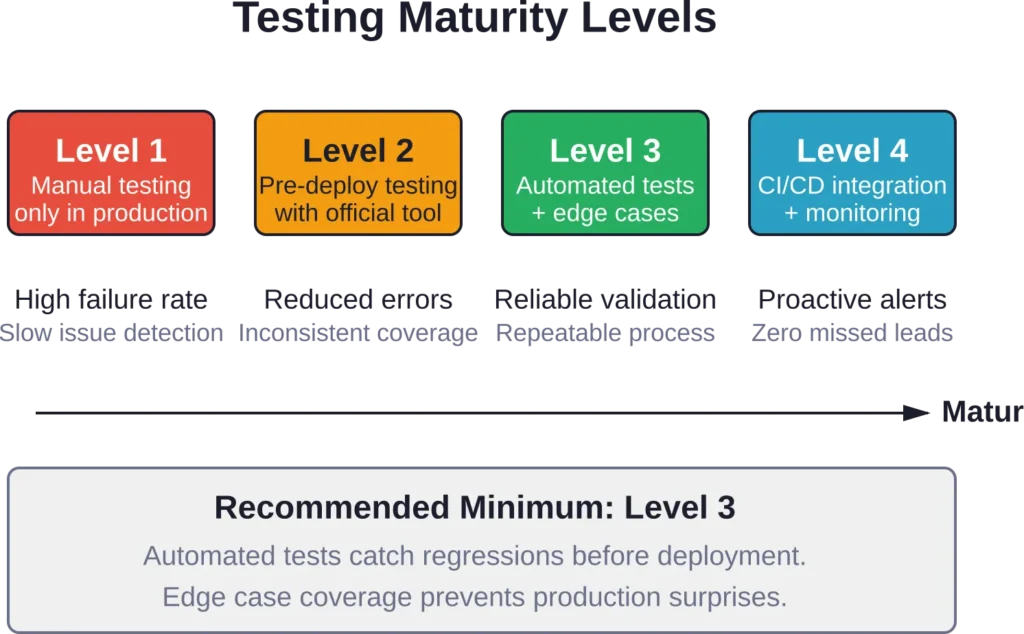
But the specific tools matter less than the testing discipline. Test early in development. Automate tests so they run on every code change. Monitor production continuously so issues surface before marketing teams notice missing leads.
Start with the official testing tool to validate basic integration functionality. Add webhook debugging to inspect actual payloads during development. Integrate automated tests into CI/CD pipelines for ongoing regression detection. That progression builds testing maturity that scales with integration complexity.
Testing isn’t optional overhead—it’s the foundation for reliable Lead Ads implementations. Set up proper testing now, before the next campaign launches and leads start flowing.