
Quick Summary: When you unblock someone on Snapchat, they won’t automatically be added back to your friends list. The person can now send you Snaps and Chats again, view your public Stories, and search for your profile. However, old chat history, Snap Streaks, and your previous friendship connection are not automatically restored—you’ll need to manually re-add them as a friend to fully reconnect.
Blocking someone on Snapchat creates immediate boundaries—they can’t message, Snap, or interact with your private content. But what happens when the situation changes and you decide to unblock them?
The unblocking process is simple. The aftermath? That’s where things get a bit more complicated.
Understanding exactly what changes when you unblock someone helps manage expectations and privacy settings effectively. According to the official Snapchat support documentation, unblocking restores certain abilities but doesn’t automatically reverse everything that blocking did.
Here’s the thing though—unblocking isn’t the same as adding someone back as a friend. That distinction matters more than most people realize.
The Immediate Effects of Unblocking Someone
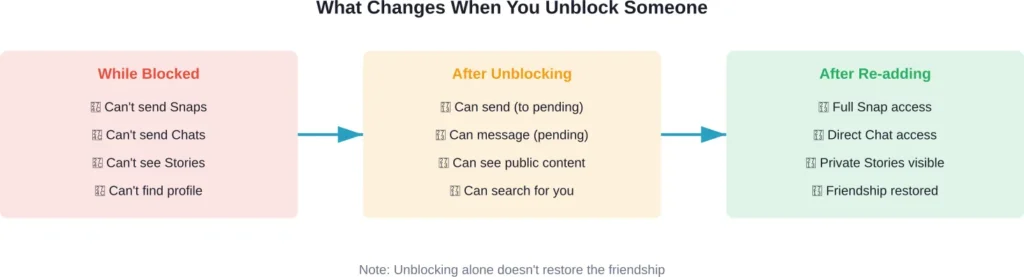
The moment you unblock someone on Snapchat, several changes happen instantly. According to official Snapchat documentation, the unblocked person will be able to send you Snaps and Chats again, view your Stories and Charms, and search for your username in the app.
But wait. They still won’t appear on your friends list automatically.
This creates an interesting in-between state. The person can technically interact with you, but they’re not your friend yet. Any messages or Snaps they send will land in your pending requests section rather than your main Chat feed.
Real talk: this is actually a safety feature. Snapchat doesn’t assume that unblocking means you want to restore the full friendship—it just removes the hard barrier you previously set.
What Happens to Your Old Messages and Chat History
This is where expectations often clash with reality. When you unblock someone, your old chat history does not automatically reappear.
According to official Snapchat documentation, if you decide to unblock them later, your old chat history will still be available. The chat slate essentially starts clean from the user’s perspective, providing a fresh start messaging-wise.
Now, this is where it gets interesting. After unblocking, old chat history will be available to both parties.
Blocking someone immediately breaks any active streak. While the official documentation doesn’t explicitly detail Snap Streak recovery after unblocking, the streak counter resets and cannot be manually restored.
Does Your Friend Status Automatically Restore?
The short answer? No.
According to official Snapchat support resources, unblocking someone does not automatically add them back to your friends list. This is probably the most misunderstood aspect of the entire unblocking process.
After unblocking, both parties are essentially back to stranger status on the platform. The person you unblocked can search for your username and send you a friend request, but they won’t automatically appear on your friends list.
You have two options to reconnect:
- You can manually search for their username and add them back as a friend
- They can send you a friend request, which you’ll need to accept
This manual re-adding requirement gives both people control over whether the connection actually resumes. It’s a deliberate design choice that prioritizes user control over convenience.
That said, the process is quick. Once either person sends a friend request and the other accepts, the friendship is restored—though as mentioned earlier, old messages and streaks don’t come back.
Can They See Your Profile and Stories After Unblocking?
This depends entirely on your privacy settings. According to official Snapchat documentation, blocked users can still view content that’s posted publicly, like Public Stories or Spotlight content, even while blocked.
After unblocking, this becomes even more relevant. The person can now search for your profile and view any public content you share. If your Stories are set to “Everyone” or you have a Public Profile, they’ll be able to see that content without being your friend.
However, private Stories and content restricted to friends remain hidden until you re-add each other. Your privacy settings for “View My Story” determine who can see your content beyond your friends list.
| Content Type | While Blocked | After Unblocking (Not Friends) | After Re-adding as Friend |
|---|---|---|---|
| Public Stories | Visible | Visible | Visible |
| Private Stories | Hidden | Hidden | Visible |
| Friends-Only Stories | Hidden | Hidden | Visible |
| Profile Information | Not searchable | Searchable & visible | Fully visible |
| Spotlight Posts | Visible | Visible | Visible |
Sound familiar? This is why understanding the difference between blocking, unblocking, and removing friends matters. Each action has different implications for what people can see.
Will They Get Notified When You Unblock Them?
No, Snapchat does not send a notification when you unblock someone. The platform maintains privacy around blocking and unblocking actions.
The person won’t receive an alert, push notification, or any direct indication that you’ve unblocked them. They’ll only discover it if they actively search for your username and notice they can now find your profile.
Similarly, Snapchat doesn’t notify someone when you initially block them either. The blocking system is designed to be discreet, allowing people to set boundaries without creating confrontational situations.
Here’s the thing though—they might figure it out indirectly. If they search for your username and couldn’t find it before, but suddenly can now, that’s a pretty clear indication. But there’s no official notification from Snapchat itself.
How to Actually Unblock Someone on Snapchat
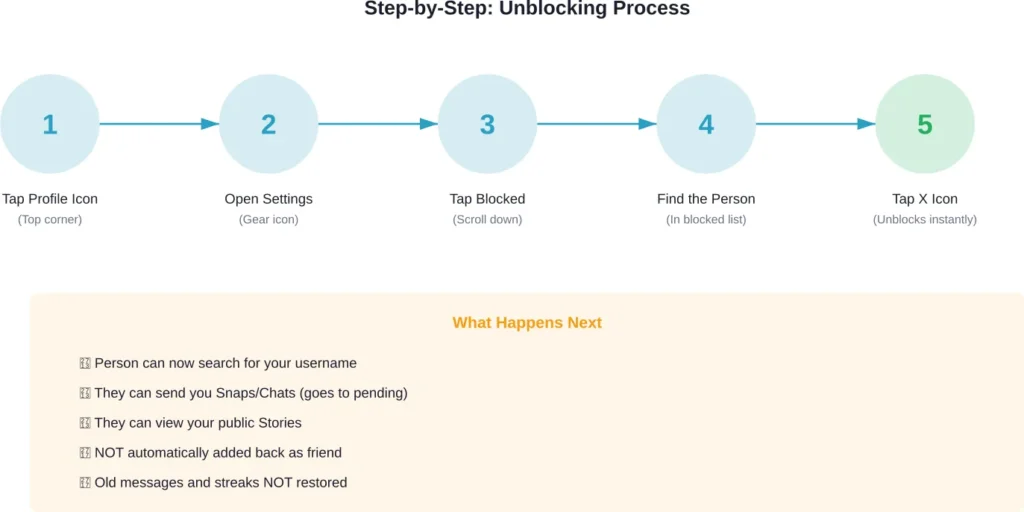
The process is straightforward and takes less than a minute. According to official Snapchat support documentation, here’s exactly how to unblock someone:
- Tap your profile icon in the top corner of the screen
- Tap the settings gear icon to open Settings
- Scroll down and tap “Blocked”
- Find the person you want to unblock in the list
- Tap the X icon next to their name
That’s it. The person is immediately unblocked and can now interact with your public content and send you messages or friend requests.
One important note: if you’ve blocked many people over time, the Blocked list can get long. There’s no search function within this list, so you’ll need to scroll through to find the specific person.
Blocking vs Removing: Understanding the Key Differences
Many people confuse blocking with removing a friend, but these are distinctly different actions with different outcomes. According to official Snapchat support resources, removing a friend is much less restrictive than blocking.
When you remove someone as a friend, they can still send you Snaps and Chats (which go to pending messages), and they can view any Stories you’ve set to public. Depending on your privacy settings, they might still be able to message you directly.
Blocking, by contrast, creates a hard boundary. The blocked person can’t send you anything, can’t find your profile in search, and can’t interact with your private content at all.
| Action | Can They Message You? | Can They See Your Stories? | Can They Find Your Profile? |
|---|---|---|---|
| Remove as Friend | Yes (goes to pending) | Yes, if set to public | Yes |
| Block | No | Only public content | No |
| Unblock (not re-added) | Yes (goes to pending) | Yes, if set to public | Yes |
Generally speaking, removing someone is appropriate when you want distance but not complete disconnection. Blocking is for situations requiring stronger boundaries—harassment, unwanted contact, or safety concerns.
Practical Scenarios: When and Why People Unblock
Common scenarios where people decide to unblock someone on Snapchat include:
Resolved conflicts top the list. When friendships repair after disagreements, unblocking and re-adding becomes part of the reconciliation process. The fresh-start aspect—no old messages, no streaks—can actually help in these situations.
Accidental blocking happens more often than expected. Someone might block the wrong person or tap the block button unintentionally. The ability to quickly unblock corrects these mistakes.
Changed circumstances matter too. An ex-relationship might have warranted blocking at the time, but months or years later, both parties might be comfortable with casual social media connection again.
Professional reasons occasionally come into play. Someone blocked from a personal account might need to be accessible later for work or networking purposes.
Privacy Considerations After Unblocking
Unblocking someone doesn’t mean giving them full access to your Snapchat life. Understanding privacy settings helps maintain appropriate boundaries even after unblocking.
Check your Story privacy settings before unblocking if you’re concerned about what the person can see. The “View My Story” settings under Story privacy determine who sees your content beyond friends. Options include “Everyone,” “My Friends,” or “Custom” lists.
Location sharing through Snap Map is another consideration. If you have Snap Map enabled, check whether your location-sharing settings would allow this person to see where you are after unblocking. You can switch to Ghost Mode or customize who sees your location.
Contact settings matter as well. Under “Who Can…” settings, you can control who can contact you, view your Story, see you in Quick Add, and see you in their viewer list. These settings remain in effect after unblocking and work independently of friend status.
The official Snapchat support site emphasizes that blocked users can still view publicly posted content like Public Stories or Spotlight posts. If privacy is a primary concern, limit what you post publicly rather than relying solely on blocking.
What to Do After Unblocking: Next Steps
Okay, so what about the actual reconnection process? Unblocking opens the door, but walking through it requires additional steps.
If you want to fully reconnect, you’ll need to manually re-add the person as a friend. Search for their username using the search function at the top of the Chat screen or camera screen. Their profile should now appear in search results.
Tap “Add Friend” on their profile. They’ll receive a friend request notification (unlike the unblocking itself, which is silent). Once they accept, the friendship is restored.
Alternatively, wait for them to add you first. If they search for your profile and send a friend request, you’ll see it in your notifications. Accepting it restores the connection from their end.
Either way works. The choice often depends on who initiated the unblocking and the context of your relationship.
After re-adding, expect to start fresh messaging-wise. Old conversations won’t reappear, and previous Snap Streaks are permanently lost. New streaks can begin with consecutive daily Snap exchanges, but the old count is gone.
Common Issues When Unblocking Someone
Sometimes unblocking doesn’t go as smoothly as expected. Several common issues can occur when unblocking someone.
The most common issue: being unable to find the person’s profile after unblocking them. This usually happens if the person deleted their account or changed their username. Try searching for their display name and username—if neither works, they may have left the platform or modified their account significantly.
Another scenario: unblocking someone but still not being able to add them back. According to official Snapchat troubleshooting resources, this can occur if you’ve hit the friend limit (yes, there’s a maximum number of friends allowed), if they’ve blocked you, or if there’s a temporary connection issue.
If the person blocked you while you had them blocked, you’ll unblock them on your end successfully—but they still have you blocked on theirs. In this case, they won’t appear in search, and you can’t add them until they unblock you as well.
Connection problems occasionally interfere. Make sure your device has a stable internet connection when attempting to unblock or search for someone. Try switching between Wi-Fi and mobile data if issues persist.
Frequently Asked Questions
No, unblocking someone does not restore old chat history. Messages sent before blocking remain deleted from both sides, and the conversation starts fresh after unblocking. Any previous Snap Streaks are also permanently lost and cannot be recovered through unblocking.
No, Snapchat does not send any notification when you unblock someone. The unblocking action is completely silent and discreet. The person will only know if they actively search for your username and notice they can now find your profile when they couldn’t before.
No, unblocking does not automatically restore the friendship. After unblocking, you’ll need to manually search for their username and add them as a friend again, or they can send you a friend request that you’ll need to accept. The friendship connection requires a separate action beyond just unblocking.
No, they cannot see your private Stories until you re-add them as a friend. After unblocking but before re-adding, they can only see content you’ve set to public, such as Public Stories or Spotlight posts. Friends-only Stories and private content remain hidden until the friendship is restored.
Each blocking and unblocking cycle follows the same pattern—the person is removed from your friends list when blocked and needs to be manually re-added after unblocking. Repeatedly blocking and unblocking someone doesn’t create any cumulative effects or additional restrictions beyond the standard blocking functionality.
No, there’s no waiting period. You can search for and re-add someone as a friend immediately after unblocking them. The re-adding process works instantly once the block is removed, though the other person still needs to accept the friend request.
After unblocking but before re-adding as friends, they can see your Snap Score if they can view your profile. However, if your privacy settings restrict who can see your profile information, this may be limited. Once you’re friends again, they can definitely see your current Snap Score, but it won’t show any changes that occurred while they were blocked.
Final Thoughts on Managing Snapchat Connections
Unblocking someone on Snapchat is simple mechanically but comes with nuances worth understanding. The action removes barriers but doesn’t automatically restore what existed before blocking—messages, streaks, and friendship status all require separate attention.
This design actually makes sense. It gives both people control over whether and how to reconnect, rather than assuming unblocking means complete reconciliation. The manual re-adding step creates space for boundaries even after unblocking.
Privacy settings remain your primary tool for managing what people can see and access on Snapchat. Review these settings regularly, especially before unblocking someone, to ensure your content visibility aligns with your comfort level.
Whether unblocking after a resolved conflict, correcting an accidental block, or simply reassessing old boundaries, understanding exactly what changes—and what doesn’t—helps set appropriate expectations for both parties involved.