
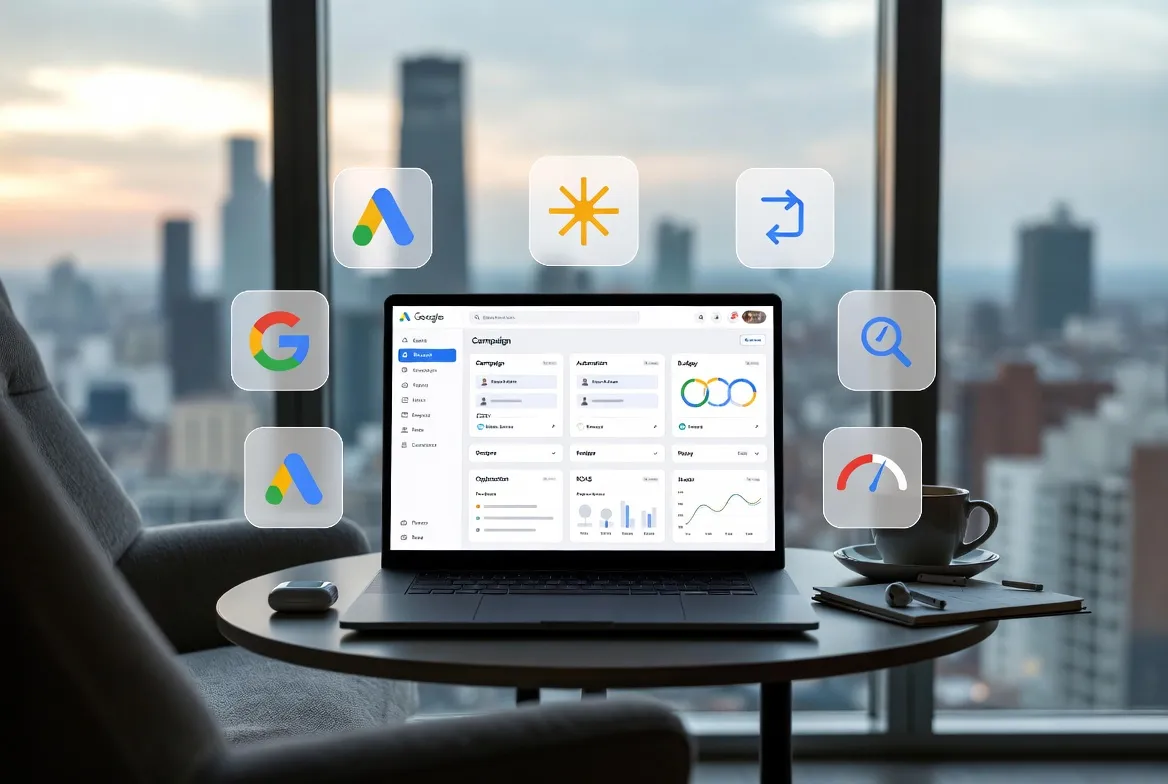
Quick Summary: AI tools for Google Ads in 2026 automate bidding, creative generation, performance analysis, and campaign optimization across Search, Performance Max, and Display. From fully autonomous platforms like Extuitive, Ryze AI to specialized solutions for ad copy (Anyword, Writesonic) and rule-based automation (Optmyzr, Adalysis), these tools help advertisers manage complexity that has outgrown manual bandwidth. The best choice depends on team size, budget, and whether autonomous management or hands-on control is preferred.
The landscape of Google Ads has changed dramatically. What used to require hours of manual tweaking now happens in seconds through machine learning algorithms.
According to research published by UC Berkeley’s Haas School of Business, 92% of Fortune 500 companies have implemented generative AI in their operations as of 2025. The shift isn’t optional anymore.
The average advertiser now juggles Search, Performance Max, Demand Gen, and YouTube campaigns simultaneously. Each campaign type brings its own bidding dynamics, audience signals, and creative requirements. Managing this complexity manually? That’s where most teams hit a wall.
This guide breaks down the AI tools actually making a difference in Google Ads management. No fluff, no theory — just tools that handle real workloads.
Why AI Tools Matter for Google Ads in 2026
Real talk: the accounts winning in 2026 are the ones using AI to manage what humans can’t scale anymore.
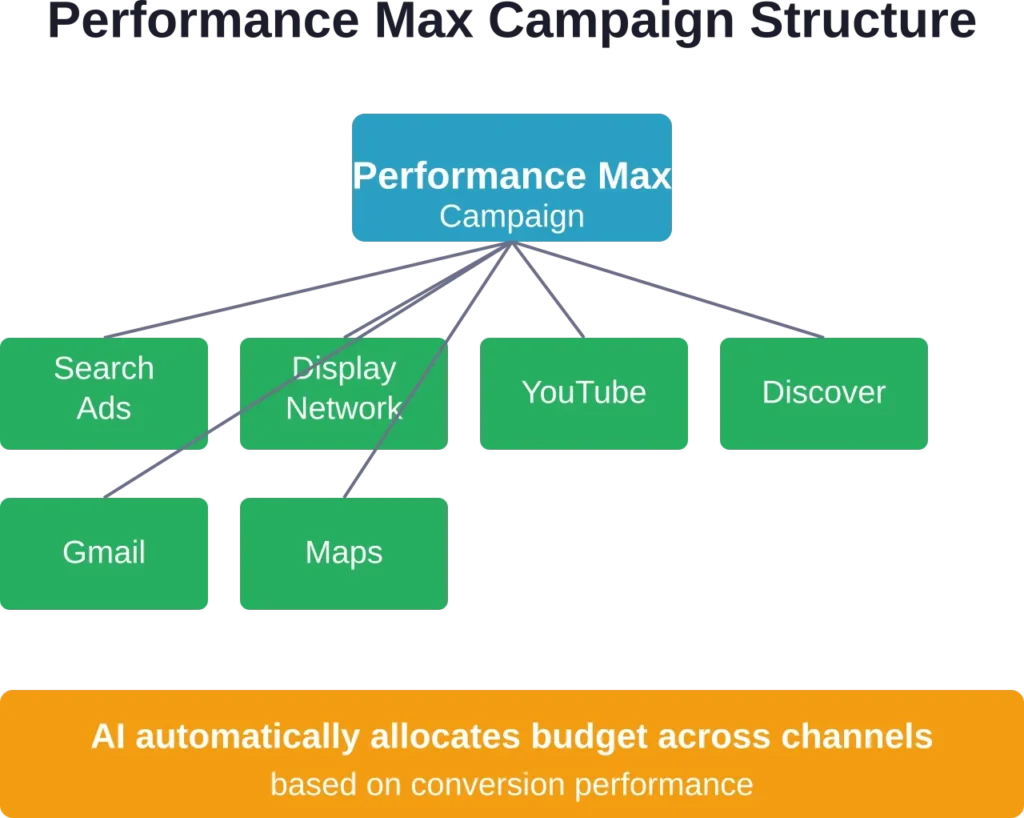
Performance Max alone requires constant monitoring of asset group performance across YouTube, Display, Search, Discover, Gmail, and Maps. Google’s own data shows that advertisers shifting from Standard Shopping to Performance Max drove a 25% increase in conversion value on average, at similar ROAS.
But here’s the thing — that performance gain only happens when campaigns are properly optimized. Manual optimization across six different surfaces? Good luck with that.
Research indicates that marketing teams report reduced campaign launch time using AI-powered tools. That’s not about working faster — it’s about handling campaigns that were impossible to manage before.
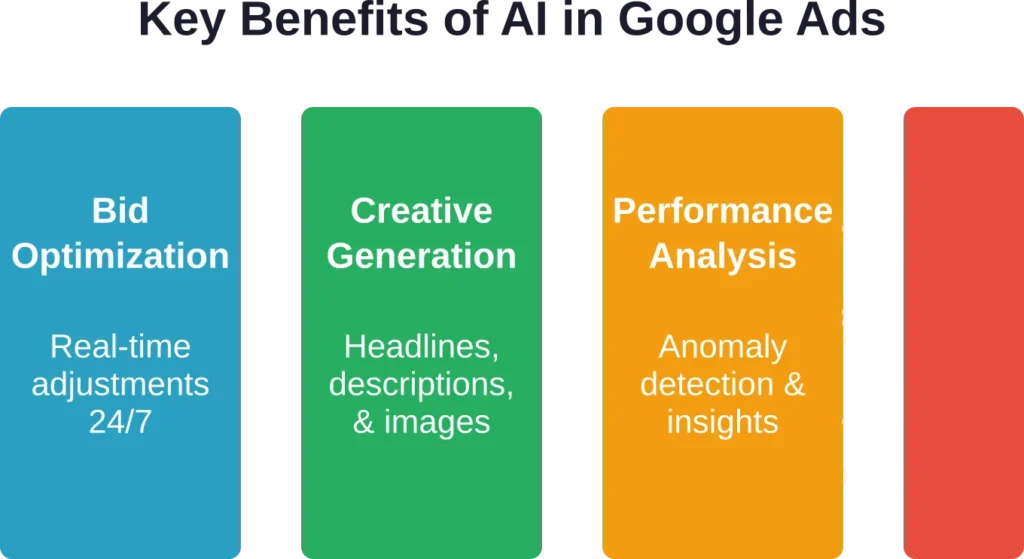
The use cases are clear. Research indicates organizations use generative AI for personalization, insight generation, and content creation.
Types of AI Tools for Google Ads
Not all AI tools do the same thing. The category breaks down into four main types.
Autonomous Campaign Management Platforms
These tools take over the daily operation of campaigns. Bid adjustments, budget shifts, keyword additions, creative testing — all handled automatically.
Think of them as a full-time PPC manager running in software. The system makes decisions based on performance data without requiring manual approval for every change.
Rule-Based Automation Tools
These platforms execute changes based on rules that the advertiser sets. If cost-per-click exceeds $X, pause the keyword. If ROAS drops below Y%, reduce budget by Z%.
The difference from autonomous tools? Rules-based systems won’t take action until a human defines the conditions. More control, more setup time.
Ad Copy and Creative Generators
Specialized tools that generate headlines, descriptions, and ad variations using language models trained on high-performing copy.
Some score generated copy against performance benchmarks. Others integrate directly with Google Ads to push new creative assets into campaigns.
Analytics and Optimization Platforms
Tools focused on surfacing insights from campaign data. They identify anomalies, recommend budget shifts, flag underperforming segments, and generate reports.
The action still happens manually, but the analysis that informs decisions runs on AI.
Top AI Tools for Google Ads Management
Here’s what’s actually being used by advertisers managing serious spend in 2026.
Extuitive — Pre-Launch AI Ad Prediction & Creative Validation
Extuitive is an AI-driven platform that lets advertisers create, validate, and forecast ad performance before spending any budget.
It uses 150,000+ AI consumer agents modeled on real behavioral data to simulate reactions and predict CTR, ROAS, and purchase intent with high accuracy.
Trusted by Shopify brands and backed by Flagship Pioneering. Currently in growth phase with strong early adoption among DTC merchants.
What sets Extuitive apart is its upstream approach: it eliminates wasteful testing by scoring thousands of creatives in advance. Pricing is flat-rate (Starter $1,000/mo, Professional $2,500/mo) instead of a percentage of ad spend.
The tool works by connecting your Shopify store (or website), where AI agents automatically analyze products, generate copy/images/video, and validate concepts. It supports Google Ads, Meta, TikTok and other platforms for launch.
Best for: Shopify/DTC advertisers who want to de-risk creative testing and launch stronger ads with minimal wasted spend.
Contact Information:
- Website: extuitive.com
- Email: [email protected]
- LinkedIn: www.linkedin.com/company/extuitive
- Twitter: x.com/Extuitive_Inc
- Instagram: www.instagram.com/extuitiveinc
Ryze AI — Fully Autonomous Campaign Management

Ryze AI handles the entire campaign lifecycle without requiring manual intervention. The platform manages bid optimization, budget allocation, and performance reporting autonomously.
Over 2,000 marketers across 23 countries use Ryze AI to manage more than $500 million in ad spend. The platform carries a 4.9/5 rating from 200+ reviews.
What sets Ryze AI apart is the flat pricing model starting around $40/month. Most competitors charge based on ad spend percentage — a structure that penalizes growth. For an account spending $50,000 monthly, the difference between flat and percentage-based pricing becomes substantial.
The tool works across Google Ads and Meta Ads, handling Search, Performance Max, Demand Gen, and YouTube campaigns simultaneously. Setup requires connecting ad accounts and setting goals. After that, the system operates independently.
Best for: advertisers who want hands-off management and don’t need to review every bid change manually.
Optmyzr — Agency-Focused Rule-Based Automation

Optmyzr provides rule-based automation aimed at agencies managing multiple client accounts. Pricing starts at $208/month with a 4.6/5 rating.
The platform offers one-click optimizations, automated reporting, and quality score tracking. Rules can be templated across accounts, which speeds up deployment for agencies running similar strategies for multiple clients.
Optmyzr includes features for bid management, keyword harvesting from search terms, and negative keyword discovery. The tool surfaces recommendations but waits for approval before implementing changes.
Best for: agencies that need standardized workflows across client accounts with control over when changes take effect.
Adalysis — Ad Testing and Copy Optimization
Adalysis specializes in ad testing and quality score analysis. Pricing is $99/month with a 4.5/5 rating.
The tool automatically tests ad variations and identifies statistically significant winners. It also monitors quality scores at the keyword level and provides recommendations for improvement.
Adalysis integrates with Google Ads Editor, allowing bulk changes to be exported and uploaded. The platform focuses specifically on the creative and quality score aspects of optimization rather than trying to handle every campaign element.
Best for: advertisers prioritizing ad copy performance and quality score improvements.
Anyword — AI Ad Copy Generator with Performance Scoring

Anyword generates Google Ads copy using language models and scores each variation on predicted performance. The tool assigns each generated headline or description a score out of 100.
According to testing documented by Andrew Marketing, most generated copy scores between 40-60. A score of 60 means the copy performs better than 60% of comparable texts in Anyword’s database.
Pricing starts at $49/month for the Starter plan, which includes one user and unlimited words. The platform offers a 7-day free trial.
The performance prediction feature distinguishes Anyword from generic language models. Instead of just generating variations, the tool estimates which variations will drive better click-through and conversion rates.
Best for: advertisers needing high volumes of ad copy variations with data-driven performance estimates.
Writesonic — Volume Copy Generation
Writesonic focuses on generating large quantities of marketing copy quickly, including Google Ads headlines and descriptions.
The free tier is limited to 10,000 words per month. Paid plans scale based on word count needs.
The tool doesn’t provide performance scoring like Anyword, but it generates variations faster. That makes it suitable for rapid testing scenarios where volume matters more than predictive accuracy.
Best for: advertisers who need to generate many creative variations quickly for manual review and testing.
ChatGPT Plus — Versatile AI Assistant for Ad Strategy

ChatGPT isn’t built specifically for Google Ads, but advertisers use it extensively for strategic analysis, creative briefs, and performance interpretation.
The Plus plan costs $20/month and provides access to GPT-4 models. The free tier limits usage to GPT-3.5.
Many advertisers use ChatGPT to analyze performance data exports, generate hypotheses for underperformance, and draft creative briefs. Community discussions indicate some users interact with the tool 20+ times daily for various marketing tasks.
Best for: advertisers needing flexible AI support for strategic decisions rather than direct campaign automation.
Rytr — Budget-Friendly Copy Generation
Rytr offers free ad copy generation with limits of 20,000 characters per month for one user. This makes it accessible for small businesses testing AI tools.
The interface is simpler than Anyword or Writesonic, with fewer customization options. But for basic headline and description generation, it handles the core task without a subscription cost.
Best for: small businesses or solo operators starting with AI copy generation on a limited budget.
HubSpot — Free Marketing AI with Campaign Integration
HubSpot provides free AI tools integrated with its CRM platform. The free plan supports one user per account with no word limits on AI-generated content.
For teams already using HubSpot for marketing operations, the integrated AI saves time compared to copying content between separate tools.
Best for: HubSpot users who want AI capabilities within their existing marketing stack.
Coupler.io — AI-Powered Performance Analysis
Coupler.io connects Google Ads data with AI analysis tools like ChatGPT, Claude, and Gemini. The platform automates data integration, allowing performance data to be analyzed by language models without manual export and upload.
This bridges the gap between campaign data and AI interpretation. Instead of downloading CSV files and uploading them to ChatGPT, the connection happens automatically.
Best for: analysts who want to query campaign performance data using conversational AI without manual data handling.
Revealbot — Rules Automation for Paid Ads

Revealbot creates rule-based automations for Google Ads and social platforms.
The tool excels at cross-platform automation. Rules can adjust budgets, pause campaigns, or send alerts based on performance thresholds across Google Ads, Facebook, Instagram, and other channels simultaneously.
Best for: advertisers running coordinated campaigns across multiple paid channels who need consistent automation rules everywhere.
| Tool | Best For | Starting Price | Automation Type |
|---|---|---|---|
| Ryze AI | Autonomous management | ~$40/month flat | Fully autonomous |
| Optmyzr | Agency workflows | $208/month | Rule-based |
| Adalysis | Ad testing | $99/month | Rule-based |
| Anyword | Scored ad copy | $49/month | Creative generation |
| Writesonic | Volume copy | Free tier available | Creative generation |
| ChatGPT Plus | Strategy & analysis | $20/month | Assistant |
| Rytr | Budget copy generation | Free tier available | Creative generation |
| HubSpot | CRM integration | Free plan available | Creative generation |
| Coupler.io | Data integration | Check official site | Analytics |
| Revealbot | Cross-platform rules | Check official site | Rule-based |
Google’s Native AI Tools for Ads
Google provides AI capabilities directly within the Ads platform. These aren’t third-party tools — they’re built into campaign types and settings.
Performance Max Campaigns
Performance Max is Google’s AI-driven campaign type that accesses inventory across YouTube, Display, Search, Discover, Gmail, and Maps from a single campaign.
The system automatically allocates budget to the best-performing channels and creates ad combinations from provided assets. Google’s official documentation states that advertisers shifting from Standard Shopping to Performance Max see an average 25% increase in conversion value at similar ROAS.
Setting up Performance Max requires providing creative assets (headlines, descriptions, images, logos, videos) and conversion goals. Google’s AI handles the rest — determining which asset combinations to show, on which channels, and to which audiences.
AI Max for Search Campaigns
AI Max for Search represents Google’s evolution of Dynamic Search Ads and Performance Max URL expansion. According to Google’s documentation, AI Max uses a broader understanding of domain URLs compared to previous dynamic features.
The system automatically generates ad copy based on website content and matches ads to relevant search queries without requiring exhaustive keyword lists.
The difference from Dynamic Search Ads? AI Max integrates the asset generation technologies from Performance Max while maintaining the control structure of traditional Search campaigns.
Generative AI for Asset Creation
Google Ads includes built-in generative AI that creates Performance Max asset groups from a website URL. The system analyzes the site and generates text, image, logo, and video suggestions.
Advertisers maintain control throughout — reviewing, editing, or rejecting suggested assets before campaigns launch. But the initial creation happens automatically, reducing the time required to build asset groups from scratch.
Smart Bidding Strategies
Smart Bidding uses machine learning to optimize bids for conversions or conversion value in each auction. Strategies include Target CPA, Target ROAS, Maximize Conversions, and Maximize Conversion Value.
The system considers signals like device, location, time of day, remarketing lists, and audience characteristics to adjust bids in real time. This happens at a scale impossible for manual bidding — evaluating millions of signal combinations per auction.
How to Choose the Right AI Tool for Your Needs
The right tool depends on what level of control versus automation makes sense for the team and account structure.
Consider Team Size and Expertise
Small teams benefit from autonomous tools that reduce daily maintenance. A solo marketer managing five campaigns can’t monitor performance data hourly — autonomous systems handle that continuously.
Larger teams with dedicated PPC specialists often prefer rule-based tools. The expertise exists in-house; the tools execute decisions faster than manual changes allow.
Evaluate Budget Structure
Percentage-based pricing penalizes growth. An account spending $10,000 monthly might pay $100 for a tool charging 1% of spend. Scale that to $100,000 monthly and the tool costs $1,000 — despite doing the same work.
Flat-rate tools avoid this problem. The value proposition improves as ad spend scales.
Match Tools to Workflow Gaps
What takes the most time? If creative generation is the bottleneck, ad copy tools deliver the biggest impact. If bid management consumes hours daily, automation platforms free up that time.
Generally speaking, most advertisers benefit from addressing the largest time sink first rather than trying to automate everything simultaneously.
Test Before Committing
Most platforms offer free trials. Run parallel tests — keep existing workflows running while the new tool operates alongside them. Compare results after 30 days.
Performance should improve, or time spent should decrease. If neither happens, the tool doesn’t fit.
| Primary Need | Recommended Tool Type | Example Tools |
|---|---|---|
| Hands-off campaign management | Autonomous platforms | Ryze AI |
| Agency client workflows | Rule-based automation | Optmyzr, Revealbot |
| Ad copy at scale | Creative generators | Anyword, Writesonic |
| Quality score focus | Specialized optimization | Adalysis |
| Strategic analysis | AI assistants | ChatGPT Plus, Claude |
| Data integration | Analytics platforms | Coupler.io |
Implementing AI Tools in Existing Google Ads Workflows
Adding AI tools to established workflows requires planning. Dropping automation into active campaigns without transition can cause performance disruption.
Start with Non-Critical Campaigns
Test new tools on campaigns that aren’t carrying critical business objectives. A brand awareness campaign makes a better testing ground than the campaign driving 80% of revenue.
Once performance stabilizes and the team understands how the tool operates, expand to more important campaigns.
Run Parallel Systems Initially
Keep manual management running while AI tools operate simultaneously. This creates a control group for comparison.
After 3-4 weeks, compare performance metrics. If the AI-managed campaigns perform better or equivalently while requiring less time, transition fully.
Set Clear Success Metrics
Define what success looks like before implementation. Is it improved ROAS? Reduced cost per acquisition? Time savings?
Vague goals like “better performance” make evaluation impossible. Specific targets like “reduce CPA by 15% or cut management time by 10 hours per week” provide clear benchmarks.
Monitor Learning Periods
AI systems require learning periods to optimize effectively. Google’s Smart Bidding typically needs 50 conversions in a 30-day window to exit the learning phase.
Third-party tools have similar ramp-up requirements. Evaluating performance during learning periods produces misleading conclusions. Wait until systems stabilize before making judgments.
Common Mistakes When Using AI Tools for Google Ads
Even powerful tools produce poor results when misused. Here are the patterns that consistently create problems.
Over-Automation Without Strategy
Automating everything doesn’t guarantee better performance. AI tools optimize toward the goals provided. If those goals don’t align with business objectives, the optimization works against desired outcomes.
Example: optimizing for maximum conversions when profit margin varies widely across products. The AI drives volume without considering profitability.
Insufficient Asset Variety for Performance Max
Performance Max requires diverse creative assets to test across channels. Providing three headlines and two images limits what the system can optimize.
Google recommends providing the maximum number of assets allowed. More variety gives the AI more options to find winning combinations.
Ignoring Exclusions and Controls
Autonomous tools need guardrails. Without negative keywords, brand exclusions, or placement exclusions, campaigns can appear in irrelevant contexts.
The AI optimizes for conversions — it doesn’t inherently know which terms or placements are inappropriate for the brand.
Changing Settings During Learning
Frequent changes reset learning periods. Adjusting bids, budgets, or targeting while Smart Bidding learns disrupts optimization.
Let systems stabilize for 2-3 weeks before making additional changes unless performance is critically poor.
Treating AI as Set-and-Forget
Autonomous doesn’t mean neglected. AI tools require monitoring for anomalies, competitive changes, and external factors they can’t account for.
A new competitor launching aggressive campaigns or a product going out of stock requires human intervention regardless of automation level.
The Future of AI in Google Ads Management
The trajectory points toward more automation, not less. Google continues expanding AI capabilities across campaign types.
Demand Gen campaigns, launched as the evolution of Discovery campaigns, use AI to find audiences across YouTube, Discover, and Gmail based on visual content and engagement signals.
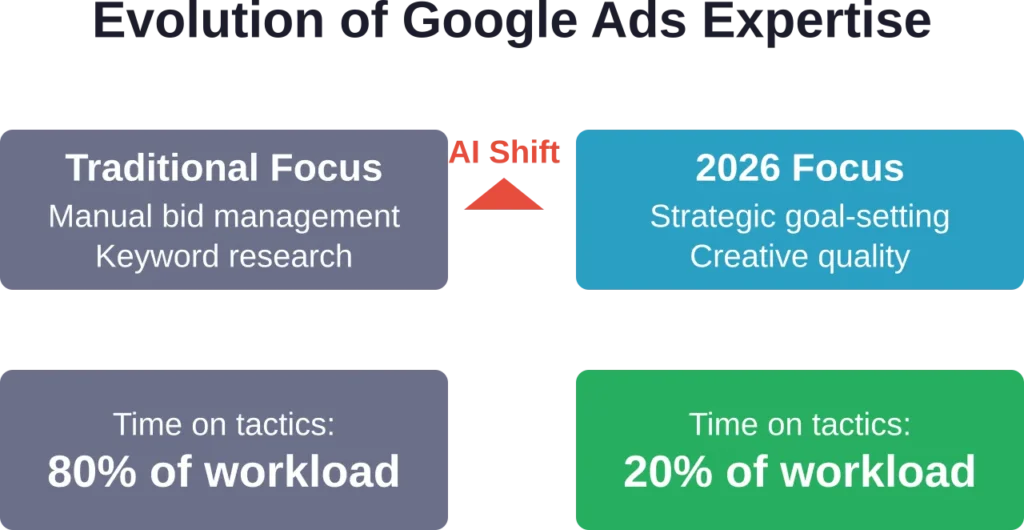
The pattern is consistent — Google shifts away from manual targeting and creative control toward providing goals and assets while AI handles execution.
For advertisers, this means two things. First, expertise shifts from tactical execution to strategic direction. Second, differentiation comes from creative quality and business strategy rather than bidding tactics.
The accounts that struggle in coming years will be those still trying to micro-manage bid adjustments and keyword-level optimizations. The ones that succeed will be those setting clear goals, providing excellent creative, and letting AI handle the complexity.
Measuring ROI from AI Tools
Tool costs need to justify themselves through improved performance or time savings. Here’s how to evaluate ROI properly.
Calculate Time Savings Value
If a tool saves 10 hours per week and the hourly cost of that person’s time is $50, the value is $500 weekly or roughly $2,000 monthly. A tool costing $200/month that delivers this savings shows 10x ROI before accounting for performance improvements.
Measure Performance Lift
Track ROAS, CPA, or conversion rate changes after implementation. A tool that improves ROAS from 400% to 450% on $50,000 monthly spend generates an additional $2,500 in revenue monthly. Even at a 20% profit margin, that’s $500 in additional profit — likely exceeding the tool cost.
Account for Compound Benefits
Time saved on tactical work gets reinvested in strategy. Better strategy compounds performance over time. This secondary benefit is harder to quantify but often exceeds the direct performance lift.
Consider Opportunity Cost
What doesn’t get done when time is spent on manual optimization? New campaign tests? Landing page improvements? Strategic analysis? The opportunity cost of manual work often exceeds the visible costs.
Frequently Asked Questions
Yes, though tool selection matters. Autonomous platforms like Ryze AI use flat-rate pricing that makes sense even for modest budgets. Percentage-based tools become expensive relative to spend. Free tools like Rytr or HubSpot provide basic AI capabilities without subscription costs. The key is matching tool cost to the value generated — not necessarily to budget size.
For routine optimization, yes. Tools like Ryze AI handle bid management, budget allocation, and performance monitoring autonomously. But strategic decisions — new campaign directions, offer testing, audience strategy, creative direction — still require human judgment. Think of AI tools as handling execution while humans focus on strategy and creative.
Most AI systems require 2-4 weeks to complete learning periods and stabilize performance. Google’s Smart Bidding typically needs 50 conversions in 30 days to exit learning. Third-party tools have similar ramp-up requirements. Expect 30-45 days before drawing conclusions about performance impact. Immediate dramatic improvements are rare — sustainable optimization takes time to establish.
Testing shows mixed results depending on the tool and use case. Tools like Anyword that score copy based on performance data often generate effective variations. Generic language models without advertising-specific training produce more hit-or-miss results. The best approach combines AI-generated variations with human editing — using AI for volume and speed while applying human judgment for brand voice and strategic messaging.
Performance Max is Google’s native AI campaign type that optimizes across multiple channels (YouTube, Display, Search, etc.) based on provided assets and goals. Autonomous AI tools like Ryze AI manage multiple campaign types simultaneously — including Performance Max — and handle cross-campaign budget allocation, testing frameworks, and optimization across the entire account. Performance Max automates within a single campaign; autonomous tools automate account-level management.
Most modern AI tools require minimal technical knowledge. Platforms like Optmyzr, Adalysis, and Ryze AI use interfaces similar to Google Ads itself. Copy generation tools like Anyword or Writesonic require no technical setup — just account creation and input of campaign details. Data integration tools like Coupler.io involve slightly more setup but provide guided workflows. Technical skills help with advanced customization but aren’t required for standard use cases.
S et exclusions and controls before enabling automation. Add negative keyword lists, exclude irrelevant placements, and set geographic and demographic restrictions. For Performance Max, use brand exclusions and negative keywords at the account level. Monitor search terms reports regularly during the first month to catch and exclude any irrelevant queries the AI targets. Autonomous tools optimize toward conversions but don’t inherently know brand-specific irrelevancies — those require human input.
Conclusion
The complexity of Google Ads has outgrown what manual management can handle effectively. Between Performance Max, Demand Gen, Search, and YouTube campaigns, the optimization surface is too large for hourly manual adjustments.
AI tools fill this gap. Whether through fully autonomous platforms like Ryze AI, rule-based systems like Optmyzr, or specialized solutions like Anyword for creative, the right tool reduces workload while maintaining or improving performance.
The choice depends on team structure, budget model, and control preferences. Small teams benefit from autonomous management. Agencies need workflow standardization across clients. Creative bottlenecks call for copy generation tools.
But the pattern is clear — advertisers using AI tools to manage complexity are winning against those still optimizing manually. The gap will widen as Google continues expanding AI-driven campaign types and automation.
Start by identifying the biggest time sink in current workflows. Test tools that address that specific problem. Run parallel tests to measure impact. Scale what works.
The accounts that thrive in 2026 and beyond will be those that embrace AI as a multiplier for human expertise — not a replacement, but an expansion of what’s possible to manage effectively.