

Quick Summary: Facebook ad creation tools range from Meta’s native Ads Manager to specialized third-party platforms for bulk launching, AI-powered automation, and creative testing. The best tool depends on campaign scale, budget, and whether automation or creative control matters more. Popular options include Revealbot for rules-based automation, AdStellar AI for bulk variations, and Zapier for workflow integration.
Creating Facebook ads manually gets old fast. When campaigns scale beyond a handful of variations, the native interface becomes a productivity bottleneck—especially for advertisers testing multiple audiences, creative sets, or bidding strategies.
That’s where specialized tools come in. Some accelerate bulk launching. Others automate optimization. A few handle creative production end-to-end. And then there are platforms that do all three.
This guide breaks down the most useful tools for creating Facebook ads in 2026, organized by what they do best.
Why Specialized Tools Beat Manual Creation
Meta Ads Manager works fine for small-scale campaigns. But it wasn’t built for speed. Launching 50 ad variations one at a time, copying audiences across campaigns, or testing creative permutations across multiple ad sets burns hours.
Third-party tools solve specific pain points:
- Bulk creation platforms launch hundreds of ad variations in minutes.
- Automation software adjusts bids and budgets based on performance rules.
- Creative builders generate ad visuals without design skills.
- Integration platforms connect Facebook leads to CRMs and email tools.
The right tool depends on workflow bottlenecks. Agencies managing dozens of client accounts need different features than solo advertisers testing direct-response offers.
Native Facebook Tools Built Into Ads Manager
Before exploring third-party options, it’s worth knowing what Meta already provides. Ads Manager includes several underused features that handle common tasks without extra subscriptions.
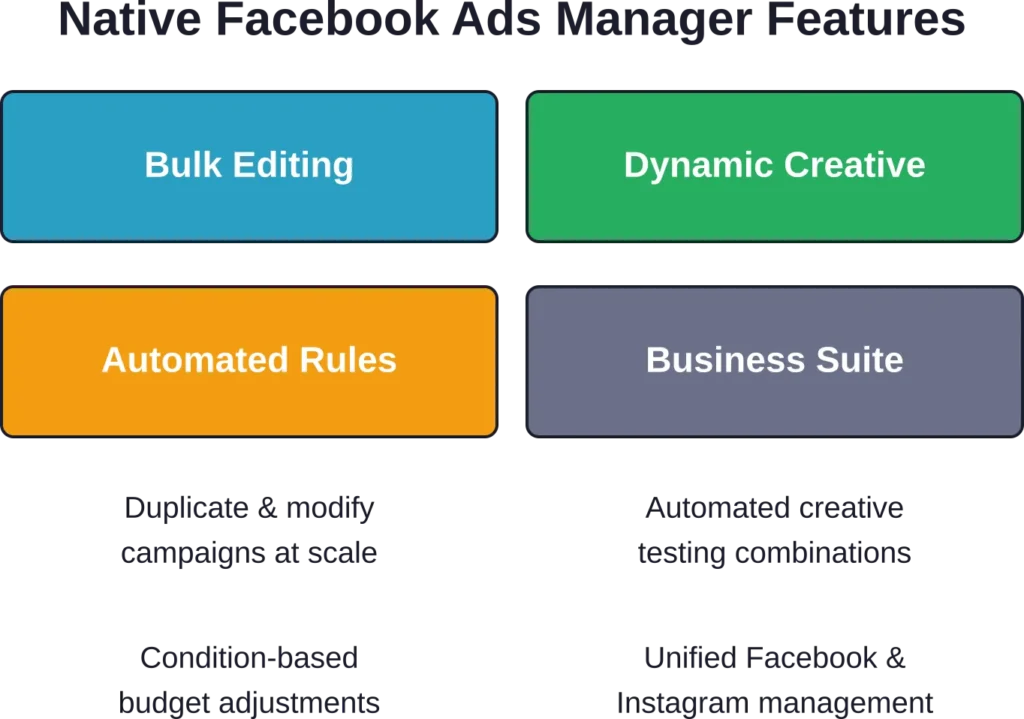
Ads Manager Bulk Editing
The native bulk editor lets advertisers duplicate campaigns, ad sets, and ads across accounts or modify settings for multiple items simultaneously. It’s not as fast as dedicated bulk tools, but it’s free and accessible to every advertiser.
Bulk actions include:
- Duplicating campaigns with modified audiences or budgets.
- Editing bids, schedules, or placements for multiple ad sets at once.
- Turning campaigns on or off in batches.
The interface requires manual selection and lacks templates, so it’s slower than purpose-built tools. But for advertisers launching 10–20 variations, it gets the job done.
Dynamic Creative
Dynamic Creative automatically tests combinations of headlines, images, descriptions, and calls-to-action. Advertisers upload multiple assets, and Meta’s algorithm assembles the highest-performing combinations for each user.
This feature works well for advertisers who want automated creative testing without managing dozens of ad variants. However, it limits control—Meta decides which combinations get budget, and reporting granularity is lower than manual A/B tests.
Automated Rules
Automated Rules let advertisers set conditions that trigger budget changes, campaign pauses, or bid adjustments. For example, a rule can pause ads when cost per result exceeds a threshold or increase budget when return on ad spend hits a target.
Rules are flexible but require manual setup for each condition. They’re best for advertisers who know which metrics matter and want simple if-then automation without third-party software.
Meta Business Suite
Meta Business Suite combines Facebook and Instagram management in one interface. It’s primarily a content scheduler, but it includes ad creation shortcuts and basic reporting.
For small businesses posting organic content alongside ads, Business Suite consolidates workflows. But it lacks the advanced targeting and bulk features that larger advertisers need.
Best Bulk Ad Creation Tools
Bulk tools solve one specific problem: launching large numbers of ad variations fast. They’re built for advertisers testing multiple audiences, creative sets, or offer angles simultaneously.
AdStellar AI

AdStellar AI specializes in bulk ad creation with AI-assisted creative generation. Advertisers input campaign parameters, and the platform generates dozens of ad variations with unique copy, images, and targeting combinations.
Key features include:
- AI-generated ad copy and creative suggestions.
- Template-based bulk launching for multiple campaigns.
- Error detection that flags common setup mistakes before publishing.
- Direct integration with Meta ad accounts—no CSV exports required.
The platform works best for performance marketers testing high volumes of creative angles. It’s less useful for brands that need precise creative control or custom design workflows.
Kitchn.io
Kitchn.io focuses purely on speed. The platform claims to reduce bulk ad launching time by 90% compared to Ads Manager by eliminating repetitive manual tasks.
The workflow centers on templates. Advertisers define audience sets, creative assets, and campaign structures once, then launch variations in bulk. Changes propagate across all linked ads automatically.
Kitchn.io shines when managing large-scale campaigns with consistent structure but variable audiences or creative. It’s overkill for small campaigns or advertisers who launch fewer than 20 ads per week.
AdManage.ai

AdManage.ai blends bulk creation with limited AI optimization. The platform suggests bid adjustments and budget reallocations based on performance trends, though automation is less advanced than dedicated optimization tools.
The bulk editor supports:
- Campaign duplication with modified parameters.
- Batch edits for budgets, schedules, and placements.
- Creative library management for asset reuse.
AdManage.ai fits advertisers who want faster launching than Ads Manager but don’t need full-scale automation. The AI features are basic compared to platforms like Revealbot or Madgicx.
| Tool | Primary Strength | Best For | Pricing Model |
|---|---|---|---|
| AdStellar AI | AI creative generation | High-volume testing | Subscription |
| Kitchn.io | Speed (90% faster launching) | Template-based campaigns | Subscription |
| AdManage.ai | Basic AI optimization | Mid-scale advertisers | Subscription |
Top Automation and Optimization Platforms
Automation tools handle ongoing campaign management—adjusting bids, reallocating budgets, and pausing underperformers based on predefined rules or AI models.
Revealbot

Revealbot is the most mature rules-based automation platform for Facebook ads. Advertisers create custom rules that trigger actions when performance conditions are met.
Common use cases include:
- Pausing ads when cost per acquisition exceeds a threshold.
- Increasing budgets for ad sets hitting ROAS targets.
- Duplicating high-performing campaigns automatically.
- Scheduling bid adjustments by time of day or day of week.
The platform supports complex conditional logic, so advertisers can stack multiple criteria before triggering actions. For example, a rule might increase budget only if ROAS is above 3.0 and ad frequency is below 2.5 and the campaign has spent at least $500.
Pricing starts at $99/month based on ad spend, with scaling tiers as monthly ad spend increases.
Revealbot works best for advertisers managing multiple accounts or running high-spend campaigns where manual optimization isn’t scalable. The learning curve is steeper than simpler tools, but the flexibility justifies the complexity for experienced media buyers.
Madgicx
Madgicx combines automation with AI-driven audience insights. The platform analyzes Meta’s conversion data to recommend targeting adjustments, creative refreshes, and budget reallocations.
Core features include:
- AI Marketer: automated campaign optimization based on performance goals.
- Audience Studio: advanced audience segmentation and lookalike modeling.
- Creative Insights: analysis of which ad elements drive conversions.
- One-click reporting dashboards with cross-channel attribution.
Madgicx leans more toward AI recommendations than rigid rule automation. Advertisers who prefer algorithmic suggestions over manual rule-building will find this approach more intuitive than Revealbot.
The platform suits direct-response advertisers focused on acquisition efficiency. Brand campaigns or top-of-funnel awareness efforts benefit less from the conversion-focused optimization.
Smartly.io

Smartly.io targets agencies and enterprises managing large ad portfolios across multiple platforms. It’s one of the few tools that handles Facebook, Instagram, Snapchat, TikTok, and Pinterest in a unified interface.
Key capabilities:
- Cross-platform campaign orchestration.
- Dynamic creative optimization at scale.
- Automated budget pacing and allocation.
- Enterprise-grade reporting and API access.
Smartly.io is overkill for small businesses or solo advertisers. Pricing reflects its enterprise focus, with custom plans typically starting in the thousands per month. But for agencies managing dozens of client accounts, the efficiency gains justify the cost.
Adzooma

Adzooma offers a more accessible entry point to automation. The platform manages Facebook ads alongside Google Ads and Microsoft Advertising, with a free tier available for small accounts.
Automation features include:
- Performance alerts when metrics deviate from benchmarks.
- Automated bid adjustments for underperforming campaigns.
- Bulk editing across platforms.
- Activity recommendations based on account health scoring.
The free tier has limited automation rules, but paid plans unlock advanced features. Adzooma works well for small businesses or freelancers managing a few accounts without needing enterprise-level complexity.

Creative and Design Tools
Not every advertiser has a design team. Creative tools generate ad visuals, video clips, and copy variations without requiring Adobe Creative Cloud skills.
Canva
Canva is the most accessible design tool for non-designers. The platform includes thousands of Facebook ad templates optimized for standard ad formats and placements.
Features relevant to Facebook advertisers:
- Pre-sized templates for feed ads, stories, and carousel formats.
- Drag-and-drop editor with stock photos, icons, and fonts.
- Brand kit storage for consistent colors and logos across ads.
- Animation and video editing for short ad clips.
Canva’s free tier covers basic ad creation. Pro plans unlock additional templates, brand management features, and team collaboration tools. It’s the default choice for solo advertisers and small teams creating ads in-house.
AdCreative.ai

AdCreative.ai uses machine learning to generate ad visuals based on performance data from millions of ads. Advertisers input their product, offer, and target audience, and the platform produces design variations optimized for clicks and conversions.
The tool works best for e-commerce and direct-response offers where performance trumps brand aesthetics. Creative purists won’t love the algorithmic designs, but performance marketers appreciate the data-driven approach.
Creatopy

Creatopy (formerly Bannersnack) specializes in animated display ads and HTML5 banners, with strong support for Facebook ad formats. The platform includes a timeline-based animation editor for creating motion graphics without After Effects.
Creatopy fits brands that want polished animated ads but lack video production resources. The learning curve is steeper than Canva but still accessible to non-designers.
Lead Capture and Integration Platforms
Facebook Lead Ads collect contact information without sending users off-platform. But captured leads sit inside Meta’s system until exported manually or synced via integration tools.
Zapier
Zapier connects Facebook Lead Ads to thousands of apps, including CRMs, email platforms, spreadsheets, and marketing automation tools. When someone submits a lead form, Zapier automatically transfers the data to the connected app.
Common workflows include:
- Sending new leads to Salesforce, HubSpot, or Pipedrive.
- Adding leads to email sequences in Mailchimp or ActiveCampaign.
- Logging leads in Google Sheets for manual follow-up.
- Triggering SMS notifications when high-value leads submit forms.
Zapier offers free tier access for basic workflows connecting Facebook Lead Ads to other apps. Paid plans reduce latency and unlock multi-step workflows.
Zapier is essential for advertisers running lead generation campaigns who want instant follow-up without manual CSV exports.
LeadsBridge

LeadsBridge offers deeper Facebook Lead Ads integration than Zapier, with real-time syncing and advanced field mapping. The platform supports hundreds of CRM and marketing platforms with pre-built connectors.
LeadsBridge also handles Facebook Custom Audiences syncing, allowing advertisers to automatically update retargeting audiences based on CRM data, email lists, or purchase events.
The platform is more specialized than Zapier—it does fewer things but handles Facebook-specific workflows with more precision. Advertisers running high-volume lead campaigns or managing complex audience syncing benefit most.
Facebook Conversion API Tools
Facebook Conversion API sends event data directly from servers to Meta’s ad system, bypassing browser-based tracking limitations. This improves attribution accuracy and campaign optimization, especially as third-party cookies decline.
Tools that simplify Conversion API setup include:
- Zapier: offers no-code Conversion API event forwarding from thousands of apps.
- Google Tag Manager Server-Side: routes events through a server container to Meta’s API.
- Segment: integrates Conversion API into customer data pipelines.
Conversion API implementation requires technical setup, but the tracking improvements justify the effort for advertisers spending more than a few thousand dollars per month.
Account Management and Collaboration Tools
Agencies and teams managing multiple ad accounts need tools for collaboration, reporting, and client communication.
AdEspresso
AdEspresso (owned by Hootsuite) streamlines campaign creation and A/B testing for Facebook, Instagram, and Google Ads. The platform’s strength is split-testing—advertisers can test dozens of creative and targeting combinations simultaneously with clean reporting.
Core features include:
- Simplified campaign creation with guided workflows.
- Advanced split testing with statistical significance tracking.
- Automated optimization that shifts budget to winning variations.
- Client reporting dashboards with white-label branding.
AdEspresso works well for agencies managing small to mid-sized client accounts. Larger agencies with enterprise needs often outgrow the platform and move to Smartly.io or custom solutions.
Qwaya
Qwaya is a lesser-known alternative focused on scheduling and collaborative ad management. Teams can draft campaigns, get internal approvals, and schedule launches without granting full Ads Manager access to every team member.
The platform includes:
- Role-based access control for team members and clients.
- Ad scheduling with timezone-specific launch times.
- Budget management and spending alerts.
- Multi-account dashboards for agencies.
Qwaya’s interface feels dated compared to newer tools, but the scheduling and permission features fill a gap that Ads Manager doesn’t handle well natively.
Hunch

Hunch automates Facebook ad reporting with customizable dashboards that update in real-time. The platform connects to multiple ad accounts and data sources, consolidating performance metrics in one view.
Key capabilities:
- Drag-and-drop dashboard builder with custom metrics.
- Automated report delivery via email or Slack.
- Cross-channel attribution connecting Facebook to Google Analytics and CRM data.
- Annotations for marking campaign changes or external events.
Hunch is built for marketers who spend more time analyzing data than launching campaigns. It doesn’t replace campaign management tools—it complements them with better reporting.
| Tool Category | Example Tools | Primary Use Case |
|---|---|---|
| Bulk Creation | AdStellar AI, Kitchn.io | Launch 50+ ad variations fast |
| Automation | Revealbot, Madgicx | Optimize campaigns with rules/AI |
| Creative Design | Canva, AdCreative.ai | Build ad visuals without designers |
| Lead Integration | Zapier, LeadsBridge | Sync leads to CRM in real-time |
| Reporting | Hunch, AdEspresso | Dashboard analytics and insights |
How AI Is Changing Facebook Ad Tools
AI-powered features are now standard in most modern Facebook ad tools. But the term “AI” covers a wide range of capabilities, from simple pattern recognition to full autonomous optimization.
What Meta’s Native AI Actually Does
Meta’s ad system includes machine learning that optimizes delivery, targeting, and bidding automatically. When advertisers select “Conversions” as the optimization goal, Meta’s algorithm learns which users are most likely to convert and prioritizes showing ads to them.
Value-based bidding takes this further by teaching the algorithm to prioritize high-value conversions over low-value ones. Advertisers send purchase value data through the Meta Pixel or Conversion API, and the system learns to bid more aggressively for users likely to make large purchases.
Training the algorithm requires quality conversion data. If conversion volume is too low or purchase values vary wildly without clear patterns, Meta’s AI can’t optimize effectively. Industry reports suggest campaigns need at least 50 conversions per week for stable optimization.
Third-Party AI Capabilities
Third-party tools add AI layers on top of Meta’s native system:
- Predictive budget allocation: AI models forecast which campaigns will hit targets and shift budget accordingly.
- Creative performance prediction: platforms analyze which visual elements (colors, layouts, copy) correlate with better results.
- Anomaly detection: automated alerts when metrics deviate from expected patterns.
- Audience recommendations: AI suggests lookalike audiences or interest targeting based on conversion patterns.
These features work best when combined with human oversight. Fully autonomous AI campaigns sometimes drift off-strategy, chasing short-term metric improvements that don’t align with business goals.
Setting Up AI-Driven Campaigns
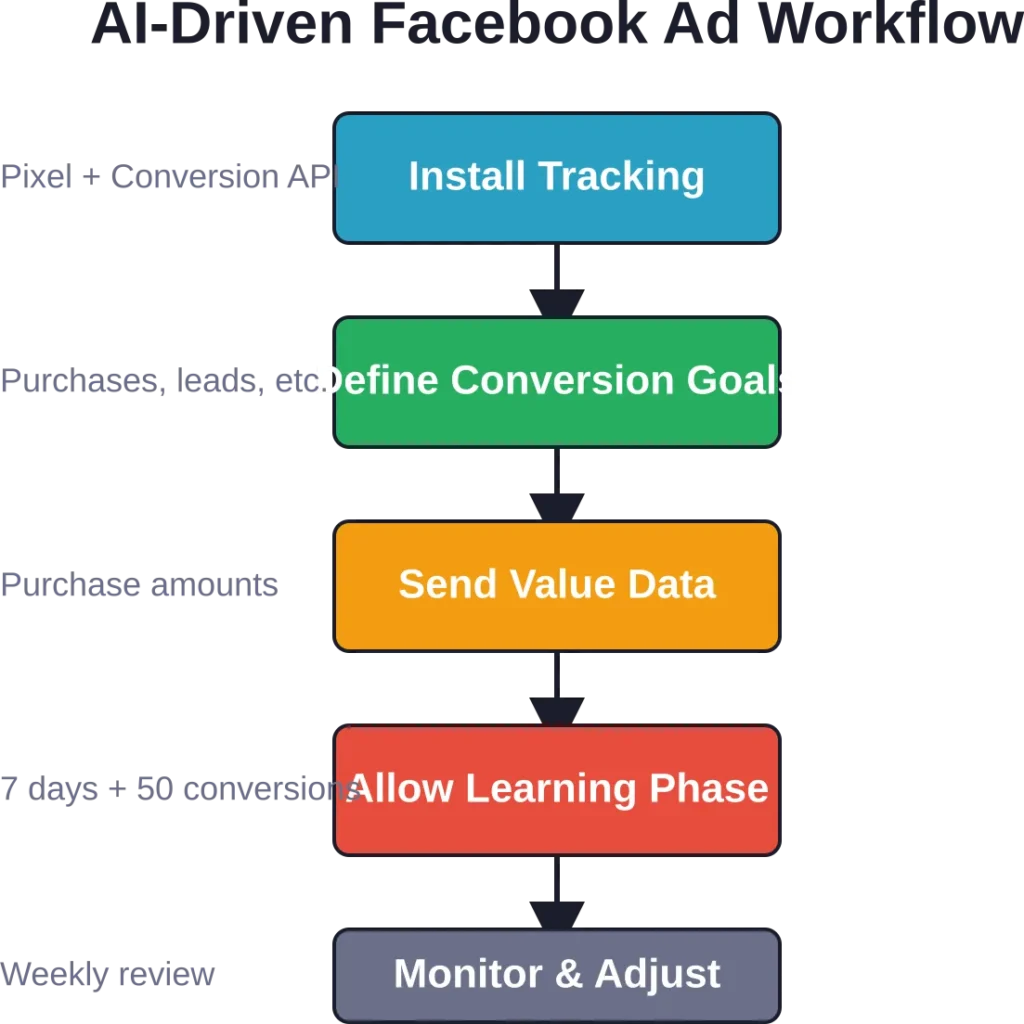
To leverage AI effectively in Facebook ad tools, follow these steps:
- Implement proper tracking: install the Meta Pixel and configure Conversion API for accurate event data.
- Define clear conversion goals: tell the system which actions matter (purchases, leads, sign-ups).
- Send value data: pass purchase amounts or lead quality scores so the AI can optimize for value, not just volume.
- Allow learning time: give campaigns at least 7 days and 50 conversions before judging AI performance.
- Monitor for drift: check weekly to ensure the AI isn’t optimizing toward unintended outcomes.
AI works best for campaigns with sufficient data volume. Low-traffic campaigns or niche audiences often lack the conversion volume needed for stable machine learning.
Choosing the Right Tool for Different Campaign Goals
The best tool depends on campaign objectives, team size, and technical resources. Here’s how to match tools to common scenarios.
For E-Commerce Brands Scaling Fast
E-commerce advertisers testing dozens of product-audience combinations need bulk creation and automated optimization. Recommended stack:
- Bulk creation: AdStellar AI or Kitchn.io for launching product catalog variations.
- Automation: Madgicx for AI-driven budget allocation and ROAS optimization.
- Creative: Canva for quick product imagery and promo graphics.
- Tracking: Conversion API setup via Zapier or native implementation.
This combination supports rapid testing while keeping costs scalable.
For Agencies Managing Multiple Clients
Agencies need multi-account management, client reporting, and team collaboration. Recommended stack:
- Automation: Revealbot for rules-based optimization across accounts.
- Reporting: Hunch for white-label dashboards and automated client reports.
- Collaboration: Qwaya or AdEspresso for team-based campaign approval workflows.
- Creative: Creatopy for consistent branded assets across clients.
The focus shifts from individual campaign tactics to portfolio management efficiency.
For Lead Generation Campaigns
Lead gen advertisers prioritize fast follow-up and CRM integration. Recommended stack:
- Lead capture: Facebook Lead Ads for on-platform form submission.
- Integration: Zapier or LeadsBridge for instant CRM syncing.
- Retargeting: Facebook Custom Audiences integration for automated list uploads.
- Automation: Revealbot for pausing campaigns when cost per lead exceeds targets.
Speed matters in lead gen—every minute of delay reduces conversion rates.
For Small Businesses With Limited Budgets
Small advertisers need free or low-cost tools that don’t require technical expertise. Recommended stack:
- Campaign creation: Native Ads Manager with bulk editing features.
- Creative: Canva free tier for ad visuals.
- Automation: Adzooma free tier or native Automated Rules.
- Tracking: Meta Pixel (free) with basic conversion setup.
This stack keeps costs near zero while covering essential functions.
Common Pitfalls When Using Facebook Ad Tools
Third-party tools add power, but they also introduce failure points. Watch for these issues.
Over-Automation Without Strategy
Automation tools execute strategies—they don’t create them. Advertisers who rely entirely on AI without clear goals often see campaigns drift toward vanity metrics or low-quality conversions.
Before automating, define:
- Which metrics actually matter (not just clicks or impressions).
- Acceptable cost thresholds for each conversion type.
- Which audiences and placements align with brand positioning.
Automation amplifies strategy. Bad strategy automated is still bad strategy, just executed faster.
Creative Fatigue From Bulk Launching
Bulk tools make launching 100 ads easy. But flooding campaigns with similar creative burns out audiences fast. Declining click-through rates and rising cost per 1,000 impressions signal fatigue.
Combat fatigue by:
- Rotating creative every 2–3 weeks.
- Testing genuinely different visual styles, not just color swaps.
- Monitoring frequency metrics—pause ads when frequency exceeds 3.0.
Speed is valuable, but only if creative quality keeps pace.
Broken Integrations and Data Loss
Integration tools like Zapier depend on stable APIs. When Facebook or a connected app updates its API, workflows break. Leads get lost. Conversions stop tracking.
Reduce integration risk by:
- Testing workflows weekly to catch breaks early.
- Setting up failure alerts in Zapier or LeadsBridge.
- Maintaining manual backup processes (CSV exports) for critical data.
Automation saves time until it breaks. Always have a fallback.
Ignoring Meta’s Native Features
Advertisers sometimes pay for third-party tools that replicate features Meta already provides for free. Before subscribing, check whether Ads Manager’s bulk editing, Automated Rules, or Dynamic Creative solve the problem.
Third-party tools add value when they meaningfully improve on native features—not when they just repackage them with a prettier interface.
Future Trends in Facebook Ad Tooling
The ad tech landscape shifts constantly. Several trends are reshaping how tools approach Facebook advertising.
Server-Side Tracking Becomes Standard
As browser-based tracking degrades, Conversion API adoption is accelerating. Future tools will assume server-side event forwarding is the default setup, with browser tracking as a secondary data source.
Tools that simplify Conversion API implementation—especially for non-technical users—will gain market share.
AI Moves From Optimization to Creation
Current AI tools mostly optimize existing campaigns. Next-generation platforms generate entire campaign strategies—choosing objectives, audiences, creative concepts, and budget allocation with minimal human input.
Early examples like AdCreative.ai hint at this direction, but full autonomous campaign planning remains years away. Human oversight will stay essential for strategy alignment and brand consistency.
Privacy-First Attribution
Attribution tracking faces ongoing restrictions from privacy regulations and platform policies. Tools that deliver accurate performance measurement without invasive tracking will command premium pricing.
Expect growth in:
- First-party data platforms that unify customer data without third-party cookies.
- Incrementality testing tools that measure true ad impact through controlled experiments.
- Privacy-compliant tracking solutions that work within Apple’s and Google’s frameworks.
Cross-Platform Unification
Facebook is one channel in multi-platform strategies. Tools that manage Facebook, Google, TikTok, and emerging platforms in unified workflows will replace single-channel specialists.
Smartly.io already operates in this space, but more accessible alternatives for small and mid-sized advertisers are emerging.
Frequently Asked Questions
Beginners should start with Meta Ads Manager’s native features combined with Canva for creative design. Both are free, widely documented, and don’t require learning third-party platforms. Once campaigns scale beyond 10–20 ads per week, consider bulk tools like Kitchn.io or automation platforms like Adzooma’s free tier.
Ads Manager supports bulk creation through its native duplication and bulk editing features. These work fine for launching 10–30 variations but become tedious at larger scales. Third-party bulk tools like AdStellar AI and Kitchn.io justify their cost when launching 50+ ad variations regularly or when managing multiple accounts simultaneously.
Revealbot pricing starts at $99/month based on ad spend, with scaling tiers as monthly ad spend increases. Pricing and features change periodically, so check the official website for current information.
Zapier handles basic Facebook Lead Ads syncing to CRMs and email platforms effectively. LeadsBridge offers more advanced features like real-time syncing, deeper field mapping, and Custom Audiences syncing. For low-volume lead campaigns, Zapier suffices. High-volume advertisers or those needing instant follow-up benefit from LeadsBridge’s specialized capabilities.
Conversion API setup difficulty depends on technical resources. Platforms like Zapier, Segment, and Google Tag Manager Server-Side offer no-code or low-code implementations that non-developers can manage. Native implementations require server access and developer knowledge. The effort is worthwhile for campaigns spending over a few thousand dollars monthly, as the tracking improvements significantly enhance optimization.
Dynamic Creative is Meta’s native feature that automatically tests combinations of headlines, images, and copy within a single ad set, then optimizes toward the best-performing combinations. AdEspresso and similar tools create separate ads for each variation, providing more granular reporting and control over which combinations receive budget. Dynamic Creative is faster to set up but offers less transparency. Split testing tools require more setup but deliver clearer performance insights.
Industry analyses indicate that declining click-through rates and rising cost per 1,000 impressions signal creative fatigue. Monitor frequency metrics—when ad frequency exceeds 2.5–3.0, creative is likely wearing out. As a general practice, rotate or refresh creative every 2–3 weeks, though high-traffic campaigns may need weekly updates. Bulk creation tools accelerate the refresh process when fatigue sets in.
Conclusion
The right Facebook ad tools depend entirely on workflow bottlenecks. Advertisers launching small campaigns benefit most from native Ads Manager features and free design tools. Agencies managing portfolios need automation, reporting, and collaboration platforms. E-commerce brands scaling fast require bulk creation and AI-driven optimization.
Start with native Meta features and add third-party tools only when manual workflows become measurably inefficient. Track time spent on campaign tasks—if bulk launching or optimization consumes more than a few hours weekly, specialized tools pay for themselves quickly.
The best tool stack isn’t the one with the most features. It’s the combination that removes specific friction points without adding unnecessary complexity. Test tools with free trials before committing to annual subscriptions, and revisit the stack quarterly as campaign needs evolve.
Ready to scale Facebook campaigns faster? Audit current workflows to identify the biggest time sinks, then match tools to those specific pain points.